mirror of
https://github.com/huggingface/diffusers.git
synced 2025-12-08 21:44:27 +08:00
Compare commits
11 Commits
fix-schedu
...
trust-remo
| Author | SHA1 | Date | |
|---|---|---|---|

|
e0f4a0cd8b | ||
|
|
09b5046e96 | ||
|
|
07179bd6c9 | ||
|
|
9fc135811e | ||
|
|
11d0bc3150 | ||
|
|
e152eccdb0 | ||
|
|
0ccc58a88d | ||
|
|
99f91226be | ||
|
|
cc934eb032 | ||
|
|
462d443c14 | ||
|
|
45d4116eb8 |
2
.github/workflows/build_documentation.yml
vendored
2
.github/workflows/build_documentation.yml
vendored
@@ -16,7 +16,7 @@ jobs:
|
||||
install_libgl1: true
|
||||
package: diffusers
|
||||
notebook_folder: diffusers_doc
|
||||
languages: en ko zh ja pt
|
||||
languages: en ko zh ja
|
||||
|
||||
secrets:
|
||||
token: ${{ secrets.HUGGINGFACE_PUSH }}
|
||||
|
||||
2
.github/workflows/build_pr_documentation.yml
vendored
2
.github/workflows/build_pr_documentation.yml
vendored
@@ -15,4 +15,4 @@ jobs:
|
||||
pr_number: ${{ github.event.number }}
|
||||
install_libgl1: true
|
||||
package: diffusers
|
||||
languages: en ko zh ja pt
|
||||
languages: en ko zh ja
|
||||
|
||||
34
.github/workflows/pr_flax_dependency_test.yml
vendored
34
.github/workflows/pr_flax_dependency_test.yml
vendored
@@ -1,34 +0,0 @@
|
||||
name: Run Flax dependency tests
|
||||
|
||||
on:
|
||||
pull_request:
|
||||
branches:
|
||||
- main
|
||||
push:
|
||||
branches:
|
||||
- main
|
||||
|
||||
concurrency:
|
||||
group: ${{ github.workflow }}-${{ github.head_ref || github.run_id }}
|
||||
cancel-in-progress: true
|
||||
|
||||
jobs:
|
||||
check_flax_dependencies:
|
||||
runs-on: ubuntu-latest
|
||||
steps:
|
||||
- uses: actions/checkout@v3
|
||||
- name: Set up Python
|
||||
uses: actions/setup-python@v4
|
||||
with:
|
||||
python-version: "3.8"
|
||||
- name: Install dependencies
|
||||
run: |
|
||||
python -m pip install --upgrade pip
|
||||
pip install -e .
|
||||
pip install "jax[cpu]>=0.2.16,!=0.3.2"
|
||||
pip install "flax>=0.4.1"
|
||||
pip install "jaxlib>=0.1.65"
|
||||
pip install pytest
|
||||
- name: Check for soft dependencies
|
||||
run: |
|
||||
pytest tests/others/test_dependencies.py
|
||||
4
.github/workflows/pr_tests.yml
vendored
4
.github/workflows/pr_tests.yml
vendored
@@ -72,7 +72,7 @@ jobs:
|
||||
run: |
|
||||
apt-get update && apt-get install libsndfile1-dev libgl1 -y
|
||||
python -m pip install -e .[quality,test]
|
||||
python -m pip install accelerate
|
||||
python -m pip install git+https://github.com/huggingface/accelerate.git
|
||||
|
||||
- name: Environment
|
||||
run: |
|
||||
@@ -115,7 +115,7 @@ jobs:
|
||||
run: |
|
||||
python -m pytest -n 2 --max-worker-restart=0 --dist=loadfile \
|
||||
--make-reports=tests_${{ matrix.config.report }} \
|
||||
examples/test_examples.py
|
||||
examples/test_examples.py
|
||||
|
||||
- name: Failure short reports
|
||||
if: ${{ failure() }}
|
||||
|
||||
32
.github/workflows/pr_torch_dependency_test.yml
vendored
32
.github/workflows/pr_torch_dependency_test.yml
vendored
@@ -1,32 +0,0 @@
|
||||
name: Run Torch dependency tests
|
||||
|
||||
on:
|
||||
pull_request:
|
||||
branches:
|
||||
- main
|
||||
push:
|
||||
branches:
|
||||
- main
|
||||
|
||||
concurrency:
|
||||
group: ${{ github.workflow }}-${{ github.head_ref || github.run_id }}
|
||||
cancel-in-progress: true
|
||||
|
||||
jobs:
|
||||
check_torch_dependencies:
|
||||
runs-on: ubuntu-latest
|
||||
steps:
|
||||
- uses: actions/checkout@v3
|
||||
- name: Set up Python
|
||||
uses: actions/setup-python@v4
|
||||
with:
|
||||
python-version: "3.8"
|
||||
- name: Install dependencies
|
||||
run: |
|
||||
python -m pip install --upgrade pip
|
||||
pip install -e .
|
||||
pip install torch torchvision torchaudio
|
||||
pip install pytest
|
||||
- name: Check for soft dependencies
|
||||
run: |
|
||||
pytest tests/others/test_dependencies.py
|
||||
50
.github/workflows/push_tests.yml
vendored
50
.github/workflows/push_tests.yml
vendored
@@ -156,56 +156,6 @@ jobs:
|
||||
name: torch_cuda_test_reports
|
||||
path: reports
|
||||
|
||||
peft_cuda_tests:
|
||||
name: PEFT CUDA Tests
|
||||
runs-on: docker-gpu
|
||||
container:
|
||||
image: diffusers/diffusers-pytorch-cuda
|
||||
options: --shm-size "16gb" --ipc host -v /mnt/hf_cache:/mnt/cache/ --gpus 0
|
||||
defaults:
|
||||
run:
|
||||
shell: bash
|
||||
steps:
|
||||
- name: Checkout diffusers
|
||||
uses: actions/checkout@v3
|
||||
with:
|
||||
fetch-depth: 2
|
||||
|
||||
- name: Install dependencies
|
||||
run: |
|
||||
apt-get update && apt-get install libsndfile1-dev libgl1 -y
|
||||
python -m pip install -e .[quality,test]
|
||||
python -m pip install git+https://github.com/huggingface/accelerate.git
|
||||
python -m pip install git+https://github.com/huggingface/peft.git
|
||||
|
||||
- name: Environment
|
||||
run: |
|
||||
python utils/print_env.py
|
||||
|
||||
- name: Run slow PEFT CUDA tests
|
||||
env:
|
||||
HUGGING_FACE_HUB_TOKEN: ${{ secrets.HUGGING_FACE_HUB_TOKEN }}
|
||||
# https://pytorch.org/docs/stable/notes/randomness.html#avoiding-nondeterministic-algorithms
|
||||
CUBLAS_WORKSPACE_CONFIG: :16:8
|
||||
run: |
|
||||
python -m pytest -n 1 --max-worker-restart=0 --dist=loadfile \
|
||||
-s -v -k "not Flax and not Onnx" \
|
||||
--make-reports=tests_peft_cuda \
|
||||
tests/lora/
|
||||
|
||||
- name: Failure short reports
|
||||
if: ${{ failure() }}
|
||||
run: |
|
||||
cat reports/tests_peft_cuda_stats.txt
|
||||
cat reports/tests_peft_cuda_failures_short.txt
|
||||
|
||||
- name: Test suite reports artifacts
|
||||
if: ${{ always() }}
|
||||
uses: actions/upload-artifact@v2
|
||||
with:
|
||||
name: torch_peft_test_reports
|
||||
path: reports
|
||||
|
||||
flax_tpu_tests:
|
||||
name: Flax TPU Tests
|
||||
runs-on: docker-tpu
|
||||
|
||||
@@ -1,4 +1,4 @@
|
||||
FROM nvidia/cuda:12.1.0-runtime-ubuntu20.04
|
||||
FROM nvidia/cuda:11.7.1-cudnn8-runtime-ubuntu20.04
|
||||
LABEL maintainer="Hugging Face"
|
||||
LABEL repository="diffusers"
|
||||
|
||||
@@ -25,8 +25,8 @@ ENV PATH="/opt/venv/bin:$PATH"
|
||||
# pre-install the heavy dependencies (these can later be overridden by the deps from setup.py)
|
||||
RUN python3 -m pip install --no-cache-dir --upgrade pip && \
|
||||
python3 -m pip install --no-cache-dir \
|
||||
torch \
|
||||
torchvision \
|
||||
torch==2.0.1 \
|
||||
torchvision==0.15.2 \
|
||||
torchaudio \
|
||||
invisible_watermark && \
|
||||
python3 -m pip install --no-cache-dir \
|
||||
|
||||
@@ -16,7 +16,7 @@ limitations under the License.
|
||||
|
||||
# Generating the documentation
|
||||
|
||||
To generate the documentation, you first have to build it. Several packages are necessary to build the doc,
|
||||
To generate the documentation, you first have to build it. Several packages are necessary to build the doc,
|
||||
you can install them with the following command, at the root of the code repository:
|
||||
|
||||
```bash
|
||||
@@ -71,7 +71,7 @@ The `preview` command only works with existing doc files. When you add a complet
|
||||
Accepted files are Markdown (.md).
|
||||
|
||||
Create a file with its extension and put it in the source directory. You can then link it to the toc-tree by putting
|
||||
the filename without the extension in the [`_toctree.yml`](https://github.com/huggingface/diffusers/blob/main/docs/source/en/_toctree.yml) file.
|
||||
the filename without the extension in the [`_toctree.yml`](https://github.com/huggingface/diffusers/blob/main/docs/source/_toctree.yml) file.
|
||||
|
||||
## Renaming section headers and moving sections
|
||||
|
||||
@@ -81,14 +81,14 @@ Therefore, we simply keep a little map of moved sections at the end of the docum
|
||||
|
||||
So if you renamed a section from: "Section A" to "Section B", then you can add at the end of the file:
|
||||
|
||||
```md
|
||||
```
|
||||
Sections that were moved:
|
||||
|
||||
[ <a href="#section-b">Section A</a><a id="section-a"></a> ]
|
||||
```
|
||||
and of course, if you moved it to another file, then:
|
||||
|
||||
```md
|
||||
```
|
||||
Sections that were moved:
|
||||
|
||||
[ <a href="../new-file#section-b">Section A</a><a id="section-a"></a> ]
|
||||
@@ -109,8 +109,8 @@ although we can write them directly in Markdown.
|
||||
|
||||
Adding a new tutorial or section is done in two steps:
|
||||
|
||||
- Add a new Markdown (.md) file under `docs/source/<languageCode>`.
|
||||
- Link that file in `docs/source/<languageCode>/_toctree.yml` on the correct toc-tree.
|
||||
- Add a new file under `docs/source`. This file can either be ReStructuredText (.rst) or Markdown (.md).
|
||||
- Link that file in `docs/source/_toctree.yml` on the correct toc-tree.
|
||||
|
||||
Make sure to put your new file under the proper section. It's unlikely to go in the first section (*Get Started*), so
|
||||
depending on the intended targets (beginners, more advanced users, or researchers) it should go in sections two, three, or four.
|
||||
@@ -119,7 +119,7 @@ depending on the intended targets (beginners, more advanced users, or researcher
|
||||
|
||||
When adding a new pipeline:
|
||||
|
||||
- Create a file `xxx.md` under `docs/source/<languageCode>/api/pipelines` (don't hesitate to copy an existing file as template).
|
||||
- create a file `xxx.md` under `docs/source/api/pipelines` (don't hesitate to copy an existing file as template).
|
||||
- Link that file in (*Diffusers Summary*) section in `docs/source/api/pipelines/overview.md`, along with the link to the paper, and a colab notebook (if available).
|
||||
- Write a short overview of the diffusion model:
|
||||
- Overview with paper & authors
|
||||
@@ -128,7 +128,9 @@ When adding a new pipeline:
|
||||
- Possible an end-to-end example of how to use it
|
||||
- Add all the pipeline classes that should be linked in the diffusion model. These classes should be added using our Markdown syntax. By default as follows:
|
||||
|
||||
```
|
||||
```py
|
||||
## XXXPipeline
|
||||
|
||||
[[autodoc]] XXXPipeline
|
||||
- all
|
||||
- __call__
|
||||
@@ -136,17 +138,17 @@ When adding a new pipeline:
|
||||
|
||||
This will include every public method of the pipeline that is documented, as well as the `__call__` method that is not documented by default. If you just want to add additional methods that are not documented, you can put the list of all methods to add in a list that contains `all`.
|
||||
|
||||
```
|
||||
```py
|
||||
[[autodoc]] XXXPipeline
|
||||
- all
|
||||
- __call__
|
||||
- enable_attention_slicing
|
||||
- disable_attention_slicing
|
||||
- enable_xformers_memory_efficient_attention
|
||||
- enable_xformers_memory_efficient_attention
|
||||
- disable_xformers_memory_efficient_attention
|
||||
```
|
||||
|
||||
You can follow the same process to create a new scheduler under the `docs/source/<languageCode>/api/schedulers` folder.
|
||||
You can follow the same process to create a new scheduler under the `docs/source/api/schedulers` folder
|
||||
|
||||
### Writing source documentation
|
||||
|
||||
@@ -154,7 +156,7 @@ Values that should be put in `code` should either be surrounded by backticks: \`
|
||||
and objects like True, None, or any strings should usually be put in `code`.
|
||||
|
||||
When mentioning a class, function, or method, it is recommended to use our syntax for internal links so that our tool
|
||||
adds a link to its documentation with this syntax: \[\`XXXClass\`\] or \[\`function\`\]. This requires the class or
|
||||
adds a link to its documentation with this syntax: \[\`XXXClass\`\] or \[\`function\`\]. This requires the class or
|
||||
function to be in the main package.
|
||||
|
||||
If you want to create a link to some internal class or function, you need to
|
||||
@@ -162,7 +164,7 @@ provide its path. For instance: \[\`pipelines.ImagePipelineOutput\`\]. This will
|
||||
`pipelines.ImagePipelineOutput` in the description. To get rid of the path and only keep the name of the object you are
|
||||
linking to in the description, add a ~: \[\`~pipelines.ImagePipelineOutput\`\] will generate a link with `ImagePipelineOutput` in the description.
|
||||
|
||||
The same works for methods so you can either use \[\`XXXClass.method\`\] or \[\`~XXXClass.method\`\].
|
||||
The same works for methods so you can either use \[\`XXXClass.method\`\] or \[~\`XXXClass.method\`\].
|
||||
|
||||
#### Defining arguments in a method
|
||||
|
||||
@@ -170,7 +172,7 @@ Arguments should be defined with the `Args:` (or `Arguments:` or `Parameters:`)
|
||||
an indentation. The argument should be followed by its type, with its shape if it is a tensor, a colon, and its
|
||||
description:
|
||||
|
||||
```
|
||||
```py
|
||||
Args:
|
||||
n_layers (`int`): The number of layers of the model.
|
||||
```
|
||||
@@ -180,7 +182,7 @@ after the argument.
|
||||
|
||||
Here's an example showcasing everything so far:
|
||||
|
||||
```
|
||||
```py
|
||||
Args:
|
||||
input_ids (`torch.LongTensor` of shape `(batch_size, sequence_length)`):
|
||||
Indices of input sequence tokens in the vocabulary.
|
||||
@@ -195,16 +197,16 @@ For optional arguments or arguments with defaults we follow the following syntax
|
||||
following signature:
|
||||
|
||||
```py
|
||||
def my_function(x: str=None, a: float=3.14):
|
||||
def my_function(x: str = None, a: float = 1):
|
||||
```
|
||||
|
||||
then its documentation should look like this:
|
||||
|
||||
```
|
||||
```py
|
||||
Args:
|
||||
x (`str`, *optional*):
|
||||
This argument controls ...
|
||||
a (`float`, *optional*, defaults to `3.14`):
|
||||
a (`float`, *optional*, defaults to 1):
|
||||
This argument is used to ...
|
||||
```
|
||||
|
||||
@@ -233,14 +235,14 @@ building the return.
|
||||
|
||||
Here's an example of a single value return:
|
||||
|
||||
```
|
||||
```py
|
||||
Returns:
|
||||
`List[int]`: A list of integers in the range [0, 1] --- 1 for a special token, 0 for a sequence token.
|
||||
```
|
||||
|
||||
Here's an example of a tuple return, comprising several objects:
|
||||
|
||||
```
|
||||
```py
|
||||
Returns:
|
||||
`tuple(torch.FloatTensor)` comprising various elements depending on the configuration ([`BertConfig`]) and inputs:
|
||||
- ** loss** (*optional*, returned when `masked_lm_labels` is provided) `torch.FloatTensor` of shape `(1,)` --
|
||||
@@ -266,3 +268,4 @@ We have an automatic script running with the `make style` command that will make
|
||||
This script may have some weird failures if you made a syntax mistake or if you uncover a bug. Therefore, it's
|
||||
recommended to commit your changes before running `make style`, so you can revert the changes done by that script
|
||||
easily.
|
||||
|
||||
|
||||
@@ -38,7 +38,7 @@ Here, `LANG-ID` should be one of the ISO 639-1 or ISO 639-2 language codes -- se
|
||||
|
||||
The fun part comes - translating the text!
|
||||
|
||||
The first thing we recommend is translating the part of the `_toctree.yml` file that corresponds to your doc chapter. This file is used to render the table of contents on the website.
|
||||
The first thing we recommend is translating the part of the `_toctree.yml` file that corresponds to your doc chapter. This file is used to render the table of contents on the website.
|
||||
|
||||
> 🙋 If the `_toctree.yml` file doesn't yet exist for your language, you can create one by copy-pasting from the English version and deleting the sections unrelated to your chapter. Just make sure it exists in the `docs/source/LANG-ID/` directory!
|
||||
|
||||
|
||||
@@ -12,13 +12,15 @@
|
||||
- local: tutorials/tutorial_overview
|
||||
title: Overview
|
||||
- local: using-diffusers/write_own_pipeline
|
||||
title: Understanding pipelines, models and schedulers
|
||||
title: Understanding models and schedulers
|
||||
- local: tutorials/autopipeline
|
||||
title: AutoPipeline
|
||||
- local: tutorials/basic_training
|
||||
title: Train a diffusion model
|
||||
- local: tutorials/using_peft_for_inference
|
||||
title: Inference with PEFT
|
||||
- local: tutorials/custom_pipelines_components
|
||||
title: Working with fully custom pipelines and components
|
||||
title: Tutorials
|
||||
- sections:
|
||||
- sections:
|
||||
@@ -29,7 +31,7 @@
|
||||
- local: using-diffusers/schedulers
|
||||
title: Load and compare different schedulers
|
||||
- local: using-diffusers/custom_pipeline_overview
|
||||
title: Load community pipelines and components
|
||||
title: Load community pipelines
|
||||
- local: using-diffusers/using_safetensors
|
||||
title: Load safetensors
|
||||
- local: using-diffusers/other-formats
|
||||
@@ -40,8 +42,6 @@
|
||||
title: Push files to the Hub
|
||||
title: Loading & Hub
|
||||
- sections:
|
||||
- local: using-diffusers/pipeline_overview
|
||||
title: Overview
|
||||
- local: using-diffusers/unconditional_image_generation
|
||||
title: Unconditional image generation
|
||||
- local: using-diffusers/conditional_image_generation
|
||||
@@ -72,14 +72,8 @@
|
||||
title: Overview
|
||||
- local: using-diffusers/sdxl
|
||||
title: Stable Diffusion XL
|
||||
- local: using-diffusers/lcm
|
||||
title: Latent Consistency Models
|
||||
- local: using-diffusers/kandinsky
|
||||
title: Kandinsky
|
||||
- local: using-diffusers/controlnet
|
||||
title: ControlNet
|
||||
- local: using-diffusers/callback
|
||||
title: Callback
|
||||
- local: using-diffusers/shap-e
|
||||
title: Shap-E
|
||||
- local: using-diffusers/diffedit
|
||||
@@ -135,7 +129,7 @@
|
||||
- local: optimization/memory
|
||||
title: Reduce memory usage
|
||||
- local: optimization/torch2.0
|
||||
title: PyTorch 2.0
|
||||
title: Torch 2.0
|
||||
- local: optimization/xformers
|
||||
title: xFormers
|
||||
- local: optimization/tome
|
||||
@@ -172,14 +166,24 @@
|
||||
title: Conceptual Guides
|
||||
- sections:
|
||||
- sections:
|
||||
- local: api/configuration
|
||||
title: Configuration
|
||||
- local: api/loaders
|
||||
title: Loaders
|
||||
- local: api/activations
|
||||
title: Custom activation functions
|
||||
- local: api/normalization
|
||||
title: Custom normalization layers
|
||||
- local: api/attnprocessor
|
||||
title: Attention Processor
|
||||
- local: api/logging
|
||||
title: Logging
|
||||
- local: api/configuration
|
||||
title: Configuration
|
||||
- local: api/outputs
|
||||
title: Outputs
|
||||
- local: api/loaders
|
||||
title: Loaders
|
||||
- local: api/utilities
|
||||
title: Utilities
|
||||
- local: api/image_processor
|
||||
title: VAE Image Processor
|
||||
title: Main Classes
|
||||
- sections:
|
||||
- local: api/models/overview
|
||||
@@ -192,8 +196,6 @@
|
||||
title: UNet2DConditionModel
|
||||
- local: api/models/unet3d-cond
|
||||
title: UNet3DConditionModel
|
||||
- local: api/models/unet-motion
|
||||
title: UNetMotionModel
|
||||
- local: api/models/vq
|
||||
title: VQModel
|
||||
- local: api/models/autoencoderkl
|
||||
@@ -202,8 +204,6 @@
|
||||
title: AsymmetricAutoencoderKL
|
||||
- local: api/models/autoencoder_tiny
|
||||
title: Tiny AutoEncoder
|
||||
- local: api/models/consistency_decoder_vae
|
||||
title: ConsistencyDecoderVAE
|
||||
- local: api/models/transformer2d
|
||||
title: Transformer2D
|
||||
- local: api/models/transformer_temporal
|
||||
@@ -218,8 +218,6 @@
|
||||
title: Overview
|
||||
- local: api/pipelines/alt_diffusion
|
||||
title: AltDiffusion
|
||||
- local: api/pipelines/animatediff
|
||||
title: AnimateDiff
|
||||
- local: api/pipelines/attend_and_excite
|
||||
title: Attend-and-Excite
|
||||
- local: api/pipelines/audio_diffusion
|
||||
@@ -255,7 +253,7 @@
|
||||
- local: api/pipelines/pix2pix
|
||||
title: InstructPix2Pix
|
||||
- local: api/pipelines/kandinsky
|
||||
title: Kandinsky 2.1
|
||||
title: Kandinsky
|
||||
- local: api/pipelines/kandinsky_v22
|
||||
title: Kandinsky 2.2
|
||||
- local: api/pipelines/latent_consistency_models
|
||||
@@ -267,13 +265,11 @@
|
||||
- local: api/pipelines/musicldm
|
||||
title: MusicLDM
|
||||
- local: api/pipelines/paint_by_example
|
||||
title: Paint By Example
|
||||
title: PaintByExample
|
||||
- local: api/pipelines/paradigms
|
||||
title: Parallel Sampling of Diffusion Models
|
||||
- local: api/pipelines/pix2pix_zero
|
||||
title: Pix2Pix Zero
|
||||
- local: api/pipelines/pixart
|
||||
title: PixArt
|
||||
- local: api/pipelines/pndm
|
||||
title: PNDM
|
||||
- local: api/pipelines/repaint
|
||||
@@ -314,7 +310,7 @@
|
||||
- local: api/pipelines/stable_diffusion/ldm3d_diffusion
|
||||
title: LDM3D Text-to-(RGB, Depth)
|
||||
- local: api/pipelines/stable_diffusion/adapter
|
||||
title: Stable Diffusion T2I-Adapter
|
||||
title: Stable Diffusion T2I-adapter
|
||||
- local: api/pipelines/stable_diffusion/gligen
|
||||
title: GLIGEN (Grounded Language-to-Image Generation)
|
||||
title: Stable Diffusion
|
||||
@@ -329,7 +325,7 @@
|
||||
- local: api/pipelines/text_to_video_zero
|
||||
title: Text2Video-Zero
|
||||
- local: api/pipelines/unclip
|
||||
title: unCLIP
|
||||
title: UnCLIP
|
||||
- local: api/pipelines/latent_diffusion_uncond
|
||||
title: Unconditional Latent Diffusion
|
||||
- local: api/pipelines/unidiffuser
|
||||
@@ -348,8 +344,6 @@
|
||||
title: Overview
|
||||
- local: api/schedulers/cm_stochastic_iterative
|
||||
title: CMStochasticIterativeScheduler
|
||||
- local: api/schedulers/consistency_decoder
|
||||
title: ConsistencyDecoderScheduler
|
||||
- local: api/schedulers/ddim_inverse
|
||||
title: DDIMInverseScheduler
|
||||
- local: api/schedulers/ddim
|
||||
@@ -397,18 +391,4 @@
|
||||
- local: api/schedulers/vq_diffusion
|
||||
title: VQDiffusionScheduler
|
||||
title: Schedulers
|
||||
- sections:
|
||||
- local: api/internal_classes_overview
|
||||
title: Overview
|
||||
- local: api/attnprocessor
|
||||
title: Attention Processor
|
||||
- local: api/activations
|
||||
title: Custom activation functions
|
||||
- local: api/normalization
|
||||
title: Custom normalization layers
|
||||
- local: api/utilities
|
||||
title: Utilities
|
||||
- local: api/image_processor
|
||||
title: VAE Image Processor
|
||||
title: Internal classes
|
||||
title: API
|
||||
|
||||
@@ -1,3 +0,0 @@
|
||||
# Overview
|
||||
|
||||
The APIs in this section are more experimental and prone to breaking changes. Most of them are used internally for development, but they may also be useful to you if you're interested in building a diffusion model with some custom parts or if you're interested in some of our helper utilities for working with 🤗 Diffusers.
|
||||
@@ -1,18 +0,0 @@
|
||||
# Consistency Decoder
|
||||
|
||||
Consistency decoder can be used to decode the latents from the denoising UNet in the [`StableDiffusionPipeline`]. This decoder was introduced in the [DALL-E 3 technical report](https://openai.com/dall-e-3).
|
||||
|
||||
The original codebase can be found at [openai/consistencydecoder](https://github.com/openai/consistencydecoder).
|
||||
|
||||
<Tip warning={true}>
|
||||
|
||||
Inference is only supported for 2 iterations as of now.
|
||||
|
||||
</Tip>
|
||||
|
||||
The pipeline could not have been contributed without the help of [madebyollin](https://github.com/madebyollin) and [mrsteyk](https://github.com/mrsteyk) from [this issue](https://github.com/openai/consistencydecoder/issues/1).
|
||||
|
||||
## ConsistencyDecoderVAE
|
||||
[[autodoc]] ConsistencyDecoderVAE
|
||||
- all
|
||||
- decode
|
||||
@@ -1,13 +0,0 @@
|
||||
# UNetMotionModel
|
||||
|
||||
The [UNet](https://huggingface.co/papers/1505.04597) model was originally introduced by Ronneberger et al for biomedical image segmentation, but it is also commonly used in 🤗 Diffusers because it outputs images that are the same size as the input. It is one of the most important components of a diffusion system because it facilitates the actual diffusion process. There are several variants of the UNet model in 🤗 Diffusers, depending on it's number of dimensions and whether it is a conditional model or not. This is a 2D UNet model.
|
||||
|
||||
The abstract from the paper is:
|
||||
|
||||
*There is large consent that successful training of deep networks requires many thousand annotated training samples. In this paper, we present a network and training strategy that relies on the strong use of data augmentation to use the available annotated samples more efficiently. The architecture consists of a contracting path to capture context and a symmetric expanding path that enables precise localization. We show that such a network can be trained end-to-end from very few images and outperforms the prior best method (a sliding-window convolutional network) on the ISBI challenge for segmentation of neuronal structures in electron microscopic stacks. Using the same network trained on transmitted light microscopy images (phase contrast and DIC) we won the ISBI cell tracking challenge 2015 in these categories by a large margin. Moreover, the network is fast. Segmentation of a 512x512 image takes less than a second on a recent GPU. The full implementation (based on Caffe) and the trained networks are available at http://lmb.informatik.uni-freiburg.de/people/ronneber/u-net.*
|
||||
|
||||
## UNetMotionModel
|
||||
[[autodoc]] UNetMotionModel
|
||||
|
||||
## UNet3DConditionOutput
|
||||
[[autodoc]] models.unet_3d_condition.UNet3DConditionOutput
|
||||
@@ -1,230 +0,0 @@
|
||||
<!--Copyright 2023 The HuggingFace Team. All rights reserved.
|
||||
|
||||
Licensed under the Apache License, Version 2.0 (the "License"); you may not use this file except in compliance with
|
||||
the License. You may obtain a copy of the License at
|
||||
|
||||
http://www.apache.org/licenses/LICENSE-2.0
|
||||
|
||||
Unless required by applicable law or agreed to in writing, software distributed under the License is distributed on
|
||||
an "AS IS" BASIS, WITHOUT WARRANTIES OR CONDITIONS OF ANY KIND, either express or implied. See the License for the
|
||||
specific language governing permissions and limitations under the License.
|
||||
-->
|
||||
|
||||
# Text-to-Video Generation with AnimateDiff
|
||||
|
||||
## Overview
|
||||
|
||||
[AnimateDiff: Animate Your Personalized Text-to-Image Diffusion Models without Specific Tuning](https://arxiv.org/abs/2307.04725) by Yuwei Guo, Ceyuan Yang*, Anyi Rao, Yaohui Wang, Yu Qiao, Dahua Lin, Bo Dai
|
||||
|
||||
The abstract of the paper is the following:
|
||||
|
||||
With the advance of text-to-image models (e.g., Stable Diffusion) and corresponding personalization techniques such as DreamBooth and LoRA, everyone can manifest their imagination into high-quality images at an affordable cost. Subsequently, there is a great demand for image animation techniques to further combine generated static images with motion dynamics. In this report, we propose a practical framework to animate most of the existing personalized text-to-image models once and for all, saving efforts in model-specific tuning. At the core of the proposed framework is to insert a newly initialized motion modeling module into the frozen text-to-image model and train it on video clips to distill reasonable motion priors. Once trained, by simply injecting this motion modeling module, all personalized versions derived from the same base T2I readily become text-driven models that produce diverse and personalized animated images. We conduct our evaluation on several public representative personalized text-to-image models across anime pictures and realistic photographs, and demonstrate that our proposed framework helps these models generate temporally smooth animation clips while preserving the domain and diversity of their outputs. Code and pre-trained weights will be publicly available at this https URL .
|
||||
|
||||
## Available Pipelines
|
||||
|
||||
| Pipeline | Tasks | Demo
|
||||
|---|---|:---:|
|
||||
| [AnimateDiffPipeline](https://github.com/huggingface/diffusers/blob/main/src/diffusers/pipelines/animatediff/pipeline_animatediff.py) | *Text-to-Video Generation with AnimateDiff* |
|
||||
|
||||
## Available checkpoints
|
||||
|
||||
Motion Adapter checkpoints can be found under [guoyww](https://huggingface.co/guoyww/). These checkpoints are meant to work with any model based on Stable Diffusion 1.4/1.5
|
||||
|
||||
## Usage example
|
||||
|
||||
AnimateDiff works with a MotionAdapter checkpoint and a Stable Diffusion model checkpoint. The MotionAdapter is a collection of Motion Modules that are responsible for adding coherent motion across image frames. These modules are applied after the Resnet and Attention blocks in Stable Diffusion UNet.
|
||||
|
||||
The following example demonstrates how to use a *MotionAdapter* checkpoint with Diffusers for inference based on StableDiffusion-1.4/1.5.
|
||||
|
||||
```python
|
||||
import torch
|
||||
from diffusers import MotionAdapter, AnimateDiffPipeline, DDIMScheduler
|
||||
from diffusers.utils import export_to_gif
|
||||
|
||||
# Load the motion adapter
|
||||
adapter = MotionAdapter.from_pretrained("guoyww/animatediff-motion-adapter-v1-5-2")
|
||||
# load SD 1.5 based finetuned model
|
||||
model_id = "SG161222/Realistic_Vision_V5.1_noVAE"
|
||||
pipe = AnimateDiffPipeline.from_pretrained(model_id, motion_adapter=adapter)
|
||||
scheduler = DDIMScheduler.from_pretrained(
|
||||
model_id, subfolder="scheduler", clip_sample=False, timestep_spacing="linspace", steps_offset=1
|
||||
)
|
||||
pipe.scheduler = scheduler
|
||||
|
||||
# enable memory savings
|
||||
pipe.enable_vae_slicing()
|
||||
pipe.enable_model_cpu_offload()
|
||||
|
||||
output = pipe(
|
||||
prompt=(
|
||||
"masterpiece, bestquality, highlydetailed, ultradetailed, sunset, "
|
||||
"orange sky, warm lighting, fishing boats, ocean waves seagulls, "
|
||||
"rippling water, wharf, silhouette, serene atmosphere, dusk, evening glow, "
|
||||
"golden hour, coastal landscape, seaside scenery"
|
||||
),
|
||||
negative_prompt="bad quality, worse quality",
|
||||
num_frames=16,
|
||||
guidance_scale=7.5,
|
||||
num_inference_steps=25,
|
||||
generator=torch.Generator("cpu").manual_seed(42),
|
||||
)
|
||||
frames = output.frames[0]
|
||||
export_to_gif(frames, "animation.gif")
|
||||
```
|
||||
|
||||
Here are some sample outputs:
|
||||
|
||||
<table>
|
||||
<tr>
|
||||
<td><center>
|
||||
masterpiece, bestquality, sunset.
|
||||
<br>
|
||||
<img src="https://huggingface.co/datasets/huggingface/documentation-images/resolve/main/diffusers/animatediff-realistic-doc.gif"
|
||||
alt="masterpiece, bestquality, sunset"
|
||||
style="width: 300px;" />
|
||||
</center></td>
|
||||
</tr>
|
||||
</table>
|
||||
|
||||
<Tip>
|
||||
|
||||
AnimateDiff tends to work better with finetuned Stable Diffusion models. If you plan on using a scheduler that can clip samples, make sure to disable it by setting `clip_sample=False` in the scheduler as this can also have an adverse effect on generated samples.
|
||||
|
||||
</Tip>
|
||||
|
||||
## Using Motion LoRAs
|
||||
|
||||
Motion LoRAs are a collection of LoRAs that work with the `guoyww/animatediff-motion-adapter-v1-5-2` checkpoint. These LoRAs are responsible for adding specific types of motion to the animations.
|
||||
|
||||
```python
|
||||
import torch
|
||||
from diffusers import MotionAdapter, AnimateDiffPipeline, DDIMScheduler
|
||||
from diffusers.utils import export_to_gif
|
||||
|
||||
# Load the motion adapter
|
||||
adapter = MotionAdapter.from_pretrained("guoyww/animatediff-motion-adapter-v1-5-2")
|
||||
# load SD 1.5 based finetuned model
|
||||
model_id = "SG161222/Realistic_Vision_V5.1_noVAE"
|
||||
pipe = AnimateDiffPipeline.from_pretrained(model_id, motion_adapter=adapter)
|
||||
pipe.load_lora_weights("guoyww/animatediff-motion-lora-zoom-out", adapter_name="zoom-out")
|
||||
|
||||
scheduler = DDIMScheduler.from_pretrained(
|
||||
model_id, subfolder="scheduler", clip_sample=False, timestep_spacing="linspace", steps_offset=1
|
||||
)
|
||||
pipe.scheduler = scheduler
|
||||
|
||||
# enable memory savings
|
||||
pipe.enable_vae_slicing()
|
||||
pipe.enable_model_cpu_offload()
|
||||
|
||||
output = pipe(
|
||||
prompt=(
|
||||
"masterpiece, bestquality, highlydetailed, ultradetailed, sunset, "
|
||||
"orange sky, warm lighting, fishing boats, ocean waves seagulls, "
|
||||
"rippling water, wharf, silhouette, serene atmosphere, dusk, evening glow, "
|
||||
"golden hour, coastal landscape, seaside scenery"
|
||||
),
|
||||
negative_prompt="bad quality, worse quality",
|
||||
num_frames=16,
|
||||
guidance_scale=7.5,
|
||||
num_inference_steps=25,
|
||||
generator=torch.Generator("cpu").manual_seed(42),
|
||||
)
|
||||
frames = output.frames[0]
|
||||
export_to_gif(frames, "animation.gif")
|
||||
```
|
||||
|
||||
<table>
|
||||
<tr>
|
||||
<td><center>
|
||||
masterpiece, bestquality, sunset.
|
||||
<br>
|
||||
<img src="https://huggingface.co/datasets/huggingface/documentation-images/resolve/main/diffusers/animatediff-zoom-out-lora.gif"
|
||||
alt="masterpiece, bestquality, sunset"
|
||||
style="width: 300px;" />
|
||||
</center></td>
|
||||
</tr>
|
||||
</table>
|
||||
|
||||
## Using Motion LoRAs with PEFT
|
||||
|
||||
You can also leverage the [PEFT](https://github.com/huggingface/peft) backend to combine Motion LoRA's and create more complex animations.
|
||||
|
||||
First install PEFT with
|
||||
|
||||
```shell
|
||||
pip install peft
|
||||
```
|
||||
|
||||
Then you can use the following code to combine Motion LoRAs.
|
||||
|
||||
```python
|
||||
import torch
|
||||
from diffusers import MotionAdapter, AnimateDiffPipeline, DDIMScheduler
|
||||
from diffusers.utils import export_to_gif
|
||||
|
||||
# Load the motion adapter
|
||||
adapter = MotionAdapter.from_pretrained("guoyww/animatediff-motion-adapter-v1-5-2")
|
||||
# load SD 1.5 based finetuned model
|
||||
model_id = "SG161222/Realistic_Vision_V5.1_noVAE"
|
||||
pipe = AnimateDiffPipeline.from_pretrained(model_id, motion_adapter=adapter)
|
||||
|
||||
pipe.load_lora_weights("diffusers/animatediff-motion-lora-zoom-out", adapter_name="zoom-out")
|
||||
pipe.load_lora_weights("diffusers/animatediff-motion-lora-pan-left", adapter_name="pan-left")
|
||||
pipe.set_adapters(["zoom-out", "pan-left"], adapter_weights=[1.0, 1.0])
|
||||
|
||||
scheduler = DDIMScheduler.from_pretrained(
|
||||
model_id, subfolder="scheduler", clip_sample=False, timestep_spacing="linspace", steps_offset=1
|
||||
)
|
||||
pipe.scheduler = scheduler
|
||||
|
||||
# enable memory savings
|
||||
pipe.enable_vae_slicing()
|
||||
pipe.enable_model_cpu_offload()
|
||||
|
||||
output = pipe(
|
||||
prompt=(
|
||||
"masterpiece, bestquality, highlydetailed, ultradetailed, sunset, "
|
||||
"orange sky, warm lighting, fishing boats, ocean waves seagulls, "
|
||||
"rippling water, wharf, silhouette, serene atmosphere, dusk, evening glow, "
|
||||
"golden hour, coastal landscape, seaside scenery"
|
||||
),
|
||||
negative_prompt="bad quality, worse quality",
|
||||
num_frames=16,
|
||||
guidance_scale=7.5,
|
||||
num_inference_steps=25,
|
||||
generator=torch.Generator("cpu").manual_seed(42),
|
||||
)
|
||||
frames = output.frames[0]
|
||||
export_to_gif(frames, "animation.gif")
|
||||
```
|
||||
|
||||
<table>
|
||||
<tr>
|
||||
<td><center>
|
||||
masterpiece, bestquality, sunset.
|
||||
<br>
|
||||
<img src="https://huggingface.co/datasets/huggingface/documentation-images/resolve/main/diffusers/animatediff-zoom-out-pan-left-lora.gif"
|
||||
alt="masterpiece, bestquality, sunset"
|
||||
style="width: 300px;" />
|
||||
</center></td>
|
||||
</tr>
|
||||
</table>
|
||||
|
||||
|
||||
## AnimateDiffPipeline
|
||||
|
||||
[[autodoc]] AnimateDiffPipeline
|
||||
- all
|
||||
- __call__
|
||||
- enable_freeu
|
||||
- disable_freeu
|
||||
- enable_vae_slicing
|
||||
- disable_vae_slicing
|
||||
- enable_vae_tiling
|
||||
- disable_vae_tiling
|
||||
|
||||
## AnimateDiffPipelineOutput
|
||||
|
||||
[[autodoc]] pipelines.animatediff.AnimateDiffPipelineOutput
|
||||
|
||||
@@ -7,60 +7,462 @@ an "AS IS" BASIS, WITHOUT WARRANTIES OR CONDITIONS OF ANY KIND, either express o
|
||||
specific language governing permissions and limitations under the License.
|
||||
-->
|
||||
|
||||
# Kandinsky 2.1
|
||||
# Kandinsky
|
||||
|
||||
Kandinsky 2.1 is created by [Arseniy Shakhmatov](https://github.com/cene555), [Anton Razzhigaev](https://github.com/razzant), [Aleksandr Nikolich](https://github.com/AlexWortega), [Igor Pavlov](https://github.com/boomb0om), [Andrey Kuznetsov](https://github.com/kuznetsoffandrey) and [Denis Dimitrov](https://github.com/denndimitrov).
|
||||
## Overview
|
||||
|
||||
The description from it's GitHub page is:
|
||||
Kandinsky inherits best practices from [DALL-E 2](https://huggingface.co/papers/2204.06125) and [Latent Diffusion](https://huggingface.co/docs/diffusers/api/pipelines/latent_diffusion), while introducing some new ideas.
|
||||
|
||||
*Kandinsky 2.1 inherits best practicies from Dall-E 2 and Latent diffusion, while introducing some new ideas. As text and image encoder it uses CLIP model and diffusion image prior (mapping) between latent spaces of CLIP modalities. This approach increases the visual performance of the model and unveils new horizons in blending images and text-guided image manipulation.*
|
||||
It uses [CLIP](https://huggingface.co/docs/transformers/model_doc/clip) for encoding images and text, and a diffusion image prior (mapping) between latent spaces of CLIP modalities. This approach enhances the visual performance of the model and unveils new horizons in blending images and text-guided image manipulation.
|
||||
|
||||
The original codebase can be found at [ai-forever/Kandinsky-2](https://github.com/ai-forever/Kandinsky-2).
|
||||
The Kandinsky model is created by [Arseniy Shakhmatov](https://github.com/cene555), [Anton Razzhigaev](https://github.com/razzant), [Aleksandr Nikolich](https://github.com/AlexWortega), [Igor Pavlov](https://github.com/boomb0om), [Andrey Kuznetsov](https://github.com/kuznetsoffandrey) and [Denis Dimitrov](https://github.com/denndimitrov). The original codebase can be found [here](https://github.com/ai-forever/Kandinsky-2)
|
||||
|
||||
<Tip>
|
||||
|
||||
Check out the [Kandinsky Community](https://huggingface.co/kandinsky-community) organization on the Hub for the official model checkpoints for tasks like text-to-image, image-to-image, and inpainting.
|
||||
## Usage example
|
||||
|
||||
In the following, we will walk you through some examples of how to use the Kandinsky pipelines to create some visually aesthetic artwork.
|
||||
|
||||
### Text-to-Image Generation
|
||||
|
||||
For text-to-image generation, we need to use both [`KandinskyPriorPipeline`] and [`KandinskyPipeline`].
|
||||
The first step is to encode text prompts with CLIP and then diffuse the CLIP text embeddings to CLIP image embeddings,
|
||||
as first proposed in [DALL-E 2](https://cdn.openai.com/papers/dall-e-2.pdf).
|
||||
Let's throw a fun prompt at Kandinsky to see what it comes up with.
|
||||
|
||||
```py
|
||||
prompt = "A alien cheeseburger creature eating itself, claymation, cinematic, moody lighting"
|
||||
```
|
||||
|
||||
First, let's instantiate the prior pipeline and the text-to-image pipeline. Both
|
||||
pipelines are diffusion models.
|
||||
|
||||
|
||||
```py
|
||||
from diffusers import DiffusionPipeline
|
||||
import torch
|
||||
|
||||
pipe_prior = DiffusionPipeline.from_pretrained("kandinsky-community/kandinsky-2-1-prior", torch_dtype=torch.float16)
|
||||
pipe_prior.to("cuda")
|
||||
|
||||
t2i_pipe = DiffusionPipeline.from_pretrained("kandinsky-community/kandinsky-2-1", torch_dtype=torch.float16)
|
||||
t2i_pipe.to("cuda")
|
||||
```
|
||||
|
||||
<Tip warning={true}>
|
||||
|
||||
By default, the text-to-image pipeline use [`DDIMScheduler`], you can change the scheduler to [`DDPMScheduler`]
|
||||
|
||||
```py
|
||||
scheduler = DDPMScheduler.from_pretrained("kandinsky-community/kandinsky-2-1", subfolder="ddpm_scheduler")
|
||||
t2i_pipe = DiffusionPipeline.from_pretrained(
|
||||
"kandinsky-community/kandinsky-2-1", scheduler=scheduler, torch_dtype=torch.float16
|
||||
)
|
||||
t2i_pipe.to("cuda")
|
||||
```
|
||||
|
||||
</Tip>
|
||||
|
||||
## KandinskyPriorPipeline
|
||||
Now we pass the prompt through the prior to generate image embeddings. The prior
|
||||
returns both the image embeddings corresponding to the prompt and negative/unconditional image
|
||||
embeddings corresponding to an empty string.
|
||||
|
||||
```py
|
||||
image_embeds, negative_image_embeds = pipe_prior(prompt, guidance_scale=1.0).to_tuple()
|
||||
```
|
||||
|
||||
<Tip warning={true}>
|
||||
|
||||
The text-to-image pipeline expects both `image_embeds`, `negative_image_embeds` and the original
|
||||
`prompt` as the text-to-image pipeline uses another text encoder to better guide the second diffusion
|
||||
process of `t2i_pipe`.
|
||||
|
||||
By default, the prior returns unconditioned negative image embeddings corresponding to the negative prompt of `""`.
|
||||
For better results, you can also pass a `negative_prompt` to the prior. This will increase the effective batch size
|
||||
of the prior by a factor of 2.
|
||||
|
||||
```py
|
||||
prompt = "A alien cheeseburger creature eating itself, claymation, cinematic, moody lighting"
|
||||
negative_prompt = "low quality, bad quality"
|
||||
|
||||
image_embeds, negative_image_embeds = pipe_prior(prompt, negative_prompt, guidance_scale=1.0).to_tuple()
|
||||
```
|
||||
|
||||
</Tip>
|
||||
|
||||
|
||||
Next, we can pass the embeddings as well as the prompt to the text-to-image pipeline. Remember that
|
||||
in case you are using a customized negative prompt, that you should pass this one also to the text-to-image pipelines
|
||||
with `negative_prompt=negative_prompt`:
|
||||
|
||||
```py
|
||||
image = t2i_pipe(
|
||||
prompt, image_embeds=image_embeds, negative_image_embeds=negative_image_embeds, height=768, width=768
|
||||
).images[0]
|
||||
image.save("cheeseburger_monster.png")
|
||||
```
|
||||
|
||||
One cheeseburger monster coming up! Enjoy!
|
||||
|
||||

|
||||
|
||||
<Tip>
|
||||
|
||||
We also provide an end-to-end Kandinsky pipeline [`KandinskyCombinedPipeline`], which combines both the prior pipeline and text-to-image pipeline, and lets you perform inference in a single step. You can create the combined pipeline with the [`~AutoPipelineForText2Image.from_pretrained`] method
|
||||
|
||||
```python
|
||||
from diffusers import AutoPipelineForText2Image
|
||||
import torch
|
||||
|
||||
pipe = AutoPipelineForText2Image.from_pretrained(
|
||||
"kandinsky-community/kandinsky-2-1", torch_dtype=torch.float16
|
||||
)
|
||||
pipe.enable_model_cpu_offload()
|
||||
```
|
||||
|
||||
Under the hood, it will automatically load both [`KandinskyPriorPipeline`] and [`KandinskyPipeline`]. To generate images, you no longer need to call both pipelines and pass the outputs from one to another. You only need to call the combined pipeline once. You can set different `guidance_scale` and `num_inference_steps` for the prior pipeline with the `prior_guidance_scale` and `prior_num_inference_steps` arguments.
|
||||
|
||||
```python
|
||||
prompt = "A alien cheeseburger creature eating itself, claymation, cinematic, moody lighting"
|
||||
negative_prompt = "low quality, bad quality"
|
||||
|
||||
image = pipe(prompt=prompt, negative_prompt=negative_prompt, prior_guidance_scale =1.0, guidance_scacle = 4.0, height=768, width=768).images[0]
|
||||
```
|
||||
</Tip>
|
||||
|
||||
The Kandinsky model works extremely well with creative prompts. Here is some of the amazing art that can be created using the exact same process but with different prompts.
|
||||
|
||||
```python
|
||||
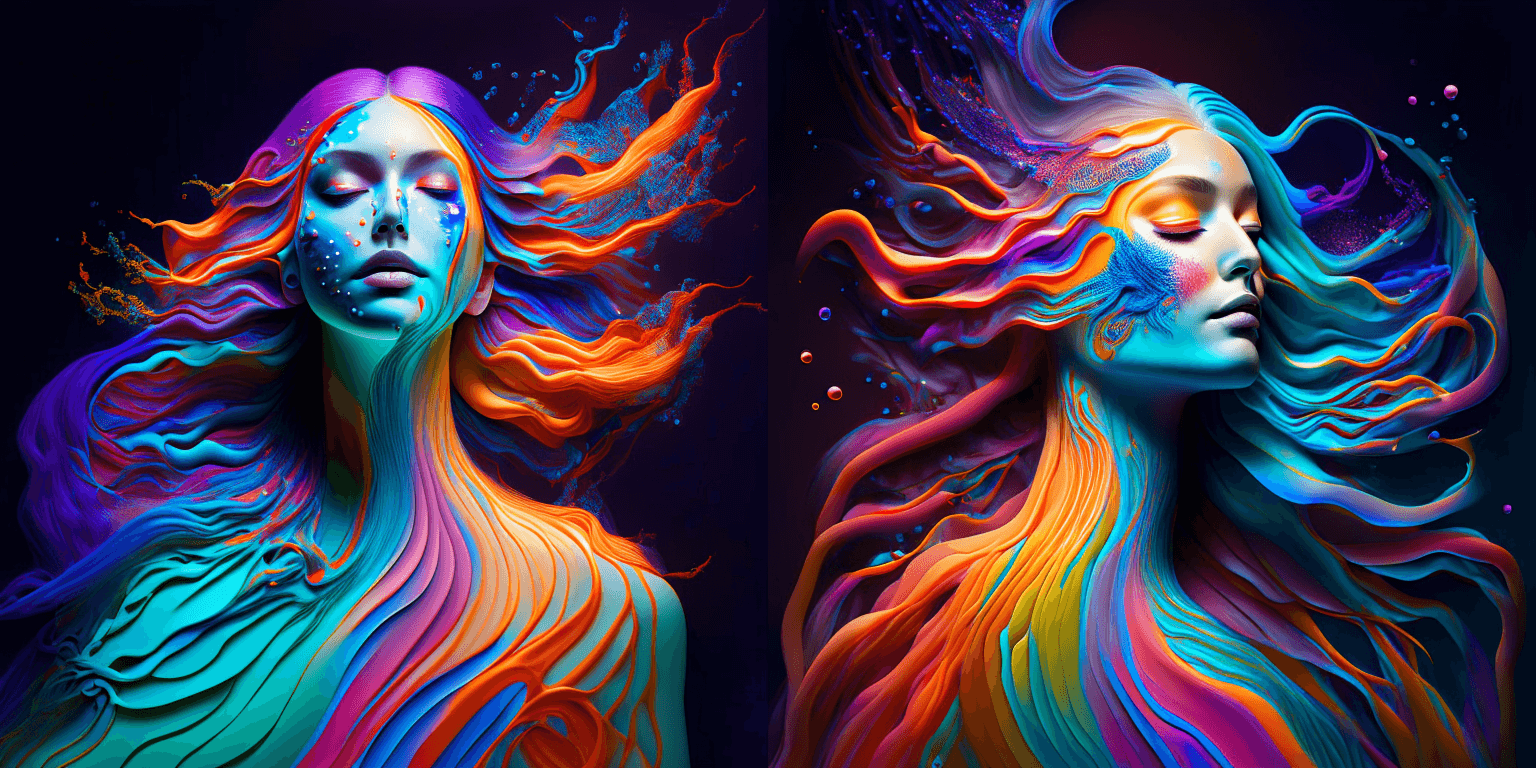
prompt = "bird eye view shot of a full body woman with cyan light orange magenta makeup, digital art, long braided hair her face separated by makeup in the style of yin Yang surrealism, symmetrical face, real image, contrasting tone, pastel gradient background"
|
||||
```
|
||||
|
||||
|
||||
```python
|
||||
prompt = "A car exploding into colorful dust"
|
||||
```
|
||||

|
||||
|
||||
```python
|
||||
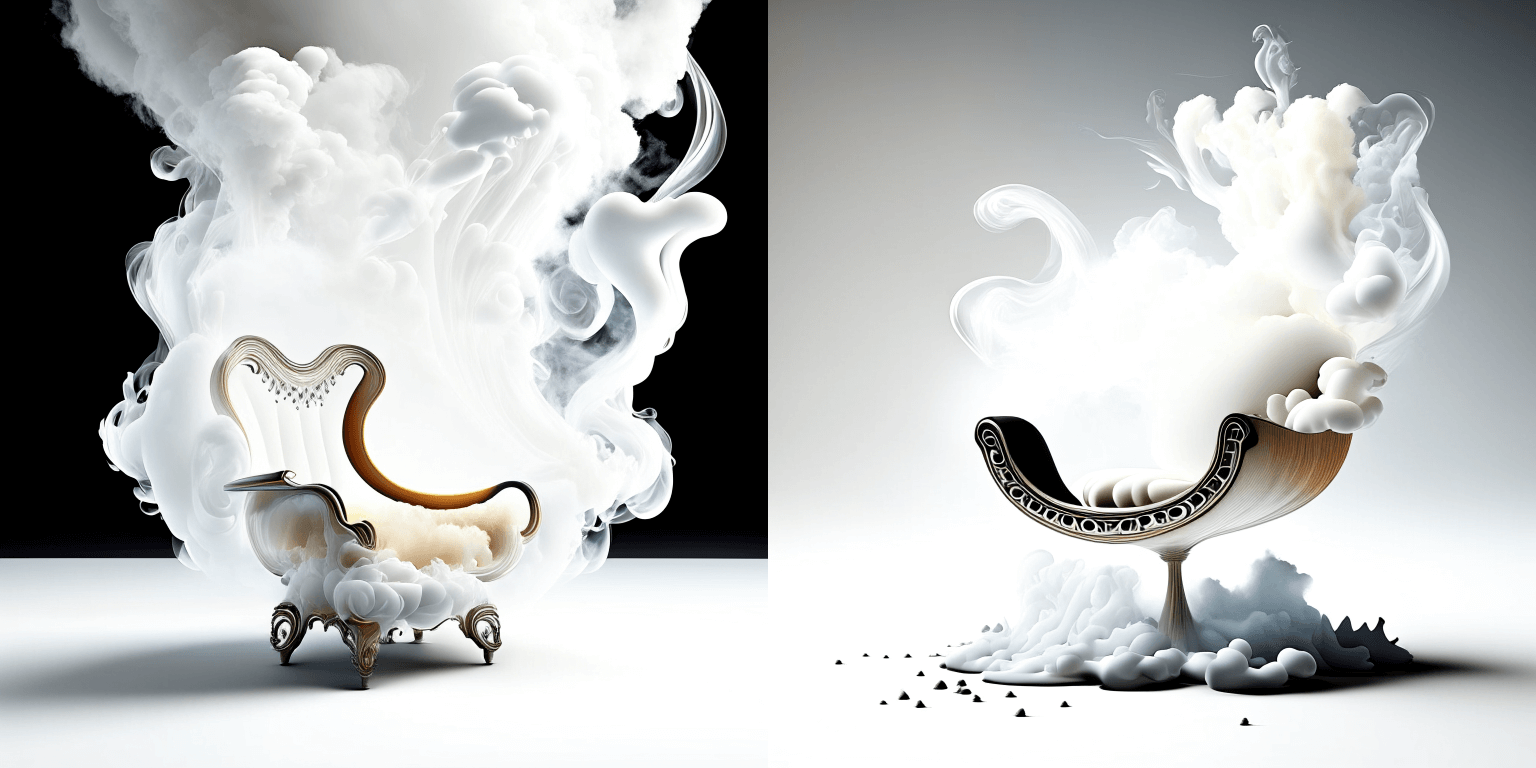
prompt = "editorial photography of an organic, almost liquid smoke style armchair"
|
||||
```
|
||||
|
||||
|
||||
```python
|
||||
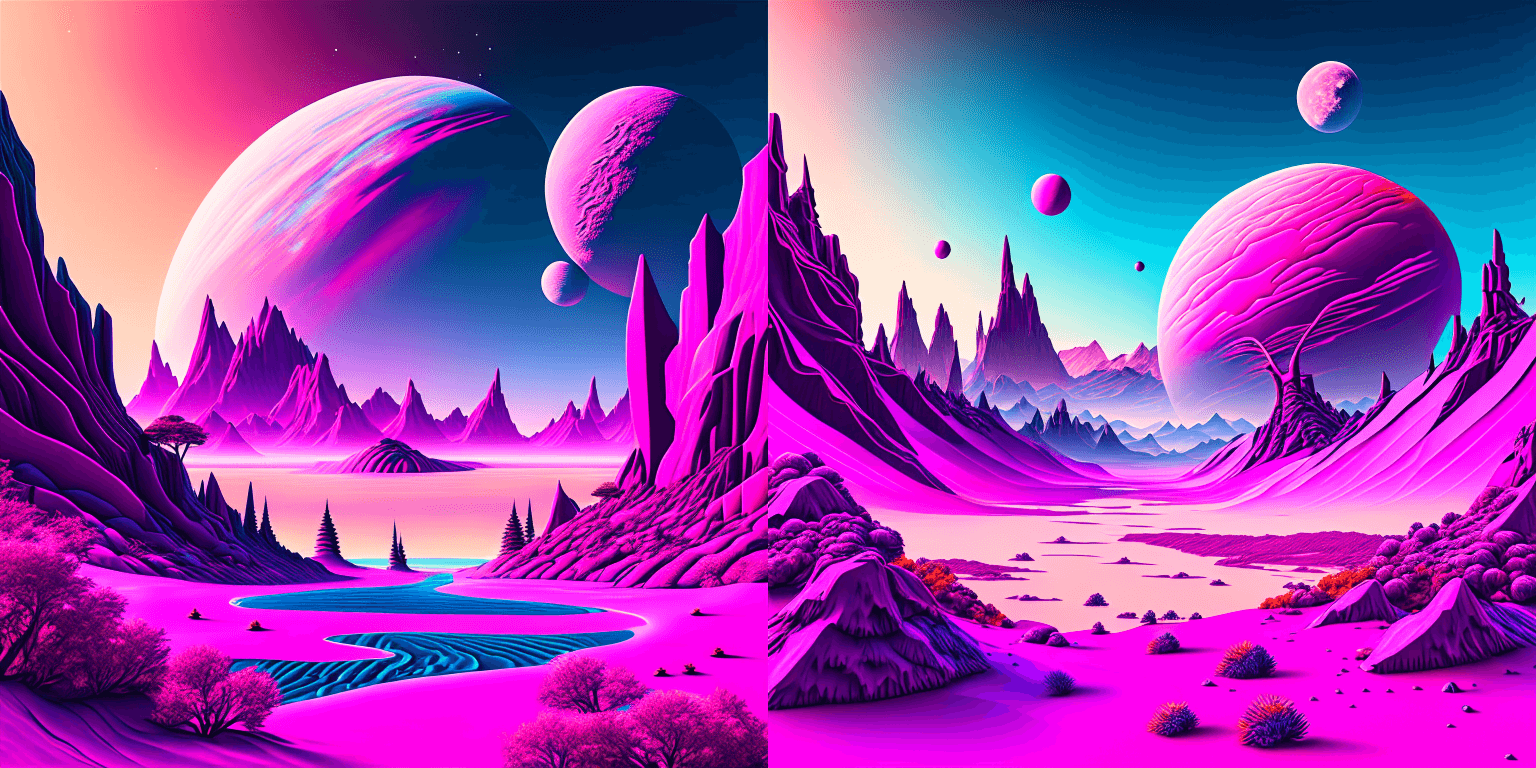
prompt = "birds eye view of a quilted paper style alien planet landscape, vibrant colours, Cinematic lighting"
|
||||
```
|
||||
|
||||
|
||||
|
||||
|
||||
### Text Guided Image-to-Image Generation
|
||||
|
||||
The same Kandinsky model weights can be used for text-guided image-to-image translation. In this case, just make sure to load the weights using the [`KandinskyImg2ImgPipeline`] pipeline.
|
||||
|
||||
**Note**: You can also directly move the weights of the text-to-image pipelines to the image-to-image pipelines
|
||||
without loading them twice by making use of the [`~DiffusionPipeline.components`] function as explained [here](#converting-between-different-pipelines).
|
||||
|
||||
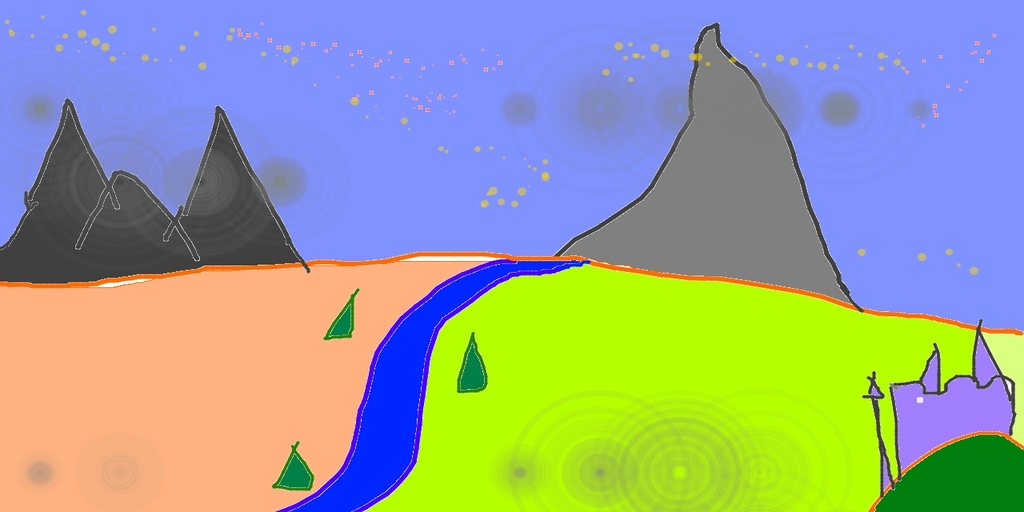
Let's download an image.
|
||||
|
||||
```python
|
||||
from PIL import Image
|
||||
import requests
|
||||
from io import BytesIO
|
||||
|
||||
# download image
|
||||
url = "https://raw.githubusercontent.com/CompVis/stable-diffusion/main/assets/stable-samples/img2img/sketch-mountains-input.jpg"
|
||||
response = requests.get(url)
|
||||
original_image = Image.open(BytesIO(response.content)).convert("RGB")
|
||||
original_image = original_image.resize((768, 512))
|
||||
```
|
||||
|
||||
|
||||
|
||||
```python
|
||||
import torch
|
||||
from diffusers import KandinskyImg2ImgPipeline, KandinskyPriorPipeline
|
||||
|
||||
# create prior
|
||||
pipe_prior = KandinskyPriorPipeline.from_pretrained(
|
||||
"kandinsky-community/kandinsky-2-1-prior", torch_dtype=torch.float16
|
||||
)
|
||||
pipe_prior.to("cuda")
|
||||
|
||||
# create img2img pipeline
|
||||
pipe = KandinskyImg2ImgPipeline.from_pretrained("kandinsky-community/kandinsky-2-1", torch_dtype=torch.float16)
|
||||
pipe.to("cuda")
|
||||
|
||||
prompt = "A fantasy landscape, Cinematic lighting"
|
||||
negative_prompt = "low quality, bad quality"
|
||||
|
||||
image_embeds, negative_image_embeds = pipe_prior(prompt, negative_prompt).to_tuple()
|
||||
|
||||
out = pipe(
|
||||
prompt,
|
||||
image=original_image,
|
||||
image_embeds=image_embeds,
|
||||
negative_image_embeds=negative_image_embeds,
|
||||
height=768,
|
||||
width=768,
|
||||
strength=0.3,
|
||||
)
|
||||
|
||||
out.images[0].save("fantasy_land.png")
|
||||
```
|
||||
|
||||

|
||||
|
||||
|
||||
<Tip>
|
||||
|
||||
You can also use the [`KandinskyImg2ImgCombinedPipeline`] for end-to-end image-to-image generation with Kandinsky 2.1
|
||||
|
||||
```python
|
||||
from diffusers import AutoPipelineForImage2Image
|
||||
import torch
|
||||
import requests
|
||||
from io import BytesIO
|
||||
from PIL import Image
|
||||
import os
|
||||
|
||||
pipe = AutoPipelineForImage2Image.from_pretrained("kandinsky-community/kandinsky-2-1", torch_dtype=torch.float16)
|
||||
pipe.enable_model_cpu_offload()
|
||||
|
||||
prompt = "A fantasy landscape, Cinematic lighting"
|
||||
negative_prompt = "low quality, bad quality"
|
||||
|
||||
url = "https://raw.githubusercontent.com/CompVis/stable-diffusion/main/assets/stable-samples/img2img/sketch-mountains-input.jpg"
|
||||
|
||||
response = requests.get(url)
|
||||
original_image = Image.open(BytesIO(response.content)).convert("RGB")
|
||||
original_image.thumbnail((768, 768))
|
||||
|
||||
image = pipe(prompt=prompt, image=original_image, strength=0.3).images[0]
|
||||
```
|
||||
</Tip>
|
||||
|
||||
### Text Guided Inpainting Generation
|
||||
|
||||
You can use [`KandinskyInpaintPipeline`] to edit images. In this example, we will add a hat to the portrait of a cat.
|
||||
|
||||
```py
|
||||
from diffusers import KandinskyInpaintPipeline, KandinskyPriorPipeline
|
||||
from diffusers.utils import load_image
|
||||
import torch
|
||||
import numpy as np
|
||||
|
||||
pipe_prior = KandinskyPriorPipeline.from_pretrained(
|
||||
"kandinsky-community/kandinsky-2-1-prior", torch_dtype=torch.float16
|
||||
)
|
||||
pipe_prior.to("cuda")
|
||||
|
||||
prompt = "a hat"
|
||||
prior_output = pipe_prior(prompt)
|
||||
|
||||
pipe = KandinskyInpaintPipeline.from_pretrained("kandinsky-community/kandinsky-2-1-inpaint", torch_dtype=torch.float16)
|
||||
pipe.to("cuda")
|
||||
|
||||
init_image = load_image(
|
||||
"https://huggingface.co/datasets/hf-internal-testing/diffusers-images/resolve/main" "/kandinsky/cat.png"
|
||||
)
|
||||
|
||||
mask = np.zeros((768, 768), dtype=np.float32)
|
||||
# Let's mask out an area above the cat's head
|
||||
mask[:250, 250:-250] = 1
|
||||
|
||||
out = pipe(
|
||||
prompt,
|
||||
image=init_image,
|
||||
mask_image=mask,
|
||||
**prior_output,
|
||||
height=768,
|
||||
width=768,
|
||||
num_inference_steps=150,
|
||||
)
|
||||
|
||||
image = out.images[0]
|
||||
image.save("cat_with_hat.png")
|
||||
```
|
||||
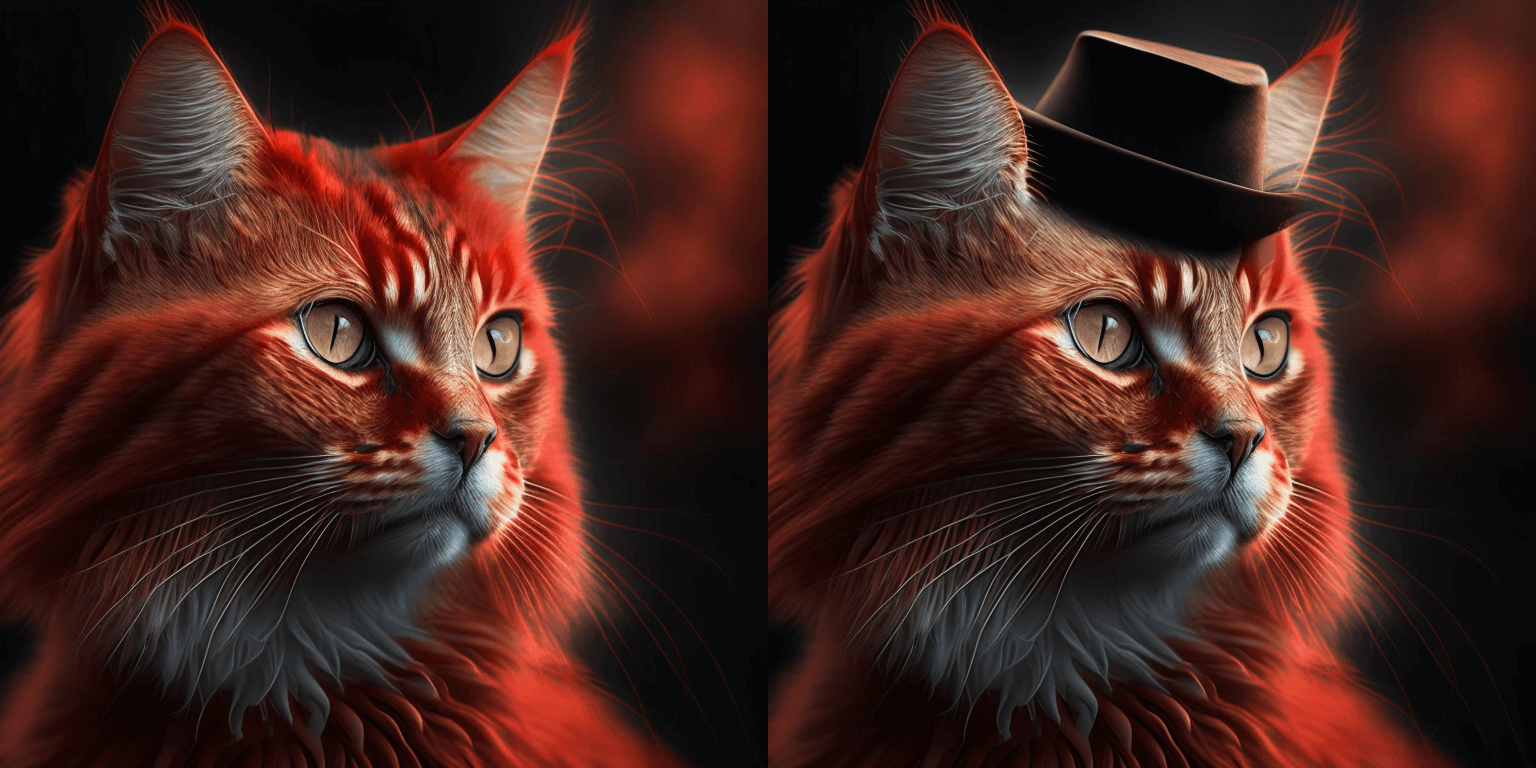
|
||||
|
||||
<Tip>
|
||||
|
||||
To use the [`KandinskyInpaintCombinedPipeline`] to perform end-to-end image inpainting generation, you can run below code instead
|
||||
|
||||
```python
|
||||
from diffusers import AutoPipelineForInpainting
|
||||
|
||||
pipe = AutoPipelineForInpainting.from_pretrained("kandinsky-community/kandinsky-2-1-inpaint", torch_dtype=torch.float16)
|
||||
pipe.enable_model_cpu_offload()
|
||||
image = pipe(prompt=prompt, image=original_image, mask_image=mask).images[0]
|
||||
```
|
||||
</Tip>
|
||||
|
||||
🚨🚨🚨 __Breaking change for Kandinsky Mask Inpainting__ 🚨🚨🚨
|
||||
|
||||
We introduced a breaking change for Kandinsky inpainting pipeline in the following pull request: https://github.com/huggingface/diffusers/pull/4207. Previously we accepted a mask format where black pixels represent the masked-out area. This is inconsistent with all other pipelines in diffusers. We have changed the mask format in Knaindsky and now using white pixels instead.
|
||||
Please upgrade your inpainting code to follow the above. If you are using Kandinsky Inpaint in production. You now need to change the mask to:
|
||||
|
||||
```python
|
||||
# For PIL input
|
||||
import PIL.ImageOps
|
||||
mask = PIL.ImageOps.invert(mask)
|
||||
|
||||
# For PyTorch and Numpy input
|
||||
mask = 1 - mask
|
||||
```
|
||||
|
||||
### Interpolate
|
||||
|
||||
The [`KandinskyPriorPipeline`] also comes with a cool utility function that will allow you to interpolate the latent space of different images and texts super easily. Here is an example of how you can create an Impressionist-style portrait for your pet based on "The Starry Night".
|
||||
|
||||
Note that you can interpolate between texts and images - in the below example, we passed a text prompt "a cat" and two images to the `interplate` function, along with a `weights` variable containing the corresponding weights for each condition we interplate.
|
||||
|
||||
```python
|
||||
from diffusers import KandinskyPriorPipeline, KandinskyPipeline
|
||||
from diffusers.utils import load_image
|
||||
import PIL
|
||||
|
||||
import torch
|
||||
|
||||
pipe_prior = KandinskyPriorPipeline.from_pretrained(
|
||||
"kandinsky-community/kandinsky-2-1-prior", torch_dtype=torch.float16
|
||||
)
|
||||
pipe_prior.to("cuda")
|
||||
|
||||
img1 = load_image(
|
||||
"https://huggingface.co/datasets/hf-internal-testing/diffusers-images/resolve/main" "/kandinsky/cat.png"
|
||||
)
|
||||
|
||||
img2 = load_image(
|
||||
"https://huggingface.co/datasets/hf-internal-testing/diffusers-images/resolve/main" "/kandinsky/starry_night.jpeg"
|
||||
)
|
||||
|
||||
# add all the conditions we want to interpolate, can be either text or image
|
||||
images_texts = ["a cat", img1, img2]
|
||||
|
||||
# specify the weights for each condition in images_texts
|
||||
weights = [0.3, 0.3, 0.4]
|
||||
|
||||
# We can leave the prompt empty
|
||||
prompt = ""
|
||||
prior_out = pipe_prior.interpolate(images_texts, weights)
|
||||
|
||||
pipe = KandinskyPipeline.from_pretrained("kandinsky-community/kandinsky-2-1", torch_dtype=torch.float16)
|
||||
pipe.to("cuda")
|
||||
|
||||
image = pipe(prompt, **prior_out, height=768, width=768).images[0]
|
||||
|
||||
image.save("starry_cat.png")
|
||||
```
|
||||
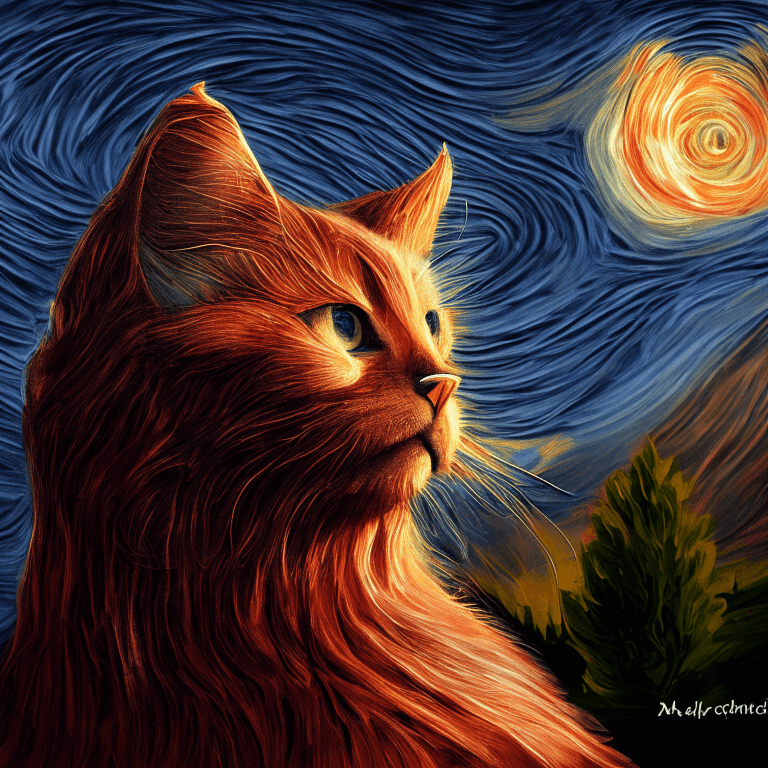
|
||||
|
||||
## Optimization
|
||||
|
||||
Running Kandinsky in inference requires running both a first prior pipeline: [`KandinskyPriorPipeline`]
|
||||
and a second image decoding pipeline which is one of [`KandinskyPipeline`], [`KandinskyImg2ImgPipeline`], or [`KandinskyInpaintPipeline`].
|
||||
|
||||
The bulk of the computation time will always be the second image decoding pipeline, so when looking
|
||||
into optimizing the model, one should look into the second image decoding pipeline.
|
||||
|
||||
When running with PyTorch < 2.0, we strongly recommend making use of [`xformers`](https://github.com/facebookresearch/xformers)
|
||||
to speed-up the optimization. This can be done by simply running:
|
||||
|
||||
```py
|
||||
from diffusers import DiffusionPipeline
|
||||
import torch
|
||||
|
||||
t2i_pipe = DiffusionPipeline.from_pretrained("kandinsky-community/kandinsky-2-1", torch_dtype=torch.float16)
|
||||
t2i_pipe.enable_xformers_memory_efficient_attention()
|
||||
```
|
||||
|
||||
When running on PyTorch >= 2.0, PyTorch's SDPA attention will automatically be used. For more information on
|
||||
PyTorch's SDPA, feel free to have a look at [this blog post](https://pytorch.org/blog/accelerated-diffusers-pt-20/).
|
||||
|
||||
To have explicit control , you can also manually set the pipeline to use PyTorch's 2.0 efficient attention:
|
||||
|
||||
```py
|
||||
from diffusers.models.attention_processor import AttnAddedKVProcessor2_0
|
||||
|
||||
t2i_pipe.unet.set_attn_processor(AttnAddedKVProcessor2_0())
|
||||
```
|
||||
|
||||
The slowest and most memory intense attention processor is the default `AttnAddedKVProcessor` processor.
|
||||
We do **not** recommend using it except for testing purposes or cases where very high determistic behaviour is desired.
|
||||
You can set it with:
|
||||
|
||||
```py
|
||||
from diffusers.models.attention_processor import AttnAddedKVProcessor
|
||||
|
||||
t2i_pipe.unet.set_attn_processor(AttnAddedKVProcessor())
|
||||
```
|
||||
|
||||
With PyTorch >= 2.0, you can also use Kandinsky with `torch.compile` which depending
|
||||
on your hardware can significantly speed-up your inference time once the model is compiled.
|
||||
To use Kandinsksy with `torch.compile`, you can do:
|
||||
|
||||
```py
|
||||
t2i_pipe.unet.to(memory_format=torch.channels_last)
|
||||
t2i_pipe.unet = torch.compile(t2i_pipe.unet, mode="reduce-overhead", fullgraph=True)
|
||||
```
|
||||
|
||||
After compilation you should see a very fast inference time. For more information,
|
||||
feel free to have a look at [Our PyTorch 2.0 benchmark](https://huggingface.co/docs/diffusers/main/en/optimization/torch2.0).
|
||||
|
||||
<Tip>
|
||||
|
||||
To generate images directly from a single pipeline, you can use [`KandinskyCombinedPipeline`], [`KandinskyImg2ImgCombinedPipeline`], [`KandinskyInpaintCombinedPipeline`].
|
||||
These combined pipelines wrap the [`KandinskyPriorPipeline`] and [`KandinskyPipeline`], [`KandinskyImg2ImgPipeline`], [`KandinskyInpaintPipeline`] respectively into a single
|
||||
pipeline for a simpler user experience
|
||||
|
||||
</Tip>
|
||||
|
||||
## Available Pipelines:
|
||||
|
||||
| Pipeline | Tasks |
|
||||
|---|---|
|
||||
| [pipeline_kandinsky.py](https://github.com/huggingface/diffusers/blob/main/src/diffusers/pipelines/kandinsky/pipeline_kandinsky.py) | *Text-to-Image Generation* |
|
||||
| [pipeline_kandinsky_combined.py](https://github.com/huggingface/diffusers/blob/main/src/diffusers/pipelines/kandinsky2_2/pipeline_kandinsky_combined.py) | *End-to-end Text-to-Image, image-to-image, Inpainting Generation* |
|
||||
| [pipeline_kandinsky_inpaint.py](https://github.com/huggingface/diffusers/blob/main/src/diffusers/pipelines/kandinsky/pipeline_kandinsky_inpaint.py) | *Image-Guided Image Generation* |
|
||||
| [pipeline_kandinsky_img2img.py](https://github.com/huggingface/diffusers/blob/main/src/diffusers/pipelines/kandinsky/pipeline_kandinsky_img2img.py) | *Image-Guided Image Generation* |
|
||||
|
||||
|
||||
### KandinskyPriorPipeline
|
||||
|
||||
[[autodoc]] KandinskyPriorPipeline
|
||||
- all
|
||||
- __call__
|
||||
- interpolate
|
||||
|
||||
## KandinskyPipeline
|
||||
### KandinskyPipeline
|
||||
|
||||
[[autodoc]] KandinskyPipeline
|
||||
- all
|
||||
- __call__
|
||||
|
||||
## KandinskyCombinedPipeline
|
||||
|
||||
[[autodoc]] KandinskyCombinedPipeline
|
||||
- all
|
||||
- __call__
|
||||
|
||||
## KandinskyImg2ImgPipeline
|
||||
### KandinskyImg2ImgPipeline
|
||||
|
||||
[[autodoc]] KandinskyImg2ImgPipeline
|
||||
- all
|
||||
- __call__
|
||||
|
||||
## KandinskyImg2ImgCombinedPipeline
|
||||
|
||||
[[autodoc]] KandinskyImg2ImgCombinedPipeline
|
||||
- all
|
||||
- __call__
|
||||
|
||||
## KandinskyInpaintPipeline
|
||||
### KandinskyInpaintPipeline
|
||||
|
||||
[[autodoc]] KandinskyInpaintPipeline
|
||||
- all
|
||||
- __call__
|
||||
|
||||
## KandinskyInpaintCombinedPipeline
|
||||
### KandinskyCombinedPipeline
|
||||
|
||||
[[autodoc]] KandinskyCombinedPipeline
|
||||
- all
|
||||
- __call__
|
||||
|
||||
### KandinskyImg2ImgCombinedPipeline
|
||||
|
||||
[[autodoc]] KandinskyImg2ImgCombinedPipeline
|
||||
- all
|
||||
- __call__
|
||||
|
||||
### KandinskyInpaintCombinedPipeline
|
||||
|
||||
[[autodoc]] KandinskyInpaintCombinedPipeline
|
||||
- all
|
||||
|
||||
@@ -9,77 +9,348 @@ specific language governing permissions and limitations under the License.
|
||||
|
||||
# Kandinsky 2.2
|
||||
|
||||
Kandinsky 2.1 is created by [Arseniy Shakhmatov](https://github.com/cene555), [Anton Razzhigaev](https://github.com/razzant), [Aleksandr Nikolich](https://github.com/AlexWortega), [Igor Pavlov](https://github.com/boomb0om), [Andrey Kuznetsov](https://github.com/kuznetsoffandrey) and [Denis Dimitrov](https://github.com/denndimitrov).
|
||||
The Kandinsky 2.2 release includes robust new text-to-image models that support text-to-image generation, image-to-image generation, image interpolation, and text-guided image inpainting. The general workflow to perform these tasks using Kandinsky 2.2 is the same as in Kandinsky 2.1. First, you will need to use a prior pipeline to generate image embeddings based on your text prompt, and then use one of the image decoding pipelines to generate the output image. The only difference is that in Kandinsky 2.2, all of the decoding pipelines no longer accept the `prompt` input, and the image generation process is conditioned with only `image_embeds` and `negative_image_embeds`.
|
||||
|
||||
The description from it's GitHub page is:
|
||||
Same as with Kandinsky 2.1, the easiest way to perform text-to-image generation is to use the combined Kandinsky pipeline. This process is exactly the same as Kandinsky 2.1. All you need to do is to replace the Kandinsky 2.1 checkpoint with 2.2.
|
||||
|
||||
*Kandinsky 2.2 brings substantial improvements upon its predecessor, Kandinsky 2.1, by introducing a new, more powerful image encoder - CLIP-ViT-G and the ControlNet support. The switch to CLIP-ViT-G as the image encoder significantly increases the model's capability to generate more aesthetic pictures and better understand text, thus enhancing the model's overall performance. The addition of the ControlNet mechanism allows the model to effectively control the process of generating images. This leads to more accurate and visually appealing outputs and opens new possibilities for text-guided image manipulation.*
|
||||
```python
|
||||
from diffusers import AutoPipelineForText2Image
|
||||
import torch
|
||||
|
||||
The original codebase can be found at [ai-forever/Kandinsky-2](https://github.com/ai-forever/Kandinsky-2).
|
||||
pipe = AutoPipelineForText2Image.from_pretrained("kandinsky-community/kandinsky-2-2-decoder", torch_dtype=torch.float16)
|
||||
pipe.enable_model_cpu_offload()
|
||||
|
||||
prompt = "A alien cheeseburger creature eating itself, claymation, cinematic, moody lighting"
|
||||
negative_prompt = "low quality, bad quality"
|
||||
|
||||
image = pipe(prompt=prompt, negative_prompt=negative_prompt, prior_guidance_scale =1.0, height=768, width=768).images[0]
|
||||
```
|
||||
|
||||
Now, let's look at an example where we take separate steps to run the prior pipeline and text-to-image pipeline. This way, we can understand what's happening under the hood and how Kandinsky 2.2 differs from Kandinsky 2.1.
|
||||
|
||||
First, let's create the prior pipeline and text-to-image pipeline with Kandinsky 2.2 checkpoints.
|
||||
|
||||
```python
|
||||
from diffusers import DiffusionPipeline
|
||||
import torch
|
||||
|
||||
pipe_prior = DiffusionPipeline.from_pretrained("kandinsky-community/kandinsky-2-2-prior", torch_dtype=torch.float16)
|
||||
pipe_prior.to("cuda")
|
||||
|
||||
t2i_pipe = DiffusionPipeline.from_pretrained("kandinsky-community/kandinsky-2-2-decoder", torch_dtype=torch.float16)
|
||||
t2i_pipe.to("cuda")
|
||||
```
|
||||
|
||||
You can then use `pipe_prior` to generate image embeddings.
|
||||
|
||||
```python
|
||||
prompt = "portrait of a women, blue eyes, cinematic"
|
||||
negative_prompt = "low quality, bad quality"
|
||||
|
||||
image_embeds, negative_image_embeds = pipe_prior(prompt, guidance_scale=1.0).to_tuple()
|
||||
```
|
||||
|
||||
Now you can pass these embeddings to the text-to-image pipeline. When using Kandinsky 2.2 you don't need to pass the `prompt` (but you do with the previous version, Kandinsky 2.1).
|
||||
|
||||
```
|
||||
image = t2i_pipe(image_embeds=image_embeds, negative_image_embeds=negative_image_embeds, height=768, width=768).images[
|
||||
0
|
||||
]
|
||||
image.save("portrait.png")
|
||||
```
|
||||
|
||||
|
||||
We used the text-to-image pipeline as an example, but the same process applies to all decoding pipelines in Kandinsky 2.2. For more information, please refer to our API section for each pipeline.
|
||||
|
||||
### Text-to-Image Generation with ControlNet Conditioning
|
||||
|
||||
In the following, we give a simple example of how to use [`KandinskyV22ControlnetPipeline`] to add control to the text-to-image generation with a depth image.
|
||||
|
||||
First, let's take an image and extract its depth map.
|
||||
|
||||
```python
|
||||
from diffusers.utils import load_image
|
||||
|
||||
img = load_image(
|
||||
"https://huggingface.co/datasets/hf-internal-testing/diffusers-images/resolve/main/kandinskyv22/cat.png"
|
||||
).resize((768, 768))
|
||||
```
|
||||
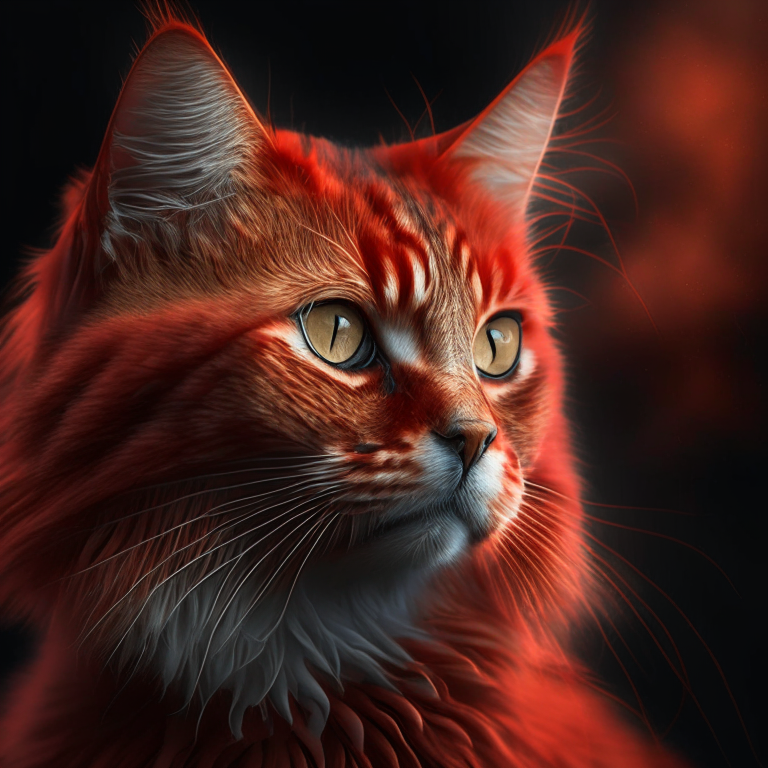
|
||||
|
||||
We can use the `depth-estimation` pipeline from transformers to process the image and retrieve its depth map.
|
||||
|
||||
```python
|
||||
import torch
|
||||
import numpy as np
|
||||
|
||||
from transformers import pipeline
|
||||
from diffusers.utils import load_image
|
||||
|
||||
|
||||
def make_hint(image, depth_estimator):
|
||||
image = depth_estimator(image)["depth"]
|
||||
image = np.array(image)
|
||||
image = image[:, :, None]
|
||||
image = np.concatenate([image, image, image], axis=2)
|
||||
detected_map = torch.from_numpy(image).float() / 255.0
|
||||
hint = detected_map.permute(2, 0, 1)
|
||||
return hint
|
||||
|
||||
|
||||
depth_estimator = pipeline("depth-estimation")
|
||||
hint = make_hint(img, depth_estimator).unsqueeze(0).half().to("cuda")
|
||||
```
|
||||
Now, we load the prior pipeline and the text-to-image controlnet pipeline
|
||||
|
||||
```python
|
||||
from diffusers import KandinskyV22PriorPipeline, KandinskyV22ControlnetPipeline
|
||||
|
||||
pipe_prior = KandinskyV22PriorPipeline.from_pretrained(
|
||||
"kandinsky-community/kandinsky-2-2-prior", torch_dtype=torch.float16
|
||||
)
|
||||
pipe_prior = pipe_prior.to("cuda")
|
||||
|
||||
pipe = KandinskyV22ControlnetPipeline.from_pretrained(
|
||||
"kandinsky-community/kandinsky-2-2-controlnet-depth", torch_dtype=torch.float16
|
||||
)
|
||||
pipe = pipe.to("cuda")
|
||||
```
|
||||
|
||||
We pass the prompt and negative prompt through the prior to generate image embeddings
|
||||
|
||||
```python
|
||||
prompt = "A robot, 4k photo"
|
||||
|
||||
negative_prior_prompt = "lowres, text, error, cropped, worst quality, low quality, jpeg artifacts, ugly, duplicate, morbid, mutilated, out of frame, extra fingers, mutated hands, poorly drawn hands, poorly drawn face, mutation, deformed, blurry, dehydrated, bad anatomy, bad proportions, extra limbs, cloned face, disfigured, gross proportions, malformed limbs, missing arms, missing legs, extra arms, extra legs, fused fingers, too many fingers, long neck, username, watermark, signature"
|
||||
|
||||
generator = torch.Generator(device="cuda").manual_seed(43)
|
||||
image_emb, zero_image_emb = pipe_prior(
|
||||
prompt=prompt, negative_prompt=negative_prior_prompt, generator=generator
|
||||
).to_tuple()
|
||||
```
|
||||
|
||||
Now we can pass the image embeddings and the depth image we extracted to the controlnet pipeline. With Kandinsky 2.2, only prior pipelines accept `prompt` input. You do not need to pass the prompt to the controlnet pipeline.
|
||||
|
||||
```python
|
||||
images = pipe(
|
||||
image_embeds=image_emb,
|
||||
negative_image_embeds=zero_image_emb,
|
||||
hint=hint,
|
||||
num_inference_steps=50,
|
||||
generator=generator,
|
||||
height=768,
|
||||
width=768,
|
||||
).images
|
||||
|
||||
images[0].save("robot_cat.png")
|
||||
```
|
||||
|
||||
The output image looks as follow:
|
||||
|
||||
|
||||
### Image-to-Image Generation with ControlNet Conditioning
|
||||
|
||||
Kandinsky 2.2 also includes a [`KandinskyV22ControlnetImg2ImgPipeline`] that will allow you to add control to the image generation process with both the image and its depth map. This pipeline works really well with [`KandinskyV22PriorEmb2EmbPipeline`], which generates image embeddings based on both a text prompt and an image.
|
||||
|
||||
For our robot cat example, we will pass the prompt and cat image together to the prior pipeline to generate an image embedding. We will then use that image embedding and the depth map of the cat to further control the image generation process.
|
||||
|
||||
We can use the same cat image and its depth map from the last example.
|
||||
|
||||
```python
|
||||
import torch
|
||||
import numpy as np
|
||||
|
||||
from diffusers import KandinskyV22PriorEmb2EmbPipeline, KandinskyV22ControlnetImg2ImgPipeline
|
||||
from diffusers.utils import load_image
|
||||
from transformers import pipeline
|
||||
|
||||
img = load_image(
|
||||
"https://huggingface.co/datasets/hf-internal-testing/diffusers-images/resolve/main" "/kandinskyv22/cat.png"
|
||||
).resize((768, 768))
|
||||
|
||||
|
||||
def make_hint(image, depth_estimator):
|
||||
image = depth_estimator(image)["depth"]
|
||||
image = np.array(image)
|
||||
image = image[:, :, None]
|
||||
image = np.concatenate([image, image, image], axis=2)
|
||||
detected_map = torch.from_numpy(image).float() / 255.0
|
||||
hint = detected_map.permute(2, 0, 1)
|
||||
return hint
|
||||
|
||||
|
||||
depth_estimator = pipeline("depth-estimation")
|
||||
hint = make_hint(img, depth_estimator).unsqueeze(0).half().to("cuda")
|
||||
|
||||
pipe_prior = KandinskyV22PriorEmb2EmbPipeline.from_pretrained(
|
||||
"kandinsky-community/kandinsky-2-2-prior", torch_dtype=torch.float16
|
||||
)
|
||||
pipe_prior = pipe_prior.to("cuda")
|
||||
|
||||
pipe = KandinskyV22ControlnetImg2ImgPipeline.from_pretrained(
|
||||
"kandinsky-community/kandinsky-2-2-controlnet-depth", torch_dtype=torch.float16
|
||||
)
|
||||
pipe = pipe.to("cuda")
|
||||
|
||||
prompt = "A robot, 4k photo"
|
||||
negative_prior_prompt = "lowres, text, error, cropped, worst quality, low quality, jpeg artifacts, ugly, duplicate, morbid, mutilated, out of frame, extra fingers, mutated hands, poorly drawn hands, poorly drawn face, mutation, deformed, blurry, dehydrated, bad anatomy, bad proportions, extra limbs, cloned face, disfigured, gross proportions, malformed limbs, missing arms, missing legs, extra arms, extra legs, fused fingers, too many fingers, long neck, username, watermark, signature"
|
||||
|
||||
generator = torch.Generator(device="cuda").manual_seed(43)
|
||||
|
||||
# run prior pipeline
|
||||
|
||||
img_emb = pipe_prior(prompt=prompt, image=img, strength=0.85, generator=generator)
|
||||
negative_emb = pipe_prior(prompt=negative_prior_prompt, image=img, strength=1, generator=generator)
|
||||
|
||||
# run controlnet img2img pipeline
|
||||
images = pipe(
|
||||
image=img,
|
||||
strength=0.5,
|
||||
image_embeds=img_emb.image_embeds,
|
||||
negative_image_embeds=negative_emb.image_embeds,
|
||||
hint=hint,
|
||||
num_inference_steps=50,
|
||||
generator=generator,
|
||||
height=768,
|
||||
width=768,
|
||||
).images
|
||||
|
||||
images[0].save("robot_cat.png")
|
||||
```
|
||||
|
||||
Here is the output. Compared with the output from our text-to-image controlnet example, it kept a lot more cat facial details from the original image and worked into the robot style we asked for.
|
||||
|
||||
|
||||
|
||||
## Optimization
|
||||
|
||||
Running Kandinsky in inference requires running both a first prior pipeline: [`KandinskyPriorPipeline`]
|
||||
and a second image decoding pipeline which is one of [`KandinskyPipeline`], [`KandinskyImg2ImgPipeline`], or [`KandinskyInpaintPipeline`].
|
||||
|
||||
The bulk of the computation time will always be the second image decoding pipeline, so when looking
|
||||
into optimizing the model, one should look into the second image decoding pipeline.
|
||||
|
||||
When running with PyTorch < 2.0, we strongly recommend making use of [`xformers`](https://github.com/facebookresearch/xformers)
|
||||
to speed-up the optimization. This can be done by simply running:
|
||||
|
||||
```py
|
||||
from diffusers import DiffusionPipeline
|
||||
import torch
|
||||
|
||||
t2i_pipe = DiffusionPipeline.from_pretrained("kandinsky-community/kandinsky-2-2-decoder", torch_dtype=torch.float16)
|
||||
t2i_pipe.enable_xformers_memory_efficient_attention()
|
||||
```
|
||||
|
||||
When running on PyTorch >= 2.0, PyTorch's SDPA attention will automatically be used. For more information on
|
||||
PyTorch's SDPA, feel free to have a look at [this blog post](https://pytorch.org/blog/accelerated-diffusers-pt-20/).
|
||||
|
||||
To have explicit control , you can also manually set the pipeline to use PyTorch's 2.0 efficient attention:
|
||||
|
||||
```py
|
||||
from diffusers.models.attention_processor import AttnAddedKVProcessor2_0
|
||||
|
||||
t2i_pipe.unet.set_attn_processor(AttnAddedKVProcessor2_0())
|
||||
```
|
||||
|
||||
The slowest and most memory intense attention processor is the default `AttnAddedKVProcessor` processor.
|
||||
We do **not** recommend using it except for testing purposes or cases where very high determistic behaviour is desired.
|
||||
You can set it with:
|
||||
|
||||
```py
|
||||
from diffusers.models.attention_processor import AttnAddedKVProcessor
|
||||
|
||||
t2i_pipe.unet.set_attn_processor(AttnAddedKVProcessor())
|
||||
```
|
||||
|
||||
With PyTorch >= 2.0, you can also use Kandinsky with `torch.compile` which depending
|
||||
on your hardware can significantly speed-up your inference time once the model is compiled.
|
||||
To use Kandinsksy with `torch.compile`, you can do:
|
||||
|
||||
```py
|
||||
t2i_pipe.unet.to(memory_format=torch.channels_last)
|
||||
t2i_pipe.unet = torch.compile(t2i_pipe.unet, mode="reduce-overhead", fullgraph=True)
|
||||
```
|
||||
|
||||
After compilation you should see a very fast inference time. For more information,
|
||||
feel free to have a look at [Our PyTorch 2.0 benchmark](https://huggingface.co/docs/diffusers/main/en/optimization/torch2.0).
|
||||
|
||||
<Tip>
|
||||
|
||||
Check out the [Kandinsky Community](https://huggingface.co/kandinsky-community) organization on the Hub for the official model checkpoints for tasks like text-to-image, image-to-image, and inpainting.
|
||||
To generate images directly from a single pipeline, you can use [`KandinskyV22CombinedPipeline`], [`KandinskyV22Img2ImgCombinedPipeline`], [`KandinskyV22InpaintCombinedPipeline`].
|
||||
These combined pipelines wrap the [`KandinskyV22PriorPipeline`] and [`KandinskyV22Pipeline`], [`KandinskyV22Img2ImgPipeline`], [`KandinskyV22InpaintPipeline`] respectively into a single
|
||||
pipeline for a simpler user experience
|
||||
|
||||
</Tip>
|
||||
|
||||
## KandinskyV22PriorPipeline
|
||||
## Available Pipelines:
|
||||
|
||||
| Pipeline | Tasks |
|
||||
|---|---|
|
||||
| [pipeline_kandinsky2_2.py](https://github.com/huggingface/diffusers/blob/main/src/diffusers/pipelines/kandinsky2_2/pipeline_kandinsky2_2.py) | *Text-to-Image Generation* |
|
||||
| [pipeline_kandinsky2_2_combined.py](https://github.com/huggingface/diffusers/blob/main/src/diffusers/pipelines/kandinsky2_2/pipeline_kandinsky2_2_combined.py) | *End-to-end Text-to-Image, image-to-image, Inpainting Generation* |
|
||||
| [pipeline_kandinsky2_2_inpaint.py](https://github.com/huggingface/diffusers/blob/main/src/diffusers/pipelines/kandinsky2_2/pipeline_kandinsky2_2_inpaint.py) | *Image-Guided Image Generation* |
|
||||
| [pipeline_kandinsky2_2_img2img.py](https://github.com/huggingface/diffusers/blob/main/src/diffusers/pipelines/kandinsky2_2/pipeline_kandinsky2_2_img2img.py) | *Image-Guided Image Generation* |
|
||||
| [pipeline_kandinsky2_2_controlnet.py](https://github.com/huggingface/diffusers/blob/main/src/diffusers/pipelines/kandinsky2_2/pipeline_kandinsky2_2_controlnet.py) | *Image-Guided Image Generation* |
|
||||
| [pipeline_kandinsky2_2_controlnet_img2img.py](https://github.com/huggingface/diffusers/blob/main/src/diffusers/pipelines/kandinsky2_2/pipeline_kandinsky2_2_controlnet_img2img.py) | *Image-Guided Image Generation* |
|
||||
|
||||
|
||||
### KandinskyV22Pipeline
|
||||
|
||||
[[autodoc]] KandinskyV22Pipeline
|
||||
- all
|
||||
- __call__
|
||||
|
||||
### KandinskyV22ControlnetPipeline
|
||||
|
||||
[[autodoc]] KandinskyV22ControlnetPipeline
|
||||
- all
|
||||
- __call__
|
||||
|
||||
### KandinskyV22ControlnetImg2ImgPipeline
|
||||
|
||||
[[autodoc]] KandinskyV22ControlnetImg2ImgPipeline
|
||||
- all
|
||||
- __call__
|
||||
|
||||
### KandinskyV22Img2ImgPipeline
|
||||
|
||||
[[autodoc]] KandinskyV22Img2ImgPipeline
|
||||
- all
|
||||
- __call__
|
||||
|
||||
### KandinskyV22InpaintPipeline
|
||||
|
||||
[[autodoc]] KandinskyV22InpaintPipeline
|
||||
- all
|
||||
- __call__
|
||||
|
||||
### KandinskyV22PriorPipeline
|
||||
|
||||
[[autodoc]] KandinskyV22PriorPipeline
|
||||
- all
|
||||
- __call__
|
||||
- interpolate
|
||||
|
||||
## KandinskyV22Pipeline
|
||||
|
||||
[[autodoc]] KandinskyV22Pipeline
|
||||
- all
|
||||
- __call__
|
||||
|
||||
## KandinskyV22CombinedPipeline
|
||||
|
||||
[[autodoc]] KandinskyV22CombinedPipeline
|
||||
- all
|
||||
- __call__
|
||||
|
||||
## KandinskyV22ControlnetPipeline
|
||||
|
||||
[[autodoc]] KandinskyV22ControlnetPipeline
|
||||
- all
|
||||
- __call__
|
||||
|
||||
## KandinskyV22PriorEmb2EmbPipeline
|
||||
### KandinskyV22PriorEmb2EmbPipeline
|
||||
|
||||
[[autodoc]] KandinskyV22PriorEmb2EmbPipeline
|
||||
- all
|
||||
- __call__
|
||||
- interpolate
|
||||
|
||||
## KandinskyV22Img2ImgPipeline
|
||||
### KandinskyV22CombinedPipeline
|
||||
|
||||
[[autodoc]] KandinskyV22Img2ImgPipeline
|
||||
[[autodoc]] KandinskyV22CombinedPipeline
|
||||
- all
|
||||
- __call__
|
||||
|
||||
## KandinskyV22Img2ImgCombinedPipeline
|
||||
### KandinskyV22Img2ImgCombinedPipeline
|
||||
|
||||
[[autodoc]] KandinskyV22Img2ImgCombinedPipeline
|
||||
- all
|
||||
- __call__
|
||||
|
||||
## KandinskyV22ControlnetImg2ImgPipeline
|
||||
|
||||
[[autodoc]] KandinskyV22ControlnetImg2ImgPipeline
|
||||
- all
|
||||
- __call__
|
||||
|
||||
## KandinskyV22InpaintPipeline
|
||||
|
||||
[[autodoc]] KandinskyV22InpaintPipeline
|
||||
- all
|
||||
- __call__
|
||||
|
||||
## KandinskyV22InpaintCombinedPipeline
|
||||
### KandinskyV22InpaintCombinedPipeline
|
||||
|
||||
[[autodoc]] KandinskyV22InpaintCombinedPipeline
|
||||
- all
|
||||
|
||||
@@ -8,8 +8,24 @@ The abstract of the [paper](https://arxiv.org/pdf/2310.04378.pdf) is as follows:
|
||||
|
||||
A demo for the [SimianLuo/LCM_Dreamshaper_v7](https://huggingface.co/SimianLuo/LCM_Dreamshaper_v7) checkpoint can be found [here](https://huggingface.co/spaces/SimianLuo/Latent_Consistency_Model).
|
||||
|
||||
The pipelines were contributed by [luosiallen](https://luosiallen.github.io/), [nagolinc](https://github.com/nagolinc), and [dg845](https://github.com/dg845).
|
||||
This pipeline was contributed by [luosiallen](https://luosiallen.github.io/) and [dg845](https://github.com/dg845).
|
||||
|
||||
```python
|
||||
import torch
|
||||
from diffusers import DiffusionPipeline
|
||||
|
||||
pipe = DiffusionPipeline.from_pretrained("SimianLuo/LCM_Dreamshaper_v7", torch_dtype=torch.float32)
|
||||
|
||||
# To save GPU memory, torch.float16 can be used, but it may compromise image quality.
|
||||
pipe.to(torch_device="cuda", torch_dtype=torch.float32)
|
||||
|
||||
prompt = "Self-portrait oil painting, a beautiful cyborg with golden hair, 8k"
|
||||
|
||||
# Can be set to 1~50 steps. LCM support fast inference even <= 4 steps. Recommend: 1~8 steps.
|
||||
num_inference_steps = 4
|
||||
|
||||
images = pipe(prompt=prompt, num_inference_steps=num_inference_steps, guidance_scale=8.0).images
|
||||
```
|
||||
|
||||
## LatentConsistencyModelPipeline
|
||||
|
||||
@@ -23,18 +39,6 @@ The pipelines were contributed by [luosiallen](https://luosiallen.github.io/), [
|
||||
- enable_vae_tiling
|
||||
- disable_vae_tiling
|
||||
|
||||
## LatentConsistencyModelImg2ImgPipeline
|
||||
|
||||
[[autodoc]] LatentConsistencyModelImg2ImgPipeline
|
||||
- all
|
||||
- __call__
|
||||
- enable_freeu
|
||||
- disable_freeu
|
||||
- enable_vae_slicing
|
||||
- disable_vae_slicing
|
||||
- enable_vae_tiling
|
||||
- disable_vae_tiling
|
||||
|
||||
## StableDiffusionPipelineOutput
|
||||
|
||||
[[autodoc]] pipelines.stable_diffusion.StableDiffusionPipelineOutput
|
||||
|
||||
@@ -10,7 +10,7 @@ an "AS IS" BASIS, WITHOUT WARRANTIES OR CONDITIONS OF ANY KIND, either express o
|
||||
specific language governing permissions and limitations under the License.
|
||||
-->
|
||||
|
||||
# Paint By Example
|
||||
# PaintByExample
|
||||
|
||||
[Paint by Example: Exemplar-based Image Editing with Diffusion Models](https://huggingface.co/papers/2211.13227) is by Binxin Yang, Shuyang Gu, Bo Zhang, Ting Zhang, Xuejin Chen, Xiaoyan Sun, Dong Chen, Fang Wen.
|
||||
|
||||
|
||||
@@ -1,36 +0,0 @@
|
||||
<!--Copyright 2023 The HuggingFace Team. All rights reserved.
|
||||
|
||||
Licensed under the Apache License, Version 2.0 (the "License"); you may not use this file except in compliance with
|
||||
the License. You may obtain a copy of the License at
|
||||
|
||||
http://www.apache.org/licenses/LICENSE-2.0
|
||||
|
||||
Unless required by applicable law or agreed to in writing, software distributed under the License is distributed on
|
||||
an "AS IS" BASIS, WITHOUT WARRANTIES OR CONDITIONS OF ANY KIND, either express or implied. See the License for the
|
||||
specific language governing permissions and limitations under the License.
|
||||
-->
|
||||
|
||||
# PixArt
|
||||
|
||||
|
||||
|
||||
[PixArt-α: Fast Training of Diffusion Transformer for Photorealistic Text-to-Image Synthesis](https://huggingface.co/papers/2310.00426) is Junsong Chen, Jincheng Yu, Chongjian Ge, Lewei Yao, Enze Xie, Yue Wu, Zhongdao Wang, James Kwok, Ping Luo, Huchuan Lu, and Zhenguo Li.
|
||||
|
||||
The abstract from the paper is:
|
||||
|
||||
*The most advanced text-to-image (T2I) models require significant training costs (e.g., millions of GPU hours), seriously hindering the fundamental innovation for the AIGC community while increasing CO2 emissions. This paper introduces PIXART-α, a Transformer-based T2I diffusion model whose image generation quality is competitive with state-of-the-art image generators (e.g., Imagen, SDXL, and even Midjourney), reaching near-commercial application standards. Additionally, it supports high-resolution image synthesis up to 1024px resolution with low training cost, as shown in Figure 1 and 2. To achieve this goal, three core designs are proposed: (1) Training strategy decomposition: We devise three distinct training steps that separately optimize pixel dependency, text-image alignment, and image aesthetic quality; (2) Efficient T2I Transformer: We incorporate cross-attention modules into Diffusion Transformer (DiT) to inject text conditions and streamline the computation-intensive class-condition branch; (3) High-informative data: We emphasize the significance of concept density in text-image pairs and leverage a large Vision-Language model to auto-label dense pseudo-captions to assist text-image alignment learning. As a result, PIXART-α's training speed markedly surpasses existing large-scale T2I models, e.g., PIXART-α only takes 10.8% of Stable Diffusion v1.5's training time (675 vs. 6,250 A100 GPU days), saving nearly $300,000 ($26,000 vs. $320,000) and reducing 90% CO2 emissions. Moreover, compared with a larger SOTA model, RAPHAEL, our training cost is merely 1%. Extensive experiments demonstrate that PIXART-α excels in image quality, artistry, and semantic control. We hope PIXART-α will provide new insights to the AIGC community and startups to accelerate building their own high-quality yet low-cost generative models from scratch.*
|
||||
|
||||
You can find the original codebase at [PixArt-alpha/PixArt-alpha](https://github.com/PixArt-alpha/PixArt-alpha) and all the available checkpoints at [PixArt-alpha](https://huggingface.co/PixArt-alpha).
|
||||
|
||||
Some notes about this pipeline:
|
||||
|
||||
* It uses a Transformer backbone (instead of a UNet) for denoising. As such it has a similar architecture as [DiT](./dit.md).
|
||||
* It was trained using text conditions computed from T5. This aspect makes the pipeline better at following complex text prompts with intricate details.
|
||||
* It is good at producing high-resolution images at different aspect ratios. To get the best results, the authors recommend some size brackets which can be found [here](https://github.com/PixArt-alpha/PixArt-alpha/blob/08fbbd281ec96866109bdd2cdb75f2f58fb17610/diffusion/data/datasets/utils.py).
|
||||
* It rivals the quality of state-of-the-art text-to-image generation systems (as of this writing) such as Stable Diffusion XL, Imagen, and DALL-E 2, while being more efficient than them.
|
||||
|
||||
## PixArtAlphaPipeline
|
||||
|
||||
[[autodoc]] PixArtAlphaPipeline
|
||||
- all
|
||||
- __call__
|
||||
@@ -12,7 +12,7 @@ specific language governing permissions and limitations under the License.
|
||||
|
||||
# Text-to-(RGB, depth)
|
||||
|
||||
LDM3D was proposed in [LDM3D: Latent Diffusion Model for 3D](https://huggingface.co/papers/2305.10853) by Gabriela Ben Melech Stan, Diana Wofk, Scottie Fox, Alex Redden, Will Saxton, Jean Yu, Estelle Aflalo, Shao-Yen Tseng, Fabio Nonato, Matthias Muller, and Vasudev Lal. LDM3D generates an image and a depth map from a given text prompt unlike the existing text-to-image diffusion models such as [Stable Diffusion](./overview) which only generates an image. With almost the same number of parameters, LDM3D achieves to create a latent space that can compress both the RGB images and the depth maps.
|
||||
LDM3D was proposed in [LDM3D: Latent Diffusion Model for 3D](https://huggingface.co/papers/2305.10853) by Gabriela Ben Melech Stan, Diana Wofk, Scottie Fox, Alex Redden, Will Saxton, Jean Yu, Estelle Aflalo, Shao-Yen Tseng, Fabio Nonato, Matthias Muller, and Vasudev Lal. LDM3D generates an image and a depth map from a given text prompt unlike the existing text-to-image diffusion models such as [Stable Diffusion](./stable_diffusion/overview) which only generates an image. With almost the same number of parameters, LDM3D achieves to create a latent space that can compress both the RGB images and the depth maps.
|
||||
|
||||
The abstract from the paper is:
|
||||
|
||||
|
||||
@@ -36,8 +36,10 @@ The table below summarizes the available Stable Diffusion pipelines, their suppo
|
||||
<th class="px-4 py-2 font-medium text-gray-900 text-left">
|
||||
Space
|
||||
</th>
|
||||
|
||||
</tr>
|
||||
</thead>
|
||||
|
||||
<tbody class="divide-y divide-gray-200">
|
||||
<tr>
|
||||
<td class="px-4 py-2 text-gray-700">
|
||||
@@ -47,6 +49,7 @@ The table below summarizes the available Stable Diffusion pipelines, their suppo
|
||||
<td class="px-4 py-2"><a href="https://huggingface.co/spaces/stabilityai/stable-diffusion"><img src="https://img.shields.io/badge/%F0%9F%A4%97%20Hugging%20Face-Spaces-blue"/></a>
|
||||
</td>
|
||||
</tr>
|
||||
|
||||
<tr>
|
||||
<td class="px-4 py-2 text-gray-700">
|
||||
<a href="./img2img">StableDiffusionImg2Img</a>
|
||||
@@ -55,6 +58,7 @@ The table below summarizes the available Stable Diffusion pipelines, their suppo
|
||||
<td class="px-4 py-2"><a href="https://huggingface.co/spaces/huggingface/diffuse-the-rest"><img src="https://img.shields.io/badge/%F0%9F%A4%97%20Hugging%20Face-Spaces-blue"/></a>
|
||||
</td>
|
||||
</tr>
|
||||
|
||||
<tr>
|
||||
<td class="px-4 py-2 text-gray-700">
|
||||
<a href="./inpaint">StableDiffusionInpaint</a>
|
||||
@@ -63,6 +67,7 @@ The table below summarizes the available Stable Diffusion pipelines, their suppo
|
||||
<td class="px-4 py-2"><a href="https://huggingface.co/spaces/runwayml/stable-diffusion-inpainting"><img src="https://img.shields.io/badge/%F0%9F%A4%97%20Hugging%20Face-Spaces-blue"/></a>
|
||||
</td>
|
||||
</tr>
|
||||
|
||||
<tr>
|
||||
<td class="px-4 py-2 text-gray-700">
|
||||
<a href="./depth2img">StableDiffusionDepth2Img</a>
|
||||
@@ -71,6 +76,7 @@ The table below summarizes the available Stable Diffusion pipelines, their suppo
|
||||
<td class="px-4 py-2"><a href="https://huggingface.co/spaces/radames/stable-diffusion-depth2img"><img src="https://img.shields.io/badge/%F0%9F%A4%97%20Hugging%20Face-Spaces-blue"/></a>
|
||||
</td>
|
||||
</tr>
|
||||
|
||||
<tr>
|
||||
<td class="px-4 py-2 text-gray-700">
|
||||
<a href="./image_variation">StableDiffusionImageVariation</a>
|
||||
@@ -79,6 +85,7 @@ The table below summarizes the available Stable Diffusion pipelines, their suppo
|
||||
<td class="px-4 py-2"><a href="https://huggingface.co/spaces/lambdalabs/stable-diffusion-image-variations"><img src="https://img.shields.io/badge/%F0%9F%A4%97%20Hugging%20Face-Spaces-blue"/></a>
|
||||
</td>
|
||||
</tr>
|
||||
|
||||
<tr>
|
||||
<td class="px-4 py-2 text-gray-700">
|
||||
<a href="./stable_diffusion_safe">StableDiffusionPipelineSafe</a>
|
||||
@@ -87,6 +94,7 @@ The table below summarizes the available Stable Diffusion pipelines, their suppo
|
||||
<td class="px-4 py-2"><a href="https://huggingface.co/spaces/AIML-TUDA/unsafe-vs-safe-stable-diffusion"><img src="https://img.shields.io/badge/%F0%9F%A4%97%20Hugging%20Face-Spaces-blue"/></a>
|
||||
</td>
|
||||
</tr>
|
||||
|
||||
<tr>
|
||||
<td class="px-4 py-2 text-gray-700">
|
||||
<a href="./stable_diffusion_2">StableDiffusion2</a>
|
||||
@@ -95,6 +103,7 @@ The table below summarizes the available Stable Diffusion pipelines, their suppo
|
||||
<td class="px-4 py-2"><a href="https://huggingface.co/spaces/stabilityai/stable-diffusion"><img src="https://img.shields.io/badge/%F0%9F%A4%97%20Hugging%20Face-Spaces-blue"/></a>
|
||||
</td>
|
||||
</tr>
|
||||
|
||||
<tr>
|
||||
<td class="px-4 py-2 text-gray-700">
|
||||
<a href="./stable_diffusion_xl">StableDiffusionXL</a>
|
||||
@@ -103,6 +112,7 @@ The table below summarizes the available Stable Diffusion pipelines, their suppo
|
||||
<td class="px-4 py-2"><a href="https://huggingface.co/spaces/RamAnanth1/stable-diffusion-xl"><img src="https://img.shields.io/badge/%F0%9F%A4%97%20Hugging%20Face-Spaces-blue"/></a>
|
||||
</td>
|
||||
</tr>
|
||||
|
||||
<tr>
|
||||
<td class="px-4 py-2 text-gray-700">
|
||||
<a href="./latent_upscale">StableDiffusionLatentUpscale</a>
|
||||
@@ -111,12 +121,14 @@ The table below summarizes the available Stable Diffusion pipelines, their suppo
|
||||
<td class="px-4 py-2"><a href="https://huggingface.co/spaces/huggingface-projects/stable-diffusion-latent-upscaler"><img src="https://img.shields.io/badge/%F0%9F%A4%97%20Hugging%20Face-Spaces-blue"/></a>
|
||||
</td>
|
||||
</tr>
|
||||
|
||||
<tr>
|
||||
<td class="px-4 py-2 text-gray-700">
|
||||
<a href="./upscale">StableDiffusionUpscale</a>
|
||||
</td>
|
||||
<td class="px-4 py-2 text-gray-700">super-resolution</td>
|
||||
</tr>
|
||||
|
||||
<tr>
|
||||
<td class="px-4 py-2 text-gray-700">
|
||||
<a href="./ldm3d_diffusion">StableDiffusionLDM3D</a>
|
||||
|
||||
@@ -20,9 +20,6 @@ The abstract from the paper is:
|
||||
|
||||
## Tips
|
||||
|
||||
- Using SDXL with a DPM++ scheduler for less than 50 steps is known to produce [visual artifacts](https://github.com/huggingface/diffusers/issues/5433) because the solver becomes numerically unstable. To fix this issue, take a look at this [PR](https://github.com/huggingface/diffusers/pull/5541) which recommends for ODE/SDE solvers:
|
||||
- set `use_karras_sigmas=True` or `lu_lambdas=True` to improve image quality
|
||||
- set `euler_at_final=True` if you're using a solver with uniform step sizes (DPM++2M or DPM++2M SDE)
|
||||
- Most SDXL checkpoints work best with an image size of 1024x1024. Image sizes of 768x768 and 512x512 are also supported, but the results aren't as good. Anything below 512x512 is not recommended and likely won't for for default checkpoints like [stabilityai/stable-diffusion-xl-base-1.0](https://huggingface.co/stabilityai/stable-diffusion-xl-base-1.0).
|
||||
- SDXL can pass a different prompt for each of the text encoders it was trained on. We can even pass different parts of the same prompt to the text encoders.
|
||||
- SDXL output images can be improved by making use of a refiner model in an image-to-image setting.
|
||||
|
||||
@@ -7,9 +7,9 @@ an "AS IS" BASIS, WITHOUT WARRANTIES OR CONDITIONS OF ANY KIND, either express o
|
||||
specific language governing permissions and limitations under the License.
|
||||
-->
|
||||
|
||||
# unCLIP
|
||||
# UnCLIP
|
||||
|
||||
[Hierarchical Text-Conditional Image Generation with CLIP Latents](https://huggingface.co/papers/2204.06125) is by Aditya Ramesh, Prafulla Dhariwal, Alex Nichol, Casey Chu, Mark Chen. The unCLIP model in 🤗 Diffusers comes from kakaobrain's [karlo]((https://github.com/kakaobrain/karlo)).
|
||||
[Hierarchical Text-Conditional Image Generation with CLIP Latents](https://huggingface.co/papers/2204.06125) is by Aditya Ramesh, Prafulla Dhariwal, Alex Nichol, Casey Chu, Mark Chen. The UnCLIP model in 🤗 Diffusers comes from kakaobrain's [karlo]((https://github.com/kakaobrain/karlo)).
|
||||
|
||||
The abstract from the paper is following:
|
||||
|
||||
@@ -34,4 +34,4 @@ Make sure to check out the Schedulers [guide](../../using-diffusers/schedulers)
|
||||
- __call__
|
||||
|
||||
## ImagePipelineOutput
|
||||
[[autodoc]] pipelines.ImagePipelineOutput
|
||||
[[autodoc]] pipelines.ImagePipelineOutput
|
||||
@@ -1,9 +0,0 @@
|
||||
# ConsistencyDecoderScheduler
|
||||
|
||||
This scheduler is a part of the [`ConsistencyDecoderPipeline`] and was introduced in [DALL-E 3](https://openai.com/dall-e-3).
|
||||
|
||||
The original codebase can be found at [openai/consistency_models](https://github.com/openai/consistency_models).
|
||||
|
||||
|
||||
## ConsistencyDecoderScheduler
|
||||
[[autodoc]] schedulers.scheduling_consistency_decoder.ConsistencyDecoderScheduler
|
||||
@@ -28,11 +28,11 @@ the core library.
|
||||
In the following, we give an overview of different ways to contribute, ranked by difficulty in ascending order. All of them are valuable to the community.
|
||||
|
||||
* 1. Asking and answering questions on [the Diffusers discussion forum](https://discuss.huggingface.co/c/discussion-related-to-httpsgithubcomhuggingfacediffusers) or on [Discord](https://discord.gg/G7tWnz98XR).
|
||||
* 2. Opening new issues on [the GitHub Issues tab](https://github.com/huggingface/diffusers/issues/new/choose).
|
||||
* 3. Answering issues on [the GitHub Issues tab](https://github.com/huggingface/diffusers/issues).
|
||||
* 2. Opening new issues on [the GitHub Issues tab](https://github.com/huggingface/diffusers/issues/new/choose)
|
||||
* 3. Answering issues on [the GitHub Issues tab](https://github.com/huggingface/diffusers/issues)
|
||||
* 4. Fix a simple issue, marked by the "Good first issue" label, see [here](https://github.com/huggingface/diffusers/issues?q=is%3Aopen+is%3Aissue+label%3A%22good+first+issue%22).
|
||||
* 5. Contribute to the [documentation](https://github.com/huggingface/diffusers/tree/main/docs/source).
|
||||
* 6. Contribute a [Community Pipeline](https://github.com/huggingface/diffusers/issues?q=is%3Aopen+is%3Aissue+label%3Acommunity-examples).
|
||||
* 6. Contribute a [Community Pipeline](https://github.com/huggingface/diffusers/issues?q=is%3Aopen+is%3Aissue+label%3Acommunity-examples)
|
||||
* 7. Contribute to the [examples](https://github.com/huggingface/diffusers/tree/main/examples).
|
||||
* 8. Fix a more difficult issue, marked by the "Good second issue" label, see [here](https://github.com/huggingface/diffusers/issues?q=is%3Aopen+is%3Aissue+label%3A%22Good+second+issue%22).
|
||||
* 9. Add a new pipeline, model, or scheduler, see ["New Pipeline/Model"](https://github.com/huggingface/diffusers/issues?q=is%3Aopen+is%3Aissue+label%3A%22New+pipeline%2Fmodel%22) and ["New scheduler"](https://github.com/huggingface/diffusers/issues?q=is%3Aopen+is%3Aissue+label%3A%22New+scheduler%22) issues. For this contribution, please have a look at [Design Philosophy](https://github.com/huggingface/diffusers/blob/main/PHILOSOPHY.md).
|
||||
@@ -40,7 +40,7 @@ In the following, we give an overview of different ways to contribute, ranked by
|
||||
As said before, **all contributions are valuable to the community**.
|
||||
In the following, we will explain each contribution a bit more in detail.
|
||||
|
||||
For all contributions 4 - 9, you will need to open a PR. It is explained in detail how to do so in [Opening a pull request](#how-to-open-a-pr).
|
||||
For all contributions 4.-9. you will need to open a PR. It is explained in detail how to do so in [Opening a pull request](#how-to-open-a-pr)
|
||||
|
||||
### 1. Asking and answering questions on the Diffusers discussion forum or on the Diffusers Discord
|
||||
|
||||
@@ -57,7 +57,7 @@ Any question or comment related to the Diffusers library can be asked on the [di
|
||||
- ...
|
||||
|
||||
Every question that is asked on the forum or on Discord actively encourages the community to publicly
|
||||
share knowledge and might very well help a beginner in the future who has the same question you're
|
||||
share knowledge and might very well help a beginner in the future that has the same question you're
|
||||
having. Please do pose any questions you might have.
|
||||
In the same spirit, you are of immense help to the community by answering such questions because this way you are publicly documenting knowledge for everybody to learn from.
|
||||
|
||||
@@ -91,12 +91,12 @@ open a new issue nevertheless and link to the related issue.
|
||||
|
||||
New issues usually include the following.
|
||||
|
||||
#### 2.1. Reproducible, minimal bug reports
|
||||
#### 2.1. Reproducible, minimal bug reports.
|
||||
|
||||
A bug report should always have a reproducible code snippet and be as minimal and concise as possible.
|
||||
This means in more detail:
|
||||
- Narrow the bug down as much as you can, **do not just dump your whole code file**.
|
||||
- Format your code.
|
||||
- Narrow the bug down as much as you can, **do not just dump your whole code file**
|
||||
- Format your code
|
||||
- Do not include any external libraries except for Diffusers depending on them.
|
||||
- **Always** provide all necessary information about your environment; for this, you can run: `diffusers-cli env` in your shell and copy-paste the displayed information to the issue.
|
||||
- Explain the issue. If the reader doesn't know what the issue is and why it is an issue, she cannot solve it.
|
||||
@@ -105,9 +105,9 @@ This means in more detail:
|
||||
|
||||
For more information, please have a look through the [How to write a good issue](#how-to-write-a-good-issue) section.
|
||||
|
||||
You can open a bug report [here](https://github.com/huggingface/diffusers/issues/new?assignees=&labels=bug&projects=&template=bug-report.yml).
|
||||
You can open a bug report [here](https://github.com/huggingface/diffusers/issues/new/choose).
|
||||
|
||||
#### 2.2. Feature requests
|
||||
#### 2.2. Feature requests.
|
||||
|
||||
A world-class feature request addresses the following points:
|
||||
|
||||
@@ -125,26 +125,26 @@ Awesome! Tell us what problem it solved for you.
|
||||
|
||||
You can open a feature request [here](https://github.com/huggingface/diffusers/issues/new?assignees=&labels=&template=feature_request.md&title=).
|
||||
|
||||
#### 2.3 Feedback
|
||||
#### 2.3 Feedback.
|
||||
|
||||
Feedback about the library design and why it is good or not good helps the core maintainers immensely to build a user-friendly library. To understand the philosophy behind the current design philosophy, please have a look [here](https://huggingface.co/docs/diffusers/conceptual/philosophy). If you feel like a certain design choice does not fit with the current design philosophy, please explain why and how it should be changed. If a certain design choice follows the design philosophy too much, hence restricting use cases, explain why and how it should be changed.
|
||||
If a certain design choice is very useful for you, please also leave a note as this is great feedback for future design decisions.
|
||||
|
||||
You can open an issue about feedback [here](https://github.com/huggingface/diffusers/issues/new?assignees=&labels=&template=feedback.md&title=).
|
||||
|
||||
#### 2.4 Technical questions
|
||||
#### 2.4 Technical questions.
|
||||
|
||||
Technical questions are mainly about why certain code of the library was written in a certain way, or what a certain part of the code does. Please make sure to link to the code in question and please provide details on
|
||||
Technical questions are mainly about why certain code of the library was written in a certain way, or what a certain part of the code does. Please make sure to link to the code in question and please provide detail on
|
||||
why this part of the code is difficult to understand.
|
||||
|
||||
You can open an issue about a technical question [here](https://github.com/huggingface/diffusers/issues/new?assignees=&labels=bug&template=bug-report.yml).
|
||||
|
||||
#### 2.5 Proposal to add a new model, scheduler, or pipeline
|
||||
#### 2.5 Proposal to add a new model, scheduler, or pipeline.
|
||||
|
||||
If the diffusion model community released a new model, pipeline, or scheduler that you would like to see in the Diffusers library, please provide the following information:
|
||||
|
||||
* Short description of the diffusion pipeline, model, or scheduler and link to the paper or public release.
|
||||
* Link to any of its open-source implementation(s).
|
||||
* Link to any of its open-source implementation.
|
||||
* Link to the model weights if they are available.
|
||||
|
||||
If you are willing to contribute to the model yourself, let us know so we can best guide you. Also, don't forget
|
||||
@@ -156,21 +156,21 @@ You can open a request for a model/pipeline/scheduler [here](https://github.com/
|
||||
|
||||
Answering issues on GitHub might require some technical knowledge of Diffusers, but we encourage everybody to give it a try even if you are not 100% certain that your answer is correct.
|
||||
Some tips to give a high-quality answer to an issue:
|
||||
- Be as concise and minimal as possible.
|
||||
- Be as concise and minimal as possible
|
||||
- Stay on topic. An answer to the issue should concern the issue and only the issue.
|
||||
- Provide links to code, papers, or other sources that prove or encourage your point.
|
||||
- Answer in code. If a simple code snippet is the answer to the issue or shows how the issue can be solved, please provide a fully reproducible code snippet.
|
||||
|
||||
Also, many issues tend to be simply off-topic, duplicates of other issues, or irrelevant. It is of great
|
||||
help to the maintainers if you can answer such issues, encouraging the author of the issue to be
|
||||
more precise, provide the link to a duplicated issue or redirect them to [the forum](https://discuss.huggingface.co/c/discussion-related-to-httpsgithubcomhuggingfacediffusers/63) or [Discord](https://discord.gg/G7tWnz98XR).
|
||||
more precise, provide the link to a duplicated issue or redirect them to [the forum](https://discuss.huggingface.co/c/discussion-related-to-httpsgithubcomhuggingfacediffusers/63) or [Discord](https://discord.gg/G7tWnz98XR)
|
||||
|
||||
If you have verified that the issued bug report is correct and requires a correction in the source code,
|
||||
please have a look at the next sections.
|
||||
|
||||
For all of the following contributions, you will need to open a PR. It is explained in detail how to do so in the [Opening a pull request](#how-to-open-a-pr) section.
|
||||
|
||||
### 4. Fixing a "Good first issue"
|
||||
### 4. Fixing a `Good first issue`
|
||||
|
||||
*Good first issues* are marked by the [Good first issue](https://github.com/huggingface/diffusers/issues?q=is%3Aopen+is%3Aissue+label%3A%22good+first+issue%22) label. Usually, the issue already
|
||||
explains how a potential solution should look so that it is easier to fix.
|
||||
@@ -188,7 +188,7 @@ valuable contribution**.
|
||||
Contributing to the library can have many forms:
|
||||
|
||||
- Correcting spelling or grammatical errors.
|
||||
- Correct incorrect formatting of the docstring. If you see that the official documentation is weirdly displayed or a link is broken, we would be very happy if you take some time to correct it.
|
||||
- Correct incorrect formatting of the docstring. If you see that the official documentation is weirdly displayed or a link is broken, we are very happy if you take some time to correct it.
|
||||
- Correct the shape or dimensions of a docstring input or output tensor.
|
||||
- Clarify documentation that is hard to understand or incorrect.
|
||||
- Update outdated code examples.
|
||||
@@ -202,7 +202,7 @@ Please have a look at [this page](https://github.com/huggingface/diffusers/tree/
|
||||
### 6. Contribute a community pipeline
|
||||
|
||||
[Pipelines](https://huggingface.co/docs/diffusers/api/pipelines/overview) are usually the first point of contact between the Diffusers library and the user.
|
||||
Pipelines are examples of how to use Diffusers [models](https://huggingface.co/docs/diffusers/api/models/overview) and [schedulers](https://huggingface.co/docs/diffusers/api/schedulers/overview).
|
||||
Pipelines are examples of how to use Diffusers [models](https://huggingface.co/docs/diffusers/api/models) and [schedulers](https://huggingface.co/docs/diffusers/api/schedulers/overview).
|
||||
We support two types of pipelines:
|
||||
|
||||
- Official Pipelines
|
||||
@@ -242,46 +242,46 @@ We support two types of training examples:
|
||||
|
||||
Research training examples are located in [examples/research_projects](https://github.com/huggingface/diffusers/tree/main/examples/research_projects) whereas official training examples include all folders under [examples](https://github.com/huggingface/diffusers/tree/main/examples) except the `research_projects` and `community` folders.
|
||||
The official training examples are maintained by the Diffusers' core maintainers whereas the research training examples are maintained by the community.
|
||||
This is because of the same reasons put forward in [6. Contribute a community pipeline](#6-contribute-a-community-pipeline) for official pipelines vs. community pipelines: It is not feasible for the core maintainers to maintain all possible training methods for diffusion models.
|
||||
This is because of the same reasons put forward in [6. Contribute a community pipeline](#contribute-a-community-pipeline) for official pipelines vs. community pipelines: It is not feasible for the core maintainers to maintain all possible training methods for diffusion models.
|
||||
If the Diffusers core maintainers and the community consider a certain training paradigm to be too experimental or not popular enough, the corresponding training code should be put in the `research_projects` folder and maintained by the author.
|
||||
|
||||
Both official training and research examples consist of a directory that contains one or more training scripts, a requirements.txt file, and a README.md file. In order for the user to make use of the
|
||||
training examples, it is required to clone the repository:
|
||||
|
||||
```bash
|
||||
```
|
||||
git clone https://github.com/huggingface/diffusers
|
||||
```
|
||||
|
||||
as well as to install all additional dependencies required for training:
|
||||
|
||||
```bash
|
||||
```
|
||||
pip install -r /examples/<your-example-folder>/requirements.txt
|
||||
```
|
||||
|
||||
Therefore when adding an example, the `requirements.txt` file shall define all pip dependencies required for your training example so that once all those are installed, the user can run the example's training script. See, for example, the [DreamBooth `requirements.txt` file](https://github.com/huggingface/diffusers/blob/main/examples/dreambooth/requirements.txt).
|
||||
|
||||
Training examples of the Diffusers library should adhere to the following philosophy:
|
||||
- All the code necessary to run the examples should be found in a single Python file.
|
||||
- One should be able to run the example from the command line with `python <your-example>.py --args`.
|
||||
- All the code necessary to run the examples should be found in a single Python file
|
||||
- One should be able to run the example from the command line with `python <your-example>.py --args`
|
||||
- Examples should be kept simple and serve as **an example** on how to use Diffusers for training. The purpose of example scripts is **not** to create state-of-the-art diffusion models, but rather to reproduce known training schemes without adding too much custom logic. As a byproduct of this point, our examples also strive to serve as good educational materials.
|
||||
|
||||
To contribute an example, it is highly recommended to look at already existing examples such as [dreambooth](https://github.com/huggingface/diffusers/blob/main/examples/dreambooth/train_dreambooth.py) to get an idea of how they should look like.
|
||||
We strongly advise contributors to make use of the [Accelerate library](https://github.com/huggingface/accelerate) as it's tightly integrated
|
||||
with Diffusers.
|
||||
Once an example script works, please make sure to add a comprehensive `README.md` that states how to use the example exactly. This README should include:
|
||||
- An example command on how to run the example script as shown [here](https://github.com/huggingface/diffusers/tree/main/examples/dreambooth#running-locally-with-pytorch).
|
||||
- A link to some training results (logs, models, etc.) that show what the user can expect as shown [here](https://api.wandb.ai/report/patrickvonplaten/xm6cd5q5).
|
||||
- An example command on how to run the example script as shown [here e.g.](https://github.com/huggingface/diffusers/tree/main/examples/dreambooth#running-locally-with-pytorch).
|
||||
- A link to some training results (logs, models, ...) that show what the user can expect as shown [here e.g.](https://api.wandb.ai/report/patrickvonplaten/xm6cd5q5).
|
||||
- If you are adding a non-official/research training example, **please don't forget** to add a sentence that you are maintaining this training example which includes your git handle as shown [here](https://github.com/huggingface/diffusers/tree/main/examples/research_projects/intel_opts#diffusers-examples-with-intel-optimizations).
|
||||
|
||||
If you are contributing to the official training examples, please also make sure to add a test to [examples/test_examples.py](https://github.com/huggingface/diffusers/blob/main/examples/test_examples.py). This is not necessary for non-official training examples.
|
||||
|
||||
### 8. Fixing a "Good second issue"
|
||||
### 8. Fixing a `Good second issue`
|
||||
|
||||
*Good second issues* are marked by the [Good second issue](https://github.com/huggingface/diffusers/issues?q=is%3Aopen+is%3Aissue+label%3A%22Good+second+issue%22) label. Good second issues are
|
||||
usually more complicated to solve than [Good first issues](https://github.com/huggingface/diffusers/issues?q=is%3Aopen+is%3Aissue+label%3A%22good+first+issue%22).
|
||||
The issue description usually gives less guidance on how to fix the issue and requires
|
||||
a decent understanding of the library by the interested contributor.
|
||||
If you are interested in tackling a good second issue, feel free to open a PR to fix it and link the PR to the issue. If you see that a PR has already been opened for this issue but did not get merged, have a look to understand why it wasn't merged and try to open an improved PR.
|
||||
If you are interested in tackling a second good issue, feel free to open a PR to fix it and link the PR to the issue. If you see that a PR has already been opened for this issue but did not get merged, have a look to understand why it wasn't merged and try to open an improved PR.
|
||||
Good second issues are usually more difficult to get merged compared to good first issues, so don't hesitate to ask for help from the core maintainers. If your PR is almost finished the core maintainers can also jump into your PR and commit to it in order to get it merged.
|
||||
|
||||
### 9. Adding pipelines, models, schedulers
|
||||
@@ -297,7 +297,7 @@ if you don't know yet what specific component you would like to add:
|
||||
- [Model or pipeline](https://github.com/huggingface/diffusers/issues?q=is%3Aopen+is%3Aissue+label%3A%22New+pipeline%2Fmodel%22)
|
||||
- [Scheduler](https://github.com/huggingface/diffusers/issues?q=is%3Aopen+is%3Aissue+label%3A%22New+scheduler%22)
|
||||
|
||||
Before adding any of the three components, it is strongly recommended that you give the [Philosophy guide](philosophy) a read to better understand the design of any of the three components. Please be aware that
|
||||
Before adding any of the three components, it is strongly recommended that you give the [Philosophy guide](https://github.com/huggingface/diffusers/issues?q=is%3Aopen+is%3Aissue+label%3A%22Good+second+issue%22) a read to better understand the design of any of the three components. Please be aware that
|
||||
we cannot merge model, scheduler, or pipeline additions that strongly diverge from our design philosophy
|
||||
as it will lead to API inconsistencies. If you fundamentally disagree with a design choice, please
|
||||
open a [Feedback issue](https://github.com/huggingface/diffusers/issues/new?assignees=&labels=&template=feedback.md&title=) instead so that it can be discussed whether a certain design
|
||||
@@ -337,8 +337,8 @@ to be merged;
|
||||
9. Add high-coverage tests. No quality testing = no merge.
|
||||
- If you are adding new `@slow` tests, make sure they pass using
|
||||
`RUN_SLOW=1 python -m pytest tests/test_my_new_model.py`.
|
||||
CircleCI does not run the slow tests, but GitHub Actions does every night!
|
||||
10. All public methods must have informative docstrings that work nicely with markdown. See [`pipeline_latent_diffusion.py`](https://github.com/huggingface/diffusers/blob/main/src/diffusers/pipelines/latent_diffusion/pipeline_latent_diffusion.py) for an example.
|
||||
CircleCI does not run the slow tests, but GitHub actions does every night!
|
||||
10. All public methods must have informative docstrings that work nicely with markdown. See `[pipeline_latent_diffusion.py](https://github.com/huggingface/diffusers/blob/main/src/diffusers/pipelines/latent_diffusion/pipeline_latent_diffusion.py)` for an example.
|
||||
11. Due to the rapidly growing repository, it is important to make sure that no files that would significantly weigh down the repository are added. This includes images, videos, and other non-text files. We prefer to leverage a hf.co hosted `dataset` like
|
||||
[`hf-internal-testing`](https://huggingface.co/hf-internal-testing) or [huggingface/documentation-images](https://huggingface.co/datasets/huggingface/documentation-images) to place these files.
|
||||
If an external contribution, feel free to add the images to your PR and ask a Hugging Face member to migrate your images
|
||||
@@ -364,7 +364,7 @@ under your GitHub user account.
|
||||
2. Clone your fork to your local disk, and add the base repository as a remote:
|
||||
|
||||
```bash
|
||||
$ git clone git@github.com:<your GitHub handle>/diffusers.git
|
||||
$ git clone git@github.com:<your Github handle>/diffusers.git
|
||||
$ cd diffusers
|
||||
$ git remote add upstream https://github.com/huggingface/diffusers.git
|
||||
```
|
||||
@@ -395,14 +395,7 @@ passes. You should run the tests impacted by your changes like this:
|
||||
$ pytest tests/<TEST_TO_RUN>.py
|
||||
```
|
||||
|
||||
Before you run the tests, please make sure you install the dependencies required for testing. You can do so
|
||||
with this command:
|
||||
|
||||
```bash
|
||||
$ pip install -e ".[test]"
|
||||
```
|
||||
|
||||
You can also run the full test suite with the following command, but it takes
|
||||
You can also run the full suite with the following command, but it takes
|
||||
a beefy machine to produce a result in a decent amount of time now that
|
||||
Diffusers has grown a lot. Here is the command for it:
|
||||
|
||||
@@ -430,7 +423,7 @@ make a commit with `git commit` to record your changes locally:
|
||||
|
||||
```bash
|
||||
$ git add modified_file.py
|
||||
$ git commit -m "A descriptive message about your changes."
|
||||
$ git commit
|
||||
```
|
||||
|
||||
It is a good idea to sync your copy of the code with the original
|
||||
@@ -450,7 +443,7 @@ Push the changes to your account using:
|
||||
webpage of your fork on GitHub. Click on 'Pull request' to send your changes
|
||||
to the project maintainers for review.
|
||||
|
||||
7. It's OK if maintainers ask you for changes. It happens to core contributors
|
||||
7. It's ok if maintainers ask you for changes. It happens to core contributors
|
||||
too! So everyone can see the changes in the Pull request, work in your local
|
||||
branch and push the changes to your fork. They will automatically appear in
|
||||
the pull request.
|
||||
@@ -493,7 +486,7 @@ To avoid pinging the upstream repository which adds reference notes to each upst
|
||||
when syncing the main branch of a forked repository, please, follow these steps:
|
||||
1. When possible, avoid syncing with the upstream using a branch and PR on the forked repository. Instead, merge directly into the forked main.
|
||||
2. If a PR is absolutely necessary, use the following steps after checking out your branch:
|
||||
```bash
|
||||
```
|
||||
$ git checkout -b your-branch-for-syncing
|
||||
$ git pull --squash --no-commit upstream main
|
||||
$ git commit -m '<your message without GitHub references>'
|
||||
@@ -502,4 +495,4 @@ $ git push --set-upstream origin your-branch-for-syncing
|
||||
|
||||
### Style guide
|
||||
|
||||
For documentation strings, 🧨 Diffusers follows the [Google style](https://google.github.io/styleguide/pyguide.html).
|
||||
For documentation strings, 🧨 Diffusers follows the [google style](https://google.github.io/styleguide/pyguide.html).
|
||||
|
||||
@@ -1,20 +1,8 @@
|
||||
<!--Copyright 2023 The HuggingFace Team. All rights reserved.
|
||||
|
||||
Licensed under the Apache License, Version 2.0 (the "License"); you may not use this file except in compliance with
|
||||
the License. You may obtain a copy of the License at
|
||||
|
||||
http://www.apache.org/licenses/LICENSE-2.0
|
||||
|
||||
Unless required by applicable law or agreed to in writing, software distributed under the License is distributed on
|
||||
an "AS IS" BASIS, WITHOUT WARRANTIES OR CONDITIONS OF ANY KIND, either express or implied. See the License for the
|
||||
specific language governing permissions and limitations under the License.
|
||||
-->
|
||||
|
||||
# 🧨 Diffusers’ Ethical Guidelines
|
||||
|
||||
## Preamble
|
||||
|
||||
[Diffusers](https://huggingface.co/docs/diffusers/index) provides pre-trained diffusion models and serves as a modular toolbox for inference and training.
|
||||
[Diffusers](https://huggingface.co/docs/diffusers/index) provides pre-trained diffusion models and serves as a modular toolbox for inference and training.
|
||||
|
||||
Given its real case applications in the world and potential negative impacts on society, we think it is important to provide the project with ethical guidelines to guide the development, users’ contributions, and usage of the Diffusers library.
|
||||
|
||||
@@ -46,7 +34,7 @@ The following ethical guidelines apply generally, but we will primarily implemen
|
||||
|
||||
## Examples of implementations: Safety features and Mechanisms
|
||||
|
||||
The team works daily to make the technical and non-technical tools available to deal with the potential ethical and social risks associated with diffusion technology. Moreover, the community's input is invaluable in ensuring these features' implementation and raising awareness with us.
|
||||
The team works daily to make the technical and non-technical tools available to deal with the potential ethical and social risks associated with diffusion technology. Moreover, the community's input is invaluable in ensuring these features' implementation and raising awareness with us.
|
||||
|
||||
- [**Community tab**](https://huggingface.co/docs/hub/repositories-pull-requests-discussions): it enables the community to discuss and better collaborate on a project.
|
||||
|
||||
@@ -54,10 +42,10 @@ The team works daily to make the technical and non-technical tools available to
|
||||
|
||||
- **Encouraging safety in deployment**
|
||||
|
||||
- [**Safe Stable Diffusion**](https://huggingface.co/docs/diffusers/main/en/api/pipelines/stable_diffusion/stable_diffusion_safe): It mitigates the well-known issue that models, like Stable Diffusion, that are trained on unfiltered, web-crawled datasets tend to suffer from inappropriate degeneration. Related paper: [Safe Latent Diffusion: Mitigating Inappropriate Degeneration in Diffusion Models](https://arxiv.org/abs/2211.05105).
|
||||
- [**Safe Stable Diffusion**](https://huggingface.co/docs/diffusers/main/en/api/pipelines/stable_diffusion_safe): It mitigates the well-known issue that models, like Stable Diffusion, that are trained on unfiltered, web-crawled datasets tend to suffer from inappropriate degeneration. Related paper: [Safe Latent Diffusion: Mitigating Inappropriate Degeneration in Diffusion Models](https://arxiv.org/abs/2211.05105).
|
||||
|
||||
- [**Safety Checker**](https://github.com/huggingface/diffusers/blob/main/src/diffusers/pipelines/stable_diffusion/safety_checker.py): It checks and compares the class probability of a set of hard-coded harmful concepts in the embedding space against an image after it has been generated. The harmful concepts are intentionally hidden to prevent reverse engineering of the checker.
|
||||
|
||||
- **Staged released on the Hub**: in particularly sensitive situations, access to some repositories should be restricted. This staged release is an intermediary step that allows the repository’s authors to have more control over its use.
|
||||
|
||||
- **Licensing**: [OpenRAILs](https://huggingface.co/blog/open_rail), a new type of licensing, allow us to ensure free access while having a set of restrictions that ensure more responsible use.
|
||||
- **Licensing**: [OpenRAILs](https://huggingface.co/blog/open_rail), a new type of licensing, allow us to ensure free access while having a set of restrictions that ensure more responsible use.
|
||||
|
||||
@@ -12,9 +12,9 @@ specific language governing permissions and limitations under the License.
|
||||
|
||||
# Evaluating Diffusion Models
|
||||
|
||||
<a target="_blank" href="https://colab.research.google.com/github/huggingface/notebooks/blob/main/diffusers/evaluation.ipynb">
|
||||
<img src="https://colab.research.google.com/assets/colab-badge.svg" alt="Open In Colab"/>
|
||||
</a>
|
||||
<a target="_blank" href="https://colab.research.google.com/github/huggingface/notebooks/blob/main/diffusers/evaluation.ipynb">
|
||||
<img src="https://colab.research.google.com/assets/colab-badge.svg" alt="Open In Colab"/>
|
||||
</a>
|
||||
|
||||
Evaluation of generative models like [Stable Diffusion](https://huggingface.co/docs/diffusers/stable_diffusion) is subjective in nature. But as practitioners and researchers, we often have to make careful choices amongst many different possibilities. So, when working with different generative models (like GANs, Diffusion, etc.), how do we choose one over the other?
|
||||
|
||||
@@ -23,7 +23,7 @@ However, quantitative metrics don't necessarily correspond to image quality. So,
|
||||
of both qualitative and quantitative evaluations provides a stronger signal when choosing one model
|
||||
over the other.
|
||||
|
||||
In this document, we provide a non-exhaustive overview of qualitative and quantitative methods to evaluate Diffusion models. For quantitative methods, we specifically focus on how to implement them alongside `diffusers`.
|
||||
In this document, we provide a non-exhaustive overview of qualitative and quantitative methods to evaluate Diffusion models. For quantitative methods, we specifically focus on how to implement them alongside `diffusers`.
|
||||
|
||||
The methods shown in this document can also be used to evaluate different [noise schedulers](https://huggingface.co/docs/diffusers/main/en/api/schedulers/overview) keeping the underlying generation model fixed.
|
||||
|
||||
@@ -32,15 +32,15 @@ The methods shown in this document can also be used to evaluate different [noise
|
||||
We cover Diffusion models with the following pipelines:
|
||||
|
||||
- Text-guided image generation (such as the [`StableDiffusionPipeline`](https://huggingface.co/docs/diffusers/main/en/api/pipelines/stable_diffusion/text2img)).
|
||||
- Text-guided image generation, additionally conditioned on an input image (such as the [`StableDiffusionImg2ImgPipeline`](https://huggingface.co/docs/diffusers/main/en/api/pipelines/stable_diffusion/img2img) and [`StableDiffusionInstructPix2PixPipeline`](https://huggingface.co/docs/diffusers/main/en/api/pipelines/pix2pix)).
|
||||
- Text-guided image generation, additionally conditioned on an input image (such as the [`StableDiffusionImg2ImgPipeline`](https://huggingface.co/docs/diffusers/main/en/api/pipelines/stable_diffusion/img2img), and [`StableDiffusionInstructPix2PixPipeline`](https://huggingface.co/docs/diffusers/main/en/api/pipelines/stable_diffusion/pix2pix)).
|
||||
- Class-conditioned image generation models (such as the [`DiTPipeline`](https://huggingface.co/docs/diffusers/main/en/api/pipelines/dit)).
|
||||
|
||||
## Qualitative Evaluation
|
||||
|
||||
Qualitative evaluation typically involves human assessment of generated images. Quality is measured across aspects such as compositionality, image-text alignment, and spatial relations. Common prompts provide a degree of uniformity for subjective metrics.
|
||||
DrawBench and PartiPrompts are prompt datasets used for qualitative benchmarking. DrawBench and PartiPrompts were introduced by [Imagen](https://imagen.research.google/) and [Parti](https://parti.research.google/) respectively.
|
||||
DrawBench and PartiPrompts are prompt datasets used for qualitative benchmarking. DrawBench and PartiPrompts were introduced by [Imagen](https://imagen.research.google/) and [Parti](https://parti.research.google/) respectively.
|
||||
|
||||
From the [official Parti website](https://parti.research.google/):
|
||||
From the [official Parti website](https://parti.research.google/):
|
||||
|
||||
> PartiPrompts (P2) is a rich set of over 1600 prompts in English that we release as part of this work. P2 can be used to measure model capabilities across various categories and challenge aspects.
|
||||
|
||||
@@ -52,13 +52,13 @@ PartiPrompts has the following columns:
|
||||
- Category of the prompt (such as “Abstract”, “World Knowledge”, etc.)
|
||||
- Challenge reflecting the difficulty (such as “Basic”, “Complex”, “Writing & Symbols”, etc.)
|
||||
|
||||
These benchmarks allow for side-by-side human evaluation of different image generation models.
|
||||
These benchmarks allow for side-by-side human evaluation of different image generation models.
|
||||
|
||||
For this, the 🧨 Diffusers team has built **Open Parti Prompts**, which is a community-driven qualitative benchmark based on Parti Prompts to compare state-of-the-art open-source diffusion models:
|
||||
- [Open Parti Prompts Game](https://huggingface.co/spaces/OpenGenAI/open-parti-prompts): For 10 parti prompts, 4 generated images are shown and the user selects the image that suits the prompt best.
|
||||
- [Open Parti Prompts Leaderboard](https://huggingface.co/spaces/OpenGenAI/parti-prompts-leaderboard): The leaderboard comparing the currently best open-sourced diffusion models to each other.
|
||||
|
||||
To manually compare images, let’s see how we can use `diffusers` on a couple of PartiPrompts.
|
||||
To manually compare images, let’s see how we can use `diffusers` on a couple of PartiPrompts.
|
||||
|
||||
Below we show some prompts sampled across different challenges: Basic, Complex, Linguistic Structures, Imagination, and Writing & Symbols. Here we are using PartiPrompts as a [dataset](https://huggingface.co/datasets/nateraw/parti-prompts).
|
||||
|
||||
@@ -87,21 +87,21 @@ import torch
|
||||
seed = 0
|
||||
generator = torch.manual_seed(seed)
|
||||
|
||||
images = sd_pipeline(sample_prompts, num_images_per_prompt=1, generator=generator).images
|
||||
images = sd_pipeline(sample_prompts, num_images_per_prompt=1, generator=generator, output_type="numpy").images
|
||||
```
|
||||
|
||||

|
||||
|
||||
We can also set `num_images_per_prompt` accordingly to compare different images for the same prompt. Running the same pipeline but with a different checkpoint ([v1-5](https://huggingface.co/runwayml/stable-diffusion-v1-5)), yields:
|
||||
We can also set `num_images_per_prompt` accordingly to compare different images for the same prompt. Running the same pipeline but with a different checkpoint ([v1-5](https://huggingface.co/runwayml/stable-diffusion-v1-5)), yields:
|
||||
|
||||

|
||||
|
||||
Once several images are generated from all the prompts using multiple models (under evaluation), these results are presented to human evaluators for scoring. For
|
||||
more details on the DrawBench and PartiPrompts benchmarks, refer to their respective papers.
|
||||
more details on the DrawBench and PartiPrompts benchmarks, refer to their respective papers.
|
||||
|
||||
<Tip>
|
||||
<Tip>
|
||||
|
||||
It is useful to look at some inference samples while a model is training to measure the
|
||||
It is useful to look at some inference samples while a model is training to measure the
|
||||
training progress. In our [training scripts](https://github.com/huggingface/diffusers/tree/main/examples/), we support this utility with additional support for
|
||||
logging to TensorBoard and Weights & Biases.
|
||||
|
||||
@@ -141,7 +141,7 @@ prompts = [
|
||||
"A small cabin on top of a snowy mountain in the style of Disney, artstation",
|
||||
]
|
||||
|
||||
images = sd_pipeline(prompts, num_images_per_prompt=1, output_type="np").images
|
||||
images = sd_pipeline(prompts, num_images_per_prompt=1, output_type="numpy").images
|
||||
|
||||
print(images.shape)
|
||||
# (6, 512, 512, 3)
|
||||
@@ -155,11 +155,13 @@ from functools import partial
|
||||
|
||||
clip_score_fn = partial(clip_score, model_name_or_path="openai/clip-vit-base-patch16")
|
||||
|
||||
|
||||
def calculate_clip_score(images, prompts):
|
||||
images_int = (images * 255).astype("uint8")
|
||||
clip_score = clip_score_fn(torch.from_numpy(images_int).permute(0, 3, 1, 2), prompts).detach()
|
||||
return round(float(clip_score), 4)
|
||||
|
||||
|
||||
sd_clip_score = calculate_clip_score(images, prompts)
|
||||
print(f"CLIP score: {sd_clip_score}")
|
||||
# CLIP score: 35.7038
|
||||
@@ -174,16 +176,16 @@ fixed seed with the [v1-4 Stable Diffusion checkpoint](https://huggingface.co/Co
|
||||
seed = 0
|
||||
generator = torch.manual_seed(seed)
|
||||
|
||||
images = sd_pipeline(prompts, num_images_per_prompt=1, generator=generator, output_type="np").images
|
||||
images = sd_pipeline(prompts, num_images_per_prompt=1, generator=generator, output_type="numpy").images
|
||||
```
|
||||
|
||||
Then we load the [v1-5 checkpoint](https://huggingface.co/runwayml/stable-diffusion-v1-5) to generate images:
|
||||
Then we load the [v1-5 checkpoint](https://huggingface.co/runwayml/stable-diffusion-v1-5) to generate images:
|
||||
|
||||
```python
|
||||
model_ckpt_1_5 = "runwayml/stable-diffusion-v1-5"
|
||||
sd_pipeline_1_5 = StableDiffusionPipeline.from_pretrained(model_ckpt_1_5, torch_dtype=weight_dtype).to(device)
|
||||
|
||||
images_1_5 = sd_pipeline_1_5(prompts, num_images_per_prompt=1, generator=generator, output_type="np").images
|
||||
images_1_5 = sd_pipeline_1_5(prompts, num_images_per_prompt=1, generator=generator, output_type="numpy").images
|
||||
```
|
||||
|
||||
And finally, we compare their CLIP scores:
|
||||
@@ -205,7 +207,7 @@ It seems like the [v1-5](https://huggingface.co/runwayml/stable-diffusion-v1-5)
|
||||
By construction, there are some limitations in this score. The captions in the training dataset
|
||||
were crawled from the web and extracted from `alt` and similar tags associated an image on the internet.
|
||||
They are not necessarily representative of what a human being would use to describe an image. Hence we
|
||||
had to "engineer" some prompts here.
|
||||
had to "engineer" some prompts here.
|
||||
|
||||
</Tip>
|
||||
|
||||
@@ -293,11 +295,12 @@ def edit_image(input_image, instruction):
|
||||
image = instruct_pix2pix_pipeline(
|
||||
instruction,
|
||||
image=input_image,
|
||||
output_type="np",
|
||||
output_type="numpy",
|
||||
generator=generator,
|
||||
).images[0]
|
||||
return image
|
||||
|
||||
|
||||
input_images = []
|
||||
original_captions = []
|
||||
modified_captions = []
|
||||
@@ -414,7 +417,7 @@ It should be noted that the `StableDiffusionInstructPix2PixPipeline` exposes t
|
||||
|
||||
We can extend the idea of this metric to measure how similar the original image and edited version are. To do that, we can just do `F.cosine_similarity(img_feat_two, img_feat_one)`. For these kinds of edits, we would still want the primary semantics of the images to be preserved as much as possible, i.e., a high similarity score.
|
||||
|
||||
We can use these metrics for similar pipelines such as the [`StableDiffusionPix2PixZeroPipeline`](https://huggingface.co/docs/diffusers/main/en/api/pipelines/pix2pix_zero#diffusers.StableDiffusionPix2PixZeroPipeline).
|
||||
We can use these metrics for similar pipelines such as the [`StableDiffusionPix2PixZeroPipeline`](https://huggingface.co/docs/diffusers/main/en/api/pipelines/stable_diffusion/pix2pix_zero#diffusers.StableDiffusionPix2PixZeroPipeline).
|
||||
|
||||
<Tip>
|
||||
|
||||
@@ -424,7 +427,7 @@ Both CLIP score and CLIP direction similarity rely on the CLIP model, which can
|
||||
|
||||
***Extending metrics like IS, FID (discussed later), or KID can be difficult*** when the model under evaluation was pre-trained on a large image-captioning dataset (such as the [LAION-5B dataset](https://laion.ai/blog/laion-5b/)). This is because underlying these metrics is an InceptionNet (pre-trained on the ImageNet-1k dataset) used for extracting intermediate image features. The pre-training dataset of Stable Diffusion may have limited overlap with the pre-training dataset of InceptionNet, so it is not a good candidate here for feature extraction.
|
||||
|
||||
***Using the above metrics helps evaluate models that are class-conditioned. For example, [DiT](https://huggingface.co/docs/diffusers/main/en/api/pipelines/dit). It was pre-trained being conditioned on the ImageNet-1k classes.***
|
||||
***Using the above metrics helps evaluate models that are class-conditioned. For example, [DiT](https://huggingface.co/docs/diffusers/main/en/api/pipelines/stable_diffusion/overview). It was pre-trained being conditioned on the ImageNet-1k classes.***
|
||||
|
||||
### Class-conditioned image generation
|
||||
|
||||
@@ -449,6 +452,7 @@ def download(url, local_filepath):
|
||||
f.write(r.content)
|
||||
return local_filepath
|
||||
|
||||
|
||||
dummy_dataset_url = "https://hf.co/datasets/sayakpaul/sample-datasets/resolve/main/sample-imagenet-images.zip"
|
||||
local_filepath = download(dummy_dataset_url, dummy_dataset_url.split("/")[-1])
|
||||
|
||||
@@ -466,7 +470,7 @@ image_paths = sorted([os.path.join(dataset_path, x) for x in os.listdir(dataset_
|
||||
real_images = [np.array(Image.open(path).convert("RGB")) for path in image_paths]
|
||||
```
|
||||
|
||||
These are 10 images from the following ImageNet-1k classes: "cassette_player", "chain_saw" (x2), "church", "gas_pump" (x3), "parachute" (x2), and "tench".
|
||||
These are 10 images from the following Imagenet-1k classes: "cassette_player", "chain_saw" (x2), "church", "gas_pump" (x3), "parachute" (x2), and "tench".
|
||||
|
||||
<p align="center">
|
||||
<img src="https://huggingface.co/datasets/diffusers/docs-images/resolve/main/evaluation_diffusion_models/real-images.png" alt="real-images"><br>
|
||||
@@ -484,6 +488,7 @@ def preprocess_image(image):
|
||||
image = image.permute(0, 3, 1, 2) / 255.0
|
||||
return F.center_crop(image, (256, 256))
|
||||
|
||||
|
||||
real_images = torch.cat([preprocess_image(image) for image in real_images])
|
||||
print(real_images.shape)
|
||||
# torch.Size([10, 3, 256, 256])
|
||||
@@ -512,7 +517,7 @@ words = [
|
||||
]
|
||||
|
||||
class_ids = dit_pipeline.get_label_ids(words)
|
||||
output = dit_pipeline(class_labels=class_ids, generator=generator, output_type="np")
|
||||
output = dit_pipeline(class_labels=class_ids, generator=generator, output_type="numpy")
|
||||
|
||||
fake_images = output.images
|
||||
fake_images = torch.tensor(fake_images)
|
||||
@@ -551,15 +556,15 @@ FID results tend to be fragile as they depend on a lot of factors:
|
||||
* The implementation accuracy of the computation.
|
||||
* The image format (not the same if we start from PNGs vs JPGs).
|
||||
|
||||
Keeping that in mind, FID is often most useful when comparing similar runs, but it is
|
||||
hard to reproduce paper results unless the authors carefully disclose the FID
|
||||
Keeping that in mind, FID is often most useful when comparing similar runs, but it is
|
||||
hard to reproduce paper results unless the authors carefully disclose the FID
|
||||
measurement code.
|
||||
|
||||
These points apply to other related metrics too, such as KID and IS.
|
||||
These points apply to other related metrics too, such as KID and IS.
|
||||
|
||||
</Tip>
|
||||
|
||||
As a final step, let's visually inspect the `fake_images`.
|
||||
As a final step, let's visually inspect the `fake_images`.
|
||||
|
||||
<p align="center">
|
||||
<img src="https://huggingface.co/datasets/diffusers/docs-images/resolve/main/evaluation_diffusion_models/fake-images.png" alt="fake-images"><br>
|
||||
|
||||
@@ -22,23 +22,23 @@ In a nutshell, Diffusers is built to be a natural extension of PyTorch. Therefor
|
||||
## Usability over Performance
|
||||
|
||||
- While Diffusers has many built-in performance-enhancing features (see [Memory and Speed](https://huggingface.co/docs/diffusers/optimization/fp16)), models are always loaded with the highest precision and lowest optimization. Therefore, by default diffusion pipelines are always instantiated on CPU with float32 precision if not otherwise defined by the user. This ensures usability across different platforms and accelerators and means that no complex installations are required to run the library.
|
||||
- Diffusers aims to be a **light-weight** package and therefore has very few required dependencies, but many soft dependencies that can improve performance (such as `accelerate`, `safetensors`, `onnx`, etc...). We strive to keep the library as lightweight as possible so that it can be added without much concern as a dependency on other packages.
|
||||
- Diffusers aim at being a **light-weight** package and therefore has very few required dependencies, but many soft dependencies that can improve performance (such as `accelerate`, `safetensors`, `onnx`, etc...). We strive to keep the library as lightweight as possible so that it can be added without much concern as a dependency on other packages.
|
||||
- Diffusers prefers simple, self-explainable code over condensed, magic code. This means that short-hand code syntaxes such as lambda functions, and advanced PyTorch operators are often not desired.
|
||||
|
||||
## Simple over easy
|
||||
|
||||
As PyTorch states, **explicit is better than implicit** and **simple is better than complex**. This design philosophy is reflected in multiple parts of the library:
|
||||
As PyTorch states, **explicit is better than implicit** and **simple is better than complex**. This design philosophy is reflected in multiple parts of the library:
|
||||
- We follow PyTorch's API with methods like [`DiffusionPipeline.to`](https://huggingface.co/docs/diffusers/main/en/api/diffusion_pipeline#diffusers.DiffusionPipeline.to) to let the user handle device management.
|
||||
- Raising concise error messages is preferred to silently correct erroneous input. Diffusers aims at teaching the user, rather than making the library as easy to use as possible.
|
||||
- Complex model vs. scheduler logic is exposed instead of magically handled inside. Schedulers/Samplers are separated from diffusion models with minimal dependencies on each other. This forces the user to write the unrolled denoising loop. However, the separation allows for easier debugging and gives the user more control over adapting the denoising process or switching out diffusion models or schedulers.
|
||||
- Separately trained components of the diffusion pipeline, *e.g.* the text encoder, the unet, and the variational autoencoder, each have their own model class. This forces the user to handle the interaction between the different model components, and the serialization format separates the model components into different files. However, this allows for easier debugging and customization. DreamBooth or Textual Inversion training
|
||||
is very simple thanks to Diffusers' ability to separate single components of the diffusion pipeline.
|
||||
- Separately trained components of the diffusion pipeline, *e.g.* the text encoder, the unet, and the variational autoencoder, each have their own model class. This forces the user to handle the interaction between the different model components, and the serialization format separates the model components into different files. However, this allows for easier debugging and customization. Dreambooth or textual inversion training
|
||||
is very simple thanks to diffusers' ability to separate single components of the diffusion pipeline.
|
||||
|
||||
## Tweakable, contributor-friendly over abstraction
|
||||
|
||||
For large parts of the library, Diffusers adopts an important design principle of the [Transformers library](https://github.com/huggingface/transformers), which is to prefer copy-pasted code over hasty abstractions. This design principle is very opinionated and stands in stark contrast to popular design principles such as [Don't repeat yourself (DRY)](https://en.wikipedia.org/wiki/Don%27t_repeat_yourself).
|
||||
In short, just like Transformers does for modeling files, Diffusers prefers to keep an extremely low level of abstraction and very self-contained code for pipelines and schedulers.
|
||||
Functions, long code blocks, and even classes can be copied across multiple files which at first can look like a bad, sloppy design choice that makes the library unmaintainable.
|
||||
For large parts of the library, Diffusers adopts an important design principle of the [Transformers library](https://github.com/huggingface/transformers), which is to prefer copy-pasted code over hasty abstractions. This design principle is very opinionated and stands in stark contrast to popular design principles such as [Don't repeat yourself (DRY)](https://en.wikipedia.org/wiki/Don%27t_repeat_yourself).
|
||||
In short, just like Transformers does for modeling files, diffusers prefers to keep an extremely low level of abstraction and very self-contained code for pipelines and schedulers.
|
||||
Functions, long code blocks, and even classes can be copied across multiple files which at first can look like a bad, sloppy design choice that makes the library unmaintainable.
|
||||
**However**, this design has proven to be extremely successful for Transformers and makes a lot of sense for community-driven, open-source machine learning libraries because:
|
||||
- Machine Learning is an extremely fast-moving field in which paradigms, model architectures, and algorithms are changing rapidly, which therefore makes it very difficult to define long-lasting code abstractions.
|
||||
- Machine Learning practitioners like to be able to quickly tweak existing code for ideation and research and therefore prefer self-contained code over one that contains many abstractions.
|
||||
@@ -47,15 +47,15 @@ Functions, long code blocks, and even classes can be copied across multiple file
|
||||
At Hugging Face, we call this design the **single-file policy** which means that almost all of the code of a certain class should be written in a single, self-contained file. To read more about the philosophy, you can have a look
|
||||
at [this blog post](https://huggingface.co/blog/transformers-design-philosophy).
|
||||
|
||||
In Diffusers, we follow this philosophy for both pipelines and schedulers, but only partly for diffusion models. The reason we don't follow this design fully for diffusion models is because almost all diffusion pipelines, such
|
||||
as [DDPM](https://huggingface.co/docs/diffusers/api/pipelines/ddpm), [Stable Diffusion](https://huggingface.co/docs/diffusers/api/pipelines/stable_diffusion/overview#stable-diffusion-pipelines), [unCLIP (DALL·E 2)](https://huggingface.co/docs/diffusers/api/pipelines/unclip) and [Imagen](https://imagen.research.google/) all rely on the same diffusion model, the [UNet](https://huggingface.co/docs/diffusers/api/models/unet2d-cond).
|
||||
In diffusers, we follow this philosophy for both pipelines and schedulers, but only partly for diffusion models. The reason we don't follow this design fully for diffusion models is because almost all diffusion pipelines, such
|
||||
as [DDPM](https://huggingface.co/docs/diffusers/v0.12.0/en/api/pipelines/ddpm), [Stable Diffusion](https://huggingface.co/docs/diffusers/v0.12.0/en/api/pipelines/stable_diffusion/overview#stable-diffusion-pipelines), [UnCLIP (Dalle-2)](https://huggingface.co/docs/diffusers/v0.12.0/en/api/pipelines/unclip#overview) and [Imagen](https://imagen.research.google/) all rely on the same diffusion model, the [UNet](https://huggingface.co/docs/diffusers/api/models#diffusers.UNet2DConditionModel).
|
||||
|
||||
Great, now you should have generally understood why 🧨 Diffusers is designed the way it is 🤗.
|
||||
Great, now you should have generally understood why 🧨 Diffusers is designed the way it is 🤗.
|
||||
We try to apply these design principles consistently across the library. Nevertheless, there are some minor exceptions to the philosophy or some unlucky design choices. If you have feedback regarding the design, we would ❤️ to hear it [directly on GitHub](https://github.com/huggingface/diffusers/issues/new?assignees=&labels=&template=feedback.md&title=).
|
||||
|
||||
## Design Philosophy in Details
|
||||
|
||||
Now, let's look a bit into the nitty-gritty details of the design philosophy. Diffusers essentially consists of three major classes: [pipelines](https://github.com/huggingface/diffusers/tree/main/src/diffusers/pipelines), [models](https://github.com/huggingface/diffusers/tree/main/src/diffusers/models), and [schedulers](https://github.com/huggingface/diffusers/tree/main/src/diffusers/schedulers).
|
||||
Now, let's look a bit into the nitty-gritty details of the design philosophy. Diffusers essentially consist of three major classes, [pipelines](https://github.com/huggingface/diffusers/tree/main/src/diffusers/pipelines), [models](https://github.com/huggingface/diffusers/tree/main/src/diffusers/models), and [schedulers](https://github.com/huggingface/diffusers/tree/main/src/diffusers/schedulers).
|
||||
Let's walk through more in-detail design decisions for each class.
|
||||
|
||||
### Pipelines
|
||||
@@ -83,26 +83,26 @@ The following design principles are followed:
|
||||
- Models correspond to **a type of model architecture**. *E.g.* the [`UNet2DConditionModel`] class is used for all UNet variations that expect 2D image inputs and are conditioned on some context.
|
||||
- All models can be found in [`src/diffusers/models`](https://github.com/huggingface/diffusers/tree/main/src/diffusers/models) and every model architecture shall be defined in its file, e.g. [`unet_2d_condition.py`](https://github.com/huggingface/diffusers/blob/main/src/diffusers/models/unet_2d_condition.py), [`transformer_2d.py`](https://github.com/huggingface/diffusers/blob/main/src/diffusers/models/transformer_2d.py), etc...
|
||||
- Models **do not** follow the single-file policy and should make use of smaller model building blocks, such as [`attention.py`](https://github.com/huggingface/diffusers/blob/main/src/diffusers/models/attention.py), [`resnet.py`](https://github.com/huggingface/diffusers/blob/main/src/diffusers/models/resnet.py), [`embeddings.py`](https://github.com/huggingface/diffusers/blob/main/src/diffusers/models/embeddings.py), etc... **Note**: This is in stark contrast to Transformers' modeling files and shows that models do not really follow the single-file policy.
|
||||
- Models intend to expose complexity, just like PyTorch's `Module` class, and give clear error messages.
|
||||
- Models intend to expose complexity, just like PyTorch's module does, and give clear error messages.
|
||||
- Models all inherit from `ModelMixin` and `ConfigMixin`.
|
||||
- Models can be optimized for performance when it doesn’t demand major code changes, keeps backward compatibility, and gives significant memory or compute gain.
|
||||
- Models should by default have the highest precision and lowest performance setting.
|
||||
- To integrate new model checkpoints whose general architecture can be classified as an architecture that already exists in Diffusers, the existing model architecture shall be adapted to make it work with the new checkpoint. One should only create a new file if the model architecture is fundamentally different.
|
||||
- Models should be designed to be easily extendable to future changes. This can be achieved by limiting public function arguments, configuration arguments, and "foreseeing" future changes, *e.g.* it is usually better to add `string` "...type" arguments that can easily be extended to new future types instead of boolean `is_..._type` arguments. Only the minimum amount of changes shall be made to existing architectures to make a new model checkpoint work.
|
||||
- The model design is a difficult trade-off between keeping code readable and concise and supporting many model checkpoints. For most parts of the modeling code, classes shall be adapted for new model checkpoints, while there are some exceptions where it is preferred to add new classes to make sure the code is kept concise and
|
||||
readable long-term, such as [UNet blocks](https://github.com/huggingface/diffusers/blob/main/src/diffusers/models/unet_2d_blocks.py) and [Attention processors](https://github.com/huggingface/diffusers/blob/main/src/diffusers/models/attention_processor.py).
|
||||
- The model design is a difficult trade-off between keeping code readable and concise and supporting many model checkpoints. For most parts of the modeling code, classes shall be adapted for new model checkpoints, while there are some exceptions where it is preferred to add new classes to make sure the code is kept concise and
|
||||
readable longterm, such as [UNet blocks](https://github.com/huggingface/diffusers/blob/main/src/diffusers/models/unet_2d_blocks.py) and [Attention processors](https://github.com/huggingface/diffusers/blob/main/src/diffusers/models/attention_processor.py).
|
||||
|
||||
### Schedulers
|
||||
|
||||
Schedulers are responsible to guide the denoising process for inference as well as to define a noise schedule for training. They are designed as individual classes with loadable configuration files and strongly follow the **single-file policy**.
|
||||
|
||||
The following design principles are followed:
|
||||
- All schedulers are found in [`src/diffusers/schedulers`](https://github.com/huggingface/diffusers/tree/main/src/diffusers/schedulers).
|
||||
- Schedulers are **not** allowed to import from large utils files and shall be kept very self-contained.
|
||||
- One scheduler Python file corresponds to one scheduler algorithm (as might be defined in a paper).
|
||||
- All schedulers are found in [`src/diffusers/schedulers`](https://github.com/huggingface/diffusers/tree/main/src/diffusers/schedulers).
|
||||
- Schedulers are **not** allowed to import from large utils files and shall be kept very self-contained.
|
||||
- One scheduler python file corresponds to one scheduler algorithm (as might be defined in a paper).
|
||||
- If schedulers share similar functionalities, we can make use of the `#Copied from` mechanism.
|
||||
- Schedulers all inherit from `SchedulerMixin` and `ConfigMixin`.
|
||||
- Schedulers can be easily swapped out with the [`ConfigMixin.from_config`](https://huggingface.co/docs/diffusers/main/en/api/configuration#diffusers.ConfigMixin.from_config) method as explained in detail [here](../using-diffusers/schedulers.md).
|
||||
- Schedulers can be easily swapped out with the [`ConfigMixin.from_config`](https://huggingface.co/docs/diffusers/main/en/api/configuration#diffusers.ConfigMixin.from_config) method as explained in detail [here](./using-diffusers/schedulers.md).
|
||||
- Every scheduler has to have a `set_num_inference_steps`, and a `step` function. `set_num_inference_steps(...)` has to be called before every denoising process, *i.e.* before `step(...)` is called.
|
||||
- Every scheduler exposes the timesteps to be "looped over" via a `timesteps` attribute, which is an array of timesteps the model will be called upon.
|
||||
- The `step(...)` function takes a predicted model output and the "current" sample (x_t) and returns the "previous", slightly more denoised sample (x_t-1).
|
||||
|
||||
@@ -45,4 +45,4 @@ The library has three main components:
|
||||
<p class="text-gray-700">Technical descriptions of how 🤗 Diffusers classes and methods work.</p>
|
||||
</a>
|
||||
</div>
|
||||
</div>
|
||||
</div>
|
||||
@@ -50,14 +50,6 @@ pip install diffusers["flax"] transformers
|
||||
</jax>
|
||||
</frameworkcontent>
|
||||
|
||||
## Install with conda
|
||||
|
||||
After activating your virtual environment, with `conda` (maintained by the community):
|
||||
|
||||
```bash
|
||||
conda install -c conda-forge diffusers
|
||||
```
|
||||
|
||||
## Install from source
|
||||
|
||||
Before installing 🤗 Diffusers from source, make sure you have PyTorch and 🤗 Accelerate installed.
|
||||
|
||||
@@ -31,7 +31,7 @@ Thankfully, Apple engineers developed [a conversion tool](https://github.com/app
|
||||
Before you convert a model, though, take a moment to explore the Hugging Face Hub – chances are the model you're interested in is already available in Core ML format:
|
||||
|
||||
- the [Apple](https://huggingface.co/apple) organization includes Stable Diffusion versions 1.4, 1.5, 2.0 base, and 2.1 base
|
||||
- [coreml community](https://huggingface.co/coreml-community) includes custom finetuned models
|
||||
- [coreml](https://huggingface.co/coreml) organization includes custom DreamBoothed and finetuned models
|
||||
- use this [filter](https://huggingface.co/models?pipeline_tag=text-to-image&library=coreml&p=2&sort=likes) to return all available Core ML checkpoints
|
||||
|
||||
If you can't find the model you're interested in, we recommend you follow the instructions for [Converting Models to Core ML](https://github.com/apple/ml-stable-diffusion#-converting-models-to-core-ml) by Apple.
|
||||
@@ -90,6 +90,7 @@ snapshot_download(repo_id, allow_patterns=f"{variant}/*", local_dir=model_path,
|
||||
print(f"Model downloaded at {model_path}")
|
||||
```
|
||||
|
||||
|
||||
### Inference[[python-inference]]
|
||||
|
||||
Once you have downloaded a snapshot of the model, you can test it using Apple's Python script.
|
||||
@@ -98,7 +99,7 @@ Once you have downloaded a snapshot of the model, you can test it using Apple's
|
||||
python -m python_coreml_stable_diffusion.pipeline --prompt "a photo of an astronaut riding a horse on mars" -i models/coreml-stable-diffusion-v1-4_original_packages -o </path/to/output/image> --compute-unit CPU_AND_GPU --seed 93
|
||||
```
|
||||
|
||||
Pass the path of the downloaded checkpoint with `-i` flag to the script. `--compute-unit` indicates the hardware you want to allow for inference. It must be one of the following options: `ALL`, `CPU_AND_GPU`, `CPU_ONLY`, `CPU_AND_NE`. You may also provide an optional output path, and a seed for reproducibility.
|
||||
`<output-mlpackages-directory>` should point to the checkpoint you downloaded in the step above, and `--compute-unit` indicates the hardware you want to allow for inference. It must be one of the following options: `ALL`, `CPU_AND_GPU`, `CPU_ONLY`, `CPU_AND_NE`. You may also provide an optional output path, and a seed for reproducibility.
|
||||
|
||||
The inference script assumes you're using the original version of the Stable Diffusion model, `CompVis/stable-diffusion-v1-4`. If you use another model, you *have* to specify its Hub id in the inference command line, using the `--model-version` option. This works for models already supported and custom models you trained or fine-tuned yourself.
|
||||
|
||||
@@ -108,6 +109,7 @@ For example, if you want to use [`runwayml/stable-diffusion-v1-5`](https://huggi
|
||||
python -m python_coreml_stable_diffusion.pipeline --prompt "a photo of an astronaut riding a horse on mars" --compute-unit ALL -o output --seed 93 -i models/coreml-stable-diffusion-v1-5_original_packages --model-version runwayml/stable-diffusion-v1-5
|
||||
```
|
||||
|
||||
|
||||
## Core ML inference in Swift
|
||||
|
||||
Running inference in Swift is slightly faster than in Python because the models are already compiled in the `mlmodelc` format. This is noticeable on app startup when the model is loaded but shouldn’t be noticeable if you run several generations afterward.
|
||||
@@ -147,6 +149,7 @@ You have to specify in `--resource-path` one of the checkpoints downloaded in th
|
||||
|
||||
For more details, please refer to the [instructions in Apple's repo](https://github.com/apple/ml-stable-diffusion).
|
||||
|
||||
|
||||
## Supported Diffusers Features
|
||||
|
||||
The Core ML models and inference code don't support many of the features, options, and flexibility of 🧨 Diffusers. These are some of the limitations to keep in mind:
|
||||
@@ -155,10 +158,10 @@ The Core ML models and inference code don't support many of the features, option
|
||||
- Only two schedulers have been ported to Swift, the default one used by Stable Diffusion and `DPMSolverMultistepScheduler`, which we ported to Swift from our `diffusers` implementation. We recommend you use `DPMSolverMultistepScheduler`, since it produces the same quality in about half the steps.
|
||||
- Negative prompts, classifier-free guidance scale, and image-to-image tasks are available in the inference code. Advanced features such as depth guidance, ControlNet, and latent upscalers are not available yet.
|
||||
|
||||
Apple's [conversion and inference repo](https://github.com/apple/ml-stable-diffusion) and our own [swift-coreml-diffusers](https://github.com/huggingface/swift-coreml-diffusers) repos are intended as technology demonstrators to enable other developers to build upon.
|
||||
Apple's [conversion and inference repo](https://github.com/apple/ml-stable-diffusion) and our own [swift-coreml-diffusers](https://github.com/huggingface/swift-coreml-diffusers) repos are intended as technology demonstrators to enable other developers to build upon.
|
||||
|
||||
If you feel strongly about any missing features, please feel free to open a feature request or, better yet, a contribution PR 🙂.
|
||||
If you feel strongly about any missing features, please feel free to open a feature request or, better yet, a contribution PR :)
|
||||
|
||||
## Native Diffusers Swift app
|
||||
|
||||
One easy way to run Stable Diffusion on your own Apple hardware is to use [our open-source Swift repo](https://github.com/huggingface/swift-coreml-diffusers), based on `diffusers` and Apple's conversion and inference repo. You can study the code, compile it with [Xcode](https://developer.apple.com/xcode/) and adapt it for your own needs. For your convenience, there's also a [standalone Mac app in the App Store](https://apps.apple.com/app/diffusers/id1666309574), so you can play with it without having to deal with the code or IDE. If you are a developer and have determined that Core ML is the best solution to build your Stable Diffusion app, then you can use the rest of this guide to get started with your project. We can't wait to see what you'll build 🙂.
|
||||
One easy way to run Stable Diffusion on your own Apple hardware is to use [our open-source Swift repo](https://github.com/huggingface/swift-coreml-diffusers), based on `diffusers` and Apple's conversion and inference repo. You can study the code, compile it with [Xcode](https://developer.apple.com/xcode/) and adapt it for your own needs. For your convenience, there's also a [standalone Mac app in the App Store](https://apps.apple.com/app/diffusers/id1666309574), so you can play with it without having to deal with the code or IDE. If you are a developer and have determined that Core ML is the best solution to build your Stable Diffusion app, then you can use the rest of this guide to get started with your project. We can't wait to see what you'll build :)
|
||||
|
||||
@@ -12,7 +12,7 @@ specific language governing permissions and limitations under the License.
|
||||
|
||||
# Speed up inference
|
||||
|
||||
There are several ways to optimize 🤗 Diffusers for inference speed. As a general rule of thumb, we recommend using either [xFormers](xformers) or `torch.nn.functional.scaled_dot_product_attention` in PyTorch 2.0 for their memory-efficient attention.
|
||||
There are several ways to optimize 🤗 Diffusers for inference speed. As a general rule of thumb, we recommend using either [xFormers](xformers) or `torch.nn.functional.scaled_dot_product_attention` in PyTorch 2.0 for their memory-efficient attention.
|
||||
|
||||
<Tip>
|
||||
|
||||
@@ -64,5 +64,5 @@ image = pipe(prompt).images[0]
|
||||
<Tip warning={true}>
|
||||
|
||||
Don't use [`torch.autocast`](https://pytorch.org/docs/stable/amp.html#torch.autocast) in any of the pipelines as it can lead to black images and is always slower than pure float16 precision.
|
||||
|
||||
</Tip>
|
||||
|
||||
</Tip>
|
||||
@@ -55,7 +55,8 @@ outputs = pipeline(
|
||||
)
|
||||
```
|
||||
|
||||
For more information, check out 🤗 Optimum Habana's [documentation](https://huggingface.co/docs/optimum/habana/usage_guides/stable_diffusion) and the [example](https://github.com/huggingface/optimum-habana/tree/main/examples/stable-diffusion) provided in the official GitHub repository.
|
||||
For more information, check out 🤗 Optimum Habana's [documentation](https://huggingface.co/docs/optimum/habana/usage_guides/stable_diffusion) and the [example](https://github.com/huggingface/optimum-habana/tree/main/examples/stable-diffusion) provided in the official Github repository.
|
||||
|
||||
|
||||
## Benchmark
|
||||
|
||||
|
||||
@@ -1,15 +1,3 @@
|
||||
<!--Copyright 2023 The HuggingFace Team. All rights reserved.
|
||||
|
||||
Licensed under the Apache License, Version 2.0 (the "License"); you may not use this file except in compliance with
|
||||
the License. You may obtain a copy of the License at
|
||||
|
||||
http://www.apache.org/licenses/LICENSE-2.0
|
||||
|
||||
Unless required by applicable law or agreed to in writing, software distributed under the License is distributed on
|
||||
an "AS IS" BASIS, WITHOUT WARRANTIES OR CONDITIONS OF ANY KIND, either express or implied. See the License for the
|
||||
specific language governing permissions and limitations under the License.
|
||||
-->
|
||||
|
||||
# Reduce memory usage
|
||||
|
||||
A barrier to using diffusion models is the large amount of memory required. To overcome this challenge, there are several memory-reducing techniques you can use to run even some of the largest models on free-tier or consumer GPUs. Some of these techniques can even be combined to further reduce memory usage.
|
||||
@@ -30,9 +18,10 @@ The results below are obtained from generating a single 512x512 image from the p
|
||||
| traced UNet | 3.21s | x2.96 |
|
||||
| memory-efficient attention | 2.63s | x3.61 |
|
||||
|
||||
|
||||
## Sliced VAE
|
||||
|
||||
Sliced VAE enables decoding large batches of images with limited VRAM or batches with 32 images or more by decoding the batches of latents one image at a time. You'll likely want to couple this with [`~ModelMixin.enable_xformers_memory_efficient_attention`] to reduce memory use further if you have xFormers installed.
|
||||
Sliced VAE enables decoding large batches of images with limited VRAM or batches with 32 images or more by decoding the batches of latents one image at a time. You'll likely want to couple this with [`~ModelMixin.enable_xformers_memory_efficient_attention`] to further reduce memory use.
|
||||
|
||||
To use sliced VAE, call [`~StableDiffusionPipeline.enable_vae_slicing`] on your pipeline before inference:
|
||||
|
||||
@@ -49,7 +38,6 @@ pipe = pipe.to("cuda")
|
||||
|
||||
prompt = "a photo of an astronaut riding a horse on mars"
|
||||
pipe.enable_vae_slicing()
|
||||
#pipe.enable_xformers_memory_efficient_attention()
|
||||
images = pipe([prompt] * 32).images
|
||||
```
|
||||
|
||||
@@ -57,7 +45,7 @@ You may see a small performance boost in VAE decoding on multi-image batches, an
|
||||
|
||||
## Tiled VAE
|
||||
|
||||
Tiled VAE processing also enables working with large images on limited VRAM (for example, generating 4k images on 8GB of VRAM) by splitting the image into overlapping tiles, decoding the tiles, and then blending the outputs together to compose the final image. You should also used tiled VAE with [`~ModelMixin.enable_xformers_memory_efficient_attention`] to reduce memory use further if you have xFormers installed.
|
||||
Tiled VAE processing also enables working with large images on limited VRAM (for example, generating 4k images on 8GB of VRAM) by splitting the image into overlapping tiles, decoding the tiles, and then blending the outputs together to compose the final image. You should also used tiled VAE with [`~ModelMixin.enable_xformers_memory_efficient_attention`] to further reduce memory use.
|
||||
|
||||
To use tiled VAE processing, call [`~StableDiffusionPipeline.enable_vae_tiling`] on your pipeline before inference:
|
||||
|
||||
@@ -74,7 +62,7 @@ pipe.scheduler = UniPCMultistepScheduler.from_config(pipe.scheduler.config)
|
||||
pipe = pipe.to("cuda")
|
||||
prompt = "a beautiful landscape photograph"
|
||||
pipe.enable_vae_tiling()
|
||||
#pipe.enable_xformers_memory_efficient_attention()
|
||||
pipe.enable_xformers_memory_efficient_attention()
|
||||
|
||||
image = pipe([prompt], width=3840, height=2224, num_inference_steps=20).images[0]
|
||||
```
|
||||
@@ -110,6 +98,24 @@ Consider using [model offloading](#model-offloading) if you want to optimize for
|
||||
|
||||
</Tip>
|
||||
|
||||
CPU offloading can also be chained with attention slicing to reduce memory consumption to less than 2GB.
|
||||
|
||||
```Python
|
||||
import torch
|
||||
from diffusers import StableDiffusionPipeline
|
||||
|
||||
pipe = StableDiffusionPipeline.from_pretrained(
|
||||
"runwayml/stable-diffusion-v1-5",
|
||||
torch_dtype=torch.float16,
|
||||
use_safetensors=True,
|
||||
)
|
||||
|
||||
prompt = "a photo of an astronaut riding a horse on mars"
|
||||
pipe.enable_sequential_cpu_offload()
|
||||
|
||||
image = pipe(prompt).images[0]
|
||||
```
|
||||
|
||||
<Tip warning={true}>
|
||||
|
||||
When using [`~StableDiffusionPipeline.enable_sequential_cpu_offload`], don't move the pipeline to CUDA beforehand or else the gain in memory consumption will only be minimal (see this [issue](https://github.com/huggingface/diffusers/issues/1934) for more information).
|
||||
@@ -140,7 +146,7 @@ import torch
|
||||
from diffusers import StableDiffusionPipeline
|
||||
|
||||
pipe = StableDiffusionPipeline.from_pretrained(
|
||||
"runwayml/stable-diffusion-v1-5",
|
||||
"runwayml/stable-diffusion-v1-5",
|
||||
torch_dtype=torch.float16,
|
||||
use_safetensors=True,
|
||||
)
|
||||
@@ -150,9 +156,28 @@ pipe.enable_model_cpu_offload()
|
||||
image = pipe(prompt).images[0]
|
||||
```
|
||||
|
||||
Model offloading can also be combined with attention slicing for additional memory savings.
|
||||
|
||||
```Python
|
||||
import torch
|
||||
from diffusers import StableDiffusionPipeline
|
||||
|
||||
pipe = StableDiffusionPipeline.from_pretrained(
|
||||
"runwayml/stable-diffusion-v1-5",
|
||||
torch_dtype=torch.float16,
|
||||
use_safetensors=True,
|
||||
)
|
||||
|
||||
prompt = "a photo of an astronaut riding a horse on mars"
|
||||
pipe.enable_model_cpu_offload()
|
||||
|
||||
image = pipe(prompt).images[0]
|
||||
```
|
||||
|
||||
<Tip warning={true}>
|
||||
|
||||
In order to properly offload models after they're called, it is required to run the entire pipeline and models are called in the pipeline's expected order. Exercise caution if models are reused outside the context of the pipeline after hooks have been installed. See [Removing Hooks](https://huggingface.co/docs/accelerate/en/package_reference/big_modeling#accelerate.hooks.remove_hook_from_module) for more information.
|
||||
In order to properly offload models after they're called, it is required to run the entire pipeline and models are called in the pipeline's expected order. Exercise caution if models are reused outside the context of the pipeline after hooks have been installed. See [Removing Hooks](https://huggingface.co/docs/accelerate/en/package_reference/big_modeling#accelerate.hooks.remove_hook_from_module)
|
||||
for more information.
|
||||
|
||||
[`~StableDiffusionPipeline.enable_model_cpu_offload`] is a stateful operation that installs hooks on the models and state on the pipeline.
|
||||
|
||||
@@ -278,7 +303,7 @@ unet_traced = torch.jit.load("unet_traced.pt")
|
||||
class TracedUNet(torch.nn.Module):
|
||||
def __init__(self):
|
||||
super().__init__()
|
||||
self.in_channels = pipe.unet.config.in_channels
|
||||
self.in_channels = pipe.unet.in_channels
|
||||
self.device = pipe.unet.device
|
||||
|
||||
def forward(self, latent_model_input, t, encoder_hidden_states):
|
||||
@@ -294,7 +319,7 @@ with torch.inference_mode():
|
||||
|
||||
## Memory-efficient attention
|
||||
|
||||
Recent work on optimizing bandwidth in the attention block has generated huge speed-ups and reductions in GPU memory usage. The most recent type of memory-efficient attention is [Flash Attention](https://arxiv.org/abs/2205.14135) (you can check out the original code at [HazyResearch/flash-attention](https://github.com/HazyResearch/flash-attention)).
|
||||
Recent work on optimizing bandwidth in the attention block has generated huge speed-ups and reductions in GPU memory usage. The most recent type of memory-efficient attention is [Flash Attention](https://arxiv.org/pdf/2205.14135.pdf) (you can check out the original code at [HazyResearch/flash-attention](https://github.com/HazyResearch/flash-attention)).
|
||||
|
||||
<Tip>
|
||||
|
||||
@@ -329,4 +354,4 @@ with torch.inference_mode():
|
||||
# pipe.disable_xformers_memory_efficient_attention()
|
||||
```
|
||||
|
||||
The iteration speed when using `xformers` should match the iteration speed of PyTorch 2.0 as described [here](torch2.0).
|
||||
The iteration speed when using `xformers` should match the iteration speed of Torch 2.0 as described [here](torch2.0).
|
||||
|
||||
@@ -31,8 +31,6 @@ pipe = pipe.to("mps")
|
||||
pipe.enable_attention_slicing()
|
||||
|
||||
prompt = "a photo of an astronaut riding a horse on mars"
|
||||
image = pipe(prompt).images[0]
|
||||
image
|
||||
```
|
||||
|
||||
<Tip warning={true}>
|
||||
@@ -50,10 +48,10 @@ If you're using **PyTorch 1.13**, you need to "prime" the pipeline with an addit
|
||||
pipe.enable_attention_slicing()
|
||||
|
||||
prompt = "a photo of an astronaut riding a horse on mars"
|
||||
# First-time "warmup" pass if PyTorch version is 1.13
|
||||
# First-time "warmup" pass if PyTorch version is 1.13
|
||||
+ _ = pipe(prompt, num_inference_steps=1)
|
||||
|
||||
# Results match those from the CPU device after the warmup pass.
|
||||
# Results match those from the CPU device after the warmup pass.
|
||||
image = pipe(prompt).images[0]
|
||||
```
|
||||
|
||||
@@ -65,7 +63,6 @@ To prevent this from happening, we recommend *attention slicing* to reduce memor
|
||||
|
||||
```py
|
||||
from diffusers import DiffusionPipeline
|
||||
import torch
|
||||
|
||||
pipeline = DiffusionPipeline.from_pretrained("runwayml/stable-diffusion-v1-5", torch_dtype=torch.float16, variant="fp16", use_safetensors=True).to("mps")
|
||||
pipeline.enable_attention_slicing()
|
||||
|
||||
@@ -10,12 +10,13 @@ an "AS IS" BASIS, WITHOUT WARRANTIES OR CONDITIONS OF ANY KIND, either express o
|
||||
specific language governing permissions and limitations under the License.
|
||||
-->
|
||||
|
||||
|
||||
# ONNX Runtime
|
||||
|
||||
🤗 [Optimum](https://github.com/huggingface/optimum) provides a Stable Diffusion pipeline compatible with ONNX Runtime. You'll need to install 🤗 Optimum with the following command for ONNX Runtime support:
|
||||
|
||||
```bash
|
||||
pip install -q optimum["onnxruntime"]
|
||||
pip install optimum["onnxruntime"]
|
||||
```
|
||||
|
||||
This guide will show you how to use the Stable Diffusion and Stable Diffusion XL (SDXL) pipelines with ONNX Runtime.
|
||||
@@ -49,7 +50,7 @@ optimum-cli export onnx --model runwayml/stable-diffusion-v1-5 sd_v15_onnx/
|
||||
|
||||
Then to perform inference (you don't have to specify `export=True` again):
|
||||
|
||||
```python
|
||||
```python
|
||||
from optimum.onnxruntime import ORTStableDiffusionPipeline
|
||||
|
||||
model_id = "sd_v15_onnx"
|
||||
|
||||
@@ -10,13 +10,14 @@ an "AS IS" BASIS, WITHOUT WARRANTIES OR CONDITIONS OF ANY KIND, either express o
|
||||
specific language governing permissions and limitations under the License.
|
||||
-->
|
||||
|
||||
|
||||
# OpenVINO
|
||||
|
||||
🤗 [Optimum](https://github.com/huggingface/optimum-intel) provides Stable Diffusion pipelines compatible with OpenVINO to perform inference on a variety of Intel processors (see the [full list](https://docs.openvino.ai/latest/openvino_docs_OV_UG_supported_plugins_Supported_Devices.html) of supported devices).
|
||||
🤗 [Optimum](https://github.com/huggingface/optimum-intel) provides Stable Diffusion pipelines compatible with OpenVINO to perform inference on a variety of Intel processors (see the [full list]((https://docs.openvino.ai/latest/openvino_docs_OV_UG_supported_plugins_Supported_Devices.html)) of supported devices).
|
||||
|
||||
You'll need to install 🤗 Optimum Intel with the `--upgrade-strategy eager` option to ensure [`optimum-intel`](https://github.com/huggingface/optimum-intel) is using the latest version:
|
||||
|
||||
```bash
|
||||
```
|
||||
pip install --upgrade-strategy eager optimum["openvino"]
|
||||
```
|
||||
|
||||
|
||||
@@ -12,6 +12,6 @@ specific language governing permissions and limitations under the License.
|
||||
|
||||
# Overview
|
||||
|
||||
Generating high-quality outputs is computationally intensive, especially during each iterative step where you go from a noisy output to a less noisy output. One of 🤗 Diffuser's goals is to make this technology widely accessible to everyone, which includes enabling fast inference on consumer and specialized hardware.
|
||||
Generating high-quality outputs is computationally intensive, especially during each iterative step where you go from a noisy output to a less noisy output. One of 🤗 Diffuser's goal is to make this technology widely accessible to everyone, which includes enabling fast inference on consumer and specialized hardware.
|
||||
|
||||
This section will cover tips and tricks - like half-precision weights and sliced attention - for optimizing inference speed and reducing memory-consumption. You'll also learn how to speed up your PyTorch code with [`torch.compile`](https://pytorch.org/tutorials/intermediate/torch_compile_tutorial.html) or [ONNX Runtime](https://onnxruntime.ai/docs/), and enable memory-efficient attention with [xFormers](https://facebookresearch.github.io/xformers/). There are also guides for running inference on specific hardware like Apple Silicon, and Intel or Habana processors.
|
||||
This section will cover tips and tricks - like half-precision weights and sliced attention - for optimizing inference speed and reducing memory-consumption. You'll also learn how to speed up your PyTorch code with [`torch.compile`](https://pytorch.org/tutorials/intermediate/torch_compile_tutorial.html) or [ONNX Runtime](https://onnxruntime.ai/docs/), and enable memory-efficient attention with [xFormers](https://facebookresearch.github.io/xformers/). There are also guides for running inference on specific hardware like Apple Silicon, and Intel or Habana processors.
|
||||
@@ -14,25 +14,18 @@ specific language governing permissions and limitations under the License.
|
||||
|
||||
[Token merging](https://huggingface.co/papers/2303.17604) (ToMe) merges redundant tokens/patches progressively in the forward pass of a Transformer-based network which can speed-up the inference latency of [`StableDiffusionPipeline`].
|
||||
|
||||
Install ToMe from `pip`:
|
||||
|
||||
```bash
|
||||
pip install tomesd
|
||||
```
|
||||
|
||||
You can use ToMe from the [`tomesd`](https://github.com/dbolya/tomesd) library with the [`apply_patch`](https://github.com/dbolya/tomesd?tab=readme-ov-file#usage) function:
|
||||
|
||||
```diff
|
||||
from diffusers import StableDiffusionPipeline
|
||||
import torch
|
||||
import tomesd
|
||||
from diffusers import StableDiffusionPipeline
|
||||
import tomesd
|
||||
|
||||
pipeline = StableDiffusionPipeline.from_pretrained(
|
||||
"runwayml/stable-diffusion-v1-5", torch_dtype=torch.float16, use_safetensors=True,
|
||||
).to("cuda")
|
||||
pipeline = StableDiffusionPipeline.from_pretrained(
|
||||
"runwayml/stable-diffusion-v1-5", torch_dtype=torch.float16, use_safetensors=True,
|
||||
).to("cuda")
|
||||
+ tomesd.apply_patch(pipeline, ratio=0.5)
|
||||
|
||||
image = pipeline("a photo of an astronaut riding a horse on mars").images[0]
|
||||
image = pipeline("a photo of an astronaut riding a horse on mars").images[0]
|
||||
```
|
||||
|
||||
The `apply_patch` function exposes a number of [arguments](https://github.com/dbolya/tomesd#usage) to help strike a balance between pipeline inference speed and the quality of the generated tokens. The most important argument is `ratio` which controls the number of tokens that are merged during the forward pass.
|
||||
|
||||
@@ -10,7 +10,7 @@ an "AS IS" BASIS, WITHOUT WARRANTIES OR CONDITIONS OF ANY KIND, either express o
|
||||
specific language governing permissions and limitations under the License.
|
||||
-->
|
||||
|
||||
# PyTorch 2.0
|
||||
# Torch 2.0
|
||||
|
||||
🤗 Diffusers supports the latest optimizations from [PyTorch 2.0](https://pytorch.org/get-started/pytorch-2.0/) which include:
|
||||
|
||||
@@ -48,6 +48,7 @@ In some cases - such as making the pipeline more deterministic or converting it
|
||||
```diff
|
||||
import torch
|
||||
from diffusers import DiffusionPipeline
|
||||
from diffusers.models.attention_processor import AttnProcessor
|
||||
|
||||
pipe = DiffusionPipeline.from_pretrained("runwayml/stable-diffusion-v1-5", torch_dtype=torch.float16, use_safetensors=True).to("cuda")
|
||||
+ pipe.unet.set_default_attn_processor()
|
||||
@@ -109,14 +110,17 @@ for _ in range(3):
|
||||
|
||||
### Stable Diffusion image-to-image
|
||||
|
||||
```python
|
||||
```python
|
||||
from diffusers import StableDiffusionImg2ImgPipeline
|
||||
from diffusers.utils import load_image
|
||||
import requests
|
||||
import torch
|
||||
from PIL import Image
|
||||
from io import BytesIO
|
||||
|
||||
url = "https://raw.githubusercontent.com/CompVis/stable-diffusion/main/assets/stable-samples/img2img/sketch-mountains-input.jpg"
|
||||
|
||||
init_image = load_image(url)
|
||||
response = requests.get(url)
|
||||
init_image = Image.open(BytesIO(response.content)).convert("RGB")
|
||||
init_image = init_image.resize((512, 512))
|
||||
|
||||
path = "runwayml/stable-diffusion-v1-5"
|
||||
@@ -139,16 +143,25 @@ for _ in range(3):
|
||||
|
||||
### Stable Diffusion inpainting
|
||||
|
||||
```python
|
||||
```python
|
||||
from diffusers import StableDiffusionInpaintPipeline
|
||||
from diffusers.utils import load_image
|
||||
import requests
|
||||
import torch
|
||||
from PIL import Image
|
||||
from io import BytesIO
|
||||
|
||||
url = "https://raw.githubusercontent.com/CompVis/stable-diffusion/main/assets/stable-samples/img2img/sketch-mountains-input.jpg"
|
||||
|
||||
def download_image(url):
|
||||
response = requests.get(url)
|
||||
return Image.open(BytesIO(response.content)).convert("RGB")
|
||||
|
||||
|
||||
img_url = "https://raw.githubusercontent.com/CompVis/latent-diffusion/main/data/inpainting_examples/overture-creations-5sI6fQgYIuo.png"
|
||||
mask_url = "https://raw.githubusercontent.com/CompVis/latent-diffusion/main/data/inpainting_examples/overture-creations-5sI6fQgYIuo_mask.png"
|
||||
|
||||
init_image = load_image(img_url).resize((512, 512))
|
||||
mask_image = load_image(mask_url).resize((512, 512))
|
||||
init_image = download_image(img_url).resize((512, 512))
|
||||
mask_image = download_image(mask_url).resize((512, 512))
|
||||
|
||||
path = "runwayml/stable-diffusion-inpainting"
|
||||
|
||||
@@ -170,14 +183,17 @@ for _ in range(3):
|
||||
|
||||
### ControlNet
|
||||
|
||||
```python
|
||||
```python
|
||||
from diffusers import StableDiffusionControlNetPipeline, ControlNetModel
|
||||
from diffusers.utils import load_image
|
||||
import requests
|
||||
import torch
|
||||
from PIL import Image
|
||||
from io import BytesIO
|
||||
|
||||
url = "https://raw.githubusercontent.com/CompVis/stable-diffusion/main/assets/stable-samples/img2img/sketch-mountains-input.jpg"
|
||||
|
||||
init_image = load_image(url)
|
||||
response = requests.get(url)
|
||||
init_image = Image.open(BytesIO(response.content)).convert("RGB")
|
||||
init_image = init_image.resize((512, 512))
|
||||
|
||||
path = "runwayml/stable-diffusion-v1-5"
|
||||
@@ -205,26 +221,26 @@ for _ in range(3):
|
||||
|
||||
### DeepFloyd IF text-to-image + upscaling
|
||||
|
||||
```python
|
||||
```python
|
||||
from diffusers import DiffusionPipeline
|
||||
import torch
|
||||
|
||||
run_compile = True # Set True / False
|
||||
|
||||
pipe_1 = DiffusionPipeline.from_pretrained("DeepFloyd/IF-I-M-v1.0", variant="fp16", text_encoder=None, torch_dtype=torch.float16, use_safetensors=True)
|
||||
pipe_1.to("cuda")
|
||||
pipe = DiffusionPipeline.from_pretrained("DeepFloyd/IF-I-M-v1.0", variant="fp16", text_encoder=None, torch_dtype=torch.float16, use_safetensors=True)
|
||||
pipe.to("cuda")
|
||||
pipe_2 = DiffusionPipeline.from_pretrained("DeepFloyd/IF-II-M-v1.0", variant="fp16", text_encoder=None, torch_dtype=torch.float16, use_safetensors=True)
|
||||
pipe_2.to("cuda")
|
||||
pipe_3 = DiffusionPipeline.from_pretrained("stabilityai/stable-diffusion-x4-upscaler", torch_dtype=torch.float16, use_safetensors=True)
|
||||
pipe_3.to("cuda")
|
||||
|
||||
|
||||
pipe_1.unet.to(memory_format=torch.channels_last)
|
||||
pipe.unet.to(memory_format=torch.channels_last)
|
||||
pipe_2.unet.to(memory_format=torch.channels_last)
|
||||
pipe_3.unet.to(memory_format=torch.channels_last)
|
||||
|
||||
if run_compile:
|
||||
pipe_1.unet = torch.compile(pipe_1.unet, mode="reduce-overhead", fullgraph=True)
|
||||
pipe.unet = torch.compile(pipe.unet, mode="reduce-overhead", fullgraph=True)
|
||||
pipe_2.unet = torch.compile(pipe_2.unet, mode="reduce-overhead", fullgraph=True)
|
||||
pipe_3.unet = torch.compile(pipe_3.unet, mode="reduce-overhead", fullgraph=True)
|
||||
|
||||
@@ -234,9 +250,9 @@ prompt_embeds = torch.randn((1, 2, 4096), dtype=torch.float16)
|
||||
neg_prompt_embeds = torch.randn((1, 2, 4096), dtype=torch.float16)
|
||||
|
||||
for _ in range(3):
|
||||
image_1 = pipe_1(prompt_embeds=prompt_embeds, negative_prompt_embeds=neg_prompt_embeds, output_type="pt").images
|
||||
image_2 = pipe_2(image=image_1, prompt_embeds=prompt_embeds, negative_prompt_embeds=neg_prompt_embeds, output_type="pt").images
|
||||
image_3 = pipe_3(prompt=prompt, image=image_1, noise_level=100).images
|
||||
image = pipe(prompt_embeds=prompt_embeds, negative_prompt_embeds=neg_prompt_embeds, output_type="pt").images
|
||||
image_2 = pipe_2(image=image, prompt_embeds=prompt_embeds, negative_prompt_embeds=neg_prompt_embeds, output_type="pt").images
|
||||
image_3 = pipe_3(prompt=prompt, image=image, noise_level=100).images
|
||||
```
|
||||
</details>
|
||||
|
||||
@@ -410,9 +426,9 @@ In the following tables, we report our findings in terms of the *number of itera
|
||||
| IF | 9.26 | 9.2 | ❌ | 13.31 |
|
||||
| SDXL - txt2img | 0.52 | 0.53 | - | - |
|
||||
|
||||
## Notes
|
||||
## Notes
|
||||
|
||||
* Follow this [PR](https://github.com/huggingface/diffusers/pull/3313) for more details on the environment used for conducting the benchmarks.
|
||||
* Follow this [PR](https://github.com/huggingface/diffusers/pull/3313) for more details on the environment used for conducting the benchmarks.
|
||||
* For the DeepFloyd IF pipeline where batch sizes > 1, we only used a batch size of > 1 in the first IF pipeline for text-to-image generation and NOT for upscaling. That means the two upscaling pipelines received a batch size of 1.
|
||||
|
||||
*Thanks to [Horace He](https://github.com/Chillee) from the PyTorch team for their support in improving our support of `torch.compile()` in Diffusers.*
|
||||
|
||||
@@ -26,7 +26,7 @@ The quicktour will show you how to use the [`DiffusionPipeline`] for inference,
|
||||
|
||||
<Tip>
|
||||
|
||||
The quicktour is a simplified version of the introductory 🧨 Diffusers [notebook](https://colab.research.google.com/github/huggingface/notebooks/blob/main/diffusers/diffusers_intro.ipynb) to help you get started quickly. If you want to learn more about 🧨 Diffusers' goal, design philosophy, and additional details about its core API, check out the notebook!
|
||||
The quicktour is a simplified version of the introductory 🧨 Diffusers [notebook](https://colab.research.google.com/github/huggingface/notebooks/blob/main/diffusers/diffusers_intro.ipynb) to help you get started quickly. If you want to learn more about 🧨 Diffusers goal, design philosophy, and additional details about it's core API, check out the notebook!
|
||||
|
||||
</Tip>
|
||||
|
||||
@@ -76,7 +76,7 @@ The [`DiffusionPipeline`] downloads and caches all modeling, tokenization, and s
|
||||
>>> pipeline
|
||||
StableDiffusionPipeline {
|
||||
"_class_name": "StableDiffusionPipeline",
|
||||
"_diffusers_version": "0.21.4",
|
||||
"_diffusers_version": "0.13.1",
|
||||
...,
|
||||
"scheduler": [
|
||||
"diffusers",
|
||||
@@ -133,7 +133,7 @@ Then load the saved weights into the pipeline:
|
||||
>>> pipeline = DiffusionPipeline.from_pretrained("./stable-diffusion-v1-5", use_safetensors=True)
|
||||
```
|
||||
|
||||
Now, you can run the pipeline as you would in the section above.
|
||||
Now you can run the pipeline as you would in the section above.
|
||||
|
||||
### Swapping schedulers
|
||||
|
||||
@@ -191,7 +191,7 @@ To use the model for inference, create the image shape with random Gaussian nois
|
||||
torch.Size([1, 3, 256, 256])
|
||||
```
|
||||
|
||||
For inference, pass the noisy image and a `timestep` to the model. The `timestep` indicates how noisy the input image is, with more noise at the beginning and less at the end. This helps the model determine its position in the diffusion process, whether it is closer to the start or the end. Use the `sample` method to get the model output:
|
||||
For inference, pass the noisy image to the model and a `timestep`. The `timestep` indicates how noisy the input image is, with more noise at the beginning and less at the end. This helps the model determine its position in the diffusion process, whether it is closer to the start or the end. Use the `sample` method to get the model output:
|
||||
|
||||
```py
|
||||
>>> with torch.no_grad():
|
||||
@@ -210,28 +210,23 @@ Schedulers manage going from a noisy sample to a less noisy sample given the mod
|
||||
|
||||
</Tip>
|
||||
|
||||
For the quicktour, you'll instantiate the [`DDPMScheduler`] with its [`~diffusers.ConfigMixin.from_config`] method:
|
||||
For the quicktour, you'll instantiate the [`DDPMScheduler`] with it's [`~diffusers.ConfigMixin.from_config`] method:
|
||||
|
||||
```py
|
||||
>>> from diffusers import DDPMScheduler
|
||||
|
||||
>>> scheduler = DDPMScheduler.from_pretrained(repo_id)
|
||||
>>> scheduler = DDPMScheduler.from_config(repo_id)
|
||||
>>> scheduler
|
||||
DDPMScheduler {
|
||||
"_class_name": "DDPMScheduler",
|
||||
"_diffusers_version": "0.21.4",
|
||||
"_diffusers_version": "0.13.1",
|
||||
"beta_end": 0.02,
|
||||
"beta_schedule": "linear",
|
||||
"beta_start": 0.0001,
|
||||
"clip_sample": true,
|
||||
"clip_sample_range": 1.0,
|
||||
"dynamic_thresholding_ratio": 0.995,
|
||||
"num_train_timesteps": 1000,
|
||||
"prediction_type": "epsilon",
|
||||
"sample_max_value": 1.0,
|
||||
"steps_offset": 0,
|
||||
"thresholding": false,
|
||||
"timestep_spacing": "leading",
|
||||
"trained_betas": null,
|
||||
"variance_type": "fixed_small"
|
||||
}
|
||||
@@ -239,13 +234,13 @@ DDPMScheduler {
|
||||
|
||||
<Tip>
|
||||
|
||||
💡 Unlike a model, a scheduler does not have trainable weights and is parameter-free!
|
||||
💡 Notice how the scheduler is instantiated from a configuration. Unlike a model, a scheduler does not have trainable weights and is parameter-free!
|
||||
|
||||
</Tip>
|
||||
|
||||
Some of the most important parameters are:
|
||||
|
||||
* `num_train_timesteps`: the length of the denoising process or, in other words, the number of timesteps required to process random Gaussian noise into a data sample.
|
||||
* `num_train_timesteps`: the length of the denoising process or in other words, the number of timesteps required to process random Gaussian noise into a data sample.
|
||||
* `beta_schedule`: the type of noise schedule to use for inference and training.
|
||||
* `beta_start` and `beta_end`: the start and end noise values for the noise schedule.
|
||||
|
||||
@@ -254,10 +249,9 @@ To predict a slightly less noisy image, pass the following to the scheduler's [`
|
||||
```py
|
||||
>>> less_noisy_sample = scheduler.step(model_output=noisy_residual, timestep=2, sample=noisy_sample).prev_sample
|
||||
>>> less_noisy_sample.shape
|
||||
torch.Size([1, 3, 256, 256])
|
||||
```
|
||||
|
||||
The `less_noisy_sample` can be passed to the next `timestep` where it'll get even less noisy! Let's bring it all together now and visualize the entire denoising process.
|
||||
The `less_noisy_sample` can be passed to the next `timestep` where it'll get even less noisier! Let's bring it all together now and visualize the entire denoising process.
|
||||
|
||||
First, create a function that postprocesses and displays the denoised image as a `PIL.Image`:
|
||||
|
||||
@@ -311,10 +305,10 @@ Sit back and watch as a cat is generated from nothing but noise! 😻
|
||||
|
||||
## Next steps
|
||||
|
||||
Hopefully, you generated some cool images with 🧨 Diffusers in this quicktour! For your next steps, you can:
|
||||
Hopefully you generated some cool images with 🧨 Diffusers in this quicktour! For your next steps, you can:
|
||||
|
||||
* Train or finetune a model to generate your own images in the [training](./tutorials/basic_training) tutorial.
|
||||
* See example official and community [training or finetuning scripts](https://github.com/huggingface/diffusers/tree/main/examples#-diffusers-examples) for a variety of use cases.
|
||||
* Learn more about loading, accessing, changing, and comparing schedulers in the [Using different Schedulers](./using-diffusers/schedulers) guide.
|
||||
* Explore prompt engineering, speed and memory optimizations, and tips and tricks for generating higher-quality images with the [Stable Diffusion](./stable_diffusion) guide.
|
||||
* Learn more about loading, accessing, changing and comparing schedulers in the [Using different Schedulers](./using-diffusers/schedulers) guide.
|
||||
* Explore prompt engineering, speed and memory optimizations, and tips and tricks for generating higher quality images with the [Stable Diffusion](./stable_diffusion) guide.
|
||||
* Dive deeper into speeding up 🧨 Diffusers with guides on [optimized PyTorch on a GPU](./optimization/fp16), and inference guides for running [Stable Diffusion on Apple Silicon (M1/M2)](./optimization/mps) and [ONNX Runtime](./optimization/onnx).
|
||||
|
||||
@@ -9,14 +9,14 @@ Unless required by applicable law or agreed to in writing, software distributed
|
||||
an "AS IS" BASIS, WITHOUT WARRANTIES OR CONDITIONS OF ANY KIND, either express or implied. See the License for the
|
||||
specific language governing permissions and limitations under the License.
|
||||
-->
|
||||
|
||||
|
||||
# Effective and efficient diffusion
|
||||
|
||||
[[open-in-colab]]
|
||||
|
||||
Getting the [`DiffusionPipeline`] to generate images in a certain style or include what you want can be tricky. Often times, you have to run the [`DiffusionPipeline`] several times before you end up with an image you're happy with. But generating something out of nothing is a computationally intensive process, especially if you're running inference over and over again.
|
||||
Getting the [`DiffusionPipeline`] to generate images in a certain style or include what you want can be tricky. Often times, you have to run the [`DiffusionPipeline`] several times before you end up with an image you're happy with. But generating something out of nothing is a computationally intensive process, especially if you're running inference over and over again.
|
||||
|
||||
This is why it's important to get the most *computational* (speed) and *memory* (GPU vRAM) efficiency from the pipeline to reduce the time between inference cycles so you can iterate faster.
|
||||
This is why it's important to get the most *computational* (speed) and *memory* (GPU RAM) efficiency from the pipeline to reduce the time between inference cycles so you can iterate faster.
|
||||
|
||||
This tutorial walks you through how to generate faster and better with the [`DiffusionPipeline`].
|
||||
|
||||
@@ -68,7 +68,7 @@ image
|
||||
<img src="https://huggingface.co/datasets/diffusers/docs-images/resolve/main/stable_diffusion_101/sd_101_1.png">
|
||||
</div>
|
||||
|
||||
This process took ~30 seconds on a T4 GPU (it might be faster if your allocated GPU is better than a T4). By default, the [`DiffusionPipeline`] runs inference with full `float32` precision for 50 inference steps. You can speed this up by switching to a lower precision like `float16` or running fewer inference steps.
|
||||
This process took ~30 seconds on a T4 GPU (it might be faster if your allocated GPU is better than a T4). By default, the [`DiffusionPipeline`] runs inference with full `float32` precision for 50 inference steps. You can speed this up by switching to a lower precision like `float16` or running fewer inference steps.
|
||||
|
||||
Let's start by loading the model in `float16` and generate an image:
|
||||
|
||||
@@ -108,7 +108,6 @@ pipeline.scheduler.compatibles
|
||||
diffusers.schedulers.scheduling_ddpm.DDPMScheduler,
|
||||
diffusers.schedulers.scheduling_dpmsolver_singlestep.DPMSolverSinglestepScheduler,
|
||||
diffusers.schedulers.scheduling_k_dpm_2_ancestral_discrete.KDPM2AncestralDiscreteScheduler,
|
||||
diffusers.utils.dummy_torch_and_torchsde_objects.DPMSolverSDEScheduler,
|
||||
diffusers.schedulers.scheduling_heun_discrete.HeunDiscreteScheduler,
|
||||
diffusers.schedulers.scheduling_pndm.PNDMScheduler,
|
||||
diffusers.schedulers.scheduling_euler_ancestral_discrete.EulerAncestralDiscreteScheduler,
|
||||
@@ -116,7 +115,7 @@ pipeline.scheduler.compatibles
|
||||
]
|
||||
```
|
||||
|
||||
The Stable Diffusion model uses the [`PNDMScheduler`] by default which usually requires ~50 inference steps, but more performant schedulers like [`DPMSolverMultistepScheduler`], require only ~20 or 25 inference steps. Use the [`~ConfigMixin.from_config`] method to load a new scheduler:
|
||||
The Stable Diffusion model uses the [`PNDMScheduler`] by default which usually requires ~50 inference steps, but more performant schedulers like [`DPMSolverMultistepScheduler`], require only ~20 or 25 inference steps. Use the [`ConfigMixin.from_config`] method to load a new scheduler:
|
||||
|
||||
```python
|
||||
from diffusers import DPMSolverMultistepScheduler
|
||||
@@ -156,13 +155,13 @@ def get_inputs(batch_size=1):
|
||||
Start with `batch_size=4` and see how much memory you've consumed:
|
||||
|
||||
```python
|
||||
from diffusers.utils import make_image_grid
|
||||
from diffusers.utils import make_image_grid
|
||||
|
||||
images = pipeline(**get_inputs(batch_size=4)).images
|
||||
make_image_grid(images, 2, 2)
|
||||
```
|
||||
|
||||
Unless you have a GPU with more vRAM, the code above probably returned an `OOM` error! Most of the memory is taken up by the cross-attention layers. Instead of running this operation in a batch, you can run it sequentially to save a significant amount of memory. All you have to do is configure the pipeline to use the [`~DiffusionPipeline.enable_attention_slicing`] function:
|
||||
Unless you have a GPU with more RAM, the code above probably returned an `OOM` error! Most of the memory is taken up by the cross-attention layers. Instead of running this operation in a batch, you can run it sequentially to save a significant amount of memory. All you have to do is configure the pipeline to use the [`~DiffusionPipeline.enable_attention_slicing`] function:
|
||||
|
||||
```python
|
||||
pipeline.enable_attention_slicing()
|
||||
|
||||
@@ -1,15 +1,3 @@
|
||||
<!--Copyright 2023 The HuggingFace Team. All rights reserved.
|
||||
|
||||
Licensed under the Apache License, Version 2.0 (the "License"); you may not use this file except in compliance with
|
||||
the License. You may obtain a copy of the License at
|
||||
|
||||
http://www.apache.org/licenses/LICENSE-2.0
|
||||
|
||||
Unless required by applicable law or agreed to in writing, software distributed under the License is distributed on
|
||||
an "AS IS" BASIS, WITHOUT WARRANTIES OR CONDITIONS OF ANY KIND, either express or implied. See the License for the
|
||||
specific language governing permissions and limitations under the License.
|
||||
-->
|
||||
|
||||
# Distributed inference with multiple GPUs
|
||||
|
||||
On distributed setups, you can run inference across multiple GPUs with 🤗 [Accelerate](https://huggingface.co/docs/accelerate/index) or [PyTorch Distributed](https://pytorch.org/tutorials/beginner/dist_overview.html), which is useful for generating with multiple prompts in parallel.
|
||||
@@ -25,7 +13,6 @@ To begin, create a Python file and initialize an [`accelerate.PartialState`] to
|
||||
Now use the [`~accelerate.PartialState.split_between_processes`] utility as a context manager to automatically distribute the prompts between the number of processes.
|
||||
|
||||
```py
|
||||
import torch
|
||||
from accelerate import PartialState
|
||||
from diffusers import DiffusionPipeline
|
||||
|
||||
@@ -105,4 +92,4 @@ Once you've completed the inference script, use the `--nproc_per_node` argument
|
||||
|
||||
```bash
|
||||
torchrun run_distributed.py --nproc_per_node=2
|
||||
```
|
||||
```
|
||||
@@ -113,15 +113,14 @@ Load the LoRA weights from your finetuned model *on top of the base model weight
|
||||
```py
|
||||
>>> pipe.unet.load_attn_procs(lora_model_path)
|
||||
>>> pipe.to("cuda")
|
||||
|
||||
# use half the weights from the LoRA finetuned model and half the weights from the base model
|
||||
|
||||
>>> image = pipe(
|
||||
... "A pokemon with blue eyes.", num_inference_steps=25, guidance_scale=7.5, cross_attention_kwargs={"scale": 0.5}
|
||||
... ).images[0]
|
||||
# use the weights from the fully finetuned LoRA model
|
||||
|
||||
# OR, use the weights from the fully finetuned LoRA model
|
||||
# >>> image = pipe("A pokemon with blue eyes.", num_inference_steps=25, guidance_scale=7.5).images[0]
|
||||
|
||||
>>> image = pipe("A pokemon with blue eyes.", num_inference_steps=25, guidance_scale=7.5).images[0]
|
||||
>>> image.save("blue_pokemon.png")
|
||||
```
|
||||
|
||||
@@ -226,18 +225,17 @@ Load the LoRA weights from your finetuned DreamBooth model *on top of the base m
|
||||
```py
|
||||
>>> pipe.unet.load_attn_procs(lora_model_path)
|
||||
>>> pipe.to("cuda")
|
||||
|
||||
# use half the weights from the LoRA finetuned model and half the weights from the base model
|
||||
|
||||
>>> image = pipe(
|
||||
... "A picture of a sks dog in a bucket.",
|
||||
... num_inference_steps=25,
|
||||
... guidance_scale=7.5,
|
||||
... cross_attention_kwargs={"scale": 0.5},
|
||||
... ).images[0]
|
||||
# use the weights from the fully finetuned LoRA model
|
||||
|
||||
# OR, use the weights from the fully finetuned LoRA model
|
||||
# >>> image = pipe("A picture of a sks dog in a bucket.", num_inference_steps=25, guidance_scale=7.5).images[0]
|
||||
|
||||
>>> image = pipe("A picture of a sks dog in a bucket.", num_inference_steps=25, guidance_scale=7.5).images[0]
|
||||
>>> image.save("bucket-dog.png")
|
||||
```
|
||||
|
||||
|
||||
@@ -1,15 +1,3 @@
|
||||
<!--Copyright 2023 The HuggingFace Team. All rights reserved.
|
||||
|
||||
Licensed under the Apache License, Version 2.0 (the "License"); you may not use this file except in compliance with
|
||||
the License. You may obtain a copy of the License at
|
||||
|
||||
http://www.apache.org/licenses/LICENSE-2.0
|
||||
|
||||
Unless required by applicable law or agreed to in writing, software distributed under the License is distributed on
|
||||
an "AS IS" BASIS, WITHOUT WARRANTIES OR CONDITIONS OF ANY KIND, either express or implied. See the License for the
|
||||
specific language governing permissions and limitations under the License.
|
||||
-->
|
||||
|
||||
# AutoPipeline
|
||||
|
||||
🤗 Diffusers is able to complete many different tasks, and you can often reuse the same pretrained weights for multiple tasks such as text-to-image, image-to-image, and inpainting. If you're new to the library and diffusion models though, it may be difficult to know which pipeline to use for a task. For example, if you're using the [runwayml/stable-diffusion-v1-5](https://huggingface.co/runwayml/stable-diffusion-v1-5) checkpoint for text-to-image, you might not know that you could also use it for image-to-image and inpainting by loading the checkpoint with the [`StableDiffusionImg2ImgPipeline`] and [`StableDiffusionInpaintPipeline`] classes respectively.
|
||||
@@ -18,7 +6,7 @@ The `AutoPipeline` class is designed to simplify the variety of pipelines in
|
||||
|
||||
<Tip>
|
||||
|
||||
Take a look at the [AutoPipeline](../api/pipelines/auto_pipeline) reference to see which tasks are supported. Currently, it supports text-to-image, image-to-image, and inpainting.
|
||||
Take a look at the [AutoPipeline](./pipelines/auto_pipeline) reference to see which tasks are supported. Currently, it supports text-to-image, image-to-image, and inpainting.
|
||||
|
||||
</Tip>
|
||||
|
||||
@@ -38,7 +26,6 @@ pipeline = AutoPipelineForText2Image.from_pretrained(
|
||||
prompt = "peasant and dragon combat, wood cutting style, viking era, bevel with rune"
|
||||
|
||||
image = pipeline(prompt, num_inference_steps=25).images[0]
|
||||
image
|
||||
```
|
||||
|
||||
<div class="flex justify-center">
|
||||
@@ -48,16 +35,12 @@ image
|
||||
Under the hood, [`AutoPipelineForText2Image`]:
|
||||
|
||||
1. automatically detects a `"stable-diffusion"` class from the [`model_index.json`](https://huggingface.co/runwayml/stable-diffusion-v1-5/blob/main/model_index.json) file
|
||||
2. loads the corresponding text-to-image [`StableDiffusionPipeline`] based on the `"stable-diffusion"` class name
|
||||
2. loads the corresponding text-to-image [`StableDiffusionPipline`] based on the `"stable-diffusion"` class name
|
||||
|
||||
Likewise, for image-to-image, [`AutoPipelineForImage2Image`] detects a `"stable-diffusion"` checkpoint from the `model_index.json` file and it'll load the corresponding [`StableDiffusionImg2ImgPipeline`] behind the scenes. You can also pass any additional arguments specific to the pipeline class such as `strength`, which determines the amount of noise or variation added to an input image:
|
||||
|
||||
```py
|
||||
from diffusers import AutoPipelineForImage2Image
|
||||
import torch
|
||||
import requests
|
||||
from PIL import Image
|
||||
from io import BytesIO
|
||||
|
||||
pipeline = AutoPipelineForImage2Image.from_pretrained(
|
||||
"runwayml/stable-diffusion-v1-5",
|
||||
@@ -73,7 +56,6 @@ image = Image.open(BytesIO(response.content)).convert("RGB")
|
||||
image.thumbnail((768, 768))
|
||||
|
||||
image = pipeline(prompt, image, num_inference_steps=200, strength=0.75, guidance_scale=10.5).images[0]
|
||||
image
|
||||
```
|
||||
|
||||
<div class="flex justify-center">
|
||||
@@ -85,7 +67,6 @@ And if you want to do inpainting, then [`AutoPipelineForInpainting`] loads the u
|
||||
```py
|
||||
from diffusers import AutoPipelineForInpainting
|
||||
from diffusers.utils import load_image
|
||||
import torch
|
||||
|
||||
pipeline = AutoPipelineForInpainting.from_pretrained(
|
||||
"stabilityai/stable-diffusion-xl-base-1.0", torch_dtype=torch.float16, use_safetensors=True
|
||||
@@ -99,7 +80,6 @@ mask_image = load_image(mask_url).convert("RGB")
|
||||
|
||||
prompt = "A majestic tiger sitting on a bench"
|
||||
image = pipeline(prompt, image=init_image, mask_image=mask_image, num_inference_steps=50, strength=0.80).images[0]
|
||||
image
|
||||
```
|
||||
|
||||
<div class="flex justify-center">
|
||||
@@ -126,7 +106,6 @@ The [`~AutoPipelineForImage2Image.from_pipe`] method detects the original pipeli
|
||||
|
||||
```py
|
||||
from diffusers import AutoPipelineForText2Image, AutoPipelineForImage2Image
|
||||
import torch
|
||||
|
||||
pipeline_text2img = AutoPipelineForText2Image.from_pretrained(
|
||||
"runwayml/stable-diffusion-v1-5", torch_dtype=torch.float16, use_safetensors=True
|
||||
@@ -147,7 +126,6 @@ If you passed an optional argument - like disabling the safety checker - to the
|
||||
|
||||
```py
|
||||
from diffusers import AutoPipelineForText2Image, AutoPipelineForImage2Image
|
||||
import torch
|
||||
|
||||
pipeline_text2img = AutoPipelineForText2Image.from_pretrained(
|
||||
"runwayml/stable-diffusion-v1-5",
|
||||
@@ -157,7 +135,7 @@ pipeline_text2img = AutoPipelineForText2Image.from_pretrained(
|
||||
).to("cuda")
|
||||
|
||||
pipeline_img2img = AutoPipelineForImage2Image.from_pipe(pipeline_text2img)
|
||||
print(pipeline_img2img.config.requires_safety_checker)
|
||||
print(pipe.config.requires_safety_checker)
|
||||
"False"
|
||||
```
|
||||
|
||||
@@ -165,6 +143,4 @@ You can overwrite any of the arguments and even configuration from the original
|
||||
|
||||
```py
|
||||
pipeline_img2img = AutoPipelineForImage2Image.from_pipe(pipeline_text2img, requires_safety_checker=True, strength=0.3)
|
||||
print(pipeline_img2img.config.requires_safety_checker)
|
||||
"True"
|
||||
```
|
||||
|
||||
@@ -31,7 +31,7 @@ Before you begin, make sure you have 🤗 Datasets installed to load and preproc
|
||||
#!pip install diffusers[training]
|
||||
```
|
||||
|
||||
We encourage you to share your model with the community, and in order to do that, you'll need to login to your Hugging Face account (create one [here](https://hf.co/join) if you don't already have one!). You can login from a notebook and enter your token when prompted. Make sure your token has the write role.
|
||||
We encourage you to share your model with the community, and in order to do that, you'll need to login to your Hugging Face account (create one [here](https://hf.co/join) if you don't already have one!). You can login from a notebook and enter your token when prompted:
|
||||
|
||||
```py
|
||||
>>> from huggingface_hub import notebook_login
|
||||
@@ -59,6 +59,7 @@ For convenience, create a `TrainingConfig` class containing the training hyperpa
|
||||
```py
|
||||
>>> from dataclasses import dataclass
|
||||
|
||||
|
||||
>>> @dataclass
|
||||
... class TrainingConfig:
|
||||
... image_size = 128 # the generated image resolution
|
||||
@@ -74,7 +75,6 @@ For convenience, create a `TrainingConfig` class containing the training hyperpa
|
||||
... output_dir = "ddpm-butterflies-128" # the model name locally and on the HF Hub
|
||||
|
||||
... push_to_hub = True # whether to upload the saved model to the HF Hub
|
||||
... hub_model_id = "<your-username>/<my-awesome-model>" # the name of the repository to create on the HF Hub
|
||||
... hub_private_repo = False
|
||||
... overwrite_output_dir = True # overwrite the old model when re-running the notebook
|
||||
... seed = 0
|
||||
@@ -253,8 +253,10 @@ Then, you'll need a way to evaluate the model. For evaluation, you can use the [
|
||||
```py
|
||||
>>> from diffusers import DDPMPipeline
|
||||
>>> from diffusers.utils import make_image_grid
|
||||
>>> import math
|
||||
>>> import os
|
||||
|
||||
|
||||
>>> def evaluate(config, epoch, pipeline):
|
||||
... # Sample some images from random noise (this is the backward diffusion process).
|
||||
... # The default pipeline output type is `List[PIL.Image]`
|
||||
|
||||
135
docs/source/en/tutorials/custom_pipelines_components.md
Normal file
135
docs/source/en/tutorials/custom_pipelines_components.md
Normal file
@@ -0,0 +1,135 @@
|
||||
<!--Copyright 2023 The HuggingFace Team. All rights reserved.
|
||||
|
||||
Licensed under the Apache License, Version 2.0 (the "License"); you may not use this file except in compliance with
|
||||
the License. You may obtain a copy of the License at
|
||||
|
||||
http://www.apache.org/licenses/LICENSE-2.0
|
||||
|
||||
Unless required by applicable law or agreed to in writing, software distributed under the License is distributed on
|
||||
an "AS IS" BASIS, WITHOUT WARRANTIES OR CONDITIONS OF ANY KIND, either express or implied. See the License for the
|
||||
specific language governing permissions and limitations under the License.
|
||||
-->
|
||||
|
||||
# Working with fully custom pipelines and components
|
||||
|
||||
Diffusers supports the use [custom pipelines](../using-diffusers/contribute_pipeline) letting the users add any additional features on top of the [`DiffusionPipeline`]. However, it can get cumbersome if you're dealing with a custom pipeline where its components (such as the UNet, VAE, scheduler) are also custom.
|
||||
|
||||
We allow loading of such pipelines by exposing a `trust_remote_code` argument inside [`DiffusionPipeline`]. The advantage of `trust_remote_code` lies in its flexibility. You can have different levels of customizations for a pipeline. Following are a few examples:
|
||||
|
||||
* Only UNet is custom
|
||||
* UNet and VAE both are custom
|
||||
* Pipeline is custom
|
||||
* UNet, VAE, scheduler, and pipeline are custom
|
||||
|
||||
With `trust_remote_code=True`, you can achieve perform of the above!
|
||||
|
||||
This tutorial covers how to author your pipeline repository so that it becomes compatible with `trust_remote_code`. You'll use a custom UNet, a custom scheduler, and a custom pipeline for this purpose.
|
||||
|
||||
<Tip warning={true}>
|
||||
|
||||
You should use `trust_remote_code=True` _only_ when you fully trust the code and have verified its usage.
|
||||
|
||||
</Tip>
|
||||
|
||||
## Pipeline components
|
||||
|
||||
In the interest of brevity, you'll use the custom UNet, scheduler, and pipeline classes that we've already authored:
|
||||
|
||||
```bash
|
||||
# Custom UNet
|
||||
wget https://huggingface.co/sayakpaul/custom_pipeline_remote_code/raw/main/unet/my_unet_model.py
|
||||
# Custom scheduler
|
||||
wget https://huggingface.co/sayakpaul/custom_pipeline_remote_code/raw/main/scheduler/my_scheduler.py
|
||||
# Custom pipeline
|
||||
wget https://huggingface.co/sayakpaul/custom_pipeline_remote_code/raw/main/my_pipeline.py
|
||||
```
|
||||
|
||||
<Tip warning={true}>
|
||||
|
||||
The above classes are just for references. We encourage you to experiment with these classes for desired customizations.
|
||||
|
||||
</Tip>
|
||||
|
||||
Load the individual components, starting with the UNet:
|
||||
|
||||
```python
|
||||
from my_unet_model import MyUNetModel
|
||||
|
||||
pretrained_id = "hf-internal-testing/tiny-sdxl-custom-all"
|
||||
unet = MyUNetModel.from_pretrained(pretrained_id, subfolder="unet")
|
||||
```
|
||||
|
||||
Then go for the scheduler:
|
||||
|
||||
```python
|
||||
from my_scheduler import MyUNetModel
|
||||
|
||||
scheduler = MyScheduler.from_pretrained(pretrained_id, subfolder="scheduler")
|
||||
```
|
||||
|
||||
Finally, the VAE and the text encoders:
|
||||
|
||||
```python
|
||||
from transformers import CLIPTextModel, CLIPTextModelWithProjection, CLIPTokenizer
|
||||
from diffusers import AutoencoderKL
|
||||
|
||||
text_encoder = CLIPTextModel.from_pretrained(pretrained_id, subfolder="text_encoder")
|
||||
text_encoder_2 = CLIPTextModelWithProjection.from_pretrained(pretrained_id, subfolder="text_encoder_2")
|
||||
tokenizer = CLIPTokenizer.from_pretrained(pretrained_id, subfolder="tokenizer")
|
||||
tokenizer_2 = CLIPTokenizer.from_pretrained(pretrained_id, subfolder="tokenizer_2")
|
||||
|
||||
vae = AutoencoderKL.from_pretrained(pretrained_id, subfolder="vae")
|
||||
```
|
||||
|
||||
`MyUNetModel`, `MyScheduler`, and `MyPipeline` use blocks that are already supported by Diffusers. If you are using any custom blocks make sure to put them in the module files themselves.
|
||||
|
||||
## Pipeline initialization and serialization
|
||||
|
||||
With all the components, you can now initialize the custom pipeline:
|
||||
|
||||
```python
|
||||
pipeline = MyPipeline(
|
||||
vae=vae,
|
||||
unet=unet,
|
||||
text_encoder=text_encoder,
|
||||
text_encoder_2=text_encoder_2,
|
||||
tokenizer=tokenizer,
|
||||
tokenizer_2=tokenizer_2,
|
||||
scheduler=scheduler,
|
||||
)
|
||||
```
|
||||
|
||||
Now, push the pipeline to the Hub:
|
||||
|
||||
```python
|
||||
pipeline.push_to_hub("custom_pipeline_remote_code")
|
||||
```
|
||||
|
||||
Since the `pipeline` itself is a custom pipeline, its corresponding Python module will also be pushed ([example](https://huggingface.co/sayakpaul/custom_pipeline_remote_code/blob/main/my_pipeline.py)). If the pipeline has any other custom components, they will be pushed as well ([UNet](https://huggingface.co/sayakpaul/custom_pipeline_remote_code/blob/main/unet/my_unet_model.py), [scheduler](https://huggingface.co/sayakpaul/custom_pipeline_remote_code/blob/main/scheduler/my_scheduler.py)).
|
||||
|
||||
If you want to keep the pipeline local, then use the [`PushToHubMixin.save_pretrained`] method.
|
||||
|
||||
## Pipeline loading
|
||||
|
||||
You can load this pipeline from the Hub by specifying `trust_remote_code=True`:
|
||||
|
||||
```python
|
||||
from diffusers import DiffusionPipeline
|
||||
|
||||
reloaded_pipeline = DiffusionPipeline.from_pretrained(
|
||||
"sayakpaul/custom_pipeline_remote_code",
|
||||
torch_dtype=torch.float16,
|
||||
trust_remote_code=True,
|
||||
).to("cuda")
|
||||
```
|
||||
|
||||
And then perform inference:
|
||||
|
||||
```python
|
||||
prompt = "hey"
|
||||
num_inference_steps = 2
|
||||
|
||||
_ = reloaded_pipeline(prompt=prompt, num_inference_steps=num_inference_steps)[0]
|
||||
```
|
||||
|
||||
For more complex pipelines, readers are welcome to check out [this comment](https://github.com/huggingface/diffusers/pull/5472#issuecomment-1775034461) on GitHub.
|
||||
@@ -20,4 +20,4 @@ After completing the tutorials, you'll have gained the necessary skills to start
|
||||
|
||||
Feel free to join our community on [Discord](https://discord.com/invite/JfAtkvEtRb) or the [forums](https://discuss.huggingface.co/c/discussion-related-to-httpsgithubcomhuggingfacediffusers/63) to connect and collaborate with other users and developers!
|
||||
|
||||
Let's start diffusing! 🧨
|
||||
Let's start diffusing! 🧨
|
||||
@@ -10,11 +10,11 @@ an "AS IS" BASIS, WITHOUT WARRANTIES OR CONDITIONS OF ANY KIND, either express o
|
||||
specific language governing permissions and limitations under the License.
|
||||
-->
|
||||
|
||||
[[open-in-colab]]
|
||||
[[open-in-colab]]
|
||||
|
||||
# Load LoRAs for inference
|
||||
# Inference with PEFT
|
||||
|
||||
There are many adapters (with LoRAs being the most common type) trained in different styles to achieve different effects. You can even combine multiple adapters to create new and unique images. With the 🤗 [PEFT](https://huggingface.co/docs/peft/index) integration in 🤗 Diffusers, it is really easy to load and manage adapters for inference. In this guide, you'll learn how to use different adapters with [Stable Diffusion XL (SDXL)](../api/pipelines/stable_diffusion/stable_diffusion_xl) for inference.
|
||||
There are many adapters trained in different styles to achieve different effects. You can even combine multiple adapters to create new and unique images. With the 🤗 [PEFT](https://huggingface.co/docs/peft/index) integration in 🤗 Diffusers, it is really easy to load and manage adapters for inference. In this guide, you'll learn how to use different adapters with [Stable Diffusion XL (SDXL)](./pipelines/stable_diffusion/stable_diffusion_xl) for inference.
|
||||
|
||||
Throughout this guide, you'll use LoRA as the main adapter technique, so we'll use the terms LoRA and adapter interchangeably. You should have some familiarity with LoRA, and if you don't, we welcome you to check out the [LoRA guide](https://huggingface.co/docs/peft/conceptual_guides/lora).
|
||||
|
||||
@@ -22,8 +22,9 @@ Let's first install all the required libraries.
|
||||
|
||||
```bash
|
||||
!pip install -q transformers accelerate
|
||||
!pip install peft
|
||||
!pip install diffusers
|
||||
# Will be updated once the stable releases are done.
|
||||
!pip install -q git+https://github.com/huggingface/peft.git
|
||||
!pip install -q git+https://github.com/huggingface/diffusers.git
|
||||
```
|
||||
|
||||
Now, let's load a pipeline with a SDXL checkpoint:
|
||||
@@ -62,7 +63,7 @@ image
|
||||
|
||||
With the `adapter_name` parameter, it is really easy to use another adapter for inference! Load the [nerijs/pixel-art-xl](https://huggingface.co/nerijs/pixel-art-xl) adapter that has been fine-tuned to generate pixel art images, and let's call it `"pixel"`.
|
||||
|
||||
The pipeline automatically sets the first loaded adapter (`"toy"`) as the active adapter. But you can activate the `"pixel"` adapter with the [`~diffusers.loaders.UNet2DConditionLoadersMixin.set_adapters`] method as shown below:
|
||||
The pipeline automatically sets the first loaded adapter (`"toy"`) as the active adapter. But you can activate the `"pixel"` adapter with the [`~diffusers.loaders.set_adapters`] method as shown below:
|
||||
|
||||
```python
|
||||
pipe.load_lora_weights("nerijs/pixel-art-xl", weight_name="pixel-art-xl.safetensors", adapter_name="pixel")
|
||||
@@ -85,7 +86,7 @@ image
|
||||
|
||||
You can also perform multi-adapter inference where you combine different adapter checkpoints for inference.
|
||||
|
||||
Once again, use the [`~diffusers.loaders.UNet2DConditionLoadersMixin.set_adapters`] method to activate two LoRA checkpoints and specify the weight for how the checkpoints should be combined.
|
||||
Once again, use the [`~diffusers.loaders.set_adapters`] method to activate two LoRA checkpoints and specify the weight for how the checkpoints should be combined.
|
||||
|
||||
```python
|
||||
pipe.set_adapters(["pixel", "toy"], adapter_weights=[0.5, 1.0])
|
||||
@@ -115,7 +116,7 @@ image
|
||||
|
||||
Impressive! As you can see, the model was able to generate an image that mixes the characteristics of both adapters.
|
||||
|
||||
If you want to go back to using only one adapter, use the [`~diffusers.loaders.UNet2DConditionLoadersMixin.set_adapters`] method to activate the `"toy"` adapter:
|
||||
If you want to go back to using only one adapter, use the [`~diffusers.loaders.set_adapters`] method to activate the `"toy"` adapter:
|
||||
|
||||
```python
|
||||
# First, set the adapter.
|
||||
@@ -133,7 +134,7 @@ image
|
||||

|
||||
|
||||
|
||||
If you want to switch to only the base model, disable all LoRAs with the [`~diffusers.loaders.UNet2DConditionLoadersMixin.disable_lora`] method.
|
||||
If you want to switch to only the base model, disable all LoRAs with the [`~diffusers.loaders.disable_lora`] method.
|
||||
|
||||
|
||||
```python
|
||||
@@ -149,37 +150,16 @@ image
|
||||
|
||||
## Monitoring active adapters
|
||||
|
||||
You have attached multiple adapters in this tutorial, and if you're feeling a bit lost on what adapters have been attached to the pipeline's components, you can easily check the list of active adapters using the [`~diffusers.loaders.LoraLoaderMixin.get_active_adapters`] method:
|
||||
You have attached multiple adapters in this tutorial, and if you're feeling a bit lost on what adapters have been attached to the pipeline's components, you can easily check the list of active adapters using the [`~diffusers.loaders.get_active_adapters`] method:
|
||||
|
||||
```py
|
||||
```python
|
||||
active_adapters = pipe.get_active_adapters()
|
||||
active_adapters
|
||||
["toy", "pixel"]
|
||||
>>> ["toy", "pixel"]
|
||||
```
|
||||
|
||||
You can also get the active adapters of each pipeline component with [`~diffusers.loaders.LoraLoaderMixin.get_list_adapters`]:
|
||||
You can also get the active adapters of each pipeline component with [`~diffusers.loaders.get_list_adapters`]:
|
||||
|
||||
```py
|
||||
```python
|
||||
list_adapters_component_wise = pipe.get_list_adapters()
|
||||
list_adapters_component_wise
|
||||
{"text_encoder": ["toy", "pixel"], "unet": ["toy", "pixel"], "text_encoder_2": ["toy", "pixel"]}
|
||||
```
|
||||
|
||||
## Fusing adapters into the model
|
||||
|
||||
You can use PEFT to easily fuse/unfuse multiple adapters directly into the model weights (both UNet and text encoder) using the [`~diffusers.loaders.LoraLoaderMixin.fuse_lora`] method, which can lead to a speed-up in inference and lower VRAM usage.
|
||||
|
||||
```py
|
||||
pipe.load_lora_weights("nerijs/pixel-art-xl", weight_name="pixel-art-xl.safetensors", adapter_name="pixel")
|
||||
pipe.load_lora_weights("CiroN2022/toy-face", weight_name="toy_face_sdxl.safetensors", adapter_name="toy")
|
||||
|
||||
pipe.set_adapters(["pixel", "toy"], adapter_weights=[0.5, 1.0])
|
||||
# Fuses the LoRAs into the Unet
|
||||
pipe.fuse_lora()
|
||||
|
||||
prompt = "toy_face of a hacker with a hoodie, pixel art"
|
||||
image = pipe(prompt, num_inference_steps=30, generator=torch.manual_seed(0)).images[0]
|
||||
|
||||
# Gets the Unet back to the original state
|
||||
pipe.unfuse_lora()
|
||||
>>> {"text_encoder": ["toy", "pixel"], "unet": ["toy", "pixel"], "text_encoder_2": ["toy", "pixel"]}
|
||||
```
|
||||
|
||||
@@ -1,60 +0,0 @@
|
||||
<!--Copyright 2023 The HuggingFace Team. All rights reserved.
|
||||
|
||||
Licensed under the Apache License, Version 2.0 (the "License"); you may not use this file except in compliance with
|
||||
the License. You may obtain a copy of the License at
|
||||
|
||||
http://www.apache.org/licenses/LICENSE-2.0
|
||||
|
||||
Unless required by applicable law or agreed to in writing, software distributed under the License is distributed on
|
||||
an "AS IS" BASIS, WITHOUT WARRANTIES OR CONDITIONS OF ANY KIND, either express or implied. See the License for the
|
||||
specific language governing permissions and limitations under the License.
|
||||
-->
|
||||
|
||||
# Using callback
|
||||
|
||||
[[open-in-colab]]
|
||||
|
||||
Most 🤗 Diffusers pipelines now accept a `callback_on_step_end` argument that allows you to change the default behavior of denoising loop with custom defined functions. Here is an example of a callback function we can write to disable classifier-free guidance after 40% of inference steps to save compute with a minimum tradeoff in performance.
|
||||
|
||||
```python
|
||||
def callback_dynamic_cfg(pipe, step_index, timestep, callback_kwargs):
|
||||
# adjust the batch_size of prompt_embeds according to guidance_scale
|
||||
if step_index == int(pipe.num_timestep * 0.4):
|
||||
prompt_embeds = callback_kwargs["prompt_embeds"]
|
||||
prompt_embeds = prompt_embeds.chunk(2)[-1]
|
||||
|
||||
# update guidance_scale and prompt_embeds
|
||||
pipe._guidance_scale = 0.0
|
||||
callback_kwargs["prompt_embeds"] = prompt_embeds
|
||||
return callback_kwargs
|
||||
```
|
||||
|
||||
Your callback function has below arguments:
|
||||
* `pipe` is the pipeline instance, which provides access to useful properties such as `num_timestep` and `guidance_scale`. You can modify these properties by updating the underlying attributes. In this example, we disable CFG by setting `pipe._guidance_scale` to be `0`.
|
||||
* `step_index` and `timestep` tell you where you are in the denoising loop. In our example, we use `step_index` to decide when to turn off CFG.
|
||||
* `callback_kwargs` is a dict that contains tensor variables you can modify during the denoising loop. It only includes variables specified in the `callback_on_step_end_tensor_inputs` argument passed to the pipeline's `__call__` method. Different pipelines may use different sets of variables so please check the pipeline class's `_callback_tensor_inputs` attribute for the list of variables that you can modify. Common variables include `latents` and `prompt_embeds`. In our example, we need to adjust the batch size of `prompt_embeds` after setting `guidance_scale` to be `0` in order for it to work properly.
|
||||
|
||||
You can pass the callback function as `callback_on_step_end` argument to the pipeline along with `callback_on_step_end_tensor_inputs`.
|
||||
|
||||
```python
|
||||
import torch
|
||||
from diffusers import StableDiffusionPipeline
|
||||
|
||||
pipe = StableDiffusionPipeline.from_pretrained("runwayml/stable-diffusion-v1-5", torch_dtype=torch.float16)
|
||||
pipe = pipe.to("cuda")
|
||||
|
||||
prompt = "a photo of an astronaut riding a horse on mars"
|
||||
|
||||
generator = torch.Generator(device="cuda").manual_seed(1)
|
||||
out = pipe(prompt, generator=generator, callback_on_step_end=callback_custom_cfg, callback_on_step_end_tensor_inputs=['prompt_embeds'])
|
||||
|
||||
out.images[0].save("out_custom_cfg.png")
|
||||
```
|
||||
|
||||
Your callback function will be executed at the end of each denoising step and modify pipeline attributes and tensor variables for the next denoising step. We successfully added the "dynamic CFG" feature to the stable diffusion pipeline without having to modify the code at all.
|
||||
|
||||
<Tip>
|
||||
|
||||
Currently we only support `callback_on_step_end`. If you have a solid use case and require a callback function with a different execution point, please open a [Feature Request](https://github.com/huggingface/diffusers/issues/new?assignees=&labels=&projects=&template=feature_request.md&title=) so we can add it!
|
||||
|
||||
</Tip>
|
||||
@@ -30,7 +30,6 @@ You can generate images from a prompt in 🤗 Diffusers in two steps:
|
||||
|
||||
```py
|
||||
from diffusers import AutoPipelineForText2Image
|
||||
import torch
|
||||
|
||||
pipeline = AutoPipelineForText2Image.from_pretrained(
|
||||
"runwayml/stable-diffusion-v1-5", torch_dtype=torch.float16, variant="fp16"
|
||||
@@ -43,7 +42,6 @@ pipeline = AutoPipelineForText2Image.from_pretrained(
|
||||
image = pipeline(
|
||||
"stained glass of darth vader, backlight, centered composition, masterpiece, photorealistic, 8k"
|
||||
).images[0]
|
||||
image
|
||||
```
|
||||
|
||||
<div class="flex justify-center">
|
||||
@@ -67,7 +65,6 @@ pipeline = AutoPipelineForText2Image.from_pretrained(
|
||||
).to("cuda")
|
||||
generator = torch.Generator("cuda").manual_seed(31)
|
||||
image = pipeline("Astronaut in a jungle, cold color palette, muted colors, detailed, 8k", generator=generator).images[0]
|
||||
image
|
||||
```
|
||||
|
||||
### Stable Diffusion XL
|
||||
@@ -83,7 +80,6 @@ pipeline = AutoPipelineForText2Image.from_pretrained(
|
||||
).to("cuda")
|
||||
generator = torch.Generator("cuda").manual_seed(31)
|
||||
image = pipeline("Astronaut in a jungle, cold color palette, muted colors, detailed, 8k", generator=generator).images[0]
|
||||
image
|
||||
```
|
||||
|
||||
### Kandinsky 2.2
|
||||
@@ -97,16 +93,15 @@ from diffusers import AutoPipelineForText2Image
|
||||
import torch
|
||||
|
||||
pipeline = AutoPipelineForText2Image.from_pretrained(
|
||||
"kandinsky-community/kandinsky-2-2-decoder", torch_dtype=torch.float16
|
||||
"kandinsky-community/kandinsky-2-2-decoder", torch_dtype=torch.float16, variant="fp16"
|
||||
).to("cuda")
|
||||
generator = torch.Generator("cuda").manual_seed(31)
|
||||
image = pipeline("Astronaut in a jungle, cold color palette, muted colors, detailed, 8k", generator=generator).images[0]
|
||||
image
|
||||
```
|
||||
|
||||
### ControlNet
|
||||
|
||||
ControlNet models are auxiliary models or adapters that are finetuned on top of text-to-image models, such as [Stable Diffusion v1.5](https://huggingface.co/runwayml/stable-diffusion-v1-5). Using ControlNet models in combination with text-to-image models offers diverse options for more explicit control over how to generate an image. With ControlNet, you add an additional conditioning input image to the model. For example, if you provide an image of a human pose (usually represented as multiple keypoints that are connected into a skeleton) as a conditioning input, the model generates an image that follows the pose of the image. Check out the more in-depth [ControlNet](controlnet) guide to learn more about other conditioning inputs and how to use them.
|
||||
ControlNet are auxiliary models or adapters that are finetuned on top of text-to-image models, such as [Stable Diffusion V1.5](https://huggingface.co/runwayml/stable-diffusion-v1-5). Using ControlNet models in combination with text-to-image models offers diverse options for more explicit control over how to generate an image. With ControlNet's, you add an additional conditioning input image to the model. For example, if you provide an image of a human pose (usually represented as multiple keypoints that are connected into a skeleton) as a conditioning input, the model generates an image that follows the pose of the image. Check out the more in-depth [ControlNet](controlnet) guide to learn more about other conditioning inputs and how to use them.
|
||||
|
||||
In this example, let's condition the ControlNet with a human pose estimation image. Load the ControlNet model pretrained on human pose estimations:
|
||||
|
||||
@@ -129,7 +124,6 @@ pipeline = AutoPipelineForText2Image.from_pretrained(
|
||||
).to("cuda")
|
||||
generator = torch.Generator("cuda").manual_seed(31)
|
||||
image = pipeline("Astronaut in a jungle, cold color palette, muted colors, detailed, 8k", image=pose_image, generator=generator).images[0]
|
||||
image
|
||||
```
|
||||
|
||||
<div class="flex flex-row gap-4">
|
||||
@@ -169,7 +163,6 @@ pipeline = AutoPipelineForText2Image.from_pretrained(
|
||||
image = pipeline(
|
||||
"Astronaut in a jungle, cold color palette, muted colors, detailed, 8k", height=768, width=512
|
||||
).images[0]
|
||||
image
|
||||
```
|
||||
|
||||
<div class="flex justify-center">
|
||||
@@ -178,7 +171,7 @@ image
|
||||
|
||||
<Tip warning={true}>
|
||||
|
||||
Other models may have different default image sizes depending on the image sizes in the training dataset. For example, SDXL's default image size is 1024x1024 and using lower `height` and `width` values may result in lower quality images. Make sure you check the model's API reference first!
|
||||
Other models may have different default image sizes depending on the image size's in the training dataset. For example, SDXL's default image size is 1024x1024 and using lower `height` and `width` values may result in lower quality images. Make sure you check the model's API reference first!
|
||||
|
||||
</Tip>
|
||||
|
||||
@@ -196,7 +189,6 @@ pipeline = AutoPipelineForText2Image.from_pretrained(
|
||||
image = pipeline(
|
||||
"Astronaut in a jungle, cold color palette, muted colors, detailed, 8k", guidance_scale=3.5
|
||||
).images[0]
|
||||
image
|
||||
```
|
||||
|
||||
<div class="flex flex-row gap-4">
|
||||
@@ -229,17 +221,16 @@ image = pipeline(
|
||||
prompt="Astronaut in a jungle, cold color palette, muted colors, detailed, 8k",
|
||||
negative_prompt="ugly, deformed, disfigured, poor details, bad anatomy",
|
||||
).images[0]
|
||||
image
|
||||
```
|
||||
|
||||
<div class="flex flex-row gap-4">
|
||||
<div class="flex-1">
|
||||
<img class="rounded-xl" src="https://huggingface.co/datasets/huggingface/documentation-images/resolve/main/diffusers/text2img-neg-prompt-1.png"/>
|
||||
<figcaption class="mt-2 text-center text-sm text-gray-500">negative_prompt = "ugly, deformed, disfigured, poor details, bad anatomy"</figcaption>
|
||||
<figcaption class="mt-2 text-center text-sm text-gray-500">negative prompt = "ugly, deformed, disfigured, poor details, bad anatomy"</figcaption>
|
||||
</div>
|
||||
<div class="flex-1">
|
||||
<img class="rounded-xl" src="https://huggingface.co/datasets/huggingface/documentation-images/resolve/main/diffusers/text2img-neg-prompt-2.png"/>
|
||||
<figcaption class="mt-2 text-center text-sm text-gray-500">negative_prompt = "astronaut"</figcaption>
|
||||
<figcaption class="mt-2 text-center text-sm text-gray-500">negative prompt = "astronaut"</figcaption>
|
||||
</div>
|
||||
</div>
|
||||
|
||||
@@ -261,7 +252,6 @@ image = pipeline(
|
||||
"Astronaut in a jungle, cold color palette, muted colors, detailed, 8k",
|
||||
generator=generator,
|
||||
).images[0]
|
||||
image
|
||||
```
|
||||
|
||||
## Control image generation
|
||||
@@ -288,14 +278,14 @@ pipeline = AutoPipelineForText2Image.from_pretrained(
|
||||
"runwayml/stable-diffusion-v1-5", torch_dtype=torch.float16
|
||||
).to("cuda")
|
||||
image = pipeline(
|
||||
prompt_embeds=prompt_embeds, # generated from Compel
|
||||
prompt_emebds=prompt_embeds, # generated from Compel
|
||||
negative_prompt_embeds=negative_prompt_embeds, # generated from Compel
|
||||
).images[0]
|
||||
```
|
||||
|
||||
### ControlNet
|
||||
|
||||
As you saw in the [ControlNet](#controlnet) section, these models offer a more flexible and accurate way to generate images by incorporating an additional conditioning image input. Each ControlNet model is pretrained on a particular type of conditioning image to generate new images that resemble it. For example, if you take a ControlNet model pretrained on depth maps, you can give the model a depth map as a conditioning input and it'll generate an image that preserves the spatial information in it. This is quicker and easier than specifying the depth information in a prompt. You can even combine multiple conditioning inputs with a [MultiControlNet](controlnet#multicontrolnet)!
|
||||
As you saw in the [ControlNet](#controlnet) section, these models offer a more flexible and accurate way to generate images by incorporating an additional conditioning image input. Each ControlNet model is pretrained on a particular type of conditioning image to generate new images that resemble it. For example, if you take a ControlNet pretrained on depth maps, you can give the model a depth map as a conditioning input and it'll generate an image that preserves the spatial information in it. This is quicker and easier than specifying the depth information in a prompt. You can even combine multiple conditioning inputs with a [MultiControlNet](controlnet#multicontrolnet)!
|
||||
|
||||
There are many types of conditioning inputs you can use, and 🤗 Diffusers supports ControlNet for Stable Diffusion and SDXL models. Take a look at the more comprehensive [ControlNet](controlnet) guide to learn how you can use these models.
|
||||
|
||||
@@ -310,7 +300,7 @@ from diffusers import AutoPipelineForText2Image
|
||||
import torch
|
||||
|
||||
pipeline = AutoPipelineForText2Image.from_pretrained("runwayml/stable-diffusion-v1-5", torch_dtype=torch.float16, variant="fp16").to("cuda")
|
||||
pipeline.unet = torch.compile(pipeline.unet, mode="reduce-overhead", fullgraph=True)
|
||||
pipeline.unet = torch.compile(pipeline.unet, mode="reduce-overheard", fullgraph=True)
|
||||
```
|
||||
|
||||
For more tips on how to optimize your code to save memory and speed up inference, read the [Memory and speed](../optimization/fp16) and [Torch 2.0](../optimization/torch2.0) guides.
|
||||
For more tips on how to optimize your code to save memory and speed up inference, read the [Memory and speed](../optimization/fp16) and [Torch 2.0](../optimization/torch2.0) guides.
|
||||
@@ -1,15 +1,3 @@
|
||||
<!--Copyright 2023 The HuggingFace Team. All rights reserved.
|
||||
|
||||
Licensed under the Apache License, Version 2.0 (the "License"); you may not use this file except in compliance with
|
||||
the License. You may obtain a copy of the License at
|
||||
|
||||
http://www.apache.org/licenses/LICENSE-2.0
|
||||
|
||||
Unless required by applicable law or agreed to in writing, software distributed under the License is distributed on
|
||||
an "AS IS" BASIS, WITHOUT WARRANTIES OR CONDITIONS OF ANY KIND, either express or implied. See the License for the
|
||||
specific language governing permissions and limitations under the License.
|
||||
-->
|
||||
|
||||
# Control image brightness
|
||||
|
||||
The Stable Diffusion pipeline is mediocre at generating images that are either very bright or dark as explained in the [Common Diffusion Noise Schedules and Sample Steps are Flawed](https://huggingface.co/papers/2305.08891) paper. The solutions proposed in the paper are currently implemented in the [`DDIMScheduler`] which you can use to improve the lighting in your images.
|
||||
@@ -34,15 +22,15 @@ Next, configure the following parameters in the [`DDIMScheduler`]:
|
||||
2. `timestep_spacing="trailing"`, starts sampling from the last timestep
|
||||
|
||||
```py
|
||||
from diffusers import DiffusionPipeline, DDIMScheduler
|
||||
|
||||
pipeline = DiffusionPipeline.from_pretrained("ptx0/pseudo-journey-v2", use_safetensors=True)
|
||||
>>> from diffusers import DiffusionPipeline, DDIMScheduler
|
||||
|
||||
>>> pipeline = DiffusionPipeline.from_pretrained("ptx0/pseudo-journey-v2", use_safetensors=True)
|
||||
# switch the scheduler in the pipeline to use the DDIMScheduler
|
||||
pipeline.scheduler = DDIMScheduler.from_config(
|
||||
pipeline.scheduler.config, rescale_betas_zero_snr=True, timestep_spacing="trailing"
|
||||
)
|
||||
pipeline.to("cuda")
|
||||
|
||||
>>> pipeline.scheduler = DDIMScheduler.from_config(
|
||||
... pipeline.scheduler.config, rescale_betas_zero_snr=True, timestep_spacing="trailing"
|
||||
... )
|
||||
>>> pipeline.to("cuda")
|
||||
```
|
||||
|
||||
Finally, in your call to the pipeline, set `guidance_rescale` to prevent overexposure:
|
||||
@@ -50,7 +38,6 @@ Finally, in your call to the pipeline, set `guidance_rescale` to prevent overexp
|
||||
```py
|
||||
prompt = "A lion in galaxies, spirals, nebulae, stars, smoke, iridescent, intricate detail, octane render, 8k"
|
||||
image = pipeline(prompt, guidance_rescale=0.7).images[0]
|
||||
image
|
||||
```
|
||||
|
||||
<div class="flex justify-center">
|
||||
|
||||
@@ -18,7 +18,7 @@ Most examples of preserving semantics reduce to being able to accurately map a c
|
||||
|
||||
Additionally, there are qualities of generated images that we would like to influence beyond semantic preservation. I.e. in general, we would like our outputs to be of good quality, adhere to a particular style, or be realistic.
|
||||
|
||||
We will document some of the techniques `diffusers` supports to control generation of diffusion models. Much is cutting edge research and can be quite nuanced. If something needs clarifying or you have a suggestion, don't hesitate to open a discussion on the [forum](https://discuss.huggingface.co/c/discussion-related-to-httpsgithubcomhuggingfacediffusers/63) or a [GitHub issue](https://github.com/huggingface/diffusers/issues).
|
||||
We will document some of the techniques `diffusers` supports to control generation of diffusion models. Much is cutting edge research and can be quite nuanced. If something needs clarifying or you have a suggestion, don't hesitate to open a discussion on the [forum](https://discuss.huggingface.co/) or a [GitHub issue](https://github.com/huggingface/diffusers/issues).
|
||||
|
||||
We provide a high level explanation of how the generation can be controlled as well as a snippet of the technicals. For more in depth explanations on the technicals, the original papers which are linked from the pipelines are always the best resources.
|
||||
|
||||
@@ -26,11 +26,11 @@ Depending on the use case, one should choose a technique accordingly. In many ca
|
||||
|
||||
Unless otherwise mentioned, these are techniques that work with existing models and don't require their own weights.
|
||||
|
||||
1. [InstructPix2Pix](#instruct-pix2pix)
|
||||
2. [Pix2Pix Zero](#pix2pix-zero)
|
||||
1. [Instruct Pix2Pix](#instruct-pix2pix)
|
||||
2. [Pix2Pix Zero](#pix2pixzero)
|
||||
3. [Attend and Excite](#attend-and-excite)
|
||||
4. [Semantic Guidance](#semantic-guidance-sega)
|
||||
5. [Self-attention Guidance](#self-attention-guidance-sag)
|
||||
4. [Semantic Guidance](#semantic-guidance)
|
||||
5. [Self-attention Guidance](#self-attention-guidance)
|
||||
6. [Depth2Image](#depth2image)
|
||||
7. [MultiDiffusion Panorama](#multidiffusion-panorama)
|
||||
8. [DreamBooth](#dreambooth)
|
||||
@@ -47,11 +47,11 @@ For convenience, we provide a table to denote which methods are inference-only a
|
||||
|
||||
| **Method** | **Inference only** | **Requires training /<br> fine-tuning** | **Comments** |
|
||||
| :-------------------------------------------------: | :----------------: | :-------------------------------------: | :---------------------------------------------------------------------------------------------: |
|
||||
| [InstructPix2Pix](#instruct-pix2pix) | ✅ | ❌ | Can additionally be<br>fine-tuned for better <br>performance on specific <br>edit instructions. |
|
||||
| [Pix2Pix Zero](#pix2pix-zero) | ✅ | ❌ | |
|
||||
| [Instruct Pix2Pix](#instruct-pix2pix) | ✅ | ❌ | Can additionally be<br>fine-tuned for better <br>performance on specific <br>edit instructions. |
|
||||
| [Pix2Pix Zero](#pix2pixzero) | ✅ | ❌ | |
|
||||
| [Attend and Excite](#attend-and-excite) | ✅ | ❌ | |
|
||||
| [Semantic Guidance](#semantic-guidance-sega) | ✅ | ❌ | |
|
||||
| [Self-attention Guidance](#self-attention-guidance-sag) | ✅ | ❌ | |
|
||||
| [Semantic Guidance](#semantic-guidance) | ✅ | ❌ | |
|
||||
| [Self-attention Guidance](#self-attention-guidance) | ✅ | ❌ | |
|
||||
| [Depth2Image](#depth2image) | ✅ | ❌ | |
|
||||
| [MultiDiffusion Panorama](#multidiffusion-panorama) | ✅ | ❌ | |
|
||||
| [DreamBooth](#dreambooth) | ❌ | ✅ | |
|
||||
@@ -63,12 +63,14 @@ For convenience, we provide a table to denote which methods are inference-only a
|
||||
| [DiffEdit](#diffedit) | ✅ | ❌ | |
|
||||
| [T2I-Adapter](#t2i-adapter) | ✅ | ❌ | |
|
||||
| [Fabric](#fabric) | ✅ | ❌ | |
|
||||
## InstructPix2Pix
|
||||
## Instruct Pix2Pix
|
||||
|
||||
[Paper](https://arxiv.org/abs/2211.09800)
|
||||
|
||||
[InstructPix2Pix](../api/pipelines/pix2pix) is fine-tuned from Stable Diffusion to support editing input images. It takes as inputs an image and a prompt describing an edit, and it outputs the edited image.
|
||||
InstructPix2Pix has been explicitly trained to work well with [InstructGPT](https://openai.com/blog/instruction-following/)-like prompts.
|
||||
[Instruct Pix2Pix](../api/pipelines/pix2pix) is fine-tuned from stable diffusion to support editing input images. It takes as inputs an image and a prompt describing an edit, and it outputs the edited image.
|
||||
Instruct Pix2Pix has been explicitly trained to work well with [InstructGPT](https://openai.com/blog/instruction-following/)-like prompts.
|
||||
|
||||
See [here](../api/pipelines/pix2pix) for more information on how to use it.
|
||||
|
||||
## Pix2Pix Zero
|
||||
|
||||
@@ -82,7 +84,7 @@ Pix2Pix Zero can be used both to edit synthetic images as well as real images.
|
||||
|
||||
- To edit synthetic images, one first generates an image given a caption.
|
||||
Next, we generate image captions for the concept that shall be edited and for the new target concept. We can use a model like [Flan-T5](https://huggingface.co/docs/transformers/model_doc/flan-t5) for this purpose. Then, "mean" prompt embeddings for both the source and target concepts are created via the text encoder. Finally, the pix2pix-zero algorithm is used to edit the synthetic image.
|
||||
- To edit a real image, one first generates an image caption using a model like [BLIP](https://huggingface.co/docs/transformers/model_doc/blip). Then one applies DDIM inversion on the prompt and image to generate "inverse" latents. Similar to before, "mean" prompt embeddings for both source and target concepts are created and finally the pix2pix-zero algorithm in combination with the "inverse" latents is used to edit the image.
|
||||
- To edit a real image, one first generates an image caption using a model like [BLIP](https://huggingface.co/docs/transformers/model_doc/blip). Then one applies ddim inversion on the prompt and image to generate "inverse" latents. Similar to before, "mean" prompt embeddings for both source and target concepts are created and finally the pix2pix-zero algorithm in combination with the "inverse" latents is used to edit the image.
|
||||
|
||||
<Tip>
|
||||
|
||||
@@ -94,13 +96,7 @@ can edit an image in less than a minute on a consumer GPU as shown [here](../api
|
||||
As mentioned above, Pix2Pix Zero includes optimizing the latents (and not any of the UNet, VAE, or the text encoder) to steer the generation toward a specific concept. This means that the overall
|
||||
pipeline might require more memory than a standard [StableDiffusionPipeline](../api/pipelines/stable_diffusion/text2img).
|
||||
|
||||
<Tip>
|
||||
|
||||
An important distinction between methods like InstructPix2Pix and Pix2Pix Zero is that the former
|
||||
involves fine-tuning the pre-trained weights while the latter does not. This means that you can
|
||||
apply Pix2Pix Zero to any of the available Stable Diffusion models.
|
||||
|
||||
</Tip>
|
||||
See [here](../api/pipelines/pix2pix_zero) for more information on how to use it.
|
||||
|
||||
## Attend and Excite
|
||||
|
||||
@@ -112,16 +108,20 @@ A set of token indices are given as input, corresponding to the subjects in the
|
||||
|
||||
Like Pix2Pix Zero, Attend and Excite also involves a mini optimization loop (leaving the pre-trained weights untouched) in its pipeline and can require more memory than the usual [StableDiffusionPipeline](../api/pipelines/stable_diffusion/text2img).
|
||||
|
||||
See [here](../api/pipelines/attend_and_excite) for more information on how to use it.
|
||||
|
||||
## Semantic Guidance (SEGA)
|
||||
|
||||
[Paper](https://arxiv.org/abs/2301.12247)
|
||||
|
||||
[SEGA](../api/pipelines/semantic_stable_diffusion) allows applying or removing one or more concepts from an image. The strength of the concept can also be controlled. I.e. the smile concept can be used to incrementally increase or decrease the smile of a portrait.
|
||||
SEGA allows applying or removing one or more concepts from an image. The strength of the concept can also be controlled. I.e. the smile concept can be used to incrementally increase or decrease the smile of a portrait.
|
||||
|
||||
Similar to how classifier free guidance provides guidance via empty prompt inputs, SEGA provides guidance on conceptual prompts. Multiple of these conceptual prompts can be applied simultaneously. Each conceptual prompt can either add or remove their concept depending on if the guidance is applied positively or negatively.
|
||||
|
||||
Unlike Pix2Pix Zero or Attend and Excite, SEGA directly interacts with the diffusion process instead of performing any explicit gradient-based optimization.
|
||||
|
||||
See [here](../api/pipelines/semantic_stable_diffusion) for more information on how to use it.
|
||||
|
||||
## Self-attention Guidance (SAG)
|
||||
|
||||
[Paper](https://arxiv.org/abs/2210.00939)
|
||||
@@ -130,20 +130,34 @@ Unlike Pix2Pix Zero or Attend and Excite, SEGA directly interacts with the diffu
|
||||
|
||||
SAG provides guidance from predictions not conditioned on high-frequency details to fully conditioned images. The high frequency details are extracted out of the UNet self-attention maps.
|
||||
|
||||
See [here](../api/pipelines/self_attention_guidance) for more information on how to use it.
|
||||
|
||||
## Depth2Image
|
||||
|
||||
[Project](https://huggingface.co/stabilityai/stable-diffusion-2-depth)
|
||||
|
||||
[Depth2Image](../api/pipelines/stable_diffusion/depth2img) is fine-tuned from Stable Diffusion to better preserve semantics for text guided image variation.
|
||||
[Depth2Image](../pipelines/stable_diffusion_2#depthtoimage) is fine-tuned from Stable Diffusion to better preserve semantics for text guided image variation.
|
||||
|
||||
It conditions on a monocular depth estimate of the original image.
|
||||
|
||||
See [here](../api/pipelines/stable_diffusion_2#depthtoimage) for more information on how to use it.
|
||||
|
||||
<Tip>
|
||||
|
||||
An important distinction between methods like InstructPix2Pix and Pix2Pix Zero is that the former
|
||||
involves fine-tuning the pre-trained weights while the latter does not. This means that you can
|
||||
apply Pix2Pix Zero to any of the available Stable Diffusion models.
|
||||
|
||||
</Tip>
|
||||
|
||||
## MultiDiffusion Panorama
|
||||
|
||||
[Paper](https://arxiv.org/abs/2302.08113)
|
||||
|
||||
[MultiDiffusion Panorama](../api/pipelines/panorama) defines a new generation process over a pre-trained diffusion model. This process binds together multiple diffusion generation methods that can be readily applied to generate high quality and diverse images. Results adhere to user-provided controls, such as desired aspect ratio (e.g., panorama), and spatial guiding signals, ranging from tight segmentation masks to bounding boxes.
|
||||
MultiDiffusion Panorama allows to generate high-quality images at arbitrary aspect ratios (e.g., panoramas).
|
||||
MultiDiffusion defines a new generation process over a pre-trained diffusion model. This process binds together multiple diffusion generation methods that can be readily applied to generate high quality and diverse images. Results adhere to user-provided controls, such as desired aspect ratio (e.g., panorama), and spatial guiding signals, ranging from tight segmentation masks to bounding boxes.
|
||||
[MultiDiffusion Panorama](../api/pipelines/panorama) allows to generate high-quality images at arbitrary aspect ratios (e.g., panoramas).
|
||||
|
||||
See [here](../api/pipelines/panorama) for more information on how to use it to generate panoramic images.
|
||||
|
||||
## Fine-tuning your own models
|
||||
|
||||
@@ -151,39 +165,44 @@ In addition to pre-trained models, Diffusers has training scripts for fine-tunin
|
||||
|
||||
## DreamBooth
|
||||
|
||||
[Project](https://dreambooth.github.io/)
|
||||
|
||||
[DreamBooth](../training/dreambooth) fine-tunes a model to teach it about a new subject. I.e. a few pictures of a person can be used to generate images of that person in different styles.
|
||||
|
||||
See [here](../training/dreambooth) for more information on how to use it.
|
||||
|
||||
## Textual Inversion
|
||||
|
||||
[Paper](https://arxiv.org/abs/2208.01618)
|
||||
|
||||
[Textual Inversion](../training/text_inversion) fine-tunes a model to teach it about a new concept. I.e. a few pictures of a style of artwork can be used to generate images in that style.
|
||||
|
||||
See [here](../training/text_inversion) for more information on how to use it.
|
||||
|
||||
## ControlNet
|
||||
|
||||
[Paper](https://arxiv.org/abs/2302.05543)
|
||||
|
||||
[ControlNet](../api/pipelines/controlnet) is an auxiliary network which adds an extra condition.
|
||||
[ControlNet](../api/pipelines/controlnet) is an auxiliary network which adds an extra condition.
|
||||
There are 8 canonical pre-trained ControlNets trained on different conditionings such as edge detection, scribbles,
|
||||
depth maps, and semantic segmentations.
|
||||
|
||||
See [here](../api/pipelines/controlnet) for more information on how to use it.
|
||||
|
||||
## Prompt Weighting
|
||||
|
||||
[Prompt weighting](../using-diffusers/weighted_prompts) is a simple technique that puts more attention weight on certain parts of the text
|
||||
Prompt weighting is a simple technique that puts more attention weight on certain parts of the text
|
||||
input.
|
||||
|
||||
For a more in-detail explanation and examples, see [here](../using-diffusers/weighted_prompts).
|
||||
|
||||
## Custom Diffusion
|
||||
|
||||
[Paper](https://arxiv.org/abs/2212.04488)
|
||||
|
||||
[Custom Diffusion](../training/custom_diffusion) only fine-tunes the cross-attention maps of a pre-trained
|
||||
text-to-image diffusion model. It also allows for additionally performing Textual Inversion. It supports
|
||||
text-to-image diffusion model. It also allows for additionally performing textual inversion. It supports
|
||||
multi-concept training by design. Like DreamBooth and Textual Inversion, Custom Diffusion is also used to
|
||||
teach a pre-trained text-to-image diffusion model about new concepts to generate outputs involving the
|
||||
concept(s) of interest.
|
||||
|
||||
For more details, check out our [official doc](../training/custom_diffusion).
|
||||
|
||||
## Model Editing
|
||||
|
||||
[Paper](https://arxiv.org/abs/2303.08084)
|
||||
@@ -192,6 +211,8 @@ The [text-to-image model editing pipeline](../api/pipelines/model_editing) helps
|
||||
diffusion model might make about the subjects present in the input prompt. For example, if you prompt Stable Diffusion to generate images for "A pack of roses", the roses in the generated images
|
||||
are more likely to be red. This pipeline helps you change that assumption.
|
||||
|
||||
To know more details, check out the [official doc](../api/pipelines/model_editing).
|
||||
|
||||
## DiffEdit
|
||||
|
||||
[Paper](https://arxiv.org/abs/2210.11427)
|
||||
@@ -199,6 +220,8 @@ are more likely to be red. This pipeline helps you change that assumption.
|
||||
[DiffEdit](../api/pipelines/diffedit) allows for semantic editing of input images along with
|
||||
input prompts while preserving the original input images as much as possible.
|
||||
|
||||
To know more details, check out the [official doc](../api/pipelines/diffedit).
|
||||
|
||||
## T2I-Adapter
|
||||
|
||||
[Paper](https://arxiv.org/abs/2302.08453)
|
||||
@@ -207,11 +230,15 @@ input prompts while preserving the original input images as much as possible.
|
||||
There are 8 canonical pre-trained adapters trained on different conditionings such as edge detection, sketch,
|
||||
depth maps, and semantic segmentations.
|
||||
|
||||
See [here](../api/pipelines/stable_diffusion/adapter) for more information on how to use it.
|
||||
|
||||
## Fabric
|
||||
|
||||
[Paper](https://arxiv.org/abs/2307.10159)
|
||||
|
||||
[Fabric](https://github.com/huggingface/diffusers/tree/442017ccc877279bcf24fbe92f92d3d0def191b6/examples/community#stable-diffusion-fabric-pipeline) is a training-free
|
||||
[Fabric](../api/pipelines/fabric) is a training-free
|
||||
approach applicable to a wide range of popular diffusion models, which exploits
|
||||
the self-attention layer present in the most widely used architectures to condition
|
||||
the diffusion process on a set of feedback images.
|
||||
|
||||
To know more details, check out the [official doc](../api/pipelines/fabric).
|
||||
|
||||
@@ -1,15 +1,3 @@
|
||||
<!--Copyright 2023 The HuggingFace Team. All rights reserved.
|
||||
|
||||
Licensed under the Apache License, Version 2.0 (the "License"); you may not use this file except in compliance with
|
||||
the License. You may obtain a copy of the License at
|
||||
|
||||
http://www.apache.org/licenses/LICENSE-2.0
|
||||
|
||||
Unless required by applicable law or agreed to in writing, software distributed under the License is distributed on
|
||||
an "AS IS" BASIS, WITHOUT WARRANTIES OR CONDITIONS OF ANY KIND, either express or implied. See the License for the
|
||||
specific language governing permissions and limitations under the License.
|
||||
-->
|
||||
|
||||
# ControlNet
|
||||
|
||||
ControlNet is a type of model for controlling image diffusion models by conditioning the model with an additional input image. There are many types of conditioning inputs (canny edge, user sketching, human pose, depth, and more) you can use to control a diffusion model. This is hugely useful because it affords you greater control over image generation, making it easier to generate specific images without experimenting with different text prompts or denoising values as much.
|
||||
|
||||
@@ -10,12 +10,10 @@ an "AS IS" BASIS, WITHOUT WARRANTIES OR CONDITIONS OF ANY KIND, either express o
|
||||
specific language governing permissions and limitations under the License.
|
||||
-->
|
||||
|
||||
# Load community pipelines and components
|
||||
# Load community pipelines
|
||||
|
||||
[[open-in-colab]]
|
||||
|
||||
## Community pipelines
|
||||
|
||||
Community pipelines are any [`DiffusionPipeline`] class that are different from the original implementation as specified in their paper (for example, the [`StableDiffusionControlNetPipeline`] corresponds to the [Text-to-Image Generation with ControlNet Conditioning](https://arxiv.org/abs/2302.05543) paper). They provide additional functionality or extend the original implementation of a pipeline.
|
||||
|
||||
There are many cool community pipelines like [Speech to Image](https://github.com/huggingface/diffusers/tree/main/examples/community#speech-to-image) or [Composable Stable Diffusion](https://github.com/huggingface/diffusers/tree/main/examples/community#composable-stable-diffusion), and you can find all the official community pipelines [here](https://github.com/huggingface/diffusers/tree/main/examples/community).
|
||||
@@ -56,111 +54,4 @@ pipeline = DiffusionPipeline.from_pretrained(
|
||||
)
|
||||
```
|
||||
|
||||
For more information about community pipelines, take a look at the [Community pipelines](custom_pipeline_examples) guide for how to use them and if you're interested in adding a community pipeline check out the [How to contribute a community pipeline](contribute_pipeline) guide!
|
||||
|
||||
## Community components
|
||||
|
||||
If your pipeline has custom components that Diffusers doesn't support already, you need to accompany the Python modules that implement them. These customized components could be VAE, UNet, scheduler, etc. For the text encoder, we rely on `transformers` anyway. So, that should be handled separately (more info here). The pipeline code itself can be customized as well.
|
||||
|
||||
Community components allow users to build pipelines that may have customized components that are not part of Diffusers. This section shows how users should use community components to build a community pipeline.
|
||||
|
||||
You'll use the [showlab/show-1-base](https://huggingface.co/showlab/show-1-base) pipeline checkpoint as an example here. Here, you have a custom UNet and a customized pipeline (`TextToVideoIFPipeline`). For convenience, let's call the UNet `ShowOneUNet3DConditionModel`.
|
||||
|
||||
"showlab/show-1-base" already provides the checkpoints in the Diffusers format, which is a great starting point. So, let's start loading up the components which are already well-supported:
|
||||
|
||||
1. **Text encoder**
|
||||
|
||||
```python
|
||||
from transformers import T5Tokenizer, T5EncoderModel
|
||||
|
||||
pipe_id = "showlab/show-1-base"
|
||||
tokenizer = T5Tokenizer.from_pretrained(pipe_id, subfolder="tokenizer")
|
||||
text_encoder = T5EncoderModel.from_pretrained(pipe_id, subfolder="text_encoder")
|
||||
```
|
||||
|
||||
2. **Scheduler**
|
||||
|
||||
```python
|
||||
from diffusers import DPMSolverMultistepScheduler
|
||||
|
||||
scheduler = DPMSolverMultistepScheduler.from_pretrained(pipe_id, subfolder="scheduler")
|
||||
```
|
||||
|
||||
3. **Image processor**
|
||||
|
||||
```python
|
||||
from transformers import CLIPFeatureExtractor
|
||||
|
||||
feature_extractor = CLIPFeatureExtractor.from_pretrained(pipe_id, subfolder="feature_extractor")
|
||||
```
|
||||
|
||||
Now, you need to implement the custom UNet. The implementation is available [here](https://github.com/showlab/Show-1/blob/main/showone/models/unet_3d_condition.py). So, let's create a Python script called `showone_unet_3d_condition.py` and copy over the implementation, changing the `UNet3DConditionModel` classname to `ShowOneUNet3DConditionModel` to avoid any conflicts with Diffusers. This is because Diffusers already has one `UNet3DConditionModel`. We put all the components needed to implement the class in `showone_unet_3d_condition.py` only. You can find the entire file [here](https://huggingface.co/sayakpaul/show-1-base-with-code/blob/main/unet/showone_unet_3d_condition.py).
|
||||
|
||||
Once this is done, we can initialize the UNet:
|
||||
|
||||
```python
|
||||
from showone_unet_3d_condition import ShowOneUNet3DConditionModel
|
||||
|
||||
unet = ShowOneUNet3DConditionModel.from_pretrained(pipe_id, subfolder="unet")
|
||||
```
|
||||
|
||||
Then implement the custom `TextToVideoIFPipeline` in another Python script: `pipeline_t2v_base_pixel.py`. This is already available [here](https://github.com/showlab/Show-1/blob/main/showone/pipelines/pipeline_t2v_base_pixel.py).
|
||||
|
||||
Now that you have all the components, initialize the `TextToVideoIFPipeline`:
|
||||
|
||||
```python
|
||||
from pipeline_t2v_base_pixel import TextToVideoIFPipeline
|
||||
import torch
|
||||
|
||||
pipeline = TextToVideoIFPipeline(
|
||||
unet=unet,
|
||||
text_encoder=text_encoder,
|
||||
tokenizer=tokenizer,
|
||||
scheduler=scheduler,
|
||||
feature_extractor=feature_extractor
|
||||
)
|
||||
pipeline = pipeline.to(device="cuda")
|
||||
pipeline.torch_dtype = torch.float16
|
||||
```
|
||||
|
||||
Push to the pipeline to the Hub to share with the community:
|
||||
|
||||
```python
|
||||
pipeline.push_to_hub("custom-t2v-pipeline")
|
||||
```
|
||||
|
||||
After the pipeline is successfully pushed, you need a couple of changes:
|
||||
|
||||
1. In `model_index.json` file, change the `_class_name` attribute. It should be like [so](https://huggingface.co/sayakpaul/show-1-base-with-code/blob/main/model_index.json#L2).
|
||||
2. Upload `showone_unet_3d_condition.py` to the `unet` directory ([example](https://huggingface.co/sayakpaul/show-1-base-with-code/blob/main/unet/showone_unet_3d_condition.py)).
|
||||
3. Upload `pipeline_t2v_base_pixel.py` to the pipeline base directory ([example](https://huggingface.co/sayakpaul/show-1-base-with-code/blob/main/unet/showone_unet_3d_condition.py)).
|
||||
|
||||
To run inference, just do:
|
||||
|
||||
```python
|
||||
from diffusers import DiffusionPipeline
|
||||
import torch
|
||||
|
||||
pipeline = DiffusionPipeline.from_pretrained(
|
||||
"<change-username>/<change-id>", trust_remote_code=True, torch_dtype=torch.float16
|
||||
).to("cuda")
|
||||
|
||||
prompt = "hello"
|
||||
|
||||
# Text embeds
|
||||
prompt_embeds, negative_embeds = pipeline.encode_prompt(prompt)
|
||||
|
||||
# Keyframes generation (8x64x40, 2fps)
|
||||
video_frames = pipeline(
|
||||
prompt_embeds=prompt_embeds,
|
||||
negative_prompt_embeds=negative_embeds,
|
||||
num_frames=8,
|
||||
height=40,
|
||||
width=64,
|
||||
num_inference_steps=2,
|
||||
guidance_scale=9.0,
|
||||
output_type="pt"
|
||||
).frames
|
||||
```
|
||||
|
||||
Here, notice the use of the `trust_remote_code` argument while initializing the pipeline. It is responsible for handling all the "magic" behind the scenes.
|
||||
For more information about community pipelines, take a look at the [Community pipelines](custom_pipeline_examples) guide for how to use them and if you're interested in adding a community pipeline check out the [How to contribute a community pipeline](contribute_pipeline) guide!
|
||||
@@ -20,10 +20,12 @@ Start by creating an instance of the [`StableDiffusionDepth2ImgPipeline`]:
|
||||
|
||||
```python
|
||||
import torch
|
||||
from diffusers import StableDiffusionDepth2ImgPipeline
|
||||
from diffusers.utils import load_image, make_image_grid
|
||||
import requests
|
||||
from PIL import Image
|
||||
|
||||
pipeline = StableDiffusionDepth2ImgPipeline.from_pretrained(
|
||||
from diffusers import StableDiffusionDepth2ImgPipeline
|
||||
|
||||
pipe = StableDiffusionDepth2ImgPipeline.from_pretrained(
|
||||
"stabilityai/stable-diffusion-2-depth",
|
||||
torch_dtype=torch.float16,
|
||||
use_safetensors=True,
|
||||
@@ -34,13 +36,22 @@ Now pass your prompt to the pipeline. You can also pass a `negative_prompt` to p
|
||||
|
||||
```python
|
||||
url = "http://images.cocodataset.org/val2017/000000039769.jpg"
|
||||
init_image = load_image(url)
|
||||
init_image = Image.open(requests.get(url, stream=True).raw)
|
||||
prompt = "two tigers"
|
||||
negative_prompt = "bad, deformed, ugly, bad anatomy"
|
||||
image = pipeline(prompt=prompt, image=init_image, negative_prompt=negative_prompt, strength=0.7).images[0]
|
||||
make_image_grid([init_image, image], rows=1, cols=2)
|
||||
n_prompt = "bad, deformed, ugly, bad anatomy"
|
||||
image = pipe(prompt=prompt, image=init_image, negative_prompt=n_prompt, strength=0.7).images[0]
|
||||
image
|
||||
```
|
||||
|
||||
| Input | Output |
|
||||
|---------------------------------------------------------------------------------|---------------------------------------------------------------------------------------------------------------------------------------|
|
||||
| <img src="https://huggingface.co/datasets/huggingface/documentation-images/resolve/main/diffusers/coco-cats.png" width="500"/> | <img src="https://huggingface.co/datasets/huggingface/documentation-images/resolve/main/diffusers/depth2img-tigers.png" width="500"/> |
|
||||
|
||||
Play around with the Spaces below and see if you notice a difference between generated images with and without a depth map!
|
||||
|
||||
<iframe
|
||||
src="https://radames-stable-diffusion-depth2img.hf.space"
|
||||
frameborder="0"
|
||||
width="850"
|
||||
height="500"
|
||||
></iframe>
|
||||
|
||||
@@ -1,15 +1,3 @@
|
||||
<!--Copyright 2023 The HuggingFace Team. All rights reserved.
|
||||
|
||||
Licensed under the Apache License, Version 2.0 (the "License"); you may not use this file except in compliance with
|
||||
the License. You may obtain a copy of the License at
|
||||
|
||||
http://www.apache.org/licenses/LICENSE-2.0
|
||||
|
||||
Unless required by applicable law or agreed to in writing, software distributed under the License is distributed on
|
||||
an "AS IS" BASIS, WITHOUT WARRANTIES OR CONDITIONS OF ANY KIND, either express or implied. See the License for the
|
||||
specific language governing permissions and limitations under the License.
|
||||
-->
|
||||
|
||||
# DiffEdit
|
||||
|
||||
[[open-in-colab]]
|
||||
|
||||
@@ -1,15 +1,3 @@
|
||||
<!--Copyright 2023 The HuggingFace Team. All rights reserved.
|
||||
|
||||
Licensed under the Apache License, Version 2.0 (the "License"); you may not use this file except in compliance with
|
||||
the License. You may obtain a copy of the License at
|
||||
|
||||
http://www.apache.org/licenses/LICENSE-2.0
|
||||
|
||||
Unless required by applicable law or agreed to in writing, software distributed under the License is distributed on
|
||||
an "AS IS" BASIS, WITHOUT WARRANTIES OR CONDITIONS OF ANY KIND, either express or implied. See the License for the
|
||||
specific language governing permissions and limitations under the License.
|
||||
-->
|
||||
|
||||
# Distilled Stable Diffusion inference
|
||||
|
||||
[[open-in-colab]]
|
||||
|
||||
@@ -1,15 +1,3 @@
|
||||
<!--Copyright 2023 The HuggingFace Team. All rights reserved.
|
||||
|
||||
Licensed under the Apache License, Version 2.0 (the "License"); you may not use this file except in compliance with
|
||||
the License. You may obtain a copy of the License at
|
||||
|
||||
http://www.apache.org/licenses/LICENSE-2.0
|
||||
|
||||
Unless required by applicable law or agreed to in writing, software distributed under the License is distributed on
|
||||
an "AS IS" BASIS, WITHOUT WARRANTIES OR CONDITIONS OF ANY KIND, either express or implied. See the License for the
|
||||
specific language governing permissions and limitations under the License.
|
||||
-->
|
||||
|
||||
# Improve generation quality with FreeU
|
||||
|
||||
[[open-in-colab]]
|
||||
@@ -23,7 +11,7 @@ However, the skip connection can sometimes introduce unnatural image details. [F
|
||||
|
||||
FreeU is applied during inference and it does not require any additional training. The technique works for different tasks such as text-to-image, image-to-image, and text-to-video.
|
||||
|
||||
In this guide, you will apply FreeU to the [`StableDiffusionPipeline`], [`StableDiffusionXLPipeline`], and [`TextToVideoSDPipeline`]. You need to install Diffusers from source to run the examples below.
|
||||
In this guide, you will apply FreeU to the [`StableDiffusionPipeline`], [`StableDiffusionXLPipeline`], and [`TextToVideoSDPipeline`].
|
||||
|
||||
## StableDiffusionPipeline
|
||||
|
||||
@@ -58,7 +46,6 @@ And then run inference:
|
||||
prompt = "A squirrel eating a burger"
|
||||
seed = 2023
|
||||
image = pipeline(prompt, generator=torch.manual_seed(seed)).images[0]
|
||||
image
|
||||
```
|
||||
|
||||
The figure below compares non-FreeU and FreeU results respectively for the same hyperparameters used above (`prompt` and `seed`):
|
||||
@@ -81,9 +68,9 @@ seed = 2023
|
||||
|
||||
pipeline.enable_freeu(s1=0.9, s2=0.2, b1=1.1, b2=1.2)
|
||||
image = pipeline(prompt, generator=torch.manual_seed(seed)).images[0]
|
||||
image
|
||||
```
|
||||
|
||||
|
||||
|
||||
|
||||
## Stable Diffusion XL
|
||||
@@ -101,13 +88,13 @@ pipeline = DiffusionPipeline.from_pretrained(
|
||||
prompt = "A squirrel eating a burger"
|
||||
seed = 2023
|
||||
|
||||
# Comes from
|
||||
# Comes from
|
||||
# https://wandb.ai/nasirk24/UNET-FreeU-SDXL/reports/FreeU-SDXL-Optimal-Parameters--Vmlldzo1NDg4NTUw
|
||||
pipeline.enable_freeu(s1=0.6, s2=0.4, b1=1.1, b2=1.2)
|
||||
image = pipeline(prompt, generator=torch.manual_seed(seed)).images[0]
|
||||
image
|
||||
```
|
||||
|
||||
|
||||
|
||||
|
||||
## Text-to-video generation
|
||||
@@ -120,7 +107,8 @@ from diffusers.utils import export_to_video
|
||||
import torch
|
||||
|
||||
model_id = "cerspense/zeroscope_v2_576w"
|
||||
pipe = DiffusionPipeline.from_pretrained(model_id, torch_dtype=torch.float16).to("cuda")
|
||||
pipe = DiffusionPipeline.from_pretrained("cerspense/zeroscope_v2_576w", torch_dtype=torch.float16).to("cuda")
|
||||
pipe = pipe.to("cuda")
|
||||
|
||||
prompt = "an astronaut riding a horse on mars"
|
||||
seed = 2023
|
||||
@@ -132,4 +120,4 @@ video_frames = pipe(prompt, height=320, width=576, num_frames=30, generator=torc
|
||||
export_to_video(video_frames, "astronaut_rides_horse.mp4")
|
||||
```
|
||||
|
||||
Thanks to [kadirnar](https://github.com/kadirnar/) for helping to integrate the feature, and to [justindujardin](https://github.com/justindujardin) for the helpful discussions.
|
||||
Thanks to [kadirnar](https://github.com/kadirnar/) for helping to integrate the feature, and to [justindujardin](https://github.com/justindujardin) for the helpful discussions.
|
||||
@@ -21,15 +21,13 @@ With 🤗 Diffusers, this is as easy as 1-2-3:
|
||||
1. Load a checkpoint into the [`AutoPipelineForImage2Image`] class; this pipeline automatically handles loading the correct pipeline class based on the checkpoint:
|
||||
|
||||
```py
|
||||
import torch
|
||||
from diffusers import AutoPipelineForImage2Image
|
||||
from diffusers.utils import load_image, make_image_grid
|
||||
from diffusers.utils import load_image
|
||||
|
||||
pipeline = AutoPipelineForImage2Image.from_pretrained(
|
||||
"kandinsky-community/kandinsky-2-2-decoder", torch_dtype=torch.float16, use_safetensors=True
|
||||
"kandinsky-community/kandinsky-2-2-decoder", torch_dtype=torch.float16, variant="fp16", use_safetensors=True
|
||||
).to("cuda")
|
||||
pipeline.enable_model_cpu_offload()
|
||||
# remove following line if xFormers is not installed or you have PyTorch 2.0 or higher installed
|
||||
pipeline.enable_xformers_memory_efficient_attention()
|
||||
```
|
||||
|
||||
@@ -50,7 +48,7 @@ init_image = load_image("https://huggingface.co/datasets/huggingface/documentati
|
||||
```py
|
||||
prompt = "cat wizard, gandalf, lord of the rings, detailed, fantasy, cute, adorable, Pixar, Disney, 8k"
|
||||
image = pipeline(prompt, image=init_image).images[0]
|
||||
make_image_grid([init_image, image], rows=1, cols=2)
|
||||
image
|
||||
```
|
||||
|
||||
<div class="flex gap-4">
|
||||
@@ -74,25 +72,27 @@ Stable Diffusion v1.5 is a latent diffusion model initialized from an earlier ch
|
||||
|
||||
```py
|
||||
import torch
|
||||
import requests
|
||||
from PIL import Image
|
||||
from io import BytesIO
|
||||
from diffusers import AutoPipelineForImage2Image
|
||||
from diffusers.utils import make_image_grid, load_image
|
||||
|
||||
pipeline = AutoPipelineForImage2Image.from_pretrained(
|
||||
"runwayml/stable-diffusion-v1-5", torch_dtype=torch.float16, variant="fp16", use_safetensors=True
|
||||
).to("cuda")
|
||||
pipeline.enable_model_cpu_offload()
|
||||
# remove following line if xFormers is not installed or you have PyTorch 2.0 or higher installed
|
||||
pipeline.enable_xformers_memory_efficient_attention()
|
||||
|
||||
# prepare image
|
||||
url = "https://huggingface.co/datasets/huggingface/documentation-images/resolve/main/diffusers/img2img-init.png"
|
||||
init_image = load_image(url)
|
||||
response = requests.get(url)
|
||||
init_image = Image.open(BytesIO(response.content)).convert("RGB")
|
||||
|
||||
prompt = "Astronaut in a jungle, cold color palette, muted colors, detailed, 8k"
|
||||
|
||||
# pass prompt and image to pipeline
|
||||
image = pipeline(prompt, image=init_image).images[0]
|
||||
make_image_grid([init_image, image], rows=1, cols=2)
|
||||
image
|
||||
```
|
||||
|
||||
<div class="flex gap-4">
|
||||
@@ -112,25 +112,27 @@ SDXL is a more powerful version of the Stable Diffusion model. It uses a larger
|
||||
|
||||
```py
|
||||
import torch
|
||||
import requests
|
||||
from PIL import Image
|
||||
from io import BytesIO
|
||||
from diffusers import AutoPipelineForImage2Image
|
||||
from diffusers.utils import make_image_grid, load_image
|
||||
|
||||
pipeline = AutoPipelineForImage2Image.from_pretrained(
|
||||
"stabilityai/stable-diffusion-xl-refiner-1.0", torch_dtype=torch.float16, variant="fp16", use_safetensors=True
|
||||
).to("cuda")
|
||||
pipeline.enable_model_cpu_offload()
|
||||
# remove following line if xFormers is not installed or you have PyTorch 2.0 or higher installed
|
||||
pipeline.enable_xformers_memory_efficient_attention()
|
||||
|
||||
# prepare image
|
||||
url = "https://huggingface.co/datasets/huggingface/documentation-images/resolve/main/diffusers/img2img-sdxl-init.png"
|
||||
init_image = load_image(url)
|
||||
response = requests.get(url)
|
||||
init_image = Image.open(BytesIO(response.content)).convert("RGB")
|
||||
|
||||
prompt = "Astronaut in a jungle, cold color palette, muted colors, detailed, 8k"
|
||||
|
||||
# pass prompt and image to pipeline
|
||||
image = pipeline(prompt, image=init_image, strength=0.5).images[0]
|
||||
make_image_grid([init_image, image], rows=1, cols=2)
|
||||
image
|
||||
```
|
||||
|
||||
<div class="flex gap-4">
|
||||
@@ -152,25 +154,27 @@ The simplest way to use Kandinsky 2.2 is:
|
||||
|
||||
```py
|
||||
import torch
|
||||
import requests
|
||||
from PIL import Image
|
||||
from io import BytesIO
|
||||
from diffusers import AutoPipelineForImage2Image
|
||||
from diffusers.utils import make_image_grid, load_image
|
||||
|
||||
pipeline = AutoPipelineForImage2Image.from_pretrained(
|
||||
"kandinsky-community/kandinsky-2-2-decoder", torch_dtype=torch.float16, use_safetensors=True
|
||||
"kandinsky-community/kandinsky-2-2-decoder", torch_dtype=torch.float16, variant="fp16", use_safetensors=True
|
||||
).to("cuda")
|
||||
pipeline.enable_model_cpu_offload()
|
||||
# remove following line if xFormers is not installed or you have PyTorch 2.0 or higher installed
|
||||
pipeline.enable_xformers_memory_efficient_attention()
|
||||
|
||||
# prepare image
|
||||
url = "https://huggingface.co/datasets/huggingface/documentation-images/resolve/main/diffusers/img2img-init.png"
|
||||
init_image = load_image(url)
|
||||
response = requests.get(url)
|
||||
init_image = Image.open(BytesIO(response.content)).convert("RGB")
|
||||
|
||||
prompt = "Astronaut in a jungle, cold color palette, muted colors, detailed, 8k"
|
||||
|
||||
# pass prompt and image to pipeline
|
||||
image = pipeline(prompt, image=init_image).images[0]
|
||||
make_image_grid([init_image, image], rows=1, cols=2)
|
||||
image
|
||||
```
|
||||
|
||||
<div class="flex gap-4">
|
||||
@@ -195,29 +199,32 @@ There are several important parameters you can configure in the pipeline that'll
|
||||
- 📈 a higher `strength` value gives the model more "creativity" to generate an image that's different from the initial image; a `strength` value of 1.0 means the initial image is more or less ignored
|
||||
- 📉 a lower `strength` value means the generated image is more similar to the initial image
|
||||
|
||||
The `strength` and `num_inference_steps` parameters are related because `strength` determines the number of noise steps to add. For example, if the `num_inference_steps` is 50 and `strength` is 0.8, then this means adding 40 (50 * 0.8) steps of noise to the initial image and then denoising for 40 steps to get the newly generated image.
|
||||
The `strength` and `num_inference_steps` parameter are related because `strength` determines the number of noise steps to add. For example, if the `num_inference_steps` is 50 and `strength` is 0.8, then this means adding 40 (50 * 0.8) steps of noise to the initial image and then denoising for 40 steps to get the newly generated image.
|
||||
|
||||
```py
|
||||
import torch
|
||||
import requests
|
||||
from PIL import Image
|
||||
from io import BytesIO
|
||||
from diffusers import AutoPipelineForImage2Image
|
||||
from diffusers.utils import make_image_grid, load_image
|
||||
|
||||
pipeline = AutoPipelineForImage2Image.from_pretrained(
|
||||
"runwayml/stable-diffusion-v1-5", torch_dtype=torch.float16, variant="fp16", use_safetensors=True
|
||||
).to("cuda")
|
||||
pipeline.enable_model_cpu_offload()
|
||||
# remove following line if xFormers is not installed or you have PyTorch 2.0 or higher installed
|
||||
pipeline.enable_xformers_memory_efficient_attention()
|
||||
|
||||
# prepare image
|
||||
url = "https://huggingface.co/datasets/huggingface/documentation-images/resolve/main/diffusers/img2img-init.png"
|
||||
init_image = load_image(url)
|
||||
response = requests.get(url)
|
||||
init_image = Image.open(BytesIO(response.content)).convert("RGB")
|
||||
|
||||
prompt = "Astronaut in a jungle, cold color palette, muted colors, detailed, 8k"
|
||||
image = init_image
|
||||
|
||||
# pass prompt and image to pipeline
|
||||
image = pipeline(prompt, image=init_image, strength=0.8).images[0]
|
||||
make_image_grid([init_image, image], rows=1, cols=2)
|
||||
image
|
||||
```
|
||||
|
||||
<div class="flex flex-row gap-4">
|
||||
@@ -243,25 +250,27 @@ You can combine `guidance_scale` with `strength` for even more precise control o
|
||||
|
||||
```py
|
||||
import torch
|
||||
import requests
|
||||
from PIL import Image
|
||||
from io import BytesIO
|
||||
from diffusers import AutoPipelineForImage2Image
|
||||
from diffusers.utils import make_image_grid, load_image
|
||||
|
||||
pipeline = AutoPipelineForImage2Image.from_pretrained(
|
||||
"runwayml/stable-diffusion-v1-5", torch_dtype=torch.float16, variant="fp16", use_safetensors=True
|
||||
).to("cuda")
|
||||
pipeline.enable_model_cpu_offload()
|
||||
# remove following line if xFormers is not installed or you have PyTorch 2.0 or higher installed
|
||||
pipeline.enable_xformers_memory_efficient_attention()
|
||||
|
||||
# prepare image
|
||||
url = "https://huggingface.co/datasets/huggingface/documentation-images/resolve/main/diffusers/img2img-init.png"
|
||||
init_image = load_image(url)
|
||||
response = requests.get(url)
|
||||
init_image = Image.open(BytesIO(response.content)).convert("RGB")
|
||||
|
||||
prompt = "Astronaut in a jungle, cold color palette, muted colors, detailed, 8k"
|
||||
|
||||
# pass prompt and image to pipeline
|
||||
image = pipeline(prompt, image=init_image, guidance_scale=8.0).images[0]
|
||||
make_image_grid([init_image, image], rows=1, cols=2)
|
||||
image
|
||||
```
|
||||
|
||||
<div class="flex flex-row gap-4">
|
||||
@@ -285,36 +294,38 @@ A negative prompt conditions the model to *not* include things in an image, and
|
||||
|
||||
```py
|
||||
import torch
|
||||
import requests
|
||||
from PIL import Image
|
||||
from io import BytesIO
|
||||
from diffusers import AutoPipelineForImage2Image
|
||||
from diffusers.utils import make_image_grid, load_image
|
||||
|
||||
pipeline = AutoPipelineForImage2Image.from_pretrained(
|
||||
"stabilityai/stable-diffusion-xl-refiner-1.0", torch_dtype=torch.float16, variant="fp16", use_safetensors=True
|
||||
).to("cuda")
|
||||
pipeline.enable_model_cpu_offload()
|
||||
# remove following line if xFormers is not installed or you have PyTorch 2.0 or higher installed
|
||||
pipeline.enable_xformers_memory_efficient_attention()
|
||||
|
||||
# prepare image
|
||||
url = "https://huggingface.co/datasets/huggingface/documentation-images/resolve/main/diffusers/img2img-init.png"
|
||||
init_image = load_image(url)
|
||||
response = requests.get(url)
|
||||
init_image = Image.open(BytesIO(response.content)).convert("RGB")
|
||||
|
||||
prompt = "Astronaut in a jungle, cold color palette, muted colors, detailed, 8k"
|
||||
negative_prompt = "ugly, deformed, disfigured, poor details, bad anatomy"
|
||||
|
||||
# pass prompt and image to pipeline
|
||||
image = pipeline(prompt, negative_prompt=negative_prompt, image=init_image).images[0]
|
||||
make_image_grid([init_image, image], rows=1, cols=2)
|
||||
image
|
||||
```
|
||||
|
||||
<div class="flex flex-row gap-4">
|
||||
<div class="flex-1">
|
||||
<img class="rounded-xl" src="https://huggingface.co/datasets/huggingface/documentation-images/resolve/main/diffusers/img2img-negative-1.png"/>
|
||||
<figcaption class="mt-2 text-center text-sm text-gray-500">negative_prompt = "ugly, deformed, disfigured, poor details, bad anatomy"</figcaption>
|
||||
<figcaption class="mt-2 text-center text-sm text-gray-500">negative prompt = "ugly, deformed, disfigured, poor details, bad anatomy"</figcaption>
|
||||
</div>
|
||||
<div class="flex-1">
|
||||
<img class="rounded-xl" src="https://huggingface.co/datasets/huggingface/documentation-images/resolve/main/diffusers/img2img-negative-2.png"/>
|
||||
<figcaption class="mt-2 text-center text-sm text-gray-500">negative_prompt = "jungle"</figcaption>
|
||||
<figcaption class="mt-2 text-center text-sm text-gray-500">negative prompt = "jungle"</figcaption>
|
||||
</div>
|
||||
</div>
|
||||
|
||||
@@ -331,54 +342,52 @@ Start by generating an image with the text-to-image pipeline:
|
||||
```py
|
||||
from diffusers import AutoPipelineForText2Image, AutoPipelineForImage2Image
|
||||
import torch
|
||||
from diffusers.utils import make_image_grid
|
||||
|
||||
pipeline = AutoPipelineForText2Image.from_pretrained(
|
||||
"runwayml/stable-diffusion-v1-5", torch_dtype=torch.float16, variant="fp16", use_safetensors=True
|
||||
).to("cuda")
|
||||
pipeline.enable_model_cpu_offload()
|
||||
# remove following line if xFormers is not installed or you have PyTorch 2.0 or higher installed
|
||||
pipeline.enable_xformers_memory_efficient_attention()
|
||||
|
||||
text2image = pipeline("Astronaut in a jungle, cold color palette, muted colors, detailed, 8k").images[0]
|
||||
text2image
|
||||
image = pipeline("Astronaut in a jungle, cold color palette, muted colors, detailed, 8k").images[0]
|
||||
```
|
||||
|
||||
Now you can pass this generated image to the image-to-image pipeline:
|
||||
|
||||
```py
|
||||
pipeline = AutoPipelineForImage2Image.from_pretrained(
|
||||
"kandinsky-community/kandinsky-2-2-decoder", torch_dtype=torch.float16, use_safetensors=True
|
||||
"kandinsky-community/kandinsky-2-2-decoder", torch_dtype=torch.float16, variant="fp16", use_safetensors=True
|
||||
).to("cuda")
|
||||
pipeline.enable_model_cpu_offload()
|
||||
# remove following line if xFormers is not installed or you have PyTorch 2.0 or higher installed
|
||||
pipeline.enable_xformers_memory_efficient_attention()
|
||||
|
||||
image2image = pipeline("Astronaut in a jungle, cold color palette, muted colors, detailed, 8k", image=text2image).images[0]
|
||||
make_image_grid([text2image, image2image], rows=1, cols=2)
|
||||
image = pipeline("Astronaut in a jungle, cold color palette, muted colors, detailed, 8k", image=image).images[0]
|
||||
image
|
||||
```
|
||||
|
||||
### Image-to-image-to-image
|
||||
|
||||
You can also chain multiple image-to-image pipelines together to create more interesting images. This can be useful for iteratively performing style transfer on an image, generating short GIFs, restoring color to an image, or restoring missing areas of an image.
|
||||
You can also chain multiple image-to-image pipelines together to create more interesting images. This can be useful for iteratively performing style transfer on an image, generate short GIFs, restore color to an image, or restore missing areas of an image.
|
||||
|
||||
Start by generating an image:
|
||||
|
||||
```py
|
||||
import torch
|
||||
import requests
|
||||
from PIL import Image
|
||||
from io import BytesIO
|
||||
from diffusers import AutoPipelineForImage2Image
|
||||
from diffusers.utils import make_image_grid, load_image
|
||||
|
||||
pipeline = AutoPipelineForImage2Image.from_pretrained(
|
||||
"runwayml/stable-diffusion-v1-5", torch_dtype=torch.float16, variant="fp16", use_safetensors=True
|
||||
).to("cuda")
|
||||
pipeline.enable_model_cpu_offload()
|
||||
# remove following line if xFormers is not installed or you have PyTorch 2.0 or higher installed
|
||||
pipeline.enable_xformers_memory_efficient_attention()
|
||||
|
||||
# prepare image
|
||||
url = "https://huggingface.co/datasets/huggingface/documentation-images/resolve/main/diffusers/img2img-init.png"
|
||||
init_image = load_image(url)
|
||||
response = requests.get(url)
|
||||
init_image = Image.open(BytesIO(response.content)).convert("RGB")
|
||||
|
||||
prompt = "Astronaut in a jungle, cold color palette, muted colors, detailed, 8k"
|
||||
|
||||
@@ -395,11 +404,10 @@ It is important to specify `output_type="latent"` in the pipeline to keep all th
|
||||
Pass the latent output from this pipeline to the next pipeline to generate an image in a [comic book art style](https://huggingface.co/ogkalu/Comic-Diffusion):
|
||||
|
||||
```py
|
||||
pipeline = AutoPipelineForImage2Image.from_pretrained(
|
||||
"ogkalu/Comic-Diffusion", torch_dtype=torch.float16
|
||||
pipelne = AutoPipelineForImage2Image.from_pretrained(
|
||||
"ogkalu/Comic-Diffusion", torch_dtype=torch.float16, variant="fp16", use_safetensors=True
|
||||
).to("cuda")
|
||||
pipeline.enable_model_cpu_offload()
|
||||
# remove following line if xFormers is not installed or you have PyTorch 2.0 or higher installed
|
||||
pipeline.enable_xformers_memory_efficient_attention()
|
||||
|
||||
# need to include the token "charliebo artstyle" in the prompt to use this checkpoint
|
||||
@@ -410,15 +418,14 @@ Repeat one more time to generate the final image in a [pixel art style](https://
|
||||
|
||||
```py
|
||||
pipeline = AutoPipelineForImage2Image.from_pretrained(
|
||||
"kohbanye/pixel-art-style", torch_dtype=torch.float16
|
||||
"kohbanye/pixel-art-style", torch_dtype=torch.float16, variant="fp16", use_safetensors=True
|
||||
).to("cuda")
|
||||
pipeline.enable_model_cpu_offload()
|
||||
# remove following line if xFormers is not installed or you have PyTorch 2.0 or higher installed
|
||||
pipeline.enable_xformers_memory_efficient_attention()
|
||||
|
||||
# need to include the token "pixelartstyle" in the prompt to use this checkpoint
|
||||
image = pipeline("Astronaut in a jungle, pixelartstyle", image=image).images[0]
|
||||
make_image_grid([init_image, image], rows=1, cols=2)
|
||||
image
|
||||
```
|
||||
|
||||
### Image-to-upscaler-to-super-resolution
|
||||
@@ -429,19 +436,21 @@ Start with an image-to-image pipeline:
|
||||
|
||||
```py
|
||||
import torch
|
||||
import requests
|
||||
from PIL import Image
|
||||
from io import BytesIO
|
||||
from diffusers import AutoPipelineForImage2Image
|
||||
from diffusers.utils import make_image_grid, load_image
|
||||
|
||||
pipeline = AutoPipelineForImage2Image.from_pretrained(
|
||||
"runwayml/stable-diffusion-v1-5", torch_dtype=torch.float16, variant="fp16", use_safetensors=True
|
||||
).to("cuda")
|
||||
pipeline.enable_model_cpu_offload()
|
||||
# remove following line if xFormers is not installed or you have PyTorch 2.0 or higher installed
|
||||
pipeline.enable_xformers_memory_efficient_attention()
|
||||
|
||||
# prepare image
|
||||
url = "https://huggingface.co/datasets/huggingface/documentation-images/resolve/main/diffusers/img2img-init.png"
|
||||
init_image = load_image(url)
|
||||
response = requests.get(url)
|
||||
init_image = Image.open(BytesIO(response.content)).convert("RGB")
|
||||
|
||||
prompt = "Astronaut in a jungle, cold color palette, muted colors, detailed, 8k"
|
||||
|
||||
@@ -458,9 +467,7 @@ It is important to specify `output_type="latent"` in the pipeline to keep all th
|
||||
Chain it to an upscaler pipeline to increase the image resolution:
|
||||
|
||||
```py
|
||||
from diffusers import StableDiffusionLatentUpscalePipeline
|
||||
|
||||
upscaler = StableDiffusionLatentUpscalePipeline.from_pretrained(
|
||||
upscaler = AutoPipelineForImage2Image.from_pretrained(
|
||||
"stabilityai/sd-x2-latent-upscaler", torch_dtype=torch.float16, variant="fp16", use_safetensors=True
|
||||
).to("cuda")
|
||||
upscaler.enable_model_cpu_offload()
|
||||
@@ -472,16 +479,14 @@ image_2 = upscaler(prompt, image=image_1, output_type="latent").images[0]
|
||||
Finally, chain it to a super-resolution pipeline to further enhance the resolution:
|
||||
|
||||
```py
|
||||
from diffusers import StableDiffusionUpscalePipeline
|
||||
|
||||
super_res = StableDiffusionUpscalePipeline.from_pretrained(
|
||||
super_res = AutoPipelineForImage2Image.from_pretrained(
|
||||
"stabilityai/stable-diffusion-x4-upscaler", torch_dtype=torch.float16, variant="fp16", use_safetensors=True
|
||||
).to("cuda")
|
||||
super_res.enable_model_cpu_offload()
|
||||
super_res.enable_xformers_memory_efficient_attention()
|
||||
|
||||
image_3 = super_res(prompt, image=image_2).images[0]
|
||||
make_image_grid([init_image, image_3.resize((512, 512))], rows=1, cols=2)
|
||||
image_3 = upscaler(prompt, image=image_2).images[0]
|
||||
image_3
|
||||
```
|
||||
|
||||
## Control image generation
|
||||
@@ -499,14 +504,13 @@ from diffusers import AutoPipelineForImage2Image
|
||||
import torch
|
||||
|
||||
pipeline = AutoPipelineForImage2Image.from_pretrained(
|
||||
"runwayml/stable-diffusion-v1-5", torch_dtype=torch.float16, variant="fp16", use_safetensors=True
|
||||
"runwayml/stable-diffusion-v1-5", torch_dtype=torch.float16, use_safetensors=True
|
||||
).to("cuda")
|
||||
pipeline.enable_model_cpu_offload()
|
||||
# remove following line if xFormers is not installed or you have PyTorch 2.0 or higher installed
|
||||
pipeline.enable_xformers_memory_efficient_attention()
|
||||
|
||||
image = pipeline(prompt_embeds=prompt_embeds, # generated from Compel
|
||||
negative_prompt_embeds=negative_prompt_embeds, # generated from Compel
|
||||
image = pipeline(prompt_emebds=prompt_embeds, # generated from Compel
|
||||
negative_prompt_embeds, # generated from Compel
|
||||
image=init_image,
|
||||
).images[0]
|
||||
```
|
||||
@@ -518,20 +522,19 @@ ControlNets provide a more flexible and accurate way to control image generation
|
||||
For example, let's condition an image with a depth map to keep the spatial information in the image.
|
||||
|
||||
```py
|
||||
from diffusers.utils import load_image, make_image_grid
|
||||
|
||||
# prepare image
|
||||
url = "https://huggingface.co/datasets/huggingface/documentation-images/resolve/main/diffusers/img2img-init.png"
|
||||
init_image = load_image(url)
|
||||
response = requests.get(url)
|
||||
init_image = Image.open(BytesIO(response.content)).convert("RGB")
|
||||
init_image = init_image.resize((958, 960)) # resize to depth image dimensions
|
||||
depth_image = load_image("https://huggingface.co/lllyasviel/control_v11f1p_sd15_depth/resolve/main/images/control.png")
|
||||
make_image_grid([init_image, depth_image], rows=1, cols=2)
|
||||
```
|
||||
|
||||
Load a ControlNet model conditioned on depth maps and the [`AutoPipelineForImage2Image`]:
|
||||
|
||||
```py
|
||||
from diffusers import ControlNetModel, AutoPipelineForImage2Image
|
||||
from diffusers.utils import load_image
|
||||
import torch
|
||||
|
||||
controlnet = ControlNetModel.from_pretrained("lllyasviel/control_v11f1p_sd15_depth", torch_dtype=torch.float16, variant="fp16", use_safetensors=True)
|
||||
@@ -539,7 +542,6 @@ pipeline = AutoPipelineForImage2Image.from_pretrained(
|
||||
"runwayml/stable-diffusion-v1-5", controlnet=controlnet, torch_dtype=torch.float16, variant="fp16", use_safetensors=True
|
||||
).to("cuda")
|
||||
pipeline.enable_model_cpu_offload()
|
||||
# remove following line if xFormers is not installed or you have PyTorch 2.0 or higher installed
|
||||
pipeline.enable_xformers_memory_efficient_attention()
|
||||
```
|
||||
|
||||
@@ -547,8 +549,8 @@ Now generate a new image conditioned on the depth map, initial image, and prompt
|
||||
|
||||
```py
|
||||
prompt = "Astronaut in a jungle, cold color palette, muted colors, detailed, 8k"
|
||||
image_control_net = pipeline(prompt, image=init_image, control_image=depth_image).images[0]
|
||||
make_image_grid([init_image, depth_image, image_control_net], rows=1, cols=3)
|
||||
image = pipeline(prompt, image=init_image, control_image=depth_image).images[0]
|
||||
image
|
||||
```
|
||||
|
||||
<div class="flex flex-row gap-4">
|
||||
@@ -573,14 +575,13 @@ pipeline = AutoPipelineForImage2Image.from_pretrained(
|
||||
"nitrosocke/elden-ring-diffusion", torch_dtype=torch.float16,
|
||||
).to("cuda")
|
||||
pipeline.enable_model_cpu_offload()
|
||||
# remove following line if xFormers is not installed or you have PyTorch 2.0 or higher installed
|
||||
pipeline.enable_xformers_memory_efficient_attention()
|
||||
|
||||
prompt = "elden ring style astronaut in a jungle" # include the token "elden ring style" in the prompt
|
||||
negative_prompt = "ugly, deformed, disfigured, poor details, bad anatomy"
|
||||
|
||||
image_elden_ring = pipeline(prompt, negative_prompt=negative_prompt, image=image_control_net, strength=0.45, guidance_scale=10.5).images[0]
|
||||
make_image_grid([init_image, depth_image, image_control_net, image_elden_ring], rows=2, cols=2)
|
||||
image = pipeline(prompt, negative_prompt=negative_prompt, image=init_image, strength=0.45, guidance_scale=10.5).images[0]
|
||||
image
|
||||
```
|
||||
|
||||
<div class="flex justify-center">
|
||||
@@ -596,10 +597,10 @@ Running diffusion models is computationally expensive and intensive, but with a
|
||||
+ pipeline.enable_xformers_memory_efficient_attention()
|
||||
```
|
||||
|
||||
With [`torch.compile`](../optimization/torch2.0#torchcompile), you can boost your inference speed even more by wrapping your UNet with it:
|
||||
With [`torch.compile`](../optimization/torch2.0#torch.compile), you can boost your inference speed even more by wrapping your UNet with it:
|
||||
|
||||
```py
|
||||
pipeline.unet = torch.compile(pipeline.unet, mode="reduce-overhead", fullgraph=True)
|
||||
pipe.unet = torch.compile(pipe.unet, mode="reduce-overhead", fullgraph=True)
|
||||
```
|
||||
|
||||
To learn more, take a look at the [Reduce memory usage](../optimization/memory) and [Torch 2.0](../optimization/torch2.0) guides.
|
||||
|
||||
@@ -23,13 +23,12 @@ With 🤗 Diffusers, here is how you can do inpainting:
|
||||
```py
|
||||
import torch
|
||||
from diffusers import AutoPipelineForInpainting
|
||||
from diffusers.utils import load_image, make_image_grid
|
||||
from diffusers.utils import load_image
|
||||
|
||||
pipeline = AutoPipelineForInpainting.from_pretrained(
|
||||
"kandinsky-community/kandinsky-2-2-decoder-inpaint", torch_dtype=torch.float16
|
||||
).to("cuda")
|
||||
pipeline.enable_model_cpu_offload()
|
||||
# remove following line if xFormers is not installed or you have PyTorch 2.0 or higher installed
|
||||
pipeline.enable_xformers_memory_efficient_attention()
|
||||
```
|
||||
|
||||
@@ -42,8 +41,8 @@ You'll notice throughout the guide, we use [`~DiffusionPipeline.enable_model_cpu
|
||||
2. Load the base and mask images:
|
||||
|
||||
```py
|
||||
init_image = load_image("https://huggingface.co/datasets/huggingface/documentation-images/resolve/main/diffusers/inpaint.png")
|
||||
mask_image = load_image("https://huggingface.co/datasets/huggingface/documentation-images/resolve/main/diffusers/inpaint_mask.png")
|
||||
init_image = load_image("https://huggingface.co/datasets/huggingface/documentation-images/resolve/main/diffusers/inpaint.png").convert("RGB")
|
||||
mask_image = load_image("https://huggingface.co/datasets/huggingface/documentation-images/resolve/main/diffusers/inpaint_mask.png").convert("RGB")
|
||||
```
|
||||
|
||||
3. Create a prompt to inpaint the image with and pass it to the pipeline with the base and mask images:
|
||||
@@ -52,7 +51,6 @@ mask_image = load_image("https://huggingface.co/datasets/huggingface/documentati
|
||||
prompt = "a black cat with glowing eyes, cute, adorable, disney, pixar, highly detailed, 8k"
|
||||
negative_prompt = "bad anatomy, deformed, ugly, disfigured"
|
||||
image = pipeline(prompt=prompt, negative_prompt=negative_prompt, image=init_image, mask_image=mask_image).images[0]
|
||||
make_image_grid([init_image, mask_image, image], rows=1, cols=3)
|
||||
```
|
||||
|
||||
<div class="flex gap-4">
|
||||
@@ -60,10 +58,6 @@ make_image_grid([init_image, mask_image, image], rows=1, cols=3)
|
||||
<img class="rounded-xl" src="https://huggingface.co/datasets/huggingface/documentation-images/resolve/main/diffusers/inpaint.png"/>
|
||||
<figcaption class="mt-2 text-center text-sm text-gray-500">base image</figcaption>
|
||||
</div>
|
||||
<div>
|
||||
<img class="rounded-xl" src="https://huggingface.co/datasets/huggingface/documentation-images/resolve/main/diffusers/inpaint_mask.png"/>
|
||||
<figcaption class="mt-2 text-center text-sm text-gray-500">mask image</figcaption>
|
||||
</div>
|
||||
<div>
|
||||
<img class="rounded-xl" src="https://huggingface.co/datasets/huggingface/documentation-images/resolve/main/diffusers/inpaint-cat.png"/>
|
||||
<figcaption class="mt-2 text-center text-sm text-gray-500">generated image</figcaption>
|
||||
@@ -85,7 +79,7 @@ Upload a base image to inpaint on and use the sketch tool to draw a mask. Once y
|
||||
|
||||
## Popular models
|
||||
|
||||
[Stable Diffusion Inpainting](https://huggingface.co/runwayml/stable-diffusion-inpainting), [Stable Diffusion XL (SDXL) Inpainting](https://huggingface.co/diffusers/stable-diffusion-xl-1.0-inpainting-0.1), and [Kandinsky 2.2 Inpainting](https://huggingface.co/kandinsky-community/kandinsky-2-2-decoder-inpaint) are among the most popular models for inpainting. SDXL typically produces higher resolution images than Stable Diffusion v1.5, and Kandinsky 2.2 is also capable of generating high-quality images.
|
||||
[Stable Diffusion Inpainting](https://huggingface.co/runwayml/stable-diffusion-inpainting), [Stable Diffusion XL (SDXL) Inpainting](https://huggingface.co/diffusers/stable-diffusion-xl-1.0-inpainting-0.1), and [Kandinsky 2.2](https://huggingface.co/kandinsky-community/kandinsky-2-2-decoder-inpaint) are among the most popular models for inpainting. SDXL typically produces higher resolution images than Stable Diffusion v1.5, and Kandinsky 2.2 is also capable of generating high-quality images.
|
||||
|
||||
### Stable Diffusion Inpainting
|
||||
|
||||
@@ -94,23 +88,21 @@ Stable Diffusion Inpainting is a latent diffusion model finetuned on 512x512 ima
|
||||
```py
|
||||
import torch
|
||||
from diffusers import AutoPipelineForInpainting
|
||||
from diffusers.utils import load_image, make_image_grid
|
||||
from diffusers.utils import load_image
|
||||
|
||||
pipeline = AutoPipelineForInpainting.from_pretrained(
|
||||
"runwayml/stable-diffusion-inpainting", torch_dtype=torch.float16, variant="fp16"
|
||||
).to("cuda")
|
||||
pipeline.enable_model_cpu_offload()
|
||||
# remove following line if xFormers is not installed or you have PyTorch 2.0 or higher installed
|
||||
pipeline.enable_xformers_memory_efficient_attention()
|
||||
|
||||
# load base and mask image
|
||||
init_image = load_image("https://huggingface.co/datasets/huggingface/documentation-images/resolve/main/diffusers/inpaint.png")
|
||||
mask_image = load_image("https://huggingface.co/datasets/huggingface/documentation-images/resolve/main/diffusers/inpaint_mask.png")
|
||||
init_image = load_image("https://huggingface.co/datasets/huggingface/documentation-images/resolve/main/diffusers/inpaint.png").convert("RGB")
|
||||
mask_image = load_image("https://huggingface.co/datasets/huggingface/documentation-images/resolve/main/diffusers/inpaint_mask.png").convert("RGB")
|
||||
|
||||
generator = torch.Generator("cuda").manual_seed(92)
|
||||
prompt = "concept art digital painting of an elven castle, inspired by lord of the rings, highly detailed, 8k"
|
||||
image = pipeline(prompt=prompt, image=init_image, mask_image=mask_image, generator=generator).images[0]
|
||||
make_image_grid([init_image, mask_image, image], rows=1, cols=3)
|
||||
```
|
||||
|
||||
### Stable Diffusion XL (SDXL) Inpainting
|
||||
@@ -120,23 +112,21 @@ SDXL is a larger and more powerful version of Stable Diffusion v1.5. This model
|
||||
```py
|
||||
import torch
|
||||
from diffusers import AutoPipelineForInpainting
|
||||
from diffusers.utils import load_image, make_image_grid
|
||||
from diffusers.utils import load_image
|
||||
|
||||
pipeline = AutoPipelineForInpainting.from_pretrained(
|
||||
"diffusers/stable-diffusion-xl-1.0-inpainting-0.1", torch_dtype=torch.float16, variant="fp16"
|
||||
).to("cuda")
|
||||
pipeline.enable_model_cpu_offload()
|
||||
# remove following line if xFormers is not installed or you have PyTorch 2.0 or higher installed
|
||||
pipeline.enable_xformers_memory_efficient_attention()
|
||||
|
||||
# load base and mask image
|
||||
init_image = load_image("https://huggingface.co/datasets/huggingface/documentation-images/resolve/main/diffusers/inpaint.png")
|
||||
mask_image = load_image("https://huggingface.co/datasets/huggingface/documentation-images/resolve/main/diffusers/inpaint_mask.png")
|
||||
init_image = load_image("https://huggingface.co/datasets/huggingface/documentation-images/resolve/main/diffusers/inpaint.png").convert("RGB")
|
||||
mask_image = load_image("https://huggingface.co/datasets/huggingface/documentation-images/resolve/main/diffusers/inpaint_mask.png").convert("RGB")
|
||||
|
||||
generator = torch.Generator("cuda").manual_seed(92)
|
||||
prompt = "concept art digital painting of an elven castle, inspired by lord of the rings, highly detailed, 8k"
|
||||
image = pipeline(prompt=prompt, image=init_image, mask_image=mask_image, generator=generator).images[0]
|
||||
make_image_grid([init_image, mask_image, image], rows=1, cols=3)
|
||||
```
|
||||
|
||||
### Kandinsky 2.2 Inpainting
|
||||
@@ -146,23 +136,21 @@ The Kandinsky model family is similar to SDXL because it uses two models as well
|
||||
```py
|
||||
import torch
|
||||
from diffusers import AutoPipelineForInpainting
|
||||
from diffusers.utils import load_image, make_image_grid
|
||||
from diffusers.utils import load_image
|
||||
|
||||
pipeline = AutoPipelineForInpainting.from_pretrained(
|
||||
"kandinsky-community/kandinsky-2-2-decoder-inpaint", torch_dtype=torch.float16
|
||||
).to("cuda")
|
||||
pipeline.enable_model_cpu_offload()
|
||||
# remove following line if xFormers is not installed or you have PyTorch 2.0 or higher installed
|
||||
pipeline.enable_xformers_memory_efficient_attention()
|
||||
|
||||
# load base and mask image
|
||||
init_image = load_image("https://huggingface.co/datasets/huggingface/documentation-images/resolve/main/diffusers/inpaint.png")
|
||||
mask_image = load_image("https://huggingface.co/datasets/huggingface/documentation-images/resolve/main/diffusers/inpaint_mask.png")
|
||||
init_image = load_image("https://huggingface.co/datasets/huggingface/documentation-images/resolve/main/diffusers/inpaint.png").convert("RGB")
|
||||
mask_image = load_image("https://huggingface.co/datasets/huggingface/documentation-images/resolve/main/diffusers/inpaint_mask.png").convert("RGB")
|
||||
|
||||
generator = torch.Generator("cuda").manual_seed(92)
|
||||
prompt = "concept art digital painting of an elven castle, inspired by lord of the rings, highly detailed, 8k"
|
||||
image = pipeline(prompt=prompt, image=init_image, mask_image=mask_image, generator=generator).images[0]
|
||||
make_image_grid([init_image, mask_image, image], rows=1, cols=3)
|
||||
```
|
||||
|
||||
<div class="flex flex-row gap-4">
|
||||
@@ -198,22 +186,20 @@ Image features - like quality and "creativity" - are dependent on pipeline param
|
||||
```py
|
||||
import torch
|
||||
from diffusers import AutoPipelineForInpainting
|
||||
from diffusers.utils import load_image, make_image_grid
|
||||
from diffusers.utils import load_image
|
||||
|
||||
pipeline = AutoPipelineForInpainting.from_pretrained(
|
||||
"runwayml/stable-diffusion-inpainting", torch_dtype=torch.float16, variant="fp16"
|
||||
).to("cuda")
|
||||
pipeline.enable_model_cpu_offload()
|
||||
# remove following line if xFormers is not installed or you have PyTorch 2.0 or higher installed
|
||||
pipeline.enable_xformers_memory_efficient_attention()
|
||||
|
||||
# load base and mask image
|
||||
init_image = load_image("https://huggingface.co/datasets/huggingface/documentation-images/resolve/main/diffusers/inpaint.png")
|
||||
mask_image = load_image("https://huggingface.co/datasets/huggingface/documentation-images/resolve/main/diffusers/inpaint_mask.png")
|
||||
init_image = load_image("https://huggingface.co/datasets/huggingface/documentation-images/resolve/main/diffusers/inpaint.png").convert("RGB")
|
||||
mask_image = load_image("https://huggingface.co/datasets/huggingface/documentation-images/resolve/main/diffusers/inpaint_mask.png").convert("RGB")
|
||||
|
||||
prompt = "concept art digital painting of an elven castle, inspired by lord of the rings, highly detailed, 8k"
|
||||
image = pipeline(prompt=prompt, image=init_image, mask_image=mask_image, strength=0.6).images[0]
|
||||
make_image_grid([init_image, mask_image, image], rows=1, cols=3)
|
||||
```
|
||||
|
||||
<div class="flex flex-row gap-4">
|
||||
@@ -243,22 +229,20 @@ You can use `strength` and `guidance_scale` together for more control over how e
|
||||
```py
|
||||
import torch
|
||||
from diffusers import AutoPipelineForInpainting
|
||||
from diffusers.utils import load_image, make_image_grid
|
||||
from diffusers.utils import load_image
|
||||
|
||||
pipeline = AutoPipelineForInpainting.from_pretrained(
|
||||
"runwayml/stable-diffusion-inpainting", torch_dtype=torch.float16, variant="fp16"
|
||||
).to("cuda")
|
||||
pipeline.enable_model_cpu_offload()
|
||||
# remove following line if xFormers is not installed or you have PyTorch 2.0 or higher installed
|
||||
pipeline.enable_xformers_memory_efficient_attention()
|
||||
|
||||
# load base and mask image
|
||||
init_image = load_image("https://huggingface.co/datasets/huggingface/documentation-images/resolve/main/diffusers/inpaint.png")
|
||||
mask_image = load_image("https://huggingface.co/datasets/huggingface/documentation-images/resolve/main/diffusers/inpaint_mask.png")
|
||||
init_image = load_image("https://huggingface.co/datasets/huggingface/documentation-images/resolve/main/diffusers/inpaint.png").convert("RGB")
|
||||
mask_image = load_image("https://huggingface.co/datasets/huggingface/documentation-images/resolve/main/diffusers/inpaint_mask.png").convert("RGB")
|
||||
|
||||
prompt = "concept art digital painting of an elven castle, inspired by lord of the rings, highly detailed, 8k"
|
||||
image = pipeline(prompt=prompt, image=init_image, mask_image=mask_image, guidance_scale=2.5).images[0]
|
||||
make_image_grid([init_image, mask_image, image], rows=1, cols=3)
|
||||
```
|
||||
|
||||
<div class="flex flex-row gap-4">
|
||||
@@ -283,23 +267,22 @@ A negative prompt assumes the opposite role of a prompt; it guides the model awa
|
||||
```py
|
||||
import torch
|
||||
from diffusers import AutoPipelineForInpainting
|
||||
from diffusers.utils import load_image, make_image_grid
|
||||
from diffusers.utils import load_image
|
||||
|
||||
pipeline = AutoPipelineForInpainting.from_pretrained(
|
||||
"runwayml/stable-diffusion-inpainting", torch_dtype=torch.float16, variant="fp16"
|
||||
).to("cuda")
|
||||
pipeline.enable_model_cpu_offload()
|
||||
# remove following line if xFormers is not installed or you have PyTorch 2.0 or higher installed
|
||||
pipeline.enable_xformers_memory_efficient_attention()
|
||||
|
||||
# load base and mask image
|
||||
init_image = load_image("https://huggingface.co/datasets/huggingface/documentation-images/resolve/main/diffusers/inpaint.png")
|
||||
mask_image = load_image("https://huggingface.co/datasets/huggingface/documentation-images/resolve/main/diffusers/inpaint_mask.png")
|
||||
init_image = load_image("https://huggingface.co/datasets/huggingface/documentation-images/resolve/main/diffusers/inpaint.png").convert("RGB")
|
||||
mask_image = load_image("https://huggingface.co/datasets/huggingface/documentation-images/resolve/main/diffusers/inpaint_mask.png").convert("RGB")
|
||||
|
||||
prompt = "concept art digital painting of an elven castle, inspired by lord of the rings, highly detailed, 8k"
|
||||
negative_prompt = "bad architecture, unstable, poor details, blurry"
|
||||
image = pipeline(prompt=prompt, negative_prompt=negative_prompt, image=init_image, mask_image=mask_image).images[0]
|
||||
make_image_grid([init_image, mask_image, image], rows=1, cols=3)
|
||||
image
|
||||
```
|
||||
|
||||
<div class="flex justify-center">
|
||||
@@ -319,7 +302,7 @@ import numpy as np
|
||||
import torch
|
||||
|
||||
from diffusers import AutoPipelineForInpainting
|
||||
from diffusers.utils import load_image, make_image_grid
|
||||
from diffusers.utils import load_image
|
||||
|
||||
device = "cuda"
|
||||
pipeline = AutoPipelineForInpainting.from_pretrained(
|
||||
@@ -351,7 +334,6 @@ mask_image_arr[mask_image_arr >= 0.5] = 1
|
||||
unmasked_unchanged_image_arr = (1 - mask_image_arr) * init_image + mask_image_arr * repainted_image
|
||||
unmasked_unchanged_image = PIL.Image.fromarray(unmasked_unchanged_image_arr.round().astype("uint8"))
|
||||
unmasked_unchanged_image.save("force_unmasked_unchanged.png")
|
||||
make_image_grid([init_image, mask_image, repainted_image, unmasked_unchanged_image], rows=2, cols=2)
|
||||
```
|
||||
|
||||
## Chained inpainting pipelines
|
||||
@@ -367,37 +349,35 @@ Start with the text-to-image pipeline to create a castle:
|
||||
```py
|
||||
import torch
|
||||
from diffusers import AutoPipelineForText2Image, AutoPipelineForInpainting
|
||||
from diffusers.utils import load_image, make_image_grid
|
||||
from diffusers.utils import load_image
|
||||
|
||||
pipeline = AutoPipelineForText2Image.from_pretrained(
|
||||
"runwayml/stable-diffusion-v1-5", torch_dtype=torch.float16, variant="fp16", use_safetensors=True
|
||||
).to("cuda")
|
||||
pipeline.enable_model_cpu_offload()
|
||||
# remove following line if xFormers is not installed or you have PyTorch 2.0 or higher installed
|
||||
pipeline.enable_xformers_memory_efficient_attention()
|
||||
|
||||
text2image = pipeline("concept art digital painting of an elven castle, inspired by lord of the rings, highly detailed, 8k").images[0]
|
||||
image = pipeline("concept art digital painting of an elven castle, inspired by lord of the rings, highly detailed, 8k").images[0]
|
||||
```
|
||||
|
||||
Load the mask image of the output from above:
|
||||
|
||||
```py
|
||||
mask_image = load_image("https://huggingface.co/datasets/huggingface/documentation-images/resolve/main/diffusers/inpaint_text-chain-mask.png")
|
||||
mask_image = load_image("https://huggingface.co/datasets/huggingface/documentation-images/resolve/main/diffusers/inpaint_text-chain-mask.png").convert("RGB")
|
||||
```
|
||||
|
||||
And let's inpaint the masked area with a waterfall:
|
||||
|
||||
```py
|
||||
pipeline = AutoPipelineForInpainting.from_pretrained(
|
||||
"kandinsky-community/kandinsky-2-2-decoder-inpaint", torch_dtype=torch.float16
|
||||
"kandinsky-community/kandinsky-2-2-decoder-inpaint", torch_dtype=torch.float16, variant="fp16"
|
||||
).to("cuda")
|
||||
pipeline.enable_model_cpu_offload()
|
||||
# remove following line if xFormers is not installed or you have PyTorch 2.0 or higher installed
|
||||
pipeline.enable_xformers_memory_efficient_attention()
|
||||
|
||||
prompt = "digital painting of a fantasy waterfall, cloudy"
|
||||
image = pipeline(prompt=prompt, image=text2image, mask_image=mask_image).images[0]
|
||||
make_image_grid([text2image, mask_image, image], rows=1, cols=3)
|
||||
image = pipeline(prompt=prompt, image=image, mask_image=mask_image).images[0]
|
||||
image
|
||||
```
|
||||
|
||||
<div class="flex flex-row gap-4">
|
||||
@@ -411,6 +391,7 @@ make_image_grid([text2image, mask_image, image], rows=1, cols=3)
|
||||
</div>
|
||||
</div>
|
||||
|
||||
|
||||
### Inpaint-to-image-to-image
|
||||
|
||||
You can also chain an inpainting pipeline before another pipeline like image-to-image or an upscaler to improve the quality.
|
||||
@@ -420,24 +401,23 @@ Begin by inpainting an image:
|
||||
```py
|
||||
import torch
|
||||
from diffusers import AutoPipelineForInpainting, AutoPipelineForImage2Image
|
||||
from diffusers.utils import load_image, make_image_grid
|
||||
from diffusers.utils import load_image
|
||||
|
||||
pipeline = AutoPipelineForInpainting.from_pretrained(
|
||||
"runwayml/stable-diffusion-inpainting", torch_dtype=torch.float16, variant="fp16"
|
||||
).to("cuda")
|
||||
pipeline.enable_model_cpu_offload()
|
||||
# remove following line if xFormers is not installed or you have PyTorch 2.0 or higher installed
|
||||
pipeline.enable_xformers_memory_efficient_attention()
|
||||
|
||||
# load base and mask image
|
||||
init_image = load_image("https://huggingface.co/datasets/huggingface/documentation-images/resolve/main/diffusers/inpaint.png")
|
||||
mask_image = load_image("https://huggingface.co/datasets/huggingface/documentation-images/resolve/main/diffusers/inpaint_mask.png")
|
||||
init_image = load_image("https://huggingface.co/datasets/huggingface/documentation-images/resolve/main/diffusers/inpaint.png").convert("RGB")
|
||||
mask_image = load_image("https://huggingface.co/datasets/huggingface/documentation-images/resolve/main/diffusers/inpaint_mask.png").convert("RGB")
|
||||
|
||||
prompt = "concept art digital painting of an elven castle, inspired by lord of the rings, highly detailed, 8k"
|
||||
image_inpainting = pipeline(prompt=prompt, image=init_image, mask_image=mask_image).images[0]
|
||||
image = pipeline(prompt=prompt, image=init_image, mask_image=mask_image).images[0]
|
||||
|
||||
# resize image to 1024x1024 for SDXL
|
||||
image_inpainting = image_inpainting.resize((1024, 1024))
|
||||
image = image.resize((1024, 1024))
|
||||
```
|
||||
|
||||
Now let's pass the image to another inpainting pipeline with SDXL's refiner model to enhance the image details and quality:
|
||||
@@ -447,10 +427,9 @@ pipeline = AutoPipelineForInpainting.from_pretrained(
|
||||
"stabilityai/stable-diffusion-xl-refiner-1.0", torch_dtype=torch.float16, variant="fp16"
|
||||
).to("cuda")
|
||||
pipeline.enable_model_cpu_offload()
|
||||
# remove following line if xFormers is not installed or you have PyTorch 2.0 or higher installed
|
||||
pipeline.enable_xformers_memory_efficient_attention()
|
||||
|
||||
image = pipeline(prompt=prompt, image=image_inpainting, mask_image=mask_image, output_type="latent").images[0]
|
||||
image = pipeline(prompt=prompt, image=image, mask_image=mask_image, output_type="latent").images[0]
|
||||
```
|
||||
|
||||
<Tip>
|
||||
@@ -463,11 +442,9 @@ Finally, you can pass this image to an image-to-image pipeline to put the finish
|
||||
|
||||
```py
|
||||
pipeline = AutoPipelineForImage2Image.from_pipe(pipeline)
|
||||
# remove following line if xFormers is not installed or you have PyTorch 2.0 or higher installed
|
||||
pipeline.enable_xformers_memory_efficient_attention()
|
||||
|
||||
image = pipeline(prompt=prompt, image=image).images[0]
|
||||
make_image_grid([init_image, mask_image, image_inpainting, image], rows=2, cols=2)
|
||||
```
|
||||
|
||||
<div class="flex flex-row gap-4">
|
||||
@@ -500,21 +477,18 @@ Once you've generated the embeddings, pass them to the `prompt_embeds` (and `neg
|
||||
```py
|
||||
import torch
|
||||
from diffusers import AutoPipelineForInpainting
|
||||
from diffusers.utils import make_image_grid
|
||||
|
||||
pipeline = AutoPipelineForInpainting.from_pretrained(
|
||||
"runwayml/stable-diffusion-inpainting", torch_dtype=torch.float16,
|
||||
).to("cuda")
|
||||
pipeline.enable_model_cpu_offload()
|
||||
# remove following line if xFormers is not installed or you have PyTorch 2.0 or higher installed
|
||||
pipeline.enable_xformers_memory_efficient_attention()
|
||||
|
||||
image = pipeline(prompt_embeds=prompt_embeds, # generated from Compel
|
||||
negative_prompt_embeds=negative_prompt_embeds, # generated from Compel
|
||||
image = pipeline(prompt_emebds=prompt_embeds, # generated from Compel
|
||||
negative_prompt_embeds, # generated from Compel
|
||||
image=init_image,
|
||||
mask_image=mask_image
|
||||
).images[0]
|
||||
make_image_grid([init_image, mask_image, image], rows=1, cols=3)
|
||||
```
|
||||
|
||||
### ControlNet
|
||||
@@ -527,7 +501,7 @@ For example, let's condition an image with a ControlNet pretrained on inpaint im
|
||||
import torch
|
||||
import numpy as np
|
||||
from diffusers import ControlNetModel, StableDiffusionControlNetInpaintPipeline
|
||||
from diffusers.utils import load_image, make_image_grid
|
||||
from diffusers.utils import load_image
|
||||
|
||||
# load ControlNet
|
||||
controlnet = ControlNetModel.from_pretrained("lllyasviel/control_v11p_sd15_inpaint", torch_dtype=torch.float16, variant="fp16")
|
||||
@@ -537,12 +511,11 @@ pipeline = StableDiffusionControlNetInpaintPipeline.from_pretrained(
|
||||
"runwayml/stable-diffusion-inpainting", controlnet=controlnet, torch_dtype=torch.float16, variant="fp16"
|
||||
).to("cuda")
|
||||
pipeline.enable_model_cpu_offload()
|
||||
# remove following line if xFormers is not installed or you have PyTorch 2.0 or higher installed
|
||||
pipeline.enable_xformers_memory_efficient_attention()
|
||||
|
||||
# load base and mask image
|
||||
init_image = load_image("https://huggingface.co/datasets/huggingface/documentation-images/resolve/main/diffusers/inpaint.png")
|
||||
mask_image = load_image("https://huggingface.co/datasets/huggingface/documentation-images/resolve/main/diffusers/inpaint_mask.png")
|
||||
init_image = load_image("https://huggingface.co/datasets/huggingface/documentation-images/resolve/main/diffusers/inpaint.png").convert("RGB")
|
||||
mask_image = load_image("https://huggingface.co/datasets/huggingface/documentation-images/resolve/main/diffusers/inpaint_mask.png").convert("RGB")
|
||||
|
||||
# prepare control image
|
||||
def make_inpaint_condition(init_image, mask_image):
|
||||
@@ -563,7 +536,7 @@ Now generate an image from the base, mask and control images. You'll notice feat
|
||||
```py
|
||||
prompt = "concept art digital painting of an elven castle, inspired by lord of the rings, highly detailed, 8k"
|
||||
image = pipeline(prompt=prompt, image=init_image, mask_image=mask_image, control_image=control_image).images[0]
|
||||
make_image_grid([init_image, mask_image, PIL.Image.fromarray(np.uint8(control_image[0][0])).convert('RGB'), image], rows=2, cols=2)
|
||||
image
|
||||
```
|
||||
|
||||
You can take this a step further and chain it with an image-to-image pipeline to apply a new [style](https://huggingface.co/nitrosocke/elden-ring-diffusion):
|
||||
@@ -575,14 +548,13 @@ pipeline = AutoPipelineForImage2Image.from_pretrained(
|
||||
"nitrosocke/elden-ring-diffusion", torch_dtype=torch.float16,
|
||||
).to("cuda")
|
||||
pipeline.enable_model_cpu_offload()
|
||||
# remove following line if xFormers is not installed or you have PyTorch 2.0 or higher installed
|
||||
pipeline.enable_xformers_memory_efficient_attention()
|
||||
|
||||
prompt = "elden ring style castle" # include the token "elden ring style" in the prompt
|
||||
negative_prompt = "bad architecture, deformed, disfigured, poor details"
|
||||
|
||||
image_elden_ring = pipeline(prompt, negative_prompt=negative_prompt, image=image).images[0]
|
||||
make_image_grid([init_image, mask_image, image, image_elden_ring], rows=2, cols=2)
|
||||
image = pipeline(prompt, negative_prompt=negative_prompt, image=image).images[0]
|
||||
image
|
||||
```
|
||||
|
||||
<div class="flex flex-row gap-4">
|
||||
@@ -604,17 +576,17 @@ make_image_grid([init_image, mask_image, image, image_elden_ring], rows=2, cols=
|
||||
|
||||
It can be difficult and slow to run diffusion models if you're resource constrained, but it doesn't have to be with a few optimization tricks. One of the biggest (and easiest) optimizations you can enable is switching to memory-efficient attention. If you're using PyTorch 2.0, [scaled-dot product attention](../optimization/torch2.0#scaled-dot-product-attention) is automatically enabled and you don't need to do anything else. For non-PyTorch 2.0 users, you can install and use [xFormers](../optimization/xformers)'s implementation of memory-efficient attention. Both options reduce memory usage and accelerate inference.
|
||||
|
||||
You can also offload the model to the CPU to save even more memory:
|
||||
You can also offload the model to the GPU to save even more memory:
|
||||
|
||||
```diff
|
||||
+ pipeline.enable_xformers_memory_efficient_attention()
|
||||
+ pipeline.enable_model_cpu_offload()
|
||||
```
|
||||
|
||||
To speed-up your inference code even more, use [`torch_compile`](../optimization/torch2.0#torchcompile). You should wrap `torch.compile` around the most intensive component in the pipeline which is typically the UNet:
|
||||
To speed-up your inference code even more, use [`torch_compile`](../optimization/torch2.0#torch.compile). You should wrap `torch.compile` around the most intensive component in the pipeline which is typically the UNet:
|
||||
|
||||
```py
|
||||
pipeline.unet = torch.compile(pipeline.unet, mode="reduce-overhead", fullgraph=True)
|
||||
pipe.unet = torch.compile(pipe.unet, mode="reduce-overhead", fullgraph=True)
|
||||
```
|
||||
|
||||
Learn more in the [Reduce memory usage](../optimization/memory) and [Torch 2.0](../optimization/torch2.0) guides.
|
||||
Learn more in the [Reduce memory usage](../optimization/memory) and [Torch 2.0](../optimization/torch2.0) guides.
|
||||
@@ -1,692 +0,0 @@
|
||||
# Kandinsky
|
||||
|
||||
[[open-in-colab]]
|
||||
|
||||
The Kandinsky models are a series of multilingual text-to-image generation models. The Kandinsky 2.0 model uses two multilingual text encoders and concatenates those results for the UNet.
|
||||
|
||||
[Kandinsky 2.1](../api/pipelines/kandinsky) changes the architecture to include an image prior model ([`CLIP`](https://huggingface.co/docs/transformers/model_doc/clip)) to generate a mapping between text and image embeddings. The mapping provides better text-image alignment and it is used with the text embeddings during training, leading to higher quality results. Finally, Kandinsky 2.1 uses a [Modulating Quantized Vectors (MoVQ)](https://huggingface.co/papers/2209.09002) decoder - which adds a spatial conditional normalization layer to increase photorealism - to decode the latents into images.
|
||||
|
||||
[Kandinsky 2.2](../api/pipelines/kandinsky_v22) improves on the previous model by replacing the image encoder of the image prior model with a larger CLIP-ViT-G model to improve quality. The image prior model was also retrained on images with different resolutions and aspect ratios to generate higher-resolution images and different image sizes.
|
||||
|
||||
This guide will show you how to use the Kandinsky models for text-to-image, image-to-image, inpainting, interpolation, and more.
|
||||
|
||||
Before you begin, make sure you have the following libraries installed:
|
||||
|
||||
```py
|
||||
# uncomment to install the necessary libraries in Colab
|
||||
#!pip install transformers accelerate safetensors
|
||||
```
|
||||
|
||||
<Tip warning={true}>
|
||||
|
||||
Kandinsky 2.1 and 2.2 usage is very similar! The only difference is Kandinsky 2.2 doesn't accept `prompt` as an input when decoding the latents. Instead, Kandinsky 2.2 only accepts `image_embeds` during decoding.
|
||||
|
||||
</Tip>
|
||||
|
||||
## Text-to-image
|
||||
|
||||
To use the Kandinsky models for any task, you always start by setting up the prior pipeline to encode the prompt and generate the image embeddings. The prior pipeline also generates `negative_image_embeds` that correspond to the negative prompt `""`. For better results, you can pass an actual `negative_prompt` to the prior pipeline, but this'll increase the effective batch size of the prior pipeline by 2x.
|
||||
|
||||
<hfoptions id="text-to-image">
|
||||
<hfoption id="Kandinsky 2.1">
|
||||
|
||||
```py
|
||||
from diffusers import KandinskyPriorPipeline, KandinskyPipeline
|
||||
import torch
|
||||
|
||||
prior_pipeline = KandinskyPriorPipeline.from_pretrained("kandinsky-community/kandinsky-2-1-prior", torch_dtype=torch.float16).to("cuda")
|
||||
pipeline = KandinskyPipeline.from_pretrained("kandinsky-community/kandinsky-2-1", torch_dtype=torch.float16).to("cuda")
|
||||
|
||||
prompt = "A alien cheeseburger creature eating itself, claymation, cinematic, moody lighting"
|
||||
negative_prompt = "low quality, bad quality" # optional to include a negative prompt, but results are usually better
|
||||
image_embeds, negative_image_embeds = prior_pipeline(prompt, negative_prompt, guidance_scale=1.0).to_tuple()
|
||||
```
|
||||
|
||||
Now pass all the prompts and embeddings to the [`KandinskyPipeline`] to generate an image:
|
||||
|
||||
```py
|
||||
image = pipeline(prompt, image_embeds=image_embeds, negative_prompt=negative_prompt, negative_image_embeds=negative_image_embeds, height=768, width=768).images[0]
|
||||
```
|
||||
|
||||
<div class="flex justify-center">
|
||||
<img class="rounded-xl" src="https://huggingface.co/datasets/huggingface/documentation-images/resolve/main/diffusers/kandinsky-docs/cheeseburger.png"/>
|
||||
</div>
|
||||
|
||||
</hfoption>
|
||||
<hfoption id="Kandinsky 2.2">
|
||||
|
||||
```py
|
||||
from diffusers import KandinskyV22PriorPipeline, KandinskyV22Pipeline
|
||||
import torch
|
||||
|
||||
prior_pipeline = KandinskyV22PriorPipeline.from_pretrained("kandinsky-community/kandinsky-2-2-prior", torch_dtype=torch.float16).to("cuda")
|
||||
pipeline = KandinskyV22Pipeline.from_pretrained("kandinsky-community/kandinsky-2-2-decoder", torch_dtype=torch.float16).to("cuda")
|
||||
|
||||
prompt = "A alien cheeseburger creature eating itself, claymation, cinematic, moody lighting"
|
||||
negative_prompt = "low quality, bad quality" # optional to include a negative prompt, but results are usually better
|
||||
image_embeds, negative_image_embeds = prior_pipeline(prompt, guidance_scale=1.0).to_tuple()
|
||||
```
|
||||
|
||||
Pass the `image_embeds` and `negative_image_embeds` to the [`KandinskyV22Pipeline`] to generate an image:
|
||||
|
||||
```py
|
||||
image = pipeline(image_embeds=image_embeds, negative_image_embeds=negative_image_embeds, height=768, width=768).images[0]
|
||||
```
|
||||
|
||||
<div class="flex justify-center">
|
||||
<img class="rounded-xl" src="https://huggingface.co/datasets/huggingface/documentation-images/resolve/main/diffusers/kandinsky-text-to-image.png"/>
|
||||
</div>
|
||||
|
||||
</hfoption>
|
||||
</hfoptions>
|
||||
|
||||
🤗 Diffusers also provides an end-to-end API with the [`KandinskyCombinedPipeline`] and [`KandinskyV22CombinedPipeline`], meaning you don't have to separately load the prior and text-to-image pipeline. The combined pipeline automatically loads both the prior model and the decoder. You can still set different values for the prior pipeline with the `prior_guidance_scale` and `prior_num_inference_steps` parameters if you want.
|
||||
|
||||
Use the [`AutoPipelineForText2Image`] to automatically call the combined pipelines under the hood:
|
||||
|
||||
<hfoptions id="text-to-image">
|
||||
<hfoption id="Kandinsky 2.1">
|
||||
|
||||
```py
|
||||
from diffusers import AutoPipelineForText2Image
|
||||
import torch
|
||||
|
||||
pipeline = AutoPipelineForText2Image.from_pretrained("kandinsky-community/kandinsky-2-1", torch_dtype=torch.float16).to("cuda")
|
||||
pipeline.enable_model_cpu_offload()
|
||||
|
||||
prompt = "A alien cheeseburger creature eating itself, claymation, cinematic, moody lighting"
|
||||
negative_prompt = "low quality, bad quality"
|
||||
|
||||
image = pipeline(prompt=prompt, negative_prompt=negative_prompt, prior_guidance_scale=1.0, guidance_scale = 4.0, height=768, width=768).images[0]
|
||||
```
|
||||
|
||||
</hfoption>
|
||||
<hfoption id="Kandinsky 2.2">
|
||||
|
||||
```py
|
||||
from diffusers import AutoPipelineForText2Image
|
||||
import torch
|
||||
|
||||
pipeline = AutoPipelineForText2Image.from_pretrained("kandinsky-community/kandinsky-2-2-decoder", torch_dtype=torch.float16).to("cuda")
|
||||
pipeline.enable_model_cpu_offload()
|
||||
|
||||
prompt = "A alien cheeseburger creature eating itself, claymation, cinematic, moody lighting"
|
||||
negative_prompt = "low quality, bad quality"
|
||||
|
||||
image = pipeline(prompt=prompt, negative_prompt=negative_prompt, prior_guidance_scale=1.0, guidance_scale = 4.0, height=768, width=768).images[0]
|
||||
```
|
||||
|
||||
</hfoption>
|
||||
</hfoptions>
|
||||
|
||||
## Image-to-image
|
||||
|
||||
For image-to-image, pass the initial image and text prompt to condition the image with to the pipeline. Start by loading the prior pipeline:
|
||||
|
||||
<hfoptions id="image-to-image">
|
||||
<hfoption id="Kandinsky 2.1">
|
||||
|
||||
```py
|
||||
import torch
|
||||
from diffusers import KandinskyImg2ImgPipeline, KandinskyPriorPipeline
|
||||
|
||||
prior_pipeline = KandinskyPriorPipeline.from_pretrained("kandinsky-community/kandinsky-2-1-prior", torch_dtype=torch.float16, use_safetensors=True).to("cuda")
|
||||
pipeline = KandinskyImg2ImgPipeline.from_pretrained("kandinsky-community/kandinsky-2-1", torch_dtype=torch.float16, use_safetensors=True).to("cuda")
|
||||
```
|
||||
|
||||
</hfoption>
|
||||
<hfoption id="Kandinsky 2.2">
|
||||
|
||||
```py
|
||||
import torch
|
||||
from diffusers import KandinskyV22Img2ImgPipeline, KandinskyPriorPipeline
|
||||
|
||||
prior_pipeline = KandinskyPriorPipeline.from_pretrained("kandinsky-community/kandinsky-2-2-prior", torch_dtype=torch.float16, use_safetensors=True).to("cuda")
|
||||
pipeline = KandinskyV22Img2ImgPipeline.from_pretrained("kandinsky-community/kandinsky-2-2-decoder", torch_dtype=torch.float16, use_safetensors=True).to("cuda")
|
||||
```
|
||||
|
||||
</hfoption>
|
||||
</hfoptions>
|
||||
|
||||
Download an image to condition on:
|
||||
|
||||
```py
|
||||
from PIL import Image
|
||||
import requests
|
||||
from io import BytesIO
|
||||
|
||||
# download image
|
||||
url = "https://raw.githubusercontent.com/CompVis/stable-diffusion/main/assets/stable-samples/img2img/sketch-mountains-input.jpg"
|
||||
response = requests.get(url)
|
||||
original_image = Image.open(BytesIO(response.content)).convert("RGB")
|
||||
original_image = original_image.resize((768, 512))
|
||||
```
|
||||
|
||||
<div class="flex justify-center">
|
||||
<img class="rounded-xl" src="https://raw.githubusercontent.com/CompVis/stable-diffusion/main/assets/stable-samples/img2img/sketch-mountains-input.jpg"/>
|
||||
</div>
|
||||
|
||||
Generate the `image_embeds` and `negative_image_embeds` with the prior pipeline:
|
||||
|
||||
```py
|
||||
prompt = "A fantasy landscape, Cinematic lighting"
|
||||
negative_prompt = "low quality, bad quality"
|
||||
|
||||
image_embeds, negative_image_embeds = prior_pipeline(prompt, negative_prompt).to_tuple()
|
||||
```
|
||||
|
||||
Now pass the original image, and all the prompts and embeddings to the pipeline to generate an image:
|
||||
|
||||
<hfoptions id="image-to-image">
|
||||
<hfoption id="Kandinsky 2.1">
|
||||
|
||||
```py
|
||||
image = pipeline(prompt, negative_prompt=negative_prompt, image=original_image, image_embeds=image_emebds, negative_image_embeds=negative_image_embeds, height=768, width=768, strength=0.3).images[0]
|
||||
```
|
||||
|
||||
<div class="flex justify-center">
|
||||
<img class="rounded-xl" src="https://huggingface.co/datasets/huggingface/documentation-images/resolve/main/diffusers/kandinsky-docs/img2img_fantasyland.png"/>
|
||||
</div>
|
||||
|
||||
</hfoption>
|
||||
<hfoption id="Kandinsky 2.2">
|
||||
|
||||
```py
|
||||
image = pipeline(image=original_image, image_embeds=image_emebds, negative_image_embeds=negative_image_embeds, height=768, width=768, strength=0.3).images[0]
|
||||
```
|
||||
|
||||
<div class="flex justify-center">
|
||||
<img class="rounded-xl" src="https://huggingface.co/datasets/huggingface/documentation-images/resolve/main/diffusers/kandinsky-image-to-image.png"/>
|
||||
</div>
|
||||
|
||||
</hfoption>
|
||||
</hfoptions>
|
||||
|
||||
🤗 Diffusers also provides an end-to-end API with the [`KandinskyImg2ImgCombinedPipeline`] and [`KandinskyV22Img2ImgCombinedPipeline`], meaning you don't have to separately load the prior and image-to-image pipeline. The combined pipeline automatically loads both the prior model and the decoder. You can still set different values for the prior pipeline with the `prior_guidance_scale` and `prior_num_inference_steps` parameters if you want.
|
||||
|
||||
Use the [`AutoPipelineForImage2Image`] to automatically call the combined pipelines under the hood:
|
||||
|
||||
<hfoptions id="image-to-image">
|
||||
<hfoption id="Kandinsky 2.1">
|
||||
|
||||
```py
|
||||
from diffusers import AutoPipelineForImage2Image
|
||||
import torch
|
||||
import requests
|
||||
from io import BytesIO
|
||||
from PIL import Image
|
||||
import os
|
||||
|
||||
pipeline = AutoPipelineForImage2Image.from_pretrained("kandinsky-community/kandinsky-2-1", torch_dtype=torch.float16, use_safetensors=True).to("cuda")
|
||||
pipeline.enable_model_cpu_offload()
|
||||
|
||||
prompt = "A fantasy landscape, Cinematic lighting"
|
||||
negative_prompt = "low quality, bad quality"
|
||||
|
||||
url = "https://raw.githubusercontent.com/CompVis/stable-diffusion/main/assets/stable-samples/img2img/sketch-mountains-input.jpg"
|
||||
|
||||
response = requests.get(url)
|
||||
original_image = Image.open(BytesIO(response.content)).convert("RGB")
|
||||
original_image.thumbnail((768, 768))
|
||||
|
||||
image = pipeline(prompt=prompt, image=original_image, strength=0.3).images[0]
|
||||
```
|
||||
|
||||
</hfoption>
|
||||
<hfoption id="Kandinsky 2.2">
|
||||
|
||||
```py
|
||||
from diffusers import AutoPipelineForImage2Image
|
||||
import torch
|
||||
import requests
|
||||
from io import BytesIO
|
||||
from PIL import Image
|
||||
import os
|
||||
|
||||
pipeline = AutoPipelineForImage2Image.from_pretrained("kandinsky-community/kandinsky-2-2-decoder", torch_dtype=torch.float16).to("cuda")
|
||||
pipeline.enable_model_cpu_offload()
|
||||
|
||||
prompt = "A fantasy landscape, Cinematic lighting"
|
||||
negative_prompt = "low quality, bad quality"
|
||||
|
||||
url = "https://raw.githubusercontent.com/CompVis/stable-diffusion/main/assets/stable-samples/img2img/sketch-mountains-input.jpg"
|
||||
|
||||
response = requests.get(url)
|
||||
original_image = Image.open(BytesIO(response.content)).convert("RGB")
|
||||
original_image.thumbnail((768, 768))
|
||||
|
||||
image = pipeline(prompt=prompt, image=original_image, strength=0.3).images[0]
|
||||
```
|
||||
|
||||
</hfoption>
|
||||
</hfoptions>
|
||||
|
||||
## Inpainting
|
||||
|
||||
<Tip warning={true}>
|
||||
|
||||
⚠️ The Kandinsky models uses ⬜️ **white pixels** to represent the masked area now instead of black pixels. If you are using [`KandinskyInpaintPipeline`] in production, you need to change the mask to use white pixels:
|
||||
|
||||
```py
|
||||
# For PIL input
|
||||
import PIL.ImageOps
|
||||
mask = PIL.ImageOps.invert(mask)
|
||||
|
||||
# For PyTorch and NumPy input
|
||||
mask = 1 - mask
|
||||
```
|
||||
|
||||
</Tip>
|
||||
|
||||
For inpainting, you'll need the original image, a mask of the area to replace in the original image, and a text prompt of what to inpaint. Load the prior pipeline:
|
||||
|
||||
<hfoptions id="inpaint">
|
||||
<hfoption id="Kandinsky 2.1">
|
||||
|
||||
```py
|
||||
from diffusers import KandinskyInpaintPipeline, KandinskyPriorPipeline
|
||||
from diffusers.utils import load_image
|
||||
import torch
|
||||
import numpy as np
|
||||
|
||||
prior_pipeline = KandinskyPriorPipeline.from_pretrained("kandinsky-community/kandinsky-2-1-prior", torch_dtype=torch.float16, use_safetensors=True).to("cuda")
|
||||
pipeline = KandinskyInpaintPipeline.from_pretrained("kandinsky-community/kandinsky-2-1-inpaint", torch_dtype=torch.float16, use_safetensors=True).to("cuda")
|
||||
```
|
||||
|
||||
</hfoption>
|
||||
<hfoption id="Kandinsky 2.2">
|
||||
|
||||
```py
|
||||
from diffusers import KandinskyV22InpaintPipeline, KandinskyV22PriorPipeline
|
||||
from diffusers.utils import load_image
|
||||
import torch
|
||||
import numpy as np
|
||||
|
||||
prior_pipeline = KandinskyV22PriorPipeline.from_pretrained("kandinsky-community/kandinsky-2-2-prior", torch_dtype=torch.float16, use_safetensors=True).to("cuda")
|
||||
pipeline = KandinskyV22InpaintPipeline.from_pretrained("kandinsky-community/kandinsky-2-2-decoder-inpaint", torch_dtype=torch.float16, use_safetensors=True).to("cuda")
|
||||
```
|
||||
|
||||
</hfoption>
|
||||
</hfoptions>
|
||||
|
||||
Load an initial image and create a mask:
|
||||
|
||||
```py
|
||||
init_image = load_image("https://huggingface.co/datasets/hf-internal-testing/diffusers-images/resolve/main/kandinsky/cat.png")
|
||||
mask = np.zeros((768, 768), dtype=np.float32)
|
||||
# mask area above cat's head
|
||||
mask[:250, 250:-250] = 1
|
||||
```
|
||||
|
||||
Generate the embeddings with the prior pipeline:
|
||||
|
||||
```py
|
||||
prompt = "a hat"
|
||||
prior_output = prior_pipeline(prompt)
|
||||
```
|
||||
|
||||
Now pass the initial image, mask, and prompt and embeddings to the pipeline to generate an image:
|
||||
|
||||
<hfoptions id="inpaint">
|
||||
<hfoption id="Kandinsky 2.1">
|
||||
|
||||
```py
|
||||
image = pipeline(prompt, image=init_image, mask_image=mask, **prior_output, height=768, width=768, num_inference_steps=150).images[0]
|
||||
```
|
||||
|
||||
<div class="flex justify-center">
|
||||
<img class="rounded-xl" src="https://huggingface.co/datasets/huggingface/documentation-images/resolve/main/diffusers/kandinsky-docs/inpaint_cat_hat.png"/>
|
||||
</div>
|
||||
|
||||
</hfoption>
|
||||
<hfoption id="Kandinsky 2.2">
|
||||
|
||||
```py
|
||||
image = pipeline(image=init_image, mask_image=mask, **prior_output, height=768, width=768, num_inference_steps=150).images[0]
|
||||
```
|
||||
|
||||
<div class="flex justify-center">
|
||||
<img class="rounded-xl" src="https://huggingface.co/datasets/huggingface/documentation-images/resolve/main/diffusers/kandinskyv22-inpaint.png"/>
|
||||
</div>
|
||||
|
||||
</hfoption>
|
||||
</hfoptions>
|
||||
|
||||
You can also use the end-to-end [`KandinskyInpaintCombinedPipeline`] and [`KandinskyV22InpaintCombinedPipeline`] to call the prior and decoder pipelines together under the hood. Use the [`AutoPipelineForInpainting`] for this:
|
||||
|
||||
<hfoptions id="inpaint">
|
||||
<hfoption id="Kandinsky 2.1">
|
||||
|
||||
```py
|
||||
import torch
|
||||
from diffusers import AutoPipelineForInpainting
|
||||
|
||||
pipe = AutoPipelineForInpainting.from_pretrained("kandinsky-community/kandinsky-2-1-inpaint", torch_dtype=torch.float16)
|
||||
pipe.enable_model_cpu_offload()
|
||||
|
||||
prompt = "a hat"
|
||||
|
||||
image = pipe(prompt=prompt, image=original_image, mask_image=mask).images[0]
|
||||
```
|
||||
|
||||
</hfoption>
|
||||
<hfoption id="Kandinsky 2.2">
|
||||
|
||||
```py
|
||||
import torch
|
||||
from diffusers import AutoPipelineForInpainting
|
||||
|
||||
pipe = AutoPipelineForInpainting.from_pretrained("kandinsky-community/kandinsky-2-2-decoder-inpaint", torch_dtype=torch.float16)
|
||||
pipe.enable_model_cpu_offload()
|
||||
|
||||
prompt = "a hat"
|
||||
|
||||
image = pipe(prompt=prompt, image=original_image, mask_image=mask).images[0]
|
||||
```
|
||||
|
||||
</hfoption>
|
||||
</hfoptions>
|
||||
|
||||
## Interpolation
|
||||
|
||||
Interpolation allows you to explore the latent space between the image and text embeddings which is a cool way to see some of the prior model's intermediate outputs. Load the prior pipeline and two images you'd like to interpolate:
|
||||
|
||||
<hfoptions id="interpolate">
|
||||
<hfoption id="Kandinsky 2.1">
|
||||
|
||||
```py
|
||||
from diffusers import KandinskyPriorPipeline, KandinskyPipeline
|
||||
from diffusers.utils import load_image
|
||||
import PIL
|
||||
import torch
|
||||
|
||||
prior_pipeline = KandinskyPriorPipeline.from_pretrained("kandinsky-community/kandinsky-2-1-prior", torch_dtype=torch.float16, use_safetensors=True).to("cuda")
|
||||
img_1 = load_image("https://huggingface.co/datasets/hf-internal-testing/diffusers-images/resolve/main/kandinsky/cat.png")
|
||||
img_2 = load_image("https://huggingface.co/datasets/hf-internal-testing/diffusers-images/resolve/main/kandinsky/starry_night.jpeg")
|
||||
```
|
||||
|
||||
</hfoption>
|
||||
<hfoption id="Kandinsky 2.2">
|
||||
|
||||
```py
|
||||
from diffusers import KandinskyV22PriorPipeline, KandinskyV22Pipeline
|
||||
from diffusers.utils import load_image
|
||||
import PIL
|
||||
import torch
|
||||
|
||||
prior_pipeline = KandinskyV22PriorPipeline.from_pretrained("kandinsky-community/kandinsky-2-2-prior", torch_dtype=torch.float16, use_safetensors=True).to("cuda")
|
||||
img_1 = load_image("https://huggingface.co/datasets/hf-internal-testing/diffusers-images/resolve/main/kandinsky/cat.png")
|
||||
img_2 = load_image("https://huggingface.co/datasets/hf-internal-testing/diffusers-images/resolve/main/kandinsky/starry_night.jpeg")
|
||||
```
|
||||
|
||||
</hfoption>
|
||||
</hfoptions>
|
||||
|
||||
<div class="flex gap-4">
|
||||
<div>
|
||||
<img class="rounded-xl" src="https://huggingface.co/datasets/hf-internal-testing/diffusers-images/resolve/main/kandinsky/cat.png"/>
|
||||
<figcaption class="mt-2 text-center text-sm text-gray-500">a cat</figcaption>
|
||||
</div>
|
||||
<div>
|
||||
<img class="rounded-xl" src="https://huggingface.co/datasets/hf-internal-testing/diffusers-images/resolve/main/kandinsky/starry_night.jpeg"/>
|
||||
<figcaption class="mt-2 text-center text-sm text-gray-500">Van Gogh's Starry Night painting</figcaption>
|
||||
</div>
|
||||
</div>
|
||||
|
||||
Specify the text or images to interpolate, and set the weights for each text or image. Experiment with the weights to see how they affect the interpolation!
|
||||
|
||||
```py
|
||||
images_texts = ["a cat", img1, img2]
|
||||
weights = [0.3, 0.3, 0.4]
|
||||
```
|
||||
|
||||
Call the `interpolate` function to generate the embeddings, and then pass them to the pipeline to generate the image:
|
||||
|
||||
<hfoptions id="interpolate">
|
||||
<hfoption id="Kandinsky 2.1">
|
||||
|
||||
```py
|
||||
# prompt can be left empty
|
||||
prompt = ""
|
||||
prior_out = prior_pipeline.interpolate(images_texts, weights)
|
||||
|
||||
pipeline = KandinskyPipeline.from_pretrained("kandinsky-community/kandinsky-2-1", torch_dtype=torch.float16, use_safetensors=True).to("cuda")
|
||||
|
||||
image = pipeline(prompt, **prior_out, height=768, width=768).images[0]
|
||||
image
|
||||
```
|
||||
|
||||
<div class="flex justify-center">
|
||||
<img class="rounded-xl" src="https://huggingface.co/datasets/huggingface/documentation-images/resolve/main/diffusers/kandinsky-docs/starry_cat.png"/>
|
||||
</div>
|
||||
|
||||
</hfoption>
|
||||
<hfoption id="Kandinsky 2.2">
|
||||
|
||||
```py
|
||||
# prompt can be left empty
|
||||
prompt = ""
|
||||
prior_out = prior_pipeline.interpolate(images_texts, weights)
|
||||
|
||||
pipeline = KandinskyV22Pipeline.from_pretrained("kandinsky-community/kandinsky-2-2-decoder", torch_dtype=torch.float16, use_safetensors=True).to("cuda")
|
||||
|
||||
image = pipeline(prompt, **prior_out, height=768, width=768).images[0]
|
||||
image
|
||||
```
|
||||
|
||||
<div class="flex justify-center">
|
||||
<img class="rounded-xl" src="https://huggingface.co/datasets/huggingface/documentation-images/resolve/main/diffusers/kandinskyv22-interpolate.png"/>
|
||||
</div>
|
||||
|
||||
</hfoption>
|
||||
</hfoptions>
|
||||
|
||||
## ControlNet
|
||||
|
||||
<Tip warning={true}>
|
||||
|
||||
⚠️ ControlNet is only supported for Kandinsky 2.2!
|
||||
|
||||
</Tip>
|
||||
|
||||
ControlNet enables conditioning large pretrained diffusion models with additional inputs such as a depth map or edge detection. For example, you can condition Kandinsky 2.2 with a depth map so the model understands and preserves the structure of the depth image.
|
||||
|
||||
Let's load an image and extract it's depth map:
|
||||
|
||||
```py
|
||||
from diffusers.utils import load_image
|
||||
|
||||
img = load_image(
|
||||
"https://huggingface.co/datasets/hf-internal-testing/diffusers-images/resolve/main/kandinskyv22/cat.png"
|
||||
).resize((768, 768))
|
||||
```
|
||||
|
||||
<div class="flex justify-center">
|
||||
<img class="rounded-xl" src="https://huggingface.co/datasets/hf-internal-testing/diffusers-images/resolve/main/kandinskyv22/cat.png"/>
|
||||
</div>
|
||||
|
||||
Then you can use the `depth-estimation` [`~transformers.Pipeline`] from 🤗 Transformers to process the image and retrieve the depth map:
|
||||
|
||||
```py
|
||||
import torch
|
||||
import numpy as np
|
||||
|
||||
from transformers import pipeline
|
||||
from diffusers.utils import load_image
|
||||
|
||||
|
||||
def make_hint(image, depth_estimator):
|
||||
image = depth_estimator(image)["depth"]
|
||||
image = np.array(image)
|
||||
image = image[:, :, None]
|
||||
image = np.concatenate([image, image, image], axis=2)
|
||||
detected_map = torch.from_numpy(image).float() / 255.0
|
||||
hint = detected_map.permute(2, 0, 1)
|
||||
return hint
|
||||
|
||||
|
||||
depth_estimator = pipeline("depth-estimation")
|
||||
hint = make_hint(img, depth_estimator).unsqueeze(0).half().to("cuda")
|
||||
```
|
||||
|
||||
### Text-to-image [[controlnet-text-to-image]]
|
||||
|
||||
Load the prior pipeline and the [`KandinskyV22ControlnetPipeline`]:
|
||||
|
||||
```py
|
||||
from diffusers import KandinskyV22PriorPipeline, KandinskyV22ControlnetPipeline
|
||||
|
||||
prior_pipeline = KandinskyV22PriorPipeline.from_pretrained(
|
||||
"kandinsky-community/kandinsky-2-2-prior", torch_dtype=torch.float16, use_safetensors=True
|
||||
)to("cuda")
|
||||
|
||||
pipeline = KandinskyV22ControlnetPipeline.from_pretrained(
|
||||
"kandinsky-community/kandinsky-2-2-controlnet-depth", torch_dtype=torch.float16, use_safetensors=True
|
||||
).to("cuda")
|
||||
```
|
||||
|
||||
Generate the image embeddings from a prompt and negative prompt:
|
||||
|
||||
```py
|
||||
prompt = "A robot, 4k photo"
|
||||
|
||||
negative_prior_prompt = "lowres, text, error, cropped, worst quality, low quality, jpeg artifacts, ugly, duplicate, morbid, mutilated, out of frame, extra fingers, mutated hands, poorly drawn hands, poorly drawn face, mutation, deformed, blurry, dehydrated, bad anatomy, bad proportions, extra limbs, cloned face, disfigured, gross proportions, malformed limbs, missing arms, missing legs, extra arms, extra legs, fused fingers, too many fingers, long neck, username, watermark, signature"
|
||||
|
||||
generator = torch.Generator(device="cuda").manual_seed(43)
|
||||
image_emb, zero_image_emb = pipe_prior(
|
||||
prompt=prompt, negative_prompt=negative_prior_prompt, generator=generator
|
||||
).to_tuple()
|
||||
```
|
||||
|
||||
Finally, pass the image embeddings and the depth image to the [`KandinskyV22ControlnetPipeline`] to generate an image:
|
||||
|
||||
```py
|
||||
image = pipeline(image_embeds=image_emb, negative_image_embeds=zero_image_emb, hint=hint, num_inference_steps=50, generator=generator, height=768, width=768).images[0]
|
||||
image
|
||||
```
|
||||
|
||||
<div class="flex justify-center">
|
||||
<img class="rounded-xl" src="https://huggingface.co/datasets/hf-internal-testing/diffusers-images/resolve/main/kandinskyv22/robot_cat_text2img.png"/>
|
||||
</div>
|
||||
|
||||
### Image-to-image [[controlnet-image-to-image]]
|
||||
|
||||
For image-to-image with ControlNet, you'll need to use the:
|
||||
|
||||
- [`KandinskyV22PriorEmb2EmbPipeline`] to generate the image embeddings from a text prompt and an image
|
||||
- [`KandinskyV22ControlnetImg2ImgPipeline`] to generate an image from the initial image and the image embeddings
|
||||
|
||||
Process and extract a depth map of an initial image of a cat with the `depth-estimation` [`~transformers.Pipeline`] from 🤗 Transformers:
|
||||
|
||||
```py
|
||||
import torch
|
||||
import numpy as np
|
||||
|
||||
from diffusers import KandinskyV22PriorEmb2EmbPipeline, KandinskyV22ControlnetImg2ImgPipeline
|
||||
from diffusers.utils import load_image
|
||||
from transformers import pipeline
|
||||
|
||||
img = load_image(
|
||||
"https://huggingface.co/datasets/hf-internal-testing/diffusers-images/resolve/main" "/kandinskyv22/cat.png"
|
||||
).resize((768, 768))
|
||||
|
||||
|
||||
def make_hint(image, depth_estimator):
|
||||
image = depth_estimator(image)["depth"]
|
||||
image = np.array(image)
|
||||
image = image[:, :, None]
|
||||
image = np.concatenate([image, image, image], axis=2)
|
||||
detected_map = torch.from_numpy(image).float() / 255.0
|
||||
hint = detected_map.permute(2, 0, 1)
|
||||
return hint
|
||||
|
||||
|
||||
depth_estimator = pipeline("depth-estimation")
|
||||
hint = make_hint(img, depth_estimator).unsqueeze(0).half().to("cuda")
|
||||
```
|
||||
|
||||
Load the prior pipeline and the [`KandinskyV22ControlnetImg2ImgPipeline`]:
|
||||
|
||||
```py
|
||||
prior_pipeline = KandinskyV22PriorEmb2EmbPipeline.from_pretrained(
|
||||
"kandinsky-community/kandinsky-2-2-prior", torch_dtype=torch.float16, use_safetensors=True
|
||||
).to("cuda")
|
||||
|
||||
pipeline = KandinskyV22ControlnetImg2ImgPipeline.from_pretrained(
|
||||
"kandinsky-community/kandinsky-2-2-controlnet-depth", torch_dtype=torch.float16
|
||||
).to("cuda")
|
||||
```
|
||||
|
||||
Pass a text prompt and the initial image to the prior pipeline to generate the image embeddings:
|
||||
|
||||
```py
|
||||
prompt = "A robot, 4k photo"
|
||||
negative_prior_prompt = "lowres, text, error, cropped, worst quality, low quality, jpeg artifacts, ugly, duplicate, morbid, mutilated, out of frame, extra fingers, mutated hands, poorly drawn hands, poorly drawn face, mutation, deformed, blurry, dehydrated, bad anatomy, bad proportions, extra limbs, cloned face, disfigured, gross proportions, malformed limbs, missing arms, missing legs, extra arms, extra legs, fused fingers, too many fingers, long neck, username, watermark, signature"
|
||||
|
||||
generator = torch.Generator(device="cuda").manual_seed(43)
|
||||
|
||||
img_emb = pipe_prior(prompt=prompt, image=img, strength=0.85, generator=generator)
|
||||
negative_emb = pipe_prior(prompt=negative_prior_prompt, image=img, strength=1, generator=generator)
|
||||
```
|
||||
|
||||
Now you can run the [`KandinskyV22ControlnetImg2ImgPipeline`] to generate an image from the initial image and the image embeddings:
|
||||
|
||||
```py
|
||||
image = pipeline(image=img, strength=0.5, image_embeds=img_emb.image_embeds, negative_image_embeds=negative_emb.image_embeds, hint=hint, num_inference_steps=50, generator=generator, height=768, width=768).images[0]
|
||||
image
|
||||
```
|
||||
|
||||
<div class="flex justify-center">
|
||||
<img class="rounded-xl" src="https://huggingface.co/datasets/hf-internal-testing/diffusers-images/resolve/main/kandinskyv22/robot_cat.png"/>
|
||||
</div>
|
||||
|
||||
## Optimizations
|
||||
|
||||
Kandinsky is unique because it requires a prior pipeline to generate the mappings, and a second pipeline to decode the latents into an image. Optimization efforts should be focused on the second pipeline because that is where the bulk of the computation is done. Here are some tips to improve Kandinsky during inference.
|
||||
|
||||
1. Enable [xFormers](https://moon-ci-docs.huggingface.co/optimization/xformers) if you're using PyTorch < 2.0:
|
||||
|
||||
```diff
|
||||
from diffusers import DiffusionPipeline
|
||||
import torch
|
||||
|
||||
pipe = DiffusionPipeline.from_pretrained("kandinsky-community/kandinsky-2-1", torch_dtype=torch.float16)
|
||||
+ pipe.enable_xformers_memory_efficient_attention()
|
||||
```
|
||||
|
||||
2. Enable `torch.compile` if you're using PyTorch 2.0 to automatically use scaled dot-product attention (SDPA):
|
||||
|
||||
```diff
|
||||
pipe.unet.to(memory_format=torch.channels_last)
|
||||
+ pipe.unet = torch.compile(pipe.unet, mode="reduced-overhead", fullgraph=True)
|
||||
|
||||
pipe = DiffusionPipeline.from_pretrained("kandinsky-community/kandinsky-2-1", torch_dtype=torch.float16)
|
||||
+ pipe.enable_xformers_memory_efficient_attention()
|
||||
```
|
||||
|
||||
This is the same as explicitly setting the attention processor to use [`~models.attention_processor.AttnAddedKVProcessor2_0`]:
|
||||
|
||||
```py
|
||||
from diffusers.models.attention_processor import AttnAddedKVProcessor2_0
|
||||
|
||||
pipe.unet.set_attn_processor(AttnAddedKVProcessor2_0())
|
||||
```
|
||||
|
||||
3. Offload the model to the CPU with [`~KandinskyPriorPipeline.enable_model_cpu_offload`] to avoid out-of-memory errors:
|
||||
|
||||
```diff
|
||||
from diffusers import DiffusionPipeline
|
||||
import torch
|
||||
|
||||
pipe = DiffusionPipeline.from_pretrained("kandinsky-community/kandinsky-2-1", torch_dtype=torch.float16)
|
||||
+ pipe.enable_model_cpu_offload()
|
||||
```
|
||||
|
||||
4. By default, the text-to-image pipeline uses the [`DDIMScheduler`] but you can replace it with another scheduler like [`DDPMScheduler`] to see how that affects the tradeoff between inference speed and image quality:
|
||||
|
||||
```py
|
||||
from diffusers import DDPMSCheduler
|
||||
|
||||
scheduler = DDPMScheduler.from_pretrained("kandinsky-community/kandinsky-2-1", subfolder="ddpm_scheduler")
|
||||
pipe = DiffusionPipeline.from_pretrained("kandinsky-community/kandinsky-2-1", scheduler=scheduler, torch_dtype=torch.float16, use_safetensors=True).to("cuda")
|
||||
```
|
||||
@@ -1,154 +0,0 @@
|
||||
<!--Copyright 2023 The HuggingFace Team. All rights reserved.
|
||||
|
||||
Licensed under the Apache License, Version 2.0 (the "License"); you may not use this file except in compliance with
|
||||
the License. You may obtain a copy of the License at
|
||||
|
||||
http://www.apache.org/licenses/LICENSE-2.0
|
||||
|
||||
Unless required by applicable law or agreed to in writing, software distributed under the License is distributed on
|
||||
an "AS IS" BASIS, WITHOUT WARRANTIES OR CONDITIONS OF ANY KIND, either express or implied. See the License for the
|
||||
specific language governing permissions and limitations under the License.
|
||||
-->
|
||||
|
||||
# Performing inference with LCM
|
||||
|
||||
Latent Consistency Models (LCM) enable quality image generation in typically 2-4 steps making it possible to use diffusion models in almost real-time settings.
|
||||
|
||||
From the [official website](https://latent-consistency-models.github.io/):
|
||||
|
||||
> LCMs can be distilled from any pre-trained Stable Diffusion (SD) in only 4,000 training steps (~32 A100 GPU Hours) for generating high quality 768 x 768 resolution images in 2~4 steps or even one step, significantly accelerating text-to-image generation. We employ LCM to distill the Dreamshaper-V7 version of SD in just 4,000 training iterations.
|
||||
|
||||
For a more technical overview of LCMs, refer to [the paper](https://huggingface.co/papers/2310.04378).
|
||||
|
||||
This guide shows how to perform inference with LCMs for text-to-image and image-to-image generation tasks. It will also cover performing inference with LoRA checkpoints.
|
||||
|
||||
## Text-to-image
|
||||
|
||||
You'll use the [`StableDiffusionXLPipeline`] here changing the `unet`. The UNet was distilled from the SDXL UNet using the framework introduced in LCM. Another important component is the scheduler: [`LCMScheduler`]. Together with the distilled UNet and the scheduler, LCM enables a fast inference workflow overcoming the slow iterative nature of diffusion models.
|
||||
|
||||
```python
|
||||
from diffusers import DiffusionPipeline, UNet2DConditionModel, LCMScheduler
|
||||
import torch
|
||||
|
||||
unet = UNet2DConditionModel.from_pretrained(
|
||||
"latent-consistency/lcm-sdxl",
|
||||
torch_dtype=torch.float16,
|
||||
variant="fp16",
|
||||
)
|
||||
pipe = DiffusionPipeline.from_pretrained(
|
||||
"stabilityai/stable-diffusion-xl-base-1.0", unet=unet, torch_dtype=torch.float16
|
||||
).to("cuda")
|
||||
pipe.scheduler = LCMScheduler.from_config(pipe.scheduler.config)
|
||||
|
||||
prompt = "Self-portrait oil painting, a beautiful cyborg with golden hair, 8k"
|
||||
|
||||
generator = torch.manual_seed(0)
|
||||
image = pipe(
|
||||
prompt=prompt, num_inference_steps=4, generator=generator, guidance_scale=8.0
|
||||
).images[0]
|
||||
```
|
||||
|
||||
|
||||
|
||||
Notice that we use only 4 steps for generation which is way less than what's typically used for standard SDXL.
|
||||
|
||||
Some details to keep in mind:
|
||||
|
||||
* To perform classifier-free guidance, batch size is usually doubled inside the pipeline. LCM, however, applies guidance using guidance embeddings, so the batch size does not have to be doubled in this case. This leads to a faster inference time, with the drawback that negative prompts don't have any effect on the denoising process.
|
||||
* The UNet was trained using the [3., 13.] guidance scale range. So, that is the ideal range for `guidance_scale`. However, disabling `guidance_scale` using a value of 1.0 is also effective in most cases.
|
||||
|
||||
## Image-to-image
|
||||
|
||||
The findings above apply to image-to-image tasks too. Let's look at how we can perform image-to-image generation with LCMs:
|
||||
|
||||
```python
|
||||
from diffusers import AutoPipelineForImage2Image, UNet2DConditionModel, LCMScheduler
|
||||
from diffusers.utils import load_image
|
||||
import torch
|
||||
|
||||
unet = UNet2DConditionModel.from_pretrained(
|
||||
"latent-consistency/lcm-sdxl",
|
||||
torch_dtype=torch.float16,
|
||||
variant="fp16",
|
||||
)
|
||||
pipe = AutoPipelineForImage2Image.from_pretrained(
|
||||
"stabilityai/stable-diffusion-xl-base-1.0", unet=unet, torch_dtype=torch.float16
|
||||
).to("cuda")
|
||||
pipe.scheduler = LCMScheduler.from_config(pipe.scheduler.config)
|
||||
|
||||
prompt = "High altitude snowy mountains"
|
||||
image = load_image(
|
||||
"https://huggingface.co/datasets/sayakpaul/sample-datasets/resolve/main/snowy_mountains.jpeg"
|
||||
)
|
||||
|
||||
generator = torch.manual_seed(0)
|
||||
image = pipe(
|
||||
prompt=prompt,
|
||||
image=image,
|
||||
num_inference_steps=4,
|
||||
generator=generator,
|
||||
guidance_scale=8.0,
|
||||
).images[0]
|
||||
```
|
||||

|
||||
|
||||
## LoRA
|
||||
|
||||
It is possible to generalize the LCM framework to use with [LoRA](../training/lora.md). It effectively eliminates the need to conduct expensive fine-tuning runs as LoRA training concerns just a few number of parameters compared to full fine-tuning. During inference, the [`LCMScheduler`] comes to the advantage as it enables very few-steps inference without compromising the quality.
|
||||
|
||||
We recommend to disable `guidance_scale` by setting it 0. The model is trained to follow prompts accurately
|
||||
even without using guidance scale. You can however, still use guidance scale in which case we recommend
|
||||
using values between 1.0 and 2.0.
|
||||
|
||||
### Text-to-image
|
||||
|
||||
```python
|
||||
from diffusers import DiffusionPipeline, LCMScheduler
|
||||
import torch
|
||||
|
||||
model_id = "stabilityai/stable-diffusion-xl-base-1.0"
|
||||
lcm_lora_id = "latent-consistency/lcm-lora-sdxl"
|
||||
|
||||
pipe = DiffusionPipeline.from_pretrained(model_id, variant="fp16", torch_dtype=torch.float16).to("cuda")
|
||||
|
||||
pipe.load_lora_weights(lcm_lora_id)
|
||||
pipe.scheduler = LCMScheduler.from_config(pipe.scheduler.config)
|
||||
|
||||
prompt = "close-up photography of old man standing in the rain at night, in a street lit by lamps, leica 35mm summilux"
|
||||
image = pipe(
|
||||
prompt=prompt,
|
||||
num_inference_steps=4,
|
||||
guidance_scale=0, # set guidance scale to 0 to disable it
|
||||
).images[0]
|
||||
```
|
||||
|
||||
|
||||
### Image-to-image
|
||||
|
||||
Extending LCM LoRA to image-to-image is possible:
|
||||
|
||||
```python
|
||||
from diffusers import StableDiffusionXLImg2ImgPipeline, LCMScheduler
|
||||
from diffusers.utils import load_image
|
||||
import torch
|
||||
|
||||
model_id = "stabilityai/stable-diffusion-xl-base-1.0"
|
||||
lcm_lora_id = "latent-consistency/lcm-lora-sdxl"
|
||||
|
||||
pipe = StableDiffusionXLImg2ImgPipeline.from_pretrained(model_id, variant="fp16", torch_dtype=torch.float16).to("cuda")
|
||||
|
||||
pipe.load_lora_weights(lcm_lora_id)
|
||||
pipe.scheduler = LCMScheduler.from_config(pipe.scheduler.config)
|
||||
|
||||
prompt = "close-up photography of old man standing in the rain at night, in a street lit by lamps, leica 35mm summilux"
|
||||
|
||||
image = load_image("https://huggingface.co/datasets/huggingface/documentation-images/resolve/main/diffusers/lcm/lora_lcm.png")
|
||||
|
||||
image = pipe(
|
||||
prompt=prompt,
|
||||
image=image,
|
||||
num_inference_steps=4,
|
||||
guidance_scale=0, # set guidance scale to 0 to disable it
|
||||
).images[0]
|
||||
```
|
||||

|
||||
@@ -29,11 +29,11 @@ This guide will show you how to load:
|
||||
|
||||
<Tip>
|
||||
|
||||
💡 Skip to the [DiffusionPipeline explained](#diffusionpipeline-explained) section if you are interested in learning in more detail about how the [`DiffusionPipeline`] class works.
|
||||
💡 Skip to the [DiffusionPipeline explained](#diffusionpipeline-explained) section if you interested in learning in more detail about how the [`DiffusionPipeline`] class works.
|
||||
|
||||
</Tip>
|
||||
|
||||
The [`DiffusionPipeline`] class is the simplest and most generic way to load the latest trending diffusion model from the [Hub](https://huggingface.co/models?library=diffusers&sort=trending). The [`DiffusionPipeline.from_pretrained`] method automatically detects the correct pipeline class from the checkpoint, downloads, and caches all the required configuration and weight files, and returns a pipeline instance ready for inference.
|
||||
The [`DiffusionPipeline`] class is the simplest and most generic way to load any diffusion model from the [Hub](https://huggingface.co/models?library=diffusers). The [`DiffusionPipeline.from_pretrained`] method automatically detects the correct pipeline class from the checkpoint, downloads and caches all the required configuration and weight files, and returns a pipeline instance ready for inference.
|
||||
|
||||
```python
|
||||
from diffusers import DiffusionPipeline
|
||||
@@ -42,7 +42,7 @@ repo_id = "runwayml/stable-diffusion-v1-5"
|
||||
pipe = DiffusionPipeline.from_pretrained(repo_id, use_safetensors=True)
|
||||
```
|
||||
|
||||
You can also load a checkpoint with its specific pipeline class. The example above loaded a Stable Diffusion model; to get the same result, use the [`StableDiffusionPipeline`] class:
|
||||
You can also load a checkpoint with it's specific pipeline class. The example above loaded a Stable Diffusion model; to get the same result, use the [`StableDiffusionPipeline`] class:
|
||||
|
||||
```python
|
||||
from diffusers import StableDiffusionPipeline
|
||||
@@ -51,7 +51,7 @@ repo_id = "runwayml/stable-diffusion-v1-5"
|
||||
pipe = StableDiffusionPipeline.from_pretrained(repo_id, use_safetensors=True)
|
||||
```
|
||||
|
||||
A checkpoint (such as [`CompVis/stable-diffusion-v1-4`](https://huggingface.co/CompVis/stable-diffusion-v1-4) or [`runwayml/stable-diffusion-v1-5`](https://huggingface.co/runwayml/stable-diffusion-v1-5)) may also be used for more than one task, like text-to-image or image-to-image. To differentiate what task you want to use the checkpoint for, you have to load it directly with its corresponding task-specific pipeline class:
|
||||
A checkpoint (such as [`CompVis/stable-diffusion-v1-4`](https://huggingface.co/CompVis/stable-diffusion-v1-4) or [`runwayml/stable-diffusion-v1-5`](https://huggingface.co/runwayml/stable-diffusion-v1-5)) may also be used for more than one task, like text-to-image or image-to-image. To differentiate what task you want to use the checkpoint for, you have to load it directly with it's corresponding task-specific pipeline class:
|
||||
|
||||
```python
|
||||
from diffusers import StableDiffusionImg2ImgPipeline
|
||||
@@ -103,10 +103,12 @@ Let's use the [`SchedulerMixin.from_pretrained`] method to replace the default [
|
||||
Then you can pass the new [`EulerDiscreteScheduler`] instance to the `scheduler` argument in [`DiffusionPipeline`]:
|
||||
|
||||
```python
|
||||
from diffusers import DiffusionPipeline, EulerDiscreteScheduler
|
||||
from diffusers import DiffusionPipeline, EulerDiscreteScheduler, DPMSolverMultistepScheduler
|
||||
|
||||
repo_id = "runwayml/stable-diffusion-v1-5"
|
||||
|
||||
scheduler = EulerDiscreteScheduler.from_pretrained(repo_id, subfolder="scheduler")
|
||||
|
||||
stable_diffusion = DiffusionPipeline.from_pretrained(repo_id, scheduler=scheduler, use_safetensors=True)
|
||||
```
|
||||
|
||||
@@ -119,9 +121,6 @@ from diffusers import DiffusionPipeline
|
||||
|
||||
repo_id = "runwayml/stable-diffusion-v1-5"
|
||||
stable_diffusion = DiffusionPipeline.from_pretrained(repo_id, safety_checker=None, use_safetensors=True)
|
||||
"""
|
||||
You have disabled the safety checker for <class 'diffusers.pipelines.stable_diffusion.pipeline_stable_diffusion.StableDiffusionPipeline'> by passing `safety_checker=None`. Ensure that you abide by the conditions of the Stable Diffusion license and do not expose unfiltered results in services or applications open to the public. Both the diffusers team and Hugging Face strongly recommend keeping the safety filter enabled in all public-facing circumstances, disabling it only for use cases that involve analyzing network behavior or auditing its results. For more information, please have a look at https://github.com/huggingface/diffusers/pull/254 .
|
||||
"""
|
||||
```
|
||||
|
||||
### Reuse components across pipelines
|
||||
@@ -164,10 +163,10 @@ stable_diffusion_img2img = StableDiffusionImg2ImgPipeline(
|
||||
|
||||
## Checkpoint variants
|
||||
|
||||
A checkpoint variant is usually a checkpoint whose weights are:
|
||||
A checkpoint variant is usually a checkpoint where it's weights are:
|
||||
|
||||
- Stored in a different floating point type for lower precision and lower storage, such as [`torch.float16`](https://pytorch.org/docs/stable/tensors.html#data-types), because it only requires half the bandwidth and storage to download. You can't use this variant if you're continuing training or using a CPU.
|
||||
- Non-exponential mean averaged (EMA) weights, which shouldn't be used for inference. You should use these to continue fine-tuning a model.
|
||||
- Non-exponential mean averaged (EMA) weights which shouldn't be used for inference. You should use these to continue finetuning a model.
|
||||
|
||||
<Tip>
|
||||
|
||||
@@ -175,7 +174,7 @@ A checkpoint variant is usually a checkpoint whose weights are:
|
||||
|
||||
</Tip>
|
||||
|
||||
Otherwise, a variant is **identical** to the original checkpoint. They have exactly the same serialization format (like [Safetensors](./using_safetensors)), model structure, and weights that have identical tensor shapes.
|
||||
Otherwise, a variant is **identical** to the original checkpoint. They have exactly the same serialization format (like [Safetensors](./using_safetensors)), model structure, and weights have identical tensor shapes.
|
||||
|
||||
| **checkpoint type** | **weight name** | **argument for loading weights** |
|
||||
|---------------------|-------------------------------------|----------------------------------|
|
||||
@@ -203,7 +202,7 @@ stable_diffusion = DiffusionPipeline.from_pretrained(
|
||||
)
|
||||
```
|
||||
|
||||
To save a checkpoint stored in a different floating-point type or as a non-EMA variant, use the [`DiffusionPipeline.save_pretrained`] method and specify the `variant` argument. You should try and save a variant to the same folder as the original checkpoint, so you can load both from the same folder:
|
||||
To save a checkpoint stored in a different floating point type or as a non-EMA variant, use the [`DiffusionPipeline.save_pretrained`] method and specify the `variant` argument. You should try and save a variant to the same folder as the original checkpoint, so you can load both from the same folder:
|
||||
|
||||
```python
|
||||
from diffusers import DiffusionPipeline
|
||||
@@ -248,7 +247,7 @@ The above example is therefore deprecated and won't be supported anymore for `di
|
||||
<Tip warning={true}>
|
||||
|
||||
If you load diffusers pipelines or models with `revision="fp16"` or `revision="non_ema"`,
|
||||
please make sure to update the code and use `variant="fp16"` or `variation="non_ema"` respectively
|
||||
please make sure to update to code and use `variant="fp16"` or `variation="non_ema"` respectively
|
||||
instead.
|
||||
|
||||
</Tip>
|
||||
@@ -256,7 +255,7 @@ instead.
|
||||
|
||||
## Models
|
||||
|
||||
Models are loaded from the [`ModelMixin.from_pretrained`] method, which downloads and caches the latest version of the model weights and configurations. If the latest files are available in the local cache, [`~ModelMixin.from_pretrained`] reuses files in the cache instead of re-downloading them.
|
||||
Models are loaded from the [`ModelMixin.from_pretrained`] method, which downloads and caches the latest version of the model weights and configurations. If the latest files are available in the local cache, [`~ModelMixin.from_pretrained`] reuses files in the cache instead of redownloading them.
|
||||
|
||||
Models can be loaded from a subfolder with the `subfolder` argument. For example, the model weights for `runwayml/stable-diffusion-v1-5` are stored in the [`unet`](https://huggingface.co/runwayml/stable-diffusion-v1-5/tree/main/unet) subfolder:
|
||||
|
||||
@@ -282,9 +281,9 @@ You can also load and save model variants by specifying the `variant` argument i
|
||||
from diffusers import UNet2DConditionModel
|
||||
|
||||
model = UNet2DConditionModel.from_pretrained(
|
||||
"runwayml/stable-diffusion-v1-5", subfolder="unet", variant="non_ema", use_safetensors=True
|
||||
"runwayml/stable-diffusion-v1-5", subfolder="unet", variant="non-ema", use_safetensors=True
|
||||
)
|
||||
model.save_pretrained("./local-unet", variant="non_ema")
|
||||
model.save_pretrained("./local-unet", variant="non-ema")
|
||||
```
|
||||
|
||||
## Schedulers
|
||||
@@ -292,7 +291,7 @@ model.save_pretrained("./local-unet", variant="non_ema")
|
||||
Schedulers are loaded from the [`SchedulerMixin.from_pretrained`] method, and unlike models, schedulers are **not parameterized** or **trained**; they are defined by a configuration file.
|
||||
|
||||
Loading schedulers does not consume any significant amount of memory and the same configuration file can be used for a variety of different schedulers.
|
||||
For example, the following schedulers are compatible with [`StableDiffusionPipeline`], which means you can load the same scheduler configuration file in any of these classes:
|
||||
For example, the following schedulers are compatible with [`StableDiffusionPipeline`] which means you can load the same scheduler configuration file in any of these classes:
|
||||
|
||||
```python
|
||||
from diffusers import StableDiffusionPipeline
|
||||
@@ -301,8 +300,8 @@ from diffusers import (
|
||||
DDIMScheduler,
|
||||
PNDMScheduler,
|
||||
LMSDiscreteScheduler,
|
||||
EulerAncestralDiscreteScheduler,
|
||||
EulerDiscreteScheduler,
|
||||
EulerAncestralDiscreteScheduler,
|
||||
DPMSolverMultistepScheduler,
|
||||
)
|
||||
|
||||
@@ -325,9 +324,9 @@ pipeline = StableDiffusionPipeline.from_pretrained(repo_id, scheduler=dpm, use_s
|
||||
As a class method, [`DiffusionPipeline.from_pretrained`] is responsible for two things:
|
||||
|
||||
- Download the latest version of the folder structure required for inference and cache it. If the latest folder structure is available in the local cache, [`DiffusionPipeline.from_pretrained`] reuses the cache and won't redownload the files.
|
||||
- Load the cached weights into the correct pipeline [class](../api/pipelines/overview#diffusers-summary) - retrieved from the `model_index.json` file - and return an instance of it.
|
||||
- Load the cached weights into the correct pipeline [class](./api/pipelines/overview#diffusers-summary) - retrieved from the `model_index.json` file - and return an instance of it.
|
||||
|
||||
The pipelines' underlying folder structure corresponds directly with their class instances. For example, the [`StableDiffusionPipeline`] corresponds to the folder structure in [`runwayml/stable-diffusion-v1-5`](https://huggingface.co/runwayml/stable-diffusion-v1-5).
|
||||
The pipelines underlying folder structure corresponds directly with their class instances. For example, the [`StableDiffusionPipeline`] corresponds to the folder structure in [`runwayml/stable-diffusion-v1-5`](https://huggingface.co/runwayml/stable-diffusion-v1-5).
|
||||
|
||||
```python
|
||||
from diffusers import DiffusionPipeline
|
||||
@@ -339,13 +338,13 @@ print(pipeline)
|
||||
|
||||
You'll see pipeline is an instance of [`StableDiffusionPipeline`], which consists of seven components:
|
||||
|
||||
- `"feature_extractor"`: a [`~transformers.CLIPImageProcessor`] from 🤗 Transformers.
|
||||
- `"feature_extractor"`: a [`~transformers.CLIPFeatureExtractor`] from 🤗 Transformers.
|
||||
- `"safety_checker"`: a [component](https://github.com/huggingface/diffusers/blob/e55687e1e15407f60f32242027b7bb8170e58266/src/diffusers/pipelines/stable_diffusion/safety_checker.py#L32) for screening against harmful content.
|
||||
- `"scheduler"`: an instance of [`PNDMScheduler`].
|
||||
- `"text_encoder"`: a [`~transformers.CLIPTextModel`] from 🤗 Transformers.
|
||||
- `"tokenizer"`: a [`~transformers.CLIPTokenizer`] from 🤗 Transformers.
|
||||
- `"unet"`: an instance of [`UNet2DConditionModel`].
|
||||
- `"vae"`: an instance of [`AutoencoderKL`].
|
||||
- `"vae"` an instance of [`AutoencoderKL`].
|
||||
|
||||
```json
|
||||
StableDiffusionPipeline {
|
||||
@@ -380,7 +379,7 @@ StableDiffusionPipeline {
|
||||
}
|
||||
```
|
||||
|
||||
Compare the components of the pipeline instance to the [`runwayml/stable-diffusion-v1-5`](https://huggingface.co/runwayml/stable-diffusion-v1-5/tree/main) folder structure, and you'll see there is a separate folder for each of the components in the repository:
|
||||
Compare the components of the pipeline instance to the [`runwayml/stable-diffusion-v1-5`](https://huggingface.co/runwayml/stable-diffusion-v1-5) folder structure, and you'll see there is a separate folder for each of the components in the repository:
|
||||
|
||||
```
|
||||
.
|
||||
@@ -389,18 +388,12 @@ Compare the components of the pipeline instance to the [`runwayml/stable-diffusi
|
||||
├── model_index.json
|
||||
├── safety_checker
|
||||
│ ├── config.json
|
||||
| ├── model.fp16.safetensors
|
||||
│ ├── model.safetensors
|
||||
│ ├── pytorch_model.bin
|
||||
| └── pytorch_model.fp16.bin
|
||||
│ └── pytorch_model.bin
|
||||
├── scheduler
|
||||
│ └── scheduler_config.json
|
||||
├── text_encoder
|
||||
│ ├── config.json
|
||||
| ├── model.fp16.safetensors
|
||||
│ ├── model.safetensors
|
||||
│ |── pytorch_model.bin
|
||||
| └── pytorch_model.fp16.bin
|
||||
│ └── pytorch_model.bin
|
||||
├── tokenizer
|
||||
│ ├── merges.txt
|
||||
│ ├── special_tokens_map.json
|
||||
@@ -409,17 +402,9 @@ Compare the components of the pipeline instance to the [`runwayml/stable-diffusi
|
||||
├── unet
|
||||
│ ├── config.json
|
||||
│ ├── diffusion_pytorch_model.bin
|
||||
| |── diffusion_pytorch_model.fp16.bin
|
||||
│ |── diffusion_pytorch_model.f16.safetensors
|
||||
│ |── diffusion_pytorch_model.non_ema.bin
|
||||
│ |── diffusion_pytorch_model.non_ema.safetensors
|
||||
│ └── diffusion_pytorch_model.safetensors
|
||||
|── vae
|
||||
. ├── config.json
|
||||
. ├── diffusion_pytorch_model.bin
|
||||
├── diffusion_pytorch_model.fp16.bin
|
||||
├── diffusion_pytorch_model.fp16.safetensors
|
||||
└── diffusion_pytorch_model.safetensors
|
||||
└── vae
|
||||
├── config.json
|
||||
├── diffusion_pytorch_model.bin
|
||||
```
|
||||
|
||||
You can access each of the components of the pipeline as an attribute to view its configuration:
|
||||
@@ -439,11 +424,10 @@ CLIPTokenizer(
|
||||
"unk_token": AddedToken("<|endoftext|>", rstrip=False, lstrip=False, single_word=False, normalized=True),
|
||||
"pad_token": "<|endoftext|>",
|
||||
},
|
||||
clean_up_tokenization_spaces=True
|
||||
)
|
||||
```
|
||||
|
||||
Every pipeline expects a [`model_index.json`](https://huggingface.co/runwayml/stable-diffusion-v1-5/blob/main/model_index.json) file that tells the [`DiffusionPipeline`]:
|
||||
Every pipeline expects a `model_index.json` file that tells the [`DiffusionPipeline`]:
|
||||
|
||||
- which pipeline class to load from `_class_name`
|
||||
- which version of 🧨 Diffusers was used to create the model in `_diffusers_version`
|
||||
|
||||
@@ -14,13 +14,13 @@ specific language governing permissions and limitations under the License.
|
||||
|
||||
[[open-in-colab]]
|
||||
|
||||
There are several [training](../training/overview) techniques for personalizing diffusion models to generate images of a specific subject or images in certain styles. Each of these training methods produces a different type of adapter. Some of the adapters generate an entirely new model, while other adapters only modify a smaller set of embeddings or weights. This means the loading process for each adapter is also different.
|
||||
There are several [training](../training/overview) techniques for personalizing diffusion models to generate images of a specific subject or images in certain styles. Each of these training methods produce a different type of adapter. Some of the adapters generate an entirely new model, while other adapters only modify a smaller set of embeddings or weights. This means the loading process for each adapter is also different.
|
||||
|
||||
This guide will show you how to load DreamBooth, textual inversion, and LoRA weights.
|
||||
|
||||
<Tip>
|
||||
|
||||
Feel free to browse the [Stable Diffusion Conceptualizer](https://huggingface.co/spaces/sd-concepts-library/stable-diffusion-conceptualizer), [LoRA the Explorer](https://huggingface.co/spaces/multimodalart/LoraTheExplorer), and the [Diffusers Models Gallery](https://huggingface.co/spaces/huggingface-projects/diffusers-gallery) for checkpoints and embeddings to use.
|
||||
Feel free to browse the [Stable Diffusion Conceptualizer](https://huggingface.co/spaces/sd-concepts-library/stable-diffusion-conceptualizer), [LoRA the Explorer](multimodalart/LoraTheExplorer), and the [Diffusers Models Gallery](https://huggingface.co/spaces/huggingface-projects/diffusers-gallery) for checkpoints and embeddings to use.
|
||||
|
||||
</Tip>
|
||||
|
||||
@@ -37,7 +37,6 @@ import torch
|
||||
pipeline = AutoPipelineForText2Image.from_pretrained("sd-dreambooth-library/herge-style", torch_dtype=torch.float16).to("cuda")
|
||||
prompt = "A cute herge_style brown bear eating a slice of pizza, stunning color scheme, masterpiece, illustration"
|
||||
image = pipeline(prompt).images[0]
|
||||
image
|
||||
```
|
||||
|
||||
<div class="flex justify-center">
|
||||
@@ -46,7 +45,7 @@ image
|
||||
|
||||
## Textual inversion
|
||||
|
||||
[Textual inversion](https://textual-inversion.github.io/) is very similar to DreamBooth and it can also personalize a diffusion model to generate certain concepts (styles, objects) from just a few images. This method works by training and finding new embeddings that represent the images you provide with a special word in the prompt. As a result, the diffusion model weights stay the same and the training process produces a relatively tiny (a few KBs) file.
|
||||
[Textual inversion](https://textual-inversion.github.io/) is very similar to DreamBooth and it can also personalize a diffusion model to generate certain concepts (styles, objects) from just a few images. This method works by training and finding new embeddings that represent the images you provide with a special word in the prompt. As a result, the diffusion model weights stays the same and the training process produces a relatively tiny (a few KBs) file.
|
||||
|
||||
Because textual inversion creates embeddings, it cannot be used on its own like DreamBooth and requires another model.
|
||||
|
||||
@@ -63,14 +62,13 @@ Now you can load the textual inversion embeddings with the [`~loaders.TextualInv
|
||||
pipeline.load_textual_inversion("sd-concepts-library/gta5-artwork")
|
||||
prompt = "A cute brown bear eating a slice of pizza, stunning color scheme, masterpiece, illustration, <gta5-artwork> style"
|
||||
image = pipeline(prompt).images[0]
|
||||
image
|
||||
```
|
||||
|
||||
<div class="flex justify-center">
|
||||
<img src="https://huggingface.co/datasets/huggingface/documentation-images/resolve/main/diffusers/load_txt_embed.png" />
|
||||
</div>
|
||||
|
||||
Textual inversion can also be trained on undesirable things to create *negative embeddings* to discourage a model from generating images with those undesirable things like blurry images or extra fingers on a hand. This can be an easy way to quickly improve your prompt. You'll also load the embeddings with [`~loaders.TextualInversionLoaderMixin.load_textual_inversion`], but this time, you'll need two more parameters:
|
||||
Textual inversion can also be trained on undesirable things to create *negative embeddings* to discourage a model from generating images with those undesirable things like blurry images or extra fingers on a hand. This can be a easy way to quickly improve your prompt. You'll also load the embeddings with [`~loaders.TextualInversionLoaderMixin.load_textual_inversion`], but this time, you'll need two more parameters:
|
||||
|
||||
- `weight_name`: specifies the weight file to load if the file was saved in the 🤗 Diffusers format with a specific name or if the file is stored in the A1111 format
|
||||
- `token`: specifies the special word to use in the prompt to trigger the embeddings
|
||||
@@ -90,7 +88,6 @@ prompt = "A cute brown bear eating a slice of pizza, stunning color scheme, mast
|
||||
negative_prompt = "EasyNegative"
|
||||
|
||||
image = pipeline(prompt, negative_prompt=negative_prompt, num_inference_steps=50).images[0]
|
||||
image
|
||||
```
|
||||
|
||||
<div class="flex justify-center">
|
||||
@@ -122,7 +119,6 @@ Then use the [`~loaders.LoraLoaderMixin.load_lora_weights`] method to load the [
|
||||
pipeline.load_lora_weights("ostris/super-cereal-sdxl-lora", weight_name="cereal_box_sdxl_v1.safetensors")
|
||||
prompt = "bears, pizza bites"
|
||||
image = pipeline(prompt).images[0]
|
||||
image
|
||||
```
|
||||
|
||||
<div class="flex justify-center">
|
||||
@@ -146,7 +142,6 @@ pipeline.unet.load_attn_procs("jbilcke-hf/sdxl-cinematic-1", weight_name="pytorc
|
||||
# use cnmt in the prompt to trigger the LoRA
|
||||
prompt = "A cute cnmt eating a slice of pizza, stunning color scheme, masterpiece, illustration"
|
||||
image = pipeline(prompt).images[0]
|
||||
image
|
||||
```
|
||||
|
||||
<div class="flex justify-center">
|
||||
@@ -189,7 +184,7 @@ pipeline = StableDiffusionXLPipeline.from_pretrained(
|
||||
).to("cuda")
|
||||
```
|
||||
|
||||
Next, load the LoRA checkpoint and fuse it with the original weights. The `lora_scale` parameter controls how much to scale the output by with the LoRA weights. It is important to make the `lora_scale` adjustments in the [`~loaders.LoraLoaderMixin.fuse_lora`] method because it won't work if you try to pass `scale` to the `cross_attention_kwargs` in the pipeline.
|
||||
Then load the LoRA checkpoint and fuse it with the original weights. The `lora_scale` parameter controls how much to scale the output by with the LoRA weights. It is important to make the `lora_scale` adjustments in the [`~loaders.LoraLoaderMixin.fuse_lora`] method because it won't work if you try to pass `scale` to the `cross_attention_kwargs` in the pipeline.
|
||||
|
||||
If you need to reset the original model weights for any reason (use a different `lora_scale`), you should use the [`~loaders.LoraLoaderMixin.unfuse_lora`] method.
|
||||
|
||||
@@ -210,7 +205,7 @@ pipeline.fuse_lora(lora_scale=0.7)
|
||||
|
||||
<Tip warning={true}>
|
||||
|
||||
You can't unfuse multiple LoRA checkpoints, so if you need to reset the model to its original weights, you'll need to reload it.
|
||||
You can't unfuse multiple LoRA checkpoints so if you need to reset the model to its original weights, you'll need to reload it.
|
||||
|
||||
</Tip>
|
||||
|
||||
@@ -219,14 +214,13 @@ Now you can generate an image that uses the weights from both LoRAs:
|
||||
```py
|
||||
prompt = "A cute brown bear eating a slice of pizza, stunning color scheme, masterpiece, illustration"
|
||||
image = pipeline(prompt).images[0]
|
||||
image
|
||||
```
|
||||
|
||||
### 🤗 PEFT
|
||||
|
||||
<Tip>
|
||||
|
||||
Read the [Inference with 🤗 PEFT](../tutorials/using_peft_for_inference) tutorial to learn more about its integration with 🤗 Diffusers and how you can easily work with and juggle multiple adapters. You'll need to install 🤗 Diffusers and PEFT from source to run the example in this section.
|
||||
Read the [Inference with 🤗 PEFT](../tutorials/using_peft_for_inference) tutorial to learn more its integration with 🤗 Diffusers and how you can easily work with and juggle multiple adapters.
|
||||
|
||||
</Tip>
|
||||
|
||||
@@ -247,12 +241,11 @@ Now use the [`~loaders.UNet2DConditionLoadersMixin.set_adapters`] to activate bo
|
||||
pipeline.set_adapters(["ikea", "cereal"], adapter_weights=[0.7, 0.5])
|
||||
```
|
||||
|
||||
Then, generate an image:
|
||||
Then generate an image:
|
||||
|
||||
```py
|
||||
prompt = "A cute brown bear eating a slice of pizza, stunning color scheme, masterpiece, illustration"
|
||||
image = pipeline(prompt, num_inference_steps=30, cross_attention_kwargs={"scale": 1.0}).images[0]
|
||||
image
|
||||
```
|
||||
|
||||
### Kohya and TheLastBen
|
||||
@@ -261,7 +254,7 @@ Other popular LoRA trainers from the community include those by [Kohya](https://
|
||||
|
||||
Let's download the [Blueprintify SD XL 1.0](https://civitai.com/models/150986/blueprintify-sd-xl-10) checkpoint from [Civitai](https://civitai.com/):
|
||||
|
||||
```sh
|
||||
```py
|
||||
!wget https://civitai.com/api/download/models/168776 -O blueprintify-sd-xl-10.safetensors
|
||||
```
|
||||
|
||||
@@ -271,7 +264,7 @@ Load the LoRA checkpoint with the [`~loaders.LoraLoaderMixin.load_lora_weights`]
|
||||
from diffusers import AutoPipelineForText2Image
|
||||
import torch
|
||||
|
||||
pipeline = AutoPipelineForText2Image.from_pretrained("stabilityai/stable-diffusion-xl-base-1.0", torch_dtype=torch.float16).to("cuda")
|
||||
pipeline = AutoPipelineForText2Image.from_pretrained("stabilityai/stable-diffusion-xl-base-1.0").to("cuda")
|
||||
pipeline.load_lora_weights("path/to/weights", weight_name="blueprintify-sd-xl-10.safetensors")
|
||||
```
|
||||
|
||||
@@ -281,14 +274,13 @@ Generate an image:
|
||||
# use bl3uprint in the prompt to trigger the LoRA
|
||||
prompt = "bl3uprint, a highly detailed blueprint of the eiffel tower, explaining how to build all parts, many txt, blueprint grid backdrop"
|
||||
image = pipeline(prompt).images[0]
|
||||
image
|
||||
```
|
||||
|
||||
<Tip warning={true}>
|
||||
|
||||
Some limitations of using Kohya LoRAs with 🤗 Diffusers include:
|
||||
|
||||
- Images may not look like those generated by UIs - like ComfyUI - for multiple reasons, which are explained [here](https://github.com/huggingface/diffusers/pull/4287/#issuecomment-1655110736).
|
||||
- Images may not look like those generated by UIs - like ComfyUI - for multiple reasons which are explained [here](https://github.com/huggingface/diffusers/pull/4287/#issuecomment-1655110736).
|
||||
- [LyCORIS checkpoints](https://github.com/KohakuBlueleaf/LyCORIS) aren't fully supported. The [`~loaders.LoraLoaderMixin.load_lora_weights`] method loads LyCORIS checkpoints with LoRA and LoCon modules, but Hada and LoKR are not supported.
|
||||
|
||||
</Tip>
|
||||
@@ -305,5 +297,4 @@ pipeline.load_lora_weights("TheLastBen/William_Eggleston_Style_SDXL", weight_nam
|
||||
# use by william eggleston in the prompt to trigger the LoRA
|
||||
prompt = "a house by william eggleston, sunrays, beautiful, sunlight, sunrays, beautiful"
|
||||
image = pipeline(prompt=prompt).images[0]
|
||||
image
|
||||
```
|
||||
```
|
||||
@@ -14,4 +14,4 @@ specific language governing permissions and limitations under the License.
|
||||
|
||||
🧨 Diffusers offers many pipelines, models, and schedulers for generative tasks. To make loading these components as simple as possible, we provide a single and unified method - `from_pretrained()` - that loads any of these components from either the Hugging Face [Hub](https://huggingface.co/models?library=diffusers&sort=downloads) or your local machine. Whenever you load a pipeline or model, the latest files are automatically downloaded and cached so you can quickly reuse them next time without redownloading the files.
|
||||
|
||||
This section will show you everything you need to know about loading pipelines, how to load different components in a pipeline, how to load checkpoint variants, and how to load community pipelines. You'll also learn how to load schedulers and compare the speed and quality trade-offs of using different schedulers. Finally, you'll see how to convert and load KerasCV checkpoints so you can use them in PyTorch with 🧨 Diffusers.
|
||||
This section will show you everything you need to know about loading pipelines, how to load different components in a pipeline, how to load checkpoint variants, and how to load community pipelines. You'll also learn how to load schedulers and compare the speed and quality trade-offs of using different schedulers. Finally, you'll see how to convert and load KerasCV checkpoints so you can use them in PyTorch with 🧨 Diffusers.
|
||||
@@ -14,7 +14,7 @@ specific language governing permissions and limitations under the License.
|
||||
|
||||
[[open-in-colab]]
|
||||
|
||||
Stable Diffusion models are available in different formats depending on the framework they're trained and saved with, and where you download them from. Converting these formats for use in 🤗 Diffusers allows you to use all the features supported by the library, such as [using different schedulers](schedulers) for inference, [building your custom pipeline](write_own_pipeline), and a variety of techniques and methods for [optimizing inference speed](../optimization/opt_overview).
|
||||
Stable Diffusion models are available in different formats depending on the framework they're trained and saved with, and where you download them from. Converting these formats for use in 🤗 Diffusers allows you to use all the features supported by the library, such as [using different schedulers](schedulers) for inference, [building your custom pipeline](write_own_pipeline), and a variety of techniques and methods for [optimizing inference speed](./optimization/opt_overview).
|
||||
|
||||
<Tip>
|
||||
|
||||
@@ -28,7 +28,7 @@ This guide will show you how to convert other Stable Diffusion formats to be com
|
||||
|
||||
The checkpoint - or `.ckpt` - format is commonly used to store and save models. The `.ckpt` file contains the entire model and is typically several GBs in size. While you can load and use a `.ckpt` file directly with the [`~StableDiffusionPipeline.from_single_file`] method, it is generally better to convert the `.ckpt` file to 🤗 Diffusers so both formats are available.
|
||||
|
||||
There are two options for converting a `.ckpt` file: use a Space to convert the checkpoint or convert the `.ckpt` file with a script.
|
||||
There are two options for converting a `.ckpt` file; use a Space to convert the checkpoint or convert the `.ckpt` file with a script.
|
||||
|
||||
### Convert with a Space
|
||||
|
||||
@@ -116,7 +116,7 @@ pipeline = DiffusionPipeline.from_pretrained(
|
||||
)
|
||||
```
|
||||
|
||||
Then, you can generate an image like:
|
||||
Then you can generate an image like:
|
||||
|
||||
```py
|
||||
from diffusers import DiffusionPipeline
|
||||
@@ -136,41 +136,53 @@ image = pipeline(prompt, num_inference_steps=50).images[0]
|
||||
[Automatic1111](https://github.com/AUTOMATIC1111/stable-diffusion-webui) (A1111) is a popular web UI for Stable Diffusion that supports model sharing platforms like [Civitai](https://civitai.com/). Models trained with the Low-Rank Adaptation (LoRA) technique are especially popular because they're fast to train and have a much smaller file size than a fully finetuned model. 🤗 Diffusers supports loading A1111 LoRA checkpoints with [`~loaders.LoraLoaderMixin.load_lora_weights`]:
|
||||
|
||||
```py
|
||||
from diffusers import StableDiffusionXLPipeline
|
||||
from diffusers import DiffusionPipeline, UniPCMultistepScheduler
|
||||
import torch
|
||||
|
||||
pipeline = StableDiffusionXLPipeline.from_pretrained(
|
||||
"Lykon/dreamshaper-xl-1-0", torch_dtype=torch.float16, variant="fp16"
|
||||
pipeline = DiffusionPipeline.from_pretrained(
|
||||
"andite/anything-v4.0", torch_dtype=torch.float16, safety_checker=None
|
||||
).to("cuda")
|
||||
pipeline.scheduler = UniPCMultistepScheduler.from_config(pipeline.scheduler.config)
|
||||
```
|
||||
|
||||
Download a LoRA checkpoint from Civitai; this example uses the [Blueprintify SD XL 1.0](https://civitai.com/models/150986/blueprintify-sd-xl-10) checkpoint, but feel free to try out any LoRA checkpoint!
|
||||
Download a LoRA checkpoint from Civitai; this example uses the [Howls Moving Castle,Interior/Scenery LoRA (Ghibli Stlye)](https://civitai.com/models/14605?modelVersionId=19998) checkpoint, but feel free to try out any LoRA checkpoint!
|
||||
|
||||
```py
|
||||
# uncomment to download the safetensor weights
|
||||
#!wget https://civitai.com/api/download/models/168776 -O blueprintify.safetensors
|
||||
#!wget https://civitai.com/api/download/models/19998 -O howls_moving_castle.safetensors
|
||||
```
|
||||
|
||||
Load the LoRA checkpoint into the pipeline with the [`~loaders.LoraLoaderMixin.load_lora_weights`] method:
|
||||
|
||||
```py
|
||||
pipeline.load_lora_weights(".", weight_name="blueprintify.safetensors")
|
||||
pipeline.load_lora_weights(".", weight_name="howls_moving_castle.safetensors")
|
||||
```
|
||||
|
||||
Now you can use the pipeline to generate images:
|
||||
|
||||
```py
|
||||
prompt = "bl3uprint, a highly detailed blueprint of the empire state building, explaining how to build all parts, many txt, blueprint grid backdrop"
|
||||
prompt = "masterpiece, illustration, ultra-detailed, cityscape, san francisco, golden gate bridge, california, bay area, in the snow, beautiful detailed starry sky"
|
||||
negative_prompt = "lowres, cropped, worst quality, low quality, normal quality, artifacts, signature, watermark, username, blurry, more than one bridge, bad architecture"
|
||||
|
||||
image = pipeline(
|
||||
images = pipeline(
|
||||
prompt=prompt,
|
||||
negative_prompt=negative_prompt,
|
||||
width=512,
|
||||
height=512,
|
||||
num_inference_steps=25,
|
||||
num_images_per_prompt=4,
|
||||
generator=torch.manual_seed(0),
|
||||
).images[0]
|
||||
image
|
||||
).images
|
||||
```
|
||||
|
||||
Display the images:
|
||||
|
||||
```py
|
||||
from diffusers.utils import make_image_grid
|
||||
|
||||
make_image_grid(images, 2, 2)
|
||||
```
|
||||
|
||||
<div class="flex justify-center">
|
||||
<img src="https://huggingface.co/datasets/huggingface/documentation-images/resolve/main/diffusers/blueprint-lora.png"/>
|
||||
<img src="https://huggingface.co/datasets/huggingface/documentation-images/resolve/main/diffusers/a1111-lora-sf.png"/>
|
||||
</div>
|
||||
|
||||
@@ -14,4 +14,4 @@ specific language governing permissions and limitations under the License.
|
||||
|
||||
A pipeline is an end-to-end class that provides a quick and easy way to use a diffusion system for inference by bundling independently trained models and schedulers together. Certain combinations of models and schedulers define specific pipeline types, like [`StableDiffusionXLPipeline`] or [`StableDiffusionControlNetPipeline`], with specific capabilities. All pipeline types inherit from the base [`DiffusionPipeline`] class; pass it any checkpoint, and it'll automatically detect the pipeline type and load the necessary components.
|
||||
|
||||
This section demonstrates how to use specific pipelines such as Stable Diffusion XL, ControlNet, and DiffEdit. You'll also learn how to use a distilled version of the Stable Diffusion model to speed up inference, how to create reproducible pipelines, and how to use and contribute community pipelines.
|
||||
This section demonstrates how to use specific pipelines such as Stable Diffusion XL, ControlNet, and DiffEdit. You'll also learn how to use a distilled version of the Stable Diffusion model to speed up inference, how to create reproducible pipelines, and how to use and contribute community pipelines.
|
||||
@@ -1,15 +1,3 @@
|
||||
<!--Copyright 2023 The HuggingFace Team. All rights reserved.
|
||||
|
||||
Licensed under the Apache License, Version 2.0 (the "License"); you may not use this file except in compliance with
|
||||
the License. You may obtain a copy of the License at
|
||||
|
||||
http://www.apache.org/licenses/LICENSE-2.0
|
||||
|
||||
Unless required by applicable law or agreed to in writing, software distributed under the License is distributed on
|
||||
an "AS IS" BASIS, WITHOUT WARRANTIES OR CONDITIONS OF ANY KIND, either express or implied. See the License for the
|
||||
specific language governing permissions and limitations under the License.
|
||||
-->
|
||||
|
||||
# Push files to the Hub
|
||||
|
||||
[[open-in-colab]]
|
||||
@@ -32,7 +20,7 @@ notebook_login()
|
||||
|
||||
## Models
|
||||
|
||||
To push a model to the Hub, call [`~diffusers.utils.PushToHubMixin.push_to_hub`] and specify the repository id of the model to be stored on the Hub:
|
||||
To push a model to the Hub, call [`~diffusers.utils.PushToHubMixin.push_to_hub`] and specfiy the repository id of the model to be stored on the Hub:
|
||||
|
||||
```py
|
||||
from diffusers import ControlNetModel
|
||||
@@ -48,7 +36,7 @@ controlnet = ControlNetModel(
|
||||
controlnet.push_to_hub("my-controlnet-model")
|
||||
```
|
||||
|
||||
For models, you can also specify the [*variant*](loading#checkpoint-variants) of the weights to push to the Hub. For example, to push `fp16` weights:
|
||||
For model's, you can also specify the [*variant*](loading#checkpoint-variants) of the weights to push to the Hub. For example, to push `fp16` weights:
|
||||
|
||||
```py
|
||||
controlnet.push_to_hub("my-controlnet-model", variant="fp16")
|
||||
@@ -64,7 +52,7 @@ model = ControlNetModel.from_pretrained("your-namespace/my-controlnet-model")
|
||||
|
||||
## Scheduler
|
||||
|
||||
To push a scheduler to the Hub, call [`~diffusers.utils.PushToHubMixin.push_to_hub`] and specify the repository id of the scheduler to be stored on the Hub:
|
||||
To push a scheduler to the Hub, call [`~diffusers.utils.PushToHubMixin.push_to_hub`] and specfiy the repository id of the scheduler to be stored on the Hub:
|
||||
|
||||
```py
|
||||
from diffusers import DDIMScheduler
|
||||
@@ -171,13 +159,13 @@ pipeline = StableDiffusionPipeline.from_pretrained("your-namespace/my-pipeline")
|
||||
Set `private=True` in the [`~diffusers.utils.PushToHubMixin.push_to_hub`] function to keep your model, scheduler, or pipeline files private:
|
||||
|
||||
```py
|
||||
controlnet.push_to_hub("my-controlnet-model-private", private=True)
|
||||
controlnet.push_to_hub("my-controlnet-model", private=True)
|
||||
```
|
||||
|
||||
Private repositories are only visible to you, and other users won't be able to clone the repository and your repository won't appear in search results. Even if a user has the URL to your private repository, they'll receive a `404 - Sorry, we can't find the page you are looking for.`
|
||||
Private repositories are only visible to you, and other users won't be able to clone the repository and your repository won't appear in search results. Even if a user has the URL to your private repository, they'll receive a `404 - Repo not found error.`
|
||||
|
||||
To load a model, scheduler, or pipeline from private or gated repositories, set `use_auth_token=True`:
|
||||
To load a model, scheduler, or pipeline from a private or gated repositories, set `use_auth_token=True`:
|
||||
|
||||
```py
|
||||
model = ControlNetModel.from_pretrained("your-namespace/my-controlnet-model-private", use_auth_token=True)
|
||||
```
|
||||
model = ControlNet.from_pretrained("your-namespace/my-controlnet-model", use_auth_token=True)
|
||||
```
|
||||
@@ -16,7 +16,7 @@ specific language governing permissions and limitations under the License.
|
||||
|
||||
A common way to improve the quality of generated images is with *deterministic batch generation*, generate a batch of images and select one image to improve with a more detailed prompt in a second round of inference. The key is to pass a list of [`torch.Generator`](https://pytorch.org/docs/stable/generated/torch.Generator.html#generator)'s to the pipeline for batched image generation, and tie each `Generator` to a seed so you can reuse it for an image.
|
||||
|
||||
Let's use [`runwayml/stable-diffusion-v1-5`](https://huggingface.co/runwayml/stable-diffusion-v1-5) for example, and generate several versions of the following prompt:
|
||||
Let's use [`runwayml/stable-diffusion-v1-5`](runwayml/stable-diffusion-v1-5) for example, and generate several versions of the following prompt:
|
||||
|
||||
```py
|
||||
prompt = "Labrador in the style of Vermeer"
|
||||
@@ -25,27 +25,27 @@ prompt = "Labrador in the style of Vermeer"
|
||||
Instantiate a pipeline with [`DiffusionPipeline.from_pretrained`] and place it on a GPU (if available):
|
||||
|
||||
```python
|
||||
import torch
|
||||
from diffusers import DiffusionPipeline
|
||||
from diffusers.utils import make_image_grid
|
||||
>>> from diffusers import DiffusionPipeline
|
||||
|
||||
pipe = DiffusionPipeline.from_pretrained(
|
||||
"runwayml/stable-diffusion-v1-5", torch_dtype=torch.float16, use_safetensors=True
|
||||
)
|
||||
pipe = pipe.to("cuda")
|
||||
>>> pipe = DiffusionPipeline.from_pretrained(
|
||||
... "runwayml/stable-diffusion-v1-5", torch_dtype=torch.float16, use_safetensors=True
|
||||
... )
|
||||
>>> pipe = pipe.to("cuda")
|
||||
```
|
||||
|
||||
Now, define four different `Generator`s and assign each `Generator` a seed (`0` to `3`) so you can reuse a `Generator` later for a specific image:
|
||||
Now, define four different `Generator`'s and assign each `Generator` a seed (`0` to `3`) so you can reuse a `Generator` later for a specific image:
|
||||
|
||||
```python
|
||||
generator = [torch.Generator(device="cuda").manual_seed(i) for i in range(4)]
|
||||
>>> import torch
|
||||
|
||||
>>> generator = [torch.Generator(device="cuda").manual_seed(i) for i in range(4)]
|
||||
```
|
||||
|
||||
Generate the images and have a look:
|
||||
|
||||
```python
|
||||
images = pipe(prompt, generator=generator, num_images_per_prompt=4).images
|
||||
make_image_grid(images, rows=2, cols=2)
|
||||
>>> images = pipe(prompt, generator=generator, num_images_per_prompt=4).images
|
||||
>>> images
|
||||
```
|
||||
|
||||
|
||||
@@ -60,8 +60,8 @@ generator = [torch.Generator(device="cuda").manual_seed(0) for i in range(4)]
|
||||
Create four generators with seed `0`, and generate another batch of images, all of which should look like the first image from the previous round!
|
||||
|
||||
```python
|
||||
images = pipe(prompt, generator=generator).images
|
||||
make_image_grid(images, rows=2, cols=2)
|
||||
>>> images = pipe(prompt, generator=generator).images
|
||||
>>> images
|
||||
```
|
||||
|
||||
|
||||
|
||||
@@ -15,13 +15,13 @@ specific language governing permissions and limitations under the License.
|
||||
[[open-in-colab]]
|
||||
|
||||
Diffusion pipelines are inherently a collection of diffusion models and schedulers that are partly independent from each other. This means that one is able to switch out parts of the pipeline to better customize
|
||||
a pipeline to one's use case. The best example of this is the [Schedulers](../api/schedulers/overview).
|
||||
a pipeline to one's use case. The best example of this is the [Schedulers](../api/schedulers/overview.md).
|
||||
|
||||
Whereas diffusion models usually simply define the forward pass from noise to a less noisy sample,
|
||||
schedulers define the whole denoising process, *i.e.*:
|
||||
- How many denoising steps?
|
||||
- Stochastic or deterministic?
|
||||
- What algorithm to use to find the denoised sample?
|
||||
- What algorithm to use to find the denoised sample
|
||||
|
||||
They can be quite complex and often define a trade-off between **denoising speed** and **denoising quality**.
|
||||
It is extremely difficult to measure quantitatively which scheduler works best for a given diffusion pipeline, so it is often recommended to simply try out which works best.
|
||||
@@ -63,7 +63,7 @@ pipeline.scheduler
|
||||
```
|
||||
PNDMScheduler {
|
||||
"_class_name": "PNDMScheduler",
|
||||
"_diffusers_version": "0.21.4",
|
||||
"_diffusers_version": "0.8.0.dev0",
|
||||
"beta_end": 0.012,
|
||||
"beta_schedule": "scaled_linear",
|
||||
"beta_start": 0.00085,
|
||||
@@ -72,7 +72,6 @@ PNDMScheduler {
|
||||
"set_alpha_to_one": false,
|
||||
"skip_prk_steps": true,
|
||||
"steps_offset": 1,
|
||||
"timestep_spacing": "leading",
|
||||
"trained_betas": null
|
||||
}
|
||||
```
|
||||
@@ -102,7 +101,7 @@ image
|
||||
|
||||
## Changing the scheduler
|
||||
|
||||
Now we show how easy it is to change the scheduler of a pipeline. Every scheduler has a property [`~SchedulerMixin.compatibles`]
|
||||
Now we show how easy it is to change the scheduler of a pipeline. Every scheduler has a property [`SchedulerMixin.compatibles`]
|
||||
which defines all compatible schedulers. You can take a look at all available, compatible schedulers for the Stable Diffusion pipeline as follows.
|
||||
|
||||
```python
|
||||
@@ -111,40 +110,27 @@ pipeline.scheduler.compatibles
|
||||
|
||||
**Output**:
|
||||
```
|
||||
[diffusers.utils.dummy_torch_and_torchsde_objects.DPMSolverSDEScheduler,
|
||||
diffusers.schedulers.scheduling_euler_discrete.EulerDiscreteScheduler,
|
||||
diffusers.schedulers.scheduling_lms_discrete.LMSDiscreteScheduler,
|
||||
[diffusers.schedulers.scheduling_lms_discrete.LMSDiscreteScheduler,
|
||||
diffusers.schedulers.scheduling_ddim.DDIMScheduler,
|
||||
diffusers.schedulers.scheduling_ddpm.DDPMScheduler,
|
||||
diffusers.schedulers.scheduling_heun_discrete.HeunDiscreteScheduler,
|
||||
diffusers.schedulers.scheduling_dpmsolver_multistep.DPMSolverMultistepScheduler,
|
||||
diffusers.schedulers.scheduling_deis_multistep.DEISMultistepScheduler,
|
||||
diffusers.schedulers.scheduling_euler_discrete.EulerDiscreteScheduler,
|
||||
diffusers.schedulers.scheduling_pndm.PNDMScheduler,
|
||||
diffusers.schedulers.scheduling_euler_ancestral_discrete.EulerAncestralDiscreteScheduler,
|
||||
diffusers.schedulers.scheduling_unipc_multistep.UniPCMultistepScheduler,
|
||||
diffusers.schedulers.scheduling_k_dpm_2_discrete.KDPM2DiscreteScheduler,
|
||||
diffusers.schedulers.scheduling_dpmsolver_singlestep.DPMSolverSinglestepScheduler,
|
||||
diffusers.schedulers.scheduling_k_dpm_2_ancestral_discrete.KDPM2AncestralDiscreteScheduler]
|
||||
diffusers.schedulers.scheduling_ddpm.DDPMScheduler,
|
||||
diffusers.schedulers.scheduling_euler_ancestral_discrete.EulerAncestralDiscreteScheduler]
|
||||
```
|
||||
|
||||
Cool, lots of schedulers to look at. Feel free to have a look at their respective class definitions:
|
||||
|
||||
- [`EulerDiscreteScheduler`],
|
||||
- [`LMSDiscreteScheduler`],
|
||||
- [`DDIMScheduler`],
|
||||
- [`DDPMScheduler`],
|
||||
- [`HeunDiscreteScheduler`],
|
||||
- [`DPMSolverMultistepScheduler`],
|
||||
- [`DEISMultistepScheduler`],
|
||||
- [`PNDMScheduler`],
|
||||
- [`EulerAncestralDiscreteScheduler`],
|
||||
- [`UniPCMultistepScheduler`],
|
||||
- [`KDPM2DiscreteScheduler`],
|
||||
- [`DPMSolverSinglestepScheduler`],
|
||||
- [`KDPM2AncestralDiscreteScheduler`].
|
||||
- [`LMSDiscreteScheduler`],
|
||||
- [`DDIMScheduler`],
|
||||
- [`DPMSolverMultistepScheduler`],
|
||||
- [`EulerDiscreteScheduler`],
|
||||
- [`PNDMScheduler`],
|
||||
- [`DDPMScheduler`],
|
||||
- [`EulerAncestralDiscreteScheduler`].
|
||||
|
||||
We will now compare the input prompt with all other schedulers. To change the scheduler of the pipeline you can make use of the
|
||||
convenient [`~ConfigMixin.config`] property in combination with the [`~ConfigMixin.from_config`] function.
|
||||
convenient [`ConfigMixin.config`] property in combination with the [`ConfigMixin.from_config`] function.
|
||||
|
||||
```python
|
||||
pipeline.scheduler.config
|
||||
@@ -153,7 +139,7 @@ pipeline.scheduler.config
|
||||
returns a dictionary of the configuration of the scheduler:
|
||||
|
||||
**Output**:
|
||||
```py
|
||||
```
|
||||
FrozenDict([('num_train_timesteps', 1000),
|
||||
('beta_start', 0.00085),
|
||||
('beta_end', 0.012),
|
||||
@@ -161,12 +147,9 @@ FrozenDict([('num_train_timesteps', 1000),
|
||||
('trained_betas', None),
|
||||
('skip_prk_steps', True),
|
||||
('set_alpha_to_one', False),
|
||||
('prediction_type', 'epsilon'),
|
||||
('timestep_spacing', 'leading'),
|
||||
('steps_offset', 1),
|
||||
('_use_default_values', ['timestep_spacing', 'prediction_type']),
|
||||
('_class_name', 'PNDMScheduler'),
|
||||
('_diffusers_version', '0.21.4'),
|
||||
('_diffusers_version', '0.8.0.dev0'),
|
||||
('clip_sample', False)])
|
||||
```
|
||||
|
||||
@@ -199,7 +182,7 @@ If you are a JAX/Flax user, please check [this section](#changing-the-scheduler-
|
||||
## Compare schedulers
|
||||
|
||||
So far we have tried running the stable diffusion pipeline with two schedulers: [`PNDMScheduler`] and [`DDIMScheduler`].
|
||||
A number of better schedulers have been released that can be run with much fewer steps; let's compare them here:
|
||||
A number of better schedulers have been released that can be run with much fewer steps, let's compare them here:
|
||||
|
||||
[`LMSDiscreteScheduler`] usually leads to better results:
|
||||
|
||||
@@ -258,7 +241,8 @@ image
|
||||
</p>
|
||||
|
||||
|
||||
[`DPMSolverMultistepScheduler`] gives a reasonable speed/quality trade-off and can be run with as little as 20 steps.
|
||||
At the time of writing this doc [`DPMSolverMultistepScheduler`] gives arguably the best speed/quality trade-off and can be run with as little
|
||||
as 20 steps.
|
||||
|
||||
```python
|
||||
from diffusers import DPMSolverMultistepScheduler
|
||||
@@ -276,12 +260,12 @@ image
|
||||
<br>
|
||||
</p>
|
||||
|
||||
As you can see, most images look very similar and are arguably of very similar quality. It often really depends on the specific use case which scheduler to choose. A good approach is always to run multiple different
|
||||
As you can see most images look very similar and are arguably of very similar quality. It often really depends on the specific use case which scheduler to choose. A good approach is always to run multiple different
|
||||
schedulers to compare results.
|
||||
|
||||
## Changing the Scheduler in Flax
|
||||
|
||||
If you are a JAX/Flax user, you can also change the default pipeline scheduler. This is a complete example of how to run inference using the Flax Stable Diffusion pipeline and the super-fast [DPM-Solver++ scheduler](../api/schedulers/multistep_dpm_solver):
|
||||
If you are a JAX/Flax user, you can also change the default pipeline scheduler. This is a complete example of how to run inference using the Flax Stable Diffusion pipeline and the super-fast [DDPM-Solver++ scheduler](../api/schedulers/multistep_dpm_solver):
|
||||
|
||||
```Python
|
||||
import jax
|
||||
|
||||
@@ -1,15 +1,3 @@
|
||||
<!--Copyright 2023 The HuggingFace Team. All rights reserved.
|
||||
|
||||
Licensed under the Apache License, Version 2.0 (the "License"); you may not use this file except in compliance with
|
||||
the License. You may obtain a copy of the License at
|
||||
|
||||
http://www.apache.org/licenses/LICENSE-2.0
|
||||
|
||||
Unless required by applicable law or agreed to in writing, software distributed under the License is distributed on
|
||||
an "AS IS" BASIS, WITHOUT WARRANTIES OR CONDITIONS OF ANY KIND, either express or implied. See the License for the
|
||||
specific language governing permissions and limitations under the License.
|
||||
-->
|
||||
|
||||
# Stable Diffusion XL
|
||||
|
||||
[[open-in-colab]]
|
||||
|
||||
@@ -1,15 +1,3 @@
|
||||
<!--Copyright 2023 The HuggingFace Team. All rights reserved.
|
||||
|
||||
Licensed under the Apache License, Version 2.0 (the "License"); you may not use this file except in compliance with
|
||||
the License. You may obtain a copy of the License at
|
||||
|
||||
http://www.apache.org/licenses/LICENSE-2.0
|
||||
|
||||
Unless required by applicable law or agreed to in writing, software distributed under the License is distributed on
|
||||
an "AS IS" BASIS, WITHOUT WARRANTIES OR CONDITIONS OF ANY KIND, either express or implied. See the License for the
|
||||
specific language governing permissions and limitations under the License.
|
||||
-->
|
||||
|
||||
# Shap-E
|
||||
|
||||
[[open-in-colab]]
|
||||
|
||||
@@ -1,15 +1,3 @@
|
||||
<!--Copyright 2023 The HuggingFace Team. All rights reserved.
|
||||
|
||||
Licensed under the Apache License, Version 2.0 (the "License"); you may not use this file except in compliance with
|
||||
the License. You may obtain a copy of the License at
|
||||
|
||||
http://www.apache.org/licenses/LICENSE-2.0
|
||||
|
||||
Unless required by applicable law or agreed to in writing, software distributed under the License is distributed on
|
||||
an "AS IS" BASIS, WITHOUT WARRANTIES OR CONDITIONS OF ANY KIND, either express or implied. See the License for the
|
||||
specific language governing permissions and limitations under the License.
|
||||
-->
|
||||
|
||||
# JAX/Flax
|
||||
|
||||
[[open-in-colab]]
|
||||
@@ -38,20 +26,25 @@ device_type = jax.devices()[0].device_kind
|
||||
|
||||
print(f"Found {num_devices} JAX devices of type {device_type}.")
|
||||
assert (
|
||||
"TPU" in device_type,
|
||||
"Available device is not a TPU, please select TPU from Runtime > Change runtime type > Hardware accelerator"
|
||||
"TPU" in device_type,
|
||||
"Available device is not a TPU, please select TPU from Edit > Notebook settings > Hardware accelerator"
|
||||
)
|
||||
# Found 8 JAX devices of type Cloud TPU.
|
||||
"Found 8 JAX devices of type Cloud TPU."
|
||||
```
|
||||
|
||||
Great, now you can import the rest of the dependencies you'll need:
|
||||
|
||||
```python
|
||||
import numpy as np
|
||||
import jax.numpy as jnp
|
||||
|
||||
from pathlib import Path
|
||||
from jax import pmap
|
||||
from flax.jax_utils import replicate
|
||||
from flax.training.common_utils import shard
|
||||
from PIL import Image
|
||||
|
||||
from huggingface_hub import notebook_login
|
||||
from diffusers import FlaxStableDiffusionPipeline
|
||||
```
|
||||
|
||||
@@ -85,7 +78,7 @@ prompt = "A cinematic film still of Morgan Freeman starring as Jimi Hendrix, por
|
||||
prompt = [prompt] * jax.device_count()
|
||||
prompt_ids = pipeline.prepare_inputs(prompt)
|
||||
prompt_ids.shape
|
||||
# (8, 77)
|
||||
"(8, 77)"
|
||||
```
|
||||
|
||||
Model parameters and inputs have to be replicated across the 8 parallel devices. The parameters dictionary is replicated with [`flax.jax_utils.replicate`](https://flax.readthedocs.io/en/latest/api_reference/flax.jax_utils.html#flax.jax_utils.replicate) which traverses the dictionary and changes the shape of the weights so they are repeated 8 times. Arrays are replicated using `shard`.
|
||||
@@ -97,7 +90,7 @@ p_params = replicate(params)
|
||||
# arrays
|
||||
prompt_ids = shard(prompt_ids)
|
||||
prompt_ids.shape
|
||||
# (8, 1, 77)
|
||||
"(8, 1, 77)"
|
||||
```
|
||||
|
||||
This shape means each one of the 8 devices receives as an input a `jnp` array with shape `(1, 77)`, where `1` is the batch size per device. On TPUs with sufficient memory, you could have a batch size larger than `1` if you want to generate multiple images (per chip) at once.
|
||||
@@ -122,7 +115,7 @@ To take advantage of JAX's optimized speed on a TPU, pass `jit=True` to the pipe
|
||||
|
||||
<Tip warning={true}>
|
||||
|
||||
You need to ensure all your inputs have the same shape in subsequent calls, otherwise JAX will need to recompile the code which is slower.
|
||||
You need to ensure all your inputs have the same shape in subsequent calls, other JAX will need to recompile the code which is slower.
|
||||
|
||||
</Tip>
|
||||
|
||||
@@ -132,18 +125,18 @@ The first inference run takes more time because it needs to compile the code, bu
|
||||
%%time
|
||||
images = pipeline(prompt_ids, p_params, rng, jit=True)[0]
|
||||
|
||||
# CPU times: user 56.2 s, sys: 42.5 s, total: 1min 38s
|
||||
# Wall time: 1min 29s
|
||||
"CPU times: user 56.2 s, sys: 42.5 s, total: 1min 38s"
|
||||
"Wall time: 1min 29s"
|
||||
```
|
||||
|
||||
The returned array has shape `(8, 1, 512, 512, 3)` which should be reshaped to remove the second dimension and get 8 images of `512 × 512 × 3`. Then you can use the [`~utils.numpy_to_pil`] function to convert the arrays into images.
|
||||
|
||||
```python
|
||||
from diffusers.utils import make_image_grid
|
||||
from diffusers import make_image_grid
|
||||
|
||||
images = images.reshape((images.shape[0] * images.shape[1],) + images.shape[-3:])
|
||||
images = pipeline.numpy_to_pil(images)
|
||||
make_image_grid(images, rows=2, cols=4)
|
||||
make_image_grid(images, 2, 4)
|
||||
```
|
||||
|
||||
|
||||
@@ -176,6 +169,7 @@ make_image_grid(images, 2, 4)
|
||||
|
||||
|
||||
|
||||
|
||||
## How does parallelization work?
|
||||
|
||||
The Flax pipeline in 🤗 Diffusers automatically compiles the model and runs it in parallel on all available devices. Let's take a closer look at how that process works.
|
||||
@@ -196,7 +190,7 @@ p_generate = pmap(pipeline._generate)
|
||||
After calling `pmap`, the prepared function `p_generate` will:
|
||||
|
||||
1. Make a copy of the underlying function, `pipeline._generate`, on each device.
|
||||
2. Send each device a different portion of the input arguments (this is why it's necessary to call the *shard* function). In this case, `prompt_ids` has shape `(8, 1, 77, 768)` so the array is split into 8 and each copy of `_generate` receives an input with shape `(1, 77, 768)`.
|
||||
2. Send each device a different portion of the input arguments (this is why its necessary to call the *shard* function). In this case, `prompt_ids` has shape `(8, 1, 77, 768)` so the array is split into 8 and each copy of `_generate` receives an input with shape `(1, 77, 768)`.
|
||||
|
||||
The most important thing to pay attention to here is the batch size (1 in this example), and the input dimensions that make sense for your code. You don't have to change anything else to make the code work in parallel.
|
||||
|
||||
@@ -206,14 +200,13 @@ The first time you call the pipeline takes more time, but the calls afterward ar
|
||||
%%time
|
||||
images = p_generate(prompt_ids, p_params, rng)
|
||||
images = images.block_until_ready()
|
||||
|
||||
# CPU times: user 1min 15s, sys: 18.2 s, total: 1min 34s
|
||||
# Wall time: 1min 15s
|
||||
"CPU times: user 1min 15s, sys: 18.2 s, total: 1min 34s"
|
||||
"Wall time: 1min 15s"
|
||||
```
|
||||
|
||||
Check your image dimensions to see if they're correct:
|
||||
|
||||
```python
|
||||
images.shape
|
||||
# (8, 1, 512, 512, 3)
|
||||
```
|
||||
"(8, 1, 512, 512, 3)"
|
||||
```
|
||||
@@ -1,15 +1,3 @@
|
||||
<!--Copyright 2023 The HuggingFace Team. All rights reserved.
|
||||
|
||||
Licensed under the Apache License, Version 2.0 (the "License"); you may not use this file except in compliance with
|
||||
the License. You may obtain a copy of the License at
|
||||
|
||||
http://www.apache.org/licenses/LICENSE-2.0
|
||||
|
||||
Unless required by applicable law or agreed to in writing, software distributed under the License is distributed on
|
||||
an "AS IS" BASIS, WITHOUT WARRANTIES OR CONDITIONS OF ANY KIND, either express or implied. See the License for the
|
||||
specific language governing permissions and limitations under the License.
|
||||
-->
|
||||
|
||||
# Textual inversion
|
||||
|
||||
[[open-in-colab]]
|
||||
@@ -18,12 +6,26 @@ The [`StableDiffusionPipeline`] supports textual inversion, a technique that ena
|
||||
|
||||
This guide will show you how to run inference with textual inversion using a pre-learned concept from the Stable Diffusion Conceptualizer. If you're interested in teaching a model new concepts with textual inversion, take a look at the [Textual Inversion](../training/text_inversion) training guide.
|
||||
|
||||
Login to your Hugging Face account:
|
||||
|
||||
```py
|
||||
from huggingface_hub import notebook_login
|
||||
|
||||
notebook_login()
|
||||
```
|
||||
|
||||
Import the necessary libraries:
|
||||
|
||||
```py
|
||||
import os
|
||||
import torch
|
||||
|
||||
import PIL
|
||||
from PIL import Image
|
||||
|
||||
from diffusers import StableDiffusionPipeline
|
||||
from diffusers.utils import make_image_grid
|
||||
from transformers import CLIPFeatureExtractor, CLIPTextModel, CLIPTokenizer
|
||||
```
|
||||
|
||||
## Stable Diffusion 1 and 2
|
||||
@@ -50,7 +52,7 @@ Create a prompt with the pre-learned concept by using the special placeholder to
|
||||
```py
|
||||
prompt = "a grafitti in a favela wall with a <cat-toy> on it"
|
||||
|
||||
num_samples_per_row = 2
|
||||
num_samples = 2
|
||||
num_rows = 2
|
||||
```
|
||||
|
||||
@@ -59,10 +61,10 @@ Then run the pipeline (feel free to adjust the parameters like `num_inference_st
|
||||
```py
|
||||
all_images = []
|
||||
for _ in range(num_rows):
|
||||
images = pipeline(prompt, num_images_per_prompt=num_samples_per_row, num_inference_steps=50, guidance_scale=7.5).images
|
||||
images = pipe(prompt, num_images_per_prompt=num_samples, num_inference_steps=50, guidance_scale=7.5).images
|
||||
all_images.extend(images)
|
||||
|
||||
grid = make_image_grid(all_images, num_rows, num_samples_per_row)
|
||||
grid = make_image_grid(all_images, num_samples, num_rows)
|
||||
grid
|
||||
```
|
||||
|
||||
@@ -70,6 +72,7 @@ grid
|
||||
<img src="https://huggingface.co/datasets/huggingface/documentation-images/resolve/main/diffusers/textual_inversion_inference.png">
|
||||
</div>
|
||||
|
||||
|
||||
## Stable Diffusion XL
|
||||
|
||||
Stable Diffusion XL (SDXL) can also use textual inversion vectors for inference. In contrast to Stable Diffusion 1 and 2, SDXL has two text encoders so you'll need two textual inversion embeddings - one for each text encoder model.
|
||||
@@ -94,9 +97,9 @@ state_dict
|
||||
[ 0.0475, -0.0508, -0.0145, ..., 0.0070, -0.0089, -0.0163]],
|
||||
```
|
||||
|
||||
There are two tensors, `"clip_g"` and `"clip_l"`.
|
||||
`"clip_g"` corresponds to the bigger text encoder in SDXL and refers to
|
||||
`pipe.text_encoder_2` and `"clip_l"` refers to `pipe.text_encoder`.
|
||||
There are two tensors, `"clip-g"` and `"clip-l"`.
|
||||
`"clip-g"` corresponds to the bigger text encoder in SDXL and refers to
|
||||
`pipe.text_encoder_2` and `"clip-l"` refers to `pipe.text_encoder`.
|
||||
|
||||
Now you can load each tensor separately by passing them along with the correct text encoder and tokenizer
|
||||
to [`~loaders.TextualInversionLoaderMixin.load_textual_inversion`]:
|
||||
@@ -114,5 +117,4 @@ pipe.load_textual_inversion(state_dict["clip_l"], token="unaestheticXLv31", text
|
||||
# the embedding should be used as a negative embedding, so we pass it as a negative prompt
|
||||
generator = torch.Generator().manual_seed(33)
|
||||
image = pipe("a woman standing in front of a mountain", negative_prompt="unaestheticXLv31", generator=generator).images[0]
|
||||
image
|
||||
```
|
||||
|
||||
@@ -23,16 +23,16 @@ You can use any of the 🧨 Diffusers [checkpoints](https://huggingface.co/model
|
||||
|
||||
<Tip>
|
||||
|
||||
💡 Want to train your own unconditional image generation model? Take a look at the training [guide](../training/unconditional_training) to learn how to generate your own images.
|
||||
💡 Want to train your own unconditional image generation model? Take a look at the training [guide](training/unconditional_training) to learn how to generate your own images.
|
||||
|
||||
</Tip>
|
||||
|
||||
In this guide, you'll use [`DiffusionPipeline`] for unconditional image generation with [DDPM](https://arxiv.org/abs/2006.11239):
|
||||
|
||||
```python
|
||||
from diffusers import DiffusionPipeline
|
||||
>>> from diffusers import DiffusionPipeline
|
||||
|
||||
generator = DiffusionPipeline.from_pretrained("anton-l/ddpm-butterflies-128", use_safetensors=True)
|
||||
>>> generator = DiffusionPipeline.from_pretrained("anton-l/ddpm-butterflies-128", use_safetensors=True)
|
||||
```
|
||||
|
||||
The [`DiffusionPipeline`] downloads and caches all modeling, tokenization, and scheduling components.
|
||||
@@ -40,14 +40,13 @@ Because the model consists of roughly 1.4 billion parameters, we strongly recomm
|
||||
You can move the generator object to a GPU, just like you would in PyTorch:
|
||||
|
||||
```python
|
||||
generator.to("cuda")
|
||||
>>> generator.to("cuda")
|
||||
```
|
||||
|
||||
Now you can use the `generator` to generate an image:
|
||||
|
||||
```python
|
||||
image = generator().images[0]
|
||||
image
|
||||
>>> image = generator().images[0]
|
||||
```
|
||||
|
||||
The output is by default wrapped into a [`PIL.Image`](https://pillow.readthedocs.io/en/stable/reference/Image.html?highlight=image#the-image-class) object.
|
||||
@@ -55,7 +54,7 @@ The output is by default wrapped into a [`PIL.Image`](https://pillow.readthedocs
|
||||
You can save the image by calling:
|
||||
|
||||
```python
|
||||
image.save("generated_image.png")
|
||||
>>> image.save("generated_image.png")
|
||||
```
|
||||
|
||||
Try out the Spaces below, and feel free to play around with the inference steps parameter to see how it affects the image quality!
|
||||
@@ -66,3 +65,5 @@ Try out the Spaces below, and feel free to play around with the inference steps
|
||||
width="850"
|
||||
height="500"
|
||||
></iframe>
|
||||
|
||||
|
||||
|
||||
@@ -1,15 +1,3 @@
|
||||
<!--Copyright 2023 The HuggingFace Team. All rights reserved.
|
||||
|
||||
Licensed under the Apache License, Version 2.0 (the "License"); you may not use this file except in compliance with
|
||||
the License. You may obtain a copy of the License at
|
||||
|
||||
http://www.apache.org/licenses/LICENSE-2.0
|
||||
|
||||
Unless required by applicable law or agreed to in writing, software distributed under the License is distributed on
|
||||
an "AS IS" BASIS, WITHOUT WARRANTIES OR CONDITIONS OF ANY KIND, either express or implied. See the License for the
|
||||
specific language governing permissions and limitations under the License.
|
||||
-->
|
||||
|
||||
# Load safetensors
|
||||
|
||||
[[open-in-colab]]
|
||||
@@ -67,11 +55,11 @@ There are several reasons for using safetensors:
|
||||
The time it takes to load the entire pipeline:
|
||||
|
||||
```py
|
||||
from diffusers import StableDiffusionPipeline
|
||||
from diffusers import StableDiffusionPipeline
|
||||
|
||||
pipeline = StableDiffusionPipeline.from_pretrained("stabilityai/stable-diffusion-2-1", use_safetensors=True)
|
||||
"Loaded in safetensors 0:00:02.033658"
|
||||
"Loaded in PyTorch 0:00:02.663379"
|
||||
pipeline = StableDiffusionPipeline.from_pretrained("stabilityai/stable-diffusion-2-1", use_safetensors=True)
|
||||
"Loaded in safetensors 0:00:02.033658"
|
||||
"Loaded in PyTorch 0:00:02.663379"
|
||||
```
|
||||
|
||||
But the actual time it takes to load 500MB of the model weights is only:
|
||||
|
||||
@@ -41,7 +41,6 @@ import torch
|
||||
|
||||
pipe = StableDiffusionPipeline.from_pretrained("CompVis/stable-diffusion-v1-4", use_safetensors=True)
|
||||
pipe.scheduler = UniPCMultistepScheduler.from_config(pipe.scheduler.config)
|
||||
pipe.to("cuda")
|
||||
|
||||
prompt = "a red cat playing with a ball"
|
||||
|
||||
@@ -166,9 +165,7 @@ import torch
|
||||
from diffusers import StableDiffusionPipeline
|
||||
from compel import Compel, DiffusersTextualInversionManager
|
||||
|
||||
pipe = StableDiffusionPipeline.from_pretrained(
|
||||
"runwayml/stable-diffusion-v1-5", torch_dtype=torch.float16,
|
||||
use_safetensors=True, variant="fp16").to("cuda")
|
||||
pipe = StableDiffusionPipeline.from_pretrained("runwayml/stable-diffusion-v1-5", torch_dtype=torch.float16, use_safetensors=True, variant="fp16").to("cuda")
|
||||
pipe.load_textual_inversion("sd-concepts-library/midjourney-style")
|
||||
```
|
||||
|
||||
@@ -176,7 +173,7 @@ Compel provides a `DiffusersTextualInversionManager` class to simplify prompt we
|
||||
|
||||
```py
|
||||
textual_inversion_manager = DiffusersTextualInversionManager(pipe)
|
||||
compel_proc = Compel(
|
||||
compel = Compel(
|
||||
tokenizer=pipe.tokenizer,
|
||||
text_encoder=pipe.text_encoder,
|
||||
textual_inversion_manager=textual_inversion_manager)
|
||||
@@ -228,8 +225,6 @@ Stable Diffusion XL (SDXL) has two tokenizers and text encoders so it's usage is
|
||||
```py
|
||||
from compel import Compel, ReturnedEmbeddingsType
|
||||
from diffusers import DiffusionPipeline
|
||||
from diffusers.utils import make_image_grid
|
||||
import torch
|
||||
|
||||
pipeline = DiffusionPipeline.from_pretrained(
|
||||
"stabilityai/stable-diffusion-xl-base-1.0",
|
||||
@@ -256,7 +251,6 @@ conditioning, pooled = compel(prompt)
|
||||
# generate image
|
||||
generator = [torch.Generator().manual_seed(33) for _ in range(len(prompt))]
|
||||
images = pipeline(prompt_embeds=conditioning, pooled_prompt_embeds=pooled, generator=generator, num_inference_steps=30).images
|
||||
make_image_grid(images, rows=1, cols=2)
|
||||
```
|
||||
|
||||
<div class="flex gap-4">
|
||||
@@ -268,4 +262,4 @@ make_image_grid(images, rows=1, cols=2)
|
||||
<img class="rounded-xl" src="https://huggingface.co/datasets/hf-internal-testing/diffusers-images/resolve/main/compel/sdxl_ball2.png"/>
|
||||
<figcaption class="mt-2 text-center text-sm text-gray-500">"a red cat playing with a (ball)0.6"</figcaption>
|
||||
</div>
|
||||
</div>
|
||||
</div>
|
||||
@@ -290,5 +290,5 @@ This is really what 🧨 Diffusers is designed for: to make it intuitive and eas
|
||||
|
||||
For your next steps, feel free to:
|
||||
|
||||
* Learn how to [build and contribute a pipeline](../using-diffusers/contribute_pipeline) to 🧨 Diffusers. We can't wait and see what you'll come up with!
|
||||
* Learn how to [build and contribute a pipeline](contribute_pipeline) to 🧨 Diffusers. We can't wait and see what you'll come up with!
|
||||
* Explore [existing pipelines](../api/pipelines/overview) in the library, and see if you can deconstruct and build a pipeline from scratch using the models and schedulers separately.
|
||||
|
||||
@@ -1,8 +0,0 @@
|
||||
- sections:
|
||||
- local: index
|
||||
title: 🧨 Diffusers
|
||||
- local: quicktour
|
||||
title: Tour rápido
|
||||
- local: installation
|
||||
title: Instalação
|
||||
title: Primeiros passos
|
||||
@@ -1,48 +0,0 @@
|
||||
<!--Copyright 2023 The HuggingFace Team. All rights reserved.
|
||||
|
||||
Licensed under the Apache License, Version 2.0 (the "License"); you may not use this file except in compliance with
|
||||
the License. You may obtain a copy of the License at
|
||||
|
||||
http://www.apache.org/licenses/LICENSE-2.0
|
||||
|
||||
Unless required by applicable law or agreed to in writing, software distributed under the License is distributed on
|
||||
an "AS IS" BASIS, WITHOUT WARRANTIES OR CONDITIONS OF ANY KIND, either express or implied. See the License for the
|
||||
specific language governing permissions and limitations under the License.
|
||||
-->
|
||||
|
||||
<p align="center">
|
||||
<br>
|
||||
<img src="https://raw.githubusercontent.com/huggingface/diffusers/77aadfee6a891ab9fcfb780f87c693f7a5beeb8e/docs/source/imgs/diffusers_library.jpg" width="400"/>
|
||||
<br>
|
||||
</p>
|
||||
|
||||
# Diffusers
|
||||
|
||||
🤗 Diffusers é uma biblioteca de modelos de difusão de última geração para geração de imagens, áudio e até mesmo estruturas 3D de moléculas. Se você está procurando uma solução de geração simples ou queira treinar seu próprio modelo de difusão, 🤗 Diffusers é uma modular caixa de ferramentas que suporta ambos. Nossa biblioteca é desenhada com foco em [usabilidade em vez de desempenho](conceptual/philosophy#usability-over-performance), [simples em vez de fácil](conceptual/philosophy#simple-over-easy) e [customizável em vez de abstrações](conceptual/philosophy#tweakable-contributorfriendly-over-abstraction).
|
||||
|
||||
A Biblioteca tem três componentes principais:
|
||||
|
||||
- Pipelines de última geração para a geração em poucas linhas de código. Têm muitos pipelines no 🤗 Diffusers, veja a tabela no pipeline [Visão geral](api/pipelines/overview) para uma lista completa de pipelines disponíveis e as tarefas que eles resolvem.
|
||||
- Intercambiáveis [agendadores de ruído](api/schedulers/overview) para balancear as compensações entre velocidade e qualidade de geração.
|
||||
- [Modelos](api/models) pré-treinados que podem ser usados como se fossem blocos de construção, e combinados com agendadores, para criar seu próprio sistema de difusão de ponta a ponta.
|
||||
|
||||
<div class="mt-10">
|
||||
<div class="w-full flex flex-col space-y-4 md:space-y-0 md:grid md:grid-cols-2 md:gap-y-4 md:gap-x-5">
|
||||
<a class="!no-underline border dark:border-gray-700 p-5 rounded-lg shadow hover:shadow-lg" href="./tutorials/tutorial_overview"
|
||||
><div class="w-full text-center bg-gradient-to-br from-blue-400 to-blue-500 rounded-lg py-1.5 font-semibold mb-5 text-white text-lg leading-relaxed">Tutoriais</div>
|
||||
<p class="text-gray-700">Aprenda as competências fundamentais que precisa para iniciar a gerar saídas, construa seu próprio sistema de difusão, e treine um modelo de difusão. Nós recomendamos começar por aqui se você está utilizando o 🤗 Diffusers pela primeira vez!</p>
|
||||
</a>
|
||||
<a class="!no-underline border dark:border-gray-700 p-5 rounded-lg shadow hover:shadow-lg" href="./using-diffusers/loading_overview"
|
||||
><div class="w-full text-center bg-gradient-to-br from-indigo-400 to-indigo-500 rounded-lg py-1.5 font-semibold mb-5 text-white text-lg leading-relaxed">Guias de utilização</div>
|
||||
<p class="text-gray-700">Guias práticos para ajudar você carregar pipelines, modelos, e agendadores. Você também aprenderá como usar os pipelines para tarefas específicas, controlar como as saídas são geradas, otimizar a velocidade de geração, e outras técnicas diferentes de treinamento.</p>
|
||||
</a>
|
||||
<a class="!no-underline border dark:border-gray-700 p-5 rounded-lg shadow hover:shadow-lg" href="./conceptual/philosophy"
|
||||
><div class="w-full text-center bg-gradient-to-br from-pink-400 to-pink-500 rounded-lg py-1.5 font-semibold mb-5 text-white text-lg leading-relaxed">Guias conceituais</div>
|
||||
<p class="text-gray-700">Compreenda porque a biblioteca foi desenhada da forma que ela é, e aprenda mais sobre as diretrizes éticas e implementações de segurança para o uso da biblioteca.</p>
|
||||
</a>
|
||||
<a class="!no-underline border dark:border-gray-700 p-5 rounded-lg shadow hover:shadow-lg" href="./api/models/overview"
|
||||
><div class="w-full text-center bg-gradient-to-br from-purple-400 to-purple-500 rounded-lg py-1.5 font-semibold mb-5 text-white text-lg leading-relaxed">Referência</div>
|
||||
<p class="text-gray-700">Descrições técnicas de como funcionam as classes e métodos do 🤗 Diffusers</p>
|
||||
</a>
|
||||
</div>
|
||||
</div>
|
||||
@@ -1,156 +0,0 @@
|
||||
<!--Copyright 2023 The HuggingFace Team. All rights reserved.
|
||||
|
||||
Licensed under the Apache License, Version 2.0 (the "License"); you may not use this file except in compliance with
|
||||
the License. You may obtain a copy of the License at
|
||||
|
||||
http://www.apache.org/licenses/LICENSE-2.0
|
||||
|
||||
Unless required by applicable law or agreed to in writing, software distributed under the License is distributed on
|
||||
an "AS IS" BASIS, WITHOUT WARRANTIES OR CONDITIONS OF ANY KIND, either express or implied. See the License for the
|
||||
specific language governing permissions and limitations under the License.
|
||||
-->
|
||||
|
||||
# Instalação
|
||||
|
||||
🤗 Diffusers é testado no Python 3.8+, PyTorch 1.7.0+, e Flax. Siga as instruções de instalação abaixo para a biblioteca de deep learning que você está utilizando:
|
||||
|
||||
- [PyTorch](https://pytorch.org/get-started/locally/) instruções de instalação
|
||||
- [Flax](https://flax.readthedocs.io/en/latest/) instruções de instalação
|
||||
|
||||
## Instalação com pip
|
||||
|
||||
Recomenda-se instalar 🤗 Diffusers em um [ambiente virtual](https://docs.python.org/3/library/venv.html).
|
||||
Se você não está familiarizado com ambiente virtuals, veja o [guia](https://packaging.python.org/guides/installing-using-pip-and-virtual-environments/).
|
||||
Um ambiente virtual deixa mais fácil gerenciar diferentes projetos e evitar problemas de compatibilidade entre dependências.
|
||||
|
||||
Comece criando um ambiente virtual no diretório do projeto:
|
||||
|
||||
```bash
|
||||
python -m venv .env
|
||||
```
|
||||
|
||||
Ative o ambiente virtual:
|
||||
|
||||
```bash
|
||||
source .env/bin/activate
|
||||
```
|
||||
|
||||
Recomenda-se a instalação do 🤗 Transformers porque 🤗 Diffusers depende de seus modelos:
|
||||
|
||||
<frameworkcontent>
|
||||
<pt>
|
||||
```bash
|
||||
pip install diffusers["torch"] transformers
|
||||
```
|
||||
</pt>
|
||||
<jax>
|
||||
```bash
|
||||
pip install diffusers["flax"] transformers
|
||||
```
|
||||
</jax>
|
||||
</frameworkcontent>
|
||||
|
||||
## Instalação a partir do código fonte
|
||||
|
||||
Antes da instalação do 🤗 Diffusers a partir do código fonte, certifique-se de ter o PyTorch e o 🤗 Accelerate instalados.
|
||||
|
||||
Para instalar o 🤗 Accelerate:
|
||||
|
||||
```bash
|
||||
pip install accelerate
|
||||
```
|
||||
|
||||
então instale o 🤗 Diffusers do código fonte:
|
||||
|
||||
```bash
|
||||
pip install git+https://github.com/huggingface/diffusers
|
||||
```
|
||||
|
||||
Esse comando instala a última versão em desenvolvimento `main` em vez da última versão estável `stable`.
|
||||
A versão `main` é útil para se manter atualizado com os últimos desenvolvimentos.
|
||||
Por exemplo, se um bug foi corrigido desde o último lançamento estável, mas um novo lançamento ainda não foi lançado.
|
||||
No entanto, isso significa que a versão `main` pode não ser sempre estável.
|
||||
Nós nos esforçamos para manter a versão `main` operacional, e a maioria dos problemas geralmente são resolvidos em algumas horas ou um dia.
|
||||
Se você encontrar um problema, por favor abra uma [Issue](https://github.com/huggingface/diffusers/issues/new/choose), assim conseguimos arrumar o quanto antes!
|
||||
|
||||
## Instalação editável
|
||||
|
||||
Você precisará de uma instalação editável se você:
|
||||
|
||||
- Usar a versão `main` do código fonte.
|
||||
- Contribuir para o 🤗 Diffusers e precisa testar mudanças no código.
|
||||
|
||||
Clone o repositório e instale o 🤗 Diffusers com os seguintes comandos:
|
||||
|
||||
```bash
|
||||
git clone https://github.com/huggingface/diffusers.git
|
||||
cd diffusers
|
||||
```
|
||||
|
||||
<frameworkcontent>
|
||||
<pt>
|
||||
```bash
|
||||
pip install -e ".[torch]"
|
||||
```
|
||||
</pt>
|
||||
<jax>
|
||||
```bash
|
||||
pip install -e ".[flax]"
|
||||
```
|
||||
</jax>
|
||||
</frameworkcontent>
|
||||
|
||||
Esses comandos irá linkar a pasta que você clonou o repositório e os caminhos das suas bibliotecas Python.
|
||||
Python então irá procurar dentro da pasta que você clonou além dos caminhos normais das bibliotecas.
|
||||
Por exemplo, se o pacote python for tipicamente instalado no `~/anaconda3/envs/main/lib/python3.8/site-packages/`, o Python também irá procurar na pasta `~/diffusers/` que você clonou.
|
||||
|
||||
<Tip warning={true}>
|
||||
|
||||
Você deve deixar a pasta `diffusers` se você quiser continuar usando a biblioteca.
|
||||
|
||||
</Tip>
|
||||
|
||||
Agora você pode facilmente atualizar seu clone para a última versão do 🤗 Diffusers com o seguinte comando:
|
||||
|
||||
```bash
|
||||
cd ~/diffusers/
|
||||
git pull
|
||||
```
|
||||
|
||||
Seu ambiente Python vai encontrar a versão `main` do 🤗 Diffusers na próxima execução.
|
||||
|
||||
## Cache
|
||||
|
||||
Os pesos e os arquivos dos modelos são baixados do Hub para o cache que geralmente é o seu diretório home. Você pode mudar a localização do cache especificando as variáveis de ambiente `HF_HOME` ou `HUGGINFACE_HUB_CACHE` ou configurando o parâmetro `cache_dir` em métodos como [`~DiffusionPipeline.from_pretrained`].
|
||||
|
||||
Aquivos em cache permitem que você rode 🤗 Diffusers offline. Para prevenir que o 🤗 Diffusers se conecte à internet, defina a variável de ambiente `HF_HUB_OFFLINE` para `True` e o 🤗 Diffusers irá apenas carregar arquivos previamente baixados em cache.
|
||||
|
||||
```shell
|
||||
export HF_HUB_OFFLINE=True
|
||||
```
|
||||
|
||||
Para mais detalhes de como gerenciar e limpar o cache, olhe o guia de [caching](https://huggingface.co/docs/huggingface_hub/guides/manage-cache).
|
||||
|
||||
## Telemetria
|
||||
|
||||
Nossa biblioteca coleta informações de telemetria durante as requisições [`~DiffusionPipeline.from_pretrained`].
|
||||
O dado coletado inclui a versão do 🤗 Diffusers e PyTorch/Flax, o modelo ou classe de pipeline requisitado,
|
||||
e o caminho para um checkpoint pré-treinado se ele estiver hospedado no Hugging Face Hub.
|
||||
Esse dado de uso nos ajuda a debugar problemas e priorizar novas funcionalidades.
|
||||
Telemetria é enviada apenas quando é carregado modelos e pipelines do Hub,
|
||||
e não é coletado se você estiver carregando arquivos locais.
|
||||
|
||||
Nos entendemos que nem todo mundo quer compartilhar informações adicionais, e nós respeitamos sua privacidade.
|
||||
Você pode desabilitar a coleta de telemetria definindo a variável de ambiente `DISABLE_TELEMETRY` do seu terminal:
|
||||
|
||||
No Linux/MacOS:
|
||||
|
||||
```bash
|
||||
export DISABLE_TELEMETRY=YES
|
||||
```
|
||||
|
||||
No Windows:
|
||||
|
||||
```bash
|
||||
set DISABLE_TELEMETRY=YES
|
||||
```
|
||||
@@ -1,314 +0,0 @@
|
||||
<!--Copyright 2023 The HuggingFace Team. All rights reserved.
|
||||
|
||||
Licensed under the Apache License, Version 2.0 (the "License"); you may not use this file except in compliance with
|
||||
the License. You may obtain a copy of the License at
|
||||
|
||||
http://www.apache.org/licenses/LICENSE-2.0
|
||||
|
||||
Unless required by applicable law or agreed to in writing, software distributed under the License is distributed on
|
||||
an "AS IS" BASIS, WITHOUT WARRANTIES OR CONDITIONS OF ANY KIND, either express or implied. See the License for the
|
||||
specific language governing permissions and limitations under the License.
|
||||
-->
|
||||
|
||||
[[open-in-colab]]
|
||||
|
||||
# Tour rápido
|
||||
|
||||
Modelos de difusão são treinados para remover o ruído Gaussiano aleatório passo a passo para gerar uma amostra de interesse, como uma imagem ou áudio. Isso despertou um tremendo interesse em IA generativa, e você provavelmente já viu exemplos de imagens geradas por difusão na internet. 🧨 Diffusers é uma biblioteca que visa tornar os modelos de difusão amplamente acessíveis a todos.
|
||||
|
||||
Seja você um desenvolvedor ou um usuário, esse tour rápido irá introduzir você ao 🧨 Diffusers e ajudar você a começar a gerar rapidamente! Há três componentes principais da biblioteca para conhecer:
|
||||
|
||||
- O [`DiffusionPipeline`] é uma classe de alto nível de ponta a ponta desenhada para gerar rapidamente amostras de modelos de difusão pré-treinados para inferência.
|
||||
- [Modelos](./api/models) pré-treinados populares e módulos que podem ser usados como blocos de construção para criar sistemas de difusão.
|
||||
- Vários [Agendadores](./api/schedulers/overview) diferentes - algoritmos que controlam como o ruído é adicionado para treinamento, e como gerar imagens sem o ruído durante a inferência.
|
||||
|
||||
Esse tour rápido mostrará como usar o [`DiffusionPipeline`] para inferência, e então mostrará como combinar um modelo e um agendador para replicar o que está acontecendo dentro do [`DiffusionPipeline`].
|
||||
|
||||
<Tip>
|
||||
|
||||
Esse tour rápido é uma versão simplificada da introdução 🧨 Diffusers [notebook](https://colab.research.google.com/github/huggingface/notebooks/blob/main/diffusers/diffusers_intro.ipynb) para ajudar você a começar rápido. Se você quer aprender mais sobre o objetivo do 🧨 Diffusers, filosofia de design, e detalhes adicionais sobre a API principal, veja o notebook!
|
||||
|
||||
</Tip>
|
||||
|
||||
Antes de começar, certifique-se de ter todas as bibliotecas necessárias instaladas:
|
||||
|
||||
```py
|
||||
# uncomment to install the necessary libraries in Colab
|
||||
#!pip install --upgrade diffusers accelerate transformers
|
||||
```
|
||||
|
||||
- [🤗 Accelerate](https://huggingface.co/docs/accelerate/index) acelera o carregamento do modelo para geração e treinamento.
|
||||
- [🤗 Transformers](https://huggingface.co/docs/transformers/index) é necessário para executar os modelos mais populares de difusão, como o [Stable Diffusion](https://huggingface.co/docs/diffusers/api/pipelines/stable_diffusion/overview).
|
||||
|
||||
## DiffusionPipeline
|
||||
|
||||
O [`DiffusionPipeline`] é a forma mais fácil de usar um sistema de difusão pré-treinado para geração. É um sistema de ponta a ponta contendo o modelo e o agendador. Você pode usar o [`DiffusionPipeline`] pronto para muitas tarefas. Dê uma olhada na tabela abaixo para algumas tarefas suportadas, e para uma lista completa de tarefas suportadas, veja a tabela [Resumo do 🧨 Diffusers](./api/pipelines/overview#diffusers-summary).
|
||||
|
||||
| **Tarefa** | **Descrição** | **Pipeline** |
|
||||
| -------------------------------------- | ------------------------------------------------------------------------------------------------------------------------- | ---------------------------------------------------------------------------------- |
|
||||
| Unconditional Image Generation | gera uma imagem a partir do ruído Gaussiano | [unconditional_image_generation](./using-diffusers/unconditional_image_generation) |
|
||||
| Text-Guided Image Generation | gera uma imagem a partir de um prompt de texto | [conditional_image_generation](./using-diffusers/conditional_image_generation) |
|
||||
| Text-Guided Image-to-Image Translation | adapta uma imagem guiada por um prompt de texto | [img2img](./using-diffusers/img2img) |
|
||||
| Text-Guided Image-Inpainting | preenche a parte da máscara da imagem, dado a imagem, a máscara e o prompt de texto | [inpaint](./using-diffusers/inpaint) |
|
||||
| Text-Guided Depth-to-Image Translation | adapta as partes de uma imagem guiada por um prompt de texto enquanto preserva a estrutura por estimativa de profundidade | [depth2img](./using-diffusers/depth2img) |
|
||||
|
||||
Comece criando uma instância do [`DiffusionPipeline`] e especifique qual checkpoint do pipeline você gostaria de baixar.
|
||||
Você pode usar o [`DiffusionPipeline`] para qualquer [checkpoint](https://huggingface.co/models?library=diffusers&sort=downloads) armazenado no Hugging Face Hub.
|
||||
Nesse quicktour, você carregará o checkpoint [`stable-diffusion-v1-5`](https://huggingface.co/runwayml/stable-diffusion-v1-5) para geração de texto para imagem.
|
||||
|
||||
<Tip warning={true}>
|
||||
|
||||
Para os modelos de [Stable Diffusion](https://huggingface.co/CompVis/stable-diffusion), por favor leia cuidadosamente a [licença](https://huggingface.co/spaces/CompVis/stable-diffusion-license) primeiro antes de rodar o modelo. 🧨 Diffusers implementa uma verificação de segurança: [`safety_checker`](https://github.com/huggingface/diffusers/blob/main/src/diffusers/pipelines/stable_diffusion/safety_checker.py) para prevenir conteúdo ofensivo ou nocivo, mas as capacidades de geração de imagem aprimorada do modelo podem ainda produzir conteúdo potencialmente nocivo.
|
||||
|
||||
</Tip>
|
||||
|
||||
Para carregar o modelo com o método [`~DiffusionPipeline.from_pretrained`]:
|
||||
|
||||
```python
|
||||
>>> from diffusers import DiffusionPipeline
|
||||
|
||||
>>> pipeline = DiffusionPipeline.from_pretrained("runwayml/stable-diffusion-v1-5", use_safetensors=True)
|
||||
```
|
||||
|
||||
O [`DiffusionPipeline`] baixa e armazena em cache todos os componentes de modelagem, tokenização, e agendamento. Você verá que o pipeline do Stable Diffusion é composto pelo [`UNet2DConditionModel`] e [`PNDMScheduler`] entre outras coisas:
|
||||
|
||||
```py
|
||||
>>> pipeline
|
||||
StableDiffusionPipeline {
|
||||
"_class_name": "StableDiffusionPipeline",
|
||||
"_diffusers_version": "0.13.1",
|
||||
...,
|
||||
"scheduler": [
|
||||
"diffusers",
|
||||
"PNDMScheduler"
|
||||
],
|
||||
...,
|
||||
"unet": [
|
||||
"diffusers",
|
||||
"UNet2DConditionModel"
|
||||
],
|
||||
"vae": [
|
||||
"diffusers",
|
||||
"AutoencoderKL"
|
||||
]
|
||||
}
|
||||
```
|
||||
|
||||
Nós fortemente recomendamos rodar o pipeline em uma placa de vídeo, pois o modelo consiste em aproximadamente 1.4 bilhões de parâmetros.
|
||||
Você pode mover o objeto gerador para uma placa de vídeo, assim como você faria no PyTorch:
|
||||
|
||||
```python
|
||||
>>> pipeline.to("cuda")
|
||||
```
|
||||
|
||||
Agora você pode passar o prompt de texto para o `pipeline` para gerar uma imagem, e então acessar a imagem sem ruído. Por padrão, a saída da imagem é embrulhada em um objeto [`PIL.Image`](https://pillow.readthedocs.io/en/stable/reference/Image.html?highlight=image#the-image-class).
|
||||
|
||||
```python
|
||||
>>> image = pipeline("An image of a squirrel in Picasso style").images[0]
|
||||
>>> image
|
||||
```
|
||||
|
||||
<div class="flex justify-center">
|
||||
<img src="https://huggingface.co/datasets/huggingface/documentation-images/resolve/main/image_of_squirrel_painting.png"/>
|
||||
</div>
|
||||
|
||||
Salve a imagem chamando o `save`:
|
||||
|
||||
```python
|
||||
>>> image.save("image_of_squirrel_painting.png")
|
||||
```
|
||||
|
||||
### Pipeline local
|
||||
|
||||
Você também pode utilizar o pipeline localmente. A única diferença é que você precisa baixar os pesos primeiro:
|
||||
|
||||
```bash
|
||||
!git lfs install
|
||||
!git clone https://huggingface.co/runwayml/stable-diffusion-v1-5
|
||||
```
|
||||
|
||||
Assim carregue os pesos salvos no pipeline:
|
||||
|
||||
```python
|
||||
>>> pipeline = DiffusionPipeline.from_pretrained("./stable-diffusion-v1-5", use_safetensors=True)
|
||||
```
|
||||
|
||||
Agora você pode rodar o pipeline como você faria na seção acima.
|
||||
|
||||
### Troca dos agendadores
|
||||
|
||||
Agendadores diferentes tem diferentes velocidades de retirar o ruído e compensações de qualidade. A melhor forma de descobrir qual funciona melhor para você é testar eles! Uma das principais características do 🧨 Diffusers é permitir que você troque facilmente entre agendadores. Por exemplo, para substituir o [`PNDMScheduler`] padrão com o [`EulerDiscreteScheduler`], carregue ele com o método [`~diffusers.ConfigMixin.from_config`]:
|
||||
|
||||
```py
|
||||
>>> from diffusers import EulerDiscreteScheduler
|
||||
|
||||
>>> pipeline = DiffusionPipeline.from_pretrained("runwayml/stable-diffusion-v1-5", use_safetensors=True)
|
||||
>>> pipeline.scheduler = EulerDiscreteScheduler.from_config(pipeline.scheduler.config)
|
||||
```
|
||||
|
||||
Tente gerar uma imagem com o novo agendador e veja se você nota alguma diferença!
|
||||
|
||||
Na próxima seção, você irá dar uma olhada mais de perto nos componentes - o modelo e o agendador - que compõe o [`DiffusionPipeline`] e aprender como usar esses componentes para gerar uma imagem de um gato.
|
||||
|
||||
## Modelos
|
||||
|
||||
A maioria dos modelos recebe uma amostra de ruído, e em cada _timestep_ ele prevê o _noise residual_ (outros modelos aprendem a prever a amostra anterior diretamente ou a velocidade ou [`v-prediction`](https://github.com/huggingface/diffusers/blob/5e5ce13e2f89ac45a0066cb3f369462a3cf1d9ef/src/diffusers/schedulers/scheduling_ddim.py#L110)), a diferença entre uma imagem menos com ruído e a imagem de entrada. Você pode misturar e combinar modelos para criar outros sistemas de difusão.
|
||||
|
||||
Modelos são inicializados com o método [`~ModelMixin.from_pretrained`] que também armazena em cache localmente os pesos do modelo para que seja mais rápido na próxima vez que você carregar o modelo. Para o tour rápido, você irá carregar o [`UNet2DModel`], um modelo básico de geração de imagem incondicional com um checkpoint treinado em imagens de gato:
|
||||
|
||||
```py
|
||||
>>> from diffusers import UNet2DModel
|
||||
|
||||
>>> repo_id = "google/ddpm-cat-256"
|
||||
>>> model = UNet2DModel.from_pretrained(repo_id, use_safetensors=True)
|
||||
```
|
||||
|
||||
Para acessar os parâmetros do modelo, chame `model.config`:
|
||||
|
||||
```py
|
||||
>>> model.config
|
||||
```
|
||||
|
||||
A configuração do modelo é um dicionário 🧊 congelado 🧊, o que significa que esses parâmetros não podem ser mudados depois que o modelo é criado. Isso é intencional e garante que os parâmetros usados para definir a arquitetura do modelo no início permaneçam os mesmos, enquanto outros parâmetros ainda podem ser ajustados durante a geração.
|
||||
|
||||
Um dos parâmetros mais importantes são:
|
||||
|
||||
- `sample_size`: a dimensão da altura e largura da amostra de entrada.
|
||||
- `in_channels`: o número de canais de entrada da amostra de entrada.
|
||||
- `down_block_types` e `up_block_types`: o tipo de blocos de downsampling e upsampling usados para criar a arquitetura UNet.
|
||||
- `block_out_channels`: o número de canais de saída dos blocos de downsampling; também utilizado como uma order reversa do número de canais de entrada dos blocos de upsampling.
|
||||
- `layers_per_block`: o número de blocks ResNet presentes em cada block UNet.
|
||||
|
||||
Para usar o modelo para geração, crie a forma da imagem com ruído Gaussiano aleatório. Deve ter um eixo `batch` porque o modelo pode receber múltiplos ruídos aleatórios, um eixo `channel` correspondente ao número de canais de entrada, e um eixo `sample_size` para a altura e largura da imagem:
|
||||
|
||||
```py
|
||||
>>> import torch
|
||||
|
||||
>>> torch.manual_seed(0)
|
||||
|
||||
>>> noisy_sample = torch.randn(1, model.config.in_channels, model.config.sample_size, model.config.sample_size)
|
||||
>>> noisy_sample.shape
|
||||
torch.Size([1, 3, 256, 256])
|
||||
```
|
||||
|
||||
Para geração, passe a imagem com ruído para o modelo e um `timestep`. O `timestep` indica o quão ruidosa a imagem de entrada é, com mais ruído no início e menos no final. Isso ajuda o modelo a determinar sua posição no processo de difusão, se está mais perto do início ou do final. Use o método `sample` para obter a saída do modelo:
|
||||
|
||||
```py
|
||||
>>> with torch.no_grad():
|
||||
... noisy_residual = model(sample=noisy_sample, timestep=2).sample
|
||||
```
|
||||
|
||||
Para geração de exemplos reais, você precisará de um agendador para guiar o processo de retirada do ruído. Na próxima seção, você irá aprender como acoplar um modelo com um agendador.
|
||||
|
||||
## Agendadores
|
||||
|
||||
Agendadores gerenciam a retirada do ruído de uma amostra ruidosa para uma amostra menos ruidosa dado a saída do modelo - nesse caso, é o `noisy_residual`.
|
||||
|
||||
<Tip>
|
||||
|
||||
🧨 Diffusers é uma caixa de ferramentas para construir sistemas de difusão. Enquanto o [`DiffusionPipeline`] é uma forma conveniente de começar com um sistema de difusão pré-construído, você também pode escolher seus próprios modelos e agendadores separadamente para construir um sistema de difusão personalizado.
|
||||
|
||||
</Tip>
|
||||
|
||||
Para o tour rápido, você irá instanciar o [`DDPMScheduler`] com o método [`~diffusers.ConfigMixin.from_config`]:
|
||||
|
||||
```py
|
||||
>>> from diffusers import DDPMScheduler
|
||||
|
||||
>>> scheduler = DDPMScheduler.from_config(repo_id)
|
||||
>>> scheduler
|
||||
DDPMScheduler {
|
||||
"_class_name": "DDPMScheduler",
|
||||
"_diffusers_version": "0.13.1",
|
||||
"beta_end": 0.02,
|
||||
"beta_schedule": "linear",
|
||||
"beta_start": 0.0001,
|
||||
"clip_sample": true,
|
||||
"clip_sample_range": 1.0,
|
||||
"num_train_timesteps": 1000,
|
||||
"prediction_type": "epsilon",
|
||||
"trained_betas": null,
|
||||
"variance_type": "fixed_small"
|
||||
}
|
||||
```
|
||||
|
||||
<Tip>
|
||||
|
||||
💡 Perceba como o agendador é instanciado de uma configuração. Diferentemente de um modelo, um agendador não tem pesos treináveis e é livre de parâmetros!
|
||||
|
||||
</Tip>
|
||||
|
||||
Um dos parâmetros mais importante são:
|
||||
|
||||
- `num_train_timesteps`: o tamanho do processo de retirar ruído ou em outras palavras, o número de _timesteps_ necessários para o processo de ruídos Gausianos aleatórios dentro de uma amostra de dados.
|
||||
- `beta_schedule`: o tipo de agendados de ruído para o uso de geração e treinamento.
|
||||
- `beta_start` e `beta_end`: para começar e terminar os valores de ruído para o agendador de ruído.
|
||||
|
||||
Para predizer uma imagem com um pouco menos de ruído, passe o seguinte para o método do agendador [`~diffusers.DDPMScheduler.step`]: saída do modelo, `timestep`, e a atual `amostra`.
|
||||
|
||||
```py
|
||||
>>> less_noisy_sample = scheduler.step(model_output=noisy_residual, timestep=2, sample=noisy_sample).prev_sample
|
||||
>>> less_noisy_sample.shape
|
||||
```
|
||||
|
||||
O `less_noisy_sample` pode ser passado para o próximo `timestep` onde ele ficará ainda com menos ruído! Vamos juntar tudo agora e visualizar o processo inteiro de retirada de ruído.
|
||||
|
||||
Comece, criando a função que faça o pós-processamento e mostre a imagem sem ruído como uma `PIL.Image`:
|
||||
|
||||
```py
|
||||
>>> import PIL.Image
|
||||
>>> import numpy as np
|
||||
|
||||
|
||||
>>> def display_sample(sample, i):
|
||||
... image_processed = sample.cpu().permute(0, 2, 3, 1)
|
||||
... image_processed = (image_processed + 1.0) * 127.5
|
||||
... image_processed = image_processed.numpy().astype(np.uint8)
|
||||
|
||||
... image_pil = PIL.Image.fromarray(image_processed[0])
|
||||
... display(f"Image at step {i}")
|
||||
... display(image_pil)
|
||||
```
|
||||
|
||||
Para acelerar o processo de retirada de ruído, mova a entrada e o modelo para uma GPU:
|
||||
|
||||
```py
|
||||
>>> model.to("cuda")
|
||||
>>> noisy_sample = noisy_sample.to("cuda")
|
||||
```
|
||||
|
||||
Agora, crie um loop de retirada de ruído que prediz o residual da amostra menos ruidosa, e computa a amostra menos ruidosa com o agendador:
|
||||
|
||||
```py
|
||||
>>> import tqdm
|
||||
|
||||
>>> sample = noisy_sample
|
||||
|
||||
>>> for i, t in enumerate(tqdm.tqdm(scheduler.timesteps)):
|
||||
... # 1. predict noise residual
|
||||
... with torch.no_grad():
|
||||
... residual = model(sample, t).sample
|
||||
|
||||
... # 2. compute less noisy image and set x_t -> x_t-1
|
||||
... sample = scheduler.step(residual, t, sample).prev_sample
|
||||
|
||||
... # 3. optionally look at image
|
||||
... if (i + 1) % 50 == 0:
|
||||
... display_sample(sample, i + 1)
|
||||
```
|
||||
|
||||
Sente-se e assista o gato ser gerado do nada além de ruído! 😻
|
||||
|
||||
<div class="flex justify-center">
|
||||
<img src="https://huggingface.co/datasets/huggingface/documentation-images/resolve/main/diffusers/diffusion-quicktour.png"/>
|
||||
</div>
|
||||
|
||||
## Próximos passos
|
||||
|
||||
Esperamos que você tenha gerado algumas imagens legais com o 🧨 Diffusers neste tour rápido! Para suas próximas etapas, você pode
|
||||
|
||||
- Treine ou faça a configuração fina de um modelo para gerar suas próprias imagens no tutorial de [treinamento](./tutorials/basic_training).
|
||||
- Veja exemplos oficiais e da comunidade de [scripts de treinamento ou configuração fina](https://github.com/huggingface/diffusers/tree/main/examples#-diffusers-examples) para os mais variados casos de uso.
|
||||
- Aprenda sobre como carregar, acessar, mudar e comparar agendadores no guia [Usando diferentes agendadores](./using-diffusers/schedulers).
|
||||
- Explore engenharia de prompt, otimizações de velocidade e memória, e dicas e truques para gerar imagens de maior qualidade com o guia [Stable Diffusion](./stable_diffusion).
|
||||
- Se aprofunde em acelerar 🧨 Diffusers com guias sobre [PyTorch otimizado em uma GPU](./optimization/fp16), e guias de inferência para rodar [Stable Diffusion em Apple Silicon (M1/M2)](./optimization/mps) e [ONNX Runtime](./optimization/onnx).
|
||||
@@ -19,7 +19,7 @@ Diffusers examples are a collection of scripts to demonstrate how to effectively
|
||||
for a variety of use cases involving training or fine-tuning.
|
||||
|
||||
**Note**: If you are looking for **official** examples on how to use `diffusers` for inference,
|
||||
please have a look at [src/diffusers/pipelines](https://github.com/huggingface/diffusers/tree/main/src/diffusers/pipelines).
|
||||
please have a look at [src/diffusers/pipelines](https://github.com/huggingface/diffusers/tree/main/src/diffusers/pipelines)
|
||||
|
||||
Our examples aspire to be **self-contained**, **easy-to-tweak**, **beginner-friendly** and for **one-purpose-only**.
|
||||
More specifically, this means:
|
||||
|
||||
@@ -21,7 +21,6 @@ from packaging import version
|
||||
from transformers import CLIPFeatureExtractor, CLIPTextModel, CLIPTokenizer
|
||||
|
||||
from diffusers.configuration_utils import FrozenDict
|
||||
from diffusers.loaders import TextualInversionLoaderMixin
|
||||
from diffusers.models import AutoencoderKL, UNet2DConditionModel
|
||||
from diffusers.pipeline_utils import DiffusionPipeline
|
||||
from diffusers.pipelines.stable_diffusion import StableDiffusionPipelineOutput
|
||||
@@ -62,7 +61,7 @@ EXAMPLE_DOC_STRING = """
|
||||
"""
|
||||
|
||||
|
||||
class StableDiffusionIPEXPipeline(DiffusionPipeline, TextualInversionLoaderMixin):
|
||||
class StableDiffusionIPEXPipeline(DiffusionPipeline):
|
||||
r"""
|
||||
Pipeline for text-to-image generation using Stable Diffusion on IPEX.
|
||||
|
||||
@@ -455,10 +454,6 @@ class StableDiffusionIPEXPipeline(DiffusionPipeline, TextualInversionLoaderMixin
|
||||
batch_size = prompt_embeds.shape[0]
|
||||
|
||||
if prompt_embeds is None:
|
||||
# textual inversion: procecss multi-vector tokens if necessary
|
||||
if isinstance(self, TextualInversionLoaderMixin):
|
||||
prompt = self.maybe_convert_prompt(prompt, self.tokenizer)
|
||||
|
||||
text_inputs = self.tokenizer(
|
||||
prompt,
|
||||
padding="max_length",
|
||||
@@ -519,10 +514,6 @@ class StableDiffusionIPEXPipeline(DiffusionPipeline, TextualInversionLoaderMixin
|
||||
else:
|
||||
uncond_tokens = negative_prompt
|
||||
|
||||
# textual inversion: procecss multi-vector tokens if necessary
|
||||
if isinstance(self, TextualInversionLoaderMixin):
|
||||
uncond_tokens = self.maybe_convert_prompt(uncond_tokens, self.tokenizer)
|
||||
|
||||
max_length = prompt_embeds.shape[1]
|
||||
uncond_input = self.tokenizer(
|
||||
uncond_tokens,
|
||||
|
||||
@@ -1,104 +0,0 @@
|
||||
# Latent Consistency Distillation Example:
|
||||
|
||||
[Latent Consistency Models (LCMs)](https://arxiv.org/abs/2310.04378) is method to distill latent diffusion model to enable swift inference with minimal steps. This example demonstrates how to use the latent consistency distillation to distill stable-diffusion-v1.5 for less timestep inference.
|
||||
|
||||
## Full model distillation
|
||||
|
||||
### Running locally with PyTorch
|
||||
|
||||
#### Installing the dependencies
|
||||
|
||||
Before running the scripts, make sure to install the library's training dependencies:
|
||||
|
||||
**Important**
|
||||
|
||||
To make sure you can successfully run the latest versions of the example scripts, we highly recommend **installing from source** and keeping the install up to date as we update the example scripts frequently and install some example-specific requirements. To do this, execute the following steps in a new virtual environment:
|
||||
```bash
|
||||
git clone https://github.com/huggingface/diffusers
|
||||
cd diffusers
|
||||
pip install -e .
|
||||
```
|
||||
|
||||
Then cd in the example folder and run
|
||||
```bash
|
||||
pip install -r requirements.txt
|
||||
```
|
||||
|
||||
And initialize an [🤗Accelerate](https://github.com/huggingface/accelerate/) environment with:
|
||||
|
||||
```bash
|
||||
accelerate config
|
||||
```
|
||||
|
||||
Or for a default accelerate configuration without answering questions about your environment
|
||||
|
||||
```bash
|
||||
accelerate config default
|
||||
```
|
||||
|
||||
Or if your environment doesn't support an interactive shell e.g. a notebook
|
||||
|
||||
```python
|
||||
from accelerate.utils import write_basic_config
|
||||
write_basic_config()
|
||||
```
|
||||
|
||||
When running `accelerate config`, if we specify torch compile mode to True there can be dramatic speedups.
|
||||
|
||||
|
||||
#### Example with LAION-A6+ dataset
|
||||
|
||||
```bash
|
||||
runwayml/stable-diffusion-v1-5
|
||||
PROGRAM="train_lcm_distill_sd_wds.py \
|
||||
--pretrained_teacher_model=$MODEL_DIR \
|
||||
--output_dir=$OUTPUT_DIR \
|
||||
--mixed_precision=fp16 \
|
||||
--resolution=512 \
|
||||
--learning_rate=1e-6 --loss_type="huber" --ema_decay=0.95 --adam_weight_decay=0.0 \
|
||||
--max_train_steps=1000 \
|
||||
--max_train_samples=4000000 \
|
||||
--dataloader_num_workers=8 \
|
||||
--train_shards_path_or_url='pipe:aws s3 cp s3://muse-datasets/laion-aesthetic6plus-min512-data/{00000..01210}.tar -' \
|
||||
--validation_steps=200 \
|
||||
--checkpointing_steps=200 --checkpoints_total_limit=10 \
|
||||
--train_batch_size=12 \
|
||||
--gradient_checkpointing --enable_xformers_memory_efficient_attention \
|
||||
--gradient_accumulation_steps=1 \
|
||||
--use_8bit_adam \
|
||||
--resume_from_checkpoint=latest \
|
||||
--report_to=wandb \
|
||||
--seed=453645634 \
|
||||
--push_to_hub \
|
||||
```
|
||||
|
||||
## LCM-LoRA
|
||||
|
||||
Instead of fine-tuning the full model, we can also just train a LoRA that can be injected into any SDXL model.
|
||||
|
||||
### Example with LAION-A6+ dataset
|
||||
|
||||
```bash
|
||||
runwayml/stable-diffusion-v1-5
|
||||
PROGRAM="train_lcm_distill_lora_sd_wds.py \
|
||||
--pretrained_teacher_model=$MODEL_DIR \
|
||||
--output_dir=$OUTPUT_DIR \
|
||||
--mixed_precision=fp16 \
|
||||
--resolution=512 \
|
||||
--lora_rank=64 \
|
||||
--learning_rate=1e-6 --loss_type="huber" --adam_weight_decay=0.0 \
|
||||
--max_train_steps=1000 \
|
||||
--max_train_samples=4000000 \
|
||||
--dataloader_num_workers=8 \
|
||||
--train_shards_path_or_url='pipe:aws s3 cp s3://muse-datasets/laion-aesthetic6plus-min512-data/{00000..01210}.tar -' \
|
||||
--validation_steps=200 \
|
||||
--checkpointing_steps=200 --checkpoints_total_limit=10 \
|
||||
--train_batch_size=12 \
|
||||
--gradient_checkpointing --enable_xformers_memory_efficient_attention \
|
||||
--gradient_accumulation_steps=1 \
|
||||
--use_8bit_adam \
|
||||
--resume_from_checkpoint=latest \
|
||||
--report_to=wandb \
|
||||
--seed=453645634 \
|
||||
--push_to_hub \
|
||||
```
|
||||
@@ -1,106 +0,0 @@
|
||||
# Latent Consistency Distillation Example:
|
||||
|
||||
[Latent Consistency Models (LCMs)](https://arxiv.org/abs/2310.04378) is method to distill latent diffusion model to enable swift inference with minimal steps. This example demonstrates how to use the latent consistency distillation to distill SDXL for less timestep inference.
|
||||
|
||||
## Full model distillation
|
||||
|
||||
### Running locally with PyTorch
|
||||
|
||||
#### Installing the dependencies
|
||||
|
||||
Before running the scripts, make sure to install the library's training dependencies:
|
||||
|
||||
**Important**
|
||||
|
||||
To make sure you can successfully run the latest versions of the example scripts, we highly recommend **installing from source** and keeping the install up to date as we update the example scripts frequently and install some example-specific requirements. To do this, execute the following steps in a new virtual environment:
|
||||
```bash
|
||||
git clone https://github.com/huggingface/diffusers
|
||||
cd diffusers
|
||||
pip install -e .
|
||||
```
|
||||
|
||||
Then cd in the example folder and run
|
||||
```bash
|
||||
pip install -r requirements.txt
|
||||
```
|
||||
|
||||
And initialize an [🤗Accelerate](https://github.com/huggingface/accelerate/) environment with:
|
||||
|
||||
```bash
|
||||
accelerate config
|
||||
```
|
||||
|
||||
Or for a default accelerate configuration without answering questions about your environment
|
||||
|
||||
```bash
|
||||
accelerate config default
|
||||
```
|
||||
|
||||
Or if your environment doesn't support an interactive shell e.g. a notebook
|
||||
|
||||
```python
|
||||
from accelerate.utils import write_basic_config
|
||||
write_basic_config()
|
||||
```
|
||||
|
||||
When running `accelerate config`, if we specify torch compile mode to True there can be dramatic speedups.
|
||||
|
||||
|
||||
#### Example with LAION-A6+ dataset
|
||||
|
||||
```bash
|
||||
export MODEL_DIR="stabilityai/stable-diffusion-xl-base-1.0"
|
||||
PROGRAM="train_lcm_distill_sdxl_wds.py \
|
||||
--pretrained_teacher_model=$MODEL_DIR \
|
||||
--pretrained_vae_model_name_or_path=madebyollin/sdxl-vae-fp16-fix \
|
||||
--output_dir=$OUTPUT_DIR \
|
||||
--mixed_precision=fp16 \
|
||||
--resolution=1024 \
|
||||
--learning_rate=1e-6 --loss_type="huber" --use_fix_crop_and_size --ema_decay=0.95 --adam_weight_decay=0.0 \
|
||||
--max_train_steps=1000 \
|
||||
--max_train_samples=4000000 \
|
||||
--dataloader_num_workers=8 \
|
||||
--train_shards_path_or_url='pipe:aws s3 cp s3://muse-datasets/laion-aesthetic6plus-min512-data/{00000..01210}.tar -' \
|
||||
--validation_steps=200 \
|
||||
--checkpointing_steps=200 --checkpoints_total_limit=10 \
|
||||
--train_batch_size=12 \
|
||||
--gradient_checkpointing --enable_xformers_memory_efficient_attention \
|
||||
--gradient_accumulation_steps=1 \
|
||||
--use_8bit_adam \
|
||||
--resume_from_checkpoint=latest \
|
||||
--report_to=wandb \
|
||||
--seed=453645634 \
|
||||
--push_to_hub \
|
||||
```
|
||||
|
||||
## LCM-LoRA
|
||||
|
||||
Instead of fine-tuning the full model, we can also just train a LoRA that can be injected into any SDXL model.
|
||||
|
||||
### Example with LAION-A6+ dataset
|
||||
|
||||
```bash
|
||||
export MODEL_DIR="stabilityai/stable-diffusion-xl-base-1.0"
|
||||
PROGRAM="train_lcm_distill_lora_sdxl_wds.py \
|
||||
--pretrained_teacher_model=$MODEL_DIR \
|
||||
--pretrained_vae_model_name_or_path=madebyollin/sdxl-vae-fp16-fix \
|
||||
--output_dir=$OUTPUT_DIR \
|
||||
--mixed_precision=fp16 \
|
||||
--resolution=1024 \
|
||||
--lora_rank=64 \
|
||||
--learning_rate=1e-6 --loss_type="huber" --use_fix_crop_and_size --adam_weight_decay=0.0 \
|
||||
--max_train_steps=1000 \
|
||||
--max_train_samples=4000000 \
|
||||
--dataloader_num_workers=8 \
|
||||
--train_shards_path_or_url='pipe:aws s3 cp s3://muse-datasets/laion-aesthetic6plus-min512-data/{00000..01210}.tar -' \
|
||||
--validation_steps=200 \
|
||||
--checkpointing_steps=200 --checkpoints_total_limit=10 \
|
||||
--train_batch_size=12 \
|
||||
--gradient_checkpointing --enable_xformers_memory_efficient_attention \
|
||||
--gradient_accumulation_steps=1 \
|
||||
--use_8bit_adam \
|
||||
--resume_from_checkpoint=latest \
|
||||
--report_to=wandb \
|
||||
--seed=453645634 \
|
||||
--push_to_hub \
|
||||
```
|
||||
@@ -1,7 +0,0 @@
|
||||
accelerate>=0.16.0
|
||||
torchvision
|
||||
transformers>=4.25.1
|
||||
ftfy
|
||||
tensorboard
|
||||
Jinja2
|
||||
webdataset
|
||||
File diff suppressed because it is too large
Load Diff
File diff suppressed because it is too large
Load Diff
File diff suppressed because it is too large
Load Diff
File diff suppressed because it is too large
Load Diff
@@ -56,7 +56,7 @@ if is_wandb_available():
|
||||
import wandb
|
||||
|
||||
# Will error if the minimal version of diffusers is not installed. Remove at your own risks.
|
||||
check_min_version("0.23.0.dev0")
|
||||
check_min_version("0.22.0.dev0")
|
||||
|
||||
logger = get_logger(__name__)
|
||||
|
||||
|
||||
@@ -59,7 +59,7 @@ if is_wandb_available():
|
||||
import wandb
|
||||
|
||||
# Will error if the minimal version of diffusers is not installed. Remove at your own risks.
|
||||
check_min_version("0.23.0.dev0")
|
||||
check_min_version("0.22.0.dev0")
|
||||
|
||||
logger = logging.getLogger(__name__)
|
||||
|
||||
|
||||
@@ -58,7 +58,7 @@ if is_wandb_available():
|
||||
import wandb
|
||||
|
||||
# Will error if the minimal version of diffusers is not installed. Remove at your own risks.
|
||||
check_min_version("0.23.0.dev0")
|
||||
check_min_version("0.22.0.dev0")
|
||||
|
||||
logger = get_logger(__name__)
|
||||
|
||||
|
||||
@@ -62,7 +62,7 @@ from diffusers.utils.import_utils import is_xformers_available
|
||||
|
||||
|
||||
# Will error if the minimal version of diffusers is not installed. Remove at your own risks.
|
||||
check_min_version("0.23.0.dev0")
|
||||
check_min_version("0.22.0.dev0")
|
||||
|
||||
logger = get_logger(__name__)
|
||||
|
||||
|
||||
@@ -61,7 +61,7 @@ if is_wandb_available():
|
||||
import wandb
|
||||
|
||||
# Will error if the minimal version of diffusers is not installed. Remove at your own risks.
|
||||
check_min_version("0.23.0.dev0")
|
||||
check_min_version("0.22.0.dev0")
|
||||
|
||||
logger = get_logger(__name__)
|
||||
|
||||
|
||||
@@ -35,7 +35,7 @@ from diffusers.utils import check_min_version
|
||||
|
||||
|
||||
# Will error if the minimal version of diffusers is not installed. Remove at your own risks.
|
||||
check_min_version("0.23.0.dev0")
|
||||
check_min_version("0.22.0.dev0")
|
||||
|
||||
# Cache compiled models across invocations of this script.
|
||||
cc.initialize_cache(os.path.expanduser("~/.cache/jax/compilation_cache"))
|
||||
|
||||
@@ -68,7 +68,7 @@ from diffusers.utils.import_utils import is_xformers_available
|
||||
|
||||
|
||||
# Will error if the minimal version of diffusers is not installed. Remove at your own risks.
|
||||
check_min_version("0.23.0.dev0")
|
||||
check_min_version("0.22.0.dev0")
|
||||
|
||||
logger = get_logger(__name__)
|
||||
|
||||
|
||||
@@ -31,7 +31,7 @@ import torch.utils.checkpoint
|
||||
import transformers
|
||||
from accelerate import Accelerator
|
||||
from accelerate.logging import get_logger
|
||||
from accelerate.utils import DistributedDataParallelKwargs, ProjectConfiguration, set_seed
|
||||
from accelerate.utils import ProjectConfiguration, set_seed
|
||||
from huggingface_hub import create_repo, upload_folder
|
||||
from packaging import version
|
||||
from PIL import Image
|
||||
@@ -58,7 +58,7 @@ from diffusers.utils.import_utils import is_xformers_available
|
||||
|
||||
|
||||
# Will error if the minimal version of diffusers is not installed. Remove at your own risks.
|
||||
check_min_version("0.23.0.dev0")
|
||||
check_min_version("0.22.0.dev0")
|
||||
|
||||
logger = get_logger(__name__)
|
||||
|
||||
@@ -579,13 +579,12 @@ def main(args):
|
||||
logging_dir = Path(args.output_dir, args.logging_dir)
|
||||
|
||||
accelerator_project_config = ProjectConfiguration(project_dir=args.output_dir, logging_dir=logging_dir)
|
||||
kwargs = DistributedDataParallelKwargs(find_unused_parameters=True)
|
||||
|
||||
accelerator = Accelerator(
|
||||
gradient_accumulation_steps=args.gradient_accumulation_steps,
|
||||
mixed_precision=args.mixed_precision,
|
||||
log_with=args.report_to,
|
||||
project_config=accelerator_project_config,
|
||||
kwargs_handlers=[kwargs],
|
||||
)
|
||||
|
||||
if args.report_to == "wandb":
|
||||
|
||||
Some files were not shown because too many files have changed in this diff Show More
Reference in New Issue
Block a user