mirror of
https://github.com/huggingface/diffusers.git
synced 2025-12-13 07:54:45 +08:00
Compare commits
1 Commits
v0.7.2
...
v0.0.2-rel
| Author | SHA1 | Date | |
|---|---|---|---|

|
23a71cf184 |
36
.github/ISSUE_TEMPLATE/bug-report.yml
vendored
36
.github/ISSUE_TEMPLATE/bug-report.yml
vendored
@@ -1,36 +0,0 @@
|
||||
name: "\U0001F41B Bug Report"
|
||||
description: Report a bug on diffusers
|
||||
labels: [ "bug" ]
|
||||
body:
|
||||
- type: markdown
|
||||
attributes:
|
||||
value: |
|
||||
Thanks for taking the time to fill out this bug report!
|
||||
- type: textarea
|
||||
id: bug-description
|
||||
attributes:
|
||||
label: Describe the bug
|
||||
description: A clear and concise description of what the bug is. If you intend to submit a pull request for this issue, tell us in the description. Thanks!
|
||||
placeholder: Bug description
|
||||
validations:
|
||||
required: true
|
||||
- type: textarea
|
||||
id: reproduction
|
||||
attributes:
|
||||
label: Reproduction
|
||||
description: Please provide a minimal reproducible code which we can copy/paste and reproduce the issue.
|
||||
placeholder: Reproduction
|
||||
- type: textarea
|
||||
id: logs
|
||||
attributes:
|
||||
label: Logs
|
||||
description: "Please include the Python logs if you can."
|
||||
render: shell
|
||||
- type: textarea
|
||||
id: system-info
|
||||
attributes:
|
||||
label: System Info
|
||||
description: Please share your system info with us. You can run the command `diffusers-cli env` and copy-paste its output below.
|
||||
placeholder: diffusers version, platform, python version, ...
|
||||
validations:
|
||||
required: true
|
||||
7
.github/ISSUE_TEMPLATE/config.yml
vendored
7
.github/ISSUE_TEMPLATE/config.yml
vendored
@@ -1,7 +0,0 @@
|
||||
contact_links:
|
||||
- name: Forum
|
||||
url: https://discuss.huggingface.co/c/discussion-related-to-httpsgithubcomhuggingfacediffusers/63
|
||||
about: General usage questions and community discussions
|
||||
- name: Blank issue
|
||||
url: https://github.com/huggingface/diffusers/issues/new
|
||||
about: Please note that the Forum is in most places the right place for discussions
|
||||
20
.github/ISSUE_TEMPLATE/feature_request.md
vendored
20
.github/ISSUE_TEMPLATE/feature_request.md
vendored
@@ -1,20 +0,0 @@
|
||||
---
|
||||
name: "\U0001F680 Feature request"
|
||||
about: Suggest an idea for this project
|
||||
title: ''
|
||||
labels: ''
|
||||
assignees: ''
|
||||
|
||||
---
|
||||
|
||||
**Is your feature request related to a problem? Please describe.**
|
||||
A clear and concise description of what the problem is. Ex. I'm always frustrated when [...]
|
||||
|
||||
**Describe the solution you'd like**
|
||||
A clear and concise description of what you want to happen.
|
||||
|
||||
**Describe alternatives you've considered**
|
||||
A clear and concise description of any alternative solutions or features you've considered.
|
||||
|
||||
**Additional context**
|
||||
Add any other context or screenshots about the feature request here.
|
||||
12
.github/ISSUE_TEMPLATE/feedback.md
vendored
12
.github/ISSUE_TEMPLATE/feedback.md
vendored
@@ -1,12 +0,0 @@
|
||||
---
|
||||
name: "💬 Feedback about API Design"
|
||||
about: Give feedback about the current API design
|
||||
title: ''
|
||||
labels: ''
|
||||
assignees: ''
|
||||
|
||||
---
|
||||
|
||||
**What API design would you like to have changed or added to the library? Why?**
|
||||
|
||||
**What use case would this enable or better enable? Can you give us a code example?**
|
||||
31
.github/ISSUE_TEMPLATE/new-model-addition.yml
vendored
31
.github/ISSUE_TEMPLATE/new-model-addition.yml
vendored
@@ -1,31 +0,0 @@
|
||||
name: "\U0001F31F New model/pipeline/scheduler addition"
|
||||
description: Submit a proposal/request to implement a new diffusion model / pipeline / scheduler
|
||||
labels: [ "New model/pipeline/scheduler" ]
|
||||
|
||||
body:
|
||||
- type: textarea
|
||||
id: description-request
|
||||
validations:
|
||||
required: true
|
||||
attributes:
|
||||
label: Model/Pipeline/Scheduler description
|
||||
description: |
|
||||
Put any and all important information relative to the model/pipeline/scheduler
|
||||
|
||||
- type: checkboxes
|
||||
id: information-tasks
|
||||
attributes:
|
||||
label: Open source status
|
||||
description: |
|
||||
Please note that if the model implementation isn't available or if the weights aren't open-source, we are less likely to implement it in `diffusers`.
|
||||
options:
|
||||
- label: "The model implementation is available"
|
||||
- label: "The model weights are available (Only relevant if addition is not a scheduler)."
|
||||
|
||||
- type: textarea
|
||||
id: additional-info
|
||||
attributes:
|
||||
label: Provide useful links for the implementation
|
||||
description: |
|
||||
Please provide information regarding the implementation, the weights, and the authors.
|
||||
Please mention the authors by @gh-username if you're aware of their usernames.
|
||||
146
.github/actions/setup-miniconda/action.yml
vendored
146
.github/actions/setup-miniconda/action.yml
vendored
@@ -1,146 +0,0 @@
|
||||
name: Set up conda environment for testing
|
||||
|
||||
description: Sets up miniconda in your ${RUNNER_TEMP} environment and gives you the ${CONDA_RUN} environment variable so you don't have to worry about polluting non-empeheral runners anymore
|
||||
|
||||
inputs:
|
||||
python-version:
|
||||
description: If set to any value, dont use sudo to clean the workspace
|
||||
required: false
|
||||
type: string
|
||||
default: "3.9"
|
||||
miniconda-version:
|
||||
description: Miniconda version to install
|
||||
required: false
|
||||
type: string
|
||||
default: "4.12.0"
|
||||
environment-file:
|
||||
description: Environment file to install dependencies from
|
||||
required: false
|
||||
type: string
|
||||
default: ""
|
||||
|
||||
runs:
|
||||
using: composite
|
||||
steps:
|
||||
# Use the same trick from https://github.com/marketplace/actions/setup-miniconda
|
||||
# to refresh the cache daily. This is kind of optional though
|
||||
- name: Get date
|
||||
id: get-date
|
||||
shell: bash
|
||||
run: echo "::set-output name=today::$(/bin/date -u '+%Y%m%d')d"
|
||||
- name: Setup miniconda cache
|
||||
id: miniconda-cache
|
||||
uses: actions/cache@v2
|
||||
with:
|
||||
path: ${{ runner.temp }}/miniconda
|
||||
key: miniconda-${{ runner.os }}-${{ runner.arch }}-${{ inputs.python-version }}-${{ steps.get-date.outputs.today }}
|
||||
- name: Install miniconda (${{ inputs.miniconda-version }})
|
||||
if: steps.miniconda-cache.outputs.cache-hit != 'true'
|
||||
env:
|
||||
MINICONDA_VERSION: ${{ inputs.miniconda-version }}
|
||||
shell: bash -l {0}
|
||||
run: |
|
||||
MINICONDA_INSTALL_PATH="${RUNNER_TEMP}/miniconda"
|
||||
mkdir -p "${MINICONDA_INSTALL_PATH}"
|
||||
case ${RUNNER_OS}-${RUNNER_ARCH} in
|
||||
Linux-X64)
|
||||
MINICONDA_ARCH="Linux-x86_64"
|
||||
;;
|
||||
macOS-ARM64)
|
||||
MINICONDA_ARCH="MacOSX-arm64"
|
||||
;;
|
||||
macOS-X64)
|
||||
MINICONDA_ARCH="MacOSX-x86_64"
|
||||
;;
|
||||
*)
|
||||
echo "::error::Platform ${RUNNER_OS}-${RUNNER_ARCH} currently unsupported using this action"
|
||||
exit 1
|
||||
;;
|
||||
esac
|
||||
MINICONDA_URL="https://repo.anaconda.com/miniconda/Miniconda3-py39_${MINICONDA_VERSION}-${MINICONDA_ARCH}.sh"
|
||||
curl -fsSL "${MINICONDA_URL}" -o "${MINICONDA_INSTALL_PATH}/miniconda.sh"
|
||||
bash "${MINICONDA_INSTALL_PATH}/miniconda.sh" -b -u -p "${MINICONDA_INSTALL_PATH}"
|
||||
rm -rf "${MINICONDA_INSTALL_PATH}/miniconda.sh"
|
||||
- name: Update GitHub path to include miniconda install
|
||||
shell: bash
|
||||
run: |
|
||||
MINICONDA_INSTALL_PATH="${RUNNER_TEMP}/miniconda"
|
||||
echo "${MINICONDA_INSTALL_PATH}/bin" >> $GITHUB_PATH
|
||||
- name: Setup miniconda env cache (with env file)
|
||||
id: miniconda-env-cache-env-file
|
||||
if: ${{ runner.os }} == 'macOS' && ${{ inputs.environment-file }} != ''
|
||||
uses: actions/cache@v2
|
||||
with:
|
||||
path: ${{ runner.temp }}/conda-python-${{ inputs.python-version }}
|
||||
key: miniconda-env-${{ runner.os }}-${{ runner.arch }}-${{ inputs.python-version }}-${{ steps.get-date.outputs.today }}-${{ hashFiles(inputs.environment-file) }}
|
||||
- name: Setup miniconda env cache (without env file)
|
||||
id: miniconda-env-cache
|
||||
if: ${{ runner.os }} == 'macOS' && ${{ inputs.environment-file }} == ''
|
||||
uses: actions/cache@v2
|
||||
with:
|
||||
path: ${{ runner.temp }}/conda-python-${{ inputs.python-version }}
|
||||
key: miniconda-env-${{ runner.os }}-${{ runner.arch }}-${{ inputs.python-version }}-${{ steps.get-date.outputs.today }}
|
||||
- name: Setup conda environment with python (v${{ inputs.python-version }})
|
||||
if: steps.miniconda-env-cache-env-file.outputs.cache-hit != 'true' && steps.miniconda-env-cache.outputs.cache-hit != 'true'
|
||||
shell: bash
|
||||
env:
|
||||
PYTHON_VERSION: ${{ inputs.python-version }}
|
||||
ENV_FILE: ${{ inputs.environment-file }}
|
||||
run: |
|
||||
CONDA_BASE_ENV="${RUNNER_TEMP}/conda-python-${PYTHON_VERSION}"
|
||||
ENV_FILE_FLAG=""
|
||||
if [[ -f "${ENV_FILE}" ]]; then
|
||||
ENV_FILE_FLAG="--file ${ENV_FILE}"
|
||||
elif [[ -n "${ENV_FILE}" ]]; then
|
||||
echo "::warning::Specified env file (${ENV_FILE}) not found, not going to include it"
|
||||
fi
|
||||
conda create \
|
||||
--yes \
|
||||
--prefix "${CONDA_BASE_ENV}" \
|
||||
"python=${PYTHON_VERSION}" \
|
||||
${ENV_FILE_FLAG} \
|
||||
cmake=3.22 \
|
||||
conda-build=3.21 \
|
||||
ninja=1.10 \
|
||||
pkg-config=0.29 \
|
||||
wheel=0.37
|
||||
- name: Clone the base conda environment and update GitHub env
|
||||
shell: bash
|
||||
env:
|
||||
PYTHON_VERSION: ${{ inputs.python-version }}
|
||||
CONDA_BASE_ENV: ${{ runner.temp }}/conda-python-${{ inputs.python-version }}
|
||||
run: |
|
||||
CONDA_ENV="${RUNNER_TEMP}/conda_environment_${GITHUB_RUN_ID}"
|
||||
conda create \
|
||||
--yes \
|
||||
--prefix "${CONDA_ENV}" \
|
||||
--clone "${CONDA_BASE_ENV}"
|
||||
# TODO: conda-build could not be cloned because it hardcodes the path, so it
|
||||
# could not be cached
|
||||
conda install --yes -p ${CONDA_ENV} conda-build=3.21
|
||||
echo "CONDA_ENV=${CONDA_ENV}" >> "${GITHUB_ENV}"
|
||||
echo "CONDA_RUN=conda run -p ${CONDA_ENV} --no-capture-output" >> "${GITHUB_ENV}"
|
||||
echo "CONDA_BUILD=conda run -p ${CONDA_ENV} conda-build" >> "${GITHUB_ENV}"
|
||||
echo "CONDA_INSTALL=conda install -p ${CONDA_ENV}" >> "${GITHUB_ENV}"
|
||||
- name: Get disk space usage and throw an error for low disk space
|
||||
shell: bash
|
||||
run: |
|
||||
echo "Print the available disk space for manual inspection"
|
||||
df -h
|
||||
# Set the minimum requirement space to 4GB
|
||||
MINIMUM_AVAILABLE_SPACE_IN_GB=4
|
||||
MINIMUM_AVAILABLE_SPACE_IN_KB=$(($MINIMUM_AVAILABLE_SPACE_IN_GB * 1024 * 1024))
|
||||
# Use KB to avoid floating point warning like 3.1GB
|
||||
df -k | tr -s ' ' | cut -d' ' -f 4,9 | while read -r LINE;
|
||||
do
|
||||
AVAIL=$(echo $LINE | cut -f1 -d' ')
|
||||
MOUNT=$(echo $LINE | cut -f2 -d' ')
|
||||
if [ "$MOUNT" = "/" ]; then
|
||||
if [ "$AVAIL" -lt "$MINIMUM_AVAILABLE_SPACE_IN_KB" ]; then
|
||||
echo "There is only ${AVAIL}KB free space left in $MOUNT, which is less than the minimum requirement of ${MINIMUM_AVAILABLE_SPACE_IN_KB}KB. Please help create an issue to PyTorch Release Engineering via https://github.com/pytorch/test-infra/issues and provide the link to the workflow run."
|
||||
exit 1;
|
||||
else
|
||||
echo "There is ${AVAIL}KB free space left in $MOUNT, continue"
|
||||
fi
|
||||
fi
|
||||
done
|
||||
50
.github/workflows/build_docker_images.yml
vendored
50
.github/workflows/build_docker_images.yml
vendored
@@ -1,50 +0,0 @@
|
||||
name: Build Docker images (nightly)
|
||||
|
||||
on:
|
||||
workflow_dispatch:
|
||||
schedule:
|
||||
- cron: "0 0 * * *" # every day at midnight
|
||||
|
||||
concurrency:
|
||||
group: docker-image-builds
|
||||
cancel-in-progress: false
|
||||
|
||||
env:
|
||||
REGISTRY: diffusers
|
||||
|
||||
jobs:
|
||||
build-docker-images:
|
||||
runs-on: ubuntu-latest
|
||||
|
||||
permissions:
|
||||
contents: read
|
||||
packages: write
|
||||
|
||||
strategy:
|
||||
fail-fast: false
|
||||
matrix:
|
||||
image-name:
|
||||
- diffusers-pytorch-cpu
|
||||
- diffusers-pytorch-cuda
|
||||
- diffusers-flax-cpu
|
||||
- diffusers-flax-tpu
|
||||
- diffusers-onnxruntime-cpu
|
||||
- diffusers-onnxruntime-cuda
|
||||
|
||||
steps:
|
||||
- name: Checkout repository
|
||||
uses: actions/checkout@v3
|
||||
|
||||
- name: Login to Docker Hub
|
||||
uses: docker/login-action@v2
|
||||
with:
|
||||
username: ${{ env.REGISTRY }}
|
||||
password: ${{ secrets.DOCKERHUB_TOKEN }}
|
||||
|
||||
- name: Build and push
|
||||
uses: docker/build-push-action@v3
|
||||
with:
|
||||
no-cache: true
|
||||
context: ./docker/${{ matrix.image-name }}
|
||||
push: true
|
||||
tags: ${{ env.REGISTRY }}/${{ matrix.image-name }}:latest
|
||||
17
.github/workflows/build_documentation.yml
vendored
17
.github/workflows/build_documentation.yml
vendored
@@ -1,17 +0,0 @@
|
||||
name: Build documentation
|
||||
|
||||
on:
|
||||
push:
|
||||
branches:
|
||||
- main
|
||||
- doc-builder*
|
||||
- v*-release
|
||||
|
||||
jobs:
|
||||
build:
|
||||
uses: huggingface/doc-builder/.github/workflows/build_main_documentation.yml@main
|
||||
with:
|
||||
commit_sha: ${{ github.sha }}
|
||||
package: diffusers
|
||||
secrets:
|
||||
token: ${{ secrets.HUGGINGFACE_PUSH }}
|
||||
16
.github/workflows/build_pr_documentation.yml
vendored
16
.github/workflows/build_pr_documentation.yml
vendored
@@ -1,16 +0,0 @@
|
||||
name: Build PR Documentation
|
||||
|
||||
on:
|
||||
pull_request:
|
||||
|
||||
concurrency:
|
||||
group: ${{ github.workflow }}-${{ github.head_ref || github.run_id }}
|
||||
cancel-in-progress: true
|
||||
|
||||
jobs:
|
||||
build:
|
||||
uses: huggingface/doc-builder/.github/workflows/build_pr_documentation.yml@main
|
||||
with:
|
||||
commit_sha: ${{ github.event.pull_request.head.sha }}
|
||||
pr_number: ${{ github.event.number }}
|
||||
package: diffusers
|
||||
13
.github/workflows/delete_doc_comment.yml
vendored
13
.github/workflows/delete_doc_comment.yml
vendored
@@ -1,13 +0,0 @@
|
||||
name: Delete dev documentation
|
||||
|
||||
on:
|
||||
pull_request:
|
||||
types: [ closed ]
|
||||
|
||||
|
||||
jobs:
|
||||
delete:
|
||||
uses: huggingface/doc-builder/.github/workflows/delete_doc_comment.yml@main
|
||||
with:
|
||||
pr_number: ${{ github.event.number }}
|
||||
package: diffusers
|
||||
50
.github/workflows/pr_quality.yml
vendored
50
.github/workflows/pr_quality.yml
vendored
@@ -1,50 +0,0 @@
|
||||
name: Run code quality checks
|
||||
|
||||
on:
|
||||
pull_request:
|
||||
branches:
|
||||
- main
|
||||
push:
|
||||
branches:
|
||||
- main
|
||||
|
||||
concurrency:
|
||||
group: ${{ github.workflow }}-${{ github.head_ref || github.run_id }}
|
||||
cancel-in-progress: true
|
||||
|
||||
jobs:
|
||||
check_code_quality:
|
||||
runs-on: ubuntu-latest
|
||||
steps:
|
||||
- uses: actions/checkout@v3
|
||||
- name: Set up Python
|
||||
uses: actions/setup-python@v4
|
||||
with:
|
||||
python-version: "3.7"
|
||||
- name: Install dependencies
|
||||
run: |
|
||||
python -m pip install --upgrade pip
|
||||
pip install .[quality]
|
||||
- name: Check quality
|
||||
run: |
|
||||
black --check --preview examples tests src utils scripts
|
||||
isort --check-only examples tests src utils scripts
|
||||
flake8 examples tests src utils scripts
|
||||
doc-builder style src/diffusers docs/source --max_len 119 --check_only --path_to_docs docs/source
|
||||
|
||||
check_repository_consistency:
|
||||
runs-on: ubuntu-latest
|
||||
steps:
|
||||
- uses: actions/checkout@v3
|
||||
- name: Set up Python
|
||||
uses: actions/setup-python@v4
|
||||
with:
|
||||
python-version: "3.7"
|
||||
- name: Install dependencies
|
||||
run: |
|
||||
python -m pip install --upgrade pip
|
||||
pip install .[quality]
|
||||
- name: Check quality
|
||||
run: |
|
||||
python utils/check_copies.py
|
||||
python utils/check_dummies.py
|
||||
150
.github/workflows/pr_tests.yml
vendored
150
.github/workflows/pr_tests.yml
vendored
@@ -1,150 +0,0 @@
|
||||
name: Run fast tests
|
||||
|
||||
on:
|
||||
pull_request:
|
||||
branches:
|
||||
- main
|
||||
|
||||
concurrency:
|
||||
group: ${{ github.workflow }}-${{ github.head_ref || github.run_id }}
|
||||
cancel-in-progress: true
|
||||
|
||||
env:
|
||||
DIFFUSERS_IS_CI: yes
|
||||
OMP_NUM_THREADS: 4
|
||||
MKL_NUM_THREADS: 4
|
||||
PYTEST_TIMEOUT: 60
|
||||
MPS_TORCH_VERSION: 1.13.0
|
||||
|
||||
jobs:
|
||||
run_fast_tests:
|
||||
strategy:
|
||||
fail-fast: false
|
||||
matrix:
|
||||
config:
|
||||
- name: Fast PyTorch CPU tests on Ubuntu
|
||||
framework: pytorch
|
||||
runner: docker-cpu
|
||||
image: diffusers/diffusers-pytorch-cpu
|
||||
report: torch_cpu
|
||||
- name: Fast Flax CPU tests on Ubuntu
|
||||
framework: flax
|
||||
runner: docker-cpu
|
||||
image: diffusers/diffusers-flax-cpu
|
||||
report: flax_cpu
|
||||
- name: Fast ONNXRuntime CPU tests on Ubuntu
|
||||
framework: onnxruntime
|
||||
runner: docker-cpu
|
||||
image: diffusers/diffusers-onnxruntime-cpu
|
||||
report: onnx_cpu
|
||||
|
||||
name: ${{ matrix.config.name }}
|
||||
|
||||
runs-on: ${{ matrix.config.runner }}
|
||||
|
||||
container:
|
||||
image: ${{ matrix.config.image }}
|
||||
options: --shm-size "16gb" --ipc host -v /mnt/hf_cache:/mnt/cache/
|
||||
|
||||
defaults:
|
||||
run:
|
||||
shell: bash
|
||||
|
||||
steps:
|
||||
- name: Checkout diffusers
|
||||
uses: actions/checkout@v3
|
||||
with:
|
||||
fetch-depth: 2
|
||||
|
||||
- name: Install dependencies
|
||||
run: |
|
||||
python -m pip install -e .[quality,test]
|
||||
python -m pip install git+https://github.com/huggingface/accelerate
|
||||
|
||||
- name: Environment
|
||||
run: |
|
||||
python utils/print_env.py
|
||||
|
||||
- name: Run fast PyTorch CPU tests
|
||||
if: ${{ matrix.config.framework == 'pytorch' }}
|
||||
run: |
|
||||
python -m pytest -n 2 --max-worker-restart=0 --dist=loadfile \
|
||||
-s -v -k "not Flax and not Onnx" \
|
||||
--make-reports=tests_${{ matrix.config.report }} \
|
||||
tests/
|
||||
|
||||
- name: Run fast Flax TPU tests
|
||||
if: ${{ matrix.config.framework == 'flax' }}
|
||||
run: |
|
||||
python -m pytest -n 2 --max-worker-restart=0 --dist=loadfile \
|
||||
-s -v -k "Flax" \
|
||||
--make-reports=tests_${{ matrix.config.report }} \
|
||||
tests/
|
||||
|
||||
- name: Run fast ONNXRuntime CPU tests
|
||||
if: ${{ matrix.config.framework == 'onnxruntime' }}
|
||||
run: |
|
||||
python -m pytest -n 2 --max-worker-restart=0 --dist=loadfile \
|
||||
-s -v -k "Onnx" \
|
||||
--make-reports=tests_${{ matrix.config.report }} \
|
||||
tests/
|
||||
|
||||
- name: Failure short reports
|
||||
if: ${{ failure() }}
|
||||
run: cat reports/tests_${{ matrix.config.report }}_failures_short.txt
|
||||
|
||||
- name: Test suite reports artifacts
|
||||
if: ${{ always() }}
|
||||
uses: actions/upload-artifact@v2
|
||||
with:
|
||||
name: pr_${{ matrix.config.report }}_test_reports
|
||||
path: reports
|
||||
|
||||
run_fast_tests_apple_m1:
|
||||
name: Fast PyTorch MPS tests on MacOS
|
||||
runs-on: [ self-hosted, apple-m1 ]
|
||||
|
||||
steps:
|
||||
- name: Checkout diffusers
|
||||
uses: actions/checkout@v3
|
||||
with:
|
||||
fetch-depth: 2
|
||||
|
||||
- name: Clean checkout
|
||||
shell: arch -arch arm64 bash {0}
|
||||
run: |
|
||||
git clean -fxd
|
||||
|
||||
- name: Setup miniconda
|
||||
uses: ./.github/actions/setup-miniconda
|
||||
with:
|
||||
python-version: 3.9
|
||||
|
||||
- name: Install dependencies
|
||||
shell: arch -arch arm64 bash {0}
|
||||
run: |
|
||||
${CONDA_RUN} python -m pip install --upgrade pip
|
||||
${CONDA_RUN} python -m pip install -e .[quality,test]
|
||||
${CONDA_RUN} python -m pip install --pre torch==${MPS_TORCH_VERSION} --extra-index-url https://download.pytorch.org/whl/test/cpu
|
||||
${CONDA_RUN} python -m pip install git+https://github.com/huggingface/accelerate
|
||||
|
||||
- name: Environment
|
||||
shell: arch -arch arm64 bash {0}
|
||||
run: |
|
||||
${CONDA_RUN} python utils/print_env.py
|
||||
|
||||
- name: Run fast PyTorch tests on M1 (MPS)
|
||||
shell: arch -arch arm64 bash {0}
|
||||
run: |
|
||||
${CONDA_RUN} python -m pytest -n 1 -s -v --make-reports=tests_torch_mps tests/
|
||||
|
||||
- name: Failure short reports
|
||||
if: ${{ failure() }}
|
||||
run: cat reports/tests_torch_mps_failures_short.txt
|
||||
|
||||
- name: Test suite reports artifacts
|
||||
if: ${{ always() }}
|
||||
uses: actions/upload-artifact@v2
|
||||
with:
|
||||
name: pr_torch_mps_test_reports
|
||||
path: reports
|
||||
154
.github/workflows/push_tests.yml
vendored
154
.github/workflows/push_tests.yml
vendored
@@ -1,154 +0,0 @@
|
||||
name: Run all tests
|
||||
|
||||
on:
|
||||
push:
|
||||
branches:
|
||||
- main
|
||||
|
||||
env:
|
||||
DIFFUSERS_IS_CI: yes
|
||||
HF_HOME: /mnt/cache
|
||||
OMP_NUM_THREADS: 8
|
||||
MKL_NUM_THREADS: 8
|
||||
PYTEST_TIMEOUT: 1000
|
||||
RUN_SLOW: yes
|
||||
|
||||
jobs:
|
||||
run_slow_tests:
|
||||
strategy:
|
||||
fail-fast: false
|
||||
matrix:
|
||||
config:
|
||||
- name: Slow PyTorch CUDA tests on Ubuntu
|
||||
framework: pytorch
|
||||
runner: docker-gpu
|
||||
image: diffusers/diffusers-pytorch-cuda
|
||||
report: torch_cuda
|
||||
- name: Slow Flax TPU tests on Ubuntu
|
||||
framework: flax
|
||||
runner: docker-tpu
|
||||
image: diffusers/diffusers-flax-tpu
|
||||
report: flax_tpu
|
||||
- name: Slow ONNXRuntime CUDA tests on Ubuntu
|
||||
framework: onnxruntime
|
||||
runner: docker-gpu
|
||||
image: diffusers/diffusers-onnxruntime-cuda
|
||||
report: onnx_cuda
|
||||
|
||||
name: ${{ matrix.config.name }}
|
||||
|
||||
runs-on: ${{ matrix.config.runner }}
|
||||
|
||||
container:
|
||||
image: ${{ matrix.config.image }}
|
||||
options: --shm-size "16gb" --ipc host -v /mnt/hf_cache:/mnt/cache/ ${{ matrix.config.runner == 'docker-tpu' && '--privileged' || '--gpus 0'}}
|
||||
|
||||
defaults:
|
||||
run:
|
||||
shell: bash
|
||||
|
||||
steps:
|
||||
- name: Checkout diffusers
|
||||
uses: actions/checkout@v3
|
||||
with:
|
||||
fetch-depth: 2
|
||||
|
||||
- name: NVIDIA-SMI
|
||||
if : ${{ matrix.config.runner == 'docker-gpu' }}
|
||||
run: |
|
||||
nvidia-smi
|
||||
|
||||
- name: Install dependencies
|
||||
run: |
|
||||
python -m pip install -e .[quality,test]
|
||||
python -m pip install git+https://github.com/huggingface/accelerate
|
||||
|
||||
- name: Environment
|
||||
run: |
|
||||
python utils/print_env.py
|
||||
|
||||
- name: Run slow PyTorch CUDA tests
|
||||
if: ${{ matrix.config.framework == 'pytorch' }}
|
||||
env:
|
||||
HUGGING_FACE_HUB_TOKEN: ${{ secrets.HUGGING_FACE_HUB_TOKEN }}
|
||||
run: |
|
||||
python -m pytest -n 1 --max-worker-restart=0 --dist=loadfile \
|
||||
-s -v -k "not Flax and not Onnx" \
|
||||
--make-reports=tests_${{ matrix.config.report }} \
|
||||
tests/
|
||||
|
||||
- name: Run slow Flax TPU tests
|
||||
if: ${{ matrix.config.framework == 'flax' }}
|
||||
env:
|
||||
HUGGING_FACE_HUB_TOKEN: ${{ secrets.HUGGING_FACE_HUB_TOKEN }}
|
||||
run: |
|
||||
python -m pytest -n 0 \
|
||||
-s -v -k "Flax" \
|
||||
--make-reports=tests_${{ matrix.config.report }} \
|
||||
tests/
|
||||
|
||||
- name: Run slow ONNXRuntime CUDA tests
|
||||
if: ${{ matrix.config.framework == 'onnxruntime' }}
|
||||
env:
|
||||
HUGGING_FACE_HUB_TOKEN: ${{ secrets.HUGGING_FACE_HUB_TOKEN }}
|
||||
run: |
|
||||
python -m pytest -n 1 --max-worker-restart=0 --dist=loadfile \
|
||||
-s -v -k "Onnx" \
|
||||
--make-reports=tests_${{ matrix.config.report }} \
|
||||
tests/
|
||||
|
||||
- name: Failure short reports
|
||||
if: ${{ failure() }}
|
||||
run: cat reports/tests_${{ matrix.config.report }}_failures_short.txt
|
||||
|
||||
- name: Test suite reports artifacts
|
||||
if: ${{ always() }}
|
||||
uses: actions/upload-artifact@v2
|
||||
with:
|
||||
name: ${{ matrix.config.report }}_test_reports
|
||||
path: reports
|
||||
|
||||
run_examples_tests:
|
||||
name: Examples PyTorch CUDA tests on Ubuntu
|
||||
|
||||
runs-on: docker-gpu
|
||||
|
||||
container:
|
||||
image: diffusers/diffusers-pytorch-cuda
|
||||
options: --gpus 0 --shm-size "16gb" --ipc host -v /mnt/hf_cache:/mnt/cache/
|
||||
|
||||
steps:
|
||||
- name: Checkout diffusers
|
||||
uses: actions/checkout@v3
|
||||
with:
|
||||
fetch-depth: 2
|
||||
|
||||
- name: NVIDIA-SMI
|
||||
run: |
|
||||
nvidia-smi
|
||||
|
||||
- name: Install dependencies
|
||||
run: |
|
||||
python -m pip install -e .[quality,test,training]
|
||||
python -m pip install git+https://github.com/huggingface/accelerate
|
||||
|
||||
- name: Environment
|
||||
run: |
|
||||
python utils/print_env.py
|
||||
|
||||
- name: Run example tests on GPU
|
||||
env:
|
||||
HUGGING_FACE_HUB_TOKEN: ${{ secrets.HUGGING_FACE_HUB_TOKEN }}
|
||||
run: |
|
||||
python -m pytest -n 1 --max-worker-restart=0 --dist=loadfile -s -v --make-reports=examples_torch_cuda examples/
|
||||
|
||||
- name: Failure short reports
|
||||
if: ${{ failure() }}
|
||||
run: cat reports/examples_torch_cuda_failures_short.txt
|
||||
|
||||
- name: Test suite reports artifacts
|
||||
if: ${{ always() }}
|
||||
uses: actions/upload-artifact@v2
|
||||
with:
|
||||
name: examples_test_reports
|
||||
path: reports
|
||||
27
.github/workflows/stale.yml
vendored
27
.github/workflows/stale.yml
vendored
@@ -1,27 +0,0 @@
|
||||
name: Stale Bot
|
||||
|
||||
on:
|
||||
schedule:
|
||||
- cron: "0 15 * * *"
|
||||
|
||||
jobs:
|
||||
close_stale_issues:
|
||||
name: Close Stale Issues
|
||||
if: github.repository == 'huggingface/diffusers'
|
||||
runs-on: ubuntu-latest
|
||||
env:
|
||||
GITHUB_TOKEN: ${{ secrets.GITHUB_TOKEN }}
|
||||
steps:
|
||||
- uses: actions/checkout@v2
|
||||
|
||||
- name: Setup Python
|
||||
uses: actions/setup-python@v1
|
||||
with:
|
||||
python-version: 3.7
|
||||
|
||||
- name: Install requirements
|
||||
run: |
|
||||
pip install PyGithub
|
||||
- name: Close stale issues
|
||||
run: |
|
||||
python utils/stale.py
|
||||
14
.github/workflows/typos.yml
vendored
14
.github/workflows/typos.yml
vendored
@@ -1,14 +0,0 @@
|
||||
name: Check typos
|
||||
|
||||
on:
|
||||
workflow_dispatch:
|
||||
|
||||
jobs:
|
||||
build:
|
||||
runs-on: ubuntu-latest
|
||||
|
||||
steps:
|
||||
- uses: actions/checkout@v3
|
||||
|
||||
- name: typos-action
|
||||
uses: crate-ci/typos@v1.12.4
|
||||
@@ -1,129 +0,0 @@
|
||||
|
||||
# Contributor Covenant Code of Conduct
|
||||
|
||||
## Our Pledge
|
||||
|
||||
We as members, contributors, and leaders pledge to make participation in our
|
||||
community a harassment-free experience for everyone, regardless of age, body
|
||||
size, visible or invisible disability, ethnicity, sex characteristics, gender
|
||||
identity and expression, level of experience, education, socio-economic status,
|
||||
nationality, personal appearance, race, religion, or sexual identity
|
||||
and orientation.
|
||||
|
||||
We pledge to act and interact in ways that contribute to an open, welcoming,
|
||||
diverse, inclusive, and healthy community.
|
||||
|
||||
## Our Standards
|
||||
|
||||
Examples of behavior that contributes to a positive environment for our
|
||||
community include:
|
||||
|
||||
* Demonstrating empathy and kindness toward other people
|
||||
* Being respectful of differing opinions, viewpoints, and experiences
|
||||
* Giving and gracefully accepting constructive feedback
|
||||
* Accepting responsibility and apologizing to those affected by our mistakes,
|
||||
and learning from the experience
|
||||
* Focusing on what is best not just for us as individuals, but for the
|
||||
overall community
|
||||
|
||||
Examples of unacceptable behavior include:
|
||||
|
||||
* The use of sexualized language or imagery, and sexual attention or
|
||||
advances of any kind
|
||||
* Trolling, insulting or derogatory comments, and personal or political attacks
|
||||
* Public or private harassment
|
||||
* Publishing others' private information, such as a physical or email
|
||||
address, without their explicit permission
|
||||
* Other conduct which could reasonably be considered inappropriate in a
|
||||
professional setting
|
||||
|
||||
## Enforcement Responsibilities
|
||||
|
||||
Community leaders are responsible for clarifying and enforcing our standards of
|
||||
acceptable behavior and will take appropriate and fair corrective action in
|
||||
response to any behavior that they deem inappropriate, threatening, offensive,
|
||||
or harmful.
|
||||
|
||||
Community leaders have the right and responsibility to remove, edit, or reject
|
||||
comments, commits, code, wiki edits, issues, and other contributions that are
|
||||
not aligned to this Code of Conduct, and will communicate reasons for moderation
|
||||
decisions when appropriate.
|
||||
|
||||
## Scope
|
||||
|
||||
This Code of Conduct applies within all community spaces, and also applies when
|
||||
an individual is officially representing the community in public spaces.
|
||||
Examples of representing our community include using an official e-mail address,
|
||||
posting via an official social media account, or acting as an appointed
|
||||
representative at an online or offline event.
|
||||
|
||||
## Enforcement
|
||||
|
||||
Instances of abusive, harassing, or otherwise unacceptable behavior may be
|
||||
reported to the community leaders responsible for enforcement at
|
||||
feedback@huggingface.co.
|
||||
All complaints will be reviewed and investigated promptly and fairly.
|
||||
|
||||
All community leaders are obligated to respect the privacy and security of the
|
||||
reporter of any incident.
|
||||
|
||||
## Enforcement Guidelines
|
||||
|
||||
Community leaders will follow these Community Impact Guidelines in determining
|
||||
the consequences for any action they deem in violation of this Code of Conduct:
|
||||
|
||||
### 1. Correction
|
||||
|
||||
**Community Impact**: Use of inappropriate language or other behavior deemed
|
||||
unprofessional or unwelcome in the community.
|
||||
|
||||
**Consequence**: A private, written warning from community leaders, providing
|
||||
clarity around the nature of the violation and an explanation of why the
|
||||
behavior was inappropriate. A public apology may be requested.
|
||||
|
||||
### 2. Warning
|
||||
|
||||
**Community Impact**: A violation through a single incident or series
|
||||
of actions.
|
||||
|
||||
**Consequence**: A warning with consequences for continued behavior. No
|
||||
interaction with the people involved, including unsolicited interaction with
|
||||
those enforcing the Code of Conduct, for a specified period of time. This
|
||||
includes avoiding interactions in community spaces as well as external channels
|
||||
like social media. Violating these terms may lead to a temporary or
|
||||
permanent ban.
|
||||
|
||||
### 3. Temporary Ban
|
||||
|
||||
**Community Impact**: A serious violation of community standards, including
|
||||
sustained inappropriate behavior.
|
||||
|
||||
**Consequence**: A temporary ban from any sort of interaction or public
|
||||
communication with the community for a specified period of time. No public or
|
||||
private interaction with the people involved, including unsolicited interaction
|
||||
with those enforcing the Code of Conduct, is allowed during this period.
|
||||
Violating these terms may lead to a permanent ban.
|
||||
|
||||
### 4. Permanent Ban
|
||||
|
||||
**Community Impact**: Demonstrating a pattern of violation of community
|
||||
standards, including sustained inappropriate behavior, harassment of an
|
||||
individual, or aggression toward or disparagement of classes of individuals.
|
||||
|
||||
**Consequence**: A permanent ban from any sort of public interaction within
|
||||
the community.
|
||||
|
||||
## Attribution
|
||||
|
||||
This Code of Conduct is adapted from the [Contributor Covenant][homepage],
|
||||
version 2.0, available at
|
||||
https://www.contributor-covenant.org/version/2/0/code_of_conduct.html.
|
||||
|
||||
Community Impact Guidelines were inspired by [Mozilla's code of conduct
|
||||
enforcement ladder](https://github.com/mozilla/diversity).
|
||||
|
||||
[homepage]: https://www.contributor-covenant.org
|
||||
|
||||
For answers to common questions about this code of conduct, see the FAQ at
|
||||
https://www.contributor-covenant.org/faq. Translations are available at
|
||||
https://www.contributor-covenant.org/translations.
|
||||
294
CONTRIBUTING.md
294
CONTRIBUTING.md
@@ -1,294 +0,0 @@
|
||||
<!---
|
||||
Copyright 2022 The HuggingFace Team. All rights reserved.
|
||||
|
||||
Licensed under the Apache License, Version 2.0 (the "License");
|
||||
you may not use this file except in compliance with the License.
|
||||
You may obtain a copy of the License at
|
||||
|
||||
http://www.apache.org/licenses/LICENSE-2.0
|
||||
|
||||
Unless required by applicable law or agreed to in writing, software
|
||||
distributed under the License is distributed on an "AS IS" BASIS,
|
||||
WITHOUT WARRANTIES OR CONDITIONS OF ANY KIND, either express or implied.
|
||||
See the License for the specific language governing permissions and
|
||||
limitations under the License.
|
||||
-->
|
||||
|
||||
# How to contribute to diffusers?
|
||||
|
||||
Everyone is welcome to contribute, and we value everybody's contribution. Code
|
||||
is thus not the only way to help the community. Answering questions, helping
|
||||
others, reaching out and improving the documentations are immensely valuable to
|
||||
the community.
|
||||
|
||||
It also helps us if you spread the word: reference the library from blog posts
|
||||
on the awesome projects it made possible, shout out on Twitter every time it has
|
||||
helped you, or simply star the repo to say "thank you".
|
||||
|
||||
Whichever way you choose to contribute, please be mindful to respect our
|
||||
[code of conduct](https://github.com/huggingface/diffusers/blob/main/CODE_OF_CONDUCT.md).
|
||||
|
||||
## You can contribute in so many ways!
|
||||
|
||||
There are 4 ways you can contribute to diffusers:
|
||||
* Fixing outstanding issues with the existing code;
|
||||
* Implementing [new diffusion pipelines](https://github.com/huggingface/diffusers/tree/main/src/diffusers/pipelines#contribution), [new schedulers](https://github.com/huggingface/diffusers/tree/main/src/diffusers/schedulers) or [new models](https://github.com/huggingface/diffusers/tree/main/src/diffusers/models)
|
||||
* [Contributing to the examples](https://github.com/huggingface/diffusers/tree/main/examples) or to the documentation;
|
||||
* Submitting issues related to bugs or desired new features.
|
||||
|
||||
In particular there is a special [Good First Issue](https://github.com/huggingface/diffusers/contribute) listing.
|
||||
It will give you a list of open Issues that are open to anybody to work on. Just comment in the issue that you'd like to work on it.
|
||||
In that same listing you will also find some Issues with `Good Second Issue` label. These are
|
||||
typically slightly more complicated than the Issues with just `Good First Issue` label. But if you
|
||||
feel you know what you're doing, go for it.
|
||||
|
||||
*All are equally valuable to the community.*
|
||||
|
||||
## Submitting a new issue or feature request
|
||||
|
||||
Do your best to follow these guidelines when submitting an issue or a feature
|
||||
request. It will make it easier for us to come back to you quickly and with good
|
||||
feedback.
|
||||
|
||||
### Did you find a bug?
|
||||
|
||||
The 🧨 Diffusers library is robust and reliable thanks to the users who notify us of
|
||||
the problems they encounter. So thank you for reporting an issue.
|
||||
|
||||
First, we would really appreciate it if you could **make sure the bug was not
|
||||
already reported** (use the search bar on Github under Issues).
|
||||
|
||||
### Do you want to implement a new diffusion pipeline / diffusion model?
|
||||
|
||||
Awesome! Please provide the following information:
|
||||
|
||||
* Short description of the diffusion pipeline and link to the paper;
|
||||
* Link to the implementation if it is open-source;
|
||||
* Link to the model weights if they are available.
|
||||
|
||||
If you are willing to contribute the model yourself, let us know so we can best
|
||||
guide you.
|
||||
|
||||
### Do you want a new feature (that is not a model)?
|
||||
|
||||
A world-class feature request addresses the following points:
|
||||
|
||||
1. Motivation first:
|
||||
* Is it related to a problem/frustration with the library? If so, please explain
|
||||
why. Providing a code snippet that demonstrates the problem is best.
|
||||
* Is it related to something you would need for a project? We'd love to hear
|
||||
about it!
|
||||
* Is it something you worked on and think could benefit the community?
|
||||
Awesome! Tell us what problem it solved for you.
|
||||
2. Write a *full paragraph* describing the feature;
|
||||
3. Provide a **code snippet** that demonstrates its future use;
|
||||
4. In case this is related to a paper, please attach a link;
|
||||
5. Attach any additional information (drawings, screenshots, etc.) you think may help.
|
||||
|
||||
If your issue is well written we're already 80% of the way there by the time you
|
||||
post it.
|
||||
|
||||
## Start contributing! (Pull Requests)
|
||||
|
||||
Before writing code, we strongly advise you to search through the existing PRs or
|
||||
issues to make sure that nobody is already working on the same thing. If you are
|
||||
unsure, it is always a good idea to open an issue to get some feedback.
|
||||
|
||||
You will need basic `git` proficiency to be able to contribute to
|
||||
🧨 Diffusers. `git` is not the easiest tool to use but it has the greatest
|
||||
manual. Type `git --help` in a shell and enjoy. If you prefer books, [Pro
|
||||
Git](https://git-scm.com/book/en/v2) is a very good reference.
|
||||
|
||||
Follow these steps to start contributing ([supported Python versions](https://github.com/huggingface/diffusers/blob/main/setup.py#L426)):
|
||||
|
||||
1. Fork the [repository](https://github.com/huggingface/diffusers) by
|
||||
clicking on the 'Fork' button on the repository's page. This creates a copy of the code
|
||||
under your GitHub user account.
|
||||
|
||||
2. Clone your fork to your local disk, and add the base repository as a remote:
|
||||
|
||||
```bash
|
||||
$ git clone git@github.com:<your Github handle>/diffusers.git
|
||||
$ cd diffusers
|
||||
$ git remote add upstream https://github.com/huggingface/diffusers.git
|
||||
```
|
||||
|
||||
3. Create a new branch to hold your development changes:
|
||||
|
||||
```bash
|
||||
$ git checkout -b a-descriptive-name-for-my-changes
|
||||
```
|
||||
|
||||
**Do not** work on the `main` branch.
|
||||
|
||||
4. Set up a development environment by running the following command in a virtual environment:
|
||||
|
||||
```bash
|
||||
$ pip install -e ".[dev]"
|
||||
```
|
||||
|
||||
(If diffusers was already installed in the virtual environment, remove
|
||||
it with `pip uninstall diffusers` before reinstalling it in editable
|
||||
mode with the `-e` flag.)
|
||||
|
||||
To run the full test suite, you might need the additional dependency on `transformers` and `datasets` which requires a separate source
|
||||
install:
|
||||
|
||||
```bash
|
||||
$ git clone https://github.com/huggingface/transformers
|
||||
$ cd transformers
|
||||
$ pip install -e .
|
||||
```
|
||||
|
||||
```bash
|
||||
$ git clone https://github.com/huggingface/datasets
|
||||
$ cd datasets
|
||||
$ pip install -e .
|
||||
```
|
||||
|
||||
If you have already cloned that repo, you might need to `git pull` to get the most recent changes in the `datasets`
|
||||
library.
|
||||
|
||||
5. Develop the features on your branch.
|
||||
|
||||
As you work on the features, you should make sure that the test suite
|
||||
passes. You should run the tests impacted by your changes like this:
|
||||
|
||||
```bash
|
||||
$ pytest tests/<TEST_TO_RUN>.py
|
||||
```
|
||||
|
||||
You can also run the full suite with the following command, but it takes
|
||||
a beefy machine to produce a result in a decent amount of time now that
|
||||
Diffusers has grown a lot. Here is the command for it:
|
||||
|
||||
```bash
|
||||
$ make test
|
||||
```
|
||||
|
||||
For more information about tests, check out the
|
||||
[dedicated documentation](https://huggingface.co/docs/diffusers/testing)
|
||||
|
||||
🧨 Diffusers relies on `black` and `isort` to format its source code
|
||||
consistently. After you make changes, apply automatic style corrections and code verifications
|
||||
that can't be automated in one go with:
|
||||
|
||||
```bash
|
||||
$ make style
|
||||
```
|
||||
|
||||
🧨 Diffusers also uses `flake8` and a few custom scripts to check for coding mistakes. Quality
|
||||
control runs in CI, however you can also run the same checks with:
|
||||
|
||||
```bash
|
||||
$ make quality
|
||||
```
|
||||
|
||||
Once you're happy with your changes, add changed files using `git add` and
|
||||
make a commit with `git commit` to record your changes locally:
|
||||
|
||||
```bash
|
||||
$ git add modified_file.py
|
||||
$ git commit
|
||||
```
|
||||
|
||||
It is a good idea to sync your copy of the code with the original
|
||||
repository regularly. This way you can quickly account for changes:
|
||||
|
||||
```bash
|
||||
$ git fetch upstream
|
||||
$ git rebase upstream/main
|
||||
```
|
||||
|
||||
Push the changes to your account using:
|
||||
|
||||
```bash
|
||||
$ git push -u origin a-descriptive-name-for-my-changes
|
||||
```
|
||||
|
||||
6. Once you are satisfied (**and the checklist below is happy too**), go to the
|
||||
webpage of your fork on GitHub. Click on 'Pull request' to send your changes
|
||||
to the project maintainers for review.
|
||||
|
||||
7. It's ok if maintainers ask you for changes. It happens to core contributors
|
||||
too! So everyone can see the changes in the Pull request, work in your local
|
||||
branch and push the changes to your fork. They will automatically appear in
|
||||
the pull request.
|
||||
|
||||
|
||||
### Checklist
|
||||
|
||||
1. The title of your pull request should be a summary of its contribution;
|
||||
2. If your pull request addresses an issue, please mention the issue number in
|
||||
the pull request description to make sure they are linked (and people
|
||||
consulting the issue know you are working on it);
|
||||
3. To indicate a work in progress please prefix the title with `[WIP]`. These
|
||||
are useful to avoid duplicated work, and to differentiate it from PRs ready
|
||||
to be merged;
|
||||
4. Make sure existing tests pass;
|
||||
5. Add high-coverage tests. No quality testing = no merge.
|
||||
- If you are adding new `@slow` tests, make sure they pass using
|
||||
`RUN_SLOW=1 python -m pytest tests/test_my_new_model.py`.
|
||||
- If you are adding a new tokenizer, write tests, and make sure
|
||||
`RUN_SLOW=1 python -m pytest tests/test_tokenization_{your_model_name}.py` passes.
|
||||
CircleCI does not run the slow tests, but github actions does every night!
|
||||
6. All public methods must have informative docstrings that work nicely with sphinx. See `modeling_bert.py` for an
|
||||
example.
|
||||
7. Due to the rapidly growing repository, it is important to make sure that no files that would significantly weigh down the repository are added. This includes images, videos and other non-text files. We prefer to leverage a hf.co hosted `dataset` like
|
||||
the ones hosted on [`hf-internal-testing`](https://huggingface.co/hf-internal-testing) in which to place these files and reference
|
||||
them by URL. We recommend putting them in the following dataset: [huggingface/documentation-images](https://huggingface.co/datasets/huggingface/documentation-images).
|
||||
If an external contribution, feel free to add the images to your PR and ask a Hugging Face member to migrate your images
|
||||
to this dataset.
|
||||
|
||||
### Tests
|
||||
|
||||
An extensive test suite is included to test the library behavior and several examples. Library tests can be found in
|
||||
the [tests folder](https://github.com/huggingface/diffusers/tree/main/tests).
|
||||
|
||||
We like `pytest` and `pytest-xdist` because it's faster. From the root of the
|
||||
repository, here's how to run tests with `pytest` for the library:
|
||||
|
||||
```bash
|
||||
$ python -m pytest -n auto --dist=loadfile -s -v ./tests/
|
||||
```
|
||||
|
||||
In fact, that's how `make test` is implemented (sans the `pip install` line)!
|
||||
|
||||
You can specify a smaller set of tests in order to test only the feature
|
||||
you're working on.
|
||||
|
||||
By default, slow tests are skipped. Set the `RUN_SLOW` environment variable to
|
||||
`yes` to run them. This will download many gigabytes of models — make sure you
|
||||
have enough disk space and a good Internet connection, or a lot of patience!
|
||||
|
||||
```bash
|
||||
$ RUN_SLOW=yes python -m pytest -n auto --dist=loadfile -s -v ./tests/
|
||||
```
|
||||
|
||||
This means `unittest` is fully supported. Here's how to run tests with
|
||||
`unittest`:
|
||||
|
||||
```bash
|
||||
$ python -m unittest discover -s tests -t . -v
|
||||
$ python -m unittest discover -s examples -t examples -v
|
||||
```
|
||||
|
||||
|
||||
### Style guide
|
||||
|
||||
For documentation strings, 🧨 Diffusers follows the [google style](https://google.github.io/styleguide/pyguide.html).
|
||||
|
||||
**This guide was heavily inspired by the awesome [scikit-learn guide to contributing](https://github.com/scikit-learn/scikit-learn/blob/main/CONTRIBUTING.md).**
|
||||
|
||||
### Syncing forked main with upstream (HuggingFace) main
|
||||
|
||||
To avoid pinging the upstream repository which adds reference notes to each upstream PR and sends unnecessary notifications to the developers involved in these PRs,
|
||||
when syncing the main branch of a forked repository, please, follow these steps:
|
||||
1. When possible, avoid syncing with the upstream using a branch and PR on the forked repository. Instead merge directly into the forked main.
|
||||
2. If a PR is absolutely necessary, use the following steps after checking out your branch:
|
||||
```
|
||||
$ git checkout -b your-branch-for-syncing
|
||||
$ git pull --squash --no-commit upstream main
|
||||
$ git commit -m '<your message without GitHub references>'
|
||||
$ git push --set-upstream origin your-branch-for-syncing
|
||||
```
|
||||
@@ -1,2 +0,0 @@
|
||||
include LICENSE
|
||||
include src/diffusers/utils/model_card_template.md
|
||||
19
Makefile
19
Makefile
@@ -3,7 +3,7 @@
|
||||
# make sure to test the local checkout in scripts and not the pre-installed one (don't use quotes!)
|
||||
export PYTHONPATH = src
|
||||
|
||||
check_dirs := examples scripts src tests utils
|
||||
check_dirs := models tests src utils
|
||||
|
||||
modified_only_fixup:
|
||||
$(eval modified_py_files := $(shell python utils/get_modified_files.py $(check_dirs)))
|
||||
@@ -34,23 +34,30 @@ autogenerate_code: deps_table_update
|
||||
# Check that the repo is in a good state
|
||||
|
||||
repo-consistency:
|
||||
python utils/check_copies.py
|
||||
python utils/check_table.py
|
||||
python utils/check_dummies.py
|
||||
python utils/check_repo.py
|
||||
python utils/check_inits.py
|
||||
python utils/check_config_docstrings.py
|
||||
python utils/tests_fetcher.py --sanity_check
|
||||
|
||||
# this target runs checks on all files
|
||||
|
||||
quality:
|
||||
black --check --preview $(check_dirs)
|
||||
isort --check-only $(check_dirs)
|
||||
python utils/custom_init_isort.py --check_only
|
||||
python utils/sort_auto_mappings.py --check_only
|
||||
flake8 $(check_dirs)
|
||||
doc-builder style src/diffusers docs/source --max_len 119 --check_only --path_to_docs docs/source
|
||||
doc-builder style src/transformers docs/source --max_len 119 --check_only --path_to_docs docs/source
|
||||
|
||||
# Format source code automatically and check is there are any problems left that need manual fixing
|
||||
|
||||
extra_style_checks:
|
||||
python utils/custom_init_isort.py
|
||||
doc-builder style src/diffusers docs/source --max_len 119 --path_to_docs docs/source
|
||||
python utils/sort_auto_mappings.py
|
||||
doc-builder style src/transformers docs/source --max_len 119 --path_to_docs docs/source
|
||||
|
||||
# this target runs checks on all files and potentially modifies some of them
|
||||
|
||||
@@ -68,6 +75,7 @@ fixup: modified_only_fixup extra_style_checks autogenerate_code repo-consistency
|
||||
|
||||
fix-copies:
|
||||
python utils/check_copies.py --fix_and_overwrite
|
||||
python utils/check_table.py --fix_and_overwrite
|
||||
python utils/check_dummies.py --fix_and_overwrite
|
||||
|
||||
# Run tests for the library
|
||||
@@ -80,6 +88,11 @@ test:
|
||||
test-examples:
|
||||
python -m pytest -n auto --dist=loadfile -s -v ./examples/pytorch/
|
||||
|
||||
# Run tests for SageMaker DLC release
|
||||
|
||||
test-sagemaker: # install sagemaker dependencies in advance with pip install .[sagemaker]
|
||||
TEST_SAGEMAKER=True python -m pytest -n auto -s -v ./tests/sagemaker
|
||||
|
||||
|
||||
# Release stuff
|
||||
|
||||
|
||||
613
README.md
613
README.md
@@ -1,495 +1,160 @@
|
||||
<p align="center">
|
||||
<br>
|
||||
<img src="https://github.com/huggingface/diffusers/raw/main/docs/source/imgs/diffusers_library.jpg" width="400"/>
|
||||
<br>
|
||||
<p>
|
||||
<p align="center">
|
||||
<a href="https://github.com/huggingface/diffusers/blob/main/LICENSE">
|
||||
<img alt="GitHub" src="https://img.shields.io/github/license/huggingface/datasets.svg?color=blue">
|
||||
</a>
|
||||
<a href="https://github.com/huggingface/diffusers/releases">
|
||||
<img alt="GitHub release" src="https://img.shields.io/github/release/huggingface/diffusers.svg">
|
||||
</a>
|
||||
<a href="CODE_OF_CONDUCT.md">
|
||||
<img alt="Contributor Covenant" src="https://img.shields.io/badge/Contributor%20Covenant-2.0-4baaaa.svg">
|
||||
</a>
|
||||
</p>
|
||||
|
||||
🤗 Diffusers provides pretrained diffusion models across multiple modalities, such as vision and audio, and serves
|
||||
as a modular toolbox for inference and training of diffusion models.
|
||||
|
||||
More precisely, 🤗 Diffusers offers:
|
||||
|
||||
- State-of-the-art diffusion pipelines that can be run in inference with just a couple of lines of code (see [src/diffusers/pipelines](https://github.com/huggingface/diffusers/tree/main/src/diffusers/pipelines)). Check [this overview](https://github.com/huggingface/diffusers/tree/main/src/diffusers/pipelines/README.md#pipelines-summary) to see all supported pipelines and their corresponding official papers.
|
||||
- Various noise schedulers that can be used interchangeably for the preferred speed vs. quality trade-off in inference (see [src/diffusers/schedulers](https://github.com/huggingface/diffusers/tree/main/src/diffusers/schedulers)).
|
||||
- Multiple types of models, such as UNet, can be used as building blocks in an end-to-end diffusion system (see [src/diffusers/models](https://github.com/huggingface/diffusers/tree/main/src/diffusers/models)).
|
||||
- Training examples to show how to train the most popular diffusion model tasks (see [examples](https://github.com/huggingface/diffusers/tree/main/examples), *e.g.* [unconditional-image-generation](https://github.com/huggingface/diffusers/tree/main/examples/unconditional_image_generation)).
|
||||
|
||||
## Installation
|
||||
|
||||
### For PyTorch
|
||||
|
||||
**With `pip`**
|
||||
|
||||
```bash
|
||||
pip install --upgrade diffusers[torch]
|
||||
```
|
||||
|
||||
**With `conda`**
|
||||
|
||||
```sh
|
||||
conda install -c conda-forge diffusers
|
||||
```
|
||||
|
||||
### For Flax
|
||||
|
||||
**With `pip`**
|
||||
|
||||
```bash
|
||||
pip install --upgrade diffusers[flax]
|
||||
```
|
||||
|
||||
**Apple Silicon (M1/M2) support**
|
||||
|
||||
Please, refer to [the documentation](https://huggingface.co/docs/diffusers/optimization/mps).
|
||||
|
||||
## Contributing
|
||||
|
||||
We ❤️ contributions from the open-source community!
|
||||
If you want to contribute to this library, please check out our [Contribution guide](https://github.com/huggingface/diffusers/blob/main/CONTRIBUTING.md).
|
||||
You can look out for [issues](https://github.com/huggingface/diffusers/issues) you'd like to tackle to contribute to the library.
|
||||
- See [Good first issues](https://github.com/huggingface/diffusers/issues?q=is%3Aopen+is%3Aissue+label%3A%22good+first+issue%22) for general opportunities to contribute
|
||||
- See [New model/pipeline](https://github.com/huggingface/diffusers/issues?q=is%3Aopen+is%3Aissue+label%3A%22New+pipeline%2Fmodel%22) to contribute exciting new diffusion models / diffusion pipelines
|
||||
- See [New scheduler](https://github.com/huggingface/diffusers/issues?q=is%3Aopen+is%3Aissue+label%3A%22New+scheduler%22)
|
||||
|
||||
Also, say 👋 in our public Discord channel <a href="https://discord.gg/G7tWnz98XR"><img alt="Join us on Discord" src="https://img.shields.io/discord/823813159592001537?color=5865F2&logo=discord&logoColor=white"></a>. We discuss the hottest trends about diffusion models, help each other with contributions, personal projects or
|
||||
just hang out ☕.
|
||||
|
||||
## Quickstart
|
||||
|
||||
In order to get started, we recommend taking a look at two notebooks:
|
||||
|
||||
- The [Getting started with Diffusers](https://colab.research.google.com/github/huggingface/notebooks/blob/main/diffusers/diffusers_intro.ipynb) [](https://colab.research.google.com/github/huggingface/notebooks/blob/main/diffusers/diffusers_intro.ipynb) notebook, which showcases an end-to-end example of usage for diffusion models, schedulers and pipelines.
|
||||
Take a look at this notebook to learn how to use the pipeline abstraction, which takes care of everything (model, scheduler, noise handling) for you, and also to understand each independent building block in the library.
|
||||
- The [Training a diffusers model](https://colab.research.google.com/github/huggingface/notebooks/blob/main/diffusers/training_example.ipynb) [](https://colab.research.google.com/github/huggingface/notebooks/blob/main/diffusers/training_example.ipynb) notebook summarizes diffusion models training methods. This notebook takes a step-by-step approach to training your
|
||||
diffusion models on an image dataset, with explanatory graphics.
|
||||
|
||||
## Stable Diffusion is fully compatible with `diffusers`!
|
||||
|
||||
Stable Diffusion is a text-to-image latent diffusion model created by the researchers and engineers from [CompVis](https://github.com/CompVis), [Stability AI](https://stability.ai/), [LAION](https://laion.ai/) and [RunwayML](https://runwayml.com/). It's trained on 512x512 images from a subset of the [LAION-5B](https://laion.ai/blog/laion-5b/) database. This model uses a frozen CLIP ViT-L/14 text encoder to condition the model on text prompts. With its 860M UNet and 123M text encoder, the model is relatively lightweight and runs on a GPU with at least 4GB VRAM.
|
||||
See the [model card](https://huggingface.co/CompVis/stable-diffusion) for more information.
|
||||
|
||||
You need to accept the model license before downloading or using the Stable Diffusion weights. Please, visit the [model card](https://huggingface.co/runwayml/stable-diffusion-v1-5), read the license carefully and tick the checkbox if you agree. You have to be a registered user in 🤗 Hugging Face Hub, and you'll also need to use an access token for the code to work. For more information on access tokens, please refer to [this section](https://huggingface.co/docs/hub/security-tokens) of the documentation.
|
||||
|
||||
|
||||
### Text-to-Image generation with Stable Diffusion
|
||||
|
||||
First let's install
|
||||
```bash
|
||||
pip install --upgrade diffusers transformers scipy
|
||||
```
|
||||
|
||||
Run this command to log in with your HF Hub token if you haven't before (you can skip this step if you prefer to run the model locally, follow [this](#running-the-model-locally) instead)
|
||||
```bash
|
||||
huggingface-cli login
|
||||
```
|
||||
|
||||
We recommend using the model in [half-precision (`fp16`)](https://pytorch.org/blog/accelerating-training-on-nvidia-gpus-with-pytorch-automatic-mixed-precision/) as it gives almost always the same results as full
|
||||
precision while being roughly twice as fast and requiring half the amount of GPU RAM.
|
||||
|
||||
```python
|
||||
import torch
|
||||
from diffusers import StableDiffusionPipeline
|
||||
|
||||
pipe = StableDiffusionPipeline.from_pretrained("runwayml/stable-diffusion-v1-5", torch_dtype=torch.float16, revision="fp16")
|
||||
pipe = pipe.to("cuda")
|
||||
|
||||
prompt = "a photo of an astronaut riding a horse on mars"
|
||||
image = pipe(prompt).images[0]
|
||||
```
|
||||
|
||||
#### Running the model locally
|
||||
If you don't want to login to Hugging Face, you can also simply download the model folder
|
||||
(after having [accepted the license](https://huggingface.co/runwayml/stable-diffusion-v1-5)) and pass
|
||||
the path to the local folder to the `StableDiffusionPipeline`.
|
||||
|
||||
```
|
||||
git lfs install
|
||||
git clone https://huggingface.co/runwayml/stable-diffusion-v1-5
|
||||
```
|
||||
|
||||
Assuming the folder is stored locally under `./stable-diffusion-v1-5`, you can also run stable diffusion
|
||||
without requiring an authentication token:
|
||||
|
||||
```python
|
||||
pipe = StableDiffusionPipeline.from_pretrained("./stable-diffusion-v1-5")
|
||||
pipe = pipe.to("cuda")
|
||||
|
||||
prompt = "a photo of an astronaut riding a horse on mars"
|
||||
image = pipe(prompt).images[0]
|
||||
```
|
||||
|
||||
If you are limited by GPU memory, you might want to consider chunking the attention computation in addition
|
||||
to using `fp16`.
|
||||
The following snippet should result in less than 4GB VRAM.
|
||||
|
||||
```python
|
||||
pipe = StableDiffusionPipeline.from_pretrained(
|
||||
"runwayml/stable-diffusion-v1-5",
|
||||
revision="fp16",
|
||||
torch_dtype=torch.float16,
|
||||
)
|
||||
pipe = pipe.to("cuda")
|
||||
|
||||
prompt = "a photo of an astronaut riding a horse on mars"
|
||||
pipe.enable_attention_slicing()
|
||||
image = pipe(prompt).images[0]
|
||||
```
|
||||
|
||||
If you wish to use a different scheduler (e.g.: DDIM, LMS, PNDM/PLMS), you can instantiate
|
||||
it before the pipeline and pass it to `from_pretrained`.
|
||||
|
||||
```python
|
||||
from diffusers import LMSDiscreteScheduler
|
||||
|
||||
lms = LMSDiscreteScheduler.from_config("CompVis/stable-diffusion-v1-4", subfolder="scheduler")
|
||||
|
||||
pipe = StableDiffusionPipeline.from_pretrained(
|
||||
"runwayml/stable-diffusion-v1-5",
|
||||
revision="fp16",
|
||||
torch_dtype=torch.float16,
|
||||
scheduler=lms,
|
||||
)
|
||||
pipe = pipe.to("cuda")
|
||||
|
||||
prompt = "a photo of an astronaut riding a horse on mars"
|
||||
image = pipe(prompt).images[0]
|
||||
|
||||
image.save("astronaut_rides_horse.png")
|
||||
```
|
||||
|
||||
If you want to run Stable Diffusion on CPU or you want to have maximum precision on GPU,
|
||||
please run the model in the default *full-precision* setting:
|
||||
|
||||
```python
|
||||
# make sure you're logged in with `huggingface-cli login`
|
||||
from diffusers import StableDiffusionPipeline
|
||||
|
||||
pipe = StableDiffusionPipeline.from_pretrained("runwayml/stable-diffusion-v1-5")
|
||||
|
||||
# disable the following line if you run on CPU
|
||||
pipe = pipe.to("cuda")
|
||||
|
||||
prompt = "a photo of an astronaut riding a horse on mars"
|
||||
image = pipe(prompt).images[0]
|
||||
|
||||
image.save("astronaut_rides_horse.png")
|
||||
```
|
||||
|
||||
### JAX/Flax
|
||||
|
||||
Diffusers offers a JAX / Flax implementation of Stable Diffusion for very fast inference. JAX shines specially on TPU hardware because each TPU server has 8 accelerators working in parallel, but it runs great on GPUs too.
|
||||
|
||||
Running the pipeline with the default PNDMScheduler:
|
||||
|
||||
```python
|
||||
import jax
|
||||
import numpy as np
|
||||
from flax.jax_utils import replicate
|
||||
from flax.training.common_utils import shard
|
||||
|
||||
from diffusers import FlaxStableDiffusionPipeline
|
||||
|
||||
pipeline, params = FlaxStableDiffusionPipeline.from_pretrained(
|
||||
"runwayml/stable-diffusion-v1-5", revision="flax", dtype=jax.numpy.bfloat16
|
||||
)
|
||||
|
||||
prompt = "a photo of an astronaut riding a horse on mars"
|
||||
|
||||
prng_seed = jax.random.PRNGKey(0)
|
||||
num_inference_steps = 50
|
||||
|
||||
num_samples = jax.device_count()
|
||||
prompt = num_samples * [prompt]
|
||||
prompt_ids = pipeline.prepare_inputs(prompt)
|
||||
|
||||
# shard inputs and rng
|
||||
params = replicate(params)
|
||||
prng_seed = jax.random.split(prng_seed, jax.device_count())
|
||||
prompt_ids = shard(prompt_ids)
|
||||
|
||||
images = pipeline(prompt_ids, params, prng_seed, num_inference_steps, jit=True).images
|
||||
images = pipeline.numpy_to_pil(np.asarray(images.reshape((num_samples,) + images.shape[-3:])))
|
||||
```
|
||||
|
||||
**Note**:
|
||||
If you are limited by TPU memory, please make sure to load the `FlaxStableDiffusionPipeline` in `bfloat16` precision instead of the default `float32` precision as done above. You can do so by telling diffusers to load the weights from "bf16" branch.
|
||||
|
||||
```python
|
||||
import jax
|
||||
import numpy as np
|
||||
from flax.jax_utils import replicate
|
||||
from flax.training.common_utils import shard
|
||||
|
||||
from diffusers import FlaxStableDiffusionPipeline
|
||||
|
||||
pipeline, params = FlaxStableDiffusionPipeline.from_pretrained(
|
||||
"runwayml/stable-diffusion-v1-5", revision="bf16", dtype=jax.numpy.bfloat16
|
||||
)
|
||||
|
||||
prompt = "a photo of an astronaut riding a horse on mars"
|
||||
|
||||
prng_seed = jax.random.PRNGKey(0)
|
||||
num_inference_steps = 50
|
||||
|
||||
num_samples = jax.device_count()
|
||||
prompt = num_samples * [prompt]
|
||||
prompt_ids = pipeline.prepare_inputs(prompt)
|
||||
|
||||
# shard inputs and rng
|
||||
params = replicate(params)
|
||||
prng_seed = jax.random.split(prng_seed, jax.device_count())
|
||||
prompt_ids = shard(prompt_ids)
|
||||
|
||||
images = pipeline(prompt_ids, params, prng_seed, num_inference_steps, jit=True).images
|
||||
images = pipeline.numpy_to_pil(np.asarray(images.reshape((num_samples,) + images.shape[-3:])))
|
||||
```
|
||||
|
||||
### Image-to-Image text-guided generation with Stable Diffusion
|
||||
|
||||
The `StableDiffusionImg2ImgPipeline` lets you pass a text prompt and an initial image to condition the generation of new images.
|
||||
|
||||
```python
|
||||
import requests
|
||||
import torch
|
||||
from PIL import Image
|
||||
from io import BytesIO
|
||||
|
||||
from diffusers import StableDiffusionImg2ImgPipeline
|
||||
|
||||
# load the pipeline
|
||||
device = "cuda"
|
||||
model_id_or_path = "runwayml/stable-diffusion-v1-5"
|
||||
pipe = StableDiffusionImg2ImgPipeline.from_pretrained(
|
||||
model_id_or_path,
|
||||
revision="fp16",
|
||||
torch_dtype=torch.float16,
|
||||
)
|
||||
# or download via git clone https://huggingface.co/runwayml/stable-diffusion-v1-5
|
||||
# and pass `model_id_or_path="./stable-diffusion-v1-5"`.
|
||||
pipe = pipe.to(device)
|
||||
|
||||
# let's download an initial image
|
||||
url = "https://raw.githubusercontent.com/CompVis/stable-diffusion/main/assets/stable-samples/img2img/sketch-mountains-input.jpg"
|
||||
|
||||
response = requests.get(url)
|
||||
init_image = Image.open(BytesIO(response.content)).convert("RGB")
|
||||
init_image = init_image.resize((768, 512))
|
||||
|
||||
prompt = "A fantasy landscape, trending on artstation"
|
||||
|
||||
images = pipe(prompt=prompt, init_image=init_image, strength=0.75, guidance_scale=7.5).images
|
||||
|
||||
images[0].save("fantasy_landscape.png")
|
||||
```
|
||||
You can also run this example on colab [](https://colab.research.google.com/github/huggingface/notebooks/blob/main/diffusers/image_2_image_using_diffusers.ipynb)
|
||||
|
||||
### In-painting using Stable Diffusion
|
||||
|
||||
The `StableDiffusionInpaintPipeline` lets you edit specific parts of an image by providing a mask and a text prompt. It uses a model optimized for this particular task, whose license you need to accept before use.
|
||||
|
||||
Please, visit the [model card](https://huggingface.co/runwayml/stable-diffusion-inpainting), read the license carefully and tick the checkbox if you agree. Note that this is an additional license, you need to accept it even if you accepted the text-to-image Stable Diffusion license in the past. You have to be a registered user in 🤗 Hugging Face Hub, and you'll also need to use an access token for the code to work. For more information on access tokens, please refer to [this section](https://huggingface.co/docs/hub/security-tokens) of the documentation.
|
||||
|
||||
|
||||
```python
|
||||
import PIL
|
||||
import requests
|
||||
import torch
|
||||
from io import BytesIO
|
||||
|
||||
from diffusers import StableDiffusionInpaintPipeline
|
||||
|
||||
def download_image(url):
|
||||
response = requests.get(url)
|
||||
return PIL.Image.open(BytesIO(response.content)).convert("RGB")
|
||||
|
||||
img_url = "https://raw.githubusercontent.com/CompVis/latent-diffusion/main/data/inpainting_examples/overture-creations-5sI6fQgYIuo.png"
|
||||
mask_url = "https://raw.githubusercontent.com/CompVis/latent-diffusion/main/data/inpainting_examples/overture-creations-5sI6fQgYIuo_mask.png"
|
||||
|
||||
init_image = download_image(img_url).resize((512, 512))
|
||||
mask_image = download_image(mask_url).resize((512, 512))
|
||||
|
||||
pipe = StableDiffusionInpaintPipeline.from_pretrained(
|
||||
"runwayml/stable-diffusion-inpainting",
|
||||
revision="fp16",
|
||||
torch_dtype=torch.float16,
|
||||
)
|
||||
pipe = pipe.to("cuda")
|
||||
|
||||
prompt = "Face of a yellow cat, high resolution, sitting on a park bench"
|
||||
image = pipe(prompt=prompt, image=init_image, mask_image=mask_image).images[0]
|
||||
```
|
||||
|
||||
### Tweak prompts reusing seeds and latents
|
||||
|
||||
You can generate your own latents to reproduce results, or tweak your prompt on a specific result you liked. [This notebook](https://github.com/pcuenca/diffusers-examples/blob/main/notebooks/stable-diffusion-seeds.ipynb) shows how to do it step by step. You can also run it in Google Colab [](https://colab.research.google.com/github/pcuenca/diffusers-examples/blob/main/notebooks/stable-diffusion-seeds.ipynb).
|
||||
|
||||
|
||||
For more details, check out [the Stable Diffusion notebook](https://colab.research.google.com/github/huggingface/notebooks/blob/main/diffusers/stable_diffusion.ipynb) [](https://colab.research.google.com/github/huggingface/notebooks/blob/main/diffusers/stable_diffusion.ipynb)
|
||||
and have a look into the [release notes](https://github.com/huggingface/diffusers/releases/tag/v0.2.0).
|
||||
|
||||
## Fine-Tuning Stable Diffusion
|
||||
|
||||
Fine-tuning techniques make it possible to adapt Stable Diffusion to your own dataset, or add new subjects to it. These are some of the techniques supported in `diffusers`:
|
||||
|
||||
Textual Inversion is a technique for capturing novel concepts from a small number of example images in a way that can later be used to control text-to-image pipelines. It does so by learning new 'words' in the embedding space of the pipeline's text encoder. These special words can then be used within text prompts to achieve very fine-grained control of the resulting images.
|
||||
|
||||
- Textual Inversion. Capture novel concepts from a small set of sample images, and associate them with new "words" in the embedding space of the text encoder. Please, refer to [our training examples](https://github.com/huggingface/diffusers/tree/main/examples/textual_inversion) or [documentation](https://huggingface.co/docs/diffusers/training/text_inversion) to try for yourself.
|
||||
|
||||
- Dreambooth. Another technique to capture new concepts in Stable Diffusion. This method fine-tunes the UNet (and, optionally, also the text encoder) of the pipeline to achieve impressive results. Please, refer to [our training examples](https://github.com/huggingface/diffusers/tree/main/examples/dreambooth) and [training report](https://wandb.ai/psuraj/dreambooth/reports/Dreambooth-Training-Analysis--VmlldzoyNzk0NDc3) for additional details and training recommendations.
|
||||
|
||||
- Full Stable Diffusion fine-tuning. If you have a more sizable dataset with a specific look or style, you can fine-tune Stable Diffusion so that it outputs images following those examples. This was the approach taken to create [a Pokémon Stable Diffusion model](https://huggingface.co/justinpinkney/pokemon-stable-diffusion) (by Justing Pinkney / Lambda Labs), [a Japanese specific version of Stable Diffusion](https://huggingface.co/spaces/rinna/japanese-stable-diffusion) (by [Rinna Co.](https://github.com/rinnakk/japanese-stable-diffusion/) and others. You can start at [our text-to-image fine-tuning example](https://github.com/huggingface/diffusers/tree/main/examples/text_to_image) and go from there.
|
||||
|
||||
|
||||
## Stable Diffusion Community Pipelines
|
||||
|
||||
The release of Stable Diffusion as an open source model has fostered a lot of interesting ideas and experimentation. Our [Community Examples folder](https://github.com/huggingface/diffusers/tree/main/examples/community) contains many ideas worth exploring, like interpolating to create animated videos, using CLIP Guidance for additional prompt fidelity, term weighting, and much more! Take a look and [contribute your own](https://huggingface.co/docs/diffusers/using-diffusers/custom_pipelines).
|
||||
|
||||
## Other Examples
|
||||
|
||||
There are many ways to try running Diffusers! Here we outline code-focused tools (primarily using `DiffusionPipeline`s and Google Colab) and interactive web-tools.
|
||||
|
||||
### Running Code
|
||||
|
||||
If you want to run the code yourself 💻, you can try out:
|
||||
- [Text-to-Image Latent Diffusion](https://huggingface.co/CompVis/ldm-text2im-large-256)
|
||||
```python
|
||||
# !pip install diffusers["torch"] transformers
|
||||
from diffusers import DiffusionPipeline
|
||||
|
||||
device = "cuda"
|
||||
model_id = "CompVis/ldm-text2im-large-256"
|
||||
|
||||
# load model and scheduler
|
||||
ldm = DiffusionPipeline.from_pretrained(model_id)
|
||||
ldm = ldm.to(device)
|
||||
|
||||
# run pipeline in inference (sample random noise and denoise)
|
||||
prompt = "A painting of a squirrel eating a burger"
|
||||
image = ldm([prompt], num_inference_steps=50, eta=0.3, guidance_scale=6).images[0]
|
||||
|
||||
# save image
|
||||
image.save("squirrel.png")
|
||||
```
|
||||
- [Unconditional Diffusion with discrete scheduler](https://huggingface.co/google/ddpm-celebahq-256)
|
||||
```python
|
||||
# !pip install diffusers["torch"]
|
||||
from diffusers import DDPMPipeline, DDIMPipeline, PNDMPipeline
|
||||
|
||||
model_id = "google/ddpm-celebahq-256"
|
||||
device = "cuda"
|
||||
|
||||
# load model and scheduler
|
||||
ddpm = DDPMPipeline.from_pretrained(model_id) # you can replace DDPMPipeline with DDIMPipeline or PNDMPipeline for faster inference
|
||||
ddpm.to(device)
|
||||
|
||||
# run pipeline in inference (sample random noise and denoise)
|
||||
image = ddpm().images[0]
|
||||
|
||||
# save image
|
||||
image.save("ddpm_generated_image.png")
|
||||
```
|
||||
- [Unconditional Latent Diffusion](https://huggingface.co/CompVis/ldm-celebahq-256)
|
||||
- [Unconditional Diffusion with continuous scheduler](https://huggingface.co/google/ncsnpp-ffhq-1024)
|
||||
|
||||
**Other Notebooks**:
|
||||
* [image-to-image generation with Stable Diffusion](https://colab.research.google.com/github/huggingface/notebooks/blob/main/diffusers/image_2_image_using_diffusers.ipynb) ,
|
||||
* [tweak images via repeated Stable Diffusion seeds](https://colab.research.google.com/github/pcuenca/diffusers-examples/blob/main/notebooks/stable-diffusion-seeds.ipynb) ,
|
||||
|
||||
### Web Demos
|
||||
If you just want to play around with some web demos, you can try out the following 🚀 Spaces:
|
||||
| Model | Hugging Face Spaces |
|
||||
|-------------------------------- |------------------------------------------------------------------------------------------------------------------------------------------------------------------- |
|
||||
| Text-to-Image Latent Diffusion | [](https://huggingface.co/spaces/CompVis/text2img-latent-diffusion) |
|
||||
| Faces generator | [](https://huggingface.co/spaces/CompVis/celeba-latent-diffusion) |
|
||||
| DDPM with different schedulers | [](https://huggingface.co/spaces/fusing/celeba-diffusion) |
|
||||
| Conditional generation from sketch | [](https://huggingface.co/spaces/huggingface/diffuse-the-rest) |
|
||||
| Composable diffusion | [](https://huggingface.co/spaces/Shuang59/Composable-Diffusion) |
|
||||
# Diffusers
|
||||
|
||||
## Definitions
|
||||
|
||||
**Models**: Neural network that models $p_\theta(\mathbf{x}_{t-1}|\mathbf{x}_t)$ (see image below) and is trained end-to-end to *denoise* a noisy input to an image.
|
||||
*Examples*: UNet, Conditioned UNet, 3D UNet, Transformer UNet
|
||||
**Models**: Single neural network that models p_θ(x_t-1|x_t) and is trained to “denoise” to image
|
||||
*Examples: UNet, Conditioned UNet, 3D UNet, Transformer UNet*
|
||||
|
||||
<p align="center">
|
||||
<img src="https://user-images.githubusercontent.com/10695622/174349667-04e9e485-793b-429a-affe-096e8199ad5b.png" width="800"/>
|
||||
<br>
|
||||
<em> Figure from DDPM paper (https://arxiv.org/abs/2006.11239). </em>
|
||||
<p>
|
||||
|
||||
**Schedulers**: Algorithm class for both **inference** and **training**.
|
||||
The class provides functionality to compute previous image according to alpha, beta schedule as well as predict noise for training.
|
||||
*Examples*: [DDPM](https://arxiv.org/abs/2006.11239), [DDIM](https://arxiv.org/abs/2010.02502), [PNDM](https://arxiv.org/abs/2202.09778), [DEIS](https://arxiv.org/abs/2204.13902)
|
||||
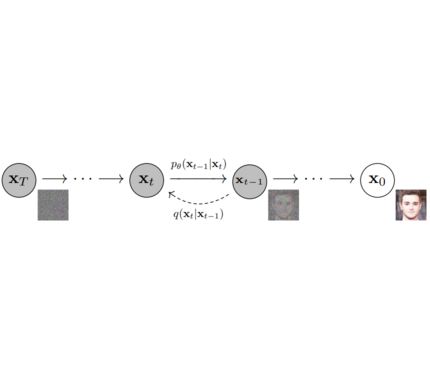
|
||||
|
||||
<p align="center">
|
||||
<img src="https://user-images.githubusercontent.com/10695622/174349706-53d58acc-a4d1-4cda-b3e8-432d9dc7ad38.png" width="800"/>
|
||||
<br>
|
||||
<em> Sampling and training algorithms. Figure from DDPM paper (https://arxiv.org/abs/2006.11239). </em>
|
||||
<p>
|
||||
|
||||
**Schedulers**: Algorithm to sample noise schedule for both *training* and *inference*. Defines alpha and beta schedule, timesteps, etc..
|
||||
*Example: Gaussian DDPM, DDIM, PMLS, DEIN*
|
||||
|
||||
**Diffusion Pipeline**: End-to-end pipeline that includes multiple diffusion models, possible text encoders, ...
|
||||
*Examples*: Glide, Latent-Diffusion, Imagen, DALL-E 2
|
||||
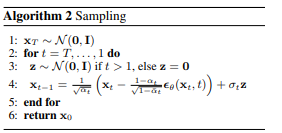
|
||||
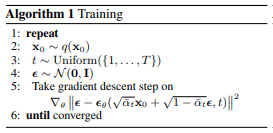
|
||||
|
||||
<p align="center">
|
||||
<img src="https://user-images.githubusercontent.com/10695622/174348898-481bd7c2-5457-4830-89bc-f0907756f64c.jpeg" width="550"/>
|
||||
<br>
|
||||
<em> Figure from ImageGen (https://imagen.research.google/). </em>
|
||||
<p>
|
||||
|
||||
## Philosophy
|
||||
**Diffusion Pipeline**: End-to-end pipeline that includes multiple diffusion models, possible text encoders, CLIP
|
||||
*Example: GLIDE,CompVis/Latent-Diffusion, Imagen, DALL-E*
|
||||
|
||||
- Readability and clarity is preferred over highly optimized code. A strong importance is put on providing readable, intuitive and elementary code design. *E.g.*, the provided [schedulers](https://github.com/huggingface/diffusers/tree/main/src/diffusers/schedulers) are separated from the provided [models](https://github.com/huggingface/diffusers/tree/main/src/diffusers/models) and provide well-commented code that can be read alongside the original paper.
|
||||
- Diffusers is **modality independent** and focuses on providing pretrained models and tools to build systems that generate **continuous outputs**, *e.g.* vision and audio.
|
||||
- Diffusion models and schedulers are provided as concise, elementary building blocks. In contrast, diffusion pipelines are a collection of end-to-end diffusion systems that can be used out-of-the-box, should stay as close as possible to their original implementation and can include components of another library, such as text-encoders. Examples for diffusion pipelines are [Glide](https://github.com/openai/glide-text2im) and [Latent Diffusion](https://github.com/CompVis/latent-diffusion).
|
||||
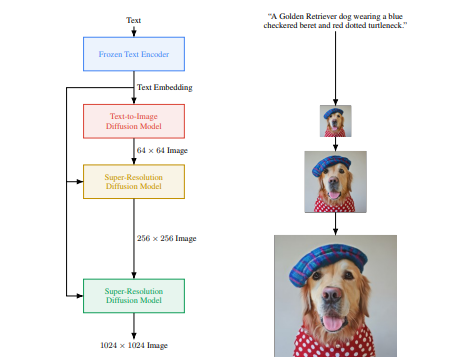
|
||||
|
||||
## In the works
|
||||
## 1. `diffusers` as a central modular diffusion and sampler library
|
||||
|
||||
For the first release, 🤗 Diffusers focuses on text-to-image diffusion techniques. However, diffusers can be used for much more than that! Over the upcoming releases, we'll be focusing on:
|
||||
`diffusers` is more modularized than `transformers`. The idea is that researchers and engineers can use only parts of the library easily for the own use cases.
|
||||
It could become a central place for all kinds of models, schedulers, training utils and processors that one can mix and match for one's own use case.
|
||||
Both models and scredulers should be load- and saveable from the Hub.
|
||||
|
||||
- Diffusers for audio
|
||||
- Diffusers for reinforcement learning (initial work happening in https://github.com/huggingface/diffusers/pull/105).
|
||||
- Diffusers for video generation
|
||||
- Diffusers for molecule generation (initial work happening in https://github.com/huggingface/diffusers/pull/54)
|
||||
Example:
|
||||
|
||||
A few pipeline components are already being worked on, namely:
|
||||
```python
|
||||
import torch
|
||||
from diffusers import UNetModel, GaussianDDPMScheduler
|
||||
import PIL
|
||||
import numpy as np
|
||||
|
||||
- BDDMPipeline for spectrogram-to-sound vocoding
|
||||
- GLIDEPipeline to support OpenAI's GLIDE model
|
||||
- Grad-TTS for text to audio generation / conditional audio generation
|
||||
generator = torch.Generator()
|
||||
generator = generator.manual_seed(6694729458485568)
|
||||
torch_device = "cuda" if torch.cuda.is_available() else "cpu"
|
||||
|
||||
We want diffusers to be a toolbox useful for diffusers models in general; if you find yourself limited in any way by the current API, or would like to see additional models, schedulers, or techniques, please open a [GitHub issue](https://github.com/huggingface/diffusers/issues) mentioning what you would like to see.
|
||||
# 1. Load models
|
||||
scheduler = GaussianDDPMScheduler.from_config("fusing/ddpm-lsun-church")
|
||||
model = UNetModel.from_pretrained("fusing/ddpm-lsun-church").to(torch_device)
|
||||
|
||||
## Credits
|
||||
# 2. Sample gaussian noise
|
||||
image = scheduler.sample_noise((1, model.in_channels, model.resolution, model.resolution), device=torch_device, generator=generator)
|
||||
|
||||
This library concretizes previous work by many different authors and would not have been possible without their great research and implementations. We'd like to thank, in particular, the following implementations which have helped us in our development and without which the API could not have been as polished today:
|
||||
# 3. Denoise
|
||||
for t in reversed(range(len(scheduler))):
|
||||
# i) define coefficients for time step t
|
||||
clipped_image_coeff = 1 / torch.sqrt(scheduler.get_alpha_prod(t))
|
||||
clipped_noise_coeff = torch.sqrt(1 / scheduler.get_alpha_prod(t) - 1)
|
||||
image_coeff = (1 - scheduler.get_alpha_prod(t - 1)) * torch.sqrt(scheduler.get_alpha(t)) / (1 - scheduler.get_alpha_prod(t))
|
||||
clipped_coeff = torch.sqrt(scheduler.get_alpha_prod(t - 1)) * scheduler.get_beta(t) / (1 - scheduler.get_alpha_prod(t))
|
||||
|
||||
- @CompVis' latent diffusion models library, available [here](https://github.com/CompVis/latent-diffusion)
|
||||
- @hojonathanho original DDPM implementation, available [here](https://github.com/hojonathanho/diffusion) as well as the extremely useful translation into PyTorch by @pesser, available [here](https://github.com/pesser/pytorch_diffusion)
|
||||
- @ermongroup's DDIM implementation, available [here](https://github.com/ermongroup/ddim).
|
||||
- @yang-song's Score-VE and Score-VP implementations, available [here](https://github.com/yang-song/score_sde_pytorch)
|
||||
# ii) predict noise residual
|
||||
with torch.no_grad():
|
||||
noise_residual = model(image, t)
|
||||
|
||||
We also want to thank @heejkoo for the very helpful overview of papers, code and resources on diffusion models, available [here](https://github.com/heejkoo/Awesome-Diffusion-Models) as well as @crowsonkb and @rromb for useful discussions and insights.
|
||||
# iii) compute predicted image from residual
|
||||
# See 2nd formula at https://github.com/hojonathanho/diffusion/issues/5#issue-896554416 for comparison
|
||||
pred_mean = clipped_image_coeff * image - clipped_noise_coeff * noise_residual
|
||||
pred_mean = torch.clamp(pred_mean, -1, 1)
|
||||
prev_image = clipped_coeff * pred_mean + image_coeff * image
|
||||
|
||||
## Citation
|
||||
# iv) sample variance
|
||||
prev_variance = scheduler.sample_variance(t, prev_image.shape, device=torch_device, generator=generator)
|
||||
|
||||
```bibtex
|
||||
@misc{von-platen-etal-2022-diffusers,
|
||||
author = {Patrick von Platen and Suraj Patil and Anton Lozhkov and Pedro Cuenca and Nathan Lambert and Kashif Rasul and Mishig Davaadorj and Thomas Wolf},
|
||||
title = {Diffusers: State-of-the-art diffusion models},
|
||||
year = {2022},
|
||||
publisher = {GitHub},
|
||||
journal = {GitHub repository},
|
||||
howpublished = {\url{https://github.com/huggingface/diffusers}}
|
||||
}
|
||||
# v) sample x_{t-1} ~ N(prev_image, prev_variance)
|
||||
sampled_prev_image = prev_image + prev_variance
|
||||
image = sampled_prev_image
|
||||
|
||||
# process image to PIL
|
||||
image_processed = image.cpu().permute(0, 2, 3, 1)
|
||||
image_processed = (image_processed + 1.0) * 127.5
|
||||
image_processed = image_processed.numpy().astype(np.uint8)
|
||||
image_pil = PIL.Image.fromarray(image_processed[0])
|
||||
|
||||
# save image
|
||||
image_pil.save("test.png")
|
||||
```
|
||||
|
||||
## 2. `diffusers` as a collection of most important Diffusion systems (GLIDE, Dalle, ...)
|
||||
`models` directory in repository hosts the complete code necessary for running a diffusion system as well as to train it. A `DiffusionPipeline` class allows to easily run the diffusion model in inference:
|
||||
|
||||
Example:
|
||||
|
||||
```python
|
||||
from diffusers import DiffusionPipeline
|
||||
import PIL.Image
|
||||
import numpy as np
|
||||
|
||||
# load model and scheduler
|
||||
ddpm = DiffusionPipeline.from_pretrained("fusing/ddpm-lsun-bedroom")
|
||||
|
||||
# run pipeline in inference (sample random noise and denoise)
|
||||
image = ddpm()
|
||||
|
||||
# process image to PIL
|
||||
image_processed = image.cpu().permute(0, 2, 3, 1)
|
||||
image_processed = (image_processed + 1.0) * 127.5
|
||||
image_processed = image_processed.numpy().astype(np.uint8)
|
||||
image_pil = PIL.Image.fromarray(image_processed[0])
|
||||
|
||||
# save image
|
||||
image_pil.save("test.png")
|
||||
```
|
||||
|
||||
## Library structure:
|
||||
|
||||
```
|
||||
├── models
|
||||
│ ├── audio
|
||||
│ │ └── fastdiff
|
||||
│ │ ├── modeling_fastdiff.py
|
||||
│ │ ├── README.md
|
||||
│ │ └── run_fastdiff.py
|
||||
│ ├── __init__.py
|
||||
│ └── vision
|
||||
│ ├── dalle2
|
||||
│ │ ├── modeling_dalle2.py
|
||||
│ │ ├── README.md
|
||||
│ │ └── run_dalle2.py
|
||||
│ ├── ddpm
|
||||
│ │ ├── example.py
|
||||
│ │ ├── modeling_ddpm.py
|
||||
│ │ ├── README.md
|
||||
│ │ └── run_ddpm.py
|
||||
│ ├── glide
|
||||
│ │ ├── modeling_glide.py
|
||||
│ │ ├── modeling_vqvae.py.py
|
||||
│ │ ├── README.md
|
||||
│ │ └── run_glide.py
|
||||
│ ├── imagen
|
||||
│ │ ├── modeling_dalle2.py
|
||||
│ │ ├── README.md
|
||||
│ │ └── run_dalle2.py
|
||||
│ ├── __init__.py
|
||||
│ └── latent_diffusion
|
||||
│ ├── modeling_latent_diffusion.py
|
||||
│ ├── README.md
|
||||
│ └── run_latent_diffusion.py
|
||||
├── pyproject.toml
|
||||
├── README.md
|
||||
├── setup.cfg
|
||||
├── setup.py
|
||||
├── src
|
||||
│ └── diffusers
|
||||
│ ├── configuration_utils.py
|
||||
│ ├── __init__.py
|
||||
│ ├── modeling_utils.py
|
||||
│ ├── models
|
||||
│ │ ├── __init__.py
|
||||
│ │ ├── unet_glide.py
|
||||
│ │ └── unet.py
|
||||
│ ├── pipeline_utils.py
|
||||
│ └── schedulers
|
||||
│ ├── gaussian_ddpm.py
|
||||
│ ├── __init__.py
|
||||
├── tests
|
||||
│ └── test_modeling_utils.py
|
||||
```
|
||||
|
||||
13
_typos.toml
13
_typos.toml
@@ -1,13 +0,0 @@
|
||||
# Files for typos
|
||||
# Instruction: https://github.com/marketplace/actions/typos-action#getting-started
|
||||
|
||||
[default.extend-identifiers]
|
||||
|
||||
[default.extend-words]
|
||||
NIN="NIN" # NIN is used in scripts/convert_ncsnpp_original_checkpoint_to_diffusers.py
|
||||
nd="np" # nd may be np (numpy)
|
||||
parms="parms" # parms is used in scripts/convert_original_stable_diffusion_to_diffusers.py
|
||||
|
||||
|
||||
[files]
|
||||
extend-exclude = ["_typos.toml"]
|
||||
@@ -1,42 +0,0 @@
|
||||
FROM ubuntu:20.04
|
||||
LABEL maintainer="Hugging Face"
|
||||
LABEL repository="diffusers"
|
||||
|
||||
ENV DEBIAN_FRONTEND=noninteractive
|
||||
|
||||
RUN apt update && \
|
||||
apt install -y bash \
|
||||
build-essential \
|
||||
git \
|
||||
git-lfs \
|
||||
curl \
|
||||
ca-certificates \
|
||||
python3.8 \
|
||||
python3-pip \
|
||||
python3.8-venv && \
|
||||
rm -rf /var/lib/apt/lists
|
||||
|
||||
# make sure to use venv
|
||||
RUN python3 -m venv /opt/venv
|
||||
ENV PATH="/opt/venv/bin:$PATH"
|
||||
|
||||
# pre-install the heavy dependencies (these can later be overridden by the deps from setup.py)
|
||||
# follow the instructions here: https://cloud.google.com/tpu/docs/run-in-container#train_a_jax_model_in_a_docker_container
|
||||
RUN python3 -m pip install --no-cache-dir --upgrade pip && \
|
||||
python3 -m pip install --upgrade --no-cache-dir \
|
||||
clu \
|
||||
"jax[cpu]>=0.2.16,!=0.3.2" \
|
||||
"flax>=0.4.1" \
|
||||
"jaxlib>=0.1.65" && \
|
||||
python3 -m pip install --no-cache-dir \
|
||||
accelerate \
|
||||
datasets \
|
||||
hf-doc-builder \
|
||||
huggingface-hub \
|
||||
modelcards \
|
||||
numpy \
|
||||
scipy \
|
||||
tensorboard \
|
||||
transformers
|
||||
|
||||
CMD ["/bin/bash"]
|
||||
@@ -1,44 +0,0 @@
|
||||
FROM ubuntu:20.04
|
||||
LABEL maintainer="Hugging Face"
|
||||
LABEL repository="diffusers"
|
||||
|
||||
ENV DEBIAN_FRONTEND=noninteractive
|
||||
|
||||
RUN apt update && \
|
||||
apt install -y bash \
|
||||
build-essential \
|
||||
git \
|
||||
git-lfs \
|
||||
curl \
|
||||
ca-certificates \
|
||||
python3.8 \
|
||||
python3-pip \
|
||||
python3.8-venv && \
|
||||
rm -rf /var/lib/apt/lists
|
||||
|
||||
# make sure to use venv
|
||||
RUN python3 -m venv /opt/venv
|
||||
ENV PATH="/opt/venv/bin:$PATH"
|
||||
|
||||
# pre-install the heavy dependencies (these can later be overridden by the deps from setup.py)
|
||||
# follow the instructions here: https://cloud.google.com/tpu/docs/run-in-container#train_a_jax_model_in_a_docker_container
|
||||
RUN python3 -m pip install --no-cache-dir --upgrade pip && \
|
||||
python3 -m pip install --no-cache-dir \
|
||||
"jax[tpu]>=0.2.16,!=0.3.2" \
|
||||
-f https://storage.googleapis.com/jax-releases/libtpu_releases.html && \
|
||||
python3 -m pip install --upgrade --no-cache-dir \
|
||||
clu \
|
||||
"flax>=0.4.1" \
|
||||
"jaxlib>=0.1.65" && \
|
||||
python3 -m pip install --no-cache-dir \
|
||||
accelerate \
|
||||
datasets \
|
||||
hf-doc-builder \
|
||||
huggingface-hub \
|
||||
modelcards \
|
||||
numpy \
|
||||
scipy \
|
||||
tensorboard \
|
||||
transformers
|
||||
|
||||
CMD ["/bin/bash"]
|
||||
@@ -1,42 +0,0 @@
|
||||
FROM ubuntu:20.04
|
||||
LABEL maintainer="Hugging Face"
|
||||
LABEL repository="diffusers"
|
||||
|
||||
ENV DEBIAN_FRONTEND=noninteractive
|
||||
|
||||
RUN apt update && \
|
||||
apt install -y bash \
|
||||
build-essential \
|
||||
git \
|
||||
git-lfs \
|
||||
curl \
|
||||
ca-certificates \
|
||||
python3.8 \
|
||||
python3-pip \
|
||||
python3.8-venv && \
|
||||
rm -rf /var/lib/apt/lists
|
||||
|
||||
# make sure to use venv
|
||||
RUN python3 -m venv /opt/venv
|
||||
ENV PATH="/opt/venv/bin:$PATH"
|
||||
|
||||
# pre-install the heavy dependencies (these can later be overridden by the deps from setup.py)
|
||||
RUN python3 -m pip install --no-cache-dir --upgrade pip && \
|
||||
python3 -m pip install --no-cache-dir \
|
||||
torch \
|
||||
torchvision \
|
||||
torchaudio \
|
||||
onnxruntime \
|
||||
--extra-index-url https://download.pytorch.org/whl/cpu && \
|
||||
python3 -m pip install --no-cache-dir \
|
||||
accelerate \
|
||||
datasets \
|
||||
hf-doc-builder \
|
||||
huggingface-hub \
|
||||
modelcards \
|
||||
numpy \
|
||||
scipy \
|
||||
tensorboard \
|
||||
transformers
|
||||
|
||||
CMD ["/bin/bash"]
|
||||
@@ -1,42 +0,0 @@
|
||||
FROM nvidia/cuda:11.6.2-cudnn8-devel-ubuntu20.04
|
||||
LABEL maintainer="Hugging Face"
|
||||
LABEL repository="diffusers"
|
||||
|
||||
ENV DEBIAN_FRONTEND=noninteractive
|
||||
|
||||
RUN apt update && \
|
||||
apt install -y bash \
|
||||
build-essential \
|
||||
git \
|
||||
git-lfs \
|
||||
curl \
|
||||
ca-certificates \
|
||||
python3.8 \
|
||||
python3-pip \
|
||||
python3.8-venv && \
|
||||
rm -rf /var/lib/apt/lists
|
||||
|
||||
# make sure to use venv
|
||||
RUN python3 -m venv /opt/venv
|
||||
ENV PATH="/opt/venv/bin:$PATH"
|
||||
|
||||
# pre-install the heavy dependencies (these can later be overridden by the deps from setup.py)
|
||||
RUN python3 -m pip install --no-cache-dir --upgrade pip && \
|
||||
python3 -m pip install --no-cache-dir \
|
||||
torch \
|
||||
torchvision \
|
||||
torchaudio \
|
||||
"onnxruntime-gpu>=1.13.1" \
|
||||
--extra-index-url https://download.pytorch.org/whl/cu117 && \
|
||||
python3 -m pip install --no-cache-dir \
|
||||
accelerate \
|
||||
datasets \
|
||||
hf-doc-builder \
|
||||
huggingface-hub \
|
||||
modelcards \
|
||||
numpy \
|
||||
scipy \
|
||||
tensorboard \
|
||||
transformers
|
||||
|
||||
CMD ["/bin/bash"]
|
||||
@@ -1,41 +0,0 @@
|
||||
FROM ubuntu:20.04
|
||||
LABEL maintainer="Hugging Face"
|
||||
LABEL repository="diffusers"
|
||||
|
||||
ENV DEBIAN_FRONTEND=noninteractive
|
||||
|
||||
RUN apt update && \
|
||||
apt install -y bash \
|
||||
build-essential \
|
||||
git \
|
||||
git-lfs \
|
||||
curl \
|
||||
ca-certificates \
|
||||
python3.8 \
|
||||
python3-pip \
|
||||
python3.8-venv && \
|
||||
rm -rf /var/lib/apt/lists
|
||||
|
||||
# make sure to use venv
|
||||
RUN python3 -m venv /opt/venv
|
||||
ENV PATH="/opt/venv/bin:$PATH"
|
||||
|
||||
# pre-install the heavy dependencies (these can later be overridden by the deps from setup.py)
|
||||
RUN python3 -m pip install --no-cache-dir --upgrade pip && \
|
||||
python3 -m pip install --no-cache-dir \
|
||||
torch \
|
||||
torchvision \
|
||||
torchaudio \
|
||||
--extra-index-url https://download.pytorch.org/whl/cpu && \
|
||||
python3 -m pip install --no-cache-dir \
|
||||
accelerate \
|
||||
datasets \
|
||||
hf-doc-builder \
|
||||
huggingface-hub \
|
||||
modelcards \
|
||||
numpy \
|
||||
scipy \
|
||||
tensorboard \
|
||||
transformers
|
||||
|
||||
CMD ["/bin/bash"]
|
||||
@@ -1,41 +0,0 @@
|
||||
FROM nvidia/cuda:11.7.1-cudnn8-runtime-ubuntu20.04
|
||||
LABEL maintainer="Hugging Face"
|
||||
LABEL repository="diffusers"
|
||||
|
||||
ENV DEBIAN_FRONTEND=noninteractive
|
||||
|
||||
RUN apt update && \
|
||||
apt install -y bash \
|
||||
build-essential \
|
||||
git \
|
||||
git-lfs \
|
||||
curl \
|
||||
ca-certificates \
|
||||
python3.8 \
|
||||
python3-pip \
|
||||
python3.8-venv && \
|
||||
rm -rf /var/lib/apt/lists
|
||||
|
||||
# make sure to use venv
|
||||
RUN python3 -m venv /opt/venv
|
||||
ENV PATH="/opt/venv/bin:$PATH"
|
||||
|
||||
# pre-install the heavy dependencies (these can later be overridden by the deps from setup.py)
|
||||
RUN python3 -m pip install --no-cache-dir --upgrade pip && \
|
||||
python3 -m pip install --no-cache-dir \
|
||||
torch \
|
||||
torchvision \
|
||||
torchaudio \
|
||||
--extra-index-url https://download.pytorch.org/whl/cu117 && \
|
||||
python3 -m pip install --no-cache-dir \
|
||||
accelerate \
|
||||
datasets \
|
||||
hf-doc-builder \
|
||||
huggingface-hub \
|
||||
modelcards \
|
||||
numpy \
|
||||
scipy \
|
||||
tensorboard \
|
||||
transformers
|
||||
|
||||
CMD ["/bin/bash"]
|
||||
@@ -1,104 +0,0 @@
|
||||
- sections:
|
||||
- local: index
|
||||
title: "🧨 Diffusers"
|
||||
- local: quicktour
|
||||
title: "Quicktour"
|
||||
- local: installation
|
||||
title: "Installation"
|
||||
title: "Get started"
|
||||
- sections:
|
||||
- sections:
|
||||
- local: using-diffusers/loading
|
||||
title: "Loading Pipelines, Models, and Schedulers"
|
||||
- local: using-diffusers/configuration
|
||||
title: "Configuring Pipelines, Models, and Schedulers"
|
||||
- local: using-diffusers/custom_pipeline_overview
|
||||
title: "Loading and Adding Custom Pipelines"
|
||||
title: "Loading & Hub"
|
||||
- sections:
|
||||
- local: using-diffusers/unconditional_image_generation
|
||||
title: "Unconditional Image Generation"
|
||||
- local: using-diffusers/conditional_image_generation
|
||||
title: "Text-to-Image Generation"
|
||||
- local: using-diffusers/img2img
|
||||
title: "Text-Guided Image-to-Image"
|
||||
- local: using-diffusers/inpaint
|
||||
title: "Text-Guided Image-Inpainting"
|
||||
- local: using-diffusers/custom_pipeline_examples
|
||||
title: "Community Pipelines"
|
||||
- local: using-diffusers/contribute_pipeline
|
||||
title: "How to contribute a Pipeline"
|
||||
title: "Pipelines for Inference"
|
||||
title: "Using Diffusers"
|
||||
- sections:
|
||||
- local: optimization/fp16
|
||||
title: "Memory and Speed"
|
||||
- local: optimization/onnx
|
||||
title: "ONNX"
|
||||
- local: optimization/open_vino
|
||||
title: "OpenVINO"
|
||||
- local: optimization/mps
|
||||
title: "MPS"
|
||||
title: "Optimization/Special Hardware"
|
||||
- sections:
|
||||
- local: training/overview
|
||||
title: "Overview"
|
||||
- local: training/unconditional_training
|
||||
title: "Unconditional Image Generation"
|
||||
- local: training/text_inversion
|
||||
title: "Textual Inversion"
|
||||
- local: training/dreambooth
|
||||
title: "Dreambooth"
|
||||
- local: training/text2image
|
||||
title: "Text-to-image fine-tuning"
|
||||
title: "Training"
|
||||
- sections:
|
||||
- local: conceptual/stable_diffusion
|
||||
title: "Stable Diffusion"
|
||||
- local: conceptual/philosophy
|
||||
title: "Philosophy"
|
||||
- local: conceptual/contribution
|
||||
title: "How to contribute?"
|
||||
title: "Conceptual Guides"
|
||||
- sections:
|
||||
- sections:
|
||||
- local: api/models
|
||||
title: "Models"
|
||||
- local: api/schedulers
|
||||
title: "Schedulers"
|
||||
- local: api/diffusion_pipeline
|
||||
title: "Diffusion Pipeline"
|
||||
- local: api/logging
|
||||
title: "Logging"
|
||||
- local: api/configuration
|
||||
title: "Configuration"
|
||||
- local: api/outputs
|
||||
title: "Outputs"
|
||||
title: "Main Classes"
|
||||
- sections:
|
||||
- local: api/pipelines/overview
|
||||
title: "Overview"
|
||||
- local: api/pipelines/ddim
|
||||
title: "DDIM"
|
||||
- local: api/pipelines/ddpm
|
||||
title: "DDPM"
|
||||
- local: api/pipelines/latent_diffusion
|
||||
title: "Latent Diffusion"
|
||||
- local: api/pipelines/latent_diffusion_uncond
|
||||
title: "Unconditional Latent Diffusion"
|
||||
- local: api/pipelines/pndm
|
||||
title: "PNDM"
|
||||
- local: api/pipelines/score_sde_ve
|
||||
title: "Score SDE VE"
|
||||
- local: api/pipelines/stable_diffusion
|
||||
title: "Stable Diffusion"
|
||||
- local: api/pipelines/stochastic_karras_ve
|
||||
title: "Stochastic Karras VE"
|
||||
- local: api/pipelines/dance_diffusion
|
||||
title: "Dance Diffusion"
|
||||
- local: api/pipelines/vq_diffusion
|
||||
title: "VQ Diffusion"
|
||||
- local: api/pipelines/repaint
|
||||
title: "RePaint"
|
||||
title: "Pipelines"
|
||||
title: "API"
|
||||
@@ -1,23 +0,0 @@
|
||||
<!--Copyright 2022 The HuggingFace Team. All rights reserved.
|
||||
|
||||
Licensed under the Apache License, Version 2.0 (the "License"); you may not use this file except in compliance with
|
||||
the License. You may obtain a copy of the License at
|
||||
|
||||
http://www.apache.org/licenses/LICENSE-2.0
|
||||
|
||||
Unless required by applicable law or agreed to in writing, software distributed under the License is distributed on
|
||||
an "AS IS" BASIS, WITHOUT WARRANTIES OR CONDITIONS OF ANY KIND, either express or implied. See the License for the
|
||||
specific language governing permissions and limitations under the License.
|
||||
-->
|
||||
|
||||
# Configuration
|
||||
|
||||
In Diffusers, schedulers of type [`schedulers.scheduling_utils.SchedulerMixin`], and models of type [`ModelMixin`] inherit from [`ConfigMixin`] which conveniently takes care of storing all parameters that are
|
||||
passed to the respective `__init__` methods in a JSON-configuration file.
|
||||
|
||||
TODO(PVP) - add example and better info here
|
||||
|
||||
## ConfigMixin
|
||||
[[autodoc]] ConfigMixin
|
||||
- from_config
|
||||
- save_config
|
||||
@@ -1,42 +0,0 @@
|
||||
<!--Copyright 2022 The HuggingFace Team. All rights reserved.
|
||||
|
||||
Licensed under the Apache License, Version 2.0 (the "License"); you may not use this file except in compliance with
|
||||
the License. You may obtain a copy of the License at
|
||||
|
||||
http://www.apache.org/licenses/LICENSE-2.0
|
||||
|
||||
Unless required by applicable law or agreed to in writing, software distributed under the License is distributed on
|
||||
an "AS IS" BASIS, WITHOUT WARRANTIES OR CONDITIONS OF ANY KIND, either express or implied. See the License for the
|
||||
specific language governing permissions and limitations under the License.
|
||||
-->
|
||||
|
||||
# Pipelines
|
||||
|
||||
The [`DiffusionPipeline`] is the easiest way to load any pretrained diffusion pipeline from the [Hub](https://huggingface.co/models?library=diffusers) and to use it in inference.
|
||||
|
||||
<Tip>
|
||||
|
||||
One should not use the Diffusion Pipeline class for training or fine-tuning a diffusion model. Individual
|
||||
components of diffusion pipelines are usually trained individually, so we suggest to directly work
|
||||
with [`UNetModel`] and [`UNetConditionModel`].
|
||||
|
||||
</Tip>
|
||||
|
||||
Any diffusion pipeline that is loaded with [`~DiffusionPipeline.from_pretrained`] will automatically
|
||||
detect the pipeline type, *e.g.* [`StableDiffusionPipeline`] and consequently load each component of the
|
||||
pipeline and pass them into the `__init__` function of the pipeline, *e.g.* [`~StableDiffusionPipeline.__init__`].
|
||||
|
||||
Any pipeline object can be saved locally with [`~DiffusionPipeline.save_pretrained`].
|
||||
|
||||
## DiffusionPipeline
|
||||
[[autodoc]] DiffusionPipeline
|
||||
- from_pretrained
|
||||
- save_pretrained
|
||||
- to
|
||||
- device
|
||||
- components
|
||||
|
||||
## ImagePipelineOutput
|
||||
By default diffusion pipelines return an object of class
|
||||
|
||||
[[autodoc]] pipeline_utils.ImagePipelineOutput
|
||||
@@ -1,98 +0,0 @@
|
||||
<!--Copyright 2020 The HuggingFace Team. All rights reserved.
|
||||
|
||||
Licensed under the Apache License, Version 2.0 (the "License"); you may not use this file except in compliance with
|
||||
the License. You may obtain a copy of the License at
|
||||
|
||||
http://www.apache.org/licenses/LICENSE-2.0
|
||||
|
||||
Unless required by applicable law or agreed to in writing, software distributed under the License is distributed on
|
||||
an "AS IS" BASIS, WITHOUT WARRANTIES OR CONDITIONS OF ANY KIND, either express or implied. See the License for the
|
||||
specific language governing permissions and limitations under the License.
|
||||
-->
|
||||
|
||||
# Logging
|
||||
|
||||
🧨 Diffusers has a centralized logging system, so that you can setup the verbosity of the library easily.
|
||||
|
||||
Currently the default verbosity of the library is `WARNING`.
|
||||
|
||||
To change the level of verbosity, just use one of the direct setters. For instance, here is how to change the verbosity
|
||||
to the INFO level.
|
||||
|
||||
```python
|
||||
import diffusers
|
||||
|
||||
diffusers.logging.set_verbosity_info()
|
||||
```
|
||||
|
||||
You can also use the environment variable `DIFFUSERS_VERBOSITY` to override the default verbosity. You can set it
|
||||
to one of the following: `debug`, `info`, `warning`, `error`, `critical`. For example:
|
||||
|
||||
```bash
|
||||
DIFFUSERS_VERBOSITY=error ./myprogram.py
|
||||
```
|
||||
|
||||
Additionally, some `warnings` can be disabled by setting the environment variable
|
||||
`DIFFUSERS_NO_ADVISORY_WARNINGS` to a true value, like *1*. This will disable any warning that is logged using
|
||||
[`logger.warning_advice`]. For example:
|
||||
|
||||
```bash
|
||||
DIFFUSERS_NO_ADVISORY_WARNINGS=1 ./myprogram.py
|
||||
```
|
||||
|
||||
Here is an example of how to use the same logger as the library in your own module or script:
|
||||
|
||||
```python
|
||||
from diffusers.utils import logging
|
||||
|
||||
logging.set_verbosity_info()
|
||||
logger = logging.get_logger("diffusers")
|
||||
logger.info("INFO")
|
||||
logger.warning("WARN")
|
||||
```
|
||||
|
||||
|
||||
All the methods of this logging module are documented below, the main ones are
|
||||
[`logging.get_verbosity`] to get the current level of verbosity in the logger and
|
||||
[`logging.set_verbosity`] to set the verbosity to the level of your choice. In order (from the least
|
||||
verbose to the most verbose), those levels (with their corresponding int values in parenthesis) are:
|
||||
|
||||
- `diffusers.logging.CRITICAL` or `diffusers.logging.FATAL` (int value, 50): only report the most
|
||||
critical errors.
|
||||
- `diffusers.logging.ERROR` (int value, 40): only report errors.
|
||||
- `diffusers.logging.WARNING` or `diffusers.logging.WARN` (int value, 30): only reports error and
|
||||
warnings. This the default level used by the library.
|
||||
- `diffusers.logging.INFO` (int value, 20): reports error, warnings and basic information.
|
||||
- `diffusers.logging.DEBUG` (int value, 10): report all information.
|
||||
|
||||
By default, `tqdm` progress bars will be displayed during model download. [`logging.disable_progress_bar`] and [`logging.enable_progress_bar`] can be used to suppress or unsuppress this behavior.
|
||||
|
||||
## Base setters
|
||||
|
||||
[[autodoc]] logging.set_verbosity_error
|
||||
|
||||
[[autodoc]] logging.set_verbosity_warning
|
||||
|
||||
[[autodoc]] logging.set_verbosity_info
|
||||
|
||||
[[autodoc]] logging.set_verbosity_debug
|
||||
|
||||
## Other functions
|
||||
|
||||
[[autodoc]] logging.get_verbosity
|
||||
|
||||
[[autodoc]] logging.set_verbosity
|
||||
|
||||
[[autodoc]] logging.get_logger
|
||||
|
||||
[[autodoc]] logging.enable_default_handler
|
||||
|
||||
[[autodoc]] logging.disable_default_handler
|
||||
|
||||
[[autodoc]] logging.enable_explicit_format
|
||||
|
||||
[[autodoc]] logging.reset_format
|
||||
|
||||
[[autodoc]] logging.enable_progress_bar
|
||||
|
||||
[[autodoc]] logging.disable_progress_bar
|
||||
@@ -1,74 +0,0 @@
|
||||
<!--Copyright 2022 The HuggingFace Team. All rights reserved.
|
||||
|
||||
Licensed under the Apache License, Version 2.0 (the "License"); you may not use this file except in compliance with
|
||||
the License. You may obtain a copy of the License at
|
||||
|
||||
http://www.apache.org/licenses/LICENSE-2.0
|
||||
|
||||
Unless required by applicable law or agreed to in writing, software distributed under the License is distributed on
|
||||
an "AS IS" BASIS, WITHOUT WARRANTIES OR CONDITIONS OF ANY KIND, either express or implied. See the License for the
|
||||
specific language governing permissions and limitations under the License.
|
||||
-->
|
||||
|
||||
# Models
|
||||
|
||||
Diffusers contains pretrained models for popular algorithms and modules for creating the next set of diffusion models.
|
||||
The primary function of these models is to denoise an input sample, by modeling the distribution $p_\theta(\mathbf{x}_{t-1}|\mathbf{x}_t)$.
|
||||
The models are built on the base class ['ModelMixin'] that is a `torch.nn.module` with basic functionality for saving and loading models both locally and from the HuggingFace hub.
|
||||
|
||||
## ModelMixin
|
||||
[[autodoc]] ModelMixin
|
||||
|
||||
## UNet2DOutput
|
||||
[[autodoc]] models.unet_2d.UNet2DOutput
|
||||
|
||||
## UNet1DModel
|
||||
[[autodoc]] UNet1DModel
|
||||
|
||||
## UNet2DModel
|
||||
[[autodoc]] UNet2DModel
|
||||
|
||||
## UNet2DConditionOutput
|
||||
[[autodoc]] models.unet_2d_condition.UNet2DConditionOutput
|
||||
|
||||
## UNet2DConditionModel
|
||||
[[autodoc]] UNet2DConditionModel
|
||||
|
||||
## DecoderOutput
|
||||
[[autodoc]] models.vae.DecoderOutput
|
||||
|
||||
## VQEncoderOutput
|
||||
[[autodoc]] models.vae.VQEncoderOutput
|
||||
|
||||
## VQModel
|
||||
[[autodoc]] VQModel
|
||||
|
||||
## AutoencoderKLOutput
|
||||
[[autodoc]] models.vae.AutoencoderKLOutput
|
||||
|
||||
## AutoencoderKL
|
||||
[[autodoc]] AutoencoderKL
|
||||
|
||||
## Transformer2DModel
|
||||
[[autodoc]] Transformer2DModel
|
||||
|
||||
## Transformer2DModelOutput
|
||||
[[autodoc]] models.attention.Transformer2DModelOutput
|
||||
|
||||
## FlaxModelMixin
|
||||
[[autodoc]] FlaxModelMixin
|
||||
|
||||
## FlaxUNet2DConditionOutput
|
||||
[[autodoc]] models.unet_2d_condition_flax.FlaxUNet2DConditionOutput
|
||||
|
||||
## FlaxUNet2DConditionModel
|
||||
[[autodoc]] FlaxUNet2DConditionModel
|
||||
|
||||
## FlaxDecoderOutput
|
||||
[[autodoc]] models.vae_flax.FlaxDecoderOutput
|
||||
|
||||
## FlaxAutoencoderKLOutput
|
||||
[[autodoc]] models.vae_flax.FlaxAutoencoderKLOutput
|
||||
|
||||
## FlaxAutoencoderKL
|
||||
[[autodoc]] FlaxAutoencoderKL
|
||||
@@ -1,55 +0,0 @@
|
||||
<!--Copyright 2022 The HuggingFace Team. All rights reserved.
|
||||
|
||||
Licensed under the Apache License, Version 2.0 (the "License"); you may not use this file except in compliance with
|
||||
the License. You may obtain a copy of the License at
|
||||
|
||||
http://www.apache.org/licenses/LICENSE-2.0
|
||||
|
||||
Unless required by applicable law or agreed to in writing, software distributed under the License is distributed on
|
||||
an "AS IS" BASIS, WITHOUT WARRANTIES OR CONDITIONS OF ANY KIND, either express or implied. See the License for the
|
||||
specific language governing permissions and limitations under the License.
|
||||
-->
|
||||
|
||||
# BaseOutputs
|
||||
|
||||
All models have outputs that are instances of subclasses of [`~utils.BaseOutput`]. Those are
|
||||
data structures containing all the information returned by the model, but that can also be used as tuples or
|
||||
dictionaries.
|
||||
|
||||
Let's see how this looks in an example:
|
||||
|
||||
```python
|
||||
from diffusers import DDIMPipeline
|
||||
|
||||
pipeline = DDIMPipeline.from_pretrained("google/ddpm-cifar10-32")
|
||||
outputs = pipeline()
|
||||
```
|
||||
|
||||
The `outputs` object is a [`~pipeline_utils.ImagePipelineOutput`], as we can see in the
|
||||
documentation of that class below, it means it has an image attribute.
|
||||
|
||||
You can access each attribute as you would usually do, and if that attribute has not been returned by the model, you will get `None`:
|
||||
|
||||
```python
|
||||
outputs.images
|
||||
```
|
||||
|
||||
or via keyword lookup
|
||||
|
||||
```python
|
||||
outputs["images"]
|
||||
```
|
||||
|
||||
When considering our `outputs` object as tuple, it only considers the attributes that don't have `None` values.
|
||||
Here for instance, we could retrieve images via indexing:
|
||||
|
||||
```python
|
||||
outputs[:1]
|
||||
```
|
||||
|
||||
which will return the tuple `(outputs.images)` for instance.
|
||||
|
||||
## BaseOutput
|
||||
|
||||
[[autodoc]] utils.BaseOutput
|
||||
- to_tuple
|
||||
@@ -1,33 +0,0 @@
|
||||
<!--Copyright 2022 The HuggingFace Team. All rights reserved.
|
||||
|
||||
Licensed under the Apache License, Version 2.0 (the "License"); you may not use this file except in compliance with
|
||||
the License. You may obtain a copy of the License at
|
||||
|
||||
http://www.apache.org/licenses/LICENSE-2.0
|
||||
|
||||
Unless required by applicable law or agreed to in writing, software distributed under the License is distributed on
|
||||
an "AS IS" BASIS, WITHOUT WARRANTIES OR CONDITIONS OF ANY KIND, either express or implied. See the License for the
|
||||
specific language governing permissions and limitations under the License.
|
||||
-->
|
||||
|
||||
# Dance Diffusion
|
||||
|
||||
## Overview
|
||||
|
||||
[Dance Diffusion](https://github.com/Harmonai-org/sample-generator) by Zach Evans.
|
||||
|
||||
Dance Diffusion is the first in a suite of generative audio tools for producers and musicians to be released by Harmonai.
|
||||
For more info or to get involved in the development of these tools, please visit https://harmonai.org and fill out the form on the front page.
|
||||
|
||||
The original codebase of this implementation can be found [here](https://github.com/Harmonai-org/sample-generator).
|
||||
|
||||
## Available Pipelines:
|
||||
|
||||
| Pipeline | Tasks | Colab
|
||||
|---|---|:---:|
|
||||
| [pipeline_dance_diffusion.py](https://github.com/huggingface/diffusers/blob/main/src/diffusers/pipelines/dance_diffusion/pipeline_dance_diffusion.py) | *Unconditional Audio Generation* | - |
|
||||
|
||||
|
||||
## DanceDiffusionPipeline
|
||||
[[autodoc]] DanceDiffusionPipeline
|
||||
- __call__
|
||||
@@ -1,34 +0,0 @@
|
||||
<!--Copyright 2022 The HuggingFace Team. All rights reserved.
|
||||
|
||||
Licensed under the Apache License, Version 2.0 (the "License"); you may not use this file except in compliance with
|
||||
the License. You may obtain a copy of the License at
|
||||
|
||||
http://www.apache.org/licenses/LICENSE-2.0
|
||||
|
||||
Unless required by applicable law or agreed to in writing, software distributed under the License is distributed on
|
||||
an "AS IS" BASIS, WITHOUT WARRANTIES OR CONDITIONS OF ANY KIND, either express or implied. See the License for the
|
||||
specific language governing permissions and limitations under the License.
|
||||
-->
|
||||
|
||||
# DDIM
|
||||
|
||||
## Overview
|
||||
|
||||
[Denoising Diffusion Implicit Models](https://arxiv.org/abs/2010.02502) (DDIM) by Jiaming Song, Chenlin Meng and Stefano Ermon.
|
||||
|
||||
The abstract of the paper is the following:
|
||||
|
||||
Denoising diffusion probabilistic models (DDPMs) have achieved high quality image generation without adversarial training, yet they require simulating a Markov chain for many steps to produce a sample. To accelerate sampling, we present denoising diffusion implicit models (DDIMs), a more efficient class of iterative implicit probabilistic models with the same training procedure as DDPMs. In DDPMs, the generative process is defined as the reverse of a Markovian diffusion process. We construct a class of non-Markovian diffusion processes that lead to the same training objective, but whose reverse process can be much faster to sample from. We empirically demonstrate that DDIMs can produce high quality samples 10× to 50× faster in terms of wall-clock time compared to DDPMs, allow us to trade off computation for sample quality, and can perform semantically meaningful image interpolation directly in the latent space.
|
||||
|
||||
The original codebase of this paper can be found [here](https://github.com/ermongroup/ddim).
|
||||
|
||||
## Available Pipelines:
|
||||
|
||||
| Pipeline | Tasks | Colab
|
||||
|---|---|:---:|
|
||||
| [pipeline_ddim.py](https://github.com/huggingface/diffusers/blob/main/src/diffusers/pipelines/ddim/pipeline_ddim.py) | *Unconditional Image Generation* | - |
|
||||
|
||||
|
||||
## DDIMPipeline
|
||||
[[autodoc]] DDIMPipeline
|
||||
- __call__
|
||||
@@ -1,36 +0,0 @@
|
||||
<!--Copyright 2022 The HuggingFace Team. All rights reserved.
|
||||
|
||||
Licensed under the Apache License, Version 2.0 (the "License"); you may not use this file except in compliance with
|
||||
the License. You may obtain a copy of the License at
|
||||
|
||||
http://www.apache.org/licenses/LICENSE-2.0
|
||||
|
||||
Unless required by applicable law or agreed to in writing, software distributed under the License is distributed on
|
||||
an "AS IS" BASIS, WITHOUT WARRANTIES OR CONDITIONS OF ANY KIND, either express or implied. See the License for the
|
||||
specific language governing permissions and limitations under the License.
|
||||
-->
|
||||
|
||||
# DDPM
|
||||
|
||||
## Overview
|
||||
|
||||
[Denoising Diffusion Probabilistic Models](https://arxiv.org/abs/2006.11239)
|
||||
(DDPM) by Jonathan Ho, Ajay Jain and Pieter Abbeel proposes the diffusion based model of the same name, but in the context of the 🤗 Diffusers library, DDPM refers to the discrete denoising scheduler from the paper as well as the pipeline.
|
||||
|
||||
The abstract of the paper is the following:
|
||||
|
||||
We present high quality image synthesis results using diffusion probabilistic models, a class of latent variable models inspired by considerations from nonequilibrium thermodynamics. Our best results are obtained by training on a weighted variational bound designed according to a novel connection between diffusion probabilistic models and denoising score matching with Langevin dynamics, and our models naturally admit a progressive lossy decompression scheme that can be interpreted as a generalization of autoregressive decoding. On the unconditional CIFAR10 dataset, we obtain an Inception score of 9.46 and a state-of-the-art FID score of 3.17. On 256x256 LSUN, we obtain sample quality similar to ProgressiveGAN.
|
||||
|
||||
The original codebase of this paper can be found [here](https://github.com/hojonathanho/diffusion).
|
||||
|
||||
|
||||
## Available Pipelines:
|
||||
|
||||
| Pipeline | Tasks | Colab
|
||||
|---|---|:---:|
|
||||
| [pipeline_ddpm.py](https://github.com/huggingface/diffusers/blob/main/src/diffusers/pipelines/ddpm/pipeline_ddpm.py) | *Unconditional Image Generation* | - |
|
||||
|
||||
|
||||
# DDPMPipeline
|
||||
[[autodoc]] DDPMPipeline
|
||||
- __call__
|
||||
@@ -1,42 +0,0 @@
|
||||
<!--Copyright 2022 The HuggingFace Team. All rights reserved.
|
||||
|
||||
Licensed under the Apache License, Version 2.0 (the "License"); you may not use this file except in compliance with
|
||||
the License. You may obtain a copy of the License at
|
||||
|
||||
http://www.apache.org/licenses/LICENSE-2.0
|
||||
|
||||
Unless required by applicable law or agreed to in writing, software distributed under the License is distributed on
|
||||
an "AS IS" BASIS, WITHOUT WARRANTIES OR CONDITIONS OF ANY KIND, either express or implied. See the License for the
|
||||
specific language governing permissions and limitations under the License.
|
||||
-->
|
||||
|
||||
# Latent Diffusion
|
||||
|
||||
## Overview
|
||||
|
||||
Latent Diffusion was proposed in [High-Resolution Image Synthesis with Latent Diffusion Models](https://arxiv.org/abs/2112.10752) by Robin Rombach, Andreas Blattmann, Dominik Lorenz, Patrick Esser, Björn Ommer.
|
||||
|
||||
The abstract of the paper is the following:
|
||||
|
||||
*By decomposing the image formation process into a sequential application of denoising autoencoders, diffusion models (DMs) achieve state-of-the-art synthesis results on image data and beyond. Additionally, their formulation allows for a guiding mechanism to control the image generation process without retraining. However, since these models typically operate directly in pixel space, optimization of powerful DMs often consumes hundreds of GPU days and inference is expensive due to sequential evaluations. To enable DM training on limited computational resources while retaining their quality and flexibility, we apply them in the latent space of powerful pretrained autoencoders. In contrast to previous work, training diffusion models on such a representation allows for the first time to reach a near-optimal point between complexity reduction and detail preservation, greatly boosting visual fidelity. By introducing cross-attention layers into the model architecture, we turn diffusion models into powerful and flexible generators for general conditioning inputs such as text or bounding boxes and high-resolution synthesis becomes possible in a convolutional manner. Our latent diffusion models (LDMs) achieve a new state of the art for image inpainting and highly competitive performance on various tasks, including unconditional image generation, semantic scene synthesis, and super-resolution, while significantly reducing computational requirements compared to pixel-based DMs.*
|
||||
|
||||
The original codebase can be found [here](https://github.com/CompVis/latent-diffusion).
|
||||
|
||||
## Tips:
|
||||
|
||||
-
|
||||
-
|
||||
-
|
||||
|
||||
## Available Pipelines:
|
||||
|
||||
| Pipeline | Tasks | Colab
|
||||
|---|---|:---:|
|
||||
| [pipeline_latent_diffusion.py](https://github.com/huggingface/diffusers/blob/main/src/diffusers/pipelines/latent_diffusion/pipeline_latent_diffusion.py) | *Text-to-Image Generation* | - |
|
||||
|
||||
## Examples:
|
||||
|
||||
|
||||
## LDMTextToImagePipeline
|
||||
[[autodoc]] pipelines.latent_diffusion.pipeline_latent_diffusion.LDMTextToImagePipeline
|
||||
- __call__
|
||||
@@ -1,41 +0,0 @@
|
||||
<!--Copyright 2022 The HuggingFace Team. All rights reserved.
|
||||
|
||||
Licensed under the Apache License, Version 2.0 (the "License"); you may not use this file except in compliance with
|
||||
the License. You may obtain a copy of the License at
|
||||
|
||||
http://www.apache.org/licenses/LICENSE-2.0
|
||||
|
||||
Unless required by applicable law or agreed to in writing, software distributed under the License is distributed on
|
||||
an "AS IS" BASIS, WITHOUT WARRANTIES OR CONDITIONS OF ANY KIND, either express or implied. See the License for the
|
||||
specific language governing permissions and limitations under the License.
|
||||
-->
|
||||
|
||||
# Unconditional Latent Diffusion
|
||||
|
||||
## Overview
|
||||
|
||||
Unconditional Latent Diffusion was proposed in [High-Resolution Image Synthesis with Latent Diffusion Models](https://arxiv.org/abs/2112.10752) by Robin Rombach, Andreas Blattmann, Dominik Lorenz, Patrick Esser, Björn Ommer.
|
||||
|
||||
The abstract of the paper is the following:
|
||||
|
||||
*By decomposing the image formation process into a sequential application of denoising autoencoders, diffusion models (DMs) achieve state-of-the-art synthesis results on image data and beyond. Additionally, their formulation allows for a guiding mechanism to control the image generation process without retraining. However, since these models typically operate directly in pixel space, optimization of powerful DMs often consumes hundreds of GPU days and inference is expensive due to sequential evaluations. To enable DM training on limited computational resources while retaining their quality and flexibility, we apply them in the latent space of powerful pretrained autoencoders. In contrast to previous work, training diffusion models on such a representation allows for the first time to reach a near-optimal point between complexity reduction and detail preservation, greatly boosting visual fidelity. By introducing cross-attention layers into the model architecture, we turn diffusion models into powerful and flexible generators for general conditioning inputs such as text or bounding boxes and high-resolution synthesis becomes possible in a convolutional manner. Our latent diffusion models (LDMs) achieve a new state of the art for image inpainting and highly competitive performance on various tasks, including unconditional image generation, semantic scene synthesis, and super-resolution, while significantly reducing computational requirements compared to pixel-based DMs.*
|
||||
|
||||
The original codebase can be found [here](https://github.com/CompVis/latent-diffusion).
|
||||
|
||||
## Tips:
|
||||
|
||||
-
|
||||
-
|
||||
-
|
||||
|
||||
## Available Pipelines:
|
||||
|
||||
| Pipeline | Tasks | Colab
|
||||
|---|---|:---:|
|
||||
| [pipeline_latent_diffusion_uncond.py](https://github.com/huggingface/diffusers/blob/main/src/diffusers/pipelines/latent_diffusion_uncond/pipeline_latent_diffusion_uncond.py) | *Unconditional Image Generation* | - |
|
||||
|
||||
## Examples:
|
||||
|
||||
## LDMPipeline
|
||||
[[autodoc]] LDMPipeline
|
||||
- __call__
|
||||
@@ -1,186 +0,0 @@
|
||||
<!--Copyright 2022 The HuggingFace Team. All rights reserved.
|
||||
|
||||
Licensed under the Apache License, Version 2.0 (the "License"); you may not use this file except in compliance with
|
||||
the License. You may obtain a copy of the License at
|
||||
|
||||
http://www.apache.org/licenses/LICENSE-2.0
|
||||
|
||||
Unless required by applicable law or agreed to in writing, software distributed under the License is distributed on
|
||||
an "AS IS" BASIS, WITHOUT WARRANTIES OR CONDITIONS OF ANY KIND, either express or implied. See the License for the
|
||||
specific language governing permissions and limitations under the License.
|
||||
-->
|
||||
|
||||
# Pipelines
|
||||
|
||||
Pipelines provide a simple way to run state-of-the-art diffusion models in inference.
|
||||
Most diffusion systems consist of multiple independently-trained models and highly adaptable scheduler
|
||||
components - all of which are needed to have a functioning end-to-end diffusion system.
|
||||
|
||||
As an example, [Stable Diffusion](https://huggingface.co/blog/stable_diffusion) has three independently trained models:
|
||||
- [Autoencoder](./api/models#vae)
|
||||
- [Conditional Unet](./api/models#UNet2DConditionModel)
|
||||
- [CLIP text encoder](https://huggingface.co/docs/transformers/v4.21.2/en/model_doc/clip#transformers.CLIPTextModel)
|
||||
- a scheduler component, [scheduler](./api/scheduler#pndm),
|
||||
- a [CLIPFeatureExtractor](https://huggingface.co/docs/transformers/v4.21.2/en/model_doc/clip#transformers.CLIPFeatureExtractor),
|
||||
- as well as a [safety checker](./stable_diffusion#safety_checker).
|
||||
All of these components are necessary to run stable diffusion in inference even though they were trained
|
||||
or created independently from each other.
|
||||
|
||||
To that end, we strive to offer all open-sourced, state-of-the-art diffusion system under a unified API.
|
||||
More specifically, we strive to provide pipelines that
|
||||
- 1. can load the officially published weights and yield 1-to-1 the same outputs as the original implementation according to the corresponding paper (*e.g.* [LDMTextToImagePipeline](https://github.com/huggingface/diffusers/tree/main/src/diffusers/pipelines/latent_diffusion), uses the officially released weights of [High-Resolution Image Synthesis with Latent Diffusion Models](https://arxiv.org/abs/2112.10752)),
|
||||
- 2. have a simple user interface to run the model in inference (see the [Pipelines API](#pipelines-api) section),
|
||||
- 3. are easy to understand with code that is self-explanatory and can be read along-side the official paper (see [Pipelines summary](#pipelines-summary)),
|
||||
- 4. can easily be contributed by the community (see the [Contribution](#contribution) section).
|
||||
|
||||
**Note** that pipelines do not (and should not) offer any training functionality.
|
||||
If you are looking for *official* training examples, please have a look at [examples](https://github.com/huggingface/diffusers/tree/main/examples).
|
||||
|
||||
## 🧨 Diffusers Summary
|
||||
|
||||
The following table summarizes all officially supported pipelines, their corresponding paper, and if
|
||||
available a colab notebook to directly try them out.
|
||||
|
||||
| Pipeline | Paper | Tasks | Colab
|
||||
|---|---|:---:|:---:|
|
||||
| [ddpm](./ddpm) | [**Denoising Diffusion Probabilistic Models**](https://arxiv.org/abs/2006.11239) | Unconditional Image Generation |
|
||||
| [ddim](./ddim) | [**Denoising Diffusion Implicit Models**](https://arxiv.org/abs/2010.02502) | Unconditional Image Generation | [](https://colab.research.google.com/github/huggingface/notebooks/blob/main/diffusers/training_example.ipynb)
|
||||
| [latent_diffusion](./latent_diffusion) | [**High-Resolution Image Synthesis with Latent Diffusion Models**](https://arxiv.org/abs/2112.10752)| Text-to-Image Generation |
|
||||
| [latent_diffusion_uncond](./latent_diffusion_uncond) | [**High-Resolution Image Synthesis with Latent Diffusion Models**](https://arxiv.org/abs/2112.10752) | Unconditional Image Generation |
|
||||
| [pndm](./pndm) | [**Pseudo Numerical Methods for Diffusion Models on Manifolds**](https://arxiv.org/abs/2202.09778) | Unconditional Image Generation |
|
||||
| [score_sde_ve](./score_sde_ve) | [**Score-Based Generative Modeling through Stochastic Differential Equations**](https://openreview.net/forum?id=PxTIG12RRHS) | Unconditional Image Generation |
|
||||
| [score_sde_vp](./score_sde_vp) | [**Score-Based Generative Modeling through Stochastic Differential Equations**](https://openreview.net/forum?id=PxTIG12RRHS) | Unconditional Image Generation |
|
||||
| [stable_diffusion](./stable_diffusion) | [**Stable Diffusion**](https://stability.ai/blog/stable-diffusion-public-release) | Text-to-Image Generation | [](https://colab.research.google.com/github/huggingface/notebooks/blob/main/diffusers/training_example.ipynb)
|
||||
| [stable_diffusion](./stable_diffusion) | [**Stable Diffusion**](https://stability.ai/blog/stable-diffusion-public-release) | Image-to-Image Text-Guided Generation | [](https://colab.research.google.com/github/huggingface/notebooks/blob/main/diffusers/image_2_image_using_diffusers.ipynb)
|
||||
| [stable_diffusion](./stable_diffusion) | [**Stable Diffusion**](https://stability.ai/blog/stable-diffusion-public-release) | Text-Guided Image Inpainting | [](https://colab.research.google.com/github/huggingface/notebooks/blob/main/diffusers/in_painting_with_stable_diffusion_using_diffusers.ipynb)
|
||||
| [stochastic_karras_ve](./stochastic_karras_ve) | [**Elucidating the Design Space of Diffusion-Based Generative Models**](https://arxiv.org/abs/2206.00364) | Unconditional Image Generation |
|
||||
| [vq_diffusion](./vq_diffusion) | [**Vector Quantized Diffusion Model for Text-to-Image Synthesis**](https://arxiv.org/abs/2111.14822) | Text-to-Image Generation |
|
||||
| [repaint](./repaint) | [**RePaint: Inpainting using Denoising Diffusion Probabilistic Models**](https://arxiv.org/abs/2201.09865) | Image Inpainting |
|
||||
|
||||
**Note**: Pipelines are simple examples of how to play around with the diffusion systems as described in the corresponding papers.
|
||||
|
||||
However, most of them can be adapted to use different scheduler components or even different model components. Some pipeline examples are shown in the [Examples](#examples) below.
|
||||
|
||||
## Pipelines API
|
||||
|
||||
Diffusion models often consist of multiple independently-trained models or other previously existing components.
|
||||
|
||||
|
||||
Each model has been trained independently on a different task and the scheduler can easily be swapped out and replaced with a different one.
|
||||
During inference, we however want to be able to easily load all components and use them in inference - even if one component, *e.g.* CLIP's text encoder, originates from a different library, such as [Transformers](https://github.com/huggingface/transformers). To that end, all pipelines provide the following functionality:
|
||||
|
||||
- [`from_pretrained` method](../diffusion_pipeline) that accepts a Hugging Face Hub repository id, *e.g.* [runwayml/stable-diffusion-v1-5](https://huggingface.co/runwayml/stable-diffusion-v1-5) or a path to a local directory, *e.g.*
|
||||
"./stable-diffusion". To correctly retrieve which models and components should be loaded, one has to provide a `model_index.json` file, *e.g.* [runwayml/stable-diffusion-v1-5/model_index.json](https://huggingface.co/runwayml/stable-diffusion-v1-5/blob/main/model_index.json), which defines all components that should be
|
||||
loaded into the pipelines. More specifically, for each model/component one needs to define the format `<name>: ["<library>", "<class name>"]`. `<name>` is the attribute name given to the loaded instance of `<class name>` which can be found in the library or pipeline folder called `"<library>"`.
|
||||
- [`save_pretrained`](../diffusion_pipeline) that accepts a local path, *e.g.* `./stable-diffusion` under which all models/components of the pipeline will be saved. For each component/model a folder is created inside the local path that is named after the given attribute name, *e.g.* `./stable_diffusion/unet`.
|
||||
In addition, a `model_index.json` file is created at the root of the local path, *e.g.* `./stable_diffusion/model_index.json` so that the complete pipeline can again be instantiated
|
||||
from the local path.
|
||||
- [`to`](../diffusion_pipeline) which accepts a `string` or `torch.device` to move all models that are of type `torch.nn.Module` to the passed device. The behavior is fully analogous to [PyTorch's `to` method](https://pytorch.org/docs/stable/generated/torch.nn.Module.html#torch.nn.Module.to).
|
||||
- [`__call__`] method to use the pipeline in inference. `__call__` defines inference logic of the pipeline and should ideally encompass all aspects of it, from pre-processing to forwarding tensors to the different models and schedulers, as well as post-processing. The API of the `__call__` method can strongly vary from pipeline to pipeline. *E.g.* a text-to-image pipeline, such as [`StableDiffusionPipeline`](./stable_diffusion) should accept among other things the text prompt to generate the image. A pure image generation pipeline, such as [DDPMPipeline](https://github.com/huggingface/diffusers/tree/main/src/diffusers/pipelines/ddpm) on the other hand can be run without providing any inputs. To better understand what inputs can be adapted for
|
||||
each pipeline, one should look directly into the respective pipeline.
|
||||
|
||||
**Note**: All pipelines have PyTorch's autograd disabled by decorating the `__call__` method with a [`torch.no_grad`](https://pytorch.org/docs/stable/generated/torch.no_grad.html) decorator because pipelines should
|
||||
not be used for training. If you want to store the gradients during the forward pass, we recommend writing your own pipeline, see also our [community-examples](https://github.com/huggingface/diffusers/tree/main/examples/community)
|
||||
|
||||
## Contribution
|
||||
|
||||
We are more than happy about any contribution to the officially supported pipelines 🤗. We aspire
|
||||
all of our pipelines to be **self-contained**, **easy-to-tweak**, **beginner-friendly** and for **one-purpose-only**.
|
||||
|
||||
- **Self-contained**: A pipeline shall be as self-contained as possible. More specifically, this means that all functionality should be either directly defined in the pipeline file itself, should be inherited from (and only from) the [`DiffusionPipeline` class](.../diffusion_pipeline) or be directly attached to the model and scheduler components of the pipeline.
|
||||
- **Easy-to-use**: Pipelines should be extremely easy to use - one should be able to load the pipeline and
|
||||
use it for its designated task, *e.g.* text-to-image generation, in just a couple of lines of code. Most
|
||||
logic including pre-processing, an unrolled diffusion loop, and post-processing should all happen inside the `__call__` method.
|
||||
- **Easy-to-tweak**: Certain pipelines will not be able to handle all use cases and tasks that you might like them to. If you want to use a certain pipeline for a specific use case that is not yet supported, you might have to copy the pipeline file and tweak the code to your needs. We try to make the pipeline code as readable as possible so that each part –from pre-processing to diffusing to post-processing– can easily be adapted. If you would like the community to benefit from your customized pipeline, we would love to see a contribution to our [community-examples](https://github.com/huggingface/diffusers/tree/main/examples/community). If you feel that an important pipeline should be part of the official pipelines but isn't, a contribution to the [official pipelines](./overview) would be even better.
|
||||
- **One-purpose-only**: Pipelines should be used for one task and one task only. Even if two tasks are very similar from a modeling point of view, *e.g.* image2image translation and in-painting, pipelines shall be used for one task only to keep them *easy-to-tweak* and *readable*.
|
||||
|
||||
## Examples
|
||||
|
||||
### Text-to-Image generation with Stable Diffusion
|
||||
|
||||
```python
|
||||
# make sure you're logged in with `huggingface-cli login`
|
||||
from diffusers import StableDiffusionPipeline, LMSDiscreteScheduler
|
||||
|
||||
pipe = StableDiffusionPipeline.from_pretrained("runwayml/stable-diffusion-v1-5")
|
||||
pipe = pipe.to("cuda")
|
||||
|
||||
prompt = "a photo of an astronaut riding a horse on mars"
|
||||
image = pipe(prompt).images[0]
|
||||
|
||||
image.save("astronaut_rides_horse.png")
|
||||
```
|
||||
|
||||
### Image-to-Image text-guided generation with Stable Diffusion
|
||||
|
||||
The `StableDiffusionImg2ImgPipeline` lets you pass a text prompt and an initial image to condition the generation of new images.
|
||||
|
||||
```python
|
||||
import requests
|
||||
from PIL import Image
|
||||
from io import BytesIO
|
||||
|
||||
from diffusers import StableDiffusionImg2ImgPipeline
|
||||
|
||||
# load the pipeline
|
||||
device = "cuda"
|
||||
pipe = StableDiffusionImg2ImgPipeline.from_pretrained(
|
||||
"runwayml/stable-diffusion-v1-5", revision="fp16", torch_dtype=torch.float16
|
||||
).to(device)
|
||||
|
||||
# let's download an initial image
|
||||
url = "https://raw.githubusercontent.com/CompVis/stable-diffusion/main/assets/stable-samples/img2img/sketch-mountains-input.jpg"
|
||||
|
||||
response = requests.get(url)
|
||||
init_image = Image.open(BytesIO(response.content)).convert("RGB")
|
||||
init_image = init_image.resize((768, 512))
|
||||
|
||||
prompt = "A fantasy landscape, trending on artstation"
|
||||
|
||||
images = pipe(prompt=prompt, init_image=init_image, strength=0.75, guidance_scale=7.5).images
|
||||
|
||||
images[0].save("fantasy_landscape.png")
|
||||
```
|
||||
You can also run this example on colab [](https://colab.research.google.com/github/huggingface/notebooks/blob/main/diffusers/image_2_image_using_diffusers.ipynb)
|
||||
|
||||
### Tweak prompts reusing seeds and latents
|
||||
|
||||
You can generate your own latents to reproduce results, or tweak your prompt on a specific result you liked. [This notebook](https://github.com/pcuenca/diffusers-examples/blob/main/notebooks/stable-diffusion-seeds.ipynb) shows how to do it step by step. You can also run it in Google Colab [](https://colab.research.google.com/github/pcuenca/diffusers-examples/blob/main/notebooks/stable-diffusion-seeds.ipynb).
|
||||
|
||||
|
||||
### In-painting using Stable Diffusion
|
||||
|
||||
The `StableDiffusionInpaintPipeline` lets you edit specific parts of an image by providing a mask and text prompt.
|
||||
|
||||
```python
|
||||
import PIL
|
||||
import requests
|
||||
import torch
|
||||
from io import BytesIO
|
||||
|
||||
from diffusers import StableDiffusionInpaintPipeline
|
||||
|
||||
|
||||
def download_image(url):
|
||||
response = requests.get(url)
|
||||
return PIL.Image.open(BytesIO(response.content)).convert("RGB")
|
||||
|
||||
|
||||
img_url = "https://raw.githubusercontent.com/CompVis/latent-diffusion/main/data/inpainting_examples/overture-creations-5sI6fQgYIuo.png"
|
||||
mask_url = "https://raw.githubusercontent.com/CompVis/latent-diffusion/main/data/inpainting_examples/overture-creations-5sI6fQgYIuo_mask.png"
|
||||
|
||||
init_image = download_image(img_url).resize((512, 512))
|
||||
mask_image = download_image(mask_url).resize((512, 512))
|
||||
|
||||
pipe = StableDiffusionInpaintPipeline.from_pretrained(
|
||||
"runwayml/stable-diffusion-inpainting",
|
||||
revision="fp16",
|
||||
torch_dtype=torch.float16,
|
||||
)
|
||||
pipe = pipe.to("cuda")
|
||||
|
||||
prompt = "Face of a yellow cat, high resolution, sitting on a park bench"
|
||||
image = pipe(prompt=prompt, image=init_image, mask_image=mask_image).images[0]
|
||||
```
|
||||
|
||||
You can also run this example on colab [](https://colab.research.google.com/github/huggingface/notebooks/blob/main/diffusers/in_painting_with_stable_diffusion_using_diffusers.ipynb)
|
||||
@@ -1,35 +0,0 @@
|
||||
<!--Copyright 2022 The HuggingFace Team. All rights reserved.
|
||||
|
||||
Licensed under the Apache License, Version 2.0 (the "License"); you may not use this file except in compliance with
|
||||
the License. You may obtain a copy of the License at
|
||||
|
||||
http://www.apache.org/licenses/LICENSE-2.0
|
||||
|
||||
Unless required by applicable law or agreed to in writing, software distributed under the License is distributed on
|
||||
an "AS IS" BASIS, WITHOUT WARRANTIES OR CONDITIONS OF ANY KIND, either express or implied. See the License for the
|
||||
specific language governing permissions and limitations under the License.
|
||||
-->
|
||||
|
||||
# PNDM
|
||||
|
||||
## Overview
|
||||
|
||||
[Pseudo Numerical methods for Diffusion Models on manifolds](https://arxiv.org/abs/2202.09778) (PNDM) by Luping Liu, Yi Ren, Zhijie Lin and Zhou Zhao.
|
||||
|
||||
The abstract of the paper is the following:
|
||||
|
||||
Denoising Diffusion Probabilistic Models (DDPMs) can generate high-quality samples such as image and audio samples. However, DDPMs require hundreds to thousands of iterations to produce final samples. Several prior works have successfully accelerated DDPMs through adjusting the variance schedule (e.g., Improved Denoising Diffusion Probabilistic Models) or the denoising equation (e.g., Denoising Diffusion Implicit Models (DDIMs)). However, these acceleration methods cannot maintain the quality of samples and even introduce new noise at a high speedup rate, which limit their practicability. To accelerate the inference process while keeping the sample quality, we provide a fresh perspective that DDPMs should be treated as solving differential equations on manifolds. Under such a perspective, we propose pseudo numerical methods for diffusion models (PNDMs). Specifically, we figure out how to solve differential equations on manifolds and show that DDIMs are simple cases of pseudo numerical methods. We change several classical numerical methods to corresponding pseudo numerical methods and find that the pseudo linear multi-step method is the best in most situations. According to our experiments, by directly using pre-trained models on Cifar10, CelebA and LSUN, PNDMs can generate higher quality synthetic images with only 50 steps compared with 1000-step DDIMs (20x speedup), significantly outperform DDIMs with 250 steps (by around 0.4 in FID) and have good generalization on different variance schedules.
|
||||
|
||||
The original codebase can be found [here](https://github.com/luping-liu/PNDM).
|
||||
|
||||
## Available Pipelines:
|
||||
|
||||
| Pipeline | Tasks | Colab
|
||||
|---|---|:---:|
|
||||
| [pipeline_pndm.py](https://github.com/huggingface/diffusers/blob/main/src/diffusers/pipelines/pndm/pipeline_pndm.py) | *Unconditional Image Generation* | - |
|
||||
|
||||
|
||||
## PNDMPipeline
|
||||
[[autodoc]] pipelines.pndm.pipeline_pndm.PNDMPipeline
|
||||
- __call__
|
||||
|
||||
@@ -1,77 +0,0 @@
|
||||
<!--Copyright 2022 The HuggingFace Team. All rights reserved.
|
||||
|
||||
Licensed under the Apache License, Version 2.0 (the "License"); you may not use this file except in compliance with
|
||||
the License. You may obtain a copy of the License at
|
||||
|
||||
http://www.apache.org/licenses/LICENSE-2.0
|
||||
|
||||
Unless required by applicable law or agreed to in writing, software distributed under the License is distributed on
|
||||
an "AS IS" BASIS, WITHOUT WARRANTIES OR CONDITIONS OF ANY KIND, either express or implied. See the License for the
|
||||
specific language governing permissions and limitations under the License.
|
||||
-->
|
||||
|
||||
# RePaint
|
||||
|
||||
## Overview
|
||||
|
||||
[RePaint: Inpainting using Denoising Diffusion Probabilistic Models](https://arxiv.org/abs/2201.09865) (PNDM) by Andreas Lugmayr, Martin Danelljan, Andres Romero, Fisher Yu, Radu Timofte, Luc Van Gool.
|
||||
|
||||
The abstract of the paper is the following:
|
||||
|
||||
Free-form inpainting is the task of adding new content to an image in the regions specified by an arbitrary binary mask. Most existing approaches train for a certain distribution of masks, which limits their generalization capabilities to unseen mask types. Furthermore, training with pixel-wise and perceptual losses often leads to simple textural extensions towards the missing areas instead of semantically meaningful generation. In this work, we propose RePaint: A Denoising Diffusion Probabilistic Model (DDPM) based inpainting approach that is applicable to even extreme masks. We employ a pretrained unconditional DDPM as the generative prior. To condition the generation process, we only alter the reverse diffusion iterations by sampling the unmasked regions using the given image information. Since this technique does not modify or condition the original DDPM network itself, the model produces high-quality and diverse output images for any inpainting form. We validate our method for both faces and general-purpose image inpainting using standard and extreme masks.
|
||||
RePaint outperforms state-of-the-art Autoregressive, and GAN approaches for at least five out of six mask distributions.
|
||||
|
||||
The original codebase can be found [here](https://github.com/andreas128/RePaint).
|
||||
|
||||
## Available Pipelines:
|
||||
|
||||
| Pipeline | Tasks | Colab
|
||||
|-------------------------------------------------------------------------------------------------------------------------------|--------------------|:---:|
|
||||
| [pipeline_repaint.py](https://github.com/huggingface/diffusers/blob/main/src/diffusers/pipelines/repaint/pipeline_repaint.py) | *Image Inpainting* | - |
|
||||
|
||||
## Usage example
|
||||
|
||||
```python
|
||||
from io import BytesIO
|
||||
|
||||
import torch
|
||||
|
||||
import PIL
|
||||
import requests
|
||||
from diffusers import RePaintPipeline, RePaintScheduler
|
||||
|
||||
|
||||
def download_image(url):
|
||||
response = requests.get(url)
|
||||
return PIL.Image.open(BytesIO(response.content)).convert("RGB")
|
||||
|
||||
|
||||
img_url = "https://huggingface.co/datasets/hf-internal-testing/diffusers-images/resolve/main/repaint/celeba_hq_256.png"
|
||||
mask_url = "https://huggingface.co/datasets/hf-internal-testing/diffusers-images/resolve/main/repaint/mask_256.png"
|
||||
|
||||
# Load the original image and the mask as PIL images
|
||||
original_image = download_image(img_url).resize((256, 256))
|
||||
mask_image = download_image(mask_url).resize((256, 256))
|
||||
|
||||
# Load the RePaint scheduler and pipeline based on a pretrained DDPM model
|
||||
scheduler = RePaintScheduler.from_config("google/ddpm-ema-celebahq-256")
|
||||
pipe = RePaintPipeline.from_pretrained("google/ddpm-ema-celebahq-256", scheduler=scheduler)
|
||||
pipe = pipe.to("cuda")
|
||||
|
||||
generator = torch.Generator(device="cuda").manual_seed(0)
|
||||
output = pipe(
|
||||
original_image=original_image,
|
||||
mask_image=mask_image,
|
||||
num_inference_steps=250,
|
||||
eta=0.0,
|
||||
jump_length=10,
|
||||
jump_n_sample=10,
|
||||
generator=generator,
|
||||
)
|
||||
inpainted_image = output.images[0]
|
||||
```
|
||||
|
||||
## RePaintPipeline
|
||||
[[autodoc]] pipelines.repaint.pipeline_repaint.RePaintPipeline
|
||||
- __call__
|
||||
|
||||
@@ -1,36 +0,0 @@
|
||||
<!--Copyright 2022 The HuggingFace Team. All rights reserved.
|
||||
|
||||
Licensed under the Apache License, Version 2.0 (the "License"); you may not use this file except in compliance with
|
||||
the License. You may obtain a copy of the License at
|
||||
|
||||
http://www.apache.org/licenses/LICENSE-2.0
|
||||
|
||||
Unless required by applicable law or agreed to in writing, software distributed under the License is distributed on
|
||||
an "AS IS" BASIS, WITHOUT WARRANTIES OR CONDITIONS OF ANY KIND, either express or implied. See the License for the
|
||||
specific language governing permissions and limitations under the License.
|
||||
-->
|
||||
|
||||
# Score SDE VE
|
||||
|
||||
## Overview
|
||||
|
||||
[Score-Based Generative Modeling through Stochastic Differential Equations](https://arxiv.org/abs/2011.13456) (Score SDE) by Yang Song, Jascha Sohl-Dickstein, Diederik P. Kingma, Abhishek Kumar, Stefano Ermon and Ben Poole.
|
||||
|
||||
The abstract of the paper is the following:
|
||||
|
||||
Creating noise from data is easy; creating data from noise is generative modeling. We present a stochastic differential equation (SDE) that smoothly transforms a complex data distribution to a known prior distribution by slowly injecting noise, and a corresponding reverse-time SDE that transforms the prior distribution back into the data distribution by slowly removing the noise. Crucially, the reverse-time SDE depends only on the time-dependent gradient field (\aka, score) of the perturbed data distribution. By leveraging advances in score-based generative modeling, we can accurately estimate these scores with neural networks, and use numerical SDE solvers to generate samples. We show that this framework encapsulates previous approaches in score-based generative modeling and diffusion probabilistic modeling, allowing for new sampling procedures and new modeling capabilities. In particular, we introduce a predictor-corrector framework to correct errors in the evolution of the discretized reverse-time SDE. We also derive an equivalent neural ODE that samples from the same distribution as the SDE, but additionally enables exact likelihood computation, and improved sampling efficiency. In addition, we provide a new way to solve inverse problems with score-based models, as demonstrated with experiments on class-conditional generation, image inpainting, and colorization. Combined with multiple architectural improvements, we achieve record-breaking performance for unconditional image generation on CIFAR-10 with an Inception score of 9.89 and FID of 2.20, a competitive likelihood of 2.99 bits/dim, and demonstrate high fidelity generation of 1024 x 1024 images for the first time from a score-based generative model.
|
||||
|
||||
The original codebase can be found [here](https://github.com/yang-song/score_sde_pytorch).
|
||||
|
||||
This pipeline implements the Variance Expanding (VE) variant of the method.
|
||||
|
||||
## Available Pipelines:
|
||||
|
||||
| Pipeline | Tasks | Colab
|
||||
|---|---|:---:|
|
||||
| [pipeline_score_sde_ve.py](https://github.com/huggingface/diffusers/blob/main/src/diffusers/pipelines/score_sde_ve/pipeline_score_sde_ve.py) | *Unconditional Image Generation* | - |
|
||||
|
||||
## ScoreSdeVePipeline
|
||||
[[autodoc]] ScoreSdeVePipeline
|
||||
- __call__
|
||||
|
||||
@@ -1,86 +0,0 @@
|
||||
<!--Copyright 2022 The HuggingFace Team. All rights reserved.
|
||||
|
||||
Licensed under the Apache License, Version 2.0 (the "License"); you may not use this file except in compliance with
|
||||
the License. You may obtain a copy of the License at
|
||||
|
||||
http://www.apache.org/licenses/LICENSE-2.0
|
||||
|
||||
Unless required by applicable law or agreed to in writing, software distributed under the License is distributed on
|
||||
an "AS IS" BASIS, WITHOUT WARRANTIES OR CONDITIONS OF ANY KIND, either express or implied. See the License for the
|
||||
specific language governing permissions and limitations under the License.
|
||||
-->
|
||||
|
||||
# Stable diffusion pipelines
|
||||
|
||||
Stable Diffusion is a text-to-image _latent diffusion_ model created by the researchers and engineers from [CompVis](https://github.com/CompVis), [Stability AI](https://stability.ai/) and [LAION](https://laion.ai/). It's trained on 512x512 images from a subset of the [LAION-5B](https://laion.ai/blog/laion-5b/) dataset. This model uses a frozen CLIP ViT-L/14 text encoder to condition the model on text prompts. With its 860M UNet and 123M text encoder, the model is relatively lightweight and can run on consumer GPUs.
|
||||
|
||||
Latent diffusion is the research on top of which Stable Diffusion was built. It was proposed in [High-Resolution Image Synthesis with Latent Diffusion Models](https://arxiv.org/abs/2112.10752) by Robin Rombach, Andreas Blattmann, Dominik Lorenz, Patrick Esser, Björn Ommer. You can learn more details about it in the [specific pipeline for latent diffusion](pipelines/latent_diffusion) that is part of 🤗 Diffusers.
|
||||
|
||||
For more details about how Stable Diffusion works and how it differs from the base latent diffusion model, please refer to the official [launch announcement post](https://stability.ai/blog/stable-diffusion-announcement) and [this section of our own blog post](https://huggingface.co/blog/stable_diffusion#how-does-stable-diffusion-work).
|
||||
|
||||
*Tips*:
|
||||
- To tweak your prompts on a specific result you liked, you can generate your own latents, as demonstrated in the following notebook: [](https://colab.research.google.com/github/pcuenca/diffusers-examples/blob/main/notebooks/stable-diffusion-seeds.ipynb)
|
||||
|
||||
*Overview*:
|
||||
|
||||
| Pipeline | Tasks | Colab | Demo
|
||||
|---|---|:---:|:---:|
|
||||
| [pipeline_stable_diffusion.py](https://github.com/huggingface/diffusers/blob/main/src/diffusers/pipelines/stable_diffusion/pipeline_stable_diffusion.py) | *Text-to-Image Generation* | [](https://colab.research.google.com/github/huggingface/notebooks/blob/main/diffusers/stable_diffusion.ipynb) | [🤗 Stable Diffusion](https://huggingface.co/spaces/stabilityai/stable-diffusion)
|
||||
| [pipeline_stable_diffusion_img2img.py](https://github.com/huggingface/diffusers/blob/main/src/diffusers/pipelines/stable_diffusion/pipeline_stable_diffusion_img2img.py) | *Image-to-Image Text-Guided Generation* | [](https://colab.research.google.com/github/huggingface/notebooks/blob/main/diffusers/image_2_image_using_diffusers.ipynb) | [🤗 Diffuse the Rest](https://huggingface.co/spaces/huggingface/diffuse-the-rest)
|
||||
| [pipeline_stable_diffusion_inpaint.py](https://github.com/huggingface/diffusers/blob/main/src/diffusers/pipelines/stable_diffusion/pipeline_stable_diffusion_inpaint.py) | **Experimental** – *Text-Guided Image Inpainting* | [](https://colab.research.google.com/github/huggingface/notebooks/blob/main/diffusers/in_painting_with_stable_diffusion_using_diffusers.ipynb) | Coming soon
|
||||
|
||||
## Tips
|
||||
|
||||
### How to load and use different schedulers.
|
||||
|
||||
The stable diffusion pipeline uses [`PNDMScheduler`] scheduler by default. But `diffusers` provides many other schedulers that can be used with the stable diffusion pipeline such as [`DDIMScheduler`], [`LMSDiscreteScheduler`], [`EulerDiscreteScheduler`], [`EulerAncestralDiscreteScheduler`] etc.
|
||||
To use a different scheduler, you can pass the `scheduler` argument to `from_pretrained` method of the pipeline. For example, to use the [`EulerDiscreteScheduler`], you can do the following:
|
||||
|
||||
```python
|
||||
from diffusers import StableDiffusionPipeline, EulerDiscreteScheduler
|
||||
|
||||
euler_scheduler = EulerDiscreteScheduler.from_config("CompVis/stable-diffusion-v1-4", subfolder="scheduler")
|
||||
pipeline = StableDiffusionPipeline.from_pretrained("CompVis/stable-diffusion-v1-4", scheduler=euler_scheduler)
|
||||
```
|
||||
|
||||
|
||||
### How to conver all use cases with multiple or single pipeline
|
||||
|
||||
If you want to use all possible use cases in a single `DiffusionPipeline` you can either:
|
||||
- Make use of the [Stable Diffusion Mega Pipeline](https://github.com/huggingface/diffusers/tree/main/examples/community#stable-diffusion-mega) or
|
||||
- Make use of the `components` functionality to instantiate all components in the most memory-efficient way:
|
||||
|
||||
```python
|
||||
>>> from diffusers import (
|
||||
... StableDiffusionPipeline,
|
||||
... StableDiffusionImg2ImgPipeline,
|
||||
... StableDiffusionInpaintPipeline,
|
||||
... )
|
||||
|
||||
>>> img2text = StableDiffusionPipeline.from_pretrained("CompVis/stable-diffusion-v1-4")
|
||||
>>> img2img = StableDiffusionImg2ImgPipeline(**img2text.components)
|
||||
>>> inpaint = StableDiffusionInpaintPipeline(**img2text.components)
|
||||
|
||||
>>> # now you can use img2text(...), img2img(...), inpaint(...) just like the call methods of each respective pipeline
|
||||
```
|
||||
|
||||
## StableDiffusionPipelineOutput
|
||||
[[autodoc]] pipelines.stable_diffusion.StableDiffusionPipelineOutput
|
||||
|
||||
## StableDiffusionPipeline
|
||||
[[autodoc]] StableDiffusionPipeline
|
||||
- __call__
|
||||
- enable_attention_slicing
|
||||
- disable_attention_slicing
|
||||
|
||||
## StableDiffusionImg2ImgPipeline
|
||||
[[autodoc]] StableDiffusionImg2ImgPipeline
|
||||
- __call__
|
||||
- enable_attention_slicing
|
||||
- disable_attention_slicing
|
||||
|
||||
## StableDiffusionInpaintPipeline
|
||||
[[autodoc]] StableDiffusionInpaintPipeline
|
||||
- __call__
|
||||
- enable_attention_slicing
|
||||
- disable_attention_slicing
|
||||
@@ -1,35 +0,0 @@
|
||||
<!--Copyright 2022 The HuggingFace Team. All rights reserved.
|
||||
|
||||
Licensed under the Apache License, Version 2.0 (the "License"); you may not use this file except in compliance with
|
||||
the License. You may obtain a copy of the License at
|
||||
|
||||
http://www.apache.org/licenses/LICENSE-2.0
|
||||
|
||||
Unless required by applicable law or agreed to in writing, software distributed under the License is distributed on
|
||||
an "AS IS" BASIS, WITHOUT WARRANTIES OR CONDITIONS OF ANY KIND, either express or implied. See the License for the
|
||||
specific language governing permissions and limitations under the License.
|
||||
-->
|
||||
|
||||
# Stochastic Karras VE
|
||||
|
||||
## Overview
|
||||
|
||||
[Elucidating the Design Space of Diffusion-Based Generative Models](https://arxiv.org/abs/2206.00364) by Tero Karras, Miika Aittala, Timo Aila and Samuli Laine.
|
||||
|
||||
The abstract of the paper is the following:
|
||||
|
||||
We argue that the theory and practice of diffusion-based generative models are currently unnecessarily convoluted and seek to remedy the situation by presenting a design space that clearly separates the concrete design choices. This lets us identify several changes to both the sampling and training processes, as well as preconditioning of the score networks. Together, our improvements yield new state-of-the-art FID of 1.79 for CIFAR-10 in a class-conditional setting and 1.97 in an unconditional setting, with much faster sampling (35 network evaluations per image) than prior designs. To further demonstrate their modular nature, we show that our design changes dramatically improve both the efficiency and quality obtainable with pre-trained score networks from previous work, including improving the FID of an existing ImageNet-64 model from 2.07 to near-SOTA 1.55.
|
||||
|
||||
This pipeline implements the Stochastic sampling tailored to the Variance-Expanding (VE) models.
|
||||
|
||||
|
||||
## Available Pipelines:
|
||||
|
||||
| Pipeline | Tasks | Colab
|
||||
|---|---|:---:|
|
||||
| [pipeline_stochastic_karras_ve.py](https://github.com/huggingface/diffusers/blob/main/src/diffusers/pipelines/stochastic_karras_ve/pipeline_stochastic_karras_ve.py) | *Unconditional Image Generation* | - |
|
||||
|
||||
|
||||
## KarrasVePipeline
|
||||
[[autodoc]] KarrasVePipeline
|
||||
- __call__
|
||||
@@ -1,34 +0,0 @@
|
||||
<!--Copyright 2022 The HuggingFace Team. All rights reserved.
|
||||
|
||||
Licensed under the Apache License, Version 2.0 (the "License"); you may not use this file except in compliance with
|
||||
the License. You may obtain a copy of the License at
|
||||
|
||||
http://www.apache.org/licenses/LICENSE-2.0
|
||||
|
||||
Unless required by applicable law or agreed to in writing, software distributed under the License is distributed on
|
||||
an "AS IS" BASIS, WITHOUT WARRANTIES OR CONDITIONS OF ANY KIND, either express or implied. See the License for the
|
||||
specific language governing permissions and limitations under the License.
|
||||
-->
|
||||
|
||||
# VQDiffusion
|
||||
|
||||
## Overview
|
||||
|
||||
[Vector Quantized Diffusion Model for Text-to-Image Synthesis](https://arxiv.org/abs/2111.14822) by Shuyang Gu, Dong Chen, Jianmin Bao, Fang Wen, Bo Zhang, Dongdong Chen, Lu Yuan, Baining Guo
|
||||
|
||||
The abstract of the paper is the following:
|
||||
|
||||
We present the vector quantized diffusion (VQ-Diffusion) model for text-to-image generation. This method is based on a vector quantized variational autoencoder (VQ-VAE) whose latent space is modeled by a conditional variant of the recently developed Denoising Diffusion Probabilistic Model (DDPM). We find that this latent-space method is well-suited for text-to-image generation tasks because it not only eliminates the unidirectional bias with existing methods but also allows us to incorporate a mask-and-replace diffusion strategy to avoid the accumulation of errors, which is a serious problem with existing methods. Our experiments show that the VQ-Diffusion produces significantly better text-to-image generation results when compared with conventional autoregressive (AR) models with similar numbers of parameters. Compared with previous GAN-based text-to-image methods, our VQ-Diffusion can handle more complex scenes and improve the synthesized image quality by a large margin. Finally, we show that the image generation computation in our method can be made highly efficient by reparameterization. With traditional AR methods, the text-to-image generation time increases linearly with the output image resolution and hence is quite time consuming even for normal size images. The VQ-Diffusion allows us to achieve a better trade-off between quality and speed. Our experiments indicate that the VQ-Diffusion model with the reparameterization is fifteen times faster than traditional AR methods while achieving a better image quality.
|
||||
|
||||
The original codebase can be found [here](https://github.com/microsoft/VQ-Diffusion).
|
||||
|
||||
## Available Pipelines:
|
||||
|
||||
| Pipeline | Tasks | Colab
|
||||
|---|---|:---:|
|
||||
| [pipeline_vq_diffusion.py](https://github.com/huggingface/diffusers/blob/main/src/diffusers/pipelines/vq_diffusion/pipeline_vq_diffusion.py) | *Text-to-Image Generation* | - |
|
||||
|
||||
|
||||
## VQDiffusionPipeline
|
||||
[[autodoc]] pipelines.vq_diffusion.pipeline_vq_diffusion.VQDiffusionPipeline
|
||||
- __call__
|
||||
@@ -1,145 +0,0 @@
|
||||
<!--Copyright 2022 The HuggingFace Team. All rights reserved.
|
||||
|
||||
Licensed under the Apache License, Version 2.0 (the "License"); you may not use this file except in compliance with
|
||||
the License. You may obtain a copy of the License at
|
||||
|
||||
http://www.apache.org/licenses/LICENSE-2.0
|
||||
|
||||
Unless required by applicable law or agreed to in writing, software distributed under the License is distributed on
|
||||
an "AS IS" BASIS, WITHOUT WARRANTIES OR CONDITIONS OF ANY KIND, either express or implied. See the License for the
|
||||
specific language governing permissions and limitations under the License.
|
||||
-->
|
||||
|
||||
# Schedulers
|
||||
|
||||
Diffusers contains multiple pre-built schedule functions for the diffusion process.
|
||||
|
||||
## What is a scheduler?
|
||||
|
||||
The schedule functions, denoted *Schedulers* in the library take in the output of a trained model, a sample which the diffusion process is iterating on, and a timestep to return a denoised sample.
|
||||
|
||||
- Schedulers define the methodology for iteratively adding noise to an image or for updating a sample based on model outputs.
|
||||
- adding noise in different manners represent the algorithmic processes to train a diffusion model by adding noise to images.
|
||||
- for inference, the scheduler defines how to update a sample based on an output from a pretrained model.
|
||||
- Schedulers are often defined by a *noise schedule* and an *update rule* to solve the differential equation solution.
|
||||
|
||||
### Discrete versus continuous schedulers
|
||||
|
||||
All schedulers take in a timestep to predict the updated version of the sample being diffused.
|
||||
The timesteps dictate where in the diffusion process the step is, where data is generated by iterating forward in time and inference is executed by propagating backwards through timesteps.
|
||||
Different algorithms use timesteps that both discrete (accepting `int` inputs), such as the [`DDPMScheduler`] or [`PNDMScheduler`], and continuous (accepting `float` inputs), such as the score-based schedulers [`ScoreSdeVeScheduler`] or [`ScoreSdeVpScheduler`].
|
||||
|
||||
## Designing Re-usable schedulers
|
||||
|
||||
The core design principle between the schedule functions is to be model, system, and framework independent.
|
||||
This allows for rapid experimentation and cleaner abstractions in the code, where the model prediction is separated from the sample update.
|
||||
To this end, the design of schedulers is such that:
|
||||
|
||||
- Schedulers can be used interchangeably between diffusion models in inference to find the preferred trade-off between speed and generation quality.
|
||||
- Schedulers are currently by default in PyTorch, but are designed to be framework independent (partial Jax support currently exists).
|
||||
|
||||
|
||||
## API
|
||||
|
||||
The core API for any new scheduler must follow a limited structure.
|
||||
- Schedulers should provide one or more `def step(...)` functions that should be called to update the generated sample iteratively.
|
||||
- Schedulers should provide a `set_timesteps(...)` method that configures the parameters of a schedule function for a specific inference task.
|
||||
- Schedulers should be framework-specific.
|
||||
|
||||
The base class [`SchedulerMixin`] implements low level utilities used by multiple schedulers.
|
||||
|
||||
### SchedulerMixin
|
||||
[[autodoc]] SchedulerMixin
|
||||
|
||||
### SchedulerOutput
|
||||
The class [`SchedulerOutput`] contains the outputs from any schedulers `step(...)` call.
|
||||
|
||||
[[autodoc]] schedulers.scheduling_utils.SchedulerOutput
|
||||
|
||||
### Implemented Schedulers
|
||||
|
||||
#### Denoising diffusion implicit models (DDIM)
|
||||
|
||||
Original paper can be found here.
|
||||
|
||||
[[autodoc]] DDIMScheduler
|
||||
|
||||
#### Denoising diffusion probabilistic models (DDPM)
|
||||
|
||||
Original paper can be found [here](https://arxiv.org/abs/2010.02502).
|
||||
|
||||
[[autodoc]] DDPMScheduler
|
||||
|
||||
#### Variance exploding, stochastic sampling from Karras et. al
|
||||
|
||||
Original paper can be found [here](https://arxiv.org/abs/2006.11239).
|
||||
|
||||
[[autodoc]] KarrasVeScheduler
|
||||
|
||||
#### Linear multistep scheduler for discrete beta schedules
|
||||
|
||||
Original implementation can be found [here](https://arxiv.org/abs/2206.00364).
|
||||
|
||||
|
||||
[[autodoc]] LMSDiscreteScheduler
|
||||
|
||||
#### Pseudo numerical methods for diffusion models (PNDM)
|
||||
|
||||
Original implementation can be found [here](https://github.com/crowsonkb/k-diffusion/blob/481677d114f6ea445aa009cf5bd7a9cdee909e47/k_diffusion/sampling.py#L181).
|
||||
|
||||
[[autodoc]] PNDMScheduler
|
||||
|
||||
#### variance exploding stochastic differential equation (VE-SDE) scheduler
|
||||
|
||||
Original paper can be found [here](https://arxiv.org/abs/2011.13456).
|
||||
|
||||
[[autodoc]] ScoreSdeVeScheduler
|
||||
|
||||
#### improved pseudo numerical methods for diffusion models (iPNDM)
|
||||
|
||||
Original implementation can be found [here](https://github.com/crowsonkb/v-diffusion-pytorch/blob/987f8985e38208345c1959b0ea767a625831cc9b/diffusion/sampling.py#L296).
|
||||
|
||||
[[autodoc]] IPNDMScheduler
|
||||
|
||||
#### variance preserving stochastic differential equation (VP-SDE) scheduler
|
||||
|
||||
Original paper can be found [here](https://arxiv.org/abs/2011.13456).
|
||||
|
||||
<Tip warning={true}>
|
||||
|
||||
Score SDE-VP is under construction.
|
||||
|
||||
</Tip>
|
||||
|
||||
[[autodoc]] schedulers.scheduling_sde_vp.ScoreSdeVpScheduler
|
||||
|
||||
#### Euler scheduler
|
||||
|
||||
Euler scheduler (Algorithm 2) from the paper [Elucidating the Design Space of Diffusion-Based Generative Models](https://arxiv.org/abs/2206.00364) by Karras et al. (2022). Based on the original [k-diffusion](https://github.com/crowsonkb/k-diffusion/blob/481677d114f6ea445aa009cf5bd7a9cdee909e47/k_diffusion/sampling.py#L51) implementation by Katherine Crowson.
|
||||
Fast scheduler which often times generates good outputs with 20-30 steps.
|
||||
|
||||
[[autodoc]] EulerDiscreteScheduler
|
||||
|
||||
|
||||
#### Euler Ancestral scheduler
|
||||
|
||||
Ancestral sampling with Euler method steps. Based on the original (k-diffusion)[https://github.com/crowsonkb/k-diffusion/blob/481677d114f6ea445aa009cf5bd7a9cdee909e47/k_diffusion/sampling.py#L72] implementation by Katherine Crowson.
|
||||
Fast scheduler which often times generates good outputs with 20-30 steps.
|
||||
|
||||
[[autodoc]] EulerAncestralDiscreteScheduler
|
||||
|
||||
|
||||
#### VQDiffusionScheduler
|
||||
|
||||
Original paper can be found [here](https://arxiv.org/abs/2111.14822)
|
||||
|
||||
[[autodoc]] VQDiffusionScheduler
|
||||
|
||||
#### RePaint scheduler
|
||||
|
||||
DDPM-based inpainting scheduler for unsupervised inpainting with extreme masks.
|
||||
Intended for use with [`RePaintPipeline`].
|
||||
Based on the paper [RePaint: Inpainting using Denoising Diffusion Probabilistic Models](https://arxiv.org/abs/2201.09865)
|
||||
and the original implementation by Andreas Lugmayr et al.: https://github.com/andreas128/RePaint
|
||||
|
||||
[[autodoc]] RePaintScheduler
|
||||
@@ -1,291 +0,0 @@
|
||||
<!--Copyright 2022 The HuggingFace Team. All rights reserved.
|
||||
|
||||
Licensed under the Apache License, Version 2.0 (the "License"); you may not use this file except in compliance with
|
||||
the License. You may obtain a copy of the License at
|
||||
|
||||
http://www.apache.org/licenses/LICENSE-2.0
|
||||
|
||||
Unless required by applicable law or agreed to in writing, software distributed under the License is distributed on
|
||||
an "AS IS" BASIS, WITHOUT WARRANTIES OR CONDITIONS OF ANY KIND, either express or implied. See the License for the
|
||||
specific language governing permissions and limitations under the License.
|
||||
-->
|
||||
|
||||
# How to contribute to Diffusers 🧨
|
||||
|
||||
We ❤️ contributions from the open-source community! Everyone is welcome, and all types of participation –not just code– are valued and appreciated. Answering questions, helping others, reaching out and improving the documentation are all immensely valuable to the community, so don't be afraid and get involved if you're up for it!
|
||||
|
||||
It also helps us if you spread the word: reference the library from blog posts
|
||||
on the awesome projects it made possible, shout out on Twitter every time it has
|
||||
helped you, or simply star the repo to say "thank you".
|
||||
|
||||
We encourage everyone to start by saying 👋 in our public Discord channel. We discuss the hottest trends about diffusion models, ask questions, show-off personal projects, help each other with contributions, or just hang out ☕. <a href="https://discord.gg/G7tWnz98XR"><img alt="Join us on Discord" src="https://img.shields.io/discord/823813159592001537?color=5865F2&logo=discord&logoColor=white"></a>
|
||||
|
||||
Whichever way you choose to contribute, we strive to be part of an open, welcoming and kind community. Please, read our [code of conduct](https://github.com/huggingface/diffusers/blob/main/CODE_OF_CONDUCT.md) and be mindful to respect it during your interactions.
|
||||
|
||||
|
||||
## Overview
|
||||
|
||||
You can contribute in so many ways! Just to name a few:
|
||||
|
||||
* Fixing outstanding issues with the existing code.
|
||||
* Implementing [new diffusion pipelines](https://github.com/huggingface/diffusers/tree/main/src/diffusers/pipelines#contribution), [new schedulers](https://github.com/huggingface/diffusers/tree/main/src/diffusers/schedulers) or [new models](https://github.com/huggingface/diffusers/tree/main/src/diffusers/models).
|
||||
* [Contributing to the examples](https://github.com/huggingface/diffusers/tree/main/examples).
|
||||
* [Contributing to the documentation](https://github.com/huggingface/diffusers/tree/main/docs/source).
|
||||
* Submitting issues related to bugs or desired new features.
|
||||
|
||||
*All are equally valuable to the community.*
|
||||
|
||||
### Browse GitHub issues for suggestions
|
||||
|
||||
If you need inspiration, you can look out for [issues](https://github.com/huggingface/diffusers/issues) you'd like to tackle to contribute to the library. There are a few filters that can be helpful:
|
||||
|
||||
- See [Good first issues](https://github.com/huggingface/diffusers/issues?q=is%3Aopen+is%3Aissue+label%3A%22good+first+issue%22) for general opportunities to contribute and getting started with the codebase.
|
||||
- See [New pipeline/model](https://github.com/huggingface/diffusers/issues?q=is%3Aopen+is%3Aissue+label%3A%22New+pipeline%2Fmodel%22) to contribute exciting new diffusion models or diffusion pipelines.
|
||||
- See [New scheduler](https://github.com/huggingface/diffusers/issues?q=is%3Aopen+is%3Aissue+label%3A%22New+scheduler%22) to work on new samplers and schedulers.
|
||||
|
||||
|
||||
## Submitting a new issue or feature request
|
||||
|
||||
Do your best to follow these guidelines when submitting an issue or a feature
|
||||
request. It will make it easier for us to come back to you quickly and with good
|
||||
feedback.
|
||||
|
||||
### Did you find a bug?
|
||||
|
||||
The 🧨 Diffusers library is robust and reliable thanks to the users who notify us of
|
||||
the problems they encounter. So thank you for reporting an issue.
|
||||
|
||||
First, we would really appreciate it if you could **make sure the bug was not
|
||||
already reported** (use the search bar on GitHub under Issues).
|
||||
|
||||
### Do you want to implement a new diffusion pipeline / diffusion model?
|
||||
|
||||
Awesome! Please provide the following information:
|
||||
|
||||
* Short description of the diffusion pipeline and link to the paper;
|
||||
* Link to the implementation if it is open-source;
|
||||
* Link to the model weights if they are available.
|
||||
|
||||
If you are willing to contribute the model yourself, let us know so we can best
|
||||
guide you.
|
||||
|
||||
### Do you want a new feature (that is not a model)?
|
||||
|
||||
A world-class feature request addresses the following points:
|
||||
|
||||
1. Motivation first:
|
||||
* Is it related to a problem/frustration with the library? If so, please explain
|
||||
why. Providing a code snippet that demonstrates the problem is best.
|
||||
* Is it related to something you would need for a project? We'd love to hear
|
||||
about it!
|
||||
* Is it something you worked on and think could benefit the community?
|
||||
Awesome! Tell us what problem it solved for you.
|
||||
2. Write a *full paragraph* describing the feature;
|
||||
3. Provide a **code snippet** that demonstrates its future use;
|
||||
4. In case this is related to a paper, please attach a link;
|
||||
5. Attach any additional information (drawings, screenshots, etc.) you think may help.
|
||||
|
||||
If your issue is well written we're already 80% of the way there by the time you
|
||||
post it.
|
||||
|
||||
## Start contributing! (Pull Requests)
|
||||
|
||||
Before writing code, we strongly advise you to search through the existing PRs or
|
||||
issues to make sure that nobody is already working on the same thing. If you are
|
||||
unsure, it is always a good idea to open an issue to get some feedback.
|
||||
|
||||
You will need basic `git` proficiency to be able to contribute to
|
||||
🧨 Diffusers. `git` is not the easiest tool to use but it has the greatest
|
||||
manual. Type `git --help` in a shell and enjoy. If you prefer books, [Pro
|
||||
Git](https://git-scm.com/book/en/v2) is a very good reference.
|
||||
|
||||
Follow these steps to start contributing ([supported Python versions](https://github.com/huggingface/diffusers/blob/main/setup.py#L212)):
|
||||
|
||||
1. Fork the [repository](https://github.com/huggingface/diffusers) by
|
||||
clicking on the 'Fork' button on the repository's page. This creates a copy of the code
|
||||
under your GitHub user account.
|
||||
|
||||
2. Clone your fork to your local disk, and add the base repository as a remote:
|
||||
|
||||
```bash
|
||||
$ git clone git@github.com:<your Github handle>/diffusers.git
|
||||
$ cd diffusers
|
||||
$ git remote add upstream https://github.com/huggingface/diffusers.git
|
||||
```
|
||||
|
||||
3. Create a new branch to hold your development changes:
|
||||
|
||||
```bash
|
||||
$ git checkout -b a-descriptive-name-for-my-changes
|
||||
```
|
||||
|
||||
**Do not** work on the `main` branch.
|
||||
|
||||
4. Set up a development environment by running the following command in a virtual environment:
|
||||
|
||||
```bash
|
||||
$ pip install -e ".[dev]"
|
||||
```
|
||||
|
||||
(If Diffusers was already installed in the virtual environment, remove
|
||||
it with `pip uninstall diffusers` before reinstalling it in editable
|
||||
mode with the `-e` flag.)
|
||||
|
||||
To run the full test suite, you might need the additional dependency on `transformers` and `datasets` which requires a separate source
|
||||
install:
|
||||
|
||||
```bash
|
||||
$ git clone https://github.com/huggingface/transformers
|
||||
$ cd transformers
|
||||
$ pip install -e .
|
||||
```
|
||||
|
||||
```bash
|
||||
$ git clone https://github.com/huggingface/datasets
|
||||
$ cd datasets
|
||||
$ pip install -e .
|
||||
```
|
||||
|
||||
If you have already cloned that repo, you might need to `git pull` to get the most recent changes in the `datasets`
|
||||
library.
|
||||
|
||||
5. Develop the features on your branch.
|
||||
|
||||
As you work on the features, you should make sure that the test suite
|
||||
passes. You should run the tests impacted by your changes like this:
|
||||
|
||||
```bash
|
||||
$ pytest tests/<TEST_TO_RUN>.py
|
||||
```
|
||||
|
||||
You can also run the full suite with the following command, but it takes
|
||||
a beefy machine to produce a result in a decent amount of time now that
|
||||
Diffusers has grown a lot. Here is the command for it:
|
||||
|
||||
```bash
|
||||
$ make test
|
||||
```
|
||||
|
||||
For more information about tests, check out the
|
||||
[dedicated documentation](https://huggingface.co/docs/diffusers/testing)
|
||||
|
||||
🧨 Diffusers relies on `black` and `isort` to format its source code
|
||||
consistently. After you make changes, apply automatic style corrections and code verifications
|
||||
that can't be automated in one go with:
|
||||
|
||||
```bash
|
||||
$ make style
|
||||
```
|
||||
|
||||
🧨 Diffusers also uses `flake8` and a few custom scripts to check for coding mistakes. Quality
|
||||
control runs in CI, however you can also run the same checks with:
|
||||
|
||||
```bash
|
||||
$ make quality
|
||||
```
|
||||
|
||||
Once you're happy with your changes, add changed files using `git add` and
|
||||
make a commit with `git commit` to record your changes locally:
|
||||
|
||||
```bash
|
||||
$ git add modified_file.py
|
||||
$ git commit
|
||||
```
|
||||
|
||||
It is a good idea to sync your copy of the code with the original
|
||||
repository regularly. This way you can quickly account for changes:
|
||||
|
||||
```bash
|
||||
$ git fetch upstream
|
||||
$ git rebase upstream/main
|
||||
```
|
||||
|
||||
Push the changes to your account using:
|
||||
|
||||
```bash
|
||||
$ git push -u origin a-descriptive-name-for-my-changes
|
||||
```
|
||||
|
||||
6. Once you are satisfied (**and the checklist below is happy too**), go to the
|
||||
webpage of your fork on GitHub. Click on 'Pull request' to send your changes
|
||||
to the project maintainers for review.
|
||||
|
||||
7. It's ok if maintainers ask you for changes. It happens to core contributors
|
||||
too! So everyone can see the changes in the Pull request, work in your local
|
||||
branch and push the changes to your fork. They will automatically appear in
|
||||
the pull request.
|
||||
|
||||
|
||||
### Checklist
|
||||
|
||||
1. The title of your pull request should be a summary of its contribution;
|
||||
2. If your pull request addresses an issue, please mention the issue number in
|
||||
the pull request description to make sure they are linked (and people
|
||||
consulting the issue know you are working on it);
|
||||
3. To indicate a work in progress please prefix the title with `[WIP]`. These
|
||||
are useful to avoid duplicated work, and to differentiate it from PRs ready
|
||||
to be merged;
|
||||
4. Make sure existing tests pass;
|
||||
5. Add high-coverage tests. No quality testing = no merge.
|
||||
- If you are adding new `@slow` tests, make sure they pass using
|
||||
`RUN_SLOW=1 python -m pytest tests/test_my_new_model.py`.
|
||||
- If you are adding a new tokenizer, write tests, and make sure
|
||||
`RUN_SLOW=1 python -m pytest tests/test_tokenization_{your_model_name}.py` passes.
|
||||
CircleCI does not run the slow tests, but GitHub actions does every night!
|
||||
6. All public methods must have informative docstrings that work nicely with sphinx. See `[pipeline_latent_diffusion.py](https://github.com/huggingface/diffusers/blob/main/src/diffusers/pipelines/latent_diffusion/pipeline_latent_diffusion.py)` for an example.
|
||||
7. Due to the rapidly growing repository, it is important to make sure that no files that would significantly weigh down the repository are added. This includes images, videos and other non-text files. We prefer to leverage a hf.co hosted `dataset` like
|
||||
the ones hosted on [`hf-internal-testing`](https://huggingface.co/hf-internal-testing) in which to place these files and reference or [huggingface/documentation-images](https://huggingface.co/datasets/huggingface/documentation-images).
|
||||
If an external contribution, feel free to add the images to your PR and ask a Hugging Face member to migrate your images
|
||||
to this dataset.
|
||||
|
||||
### Tests
|
||||
|
||||
An extensive test suite is included to test the library behavior and several examples. Library tests can be found in
|
||||
the [tests folder](https://github.com/huggingface/diffusers/tree/main/tests).
|
||||
|
||||
We like `pytest` and `pytest-xdist` because it's faster. From the root of the
|
||||
repository, here's how to run tests with `pytest` for the library:
|
||||
|
||||
```bash
|
||||
$ python -m pytest -n auto --dist=loadfile -s -v ./tests/
|
||||
```
|
||||
|
||||
In fact, that's how `make test` is implemented!
|
||||
|
||||
You can specify a smaller set of tests in order to test only the feature
|
||||
you're working on.
|
||||
|
||||
By default, slow tests are skipped. Set the `RUN_SLOW` environment variable to
|
||||
`yes` to run them. This will download many gigabytes of models — make sure you
|
||||
have enough disk space and a good Internet connection, or a lot of patience!
|
||||
|
||||
```bash
|
||||
$ RUN_SLOW=yes python -m pytest -n auto --dist=loadfile -s -v ./tests/
|
||||
```
|
||||
|
||||
`unittest` is fully supported, here's how to run tests with it:
|
||||
|
||||
```bash
|
||||
$ python -m unittest discover -s tests -t . -v
|
||||
$ python -m unittest discover -s examples -t examples -v
|
||||
```
|
||||
|
||||
### Syncing forked main with upstream (HuggingFace) main
|
||||
|
||||
To avoid pinging the upstream repository which adds reference notes to each upstream PR and sends unnecessary notifications to the developers involved in these PRs,
|
||||
when syncing the main branch of a forked repository, please, follow these steps:
|
||||
1. When possible, avoid syncing with the upstream using a branch and PR on the forked repository. Instead, merge directly into the forked main.
|
||||
2. If a PR is absolutely necessary, use the following steps after checking out your branch:
|
||||
```
|
||||
$ git checkout -b your-branch-for-syncing
|
||||
$ git pull --squash --no-commit upstream main
|
||||
$ git commit -m '<your message without GitHub references>'
|
||||
$ git push --set-upstream origin your-branch-for-syncing
|
||||
```
|
||||
|
||||
### Style guide
|
||||
|
||||
For documentation strings, 🧨 Diffusers follows the [google style](https://google.github.io/styleguide/pyguide.html).
|
||||
|
||||
|
||||
**This guide was heavily inspired by the awesome [scikit-learn guide to contributing](https://github.com/scikit-learn/scikit-learn/blob/main/CONTRIBUTING.md).**
|
||||
@@ -1,17 +0,0 @@
|
||||
<!--Copyright 2022 The HuggingFace Team. All rights reserved.
|
||||
|
||||
Licensed under the Apache License, Version 2.0 (the "License"); you may not use this file except in compliance with
|
||||
the License. You may obtain a copy of the License at
|
||||
|
||||
http://www.apache.org/licenses/LICENSE-2.0
|
||||
|
||||
Unless required by applicable law or agreed to in writing, software distributed under the License is distributed on
|
||||
an "AS IS" BASIS, WITHOUT WARRANTIES OR CONDITIONS OF ANY KIND, either express or implied. See the License for the
|
||||
specific language governing permissions and limitations under the License.
|
||||
-->
|
||||
|
||||
# Philosophy
|
||||
|
||||
- Readability and clarity are preferred over highly optimized code. A strong importance is put on providing readable, intuitive and elementary code design. *E.g.*, the provided [schedulers](https://github.com/huggingface/diffusers/tree/main/src/diffusers/schedulers) are separated from the provided [models](https://github.com/huggingface/diffusers/tree/main/src/diffusers/models) and use well-commented code that can be read alongside the original paper.
|
||||
- Diffusers is **modality independent** and focuses on providing pretrained models and tools to build systems that generate **continuous outputs**, *e.g.* vision and audio. This is one of the guiding goals even if the initial pipelines are devoted to vision tasks.
|
||||
- Diffusion models and schedulers are provided as concise, elementary building blocks. In contrast, diffusion pipelines are a collection of end-to-end diffusion systems that can be used out-of-the-box, should stay as close as possible to their original implementations and can include components of other libraries, such as text encoders. Examples of diffusion pipelines are [Glide](https://github.com/openai/glide-text2im), [Latent Diffusion](https://github.com/CompVis/latent-diffusion) and [Stable Diffusion](https://github.com/compvis/stable-diffusion).
|
||||
@@ -1,15 +0,0 @@
|
||||
<!--Copyright 2022 The HuggingFace Team. All rights reserved.
|
||||
|
||||
Licensed under the Apache License, Version 2.0 (the "License"); you may not use this file except in compliance with
|
||||
the License. You may obtain a copy of the License at
|
||||
|
||||
http://www.apache.org/licenses/LICENSE-2.0
|
||||
|
||||
Unless required by applicable law or agreed to in writing, software distributed under the License is distributed on
|
||||
an "AS IS" BASIS, WITHOUT WARRANTIES OR CONDITIONS OF ANY KIND, either express or implied. See the License for the
|
||||
specific language governing permissions and limitations under the License.
|
||||
-->
|
||||
|
||||
# Stable Diffusion
|
||||
|
||||
Please visit this [very in-detail blog post](https://huggingface.co/blog/stable_diffusion) on Stable Diffusion!
|
||||

Binary file not shown.
|
Before Width: | Height: | Size: 14 KiB |
@@ -1,51 +0,0 @@
|
||||
<!--Copyright 2022 The HuggingFace Team. All rights reserved.
|
||||
|
||||
Licensed under the Apache License, Version 2.0 (the "License"); you may not use this file except in compliance with
|
||||
the License. You may obtain a copy of the License at
|
||||
|
||||
http://www.apache.org/licenses/LICENSE-2.0
|
||||
|
||||
Unless required by applicable law or agreed to in writing, software distributed under the License is distributed on
|
||||
an "AS IS" BASIS, WITHOUT WARRANTIES OR CONDITIONS OF ANY KIND, either express or implied. See the License for the
|
||||
specific language governing permissions and limitations under the License.
|
||||
-->
|
||||
|
||||
<p align="center">
|
||||
<br>
|
||||
<img src="https://raw.githubusercontent.com/huggingface/diffusers/77aadfee6a891ab9fcfb780f87c693f7a5beeb8e/docs/source/imgs/diffusers_library.jpg" width="400"/>
|
||||
<br>
|
||||
</p>
|
||||
|
||||
# 🧨 Diffusers
|
||||
|
||||
🤗 Diffusers provides pretrained vision diffusion models, and serves as a modular toolbox for inference and training.
|
||||
|
||||
More precisely, 🤗 Diffusers offers:
|
||||
|
||||
- State-of-the-art diffusion pipelines that can be run in inference with just a couple of lines of code (see [**Using Diffusers**](./using-diffusers/conditional_image_generation)) or have a look at [**Pipelines**](#pipelines) to get an overview of all supported pipelines and their corresponding papers.
|
||||
- Various noise schedulers that can be used interchangeably for the preferred speed vs. quality trade-off in inference. For more information see [**Schedulers**](./api/schedulers).
|
||||
- Multiple types of models, such as UNet, can be used as building blocks in an end-to-end diffusion system. See [**Models**](./api/models) for more details
|
||||
- Training examples to show how to train the most popular diffusion model tasks. For more information see [**Training**](./training/overview).
|
||||
|
||||
## 🧨 Diffusers Pipelines
|
||||
|
||||
The following table summarizes all officially supported pipelines, their corresponding paper, and if
|
||||
available a colab notebook to directly try them out.
|
||||
|
||||
| Pipeline | Paper | Tasks | Colab
|
||||
|---|---|:---:|:---:|
|
||||
| [dance_diffusion](./api/pipelines/dance_diffusion) | [**Dance Diffusion**](https://github.com/williamberman/diffusers.git) | Unconditional Audio Generation |
|
||||
| [ddpm](./api/pipelines/ddpm) | [**Denoising Diffusion Probabilistic Models**](https://arxiv.org/abs/2006.11239) | Unconditional Image Generation |
|
||||
| [ddim](./api/pipelines/ddim) | [**Denoising Diffusion Implicit Models**](https://arxiv.org/abs/2010.02502) | Unconditional Image Generation |
|
||||
| [latent_diffusion](./api/pipelines/latent_diffusion) | [**High-Resolution Image Synthesis with Latent Diffusion Models**](https://arxiv.org/abs/2112.10752)| Text-to-Image Generation |
|
||||
| [latent_diffusion_uncond](./api/pipelines/latent_diffusion_uncond) | [**High-Resolution Image Synthesis with Latent Diffusion Models**](https://arxiv.org/abs/2112.10752) | Unconditional Image Generation |
|
||||
| [pndm](./api/pipelines/pndm) | [**Pseudo Numerical Methods for Diffusion Models on Manifolds**](https://arxiv.org/abs/2202.09778) | Unconditional Image Generation |
|
||||
| [score_sde_ve](./api/pipelines/score_sde_ve) | [**Score-Based Generative Modeling through Stochastic Differential Equations**](https://openreview.net/forum?id=PxTIG12RRHS) | Unconditional Image Generation |
|
||||
| [score_sde_vp](./api/pipelines/score_sde_vp) | [**Score-Based Generative Modeling through Stochastic Differential Equations**](https://openreview.net/forum?id=PxTIG12RRHS) | Unconditional Image Generation |
|
||||
| [stable_diffusion](./api/pipelines/stable_diffusion) | [**Stable Diffusion**](https://stability.ai/blog/stable-diffusion-public-release) | Text-to-Image Generation | [](https://colab.research.google.com/github/huggingface/notebooks/blob/main/diffusers/training_example.ipynb)
|
||||
| [stable_diffusion](./api/pipelines/stable_diffusion) | [**Stable Diffusion**](https://stability.ai/blog/stable-diffusion-public-release) | Image-to-Image Text-Guided Generation | [](https://colab.research.google.com/github/huggingface/notebooks/blob/main/diffusers/image_2_image_using_diffusers.ipynb)
|
||||
| [stable_diffusion](./api/pipelines/stable_diffusion) | [**Stable Diffusion**](https://stability.ai/blog/stable-diffusion-public-release) | Text-Guided Image Inpainting | [](https://colab.research.google.com/github/huggingface/notebooks/blob/main/diffusers/in_painting_with_stable_diffusion_using_diffusers.ipynb)
|
||||
| [stochastic_karras_ve](./api/pipelines/stochastic_karras_ve) | [**Elucidating the Design Space of Diffusion-Based Generative Models**](https://arxiv.org/abs/2206.00364) | Unconditional Image Generation |
|
||||
| [vq_diffusion](./api/pipelines/vq_diffusion) | [Vector Quantized Diffusion Model for Text-to-Image Synthesis](https://arxiv.org/abs/2111.14822) | Text-to-Image Generation |
|
||||
|
||||
**Note**: Pipelines are simple examples of how to play around with the diffusion systems as described in the corresponding papers.
|
||||
@@ -1,122 +0,0 @@
|
||||
<!--Copyright 2022 The HuggingFace Team. All rights reserved.
|
||||
|
||||
Licensed under the Apache License, Version 2.0 (the "License"); you may not use this file except in compliance with
|
||||
the License. You may obtain a copy of the License at
|
||||
|
||||
http://www.apache.org/licenses/LICENSE-2.0
|
||||
|
||||
Unless required by applicable law or agreed to in writing, software distributed under the License is distributed on
|
||||
an "AS IS" BASIS, WITHOUT WARRANTIES OR CONDITIONS OF ANY KIND, either express or implied. See the License for the
|
||||
specific language governing permissions and limitations under the License.
|
||||
-->
|
||||
|
||||
# Installation
|
||||
|
||||
Install 🤗 Diffusers for whichever deep learning library you’re working with.
|
||||
|
||||
🤗 Diffusers is tested on Python 3.7+, PyTorch 1.7.0+ and flax. Follow the installation instructions below for the deep learning library you are using:
|
||||
|
||||
- [PyTorch](https://pytorch.org/get-started/locally/) installation instructions.
|
||||
- [Flax](https://flax.readthedocs.io/en/latest/) installation instructions.
|
||||
|
||||
## Install with pip
|
||||
|
||||
You should install 🤗 Diffusers in a [virtual environment](https://docs.python.org/3/library/venv.html).
|
||||
If you're unfamiliar with Python virtual environments, take a look at this [guide](https://packaging.python.org/guides/installing-using-pip-and-virtual-environments/).
|
||||
A virtual environment makes it easier to manage different projects, and avoid compatibility issues between dependencies.
|
||||
|
||||
Start by creating a virtual environment in your project directory:
|
||||
|
||||
```bash
|
||||
python -m venv .env
|
||||
```
|
||||
|
||||
Activate the virtual environment:
|
||||
|
||||
```bash
|
||||
source .env/bin/activate
|
||||
```
|
||||
|
||||
Now you're ready to install 🤗 Diffusers with the following command:
|
||||
|
||||
**For PyTorch**
|
||||
|
||||
```bash
|
||||
pip install diffusers["torch"]
|
||||
```
|
||||
|
||||
**For Flax**
|
||||
|
||||
```bash
|
||||
pip install diffusers["flax"]
|
||||
```
|
||||
|
||||
## Install from source
|
||||
|
||||
Before intsalling `diffusers` from source, make sure you have `torch` and `accelerate` installed.
|
||||
|
||||
For `torch` installation refer to the `torch` [docs](https://pytorch.org/get-started/locally/#start-locally).
|
||||
|
||||
To install `accelerate`
|
||||
|
||||
```bash
|
||||
pip install accelerate
|
||||
```
|
||||
|
||||
Install 🤗 Diffusers from source with the following command:
|
||||
|
||||
```bash
|
||||
pip install git+https://github.com/huggingface/diffusers
|
||||
```
|
||||
|
||||
This command installs the bleeding edge `main` version rather than the latest `stable` version.
|
||||
The `main` version is useful for staying up-to-date with the latest developments.
|
||||
For instance, if a bug has been fixed since the last official release but a new release hasn't been rolled out yet.
|
||||
However, this means the `main` version may not always be stable.
|
||||
We strive to keep the `main` version operational, and most issues are usually resolved within a few hours or a day.
|
||||
If you run into a problem, please open an [Issue](https://github.com/huggingface/transformers/issues), so we can fix it even sooner!
|
||||
|
||||
## Editable install
|
||||
|
||||
You will need an editable install if you'd like to:
|
||||
|
||||
* Use the `main` version of the source code.
|
||||
* Contribute to 🤗 Diffusers and need to test changes in the code.
|
||||
|
||||
Clone the repository and install 🤗 Diffusers with the following commands:
|
||||
|
||||
```bash
|
||||
git clone https://github.com/huggingface/diffusers.git
|
||||
cd diffusers
|
||||
```
|
||||
|
||||
**For PyTorch**
|
||||
|
||||
```
|
||||
pip install -e ".[torch]"
|
||||
```
|
||||
|
||||
**For Flax**
|
||||
|
||||
```
|
||||
pip install -e ".[flax]"
|
||||
```
|
||||
|
||||
These commands will link the folder you cloned the repository to and your Python library paths.
|
||||
Python will now look inside the folder you cloned to in addition to the normal library paths.
|
||||
For example, if your Python packages are typically installed in `~/anaconda3/envs/main/lib/python3.7/site-packages/`, Python will also search the folder you cloned to: `~/diffusers/`.
|
||||
|
||||
<Tip warning={true}>
|
||||
|
||||
You must keep the `diffusers` folder if you want to keep using the library.
|
||||
|
||||
</Tip>
|
||||
|
||||
Now you can easily update your clone to the latest version of 🤗 Diffusers with the following command:
|
||||
|
||||
```bash
|
||||
cd ~/diffusers/
|
||||
git pull
|
||||
```
|
||||
|
||||
Your Python environment will find the `main` version of 🤗 Diffusers on the next run.
|
||||
@@ -1,331 +0,0 @@
|
||||
<!--Copyright 2022 The HuggingFace Team. All rights reserved.
|
||||
|
||||
Licensed under the Apache License, Version 2.0 (the "License"); you may not use this file except in compliance with
|
||||
the License. You may obtain a copy of the License at
|
||||
|
||||
http://www.apache.org/licenses/LICENSE-2.0
|
||||
|
||||
Unless required by applicable law or agreed to in writing, software distributed under the License is distributed on
|
||||
an "AS IS" BASIS, WITHOUT WARRANTIES OR CONDITIONS OF ANY KIND, either express or implied. See the License for the
|
||||
specific language governing permissions and limitations under the License.
|
||||
-->
|
||||
|
||||
# Memory and speed
|
||||
|
||||
We present some techniques and ideas to optimize 🤗 Diffusers _inference_ for memory or speed.
|
||||
|
||||
| | Latency | Speedup |
|
||||
| ---------------- | ------- | ------- |
|
||||
| original | 9.50s | x1 |
|
||||
| cuDNN auto-tuner | 9.37s | x1.01 |
|
||||
| autocast (fp16) | 5.47s | x1.74 |
|
||||
| fp16 | 3.61s | x2.63 |
|
||||
| channels last | 3.30s | x2.88 |
|
||||
| traced UNet | 3.21s | x2.96 |
|
||||
| memory efficient attention | 2.63s | x3.61 |
|
||||
|
||||
<em>
|
||||
obtained on NVIDIA TITAN RTX by generating a single image of size 512x512 from
|
||||
the prompt "a photo of an astronaut riding a horse on mars" with 50 DDIM
|
||||
steps.
|
||||
</em>
|
||||
|
||||
## Enable cuDNN auto-tuner
|
||||
|
||||
[NVIDIA cuDNN](https://developer.nvidia.com/cudnn) supports many algorithms to compute a convolution. Autotuner runs a short benchmark and selects the kernel with the best performance on a given hardware for a given input size.
|
||||
|
||||
Since we’re using **convolutional networks** (other types currently not supported), we can enable cuDNN autotuner before launching the inference by setting:
|
||||
|
||||
```python
|
||||
import torch
|
||||
|
||||
torch.backends.cudnn.benchmark = True
|
||||
```
|
||||
|
||||
### Use tf32 instead of fp32 (on Ampere and later CUDA devices)
|
||||
|
||||
On Ampere and later CUDA devices matrix multiplications and convolutions can use the TensorFloat32 (TF32) mode for faster but slightly less accurate computations. By default PyTorch enables TF32 mode for convolutions but not matrix multiplications, and unless a network requires full float32 precision we recommend enabling this setting for matrix multiplications, too. It can significantly speed up computations with typically negligible loss of numerical accuracy. You can read more about it [here](https://huggingface.co/docs/transformers/v4.18.0/en/performance#tf32). All you need to do is to add this before your inference:
|
||||
|
||||
```python
|
||||
import torch
|
||||
|
||||
torch.backends.cuda.matmul.allow_tf32 = True
|
||||
```
|
||||
|
||||
## Automatic mixed precision (AMP)
|
||||
|
||||
If you use a CUDA GPU, you can take advantage of `torch.autocast` to perform inference roughly twice as fast at the cost of slightly lower precision. All you need to do is put your inference call inside an `autocast` context manager. The following example shows how to do it using Stable Diffusion text-to-image generation as an example:
|
||||
|
||||
```Python
|
||||
from torch import autocast
|
||||
from diffusers import StableDiffusionPipeline
|
||||
|
||||
pipe = StableDiffusionPipeline.from_pretrained("runwayml/stable-diffusion-v1-5")
|
||||
pipe = pipe.to("cuda")
|
||||
|
||||
prompt = "a photo of an astronaut riding a horse on mars"
|
||||
with autocast("cuda"):
|
||||
image = pipe(prompt).images[0]
|
||||
```
|
||||
|
||||
Despite the precision loss, in our experience the final image results look the same as the `float32` versions. Feel free to experiment and report back!
|
||||
|
||||
## Half precision weights
|
||||
|
||||
To save more GPU memory and get even more speed, you can load and run the model weights directly in half precision. This involves loading the float16 version of the weights, which was saved to a branch named `fp16`, and telling PyTorch to use the `float16` type when loading them:
|
||||
|
||||
```Python
|
||||
pipe = StableDiffusionPipeline.from_pretrained(
|
||||
"runwayml/stable-diffusion-v1-5",
|
||||
revision="fp16",
|
||||
torch_dtype=torch.float16,
|
||||
)
|
||||
pipe = pipe.to("cuda")
|
||||
|
||||
prompt = "a photo of an astronaut riding a horse on mars"
|
||||
image = pipe(prompt).images[0]
|
||||
```
|
||||
|
||||
## Sliced attention for additional memory savings
|
||||
|
||||
For even additional memory savings, you can use a sliced version of attention that performs the computation in steps instead of all at once.
|
||||
|
||||
<Tip>
|
||||
Attention slicing is useful even if a batch size of just 1 is used - as long
|
||||
as the model uses more than one attention head. If there is more than one
|
||||
attention head the *QK^T* attention matrix can be computed sequentially for
|
||||
each head which can save a significant amount of memory.
|
||||
</Tip>
|
||||
|
||||
To perform the attention computation sequentially over each head, you only need to invoke [`~StableDiffusionPipeline.enable_attention_slicing`] in your pipeline before inference, like here:
|
||||
|
||||
```Python
|
||||
import torch
|
||||
from diffusers import StableDiffusionPipeline
|
||||
|
||||
pipe = StableDiffusionPipeline.from_pretrained(
|
||||
"runwayml/stable-diffusion-v1-5",
|
||||
revision="fp16",
|
||||
torch_dtype=torch.float16,
|
||||
)
|
||||
pipe = pipe.to("cuda")
|
||||
|
||||
prompt = "a photo of an astronaut riding a horse on mars"
|
||||
pipe.enable_attention_slicing()
|
||||
image = pipe(prompt).images[0]
|
||||
```
|
||||
|
||||
There's a small performance penalty of about 10% slower inference times, but this method allows you to use Stable Diffusion in as little as 3.2 GB of VRAM!
|
||||
|
||||
## Offloading to CPU with accelerate for memory savings
|
||||
|
||||
For additional memory savings, you can offload the weights to CPU and load them to GPU when performing the forward pass.
|
||||
|
||||
To perform CPU offloading, all you have to do is invoke [`~StableDiffusionPipeline.enable_sequential_cpu_offload`]:
|
||||
|
||||
```Python
|
||||
import torch
|
||||
from diffusers import StableDiffusionPipeline
|
||||
|
||||
pipe = StableDiffusionPipeline.from_pretrained(
|
||||
"runwayml/stable-diffusion-v1-5",
|
||||
revision="fp16",
|
||||
torch_dtype=torch.float16,
|
||||
)
|
||||
pipe = pipe.to("cuda")
|
||||
|
||||
prompt = "a photo of an astronaut riding a horse on mars"
|
||||
pipe.enable_sequential_cpu_offload()
|
||||
image = pipe(prompt).images[0]
|
||||
```
|
||||
|
||||
And you can get the memory consumption to < 2GB.
|
||||
|
||||
If is also possible to chain it with attention slicing for minimal memory consumption, running it in as little as < 800mb of GPU vRAM:
|
||||
|
||||
```Python
|
||||
import torch
|
||||
from diffusers import StableDiffusionPipeline
|
||||
|
||||
pipe = StableDiffusionPipeline.from_pretrained(
|
||||
"runwayml/stable-diffusion-v1-5",
|
||||
revision="fp16",
|
||||
torch_dtype=torch.float16,
|
||||
)
|
||||
pipe = pipe.to("cuda")
|
||||
|
||||
prompt = "a photo of an astronaut riding a horse on mars"
|
||||
pipe.enable_sequential_cpu_offload()
|
||||
pipe.enable_attention_slicing(1)
|
||||
|
||||
image = pipe(prompt).images[0]
|
||||
```
|
||||
|
||||
## Using Channels Last memory format
|
||||
|
||||
Channels last memory format is an alternative way of ordering NCHW tensors in memory preserving dimensions ordering. Channels last tensors ordered in such a way that channels become the densest dimension (aka storing images pixel-per-pixel). Since not all operators currently support channels last format it may result in a worst performance, so it's better to try it and see if it works for your model.
|
||||
|
||||
For example, in order to set the UNet model in our pipeline to use channels last format, we can use the following:
|
||||
|
||||
```python
|
||||
print(pipe.unet.conv_out.state_dict()["weight"].stride()) # (2880, 9, 3, 1)
|
||||
pipe.unet.to(memory_format=torch.channels_last) # in-place operation
|
||||
print(
|
||||
pipe.unet.conv_out.state_dict()["weight"].stride()
|
||||
) # (2880, 1, 960, 320) having a stride of 1 for the 2nd dimension proves that it works
|
||||
```
|
||||
|
||||
## Tracing
|
||||
|
||||
Tracing runs an example input tensor through your model, and captures the operations that are invoked as that input makes its way through the model's layers so that an executable or `ScriptFunction` is returned that will be optimized using just-in-time compilation.
|
||||
|
||||
To trace our UNet model, we can use the following:
|
||||
|
||||
```python
|
||||
import time
|
||||
import torch
|
||||
from diffusers import StableDiffusionPipeline
|
||||
import functools
|
||||
|
||||
# torch disable grad
|
||||
torch.set_grad_enabled(False)
|
||||
|
||||
# set variables
|
||||
n_experiments = 2
|
||||
unet_runs_per_experiment = 50
|
||||
|
||||
# load inputs
|
||||
def generate_inputs():
|
||||
sample = torch.randn(2, 4, 64, 64).half().cuda()
|
||||
timestep = torch.rand(1).half().cuda() * 999
|
||||
encoder_hidden_states = torch.randn(2, 77, 768).half().cuda()
|
||||
return sample, timestep, encoder_hidden_states
|
||||
|
||||
|
||||
pipe = StableDiffusionPipeline.from_pretrained(
|
||||
"runwayml/stable-diffusion-v1-5",
|
||||
revision="fp16",
|
||||
torch_dtype=torch.float16,
|
||||
).to("cuda")
|
||||
unet = pipe.unet
|
||||
unet.eval()
|
||||
unet.to(memory_format=torch.channels_last) # use channels_last memory format
|
||||
unet.forward = functools.partial(unet.forward, return_dict=False) # set return_dict=False as default
|
||||
|
||||
# warmup
|
||||
for _ in range(3):
|
||||
with torch.inference_mode():
|
||||
inputs = generate_inputs()
|
||||
orig_output = unet(*inputs)
|
||||
|
||||
# trace
|
||||
print("tracing..")
|
||||
unet_traced = torch.jit.trace(unet, inputs)
|
||||
unet_traced.eval()
|
||||
print("done tracing")
|
||||
|
||||
|
||||
# warmup and optimize graph
|
||||
for _ in range(5):
|
||||
with torch.inference_mode():
|
||||
inputs = generate_inputs()
|
||||
orig_output = unet_traced(*inputs)
|
||||
|
||||
|
||||
# benchmarking
|
||||
with torch.inference_mode():
|
||||
for _ in range(n_experiments):
|
||||
torch.cuda.synchronize()
|
||||
start_time = time.time()
|
||||
for _ in range(unet_runs_per_experiment):
|
||||
orig_output = unet_traced(*inputs)
|
||||
torch.cuda.synchronize()
|
||||
print(f"unet traced inference took {time.time() - start_time:.2f} seconds")
|
||||
for _ in range(n_experiments):
|
||||
torch.cuda.synchronize()
|
||||
start_time = time.time()
|
||||
for _ in range(unet_runs_per_experiment):
|
||||
orig_output = unet(*inputs)
|
||||
torch.cuda.synchronize()
|
||||
print(f"unet inference took {time.time() - start_time:.2f} seconds")
|
||||
|
||||
# save the model
|
||||
unet_traced.save("unet_traced.pt")
|
||||
```
|
||||
|
||||
Then we can replace the `unet` attribute of the pipeline with the traced model like the following
|
||||
|
||||
```python
|
||||
from diffusers import StableDiffusionPipeline
|
||||
import torch
|
||||
from dataclasses import dataclass
|
||||
|
||||
|
||||
@dataclass
|
||||
class UNet2DConditionOutput:
|
||||
sample: torch.FloatTensor
|
||||
|
||||
|
||||
pipe = StableDiffusionPipeline.from_pretrained(
|
||||
"runwayml/stable-diffusion-v1-5",
|
||||
revision="fp16",
|
||||
torch_dtype=torch.float16,
|
||||
).to("cuda")
|
||||
|
||||
# use jitted unet
|
||||
unet_traced = torch.jit.load("unet_traced.pt")
|
||||
# del pipe.unet
|
||||
class TracedUNet(torch.nn.Module):
|
||||
def __init__(self):
|
||||
super().__init__()
|
||||
self.in_channels = pipe.unet.in_channels
|
||||
self.device = pipe.unet.device
|
||||
|
||||
def forward(self, latent_model_input, t, encoder_hidden_states):
|
||||
sample = unet_traced(latent_model_input, t, encoder_hidden_states)[0]
|
||||
return UNet2DConditionOutput(sample=sample)
|
||||
|
||||
|
||||
pipe.unet = TracedUNet()
|
||||
|
||||
with torch.inference_mode():
|
||||
image = pipe([prompt] * 1, num_inference_steps=50).images[0]
|
||||
```
|
||||
|
||||
|
||||
## Memory Efficient Attention
|
||||
Recent work on optimizing the bandwitdh in the attention block have generated huge speed ups and gains in GPU memory usage. The most recent being Flash Attention (from @tridao, [code](https://github.com/HazyResearch/flash-attention), [paper](https://arxiv.org/pdf/2205.14135.pdf)) .
|
||||
Here are the speedups we obtain on a few Nvidia GPUs when running the inference at 512x512 with a batch size of 1 (one prompt):
|
||||
|
||||
| GPU | Base Attention FP16 | Memory Efficient Attention FP16 |
|
||||
|------------------ |--------------------- |--------------------------------- |
|
||||
| NVIDIA Tesla T4 | 3.5it/s | 5.5it/s |
|
||||
| NVIDIA 3060 RTX | 4.6it/s | 7.8it/s |
|
||||
| NVIDIA A10G | 8.88it/s | 15.6it/s |
|
||||
| NVIDIA RTX A6000 | 11.7it/s | 21.09it/s |
|
||||
| NVIDIA TITAN RTX | 12.51it/s | 18.22it/s |
|
||||
| A100-SXM4-40GB | 18.6it/s | 29.it/s |
|
||||
| A100-SXM-80GB | 18.7it/s | 29.5it/s |
|
||||
|
||||
To leverage it just make sure you have:
|
||||
- PyTorch > 1.12
|
||||
- Cuda available
|
||||
- Installed the [xformers](https://github.com/facebookresearch/xformers) library
|
||||
```python
|
||||
from diffusers import StableDiffusionPipeline
|
||||
import torch
|
||||
|
||||
pipe = StableDiffusionPipeline.from_pretrained(
|
||||
"runwayml/stable-diffusion-v1-5",
|
||||
revision="fp16",
|
||||
torch_dtype=torch.float16,
|
||||
).to("cuda")
|
||||
|
||||
pipe.enable_xformers_memory_efficient_attention()
|
||||
|
||||
with torch.inference_mode():
|
||||
sample = pipe("a small cat")
|
||||
|
||||
# optional: You can disable it via
|
||||
# pipe.disable_xformers_memory_efficient_attention()
|
||||
```
|
||||
@@ -1,63 +0,0 @@
|
||||
<!--Copyright 2022 The HuggingFace Team. All rights reserved.
|
||||
|
||||
Licensed under the Apache License, Version 2.0 (the "License"); you may not use this file except in compliance with
|
||||
the License. You may obtain a copy of the License at
|
||||
|
||||
http://www.apache.org/licenses/LICENSE-2.0
|
||||
|
||||
Unless required by applicable law or agreed to in writing, software distributed under the License is distributed on
|
||||
an "AS IS" BASIS, WITHOUT WARRANTIES OR CONDITIONS OF ANY KIND, either express or implied. See the License for the
|
||||
specific language governing permissions and limitations under the License.
|
||||
-->
|
||||
|
||||
# How to use Stable Diffusion in Apple Silicon (M1/M2)
|
||||
|
||||
🤗 Diffusers is compatible with Apple silicon for Stable Diffusion inference, using the PyTorch `mps` device. These are the steps you need to follow to use your M1 or M2 computer with Stable Diffusion.
|
||||
|
||||
## Requirements
|
||||
|
||||
- Mac computer with Apple silicon (M1/M2) hardware.
|
||||
- macOS 12.6 or later (13.0 or later recommended).
|
||||
- arm64 version of Python.
|
||||
- PyTorch 1.13. You can install it with `pip` or `conda` using the instructions in https://pytorch.org/get-started/locally/.
|
||||
|
||||
|
||||
## Inference Pipeline
|
||||
|
||||
The snippet below demonstrates how to use the `mps` backend using the familiar `to()` interface to move the Stable Diffusion pipeline to your M1 or M2 device.
|
||||
|
||||
We recommend to "prime" the pipeline using an additional one-time pass through it. This is a temporary workaround for a weird issue we have detected: the first inference pass produces slightly different results than subsequent ones. You only need to do this pass once, and it's ok to use just one inference step and discard the result.
|
||||
|
||||
```python
|
||||
# make sure you're logged in with `huggingface-cli login`
|
||||
from diffusers import StableDiffusionPipeline
|
||||
|
||||
pipe = StableDiffusionPipeline.from_pretrained("runwayml/stable-diffusion-v1-5")
|
||||
pipe = pipe.to("mps")
|
||||
|
||||
# Recommended if your computer has < 64 GB of RAM
|
||||
pipe.enable_attention_slicing()
|
||||
|
||||
prompt = "a photo of an astronaut riding a horse on mars"
|
||||
|
||||
# First-time "warmup" pass (see explanation above)
|
||||
_ = pipe(prompt, num_inference_steps=1)
|
||||
|
||||
# Results match those from the CPU device after the warmup pass.
|
||||
image = pipe(prompt).images[0]
|
||||
```
|
||||
|
||||
## Performance Recommendations
|
||||
|
||||
M1/M2 performance is very sensitive to memory pressure. The system will automatically swap if it needs to, but performance will degrade significantly when it does.
|
||||
|
||||
We recommend you use _attention slicing_ to reduce memory pressure during inference and prevent swapping, particularly if your computer has lass than 64 GB of system RAM, or if you generate images at non-standard resolutions larger than 512 × 512 pixels. Attention slicing performs the costly attention operation in multiple steps instead of all at once. It usually has a performance impact of ~20% in computers without universal memory, but we have observed _better performance_ in most Apple Silicon computers, unless you have 64 GB or more.
|
||||
|
||||
```python
|
||||
pipeline.enable_attention_slicing()
|
||||
```
|
||||
|
||||
## Known Issues
|
||||
|
||||
- As mentioned above, we are investigating a strange [first-time inference issue](https://github.com/huggingface/diffusers/issues/372).
|
||||
- Generating multiple prompts in a batch [crashes or doesn't work reliably](https://github.com/huggingface/diffusers/issues/363). We believe this is related to the [`mps` backend in PyTorch](https://github.com/pytorch/pytorch/issues/84039). This is being resolved, but for now we recommend to iterate instead of batching.
|
||||
@@ -1,42 +0,0 @@
|
||||
<!--Copyright 2022 The HuggingFace Team. All rights reserved.
|
||||
|
||||
Licensed under the Apache License, Version 2.0 (the "License"); you may not use this file except in compliance with
|
||||
the License. You may obtain a copy of the License at
|
||||
|
||||
http://www.apache.org/licenses/LICENSE-2.0
|
||||
|
||||
Unless required by applicable law or agreed to in writing, software distributed under the License is distributed on
|
||||
an "AS IS" BASIS, WITHOUT WARRANTIES OR CONDITIONS OF ANY KIND, either express or implied. See the License for the
|
||||
specific language governing permissions and limitations under the License.
|
||||
-->
|
||||
|
||||
|
||||
# How to use the ONNX Runtime for inference
|
||||
|
||||
🤗 Diffusers provides a Stable Diffusion pipeline compatible with the ONNX Runtime. This allows you to run Stable Diffusion on any hardware that supports ONNX (including CPUs), and where an accelerated version of PyTorch is not available.
|
||||
|
||||
## Installation
|
||||
|
||||
- TODO
|
||||
|
||||
## Stable Diffusion Inference
|
||||
|
||||
The snippet below demonstrates how to use the ONNX runtime. You need to use `StableDiffusionOnnxPipeline` instead of `StableDiffusionPipeline`. You also need to download the weights from the `onnx` branch of the repository, and indicate the runtime provider you want to use.
|
||||
|
||||
```python
|
||||
# make sure you're logged in with `huggingface-cli login`
|
||||
from diffusers import StableDiffusionOnnxPipeline
|
||||
|
||||
pipe = StableDiffusionOnnxPipeline.from_pretrained(
|
||||
"runwayml/stable-diffusion-v1-5",
|
||||
revision="onnx",
|
||||
provider="CUDAExecutionProvider",
|
||||
)
|
||||
|
||||
prompt = "a photo of an astronaut riding a horse on mars"
|
||||
image = pipe(prompt).images[0]
|
||||
```
|
||||
|
||||
## Known Issues
|
||||
|
||||
- Generating multiple prompts in a batch seems to take too much memory. While we look into it, you may need to iterate instead of batching.
|
||||
@@ -1,15 +0,0 @@
|
||||
<!--Copyright 2022 The HuggingFace Team. All rights reserved.
|
||||
|
||||
Licensed under the Apache License, Version 2.0 (the "License"); you may not use this file except in compliance with
|
||||
the License. You may obtain a copy of the License at
|
||||
|
||||
http://www.apache.org/licenses/LICENSE-2.0
|
||||
|
||||
Unless required by applicable law or agreed to in writing, software distributed under the License is distributed on
|
||||
an "AS IS" BASIS, WITHOUT WARRANTIES OR CONDITIONS OF ANY KIND, either express or implied. See the License for the
|
||||
specific language governing permissions and limitations under the License.
|
||||
-->
|
||||
|
||||
# OpenVINO
|
||||
|
||||
Under construction 🚧
|
||||
@@ -1,145 +0,0 @@
|
||||
<!--Copyright 2022 The HuggingFace Team. All rights reserved.
|
||||
|
||||
Licensed under the Apache License, Version 2.0 (the "License"); you may not use this file except in compliance with
|
||||
the License. You may obtain a copy of the License at
|
||||
|
||||
http://www.apache.org/licenses/LICENSE-2.0
|
||||
|
||||
Unless required by applicable law or agreed to in writing, software distributed under the License is distributed on
|
||||
an "AS IS" BASIS, WITHOUT WARRANTIES OR CONDITIONS OF ANY KIND, either express or implied. See the License for the
|
||||
specific language governing permissions and limitations under the License.
|
||||
-->
|
||||
|
||||
# Quicktour
|
||||
|
||||
Get up and running with 🧨 Diffusers quickly!
|
||||
Whether you're a developer or an everyday user, this quick tour will help you get started and show you how to use [`DiffusionPipeline`] for inference.
|
||||
|
||||
Before you begin, make sure you have all the necessary libraries installed:
|
||||
|
||||
```bash
|
||||
pip install --upgrade diffusers
|
||||
```
|
||||
|
||||
## DiffusionPipeline
|
||||
|
||||
The [`DiffusionPipeline`] is the easiest way to use a pre-trained diffusion system for inference. You can use the [`DiffusionPipeline`] out-of-the-box for many tasks across different modalities. Take a look at the table below for some supported tasks:
|
||||
|
||||
| **Task** | **Description** | **Pipeline**
|
||||
|------------------------------|--------------------------------------------------------------------------------------------------------------|-----------------|
|
||||
| Unconditional Image Generation | generate an image from gaussian noise | [unconditional_image_generation](./using-diffusers/unconditional_image_generation`) |
|
||||
| Text-Guided Image Generation | generate an image given a text prompt | [conditional_image_generation](./using-diffusers/conditional_image_generation) |
|
||||
| Text-Guided Image-to-Image Translation | generate an image given an original image and a text prompt | [img2img](./using-diffusers/img2img) |
|
||||
| Text-Guided Image-Inpainting | fill the masked part of an image given the image, the mask and a text prompt | [inpaint](./using-diffusers/inpaint) |
|
||||
|
||||
For more in-detail information on how diffusion pipelines function for the different tasks, please have a look at the [**Using Diffusers**](./using-diffusers/overview) section.
|
||||
|
||||
As an example, start by creating an instance of [`DiffusionPipeline`] and specify which pipeline checkpoint you would like to download.
|
||||
You can use the [`DiffusionPipeline`] for any [Diffusers' checkpoint](https://huggingface.co/models?library=diffusers&sort=downloads).
|
||||
In this guide though, you'll use [`DiffusionPipeline`] for text-to-image generation with [Latent Diffusion](https://huggingface.co/CompVis/ldm-text2im-large-256):
|
||||
|
||||
```python
|
||||
>>> from diffusers import DiffusionPipeline
|
||||
|
||||
>>> generator = DiffusionPipeline.from_pretrained("CompVis/ldm-text2im-large-256")
|
||||
```
|
||||
|
||||
The [`DiffusionPipeline`] downloads and caches all modeling, tokenization, and scheduling components.
|
||||
Because the model consists of roughly 1.4 billion parameters, we strongly recommend running it on GPU.
|
||||
You can move the generator object to GPU, just like you would in PyTorch.
|
||||
|
||||
```python
|
||||
>>> generator.to("cuda")
|
||||
```
|
||||
|
||||
Now you can use the `generator` on your text prompt:
|
||||
|
||||
```python
|
||||
>>> image = generator("An image of a squirrel in Picasso style").images[0]
|
||||
```
|
||||
|
||||
The output is by default wrapped into a [PIL Image object](https://pillow.readthedocs.io/en/stable/reference/Image.html?highlight=image#the-image-class).
|
||||
|
||||
You can save the image by simply calling:
|
||||
|
||||
```python
|
||||
>>> image.save("image_of_squirrel_painting.png")
|
||||
```
|
||||
|
||||
More advanced models, like [Stable Diffusion](https://huggingface.co/CompVis/stable-diffusion) require you to accept a [license](https://huggingface.co/spaces/CompVis/stable-diffusion-license) before running the model.
|
||||
This is due to the improved image generation capabilities of the model and the potentially harmful content that could be produced with it.
|
||||
Please, head over to your stable diffusion model of choice, *e.g.* [`runwayml/stable-diffusion-v1-5`](https://huggingface.co/runwayml/stable-diffusion-v1-5), read the license carefully and tick the checkbox if you agree.
|
||||
You have to be a registered user in 🤗 Hugging Face Hub, and you'll also need to use an access token for the code to work. For more information on access tokens, please refer to [this section of the documentation](https://huggingface.co/docs/hub/security-tokens).
|
||||
Having "click-accepted" the license, you can save your token:
|
||||
|
||||
```python
|
||||
AUTH_TOKEN = "<please-fill-with-your-token>"
|
||||
```
|
||||
|
||||
You can then load [`runwayml/stable-diffusion-v1-5`](https://huggingface.co/runwayml/stable-diffusion-v1-5)
|
||||
just like we did before only that now you need to pass your `AUTH_TOKEN`:
|
||||
|
||||
```python
|
||||
>>> from diffusers import DiffusionPipeline
|
||||
|
||||
>>> generator = DiffusionPipeline.from_pretrained("runwayml/stable-diffusion-v1-5", use_auth_token=AUTH_TOKEN)
|
||||
```
|
||||
|
||||
If you do not pass your authentication token you will see that the diffusion system will not be correctly
|
||||
downloaded. Forcing the user to pass an authentication token ensures that it can be verified that the
|
||||
user has indeed read and accepted the license, which also means that an internet connection is required.
|
||||
|
||||
**Note**: If you do not want to be forced to pass an authentication token, you can also simply download
|
||||
the weights locally via:
|
||||
|
||||
```
|
||||
git lfs install
|
||||
git clone https://huggingface.co/runwayml/stable-diffusion-v1-5
|
||||
```
|
||||
|
||||
and then load locally saved weights into the pipeline. This way, you do not need to pass an authentication
|
||||
token. Assuming that `"./stable-diffusion-v1-5"` is the local path to the cloned stable-diffusion-v1-5 repo,
|
||||
you can also load the pipeline as follows:
|
||||
|
||||
```python
|
||||
>>> generator = DiffusionPipeline.from_pretrained("./stable-diffusion-v1-5")
|
||||
```
|
||||
|
||||
Running the pipeline is then identical to the code above as it's the same model architecture.
|
||||
|
||||
```python
|
||||
>>> generator.to("cuda")
|
||||
>>> image = generator("An image of a squirrel in Picasso style").images[0]
|
||||
>>> image.save("image_of_squirrel_painting.png")
|
||||
```
|
||||
|
||||
Diffusion systems can be used with multiple different [schedulers](./api/schedulers) each with their
|
||||
pros and cons. By default, Stable Diffusion runs with [`PNDMScheduler`], but it's very simple to
|
||||
use a different scheduler. *E.g.* if you would instead like to use the [`LMSDiscreteScheduler`] scheduler,
|
||||
you could use it as follows:
|
||||
|
||||
```python
|
||||
>>> from diffusers import LMSDiscreteScheduler
|
||||
|
||||
>>> scheduler = LMSDiscreteScheduler.from_config("runwayml/stable-diffusion-v1-5", subfolder="scheduler")
|
||||
|
||||
>>> generator = StableDiffusionPipeline.from_pretrained(
|
||||
... "runwayml/stable-diffusion-v1-5", scheduler=scheduler, use_auth_token=AUTH_TOKEN
|
||||
... )
|
||||
```
|
||||
|
||||
[Stability AI's](https://stability.ai/) Stable Diffusion model is an impressive image generation model
|
||||
and can do much more than just generating images from text. We have dedicated a whole documentation page,
|
||||
just for Stable Diffusion [here](./conceptual/stable_diffusion).
|
||||
|
||||
If you want to know how to optimize Stable Diffusion to run on less memory, higher inference speeds, on specific hardware, such as Mac, or with [ONNX Runtime](https://onnxruntime.ai/), please have a look at our
|
||||
optimization pages:
|
||||
|
||||
- [Optimized PyTorch on GPU](./optimization/fp16)
|
||||
- [Mac OS with PyTorch](./optimization/mps)
|
||||
- [ONNX](./optimization/onnx)
|
||||
- [OpenVINO](./optimization/open_vino)
|
||||
|
||||
If you want to fine-tune or train your diffusion model, please have a look at the [**training section**](./training/overview)
|
||||
|
||||
Finally, please be considerate when distributing generated images publicly 🤗.
|
||||
@@ -1,240 +0,0 @@
|
||||
<!--Copyright 2022 The HuggingFace Team. All rights reserved.
|
||||
|
||||
Licensed under the Apache License, Version 2.0 (the "License"); you may not use this file except in compliance with
|
||||
the License. You may obtain a copy of the License at
|
||||
|
||||
http://www.apache.org/licenses/LICENSE-2.0
|
||||
|
||||
Unless required by applicable law or agreed to in writing, software distributed under the License is distributed on
|
||||
an "AS IS" BASIS, WITHOUT WARRANTIES OR CONDITIONS OF ANY KIND, either express or implied. See the License for the
|
||||
specific language governing permissions and limitations under the License.
|
||||
-->
|
||||
|
||||
# DreamBooth fine-tuning example
|
||||
|
||||
[DreamBooth](https://arxiv.org/abs/2208.12242) is a method to personalize text-to-image models like stable diffusion given just a few (3~5) images of a subject.
|
||||
|
||||
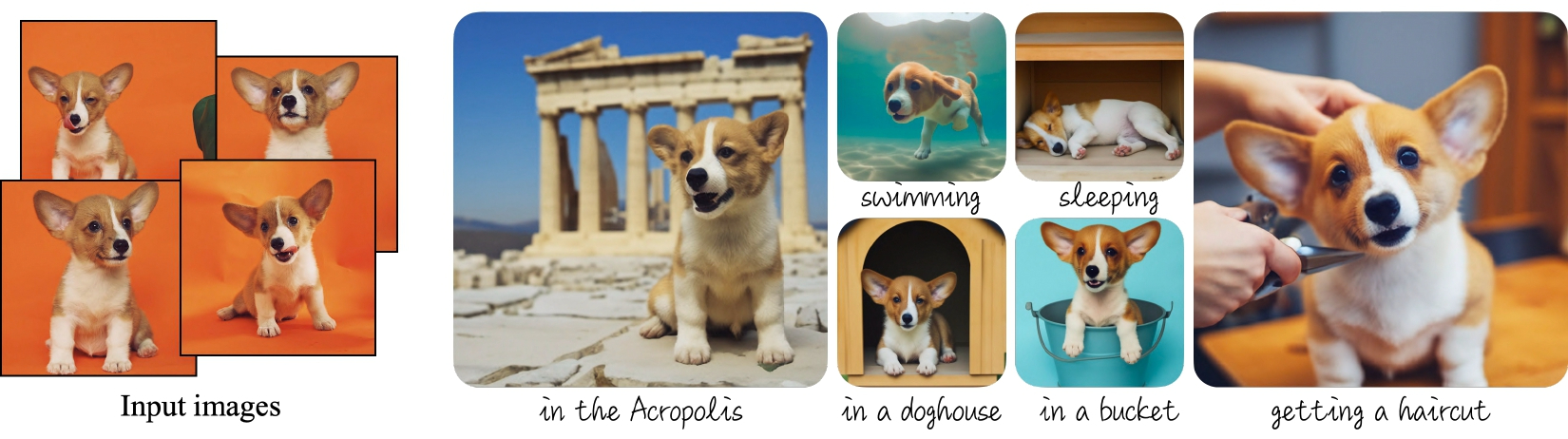
|
||||
_Dreambooth examples from the [project's blog](https://dreambooth.github.io)._
|
||||
|
||||
The [Dreambooth training script](https://github.com/huggingface/diffusers/tree/main/examples/dreambooth) shows how to implement this training procedure on a pre-trained Stable Diffusion model.
|
||||
|
||||
<Tip warning={true}>
|
||||
|
||||
<!-- TODO: replace with our blog when it's done -->
|
||||
|
||||
Dreambooth fine-tuning is very sensitive to hyperparameters and easy to overfit. We recommend you take a look at our [in-depth analysis](https://wandb.ai/psuraj/dreambooth/reports/Dreambooth-Training-Analysis--VmlldzoyNzk0NDc3) with recommended settings for different subjects, and go from there.
|
||||
|
||||
</Tip>
|
||||
|
||||
## Training locally
|
||||
|
||||
### Installing the dependencies
|
||||
|
||||
Before running the scripts, make sure to install the library's training dependencies. We also recommend to install `diffusers` from the `main` github branch.
|
||||
|
||||
```bash
|
||||
pip install git+https://github.com/huggingface/diffusers
|
||||
pip install -U -r diffusers/examples/dreambooth/requirements.txt
|
||||
```
|
||||
|
||||
Then initialize and configure a [🤗 Accelerate](https://github.com/huggingface/accelerate/) environment with:
|
||||
|
||||
```bash
|
||||
accelerate config
|
||||
```
|
||||
|
||||
You need to accept the model license before downloading or using the weights. In this example we'll use model version `v1-4`, so you'll need to visit [its card](https://huggingface.co/CompVis/stable-diffusion-v1-4), read the license and tick the checkbox if you agree.
|
||||
|
||||
You have to be a registered user in 🤗 Hugging Face Hub, and you'll also need to use an access token for the code to work. For more information on access tokens, please refer to [this section of the documentation](https://huggingface.co/docs/hub/security-tokens).
|
||||
|
||||
Run the following command to authenticate your token
|
||||
|
||||
```bash
|
||||
huggingface-cli login
|
||||
```
|
||||
|
||||
If you have already cloned the repo, then you won't need to go through these steps. Instead, you can pass the path to your local checkout to the training script and it will be loaded from there.
|
||||
|
||||
### Dog toy example
|
||||
|
||||
In this example we'll use [these images](https://drive.google.com/drive/folders/1BO_dyz-p65qhBRRMRA4TbZ8qW4rB99JZ) to add a new concept to Stable Diffusion using the Dreambooth process. They will be our training data. Please, download them and place them somewhere in your system.
|
||||
|
||||
Then you can launch the training script using:
|
||||
|
||||
```bash
|
||||
export MODEL_NAME="CompVis/stable-diffusion-v1-4"
|
||||
export INSTANCE_DIR="path_to_training_images"
|
||||
export OUTPUT_DIR="path_to_saved_model"
|
||||
|
||||
accelerate launch train_dreambooth.py \
|
||||
--pretrained_model_name_or_path=$MODEL_NAME \
|
||||
--instance_data_dir=$INSTANCE_DIR \
|
||||
--output_dir=$OUTPUT_DIR \
|
||||
--instance_prompt="a photo of sks dog" \
|
||||
--resolution=512 \
|
||||
--train_batch_size=1 \
|
||||
--gradient_accumulation_steps=1 \
|
||||
--learning_rate=5e-6 \
|
||||
--lr_scheduler="constant" \
|
||||
--lr_warmup_steps=0 \
|
||||
--max_train_steps=400
|
||||
```
|
||||
|
||||
### Training with a prior-preserving loss
|
||||
|
||||
Prior preservation is used to avoid overfitting and language-drift. Please, refer to the paper to learn more about it if you are interested. For prior preservation, we use other images of the same class as part of the training process. The nice thing is that we can generate those images using the Stable Diffusion model itself! The training script will save the generated images to a local path we specify.
|
||||
|
||||
According to the paper, it's recommended to generate `num_epochs * num_samples` images for prior preservation. 200-300 works well for most cases.
|
||||
|
||||
```bash
|
||||
export MODEL_NAME="CompVis/stable-diffusion-v1-4"
|
||||
export INSTANCE_DIR="path_to_training_images"
|
||||
export CLASS_DIR="path_to_class_images"
|
||||
export OUTPUT_DIR="path_to_saved_model"
|
||||
|
||||
accelerate launch train_dreambooth.py \
|
||||
--pretrained_model_name_or_path=$MODEL_NAME \
|
||||
--instance_data_dir=$INSTANCE_DIR \
|
||||
--class_data_dir=$CLASS_DIR \
|
||||
--output_dir=$OUTPUT_DIR \
|
||||
--with_prior_preservation --prior_loss_weight=1.0 \
|
||||
--instance_prompt="a photo of sks dog" \
|
||||
--class_prompt="a photo of dog" \
|
||||
--resolution=512 \
|
||||
--train_batch_size=1 \
|
||||
--gradient_accumulation_steps=1 \
|
||||
--learning_rate=5e-6 \
|
||||
--lr_scheduler="constant" \
|
||||
--lr_warmup_steps=0 \
|
||||
--num_class_images=200 \
|
||||
--max_train_steps=800
|
||||
```
|
||||
|
||||
### Training on a 16GB GPU
|
||||
|
||||
With the help of gradient checkpointing and the 8-bit optimizer from [bitsandbytes](https://github.com/TimDettmers/bitsandbytes), it's possible to train dreambooth on a 16GB GPU.
|
||||
|
||||
```bash
|
||||
pip install bitsandbytes
|
||||
```
|
||||
|
||||
Then pass the `--use_8bit_adam` option to the training script.
|
||||
|
||||
```bash
|
||||
export MODEL_NAME="CompVis/stable-diffusion-v1-4"
|
||||
export INSTANCE_DIR="path_to_training_images"
|
||||
export CLASS_DIR="path_to_class_images"
|
||||
export OUTPUT_DIR="path_to_saved_model"
|
||||
|
||||
accelerate launch train_dreambooth.py \
|
||||
--pretrained_model_name_or_path=$MODEL_NAME \
|
||||
--instance_data_dir=$INSTANCE_DIR \
|
||||
--class_data_dir=$CLASS_DIR \
|
||||
--output_dir=$OUTPUT_DIR \
|
||||
--with_prior_preservation --prior_loss_weight=1.0 \
|
||||
--instance_prompt="a photo of sks dog" \
|
||||
--class_prompt="a photo of dog" \
|
||||
--resolution=512 \
|
||||
--train_batch_size=1 \
|
||||
--gradient_accumulation_steps=2 --gradient_checkpointing \
|
||||
--use_8bit_adam \
|
||||
--learning_rate=5e-6 \
|
||||
--lr_scheduler="constant" \
|
||||
--lr_warmup_steps=0 \
|
||||
--num_class_images=200 \
|
||||
--max_train_steps=800
|
||||
```
|
||||
|
||||
### Fine-tune the text encoder in addition to the UNet
|
||||
|
||||
The script also allows to fine-tune the `text_encoder` along with the `unet`. It has been observed experimentally that this gives much better results, especially on faces. Please, refer to [our report](https://wandb.ai/psuraj/dreambooth/reports/Dreambooth-Training-Analysis--VmlldzoyNzk0NDc3) for more details.
|
||||
|
||||
To enable this option, pass the `--train_text_encoder` argument to the training script.
|
||||
|
||||
<Tip>
|
||||
Training the text encoder requires additional memory, so training won't fit on a 16GB GPU. You'll need at least 24GB VRAM to use this option.
|
||||
</Tip>
|
||||
|
||||
```bash
|
||||
export MODEL_NAME="CompVis/stable-diffusion-v1-4"
|
||||
export INSTANCE_DIR="path_to_training_images"
|
||||
export CLASS_DIR="path_to_class_images"
|
||||
export OUTPUT_DIR="path_to_saved_model"
|
||||
|
||||
accelerate launch train_dreambooth.py \
|
||||
--pretrained_model_name_or_path=$MODEL_NAME \
|
||||
--train_text_encoder \
|
||||
--instance_data_dir=$INSTANCE_DIR \
|
||||
--class_data_dir=$CLASS_DIR \
|
||||
--output_dir=$OUTPUT_DIR \
|
||||
--with_prior_preservation --prior_loss_weight=1.0 \
|
||||
--instance_prompt="a photo of sks dog" \
|
||||
--class_prompt="a photo of dog" \
|
||||
--resolution=512 \
|
||||
--train_batch_size=1 \
|
||||
--use_8bit_adam
|
||||
--gradient_checkpointing \
|
||||
--learning_rate=2e-6 \
|
||||
--lr_scheduler="constant" \
|
||||
--lr_warmup_steps=0 \
|
||||
--num_class_images=200 \
|
||||
--max_train_steps=800
|
||||
```
|
||||
|
||||
### Training on a 8 GB GPU:
|
||||
|
||||
Using [DeepSpeed](https://www.deepspeed.ai/) it's even possible to offload some
|
||||
tensors from VRAM to either CPU or NVME, allowing training to proceed with less GPU memory.
|
||||
|
||||
DeepSpeed needs to be enabled with `accelerate config`. During configuration,
|
||||
answer yes to "Do you want to use DeepSpeed?". Combining DeepSpeed stage 2, fp16
|
||||
mixed precision, and offloading both the model parameters and the optimizer state to CPU, it's
|
||||
possible to train on under 8 GB VRAM. The drawback is that this requires more system RAM (about 25 GB). See [the DeepSpeed documentation](https://huggingface.co/docs/accelerate/usage_guides/deepspeed) for more configuration options.
|
||||
|
||||
Changing the default Adam optimizer to DeepSpeed's special version of Adam
|
||||
`deepspeed.ops.adam.DeepSpeedCPUAdam` gives a substantial speedup, but enabling
|
||||
it requires the system's CUDA toolchain version to be the same as the one installed with PyTorch. 8-bit optimizers don't seem to be compatible with DeepSpeed at the moment.
|
||||
|
||||
```bash
|
||||
export MODEL_NAME="CompVis/stable-diffusion-v1-4"
|
||||
export INSTANCE_DIR="path_to_training_images"
|
||||
export CLASS_DIR="path_to_class_images"
|
||||
export OUTPUT_DIR="path_to_saved_model"
|
||||
|
||||
accelerate launch train_dreambooth.py \
|
||||
--pretrained_model_name_or_path=$MODEL_NAME \
|
||||
--instance_data_dir=$INSTANCE_DIR \
|
||||
--class_data_dir=$CLASS_DIR \
|
||||
--output_dir=$OUTPUT_DIR \
|
||||
--with_prior_preservation --prior_loss_weight=1.0 \
|
||||
--instance_prompt="a photo of sks dog" \
|
||||
--class_prompt="a photo of dog" \
|
||||
--resolution=512 \
|
||||
--train_batch_size=1 \
|
||||
--sample_batch_size=1 \
|
||||
--gradient_accumulation_steps=1 --gradient_checkpointing \
|
||||
--learning_rate=5e-6 \
|
||||
--lr_scheduler="constant" \
|
||||
--lr_warmup_steps=0 \
|
||||
--num_class_images=200 \
|
||||
--max_train_steps=800 \
|
||||
--mixed_precision=fp16
|
||||
```
|
||||
|
||||
## Inference
|
||||
|
||||
Once you have trained a model, inference can be done using the `StableDiffusionPipeline`, by simply indicating the path where the model was saved. Make sure that your prompts include the special `identifier` used during training (`sks` in the previous examples).
|
||||
|
||||
```python
|
||||
from diffusers import StableDiffusionPipeline
|
||||
import torch
|
||||
|
||||
model_id = "path_to_saved_model"
|
||||
pipe = StableDiffusionPipeline.from_pretrained(model_id, torch_dtype=torch.float16).to("cuda")
|
||||
|
||||
prompt = "A photo of sks dog in a bucket"
|
||||
image = pipe(prompt, num_inference_steps=50, guidance_scale=7.5).images[0]
|
||||
|
||||
image.save("dog-bucket.png")
|
||||
```
|
||||
@@ -1,71 +0,0 @@
|
||||
<!--Copyright 2022 The HuggingFace Team. All rights reserved.
|
||||
|
||||
Licensed under the Apache License, Version 2.0 (the "License"); you may not use this file except in compliance with
|
||||
the License. You may obtain a copy of the License at
|
||||
|
||||
http://www.apache.org/licenses/LICENSE-2.0
|
||||
|
||||
Unless required by applicable law or agreed to in writing, software distributed under the License is distributed on
|
||||
an "AS IS" BASIS, WITHOUT WARRANTIES OR CONDITIONS OF ANY KIND, either express or implied. See the License for the
|
||||
specific language governing permissions and limitations under the License.
|
||||
-->
|
||||
|
||||
# 🧨 Diffusers Training Examples
|
||||
|
||||
Diffusers training examples are a collection of scripts to demonstrate how to effectively use the `diffusers` library
|
||||
for a variety of use cases.
|
||||
|
||||
**Note**: If you are looking for **official** examples on how to use `diffusers` for inference,
|
||||
please have a look at [src/diffusers/pipelines](https://github.com/huggingface/diffusers/tree/main/src/diffusers/pipelines)
|
||||
|
||||
Our examples aspire to be **self-contained**, **easy-to-tweak**, **beginner-friendly** and for **one-purpose-only**.
|
||||
More specifically, this means:
|
||||
|
||||
- **Self-contained**: An example script shall only depend on "pip-install-able" Python packages that can be found in a `requirements.txt` file. Example scripts shall **not** depend on any local files. This means that one can simply download an example script, *e.g.* [train_unconditional.py](https://github.com/huggingface/diffusers/blob/main/examples/unconditional_image_generation/train_unconditional.py), install the required dependencies, *e.g.* [requirements.txt](https://github.com/huggingface/diffusers/blob/main/examples/unconditional_image_generation/requirements.txt) and execute the example script.
|
||||
- **Easy-to-tweak**: While we strive to present as many use cases as possible, the example scripts are just that - examples. It is expected that they won't work out-of-the box on your specific problem and that you will be required to change a few lines of code to adapt them to your needs. To help you with that, most of the examples fully expose the preprocessing of the data and the training loop to allow you to tweak and edit them as required.
|
||||
- **Beginner-friendly**: We do not aim for providing state-of-the-art training scripts for the newest models, but rather examples that can be used as a way to better understand diffusion models and how to use them with the `diffusers` library. We often purposefully leave out certain state-of-the-art methods if we consider them too complex for beginners.
|
||||
- **One-purpose-only**: Examples should show one task and one task only. Even if a task is from a modeling
|
||||
point of view very similar, *e.g.* image super-resolution and image modification tend to use the same model and training method, we want examples to showcase only one task to keep them as readable and easy-to-understand as possible.
|
||||
|
||||
We provide **official** examples that cover the most popular tasks of diffusion models.
|
||||
*Official* examples are **actively** maintained by the `diffusers` maintainers and we try to rigorously follow our example philosophy as defined above.
|
||||
If you feel like another important example should exist, we are more than happy to welcome a [Feature Request](https://github.com/huggingface/diffusers/issues/new?assignees=&labels=&template=feature_request.md&title=) or directly a [Pull Request](https://github.com/huggingface/diffusers/compare) from you!
|
||||
|
||||
Training examples show how to pretrain or fine-tune diffusion models for a variety of tasks. Currently we support:
|
||||
|
||||
- [Unconditional Training](./unconditional_training)
|
||||
- [Text-to-Image Training](./text2image)
|
||||
- [Text Inversion](./text_inversion)
|
||||
- [Dreambooth](./dreambooth)
|
||||
|
||||
|
||||
| Task | 🤗 Accelerate | 🤗 Datasets | Colab
|
||||
|---|---|:---:|:---:|
|
||||
| [**Unconditional Image Generation**](./unconditional_training) | ✅ | ✅ | [](https://colab.research.google.com/github/huggingface/notebooks/blob/main/diffusers/training_example.ipynb)
|
||||
| [**Text-to-Image fine-tuning**](./text2image) | ✅ | ✅ |
|
||||
| [**Textual Inversion**](./text_inversion) | ✅ | - | [](https://colab.research.google.com/github/huggingface/notebooks/blob/main/diffusers/sd_textual_inversion_training.ipynb)
|
||||
| [**Dreambooth**](./dreambooth) | ✅ | - | [](https://colab.research.google.com/github/huggingface/notebooks/blob/main/diffusers/sd_dreambooth_training.ipynb)
|
||||
|
||||
## Community
|
||||
|
||||
In addition, we provide **community** examples, which are examples added and maintained by our community.
|
||||
Community examples can consist of both *training* examples or *inference* pipelines.
|
||||
For such examples, we are more lenient regarding the philosophy defined above and also cannot guarantee to provide maintenance for every issue.
|
||||
Examples that are useful for the community, but are either not yet deemed popular or not yet following our above philosophy should go into the [community examples](https://github.com/huggingface/diffusers/tree/main/examples/community) folder. The community folder therefore includes training examples and inference pipelines.
|
||||
**Note**: Community examples can be a [great first contribution](https://github.com/huggingface/diffusers/issues?q=is%3Aopen+is%3Aissue+label%3A%22good+first+issue%22) to show to the community how you like to use `diffusers` 🪄.
|
||||
|
||||
## Important note
|
||||
|
||||
To make sure you can successfully run the latest versions of the example scripts, you have to **install the library from source** and install some example-specific requirements. To do this, execute the following steps in a new virtual environment:
|
||||
|
||||
```bash
|
||||
git clone https://github.com/huggingface/diffusers
|
||||
cd diffusers
|
||||
pip install .
|
||||
```
|
||||
|
||||
Then cd in the example folder of your choice and run
|
||||
|
||||
```bash
|
||||
pip install -r requirements.txt
|
||||
```
|
||||
@@ -1,138 +0,0 @@
|
||||
<!--Copyright 2022 The HuggingFace Team. All rights reserved.
|
||||
|
||||
Licensed under the Apache License, Version 2.0 (the "License"); you may not use this file except in compliance with
|
||||
the License. You may obtain a copy of the License at
|
||||
|
||||
http://www.apache.org/licenses/LICENSE-2.0
|
||||
|
||||
Unless required by applicable law or agreed to in writing, software distributed under the License is distributed on
|
||||
an "AS IS" BASIS, WITHOUT WARRANTIES OR CONDITIONS OF ANY KIND, either express or implied. See the License for the
|
||||
specific language governing permissions and limitations under the License.
|
||||
-->
|
||||
|
||||
|
||||
# Stable Diffusion text-to-image fine-tuning
|
||||
|
||||
The [`train_text_to_image.py`](https://github.com/huggingface/diffusers/tree/main/examples/textual_inversion) script shows how to fine-tune the stable diffusion model on your own dataset.
|
||||
|
||||
<Tip warning={true}>
|
||||
|
||||
The text-to-image fine-tuning script is experimental. It's easy to overfit and run into issues like catastrophic forgetting. We recommend to explore different hyperparameters to get the best results on your dataset.
|
||||
|
||||
</Tip>
|
||||
|
||||
|
||||
## Running locally
|
||||
|
||||
### Installing the dependencies
|
||||
|
||||
Before running the scripts, make sure to install the library's training dependencies:
|
||||
|
||||
```bash
|
||||
pip install git+https://github.com/huggingface/diffusers.git
|
||||
pip install -U -r requirements.txt
|
||||
```
|
||||
|
||||
And initialize an [🤗Accelerate](https://github.com/huggingface/accelerate/) environment with:
|
||||
|
||||
```bash
|
||||
accelerate config
|
||||
```
|
||||
|
||||
You need to accept the model license before downloading or using the weights. In this example we'll use model version `v1-4`, so you'll need to visit [its card](https://huggingface.co/CompVis/stable-diffusion-v1-4), read the license and tick the checkbox if you agree.
|
||||
|
||||
You have to be a registered user in 🤗 Hugging Face Hub, and you'll also need to use an access token for the code to work. For more information on access tokens, please refer to [this section of the documentation](https://huggingface.co/docs/hub/security-tokens).
|
||||
|
||||
Run the following command to authenticate your token
|
||||
|
||||
```bash
|
||||
huggingface-cli login
|
||||
```
|
||||
|
||||
If you have already cloned the repo, then you won't need to go through these steps. Instead, you can pass the path to your local checkout to the training script and it will be loaded from there.
|
||||
|
||||
### Hardware Requirements for Fine-tuning
|
||||
|
||||
Using `gradient_checkpointing` and `mixed_precision` it should be possible to fine tune the model on a single 24GB GPU. For higher `batch_size` and faster training it's better to use GPUs with more than 30GB of GPU memory. You can also use JAX / Flax for fine-tuning on TPUs or GPUs, see [below](#flax-jax-finetuning) for details.
|
||||
|
||||
### Fine-tuning Example
|
||||
|
||||
The following script will launch a fine-tuning run using [Justin Pinkneys' captioned Pokemon dataset](https://huggingface.co/datasets/lambdalabs/pokemon-blip-captions), available in Hugging Face Hub.
|
||||
|
||||
|
||||
```bash
|
||||
export MODEL_NAME="CompVis/stable-diffusion-v1-4"
|
||||
export dataset_name="lambdalabs/pokemon-blip-captions"
|
||||
|
||||
accelerate launch train_text_to_image.py \
|
||||
--pretrained_model_name_or_path=$MODEL_NAME \
|
||||
--dataset_name=$dataset_name \
|
||||
--use_ema \
|
||||
--resolution=512 --center_crop --random_flip \
|
||||
--train_batch_size=1 \
|
||||
--gradient_accumulation_steps=4 \
|
||||
--gradient_checkpointing \
|
||||
--mixed_precision="fp16" \
|
||||
--max_train_steps=15000 \
|
||||
--learning_rate=1e-05 \
|
||||
--max_grad_norm=1 \
|
||||
--lr_scheduler="constant" --lr_warmup_steps=0 \
|
||||
--output_dir="sd-pokemon-model"
|
||||
```
|
||||
|
||||
To run on your own training files you need to prepare the dataset according to the format required by `datasets`. You can upload your dataset to the Hub, or you can prepare a local folder with your files. [This documentation](https://huggingface.co/docs/datasets/v2.4.0/en/image_load#imagefolder-with-metadata) explains how to do it.
|
||||
|
||||
You should modify the script if you wish to use custom loading logic. We have left pointers in the code in the appropriate places :)
|
||||
|
||||
```bash
|
||||
export MODEL_NAME="CompVis/stable-diffusion-v1-4"
|
||||
export TRAIN_DIR="path_to_your_dataset"
|
||||
export OUTPUT_DIR="path_to_save_model"
|
||||
|
||||
accelerate launch train_text_to_image.py \
|
||||
--pretrained_model_name_or_path=$MODEL_NAME \
|
||||
--train_data_dir=$TRAIN_DIR \
|
||||
--use_ema \
|
||||
--resolution=512 --center_crop --random_flip \
|
||||
--train_batch_size=1 \
|
||||
--gradient_accumulation_steps=4 \
|
||||
--gradient_checkpointing \
|
||||
--mixed_precision="fp16" \
|
||||
--max_train_steps=15000 \
|
||||
--learning_rate=1e-05 \
|
||||
--max_grad_norm=1 \
|
||||
--lr_scheduler="constant" --lr_warmup_steps=0 \
|
||||
--output_dir=${OUTPUT_DIR}
|
||||
```
|
||||
|
||||
Once training is finished the model will be saved to the `OUTPUT_DIR` specified in the command. To load the fine-tuned model for inference, just pass that path to `StableDiffusionPipeline`:
|
||||
|
||||
```python
|
||||
from diffusers import StableDiffusionPipeline
|
||||
|
||||
model_path = "path_to_saved_model"
|
||||
pipe = StableDiffusionPipeline.from_pretrained(model_path, torch_dtype=torch.float16)
|
||||
pipe.to("cuda")
|
||||
|
||||
image = pipe(prompt="yoda").images[0]
|
||||
image.save("yoda-pokemon.png")
|
||||
```
|
||||
|
||||
### Flax / JAX fine-tuning
|
||||
|
||||
Thanks to [@duongna211](https://github.com/duongna21) it's possible to fine-tune Stable Diffusion using Flax! This is very efficient on TPU hardware but works great on GPUs too. You can use the [Flax training script](https://github.com/huggingface/diffusers/blob/main/examples/text_to_image/train_text_to_image_flax.py) like this:
|
||||
|
||||
```Python
|
||||
export MODEL_NAME="runwayml/stable-diffusion-v1-5"
|
||||
export dataset_name="lambdalabs/pokemon-blip-captions"
|
||||
|
||||
python train_text_to_image_flax.py \
|
||||
--pretrained_model_name_or_path=$MODEL_NAME \
|
||||
--dataset_name=$dataset_name \
|
||||
--resolution=512 --center_crop --random_flip \
|
||||
--train_batch_size=1 \
|
||||
--max_train_steps=15000 \
|
||||
--learning_rate=1e-05 \
|
||||
--max_grad_norm=1 \
|
||||
--output_dir="sd-pokemon-model"
|
||||
```
|
||||
@@ -1,122 +0,0 @@
|
||||
<!--Copyright 2022 The HuggingFace Team. All rights reserved.
|
||||
|
||||
Licensed under the Apache License, Version 2.0 (the "License"); you may not use this file except in compliance with
|
||||
the License. You may obtain a copy of the License at
|
||||
|
||||
http://www.apache.org/licenses/LICENSE-2.0
|
||||
|
||||
Unless required by applicable law or agreed to in writing, software distributed under the License is distributed on
|
||||
an "AS IS" BASIS, WITHOUT WARRANTIES OR CONDITIONS OF ANY KIND, either express or implied. See the License for the
|
||||
specific language governing permissions and limitations under the License.
|
||||
-->
|
||||
|
||||
|
||||
|
||||
# Textual Inversion
|
||||
|
||||
Textual Inversion is a technique for capturing novel concepts from a small number of example images in a way that can later be used to control text-to-image pipelines. It does so by learning new 'words' in the embedding space of the pipeline's text encoder. These special words can then be used within text prompts to achieve very fine-grained control of the resulting images.
|
||||
|
||||
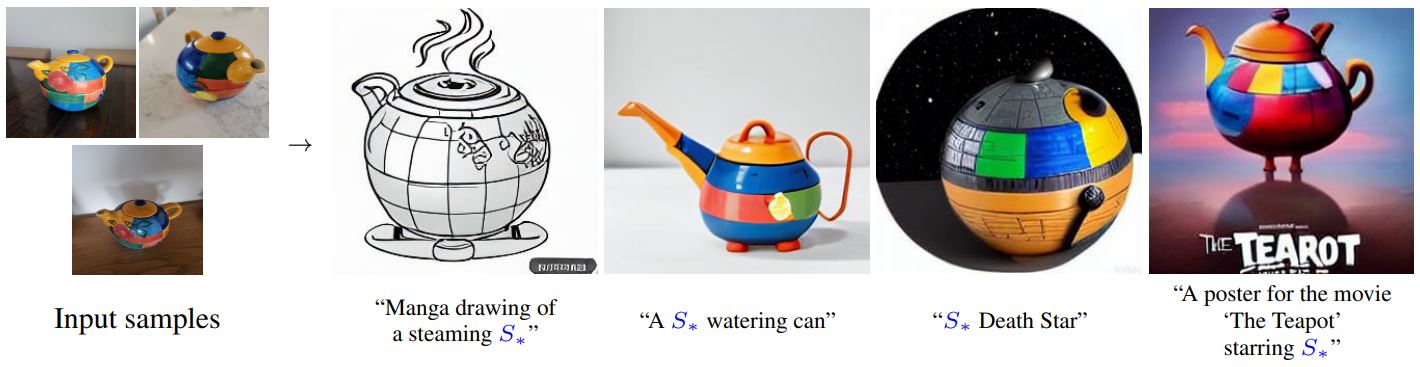
|
||||
_By using just 3-5 images you can teach new concepts to a model such as Stable Diffusion for personalized image generation ([image source](https://github.com/rinongal/textual_inversion))._
|
||||
|
||||
This technique was introduced in [An Image is Worth One Word: Personalizing Text-to-Image Generation using Textual Inversion](https://arxiv.org/abs/2208.01618). The paper demonstrated the concept using a [latent diffusion model](https://github.com/CompVis/latent-diffusion) but the idea has since been applied to other variants such as [Stable Diffusion](https://huggingface.co/docs/diffusers/main/en/conceptual/stable_diffusion).
|
||||
|
||||
|
||||
## How It Works
|
||||
|
||||
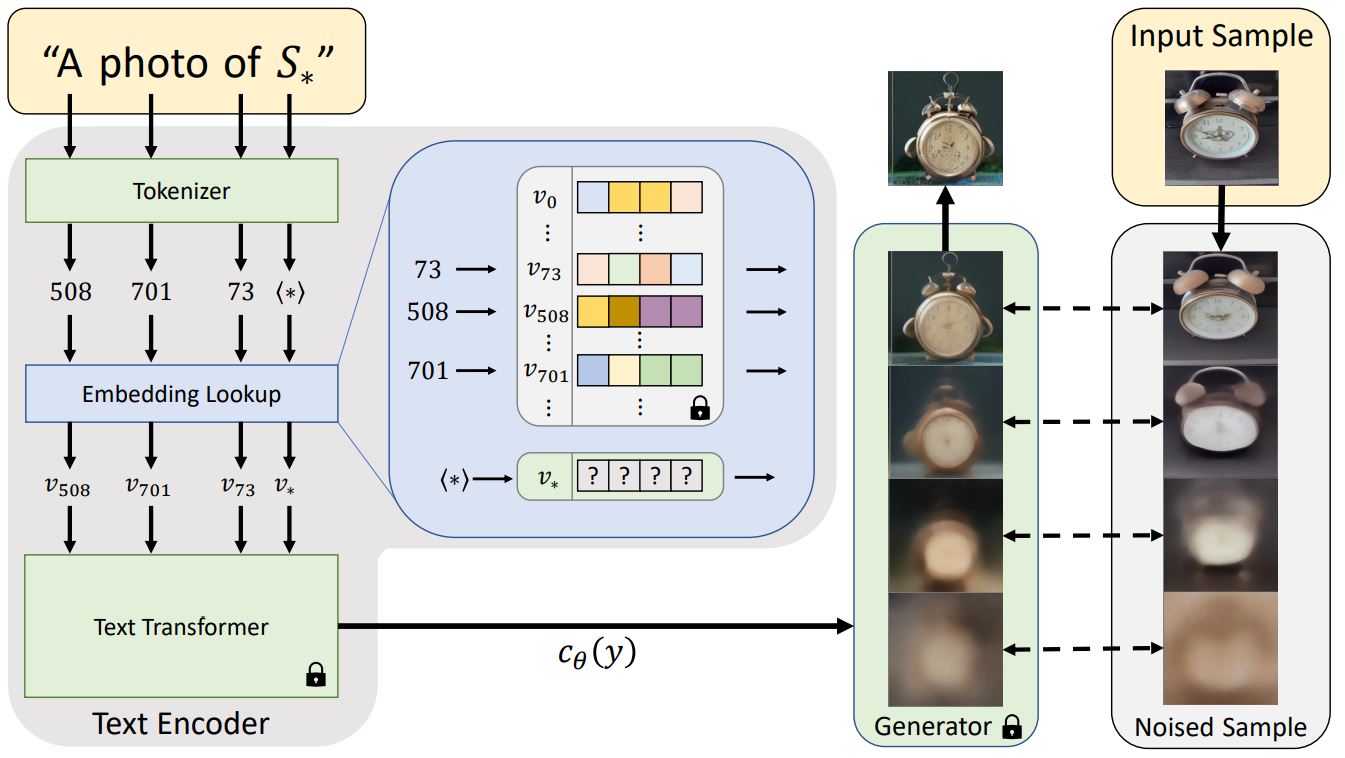
|
||||
_Architecture Overview from the [textual inversion blog post](https://textual-inversion.github.io/)_
|
||||
|
||||
Before a text prompt can be used in a diffusion model, it must first be processed into a numerical representation. This typically involves tokenizing the text, converting each token to an embedding and then feeding those embeddings through a model (typically a transformer) whose output will be used as the conditioning for the diffusion model.
|
||||
|
||||
Textual inversion learns a new token embedding (v* in the diagram above). A prompt (that includes a token which will be mapped to this new embedding) is used in conjunction with a noised version of one or more training images as inputs to the generator model, which attempts to predict the denoised version of the image. The embedding is optimized based on how well the model does at this task - an embedding that better captures the object or style shown by the training images will give more useful information to the diffusion model and thus result in a lower denoising loss. After many steps (typically several thousand) with a variety of prompt and image variants the learned embedding should hopefully capture the essence of the new concept being taught.
|
||||
|
||||
## Usage
|
||||
|
||||
To train your own textual inversions, see the [example script here](https://github.com/huggingface/diffusers/tree/main/examples/textual_inversion).
|
||||
|
||||
There is also a notebook for training:
|
||||
[](https://colab.research.google.com/github/huggingface/notebooks/blob/main/diffusers/sd_textual_inversion_training.ipynb)
|
||||
|
||||
And one for inference:
|
||||
[](https://colab.research.google.com/github/huggingface/notebooks/blob/main/diffusers/stable_conceptualizer_inference.ipynb)
|
||||
|
||||
In addition to using concepts you have trained yourself, there is a community-created collection of trained textual inversions in the new [Stable Diffusion public concepts library](https://huggingface.co/sd-concepts-library) which you can also use from the inference notebook above. Over time this will hopefully grow into a useful resource as more examples are added.
|
||||
|
||||
## Example: Running locally
|
||||
|
||||
The `textual_inversion.py` script [here](https://github.com/huggingface/diffusers/blob/main/examples/textual_inversion) shows how to implement the training procedure and adapt it for stable diffusion.
|
||||
|
||||
### Installing the dependencies
|
||||
|
||||
Before running the scripts, make sure to install the library's training dependencies.
|
||||
|
||||
```bash
|
||||
pip install diffusers[training] accelerate transformers
|
||||
```
|
||||
|
||||
And initialize an [🤗Accelerate](https://github.com/huggingface/accelerate/) environment with:
|
||||
|
||||
```bash
|
||||
accelerate config
|
||||
```
|
||||
|
||||
|
||||
### Cat toy example
|
||||
|
||||
You need to accept the model license before downloading or using the weights. In this example we'll use model version `v1-4`, so you'll need to visit [its card](https://huggingface.co/CompVis/stable-diffusion-v1-4), read the license and tick the checkbox if you agree.
|
||||
|
||||
You have to be a registered user in 🤗 Hugging Face Hub, and you'll also need to use an access token for the code to work. For more information on access tokens, please refer to [this section of the documentation](https://huggingface.co/docs/hub/security-tokens).
|
||||
|
||||
Run the following command to authenticate your token
|
||||
|
||||
```bash
|
||||
huggingface-cli login
|
||||
```
|
||||
|
||||
If you have already cloned the repo, then you won't need to go through these steps.
|
||||
|
||||
<br>
|
||||
|
||||
Now let's get our dataset.Download 3-4 images from [here](https://drive.google.com/drive/folders/1fmJMs25nxS_rSNqS5hTcRdLem_YQXbq5) and save them in a directory. This will be our training data.
|
||||
|
||||
And launch the training using
|
||||
|
||||
```bash
|
||||
export MODEL_NAME="runwayml/stable-diffusion-v1-5"
|
||||
export DATA_DIR="path-to-dir-containing-images"
|
||||
|
||||
accelerate launch textual_inversion.py \
|
||||
--pretrained_model_name_or_path=$MODEL_NAME \
|
||||
--train_data_dir=$DATA_DIR \
|
||||
--learnable_property="object" \
|
||||
--placeholder_token="<cat-toy>" --initializer_token="toy" \
|
||||
--resolution=512 \
|
||||
--train_batch_size=1 \
|
||||
--gradient_accumulation_steps=4 \
|
||||
--max_train_steps=3000 \
|
||||
--learning_rate=5.0e-04 --scale_lr \
|
||||
--lr_scheduler="constant" \
|
||||
--lr_warmup_steps=0 \
|
||||
--output_dir="textual_inversion_cat"
|
||||
```
|
||||
|
||||
A full training run takes ~1 hour on one V100 GPU.
|
||||
|
||||
|
||||
### Inference
|
||||
|
||||
Once you have trained a model using above command, the inference can be done simply using the `StableDiffusionPipeline`. Make sure to include the `placeholder_token` in your prompt.
|
||||
|
||||
```python
|
||||
from diffusers import StableDiffusionPipeline
|
||||
|
||||
model_id = "path-to-your-trained-model"
|
||||
pipe = StableDiffusionPipeline.from_pretrained(model_id, torch_dtype=torch.float16).to("cuda")
|
||||
|
||||
prompt = "A <cat-toy> backpack"
|
||||
|
||||
image = pipe(prompt, num_inference_steps=50, guidance_scale=7.5).images[0]
|
||||
|
||||
image.save("cat-backpack.png")
|
||||
```
|
||||
@@ -1,149 +0,0 @@
|
||||
<!--Copyright 2022 The HuggingFace Team. All rights reserved.
|
||||
|
||||
Licensed under the Apache License, Version 2.0 (the "License"); you may not use this file except in compliance with
|
||||
the License. You may obtain a copy of the License at
|
||||
|
||||
http://www.apache.org/licenses/LICENSE-2.0
|
||||
|
||||
Unless required by applicable law or agreed to in writing, software distributed under the License is distributed on
|
||||
an "AS IS" BASIS, WITHOUT WARRANTIES OR CONDITIONS OF ANY KIND, either express or implied. See the License for the
|
||||
specific language governing permissions and limitations under the License.
|
||||
-->
|
||||
|
||||
# Unconditional Image-Generation
|
||||
|
||||
In this section, we explain how one can train an unconditional image generation diffusion
|
||||
model. "Unconditional" because the model is not conditioned on any context to generate an image - once trained the model will simply generate images that resemble its training data
|
||||
distribution.
|
||||
|
||||
## Installing the dependencies
|
||||
|
||||
Before running the scripts, make sure to install the library's training dependencies:
|
||||
|
||||
```bash
|
||||
pip install diffusers[training] accelerate datasets
|
||||
```
|
||||
|
||||
And initialize an [🤗Accelerate](https://github.com/huggingface/accelerate/) environment with:
|
||||
|
||||
```bash
|
||||
accelerate config
|
||||
```
|
||||
|
||||
## Unconditional Flowers
|
||||
|
||||
The command to train a DDPM UNet model on the Oxford Flowers dataset:
|
||||
|
||||
```bash
|
||||
accelerate launch train_unconditional.py \
|
||||
--dataset_name="huggan/flowers-102-categories" \
|
||||
--resolution=64 \
|
||||
--output_dir="ddpm-ema-flowers-64" \
|
||||
--train_batch_size=16 \
|
||||
--num_epochs=100 \
|
||||
--gradient_accumulation_steps=1 \
|
||||
--learning_rate=1e-4 \
|
||||
--lr_warmup_steps=500 \
|
||||
--mixed_precision=no \
|
||||
--push_to_hub
|
||||
```
|
||||
An example trained model: https://huggingface.co/anton-l/ddpm-ema-flowers-64
|
||||
|
||||
A full training run takes 2 hours on 4xV100 GPUs.
|
||||
|
||||
<img src="https://user-images.githubusercontent.com/26864830/180248660-a0b143d0-b89a-42c5-8656-2ebf6ece7e52.png" width="700" />
|
||||
|
||||
## Unconditional Pokemon
|
||||
|
||||
The command to train a DDPM UNet model on the Pokemon dataset:
|
||||
|
||||
```bash
|
||||
accelerate launch train_unconditional.py \
|
||||
--dataset_name="huggan/pokemon" \
|
||||
--resolution=64 \
|
||||
--output_dir="ddpm-ema-pokemon-64" \
|
||||
--train_batch_size=16 \
|
||||
--num_epochs=100 \
|
||||
--gradient_accumulation_steps=1 \
|
||||
--learning_rate=1e-4 \
|
||||
--lr_warmup_steps=500 \
|
||||
--mixed_precision=no \
|
||||
--push_to_hub
|
||||
```
|
||||
An example trained model: https://huggingface.co/anton-l/ddpm-ema-pokemon-64
|
||||
|
||||
A full training run takes 2 hours on 4xV100 GPUs.
|
||||
|
||||
<img src="https://user-images.githubusercontent.com/26864830/180248200-928953b4-db38-48db-b0c6-8b740fe6786f.png" width="700" />
|
||||
|
||||
|
||||
## Using your own data
|
||||
|
||||
To use your own dataset, there are 2 ways:
|
||||
- you can either provide your own folder as `--train_data_dir`
|
||||
- or you can upload your dataset to the hub (possibly as a private repo, if you prefer so), and simply pass the `--dataset_name` argument.
|
||||
|
||||
**Note**: If you want to create your own training dataset please have a look at [this document](https://huggingface.co/docs/datasets/image_process#image-datasets).
|
||||
|
||||
Below, we explain both in more detail.
|
||||
|
||||
### Provide the dataset as a folder
|
||||
|
||||
If you provide your own folders with images, the script expects the following directory structure:
|
||||
|
||||
```bash
|
||||
data_dir/xxx.png
|
||||
data_dir/xxy.png
|
||||
data_dir/[...]/xxz.png
|
||||
```
|
||||
|
||||
In other words, the script will take care of gathering all images inside the folder. You can then run the script like this:
|
||||
|
||||
```bash
|
||||
accelerate launch train_unconditional.py \
|
||||
--train_data_dir <path-to-train-directory> \
|
||||
<other-arguments>
|
||||
```
|
||||
|
||||
Internally, the script will use the [`ImageFolder`](https://huggingface.co/docs/datasets/v2.0.0/en/image_process#imagefolder) feature which will automatically turn the folders into 🤗 Dataset objects.
|
||||
|
||||
### Upload your data to the hub, as a (possibly private) repo
|
||||
|
||||
It's very easy (and convenient) to upload your image dataset to the hub using the [`ImageFolder`](https://huggingface.co/docs/datasets/v2.0.0/en/image_process#imagefolder) feature available in 🤗 Datasets. Simply do the following:
|
||||
|
||||
```python
|
||||
from datasets import load_dataset
|
||||
|
||||
# example 1: local folder
|
||||
dataset = load_dataset("imagefolder", data_dir="path_to_your_folder")
|
||||
|
||||
# example 2: local files (supported formats are tar, gzip, zip, xz, rar, zstd)
|
||||
dataset = load_dataset("imagefolder", data_files="path_to_zip_file")
|
||||
|
||||
# example 3: remote files (supported formats are tar, gzip, zip, xz, rar, zstd)
|
||||
dataset = load_dataset(
|
||||
"imagefolder",
|
||||
data_files="https://download.microsoft.com/download/3/E/1/3E1C3F21-ECDB-4869-8368-6DEBA77B919F/kagglecatsanddogs_3367a.zip",
|
||||
)
|
||||
|
||||
# example 4: providing several splits
|
||||
dataset = load_dataset(
|
||||
"imagefolder", data_files={"train": ["path/to/file1", "path/to/file2"], "test": ["path/to/file3", "path/to/file4"]}
|
||||
)
|
||||
```
|
||||
|
||||
`ImageFolder` will create an `image` column containing the PIL-encoded images.
|
||||
|
||||
Next, push it to the hub!
|
||||
|
||||
```python
|
||||
# assuming you have ran the huggingface-cli login command in a terminal
|
||||
dataset.push_to_hub("name_of_your_dataset")
|
||||
|
||||
# if you want to push to a private repo, simply pass private=True:
|
||||
dataset.push_to_hub("name_of_your_dataset", private=True)
|
||||
```
|
||||
|
||||
and that's it! You can now train your model by simply setting the `--dataset_name` argument to the name of your dataset on the hub.
|
||||
|
||||
More on this can also be found in [this blog post](https://huggingface.co/blog/image-search-datasets).
|
||||
@@ -1,48 +0,0 @@
|
||||
<!--Copyright 2022 The HuggingFace Team. All rights reserved.
|
||||
|
||||
Licensed under the Apache License, Version 2.0 (the "License"); you may not use this file except in compliance with
|
||||
the License. You may obtain a copy of the License at
|
||||
|
||||
http://www.apache.org/licenses/LICENSE-2.0
|
||||
|
||||
Unless required by applicable law or agreed to in writing, software distributed under the License is distributed on
|
||||
an "AS IS" BASIS, WITHOUT WARRANTIES OR CONDITIONS OF ANY KIND, either express or implied. See the License for the
|
||||
specific language governing permissions and limitations under the License.
|
||||
-->
|
||||
|
||||
# Conditional Image Generation
|
||||
|
||||
The [`DiffusionPipeline`] is the easiest way to use a pre-trained diffusion system for inference
|
||||
|
||||
Start by creating an instance of [`DiffusionPipeline`] and specify which pipeline checkpoint you would like to download.
|
||||
You can use the [`DiffusionPipeline`] for any [Diffusers' checkpoint](https://huggingface.co/models?library=diffusers&sort=downloads).
|
||||
In this guide though, you'll use [`DiffusionPipeline`] for text-to-image generation with [Latent Diffusion](https://huggingface.co/CompVis/ldm-text2im-large-256):
|
||||
|
||||
```python
|
||||
>>> from diffusers import DiffusionPipeline
|
||||
|
||||
>>> generator = DiffusionPipeline.from_pretrained("CompVis/ldm-text2im-large-256")
|
||||
```
|
||||
The [`DiffusionPipeline`] downloads and caches all modeling, tokenization, and scheduling components.
|
||||
Because the model consists of roughly 1.4 billion parameters, we strongly recommend running it on GPU.
|
||||
You can move the generator object to GPU, just like you would in PyTorch.
|
||||
|
||||
```python
|
||||
>>> generator.to("cuda")
|
||||
```
|
||||
|
||||
Now you can use the `generator` on your text prompt:
|
||||
|
||||
```python
|
||||
>>> image = generator("An image of a squirrel in Picasso style").images[0]
|
||||
```
|
||||
|
||||
The output is by default wrapped into a [PIL Image object](https://pillow.readthedocs.io/en/stable/reference/Image.html?highlight=image#the-image-class).
|
||||
|
||||
You can save the image by simply calling:
|
||||
|
||||
```python
|
||||
>>> image.save("image_of_squirrel_painting.png")
|
||||
```
|
||||
|
||||
|
||||
@@ -1,21 +0,0 @@
|
||||
<!--Copyright 2022 The HuggingFace Team. All rights reserved.
|
||||
|
||||
Licensed under the Apache License, Version 2.0 (the "License"); you may not use this file except in compliance with
|
||||
the License. You may obtain a copy of the License at
|
||||
|
||||
http://www.apache.org/licenses/LICENSE-2.0
|
||||
|
||||
Unless required by applicable law or agreed to in writing, software distributed under the License is distributed on
|
||||
an "AS IS" BASIS, WITHOUT WARRANTIES OR CONDITIONS OF ANY KIND, either express or implied. See the License for the
|
||||
specific language governing permissions and limitations under the License.
|
||||
-->
|
||||
|
||||
|
||||
|
||||
# Configuration
|
||||
|
||||
The handling of configurations in Diffusers is with the `ConfigMixin` class.
|
||||
|
||||
[[autodoc]] ConfigMixin
|
||||
|
||||
Under further construction 🚧, open a [PR](https://github.com/huggingface/diffusers/compare) if you want to contribute!
|
||||
@@ -1,169 +0,0 @@
|
||||
<!--Copyright 2022 The HuggingFace Team. All rights reserved.
|
||||
|
||||
Licensed under the Apache License, Version 2.0 (the "License"); you may not use this file except in compliance with
|
||||
the License. You may obtain a copy of the License at
|
||||
|
||||
http://www.apache.org/licenses/LICENSE-2.0
|
||||
|
||||
Unless required by applicable law or agreed to in writing, software distributed under the License is distributed on
|
||||
an "AS IS" BASIS, WITHOUT WARRANTIES OR CONDITIONS OF ANY KIND, either express or implied. See the License for the
|
||||
specific language governing permissions and limitations under the License.
|
||||
-->
|
||||
|
||||
# How to build a community pipeline
|
||||
|
||||
*Note*: this page was built from the GitHub Issue on Community Pipelines [#841](https://github.com/huggingface/diffusers/issues/841).
|
||||
|
||||
Let's make an example!
|
||||
Say you want to define a pipeline that just does a single forward pass to a U-Net and then calls a scheduler only once (Note, this doesn't make any sense from a scientific point of view, but only represents an example of how things work under the hood).
|
||||
|
||||
Cool! So you open your favorite IDE and start creating your pipeline 💻.
|
||||
First, what model weights and configurations do we need?
|
||||
We have a U-Net and a scheduler, so our pipeline should take a U-Net and a scheduler as an argument.
|
||||
Also, as stated above, you'd like to be able to load weights and the scheduler config for Hub and share your code with others, so we'll inherit from `DiffusionPipeline`:
|
||||
|
||||
```python
|
||||
from diffusers import DiffusionPipeline
|
||||
import torch
|
||||
|
||||
|
||||
class UnetSchedulerOneForwardPipeline(DiffusionPipeline):
|
||||
def __init__(self, unet, scheduler):
|
||||
super().__init__()
|
||||
```
|
||||
|
||||
Now, we must save the `unet` and `scheduler` in a config file so that you can save your pipeline with `save_pretrained`.
|
||||
Therefore, make sure you add every component that is save-able to the `register_modules` function:
|
||||
|
||||
```python
|
||||
from diffusers import DiffusionPipeline
|
||||
import torch
|
||||
|
||||
|
||||
class UnetSchedulerOneForwardPipeline(DiffusionPipeline):
|
||||
def __init__(self, unet, scheduler):
|
||||
super().__init__()
|
||||
|
||||
self.register_modules(unet=unet, scheduler=scheduler)
|
||||
```
|
||||
|
||||
Cool, the init is done! 🔥 Now, let's go into the forward pass, which we recommend defining as `__call__` . Here you're given all the creative freedom there is. For our amazing "one-step" pipeline, we simply create a random image and call the unet once and the scheduler once:
|
||||
|
||||
```python
|
||||
from diffusers import DiffusionPipeline
|
||||
import torch
|
||||
|
||||
|
||||
class UnetSchedulerOneForwardPipeline(DiffusionPipeline):
|
||||
def __init__(self, unet, scheduler):
|
||||
super().__init__()
|
||||
|
||||
self.register_modules(unet=unet, scheduler=scheduler)
|
||||
|
||||
def __call__(self):
|
||||
image = torch.randn(
|
||||
(1, self.unet.in_channels, self.unet.sample_size, self.unet.sample_size),
|
||||
)
|
||||
timestep = 1
|
||||
|
||||
model_output = self.unet(image, timestep).sample
|
||||
scheduler_output = self.scheduler.step(model_output, timestep, image).prev_sample
|
||||
|
||||
return scheduler_output
|
||||
```
|
||||
|
||||
Cool, that's it! 🚀 You can now run this pipeline by passing a `unet` and a `scheduler` to the init:
|
||||
|
||||
```python
|
||||
from diffusers import DDPMScheduler, Unet2DModel
|
||||
|
||||
scheduler = DDPMScheduler()
|
||||
unet = UNet2DModel()
|
||||
|
||||
pipeline = UnetSchedulerOneForwardPipeline(unet=unet, scheduler=scheduler)
|
||||
|
||||
output = pipeline()
|
||||
```
|
||||
|
||||
But what's even better is that you can load pre-existing weights into the pipeline if they match exactly your pipeline structure. This is e.g. the case for [https://huggingface.co/google/ddpm-cifar10-32](https://huggingface.co/google/ddpm-cifar10-32) so that we can do the following:
|
||||
|
||||
```python
|
||||
pipeline = UnetSchedulerOneForwardPipeline.from_pretrained("google/ddpm-cifar10-32")
|
||||
|
||||
output = pipeline()
|
||||
```
|
||||
|
||||
We want to share this amazing pipeline with the community, so we would open a PR request to add the following code under `one_step_unet.py` to [https://github.com/huggingface/diffusers/tree/main/examples/community](https://github.com/huggingface/diffusers/tree/main/examples/community) .
|
||||
|
||||
```python
|
||||
from diffusers import DiffusionPipeline
|
||||
import torch
|
||||
|
||||
|
||||
class UnetSchedulerOneForwardPipeline(DiffusionPipeline):
|
||||
def __init__(self, unet, scheduler):
|
||||
super().__init__()
|
||||
|
||||
self.register_modules(unet=unet, scheduler=scheduler)
|
||||
|
||||
def __call__(self):
|
||||
image = torch.randn(
|
||||
(1, self.unet.in_channels, self.unet.sample_size, self.unet.sample_size),
|
||||
)
|
||||
timestep = 1
|
||||
|
||||
model_output = self.unet(image, timestep).sample
|
||||
scheduler_output = self.scheduler.step(model_output, timestep, image).prev_sample
|
||||
|
||||
return scheduler_output
|
||||
```
|
||||
|
||||
Our amazing pipeline got merged here: [#840](https://github.com/huggingface/diffusers/pull/840).
|
||||
Now everybody that has `diffusers >= 0.4.0` installed can use our pipeline magically 🪄 as follows:
|
||||
|
||||
```python
|
||||
from diffusers import DiffusionPipeline
|
||||
|
||||
pipe = DiffusionPipeline.from_pretrained("google/ddpm-cifar10-32", custom_pipeline="one_step_unet")
|
||||
pipe()
|
||||
```
|
||||
|
||||
Another way to upload your custom_pipeline, besides sending a PR, is uploading the code that contains it to the Hugging Face Hub, [as exemplified here](https://huggingface.co/docs/diffusers/using-diffusers/custom_pipelines#loading-custom-pipelines-from-the-hub).
|
||||
|
||||
**Try it out now - it works!**
|
||||
|
||||
In general, you will want to create much more sophisticated pipelines, so we recommend looking at existing pipelines here: [https://github.com/huggingface/diffusers/tree/main/examples/community](https://github.com/huggingface/diffusers/tree/main/examples/community).
|
||||
|
||||
IMPORTANT:
|
||||
You can use whatever package you want in your community pipeline file - as long as the user has it installed, everything will work fine. Make sure you have one and only one pipeline class that inherits from `DiffusionPipeline` as this will be automatically detected.
|
||||
|
||||
## How do community pipelines work?
|
||||
A community pipeline is a class that has to inherit from ['DiffusionPipeline']:
|
||||
and that has been added to `examples/community` [files](https://github.com/huggingface/diffusers/tree/main/examples/community).
|
||||
The community can load the pipeline code via the custom_pipeline argument from DiffusionPipeline. See docs [here](https://huggingface.co/docs/diffusers/api/diffusion_pipeline#diffusers.DiffusionPipeline.from_pretrained.custom_pipeline):
|
||||
|
||||
This means:
|
||||
The model weights and configs of the pipeline should be loaded from the `pretrained_model_name_or_path` [argument](https://huggingface.co/docs/diffusers/api/diffusion_pipeline#diffusers.DiffusionPipeline.from_pretrained.pretrained_model_name_or_path):
|
||||
whereas the code that powers the community pipeline is defined in a file added in [`examples/community`](https://github.com/huggingface/diffusers/tree/main/examples/community).
|
||||
|
||||
Now, it might very well be that only some of your pipeline components weights can be downloaded from an official repo.
|
||||
The other components should then be passed directly to init as is the case for the ClIP guidance notebook [here](https://colab.research.google.com/github/huggingface/notebooks/blob/main/diffusers/CLIP_Guided_Stable_diffusion_with_diffusers.ipynb#scrollTo=z9Kglma6hjki).
|
||||
|
||||
The magic behind all of this is that we load the code directly from GitHub. You can check it out in more detail if you follow the functionality defined here:
|
||||
|
||||
```python
|
||||
# 2. Load the pipeline class, if using custom module then load it from the hub
|
||||
# if we load from explicit class, let's use it
|
||||
if custom_pipeline is not None:
|
||||
pipeline_class = get_class_from_dynamic_module(
|
||||
custom_pipeline, module_file=CUSTOM_PIPELINE_FILE_NAME, cache_dir=custom_pipeline
|
||||
)
|
||||
elif cls != DiffusionPipeline:
|
||||
pipeline_class = cls
|
||||
else:
|
||||
diffusers_module = importlib.import_module(cls.__module__.split(".")[0])
|
||||
pipeline_class = getattr(diffusers_module, config_dict["_class_name"])
|
||||
```
|
||||
|
||||
This is why a community pipeline merged to GitHub will be directly available to all `diffusers` packages.
|
||||
|
||||
@@ -1,283 +0,0 @@
|
||||
<!--Copyright 2022 The HuggingFace Team. All rights reserved.
|
||||
|
||||
Licensed under the Apache License, Version 2.0 (the "License"); you may not use this file except in compliance with
|
||||
the License. You may obtain a copy of the License at
|
||||
|
||||
http://www.apache.org/licenses/LICENSE-2.0
|
||||
|
||||
Unless required by applicable law or agreed to in writing, software distributed under the License is distributed on
|
||||
an "AS IS" BASIS, WITHOUT WARRANTIES OR CONDITIONS OF ANY KIND, either express or implied. See the License for the
|
||||
specific language governing permissions and limitations under the License.
|
||||
-->
|
||||
|
||||
# Custom Pipelines
|
||||
|
||||
> **For more information about community pipelines, please have a look at [this issue](https://github.com/huggingface/diffusers/issues/841).**
|
||||
|
||||
**Community** examples consist of both inference and training examples that have been added by the community.
|
||||
Please have a look at the following table to get an overview of all community examples. Click on the **Code Example** to get a copy-and-paste ready code example that you can try out.
|
||||
If a community doesn't work as expected, please open an issue and ping the author on it.
|
||||
|
||||
| Example | Description | Code Example | Colab | Author |
|
||||
|:---------------------------------------|:---------------------------------------------------------------------------------------------------------------------------------------------------------------------------------------------------------------------------------------------------------------------------------------------------------------------------------------------------------------------------------------------------------------------------------------------------------------------------------------------------------|:------------------------------------------------------------------|:-------------------------------------------------------------------------------------------------------------------------------------------------------------------------------------------------------------------|-----------------------------------------------------------:|
|
||||
| CLIP Guided Stable Diffusion | Doing CLIP guidance for text to image generation with Stable Diffusion | [CLIP Guided Stable Diffusion](#clip-guided-stable-diffusion) | [](https://colab.research.google.com/github/huggingface/notebooks/blob/main/diffusers/CLIP_Guided_Stable_diffusion_with_diffusers.ipynb) | [Suraj Patil](https://github.com/patil-suraj/) |
|
||||
| One Step U-Net (Dummy) | Example showcasing of how to use Community Pipelines (see https://github.com/huggingface/diffusers/issues/841) | [One Step U-Net](#one-step-unet) | - | [Patrick von Platen](https://github.com/patrickvonplaten/) |
|
||||
| Stable Diffusion Interpolation | Interpolate the latent space of Stable Diffusion between different prompts/seeds | [Stable Diffusion Interpolation](#stable-diffusion-interpolation) | - | [Nate Raw](https://github.com/nateraw/) |
|
||||
| Stable Diffusion Mega | **One** Stable Diffusion Pipeline with all functionalities of [Text2Image](https://github.com/huggingface/diffusers/blob/main/src/diffusers/pipelines/stable_diffusion/pipeline_stable_diffusion.py), [Image2Image](https://github.com/huggingface/diffusers/blob/main/src/diffusers/pipelines/stable_diffusion/pipeline_stable_diffusion_img2img.py) and [Inpainting](https://github.com/huggingface/diffusers/blob/main/src/diffusers/pipelines/stable_diffusion/pipeline_stable_diffusion_inpaint.py) | [Stable Diffusion Mega](#stable-diffusion-mega) | - | [Patrick von Platen](https://github.com/patrickvonplaten/) |
|
||||
| Long Prompt Weighting Stable Diffusion | **One** Stable Diffusion Pipeline without tokens length limit, and support parsing weighting in prompt. | [Long Prompt Weighting Stable Diffusion](#long-prompt-weighting-stable-diffusion) | - | [SkyTNT](https://github.com/SkyTNT) |
|
||||
| Speech to Image | Using automatic-speech-recognition to transcribe text and Stable Diffusion to generate images | [Speech to Image](#speech-to-image) | - | [Mikail Duzenli](https://github.com/MikailINTech)
|
||||
|
||||
To load a custom pipeline you just need to pass the `custom_pipeline` argument to `DiffusionPipeline`, as one of the files in `diffusers/examples/community`. Feel free to send a PR with your own pipelines, we will merge them quickly.
|
||||
```py
|
||||
pipe = DiffusionPipeline.from_pretrained(
|
||||
"CompVis/stable-diffusion-v1-4", custom_pipeline="filename_in_the_community_folder"
|
||||
)
|
||||
```
|
||||
|
||||
## Example usages
|
||||
|
||||
### CLIP Guided Stable Diffusion
|
||||
|
||||
CLIP guided stable diffusion can help to generate more realistic images
|
||||
by guiding stable diffusion at every denoising step with an additional CLIP model.
|
||||
|
||||
The following code requires roughly 12GB of GPU RAM.
|
||||
|
||||
```python
|
||||
from diffusers import DiffusionPipeline
|
||||
from transformers import CLIPFeatureExtractor, CLIPModel
|
||||
import torch
|
||||
|
||||
|
||||
feature_extractor = CLIPFeatureExtractor.from_pretrained("laion/CLIP-ViT-B-32-laion2B-s34B-b79K")
|
||||
clip_model = CLIPModel.from_pretrained("laion/CLIP-ViT-B-32-laion2B-s34B-b79K", torch_dtype=torch.float16)
|
||||
|
||||
|
||||
guided_pipeline = DiffusionPipeline.from_pretrained(
|
||||
"CompVis/stable-diffusion-v1-4",
|
||||
custom_pipeline="clip_guided_stable_diffusion",
|
||||
clip_model=clip_model,
|
||||
feature_extractor=feature_extractor,
|
||||
revision="fp16",
|
||||
torch_dtype=torch.float16,
|
||||
)
|
||||
guided_pipeline.enable_attention_slicing()
|
||||
guided_pipeline = guided_pipeline.to("cuda")
|
||||
|
||||
prompt = "fantasy book cover, full moon, fantasy forest landscape, golden vector elements, fantasy magic, dark light night, intricate, elegant, sharp focus, illustration, highly detailed, digital painting, concept art, matte, art by WLOP and Artgerm and Albert Bierstadt, masterpiece"
|
||||
|
||||
generator = torch.Generator(device="cuda").manual_seed(0)
|
||||
images = []
|
||||
for i in range(4):
|
||||
image = guided_pipeline(
|
||||
prompt,
|
||||
num_inference_steps=50,
|
||||
guidance_scale=7.5,
|
||||
clip_guidance_scale=100,
|
||||
num_cutouts=4,
|
||||
use_cutouts=False,
|
||||
generator=generator,
|
||||
).images[0]
|
||||
images.append(image)
|
||||
|
||||
# save images locally
|
||||
for i, img in enumerate(images):
|
||||
img.save(f"./clip_guided_sd/image_{i}.png")
|
||||
```
|
||||
|
||||
The `images` list contains a list of PIL images that can be saved locally or displayed directly in a google colab.
|
||||
Generated images tend to be of higher qualtiy than natively using stable diffusion. E.g. the above script generates the following images:
|
||||
|
||||
.
|
||||
|
||||
### One Step Unet
|
||||
|
||||
The dummy "one-step-unet" can be run as follows:
|
||||
|
||||
```python
|
||||
from diffusers import DiffusionPipeline
|
||||
|
||||
pipe = DiffusionPipeline.from_pretrained("google/ddpm-cifar10-32", custom_pipeline="one_step_unet")
|
||||
pipe()
|
||||
```
|
||||
|
||||
**Note**: This community pipeline is not useful as a feature, but rather just serves as an example of how community pipelines can be added (see https://github.com/huggingface/diffusers/issues/841).
|
||||
|
||||
### Stable Diffusion Interpolation
|
||||
|
||||
The following code can be run on a GPU of at least 8GB VRAM and should take approximately 5 minutes.
|
||||
|
||||
```python
|
||||
from diffusers import DiffusionPipeline
|
||||
import torch
|
||||
|
||||
pipe = DiffusionPipeline.from_pretrained(
|
||||
"CompVis/stable-diffusion-v1-4",
|
||||
revision="fp16",
|
||||
torch_dtype=torch.float16,
|
||||
safety_checker=None, # Very important for videos...lots of false positives while interpolating
|
||||
custom_pipeline="interpolate_stable_diffusion",
|
||||
).to("cuda")
|
||||
pipe.enable_attention_slicing()
|
||||
|
||||
frame_filepaths = pipe.walk(
|
||||
prompts=["a dog", "a cat", "a horse"],
|
||||
seeds=[42, 1337, 1234],
|
||||
num_interpolation_steps=16,
|
||||
output_dir="./dreams",
|
||||
batch_size=4,
|
||||
height=512,
|
||||
width=512,
|
||||
guidance_scale=8.5,
|
||||
num_inference_steps=50,
|
||||
)
|
||||
```
|
||||
|
||||
The output of the `walk(...)` function returns a list of images saved under the folder as defined in `output_dir`. You can use these images to create videos of stable diffusion.
|
||||
|
||||
> **Please have a look at https://github.com/nateraw/stable-diffusion-videos for more in-detail information on how to create videos using stable diffusion as well as more feature-complete functionality.**
|
||||
|
||||
### Stable Diffusion Mega
|
||||
|
||||
The Stable Diffusion Mega Pipeline lets you use the main use cases of the stable diffusion pipeline in a single class.
|
||||
|
||||
```python
|
||||
#!/usr/bin/env python3
|
||||
from diffusers import DiffusionPipeline
|
||||
import PIL
|
||||
import requests
|
||||
from io import BytesIO
|
||||
import torch
|
||||
|
||||
|
||||
def download_image(url):
|
||||
response = requests.get(url)
|
||||
return PIL.Image.open(BytesIO(response.content)).convert("RGB")
|
||||
|
||||
|
||||
pipe = DiffusionPipeline.from_pretrained(
|
||||
"CompVis/stable-diffusion-v1-4",
|
||||
custom_pipeline="stable_diffusion_mega",
|
||||
torch_dtype=torch.float16,
|
||||
revision="fp16",
|
||||
)
|
||||
pipe.to("cuda")
|
||||
pipe.enable_attention_slicing()
|
||||
|
||||
|
||||
### Text-to-Image
|
||||
|
||||
images = pipe.text2img("An astronaut riding a horse").images
|
||||
|
||||
### Image-to-Image
|
||||
|
||||
init_image = download_image(
|
||||
"https://raw.githubusercontent.com/CompVis/stable-diffusion/main/assets/stable-samples/img2img/sketch-mountains-input.jpg"
|
||||
)
|
||||
|
||||
prompt = "A fantasy landscape, trending on artstation"
|
||||
|
||||
images = pipe.img2img(prompt=prompt, init_image=init_image, strength=0.75, guidance_scale=7.5).images
|
||||
|
||||
### Inpainting
|
||||
|
||||
img_url = "https://raw.githubusercontent.com/CompVis/latent-diffusion/main/data/inpainting_examples/overture-creations-5sI6fQgYIuo.png"
|
||||
mask_url = "https://raw.githubusercontent.com/CompVis/latent-diffusion/main/data/inpainting_examples/overture-creations-5sI6fQgYIuo_mask.png"
|
||||
init_image = download_image(img_url).resize((512, 512))
|
||||
mask_image = download_image(mask_url).resize((512, 512))
|
||||
|
||||
prompt = "a cat sitting on a bench"
|
||||
images = pipe.inpaint(prompt=prompt, init_image=init_image, mask_image=mask_image, strength=0.75).images
|
||||
```
|
||||
|
||||
As shown above this one pipeline can run all both "text-to-image", "image-to-image", and "inpainting" in one pipeline.
|
||||
|
||||
### Long Prompt Weighting Stable Diffusion
|
||||
|
||||
The Pipeline lets you input prompt without 77 token length limit. And you can increase words weighting by using "()" or decrease words weighting by using "[]"
|
||||
The Pipeline also lets you use the main use cases of the stable diffusion pipeline in a single class.
|
||||
|
||||
#### pytorch
|
||||
|
||||
```python
|
||||
from diffusers import DiffusionPipeline
|
||||
import torch
|
||||
|
||||
pipe = DiffusionPipeline.from_pretrained(
|
||||
"hakurei/waifu-diffusion", custom_pipeline="lpw_stable_diffusion", revision="fp16", torch_dtype=torch.float16
|
||||
)
|
||||
pipe = pipe.to("cuda")
|
||||
|
||||
prompt = "best_quality (1girl:1.3) bow bride brown_hair closed_mouth frilled_bow frilled_hair_tubes frills (full_body:1.3) fox_ear hair_bow hair_tubes happy hood japanese_clothes kimono long_sleeves red_bow smile solo tabi uchikake white_kimono wide_sleeves cherry_blossoms"
|
||||
neg_prompt = "lowres, bad_anatomy, error_body, error_hair, error_arm, error_hands, bad_hands, error_fingers, bad_fingers, missing_fingers, error_legs, bad_legs, multiple_legs, missing_legs, error_lighting, error_shadow, error_reflection, text, error, extra_digit, fewer_digits, cropped, worst_quality, low_quality, normal_quality, jpeg_artifacts, signature, watermark, username, blurry"
|
||||
|
||||
pipe.text2img(prompt, negative_prompt=neg_prompt, width=512, height=512, max_embeddings_multiples=3).images[0]
|
||||
```
|
||||
|
||||
#### onnxruntime
|
||||
|
||||
```python
|
||||
from diffusers import DiffusionPipeline
|
||||
import torch
|
||||
|
||||
pipe = DiffusionPipeline.from_pretrained(
|
||||
"CompVis/stable-diffusion-v1-4",
|
||||
custom_pipeline="lpw_stable_diffusion_onnx",
|
||||
revision="onnx",
|
||||
provider="CUDAExecutionProvider",
|
||||
)
|
||||
|
||||
prompt = "a photo of an astronaut riding a horse on mars, best quality"
|
||||
neg_prompt = "lowres, bad anatomy, error body, error hair, error arm, error hands, bad hands, error fingers, bad fingers, missing fingers, error legs, bad legs, multiple legs, missing legs, error lighting, error shadow, error reflection, text, error, extra digit, fewer digits, cropped, worst quality, low quality, normal quality, jpeg artifacts, signature, watermark, username, blurry"
|
||||
|
||||
pipe.text2img(prompt, negative_prompt=neg_prompt, width=512, height=512, max_embeddings_multiples=3).images[0]
|
||||
```
|
||||
|
||||
if you see `Token indices sequence length is longer than the specified maximum sequence length for this model ( *** > 77 ) . Running this sequence through the model will result in indexing errors`. Do not worry, it is normal.
|
||||
|
||||
### Speech to Image
|
||||
|
||||
The following code can generate an image from an audio sample using pre-trained OpenAI whisper-small and Stable Diffusion.
|
||||
|
||||
```Python
|
||||
import torch
|
||||
|
||||
import matplotlib.pyplot as plt
|
||||
from datasets import load_dataset
|
||||
from diffusers import DiffusionPipeline
|
||||
from transformers import (
|
||||
WhisperForConditionalGeneration,
|
||||
WhisperProcessor,
|
||||
)
|
||||
|
||||
|
||||
device = "cuda" if torch.cuda.is_available() else "cpu"
|
||||
|
||||
ds = load_dataset("hf-internal-testing/librispeech_asr_dummy", "clean", split="validation")
|
||||
|
||||
audio_sample = ds[3]
|
||||
|
||||
text = audio_sample["text"].lower()
|
||||
speech_data = audio_sample["audio"]["array"]
|
||||
|
||||
model = WhisperForConditionalGeneration.from_pretrained("openai/whisper-small").to(device)
|
||||
processor = WhisperProcessor.from_pretrained("openai/whisper-small")
|
||||
|
||||
diffuser_pipeline = DiffusionPipeline.from_pretrained(
|
||||
"CompVis/stable-diffusion-v1-4",
|
||||
custom_pipeline="speech_to_image_diffusion",
|
||||
speech_model=model,
|
||||
speech_processor=processor,
|
||||
revision="fp16",
|
||||
torch_dtype=torch.float16,
|
||||
)
|
||||
|
||||
diffuser_pipeline.enable_attention_slicing()
|
||||
diffuser_pipeline = diffuser_pipeline.to(device)
|
||||
|
||||
output = diffuser_pipeline(speech_data)
|
||||
plt.imshow(output.images[0])
|
||||
```
|
||||
This example produces the following image:
|
||||
|
||||
|
||||
@@ -1,121 +0,0 @@
|
||||
<!--Copyright 2022 The HuggingFace Team. All rights reserved.
|
||||
|
||||
Licensed under the Apache License, Version 2.0 (the "License"); you may not use this file except in compliance with
|
||||
the License. You may obtain a copy of the License at
|
||||
|
||||
http://www.apache.org/licenses/LICENSE-2.0
|
||||
|
||||
Unless required by applicable law or agreed to in writing, software distributed under the License is distributed on
|
||||
an "AS IS" BASIS, WITHOUT WARRANTIES OR CONDITIONS OF ANY KIND, either express or implied. See the License for the
|
||||
specific language governing permissions and limitations under the License.
|
||||
-->
|
||||
|
||||
# Loading and Saving Custom Pipelines
|
||||
|
||||
Diffusers allows you to conveniently load any custom pipeline from the Hugging Face Hub as well as any [official community pipeline](https://github.com/huggingface/diffusers/tree/main/examples/community)
|
||||
via the [`DiffusionPipeline`] class.
|
||||
|
||||
## Loading custom pipelines from the Hub
|
||||
|
||||
Custom pipelines can be easily loaded from any model repository on the Hub that defines a diffusion pipeline in a `pipeline.py` file.
|
||||
Let's load a dummy pipeline from [hf-internal-testing/diffusers-dummy-pipeline](https://huggingface.co/hf-internal-testing/diffusers-dummy-pipeline).
|
||||
|
||||
All you need to do is pass the custom pipeline repo id with the `custom_pipeline` argument alongside the repo from where you wish to load the pipeline modules.
|
||||
|
||||
```python
|
||||
from diffusers import DiffusionPipeline
|
||||
|
||||
pipeline = DiffusionPipeline.from_pretrained(
|
||||
"google/ddpm-cifar10-32", custom_pipeline="hf-internal-testing/diffusers-dummy-pipeline"
|
||||
)
|
||||
```
|
||||
|
||||
This will load the custom pipeline as defined in the [model repository](https://huggingface.co/hf-internal-testing/diffusers-dummy-pipeline/blob/main/pipeline.py).
|
||||
|
||||
<Tip warning={true} >
|
||||
|
||||
By loading a custom pipeline from the Hugging Face Hub, you are trusting that the code you are loading
|
||||
is safe 🔒. Make sure to check out the code online before loading & running it automatically.
|
||||
|
||||
</Tip>
|
||||
|
||||
## Loading official community pipelines
|
||||
|
||||
Community pipelines are summarized in the [community examples folder](https://github.com/huggingface/diffusers/tree/main/examples/community)
|
||||
|
||||
Similarly, you need to pass both the *repo id* from where you wish to load the weights as well as the `custom_pipeline` argument. Here the `custom_pipeline` argument should consist simply of the filename of the community pipeline excluding the `.py` suffix, *e.g.* `clip_guided_stable_diffusion`.
|
||||
|
||||
Since community pipelines are often more complex, one can mix loading weights from an official *repo id*
|
||||
and passing pipeline modules directly.
|
||||
|
||||
```python
|
||||
from diffusers import DiffusionPipeline
|
||||
from transformers import CLIPFeatureExtractor, CLIPModel
|
||||
|
||||
clip_model_id = "laion/CLIP-ViT-B-32-laion2B-s34B-b79K"
|
||||
|
||||
feature_extractor = CLIPFeatureExtractor.from_pretrained(clip_model_id)
|
||||
clip_model = CLIPModel.from_pretrained(clip_model_id)
|
||||
|
||||
pipeline = DiffusionPipeline.from_pretrained(
|
||||
"runwayml/stable-diffusion-v1-5",
|
||||
custom_pipeline="clip_guided_stable_diffusion",
|
||||
clip_model=clip_model,
|
||||
feature_extractor=feature_extractor,
|
||||
)
|
||||
```
|
||||
|
||||
## Adding custom pipelines to the Hub
|
||||
|
||||
To add a custom pipeline to the Hub, all you need to do is to define a pipeline class that inherits
|
||||
from [`DiffusionPipeline`] in a `pipeline.py` file.
|
||||
Make sure that the whole pipeline is encapsulated within a single class and that the `pipeline.py` file
|
||||
has only one such class.
|
||||
|
||||
Let's quickly define an example pipeline.
|
||||
|
||||
|
||||
```python
|
||||
import torch
|
||||
from diffusers import DiffusionPipeline
|
||||
|
||||
|
||||
class MyPipeline(DiffusionPipeline):
|
||||
def __init__(self, unet, scheduler):
|
||||
super().__init__()
|
||||
|
||||
self.register_modules(unet=unet, scheduler=scheduler)
|
||||
|
||||
@torch.no_grad()
|
||||
def __call__(self, batch_size: int = 1, num_inference_steps: int = 50):
|
||||
# Sample gaussian noise to begin loop
|
||||
image = torch.randn((batch_size, self.unet.in_channels, self.unet.sample_size, self.unet.sample_size))
|
||||
|
||||
image = image.to(self.device)
|
||||
|
||||
# set step values
|
||||
self.scheduler.set_timesteps(num_inference_steps)
|
||||
|
||||
for t in self.progress_bar(self.scheduler.timesteps):
|
||||
# 1. predict noise model_output
|
||||
model_output = self.unet(image, t).sample
|
||||
|
||||
# 2. predict previous mean of image x_t-1 and add variance depending on eta
|
||||
# eta corresponds to η in paper and should be between [0, 1]
|
||||
# do x_t -> x_t-1
|
||||
image = self.scheduler.step(model_output, t, image, eta).prev_sample
|
||||
|
||||
image = (image / 2 + 0.5).clamp(0, 1)
|
||||
image = image.cpu().permute(0, 2, 3, 1).numpy()
|
||||
|
||||
return image
|
||||
```
|
||||
|
||||
Now you can upload this short file under the name `pipeline.py` in your preferred [model repository](https://huggingface.co/docs/hub/models-uploading). For Stable Diffusion pipelines, you may also [join the community organisation for shared pipelines](https://huggingface.co/organizations/sd-diffusers-pipelines-library/share/BUPyDUuHcciGTOKaExlqtfFcyCZsVFdrjr) to upload yours.
|
||||
Finally, we can load the custom pipeline by passing the model repository name, *e.g.* `sd-diffusers-pipelines-library/my_custom_pipeline` alongside the model repository from where we want to load the `unet` and `scheduler` components.
|
||||
|
||||
```python
|
||||
my_pipeline = DiffusionPipeline.from_pretrained(
|
||||
"google/ddpm-cifar10-32", custom_pipeline="patrickvonplaten/my_custom_pipeline"
|
||||
)
|
||||
```
|
||||
@@ -1,45 +0,0 @@
|
||||
<!--Copyright 2022 The HuggingFace Team. All rights reserved.
|
||||
|
||||
Licensed under the Apache License, Version 2.0 (the "License"); you may not use this file except in compliance with
|
||||
the License. You may obtain a copy of the License at
|
||||
|
||||
http://www.apache.org/licenses/LICENSE-2.0
|
||||
|
||||
Unless required by applicable law or agreed to in writing, software distributed under the License is distributed on
|
||||
an "AS IS" BASIS, WITHOUT WARRANTIES OR CONDITIONS OF ANY KIND, either express or implied. See the License for the
|
||||
specific language governing permissions and limitations under the License.
|
||||
-->
|
||||
|
||||
# Text-Guided Image-to-Image Generation
|
||||
|
||||
The [`StableDiffusionImg2ImgPipeline`] lets you pass a text prompt and an initial image to condition the generation of new images.
|
||||
|
||||
```python
|
||||
import torch
|
||||
import requests
|
||||
from PIL import Image
|
||||
from io import BytesIO
|
||||
|
||||
from diffusers import StableDiffusionImg2ImgPipeline
|
||||
|
||||
# load the pipeline
|
||||
device = "cuda"
|
||||
pipe = StableDiffusionImg2ImgPipeline.from_pretrained(
|
||||
"runwayml/stable-diffusion-v1-5", revision="fp16", torch_dtype=torch.float16
|
||||
).to(device)
|
||||
|
||||
# let's download an initial image
|
||||
url = "https://raw.githubusercontent.com/CompVis/stable-diffusion/main/assets/stable-samples/img2img/sketch-mountains-input.jpg"
|
||||
|
||||
response = requests.get(url)
|
||||
init_image = Image.open(BytesIO(response.content)).convert("RGB")
|
||||
init_image = init_image.resize((768, 512))
|
||||
|
||||
prompt = "A fantasy landscape, trending on artstation"
|
||||
|
||||
images = pipe(prompt=prompt, init_image=init_image, strength=0.75, guidance_scale=7.5).images
|
||||
|
||||
images[0].save("fantasy_landscape.png")
|
||||
```
|
||||
You can also run this example on colab [](https://colab.research.google.com/github/huggingface/notebooks/blob/main/diffusers/image_2_image_using_diffusers.ipynb)
|
||||
|
||||
@@ -1,63 +0,0 @@
|
||||
<!--Copyright 2022 The HuggingFace Team. All rights reserved.
|
||||
|
||||
Licensed under the Apache License, Version 2.0 (the "License"); you may not use this file except in compliance with
|
||||
the License. You may obtain a copy of the License at
|
||||
|
||||
http://www.apache.org/licenses/LICENSE-2.0
|
||||
|
||||
Unless required by applicable law or agreed to in writing, software distributed under the License is distributed on
|
||||
an "AS IS" BASIS, WITHOUT WARRANTIES OR CONDITIONS OF ANY KIND, either express or implied. See the License for the
|
||||
specific language governing permissions and limitations under the License.
|
||||
-->
|
||||
|
||||
# Text-Guided Image-Inpainting
|
||||
|
||||
The [`StableDiffusionInpaintPipeline`] lets you edit specific parts of an image by providing a mask and a text prompt. It uses a version of Stable Diffusion specifically trained for in-painting tasks.
|
||||
|
||||
<Tip warning={true}>
|
||||
Note that this model is distributed separately from the regular Stable Diffusion model, so you have to accept its license even if you accepted the Stable Diffusion one in the past.
|
||||
|
||||
Please, visit the [model card](https://huggingface.co/runwayml/stable-diffusion-inpainting), read the license carefully and tick the checkbox if you agree. You have to be a registered user in 🤗 Hugging Face Hub, and you'll also need to use an access token for the code to work. For more information on access tokens, please refer to [this section](https://huggingface.co/docs/hub/security-tokens) of the documentation.
|
||||
</Tip>
|
||||
|
||||
```python
|
||||
import PIL
|
||||
import requests
|
||||
import torch
|
||||
from io import BytesIO
|
||||
|
||||
from diffusers import StableDiffusionInpaintPipeline
|
||||
|
||||
|
||||
def download_image(url):
|
||||
response = requests.get(url)
|
||||
return PIL.Image.open(BytesIO(response.content)).convert("RGB")
|
||||
|
||||
|
||||
img_url = "https://raw.githubusercontent.com/CompVis/latent-diffusion/main/data/inpainting_examples/overture-creations-5sI6fQgYIuo.png"
|
||||
mask_url = "https://raw.githubusercontent.com/CompVis/latent-diffusion/main/data/inpainting_examples/overture-creations-5sI6fQgYIuo_mask.png"
|
||||
|
||||
init_image = download_image(img_url).resize((512, 512))
|
||||
mask_image = download_image(mask_url).resize((512, 512))
|
||||
|
||||
pipe = StableDiffusionInpaintPipeline.from_pretrained(
|
||||
"runwayml/stable-diffusion-inpainting",
|
||||
revision="fp16",
|
||||
torch_dtype=torch.float16,
|
||||
)
|
||||
pipe = pipe.to("cuda")
|
||||
|
||||
prompt = "Face of a yellow cat, high resolution, sitting on a park bench"
|
||||
image = pipe(prompt=prompt, image=init_image, mask_image=mask_image).images[0]
|
||||
```
|
||||
|
||||
`image` | `mask_image` | `prompt` | **Output** |
|
||||
:-------------------------:|:-------------------------:|:-------------------------:|-------------------------:|
|
||||
<img src="https://raw.githubusercontent.com/CompVis/latent-diffusion/main/data/inpainting_examples/overture-creations-5sI6fQgYIuo.png" alt="drawing" width="250"/> | <img src="https://raw.githubusercontent.com/CompVis/latent-diffusion/main/data/inpainting_examples/overture-creations-5sI6fQgYIuo_mask.png" alt="drawing" width="250"/> | ***Face of a yellow cat, high resolution, sitting on a park bench*** | <img src="https://huggingface.co/datasets/patrickvonplaten/images/resolve/main/test.png" alt="drawing" width="250"/> |
|
||||
|
||||
|
||||
You can also run this example on colab [](https://colab.research.google.com/github/huggingface/notebooks/blob/main/diffusers/in_painting_with_stable_diffusion_using_diffusers.ipynb)
|
||||
|
||||
<Tip warning={true}>
|
||||
A previous experimental implementation of in-painting used a different, lower-quality process. To ensure backwards compatibility, loading a pretrained pipeline that doesn't contain the new model will still apply the old in-painting method.
|
||||
</Tip>
|
||||
@@ -1,34 +0,0 @@
|
||||
<!--Copyright 2022 The HuggingFace Team. All rights reserved.
|
||||
|
||||
Licensed under the Apache License, Version 2.0 (the "License"); you may not use this file except in compliance with
|
||||
the License. You may obtain a copy of the License at
|
||||
|
||||
http://www.apache.org/licenses/LICENSE-2.0
|
||||
|
||||
Unless required by applicable law or agreed to in writing, software distributed under the License is distributed on
|
||||
an "AS IS" BASIS, WITHOUT WARRANTIES OR CONDITIONS OF ANY KIND, either express or implied. See the License for the
|
||||
specific language governing permissions and limitations under the License.
|
||||
-->
|
||||
|
||||
# Loading
|
||||
|
||||
The core functionality for saving and loading systems in `Diffusers` is the HuggingFace Hub.
|
||||
|
||||
[[autodoc]] modeling_utils.ModelMixin
|
||||
- from_pretrained
|
||||
- save_pretrained
|
||||
|
||||
[[autodoc]] pipeline_utils.DiffusionPipeline
|
||||
- from_pretrained
|
||||
- save_pretrained
|
||||
|
||||
[[autodoc]] modeling_flax_utils.FlaxModelMixin
|
||||
- from_pretrained
|
||||
- save_pretrained
|
||||
|
||||
[[autodoc]] pipeline_flax_utils.FlaxDiffusionPipeline
|
||||
- from_pretrained
|
||||
- save_pretrained
|
||||
|
||||
|
||||
Under further construction 🚧, open a [PR](https://github.com/huggingface/diffusers/compare) if you want to contribute!
|
||||
@@ -1,52 +0,0 @@
|
||||
<!--Copyright 2022 The HuggingFace Team. All rights reserved.
|
||||
|
||||
Licensed under the Apache License, Version 2.0 (the "License"); you may not use this file except in compliance with
|
||||
the License. You may obtain a copy of the License at
|
||||
|
||||
http://www.apache.org/licenses/LICENSE-2.0
|
||||
|
||||
Unless required by applicable law or agreed to in writing, software distributed under the License is distributed on
|
||||
an "AS IS" BASIS, WITHOUT WARRANTIES OR CONDITIONS OF ANY KIND, either express or implied. See the License for the
|
||||
specific language governing permissions and limitations under the License.
|
||||
-->
|
||||
|
||||
|
||||
|
||||
# Unconditional Image Generation
|
||||
|
||||
The [`DiffusionPipeline`] is the easiest way to use a pre-trained diffusion system for inference
|
||||
|
||||
Start by creating an instance of [`DiffusionPipeline`] and specify which pipeline checkpoint you would like to download.
|
||||
You can use the [`DiffusionPipeline`] for any [Diffusers' checkpoint](https://huggingface.co/models?library=diffusers&sort=downloads).
|
||||
In this guide though, you'll use [`DiffusionPipeline`] for unconditional image generation with [DDPM](https://arxiv.org/abs/2006.11239):
|
||||
|
||||
```python
|
||||
>>> from diffusers import DiffusionPipeline
|
||||
|
||||
>>> generator = DiffusionPipeline.from_pretrained("google/ddpm-celebahq-256")
|
||||
```
|
||||
The [`DiffusionPipeline`] downloads and caches all modeling, tokenization, and scheduling components.
|
||||
Because the model consists of roughly 1.4 billion parameters, we strongly recommend running it on GPU.
|
||||
You can move the generator object to GPU, just like you would in PyTorch.
|
||||
|
||||
```python
|
||||
>>> generator.to("cuda")
|
||||
```
|
||||
|
||||
Now you can use the `generator` on your text prompt:
|
||||
|
||||
```python
|
||||
>>> image = generator().images[0]
|
||||
```
|
||||
|
||||
The output is by default wrapped into a [PIL Image object](https://pillow.readthedocs.io/en/stable/reference/Image.html?highlight=image#the-image-class).
|
||||
|
||||
You can save the image by simply calling:
|
||||
|
||||
```python
|
||||
>>> image.save("generated_image.png")
|
||||
```
|
||||
|
||||
|
||||
|
||||
|
||||
@@ -1,66 +0,0 @@
|
||||
<!---
|
||||
Copyright 2022 The HuggingFace Team. All rights reserved.
|
||||
Licensed under the Apache License, Version 2.0 (the "License");
|
||||
you may not use this file except in compliance with the License.
|
||||
You may obtain a copy of the License at
|
||||
|
||||
http://www.apache.org/licenses/LICENSE-2.0
|
||||
|
||||
Unless required by applicable law or agreed to in writing, software
|
||||
distributed under the License is distributed on an "AS IS" BASIS,
|
||||
WITHOUT WARRANTIES OR CONDITIONS OF ANY KIND, either express or implied.
|
||||
See the License for the specific language governing permissions and
|
||||
limitations under the License.
|
||||
-->
|
||||
|
||||
# 🧨 Diffusers Examples
|
||||
|
||||
Diffusers examples are a collection of scripts to demonstrate how to effectively use the `diffusers` library
|
||||
for a variety of use cases involving training or fine-tuning.
|
||||
|
||||
**Note**: If you are looking for **official** examples on how to use `diffusers` for inference,
|
||||
please have a look at [src/diffusers/pipelines](https://github.com/huggingface/diffusers/tree/main/src/diffusers/pipelines)
|
||||
|
||||
Our examples aspire to be **self-contained**, **easy-to-tweak**, **beginner-friendly** and for **one-purpose-only**.
|
||||
More specifically, this means:
|
||||
|
||||
- **Self-contained**: An example script shall only depend on "pip-install-able" Python packages that can be found in a `requirements.txt` file. Example scripts shall **not** depend on any local files. This means that one can simply download an example script, *e.g.* [train_unconditional.py](https://github.com/huggingface/diffusers/blob/main/examples/unconditional_image_generation/train_unconditional.py), install the required dependencies, *e.g.* [requirements.txt](https://github.com/huggingface/diffusers/blob/main/examples/unconditional_image_generation/requirements.txt) and execute the example script.
|
||||
- **Easy-to-tweak**: While we strive to present as many use cases as possible, the example scripts are just that - examples. It is expected that they won't work out-of-the box on your specific problem and that you will be required to change a few lines of code to adapt them to your needs. To help you with that, most of the examples fully expose the preprocessing of the data and the training loop to allow you to tweak and edit them as required.
|
||||
- **Beginner-friendly**: We do not aim for providing state-of-the-art training scripts for the newest models, but rather examples that can be used as a way to better understand diffusion models and how to use them with the `diffusers` library. We often purposefully leave out certain state-of-the-art methods if we consider them too complex for beginners.
|
||||
- **One-purpose-only**: Examples should show one task and one task only. Even if a task is from a modeling
|
||||
point of view very similar, *e.g.* image super-resolution and image modification tend to use the same model and training method, we want examples to showcase only one task to keep them as readable and easy-to-understand as possible.
|
||||
|
||||
We provide **official** examples that cover the most popular tasks of diffusion models.
|
||||
*Official* examples are **actively** maintained by the `diffusers` maintainers and we try to rigorously follow our example philosophy as defined above.
|
||||
If you feel like another important example should exist, we are more than happy to welcome a [Feature Request](https://github.com/huggingface/diffusers/issues/new?assignees=&labels=&template=feature_request.md&title=) or directly a [Pull Request](https://github.com/huggingface/diffusers/compare) from you!
|
||||
|
||||
Training examples show how to pretrain or fine-tune diffusion models for a variety of tasks. Currently we support:
|
||||
|
||||
| Task | 🤗 Accelerate | 🤗 Datasets | Colab
|
||||
|---|---|:---:|:---:|
|
||||
| [**Unconditional Image Generation**](./unconditional_training) | ✅ | ✅ | [](https://colab.research.google.com/github/huggingface/notebooks/blob/main/diffusers/training_example.ipynb)
|
||||
| [**Text-to-Image fine-tuning**](./text2image) | ✅ | ✅ |
|
||||
| [**Textual Inversion**](./text_inversion) | ✅ | - | [](https://colab.research.google.com/github/huggingface/notebooks/blob/main/diffusers/sd_textual_inversion_training.ipynb)
|
||||
| [**Dreambooth**](./dreambooth) | ✅ | - | [](https://colab.research.google.com/github/huggingface/notebooks/blob/main/diffusers/sd_dreambooth_training.ipynb)
|
||||
|
||||
|
||||
## Community
|
||||
|
||||
In addition, we provide **community** examples, which are examples added and maintained by our community.
|
||||
Community examples can consist of both *training* examples or *inference* pipelines.
|
||||
For such examples, we are more lenient regarding the philosophy defined above and also cannot guarantee to provide maintenance for every issue.
|
||||
Examples that are useful for the community, but are either not yet deemed popular or not yet following our above philosophy should go into the [community examples](https://github.com/huggingface/diffusers/tree/main/examples/community) folder. The community folder therefore includes training examples and inference pipelines.
|
||||
**Note**: Community examples can be a [great first contribution](https://github.com/huggingface/diffusers/issues?q=is%3Aopen+is%3Aissue+label%3A%22good+first+issue%22) to show to the community how you like to use `diffusers` 🪄.
|
||||
|
||||
## Important note
|
||||
|
||||
To make sure you can successfully run the latest versions of the example scripts, you have to **install the library from source** and install some example-specific requirements. To do this, execute the following steps in a new virtual environment:
|
||||
```bash
|
||||
git clone https://github.com/huggingface/diffusers
|
||||
cd diffusers
|
||||
pip install .
|
||||
```
|
||||
Then cd in the example folder of your choice and run
|
||||
```bash
|
||||
pip install -r requirements.txt
|
||||
```
|
||||
@@ -1,503 +0,0 @@
|
||||
# Community Examples
|
||||
|
||||
> **For more information about community pipelines, please have a look at [this issue](https://github.com/huggingface/diffusers/issues/841).**
|
||||
|
||||
**Community** examples consist of both inference and training examples that have been added by the community.
|
||||
Please have a look at the following table to get an overview of all community examples. Click on the **Code Example** to get a copy-and-paste ready code example that you can try out.
|
||||
If a community doesn't work as expected, please open an issue and ping the author on it.
|
||||
|
||||
| Example | Description | Code Example | Colab | Author |
|
||||
|:---------------------------------------|:---------------------------------------------------------------------------------------------------------------------------------------------------------------------------------------------------------------------------------------------------------------------------------------------------------------------------------------------------------------------------------------------------------------------------------------------------------------------------------------------------------|:------------------------------------------------------------------|:-------------------------------------------------------------------------------------------------------------------------------------------------------------------------------------------------------------------|-----------------------------------------------------------:|
|
||||
| CLIP Guided Stable Diffusion | Doing CLIP guidance for text to image generation with Stable Diffusion | [CLIP Guided Stable Diffusion](#clip-guided-stable-diffusion) | [](https://colab.research.google.com/github/huggingface/notebooks/blob/main/diffusers/CLIP_Guided_Stable_diffusion_with_diffusers.ipynb) | [Suraj Patil](https://github.com/patil-suraj/) |
|
||||
| One Step U-Net (Dummy) | Example showcasing of how to use Community Pipelines (see https://github.com/huggingface/diffusers/issues/841) | [One Step U-Net](#one-step-unet) | - | [Patrick von Platen](https://github.com/patrickvonplaten/) |
|
||||
| Stable Diffusion Interpolation | Interpolate the latent space of Stable Diffusion between different prompts/seeds | [Stable Diffusion Interpolation](#stable-diffusion-interpolation) | - | [Nate Raw](https://github.com/nateraw/) |
|
||||
| Stable Diffusion Mega | **One** Stable Diffusion Pipeline with all functionalities of [Text2Image](https://github.com/huggingface/diffusers/blob/main/src/diffusers/pipelines/stable_diffusion/pipeline_stable_diffusion.py), [Image2Image](https://github.com/huggingface/diffusers/blob/main/src/diffusers/pipelines/stable_diffusion/pipeline_stable_diffusion_img2img.py) and [Inpainting](https://github.com/huggingface/diffusers/blob/main/src/diffusers/pipelines/stable_diffusion/pipeline_stable_diffusion_inpaint.py) | [Stable Diffusion Mega](#stable-diffusion-mega) | - | [Patrick von Platen](https://github.com/patrickvonplaten/) |
|
||||
| Long Prompt Weighting Stable Diffusion | **One** Stable Diffusion Pipeline without tokens length limit, and support parsing weighting in prompt. | [Long Prompt Weighting Stable Diffusion](#long-prompt-weighting-stable-diffusion) | - | [SkyTNT](https://github.com/SkyTNT) |
|
||||
| Speech to Image | Using automatic-speech-recognition to transcribe text and Stable Diffusion to generate images | [Speech to Image](#speech-to-image) | - | [Mikail Duzenli](https://github.com/MikailINTech)
|
||||
| Wild Card Stable Diffusion | Stable Diffusion Pipeline that supports prompts that contain wildcard terms (indicated by surrounding double underscores), with values instantiated randomly from a corresponding txt file or a dictionary of possible values | [Wildcard Stable Diffusion](#wildcard-stable-diffusion) | - | [Shyam Sudhakaran](https://github.com/shyamsn97) |
|
||||
| Composable Stable Diffusion| Stable Diffusion Pipeline that supports prompts that contain "|" in prompts (as an AND condition) and weights (separated by "|" as well) to positively / negatively weight prompts. | [Composable Stable Diffusion](#composable-stable-diffusion) | - | [Mark Rich](https://github.com/MarkRich) |
|
||||
| Seed Resizing Stable Diffusion| Stable Diffusion Pipeline that supports resizing an image and retaining the concepts of the 512 by 512 generation. | [Seed Resizing](#seed-resizing) | - | [Mark Rich](https://github.com/MarkRich) |
|
||||
|
||||
| Imagic Stable Diffusion | Stable Diffusion Pipeline that enables writing a text prompt to edit an existing image| [Imagic Stable Diffusion](#imagic-stable-diffusion) | - | [Mark Rich](https://github.com/MarkRich) |
|
||||
|
||||
|
||||
To load a custom pipeline you just need to pass the `custom_pipeline` argument to `DiffusionPipeline`, as one of the files in `diffusers/examples/community`. Feel free to send a PR with your own pipelines, we will merge them quickly.
|
||||
```py
|
||||
pipe = DiffusionPipeline.from_pretrained("runwayml/stable-diffusion-v1-5", custom_pipeline="filename_in_the_community_folder")
|
||||
```
|
||||
|
||||
## Example usages
|
||||
|
||||
### CLIP Guided Stable Diffusion
|
||||
|
||||
CLIP guided stable diffusion can help to generate more realistic images
|
||||
by guiding stable diffusion at every denoising step with an additional CLIP model.
|
||||
|
||||
The following code requires roughly 12GB of GPU RAM.
|
||||
|
||||
```python
|
||||
from diffusers import DiffusionPipeline
|
||||
from transformers import CLIPFeatureExtractor, CLIPModel
|
||||
import torch
|
||||
|
||||
|
||||
feature_extractor = CLIPFeatureExtractor.from_pretrained("laion/CLIP-ViT-B-32-laion2B-s34B-b79K")
|
||||
clip_model = CLIPModel.from_pretrained("laion/CLIP-ViT-B-32-laion2B-s34B-b79K", torch_dtype=torch.float16)
|
||||
|
||||
|
||||
guided_pipeline = DiffusionPipeline.from_pretrained(
|
||||
"runwayml/stable-diffusion-v1-5",
|
||||
custom_pipeline="clip_guided_stable_diffusion",
|
||||
clip_model=clip_model,
|
||||
feature_extractor=feature_extractor,
|
||||
revision="fp16",
|
||||
torch_dtype=torch.float16,
|
||||
)
|
||||
guided_pipeline.enable_attention_slicing()
|
||||
guided_pipeline = guided_pipeline.to("cuda")
|
||||
|
||||
prompt = "fantasy book cover, full moon, fantasy forest landscape, golden vector elements, fantasy magic, dark light night, intricate, elegant, sharp focus, illustration, highly detailed, digital painting, concept art, matte, art by WLOP and Artgerm and Albert Bierstadt, masterpiece"
|
||||
|
||||
generator = torch.Generator(device="cuda").manual_seed(0)
|
||||
images = []
|
||||
for i in range(4):
|
||||
image = guided_pipeline(
|
||||
prompt,
|
||||
num_inference_steps=50,
|
||||
guidance_scale=7.5,
|
||||
clip_guidance_scale=100,
|
||||
num_cutouts=4,
|
||||
use_cutouts=False,
|
||||
generator=generator,
|
||||
).images[0]
|
||||
images.append(image)
|
||||
|
||||
# save images locally
|
||||
for i, img in enumerate(images):
|
||||
img.save(f"./clip_guided_sd/image_{i}.png")
|
||||
```
|
||||
|
||||
The `images` list contains a list of PIL images that can be saved locally or displayed directly in a google colab.
|
||||
Generated images tend to be of higher qualtiy than natively using stable diffusion. E.g. the above script generates the following images:
|
||||
|
||||
.
|
||||
|
||||
### One Step Unet
|
||||
|
||||
The dummy "one-step-unet" can be run as follows:
|
||||
|
||||
```python
|
||||
from diffusers import DiffusionPipeline
|
||||
|
||||
pipe = DiffusionPipeline.from_pretrained("google/ddpm-cifar10-32", custom_pipeline="one_step_unet")
|
||||
pipe()
|
||||
```
|
||||
|
||||
**Note**: This community pipeline is not useful as a feature, but rather just serves as an example of how community pipelines can be added (see https://github.com/huggingface/diffusers/issues/841).
|
||||
|
||||
### Stable Diffusion Interpolation
|
||||
|
||||
The following code can be run on a GPU of at least 8GB VRAM and should take approximately 5 minutes.
|
||||
|
||||
```python
|
||||
from diffusers import DiffusionPipeline
|
||||
import torch
|
||||
|
||||
pipe = DiffusionPipeline.from_pretrained(
|
||||
"CompVis/stable-diffusion-v1-4",
|
||||
revision='fp16',
|
||||
torch_dtype=torch.float16,
|
||||
safety_checker=None, # Very important for videos...lots of false positives while interpolating
|
||||
custom_pipeline="interpolate_stable_diffusion",
|
||||
).to('cuda')
|
||||
pipe.enable_attention_slicing()
|
||||
|
||||
frame_filepaths = pipe.walk(
|
||||
prompts=['a dog', 'a cat', 'a horse'],
|
||||
seeds=[42, 1337, 1234],
|
||||
num_interpolation_steps=16,
|
||||
output_dir='./dreams',
|
||||
batch_size=4,
|
||||
height=512,
|
||||
width=512,
|
||||
guidance_scale=8.5,
|
||||
num_inference_steps=50,
|
||||
)
|
||||
```
|
||||
|
||||
The output of the `walk(...)` function returns a list of images saved under the folder as defined in `output_dir`. You can use these images to create videos of stable diffusion.
|
||||
|
||||
> **Please have a look at https://github.com/nateraw/stable-diffusion-videos for more in-detail information on how to create videos using stable diffusion as well as more feature-complete functionality.**
|
||||
|
||||
### Stable Diffusion Mega
|
||||
|
||||
The Stable Diffusion Mega Pipeline lets you use the main use cases of the stable diffusion pipeline in a single class.
|
||||
|
||||
```python
|
||||
#!/usr/bin/env python3
|
||||
from diffusers import DiffusionPipeline
|
||||
import PIL
|
||||
import requests
|
||||
from io import BytesIO
|
||||
import torch
|
||||
|
||||
|
||||
def download_image(url):
|
||||
response = requests.get(url)
|
||||
return PIL.Image.open(BytesIO(response.content)).convert("RGB")
|
||||
|
||||
pipe = DiffusionPipeline.from_pretrained("runwayml/stable-diffusion-v1-5", custom_pipeline="stable_diffusion_mega", torch_dtype=torch.float16, revision="fp16")
|
||||
pipe.to("cuda")
|
||||
pipe.enable_attention_slicing()
|
||||
|
||||
|
||||
### Text-to-Image
|
||||
|
||||
images = pipe.text2img("An astronaut riding a horse").images
|
||||
|
||||
### Image-to-Image
|
||||
|
||||
init_image = download_image("https://raw.githubusercontent.com/CompVis/stable-diffusion/main/assets/stable-samples/img2img/sketch-mountains-input.jpg")
|
||||
|
||||
prompt = "A fantasy landscape, trending on artstation"
|
||||
|
||||
images = pipe.img2img(prompt=prompt, init_image=init_image, strength=0.75, guidance_scale=7.5).images
|
||||
|
||||
### Inpainting
|
||||
|
||||
img_url = "https://raw.githubusercontent.com/CompVis/latent-diffusion/main/data/inpainting_examples/overture-creations-5sI6fQgYIuo.png"
|
||||
mask_url = "https://raw.githubusercontent.com/CompVis/latent-diffusion/main/data/inpainting_examples/overture-creations-5sI6fQgYIuo_mask.png"
|
||||
init_image = download_image(img_url).resize((512, 512))
|
||||
mask_image = download_image(mask_url).resize((512, 512))
|
||||
|
||||
prompt = "a cat sitting on a bench"
|
||||
images = pipe.inpaint(prompt=prompt, init_image=init_image, mask_image=mask_image, strength=0.75).images
|
||||
```
|
||||
|
||||
As shown above this one pipeline can run all both "text-to-image", "image-to-image", and "inpainting" in one pipeline.
|
||||
|
||||
### Long Prompt Weighting Stable Diffusion
|
||||
|
||||
The Pipeline lets you input prompt without 77 token length limit. And you can increase words weighting by using "()" or decrease words weighting by using "[]"
|
||||
The Pipeline also lets you use the main use cases of the stable diffusion pipeline in a single class.
|
||||
|
||||
#### pytorch
|
||||
|
||||
```python
|
||||
from diffusers import DiffusionPipeline
|
||||
import torch
|
||||
|
||||
pipe = DiffusionPipeline.from_pretrained(
|
||||
'hakurei/waifu-diffusion',
|
||||
custom_pipeline="lpw_stable_diffusion",
|
||||
revision="fp16",
|
||||
torch_dtype=torch.float16
|
||||
)
|
||||
pipe=pipe.to("cuda")
|
||||
|
||||
prompt = "best_quality (1girl:1.3) bow bride brown_hair closed_mouth frilled_bow frilled_hair_tubes frills (full_body:1.3) fox_ear hair_bow hair_tubes happy hood japanese_clothes kimono long_sleeves red_bow smile solo tabi uchikake white_kimono wide_sleeves cherry_blossoms"
|
||||
neg_prompt = "lowres, bad_anatomy, error_body, error_hair, error_arm, error_hands, bad_hands, error_fingers, bad_fingers, missing_fingers, error_legs, bad_legs, multiple_legs, missing_legs, error_lighting, error_shadow, error_reflection, text, error, extra_digit, fewer_digits, cropped, worst_quality, low_quality, normal_quality, jpeg_artifacts, signature, watermark, username, blurry"
|
||||
|
||||
pipe.text2img(prompt, negative_prompt=neg_prompt, width=512,height=512,max_embeddings_multiples=3).images[0]
|
||||
|
||||
```
|
||||
|
||||
#### onnxruntime
|
||||
|
||||
```python
|
||||
from diffusers import DiffusionPipeline
|
||||
import torch
|
||||
|
||||
pipe = DiffusionPipeline.from_pretrained(
|
||||
'CompVis/stable-diffusion-v1-4',
|
||||
custom_pipeline="lpw_stable_diffusion_onnx",
|
||||
revision="onnx",
|
||||
provider="CUDAExecutionProvider"
|
||||
)
|
||||
|
||||
prompt = "a photo of an astronaut riding a horse on mars, best quality"
|
||||
neg_prompt = "lowres, bad anatomy, error body, error hair, error arm, error hands, bad hands, error fingers, bad fingers, missing fingers, error legs, bad legs, multiple legs, missing legs, error lighting, error shadow, error reflection, text, error, extra digit, fewer digits, cropped, worst quality, low quality, normal quality, jpeg artifacts, signature, watermark, username, blurry"
|
||||
|
||||
pipe.text2img(prompt,negative_prompt=neg_prompt, width=512, height=512, max_embeddings_multiples=3).images[0]
|
||||
|
||||
```
|
||||
|
||||
if you see `Token indices sequence length is longer than the specified maximum sequence length for this model ( *** > 77 ) . Running this sequence through the model will result in indexing errors`. Do not worry, it is normal.
|
||||
|
||||
### Speech to Image
|
||||
|
||||
The following code can generate an image from an audio sample using pre-trained OpenAI whisper-small and Stable Diffusion.
|
||||
|
||||
```Python
|
||||
import torch
|
||||
|
||||
import matplotlib.pyplot as plt
|
||||
from datasets import load_dataset
|
||||
from diffusers import DiffusionPipeline
|
||||
from transformers import (
|
||||
WhisperForConditionalGeneration,
|
||||
WhisperProcessor,
|
||||
)
|
||||
|
||||
|
||||
device = "cuda" if torch.cuda.is_available() else "cpu"
|
||||
|
||||
ds = load_dataset("hf-internal-testing/librispeech_asr_dummy", "clean", split="validation")
|
||||
|
||||
audio_sample = ds[3]
|
||||
|
||||
text = audio_sample["text"].lower()
|
||||
speech_data = audio_sample["audio"]["array"]
|
||||
|
||||
model = WhisperForConditionalGeneration.from_pretrained("openai/whisper-small").to(device)
|
||||
processor = WhisperProcessor.from_pretrained("openai/whisper-small")
|
||||
|
||||
diffuser_pipeline = DiffusionPipeline.from_pretrained(
|
||||
"CompVis/stable-diffusion-v1-4",
|
||||
custom_pipeline="speech_to_image_diffusion",
|
||||
speech_model=model,
|
||||
speech_processor=processor,
|
||||
revision="fp16",
|
||||
torch_dtype=torch.float16,
|
||||
)
|
||||
|
||||
diffuser_pipeline.enable_attention_slicing()
|
||||
diffuser_pipeline = diffuser_pipeline.to(device)
|
||||
|
||||
output = diffuser_pipeline(speech_data)
|
||||
plt.imshow(output.images[0])
|
||||
```
|
||||
This example produces the following image:
|
||||
|
||||

|
||||
|
||||
### Wildcard Stable Diffusion
|
||||
Following the great examples from https://github.com/jtkelm2/stable-diffusion-webui-1/blob/master/scripts/wildcards.py and https://github.com/AUTOMATIC1111/stable-diffusion-webui/wiki/Custom-Scripts#wildcards, here's a minimal implementation that allows for users to add "wildcards", denoted by `__wildcard__` to prompts that are used as placeholders for randomly sampled values given by either a dictionary or a `.txt` file. For example:
|
||||
|
||||
Say we have a prompt:
|
||||
|
||||
```
|
||||
prompt = "__animal__ sitting on a __object__ wearing a __clothing__"
|
||||
```
|
||||
|
||||
We can then define possible values to be sampled for `animal`, `object`, and `clothing`. These can either be from a `.txt` with the same name as the category.
|
||||
|
||||
The possible values can also be defined / combined by using a dictionary like: `{"animal":["dog", "cat", mouse"]}`.
|
||||
|
||||
The actual pipeline works just like `StableDiffusionPipeline`, except the `__call__` method takes in:
|
||||
|
||||
`wildcard_files`: list of file paths for wild card replacement
|
||||
`wildcard_option_dict`: dict with key as `wildcard` and values as a list of possible replacements
|
||||
`num_prompt_samples`: number of prompts to sample, uniformly sampling wildcards
|
||||
|
||||
A full example:
|
||||
|
||||
create `animal.txt`, with contents like:
|
||||
|
||||
```
|
||||
dog
|
||||
cat
|
||||
mouse
|
||||
```
|
||||
|
||||
create `object.txt`, with contents like:
|
||||
|
||||
```
|
||||
chair
|
||||
sofa
|
||||
bench
|
||||
```
|
||||
|
||||
```python
|
||||
from diffusers import DiffusionPipeline
|
||||
import torch
|
||||
|
||||
pipe = DiffusionPipeline.from_pretrained(
|
||||
"CompVis/stable-diffusion-v1-4",
|
||||
custom_pipeline="wildcard_stable_diffusion",
|
||||
revision="fp16",
|
||||
torch_dtype=torch.float16,
|
||||
)
|
||||
prompt = "__animal__ sitting on a __object__ wearing a __clothing__"
|
||||
out = pipe(
|
||||
prompt,
|
||||
wildcard_option_dict={
|
||||
"clothing":["hat", "shirt", "scarf", "beret"]
|
||||
},
|
||||
wildcard_files=["object.txt", "animal.txt"],
|
||||
num_prompt_samples=1
|
||||
)
|
||||
```
|
||||
|
||||
|
||||
### Composable Stable diffusion
|
||||
|
||||
```python
|
||||
import torch as th
|
||||
import numpy as np
|
||||
import torchvision.utils as tvu
|
||||
from diffusers import DiffusionPipeline
|
||||
|
||||
has_cuda = th.cuda.is_available()
|
||||
device = th.device('cpu' if not has_cuda else 'cuda')
|
||||
|
||||
pipe = DiffusionPipeline.from_pretrained(
|
||||
"CompVis/stable-diffusion-v1-4",
|
||||
use_auth_token=True,
|
||||
custom_pipeline="composable_stable_diffusion",
|
||||
).to(device)
|
||||
|
||||
|
||||
def dummy(images, **kwargs):
|
||||
return images, False
|
||||
|
||||
pipe.safety_checker = dummy
|
||||
|
||||
images = []
|
||||
generator = th.Generator("cuda").manual_seed(0)
|
||||
|
||||
seed = 0
|
||||
prompt = "a forest | a camel"
|
||||
weights = " 1 | 1" # Equal weight to each prompt. Can be negative
|
||||
|
||||
images = []
|
||||
for i in range(4):
|
||||
res = pipe(
|
||||
prompt,
|
||||
guidance_scale=7.5,
|
||||
num_inference_steps=50,
|
||||
weights=weights,
|
||||
generator=generator)
|
||||
image = res.images[0]
|
||||
images.append(image)
|
||||
|
||||
for i, img in enumerate(images):
|
||||
img.save(f"./composable_diffusion/image_{i}.png")
|
||||
```
|
||||
|
||||
### Imagic Stable Diffusion
|
||||
Allows you to edit an image using stable diffusion.
|
||||
|
||||
```python
|
||||
import requests
|
||||
from PIL import Image
|
||||
from io import BytesIO
|
||||
import torch
|
||||
from diffusers import DiffusionPipeline, DDIMScheduler
|
||||
has_cuda = torch.cuda.is_available()
|
||||
device = torch.device('cpu' if not has_cuda else 'cuda')
|
||||
pipe = DiffusionPipeline.from_pretrained(
|
||||
"CompVis/stable-diffusion-v1-4",
|
||||
safety_checker=None,
|
||||
use_auth_token=True,
|
||||
custom_pipeline="imagic_stable_diffusion",
|
||||
scheduler = DDIMScheduler(beta_start=0.00085, beta_end=0.012, beta_schedule="scaled_linear", clip_sample=False, set_alpha_to_one=False)
|
||||
).to(device)
|
||||
generator = th.Generator("cuda").manual_seed(0)
|
||||
seed = 0
|
||||
prompt = "A photo of Barack Obama smiling with a big grin"
|
||||
url = 'https://www.dropbox.com/s/6tlwzr73jd1r9yk/obama.png?dl=1'
|
||||
response = requests.get(url)
|
||||
init_image = Image.open(BytesIO(response.content)).convert("RGB")
|
||||
init_image = init_image.resize((512, 512))
|
||||
res = pipe.train(
|
||||
prompt,
|
||||
init_image,
|
||||
guidance_scale=7.5,
|
||||
num_inference_steps=50,
|
||||
generator=generator)
|
||||
res = pipe(alpha=1)
|
||||
image = res.images[0]
|
||||
image.save('./imagic/imagic_image_alpha_1.png')
|
||||
res = pipe(alpha=1.5)
|
||||
image = res.images[0]
|
||||
image.save('./imagic/imagic_image_alpha_1_5.png')
|
||||
res = pipe(alpha=2)
|
||||
image = res.images[0]
|
||||
image.save('./imagic/imagic_image_alpha_2.png')
|
||||
```
|
||||
|
||||
### Seed Resizing
|
||||
Test seed resizing. Originally generate an image in 512 by 512, then generate image with same seed at 512 by 592 using seed resizing. Finally, generate 512 by 592 using original stable diffusion pipeline.
|
||||
|
||||
```python
|
||||
import torch as th
|
||||
import numpy as np
|
||||
from diffusers import DiffusionPipeline
|
||||
|
||||
has_cuda = th.cuda.is_available()
|
||||
device = th.device('cpu' if not has_cuda else 'cuda')
|
||||
|
||||
pipe = DiffusionPipeline.from_pretrained(
|
||||
"CompVis/stable-diffusion-v1-4",
|
||||
use_auth_token=True,
|
||||
custom_pipeline="seed_resize_stable_diffusion"
|
||||
).to(device)
|
||||
|
||||
def dummy(images, **kwargs):
|
||||
return images, False
|
||||
|
||||
pipe.safety_checker = dummy
|
||||
|
||||
|
||||
images = []
|
||||
th.manual_seed(0)
|
||||
generator = th.Generator("cuda").manual_seed(0)
|
||||
|
||||
seed = 0
|
||||
prompt = "A painting of a futuristic cop"
|
||||
|
||||
width = 512
|
||||
height = 512
|
||||
|
||||
res = pipe(
|
||||
prompt,
|
||||
guidance_scale=7.5,
|
||||
num_inference_steps=50,
|
||||
height=height,
|
||||
width=width,
|
||||
generator=generator)
|
||||
image = res.images[0]
|
||||
image.save('./seed_resize/seed_resize_{w}_{h}_image.png'.format(w=width, h=height))
|
||||
|
||||
|
||||
th.manual_seed(0)
|
||||
generator = th.Generator("cuda").manual_seed(0)
|
||||
|
||||
pipe = DiffusionPipeline.from_pretrained(
|
||||
"CompVis/stable-diffusion-v1-4",
|
||||
use_auth_token=True,
|
||||
custom_pipeline="/home/mark/open_source/diffusers/examples/community/"
|
||||
).to(device)
|
||||
|
||||
width = 512
|
||||
height = 592
|
||||
|
||||
res = pipe(
|
||||
prompt,
|
||||
guidance_scale=7.5,
|
||||
num_inference_steps=50,
|
||||
height=height,
|
||||
width=width,
|
||||
generator=generator)
|
||||
image = res.images[0]
|
||||
image.save('./seed_resize/seed_resize_{w}_{h}_image.png'.format(w=width, h=height))
|
||||
|
||||
pipe_compare = DiffusionPipeline.from_pretrained(
|
||||
"CompVis/stable-diffusion-v1-4",
|
||||
use_auth_token=True,
|
||||
custom_pipeline="/home/mark/open_source/diffusers/examples/community/"
|
||||
).to(device)
|
||||
|
||||
res = pipe_compare(
|
||||
prompt,
|
||||
guidance_scale=7.5,
|
||||
num_inference_steps=50,
|
||||
height=height,
|
||||
width=width,
|
||||
generator=generator
|
||||
)
|
||||
|
||||
image = res.images[0]
|
||||
image.save('./seed_resize/seed_resize_{w}_{h}_image_compare.png'.format(w=width, h=height))
|
||||
```
|
||||
@@ -1,324 +0,0 @@
|
||||
import inspect
|
||||
from typing import List, Optional, Union
|
||||
|
||||
import torch
|
||||
from torch import nn
|
||||
from torch.nn import functional as F
|
||||
|
||||
from diffusers import AutoencoderKL, DiffusionPipeline, LMSDiscreteScheduler, PNDMScheduler, UNet2DConditionModel
|
||||
from diffusers.pipelines.stable_diffusion.pipeline_stable_diffusion import StableDiffusionPipelineOutput
|
||||
from torchvision import transforms
|
||||
from transformers import CLIPFeatureExtractor, CLIPModel, CLIPTextModel, CLIPTokenizer
|
||||
|
||||
|
||||
class MakeCutouts(nn.Module):
|
||||
def __init__(self, cut_size, cut_power=1.0):
|
||||
super().__init__()
|
||||
|
||||
self.cut_size = cut_size
|
||||
self.cut_power = cut_power
|
||||
|
||||
def forward(self, pixel_values, num_cutouts):
|
||||
sideY, sideX = pixel_values.shape[2:4]
|
||||
max_size = min(sideX, sideY)
|
||||
min_size = min(sideX, sideY, self.cut_size)
|
||||
cutouts = []
|
||||
for _ in range(num_cutouts):
|
||||
size = int(torch.rand([]) ** self.cut_power * (max_size - min_size) + min_size)
|
||||
offsetx = torch.randint(0, sideX - size + 1, ())
|
||||
offsety = torch.randint(0, sideY - size + 1, ())
|
||||
cutout = pixel_values[:, :, offsety : offsety + size, offsetx : offsetx + size]
|
||||
cutouts.append(F.adaptive_avg_pool2d(cutout, self.cut_size))
|
||||
return torch.cat(cutouts)
|
||||
|
||||
|
||||
def spherical_dist_loss(x, y):
|
||||
x = F.normalize(x, dim=-1)
|
||||
y = F.normalize(y, dim=-1)
|
||||
return (x - y).norm(dim=-1).div(2).arcsin().pow(2).mul(2)
|
||||
|
||||
|
||||
def set_requires_grad(model, value):
|
||||
for param in model.parameters():
|
||||
param.requires_grad = value
|
||||
|
||||
|
||||
class CLIPGuidedStableDiffusion(DiffusionPipeline):
|
||||
"""CLIP guided stable diffusion based on the amazing repo by @crowsonkb and @Jack000
|
||||
- https://github.com/Jack000/glid-3-xl
|
||||
- https://github.dev/crowsonkb/k-diffusion
|
||||
"""
|
||||
|
||||
def __init__(
|
||||
self,
|
||||
vae: AutoencoderKL,
|
||||
text_encoder: CLIPTextModel,
|
||||
clip_model: CLIPModel,
|
||||
tokenizer: CLIPTokenizer,
|
||||
unet: UNet2DConditionModel,
|
||||
scheduler: Union[PNDMScheduler, LMSDiscreteScheduler],
|
||||
feature_extractor: CLIPFeatureExtractor,
|
||||
):
|
||||
super().__init__()
|
||||
self.register_modules(
|
||||
vae=vae,
|
||||
text_encoder=text_encoder,
|
||||
clip_model=clip_model,
|
||||
tokenizer=tokenizer,
|
||||
unet=unet,
|
||||
scheduler=scheduler,
|
||||
feature_extractor=feature_extractor,
|
||||
)
|
||||
|
||||
self.normalize = transforms.Normalize(mean=feature_extractor.image_mean, std=feature_extractor.image_std)
|
||||
self.make_cutouts = MakeCutouts(feature_extractor.size)
|
||||
|
||||
set_requires_grad(self.text_encoder, False)
|
||||
set_requires_grad(self.clip_model, False)
|
||||
|
||||
def enable_attention_slicing(self, slice_size: Optional[Union[str, int]] = "auto"):
|
||||
if slice_size == "auto":
|
||||
# half the attention head size is usually a good trade-off between
|
||||
# speed and memory
|
||||
slice_size = self.unet.config.attention_head_dim // 2
|
||||
self.unet.set_attention_slice(slice_size)
|
||||
|
||||
def disable_attention_slicing(self):
|
||||
self.enable_attention_slicing(None)
|
||||
|
||||
def freeze_vae(self):
|
||||
set_requires_grad(self.vae, False)
|
||||
|
||||
def unfreeze_vae(self):
|
||||
set_requires_grad(self.vae, True)
|
||||
|
||||
def freeze_unet(self):
|
||||
set_requires_grad(self.unet, False)
|
||||
|
||||
def unfreeze_unet(self):
|
||||
set_requires_grad(self.unet, True)
|
||||
|
||||
@torch.enable_grad()
|
||||
def cond_fn(
|
||||
self,
|
||||
latents,
|
||||
timestep,
|
||||
index,
|
||||
text_embeddings,
|
||||
noise_pred_original,
|
||||
text_embeddings_clip,
|
||||
clip_guidance_scale,
|
||||
num_cutouts,
|
||||
use_cutouts=True,
|
||||
):
|
||||
latents = latents.detach().requires_grad_()
|
||||
|
||||
if isinstance(self.scheduler, LMSDiscreteScheduler):
|
||||
sigma = self.scheduler.sigmas[index]
|
||||
# the model input needs to be scaled to match the continuous ODE formulation in K-LMS
|
||||
latent_model_input = latents / ((sigma**2 + 1) ** 0.5)
|
||||
else:
|
||||
latent_model_input = latents
|
||||
|
||||
# predict the noise residual
|
||||
noise_pred = self.unet(latent_model_input, timestep, encoder_hidden_states=text_embeddings).sample
|
||||
|
||||
if isinstance(self.scheduler, PNDMScheduler):
|
||||
alpha_prod_t = self.scheduler.alphas_cumprod[timestep]
|
||||
beta_prod_t = 1 - alpha_prod_t
|
||||
# compute predicted original sample from predicted noise also called
|
||||
# "predicted x_0" of formula (12) from https://arxiv.org/pdf/2010.02502.pdf
|
||||
pred_original_sample = (latents - beta_prod_t ** (0.5) * noise_pred) / alpha_prod_t ** (0.5)
|
||||
|
||||
fac = torch.sqrt(beta_prod_t)
|
||||
sample = pred_original_sample * (fac) + latents * (1 - fac)
|
||||
elif isinstance(self.scheduler, LMSDiscreteScheduler):
|
||||
sigma = self.scheduler.sigmas[index]
|
||||
sample = latents - sigma * noise_pred
|
||||
else:
|
||||
raise ValueError(f"scheduler type {type(self.scheduler)} not supported")
|
||||
|
||||
sample = 1 / 0.18215 * sample
|
||||
image = self.vae.decode(sample).sample
|
||||
image = (image / 2 + 0.5).clamp(0, 1)
|
||||
|
||||
if use_cutouts:
|
||||
image = self.make_cutouts(image, num_cutouts)
|
||||
else:
|
||||
image = transforms.Resize(self.feature_extractor.size)(image)
|
||||
image = self.normalize(image).to(latents.dtype)
|
||||
|
||||
image_embeddings_clip = self.clip_model.get_image_features(image)
|
||||
image_embeddings_clip = image_embeddings_clip / image_embeddings_clip.norm(p=2, dim=-1, keepdim=True)
|
||||
|
||||
if use_cutouts:
|
||||
dists = spherical_dist_loss(image_embeddings_clip, text_embeddings_clip)
|
||||
dists = dists.view([num_cutouts, sample.shape[0], -1])
|
||||
loss = dists.sum(2).mean(0).sum() * clip_guidance_scale
|
||||
else:
|
||||
loss = spherical_dist_loss(image_embeddings_clip, text_embeddings_clip).mean() * clip_guidance_scale
|
||||
|
||||
grads = -torch.autograd.grad(loss, latents)[0]
|
||||
|
||||
if isinstance(self.scheduler, LMSDiscreteScheduler):
|
||||
latents = latents.detach() + grads * (sigma**2)
|
||||
noise_pred = noise_pred_original
|
||||
else:
|
||||
noise_pred = noise_pred_original - torch.sqrt(beta_prod_t) * grads
|
||||
return noise_pred, latents
|
||||
|
||||
@torch.no_grad()
|
||||
def __call__(
|
||||
self,
|
||||
prompt: Union[str, List[str]],
|
||||
height: Optional[int] = 512,
|
||||
width: Optional[int] = 512,
|
||||
num_inference_steps: Optional[int] = 50,
|
||||
guidance_scale: Optional[float] = 7.5,
|
||||
num_images_per_prompt: Optional[int] = 1,
|
||||
clip_guidance_scale: Optional[float] = 100,
|
||||
clip_prompt: Optional[Union[str, List[str]]] = None,
|
||||
num_cutouts: Optional[int] = 4,
|
||||
use_cutouts: Optional[bool] = True,
|
||||
generator: Optional[torch.Generator] = None,
|
||||
latents: Optional[torch.FloatTensor] = None,
|
||||
output_type: Optional[str] = "pil",
|
||||
return_dict: bool = True,
|
||||
):
|
||||
if isinstance(prompt, str):
|
||||
batch_size = 1
|
||||
elif isinstance(prompt, list):
|
||||
batch_size = len(prompt)
|
||||
else:
|
||||
raise ValueError(f"`prompt` has to be of type `str` or `list` but is {type(prompt)}")
|
||||
|
||||
if height % 8 != 0 or width % 8 != 0:
|
||||
raise ValueError(f"`height` and `width` have to be divisible by 8 but are {height} and {width}.")
|
||||
|
||||
# get prompt text embeddings
|
||||
text_input = self.tokenizer(
|
||||
prompt,
|
||||
padding="max_length",
|
||||
max_length=self.tokenizer.model_max_length,
|
||||
truncation=True,
|
||||
return_tensors="pt",
|
||||
)
|
||||
text_embeddings = self.text_encoder(text_input.input_ids.to(self.device))[0]
|
||||
# duplicate text embeddings for each generation per prompt
|
||||
text_embeddings = text_embeddings.repeat_interleave(num_images_per_prompt, dim=0)
|
||||
|
||||
if clip_guidance_scale > 0:
|
||||
if clip_prompt is not None:
|
||||
clip_text_input = self.tokenizer(
|
||||
clip_prompt,
|
||||
padding="max_length",
|
||||
max_length=self.tokenizer.model_max_length,
|
||||
truncation=True,
|
||||
return_tensors="pt",
|
||||
).input_ids.to(self.device)
|
||||
else:
|
||||
clip_text_input = text_input.input_ids.to(self.device)
|
||||
text_embeddings_clip = self.clip_model.get_text_features(clip_text_input)
|
||||
text_embeddings_clip = text_embeddings_clip / text_embeddings_clip.norm(p=2, dim=-1, keepdim=True)
|
||||
# duplicate text embeddings clip for each generation per prompt
|
||||
text_embeddings_clip = text_embeddings_clip.repeat_interleave(num_images_per_prompt, dim=0)
|
||||
|
||||
# here `guidance_scale` is defined analog to the guidance weight `w` of equation (2)
|
||||
# of the Imagen paper: https://arxiv.org/pdf/2205.11487.pdf . `guidance_scale = 1`
|
||||
# corresponds to doing no classifier free guidance.
|
||||
do_classifier_free_guidance = guidance_scale > 1.0
|
||||
# get unconditional embeddings for classifier free guidance
|
||||
if do_classifier_free_guidance:
|
||||
max_length = text_input.input_ids.shape[-1]
|
||||
uncond_input = self.tokenizer([""], padding="max_length", max_length=max_length, return_tensors="pt")
|
||||
uncond_embeddings = self.text_encoder(uncond_input.input_ids.to(self.device))[0]
|
||||
# duplicate unconditional embeddings for each generation per prompt
|
||||
uncond_embeddings = uncond_embeddings.repeat_interleave(num_images_per_prompt, dim=0)
|
||||
|
||||
# For classifier free guidance, we need to do two forward passes.
|
||||
# Here we concatenate the unconditional and text embeddings into a single batch
|
||||
# to avoid doing two forward passes
|
||||
text_embeddings = torch.cat([uncond_embeddings, text_embeddings])
|
||||
|
||||
# get the initial random noise unless the user supplied it
|
||||
|
||||
# Unlike in other pipelines, latents need to be generated in the target device
|
||||
# for 1-to-1 results reproducibility with the CompVis implementation.
|
||||
# However this currently doesn't work in `mps`.
|
||||
latents_shape = (batch_size * num_images_per_prompt, self.unet.in_channels, height // 8, width // 8)
|
||||
latents_dtype = text_embeddings.dtype
|
||||
if latents is None:
|
||||
if self.device.type == "mps":
|
||||
# randn does not work reproducibly on mps
|
||||
latents = torch.randn(latents_shape, generator=generator, device="cpu", dtype=latents_dtype).to(
|
||||
self.device
|
||||
)
|
||||
else:
|
||||
latents = torch.randn(latents_shape, generator=generator, device=self.device, dtype=latents_dtype)
|
||||
else:
|
||||
if latents.shape != latents_shape:
|
||||
raise ValueError(f"Unexpected latents shape, got {latents.shape}, expected {latents_shape}")
|
||||
latents = latents.to(self.device)
|
||||
|
||||
# set timesteps
|
||||
accepts_offset = "offset" in set(inspect.signature(self.scheduler.set_timesteps).parameters.keys())
|
||||
extra_set_kwargs = {}
|
||||
if accepts_offset:
|
||||
extra_set_kwargs["offset"] = 1
|
||||
|
||||
self.scheduler.set_timesteps(num_inference_steps, **extra_set_kwargs)
|
||||
|
||||
# Some schedulers like PNDM have timesteps as arrays
|
||||
# It's more optimized to move all timesteps to correct device beforehand
|
||||
timesteps_tensor = self.scheduler.timesteps.to(self.device)
|
||||
|
||||
# scale the initial noise by the standard deviation required by the scheduler
|
||||
latents = latents * self.scheduler.init_noise_sigma
|
||||
|
||||
for i, t in enumerate(self.progress_bar(timesteps_tensor)):
|
||||
# expand the latents if we are doing classifier free guidance
|
||||
latent_model_input = torch.cat([latents] * 2) if do_classifier_free_guidance else latents
|
||||
latent_model_input = self.scheduler.scale_model_input(latent_model_input, t)
|
||||
|
||||
# predict the noise residual
|
||||
noise_pred = self.unet(latent_model_input, t, encoder_hidden_states=text_embeddings).sample
|
||||
|
||||
# perform classifier free guidance
|
||||
if do_classifier_free_guidance:
|
||||
noise_pred_uncond, noise_pred_text = noise_pred.chunk(2)
|
||||
noise_pred = noise_pred_uncond + guidance_scale * (noise_pred_text - noise_pred_uncond)
|
||||
|
||||
# perform clip guidance
|
||||
if clip_guidance_scale > 0:
|
||||
text_embeddings_for_guidance = (
|
||||
text_embeddings.chunk(2)[1] if do_classifier_free_guidance else text_embeddings
|
||||
)
|
||||
noise_pred, latents = self.cond_fn(
|
||||
latents,
|
||||
t,
|
||||
i,
|
||||
text_embeddings_for_guidance,
|
||||
noise_pred,
|
||||
text_embeddings_clip,
|
||||
clip_guidance_scale,
|
||||
num_cutouts,
|
||||
use_cutouts,
|
||||
)
|
||||
|
||||
# compute the previous noisy sample x_t -> x_t-1
|
||||
latents = self.scheduler.step(noise_pred, t, latents).prev_sample
|
||||
|
||||
# scale and decode the image latents with vae
|
||||
latents = 1 / 0.18215 * latents
|
||||
image = self.vae.decode(latents).sample
|
||||
|
||||
image = (image / 2 + 0.5).clamp(0, 1)
|
||||
image = image.cpu().permute(0, 2, 3, 1).numpy()
|
||||
|
||||
if output_type == "pil":
|
||||
image = self.numpy_to_pil(image)
|
||||
|
||||
if not return_dict:
|
||||
return (image, None)
|
||||
|
||||
return StableDiffusionPipelineOutput(images=image, nsfw_content_detected=None)
|
||||
@@ -1,329 +0,0 @@
|
||||
"""
|
||||
modified based on diffusion library from Huggingface: https://github.com/huggingface/diffusers/blob/main/src/diffusers/pipelines/stable_diffusion/pipeline_stable_diffusion.py
|
||||
"""
|
||||
import inspect
|
||||
import warnings
|
||||
from typing import List, Optional, Union
|
||||
|
||||
import torch
|
||||
|
||||
from diffusers.models import AutoencoderKL, UNet2DConditionModel
|
||||
from diffusers.pipeline_utils import DiffusionPipeline
|
||||
from diffusers.pipelines.stable_diffusion import StableDiffusionPipelineOutput
|
||||
from diffusers.pipelines.stable_diffusion.safety_checker import StableDiffusionSafetyChecker
|
||||
from diffusers.schedulers import DDIMScheduler, LMSDiscreteScheduler, PNDMScheduler
|
||||
from transformers import CLIPFeatureExtractor, CLIPTextModel, CLIPTokenizer
|
||||
|
||||
|
||||
class ComposableStableDiffusionPipeline(DiffusionPipeline):
|
||||
r"""
|
||||
Pipeline for text-to-image generation using Stable Diffusion.
|
||||
This model inherits from [`DiffusionPipeline`]. Check the superclass documentation for the generic methods the
|
||||
library implements for all the pipelines (such as downloading or saving, running on a particular device, etc.)
|
||||
Args:
|
||||
vae ([`AutoencoderKL`]):
|
||||
Variational Auto-Encoder (VAE) Model to encode and decode images to and from latent representations.
|
||||
text_encoder ([`CLIPTextModel`]):
|
||||
Frozen text-encoder. Stable Diffusion uses the text portion of
|
||||
[CLIP](https://huggingface.co/docs/transformers/model_doc/clip#transformers.CLIPTextModel), specifically
|
||||
the [clip-vit-large-patch14](https://huggingface.co/openai/clip-vit-large-patch14) variant.
|
||||
tokenizer (`CLIPTokenizer`):
|
||||
Tokenizer of class
|
||||
[CLIPTokenizer](https://huggingface.co/docs/transformers/v4.21.0/en/model_doc/clip#transformers.CLIPTokenizer).
|
||||
unet ([`UNet2DConditionModel`]): Conditional U-Net architecture to denoise the encoded image latents.
|
||||
scheduler ([`SchedulerMixin`]):
|
||||
A scheduler to be used in combination with `unet` to denoise the encoded image latens. Can be one of
|
||||
[`DDIMScheduler`], [`LMSDiscreteScheduler`], or [`PNDMScheduler`].
|
||||
safety_checker ([`StableDiffusionSafetyChecker`]):
|
||||
Classification module that estimates whether generated images could be considered offsensive or harmful.
|
||||
Please, refer to the [model card](https://huggingface.co/CompVis/stable-diffusion-v1-4) for details.
|
||||
feature_extractor ([`CLIPFeatureExtractor`]):
|
||||
Model that extracts features from generated images to be used as inputs for the `safety_checker`.
|
||||
"""
|
||||
|
||||
def __init__(
|
||||
self,
|
||||
vae: AutoencoderKL,
|
||||
text_encoder: CLIPTextModel,
|
||||
tokenizer: CLIPTokenizer,
|
||||
unet: UNet2DConditionModel,
|
||||
scheduler: Union[DDIMScheduler, PNDMScheduler, LMSDiscreteScheduler],
|
||||
safety_checker: StableDiffusionSafetyChecker,
|
||||
feature_extractor: CLIPFeatureExtractor,
|
||||
):
|
||||
super().__init__()
|
||||
self.register_modules(
|
||||
vae=vae,
|
||||
text_encoder=text_encoder,
|
||||
tokenizer=tokenizer,
|
||||
unet=unet,
|
||||
scheduler=scheduler,
|
||||
safety_checker=safety_checker,
|
||||
feature_extractor=feature_extractor,
|
||||
)
|
||||
|
||||
def enable_attention_slicing(self, slice_size: Optional[Union[str, int]] = "auto"):
|
||||
r"""
|
||||
Enable sliced attention computation.
|
||||
When this option is enabled, the attention module will split the input tensor in slices, to compute attention
|
||||
in several steps. This is useful to save some memory in exchange for a small speed decrease.
|
||||
Args:
|
||||
slice_size (`str` or `int`, *optional*, defaults to `"auto"`):
|
||||
When `"auto"`, halves the input to the attention heads, so attention will be computed in two steps. If
|
||||
a number is provided, uses as many slices as `attention_head_dim // slice_size`. In this case,
|
||||
`attention_head_dim` must be a multiple of `slice_size`.
|
||||
"""
|
||||
if slice_size == "auto":
|
||||
# half the attention head size is usually a good trade-off between
|
||||
# speed and memory
|
||||
slice_size = self.unet.config.attention_head_dim // 2
|
||||
self.unet.set_attention_slice(slice_size)
|
||||
|
||||
def disable_attention_slicing(self):
|
||||
r"""
|
||||
Disable sliced attention computation. If `enable_attention_slicing` was previously invoked, this method will go
|
||||
back to computing attention in one step.
|
||||
"""
|
||||
# set slice_size = `None` to disable `attention slicing`
|
||||
self.enable_attention_slicing(None)
|
||||
|
||||
@torch.no_grad()
|
||||
def __call__(
|
||||
self,
|
||||
prompt: Union[str, List[str]],
|
||||
height: Optional[int] = 512,
|
||||
width: Optional[int] = 512,
|
||||
num_inference_steps: Optional[int] = 50,
|
||||
guidance_scale: Optional[float] = 7.5,
|
||||
eta: Optional[float] = 0.0,
|
||||
generator: Optional[torch.Generator] = None,
|
||||
latents: Optional[torch.FloatTensor] = None,
|
||||
output_type: Optional[str] = "pil",
|
||||
return_dict: bool = True,
|
||||
weights: Optional[str] = "",
|
||||
**kwargs,
|
||||
):
|
||||
r"""
|
||||
Function invoked when calling the pipeline for generation.
|
||||
Args:
|
||||
prompt (`str` or `List[str]`):
|
||||
The prompt or prompts to guide the image generation.
|
||||
height (`int`, *optional*, defaults to 512):
|
||||
The height in pixels of the generated image.
|
||||
width (`int`, *optional*, defaults to 512):
|
||||
The width in pixels of the generated image.
|
||||
num_inference_steps (`int`, *optional*, defaults to 50):
|
||||
The number of denoising steps. More denoising steps usually lead to a higher quality image at the
|
||||
expense of slower inference.
|
||||
guidance_scale (`float`, *optional*, defaults to 7.5):
|
||||
Guidance scale as defined in [Classifier-Free Diffusion Guidance](https://arxiv.org/abs/2207.12598).
|
||||
`guidance_scale` is defined as `w` of equation 2. of [Imagen
|
||||
Paper](https://arxiv.org/pdf/2205.11487.pdf). Guidance scale is enabled by setting `guidance_scale >
|
||||
1`. Higher guidance scale encourages to generate images that are closely linked to the text `prompt`,
|
||||
usually at the expense of lower image quality.
|
||||
eta (`float`, *optional*, defaults to 0.0):
|
||||
Corresponds to parameter eta (η) in the DDIM paper: https://arxiv.org/abs/2010.02502. Only applies to
|
||||
[`schedulers.DDIMScheduler`], will be ignored for others.
|
||||
generator (`torch.Generator`, *optional*):
|
||||
A [torch generator](https://pytorch.org/docs/stable/generated/torch.Generator.html) to make generation
|
||||
deterministic.
|
||||
latents (`torch.FloatTensor`, *optional*):
|
||||
Pre-generated noisy latents, sampled from a Gaussian distribution, to be used as inputs for image
|
||||
generation. Can be used to tweak the same generation with different prompts. If not provided, a latents
|
||||
tensor will ge generated by sampling using the supplied random `generator`.
|
||||
output_type (`str`, *optional*, defaults to `"pil"`):
|
||||
The output format of the generate image. Choose between
|
||||
[PIL](https://pillow.readthedocs.io/en/stable/): `PIL.Image.Image` or `np.array`.
|
||||
return_dict (`bool`, *optional*, defaults to `True`):
|
||||
Whether or not to return a [`~pipelines.stable_diffusion.StableDiffusionPipelineOutput`] instead of a
|
||||
plain tuple.
|
||||
Returns:
|
||||
[`~pipelines.stable_diffusion.StableDiffusionPipelineOutput`] or `tuple`:
|
||||
[`~pipelines.stable_diffusion.StableDiffusionPipelineOutput`] if `return_dict` is True, otherwise a `tuple.
|
||||
When returning a tuple, the first element is a list with the generated images, and the second element is a
|
||||
list of `bool`s denoting whether the corresponding generated image likely represents "not-safe-for-work"
|
||||
(nsfw) content, according to the `safety_checker`.
|
||||
"""
|
||||
|
||||
if "torch_device" in kwargs:
|
||||
device = kwargs.pop("torch_device")
|
||||
warnings.warn(
|
||||
"`torch_device` is deprecated as an input argument to `__call__` and will be removed in v0.3.0."
|
||||
" Consider using `pipe.to(torch_device)` instead."
|
||||
)
|
||||
|
||||
# Set device as before (to be removed in 0.3.0)
|
||||
if device is None:
|
||||
device = "cuda" if torch.cuda.is_available() else "cpu"
|
||||
self.to(device)
|
||||
|
||||
if isinstance(prompt, str):
|
||||
batch_size = 1
|
||||
elif isinstance(prompt, list):
|
||||
batch_size = len(prompt)
|
||||
else:
|
||||
raise ValueError(f"`prompt` has to be of type `str` or `list` but is {type(prompt)}")
|
||||
|
||||
if height % 8 != 0 or width % 8 != 0:
|
||||
raise ValueError(f"`height` and `width` have to be divisible by 8 but are {height} and {width}.")
|
||||
|
||||
if "|" in prompt:
|
||||
prompt = [x.strip() for x in prompt.split("|")]
|
||||
print(f"composing {prompt}...")
|
||||
|
||||
# get prompt text embeddings
|
||||
text_input = self.tokenizer(
|
||||
prompt,
|
||||
padding="max_length",
|
||||
max_length=self.tokenizer.model_max_length,
|
||||
truncation=True,
|
||||
return_tensors="pt",
|
||||
)
|
||||
text_embeddings = self.text_encoder(text_input.input_ids.to(self.device))[0]
|
||||
|
||||
if not weights:
|
||||
# specify weights for prompts (excluding the unconditional score)
|
||||
print("using equal weights for all prompts...")
|
||||
pos_weights = torch.tensor(
|
||||
[1 / (text_embeddings.shape[0] - 1)] * (text_embeddings.shape[0] - 1), device=self.device
|
||||
).reshape(-1, 1, 1, 1)
|
||||
neg_weights = torch.tensor([1.0], device=self.device).reshape(-1, 1, 1, 1)
|
||||
mask = torch.tensor([False] + [True] * pos_weights.shape[0], dtype=torch.bool)
|
||||
else:
|
||||
# set prompt weight for each
|
||||
num_prompts = len(prompt) if isinstance(prompt, list) else 1
|
||||
weights = [float(w.strip()) for w in weights.split("|")]
|
||||
if len(weights) < num_prompts:
|
||||
weights.append(1.0)
|
||||
weights = torch.tensor(weights, device=self.device)
|
||||
assert len(weights) == text_embeddings.shape[0], "weights specified are not equal to the number of prompts"
|
||||
pos_weights = []
|
||||
neg_weights = []
|
||||
mask = [] # first one is unconditional score
|
||||
for w in weights:
|
||||
if w > 0:
|
||||
pos_weights.append(w)
|
||||
mask.append(True)
|
||||
else:
|
||||
neg_weights.append(abs(w))
|
||||
mask.append(False)
|
||||
# normalize the weights
|
||||
pos_weights = torch.tensor(pos_weights, device=self.device).reshape(-1, 1, 1, 1)
|
||||
pos_weights = pos_weights / pos_weights.sum()
|
||||
neg_weights = torch.tensor(neg_weights, device=self.device).reshape(-1, 1, 1, 1)
|
||||
neg_weights = neg_weights / neg_weights.sum()
|
||||
mask = torch.tensor(mask, device=self.device, dtype=torch.bool)
|
||||
|
||||
# here `guidance_scale` is defined analog to the guidance weight `w` of equation (2)
|
||||
# of the Imagen paper: https://arxiv.org/pdf/2205.11487.pdf . `guidance_scale = 1`
|
||||
# corresponds to doing no classifier free guidance.
|
||||
do_classifier_free_guidance = guidance_scale > 1.0
|
||||
# get unconditional embeddings for classifier free guidance
|
||||
if do_classifier_free_guidance:
|
||||
max_length = text_input.input_ids.shape[-1]
|
||||
|
||||
if torch.all(mask):
|
||||
# no negative prompts, so we use empty string as the negative prompt
|
||||
uncond_input = self.tokenizer(
|
||||
[""] * batch_size, padding="max_length", max_length=max_length, return_tensors="pt"
|
||||
)
|
||||
uncond_embeddings = self.text_encoder(uncond_input.input_ids.to(self.device))[0]
|
||||
|
||||
# For classifier free guidance, we need to do two forward passes.
|
||||
# Here we concatenate the unconditional and text embeddings into a single batch
|
||||
# to avoid doing two forward passes
|
||||
text_embeddings = torch.cat([uncond_embeddings, text_embeddings])
|
||||
|
||||
# update negative weights
|
||||
neg_weights = torch.tensor([1.0], device=self.device)
|
||||
mask = torch.tensor([False] + mask.detach().tolist(), device=self.device, dtype=torch.bool)
|
||||
|
||||
# get the initial random noise unless the user supplied it
|
||||
|
||||
# Unlike in other pipelines, latents need to be generated in the target device
|
||||
# for 1-to-1 results reproducibility with the CompVis implementation.
|
||||
# However this currently doesn't work in `mps`.
|
||||
latents_device = "cpu" if self.device.type == "mps" else self.device
|
||||
latents_shape = (batch_size, self.unet.in_channels, height // 8, width // 8)
|
||||
if latents is None:
|
||||
latents = torch.randn(
|
||||
latents_shape,
|
||||
generator=generator,
|
||||
device=latents_device,
|
||||
)
|
||||
else:
|
||||
if latents.shape != latents_shape:
|
||||
raise ValueError(f"Unexpected latents shape, got {latents.shape}, expected {latents_shape}")
|
||||
latents = latents.to(self.device)
|
||||
|
||||
# set timesteps
|
||||
accepts_offset = "offset" in set(inspect.signature(self.scheduler.set_timesteps).parameters.keys())
|
||||
extra_set_kwargs = {}
|
||||
if accepts_offset:
|
||||
extra_set_kwargs["offset"] = 1
|
||||
|
||||
self.scheduler.set_timesteps(num_inference_steps, **extra_set_kwargs)
|
||||
|
||||
# if we use LMSDiscreteScheduler, let's make sure latents are multiplied by sigmas
|
||||
if isinstance(self.scheduler, LMSDiscreteScheduler):
|
||||
latents = latents * self.scheduler.sigmas[0]
|
||||
|
||||
# prepare extra kwargs for the scheduler step, since not all schedulers have the same signature
|
||||
# eta (η) is only used with the DDIMScheduler, it will be ignored for other schedulers.
|
||||
# eta corresponds to η in DDIM paper: https://arxiv.org/abs/2010.02502
|
||||
# and should be between [0, 1]
|
||||
accepts_eta = "eta" in set(inspect.signature(self.scheduler.step).parameters.keys())
|
||||
extra_step_kwargs = {}
|
||||
if accepts_eta:
|
||||
extra_step_kwargs["eta"] = eta
|
||||
|
||||
for i, t in enumerate(self.progress_bar(self.scheduler.timesteps)):
|
||||
# expand the latents if we are doing classifier free guidance
|
||||
latent_model_input = (
|
||||
torch.cat([latents] * text_embeddings.shape[0]) if do_classifier_free_guidance else latents
|
||||
)
|
||||
if isinstance(self.scheduler, LMSDiscreteScheduler):
|
||||
sigma = self.scheduler.sigmas[i]
|
||||
# the model input needs to be scaled to match the continuous ODE formulation in K-LMS
|
||||
latent_model_input = latent_model_input / ((sigma**2 + 1) ** 0.5)
|
||||
|
||||
# reduce memory by predicting each score sequentially
|
||||
noise_preds = []
|
||||
# predict the noise residual
|
||||
for latent_in, text_embedding_in in zip(
|
||||
torch.chunk(latent_model_input, chunks=latent_model_input.shape[0], dim=0),
|
||||
torch.chunk(text_embeddings, chunks=text_embeddings.shape[0], dim=0),
|
||||
):
|
||||
noise_preds.append(self.unet(latent_in, t, encoder_hidden_states=text_embedding_in).sample)
|
||||
noise_preds = torch.cat(noise_preds, dim=0)
|
||||
|
||||
# perform guidance
|
||||
if do_classifier_free_guidance:
|
||||
noise_pred_uncond = (noise_preds[~mask] * neg_weights).sum(dim=0, keepdims=True)
|
||||
noise_pred_text = (noise_preds[mask] * pos_weights).sum(dim=0, keepdims=True)
|
||||
noise_pred = noise_pred_uncond + guidance_scale * (noise_pred_text - noise_pred_uncond)
|
||||
|
||||
# compute the previous noisy sample x_t -> x_t-1
|
||||
if isinstance(self.scheduler, LMSDiscreteScheduler):
|
||||
latents = self.scheduler.step(noise_pred, i, latents, **extra_step_kwargs).prev_sample
|
||||
else:
|
||||
latents = self.scheduler.step(noise_pred, t, latents, **extra_step_kwargs).prev_sample
|
||||
|
||||
# scale and decode the image latents with vae
|
||||
latents = 1 / 0.18215 * latents
|
||||
image = self.vae.decode(latents).sample
|
||||
|
||||
image = (image / 2 + 0.5).clamp(0, 1)
|
||||
image = image.cpu().permute(0, 2, 3, 1).numpy()
|
||||
|
||||
# run safety checker
|
||||
safety_cheker_input = self.feature_extractor(self.numpy_to_pil(image), return_tensors="pt").to(self.device)
|
||||
image, has_nsfw_concept = self.safety_checker(images=image, clip_input=safety_cheker_input.pixel_values)
|
||||
|
||||
if output_type == "pil":
|
||||
image = self.numpy_to_pil(image)
|
||||
|
||||
if not return_dict:
|
||||
return (image, has_nsfw_concept)
|
||||
|
||||
return StableDiffusionPipelineOutput(images=image, nsfw_content_detected=has_nsfw_concept)
|
||||
@@ -1,476 +0,0 @@
|
||||
"""
|
||||
modeled after the textual_inversion.py / train_dreambooth.py and the work
|
||||
of justinpinkney here: https://github.com/justinpinkney/stable-diffusion/blob/main/notebooks/imagic.ipynb
|
||||
"""
|
||||
import inspect
|
||||
import warnings
|
||||
from typing import List, Optional, Union
|
||||
|
||||
import numpy as np
|
||||
import torch
|
||||
import torch.nn.functional as F
|
||||
|
||||
import PIL
|
||||
from accelerate import Accelerator
|
||||
from diffusers.models import AutoencoderKL, UNet2DConditionModel
|
||||
from diffusers.pipeline_utils import DiffusionPipeline
|
||||
from diffusers.pipelines.stable_diffusion import StableDiffusionPipelineOutput
|
||||
from diffusers.pipelines.stable_diffusion.safety_checker import StableDiffusionSafetyChecker
|
||||
from diffusers.schedulers import DDIMScheduler, LMSDiscreteScheduler, PNDMScheduler
|
||||
from diffusers.utils import logging
|
||||
from tqdm.auto import tqdm
|
||||
from transformers import CLIPFeatureExtractor, CLIPTextModel, CLIPTokenizer
|
||||
|
||||
|
||||
logger = logging.get_logger(__name__) # pylint: disable=invalid-name
|
||||
|
||||
|
||||
def preprocess(image):
|
||||
w, h = image.size
|
||||
w, h = map(lambda x: x - x % 32, (w, h)) # resize to integer multiple of 32
|
||||
image = image.resize((w, h), resample=PIL.Image.LANCZOS)
|
||||
image = np.array(image).astype(np.float32) / 255.0
|
||||
image = image[None].transpose(0, 3, 1, 2)
|
||||
image = torch.from_numpy(image)
|
||||
return 2.0 * image - 1.0
|
||||
|
||||
|
||||
class ImagicStableDiffusionPipeline(DiffusionPipeline):
|
||||
r"""
|
||||
Pipeline for imagic image editing.
|
||||
See paper here: https://arxiv.org/pdf/2210.09276.pdf
|
||||
|
||||
This model inherits from [`DiffusionPipeline`]. Check the superclass documentation for the generic methods the
|
||||
library implements for all the pipelines (such as downloading or saving, running on a particular device, etc.)
|
||||
Args:
|
||||
vae ([`AutoencoderKL`]):
|
||||
Variational Auto-Encoder (VAE) Model to encode and decode images to and from latent representations.
|
||||
text_encoder ([`CLIPTextModel`]):
|
||||
Frozen text-encoder. Stable Diffusion uses the text portion of
|
||||
[CLIP](https://huggingface.co/docs/transformers/model_doc/clip#transformers.CLIPTextModel), specifically
|
||||
the [clip-vit-large-patch14](https://huggingface.co/openai/clip-vit-large-patch14) variant.
|
||||
tokenizer (`CLIPTokenizer`):
|
||||
Tokenizer of class
|
||||
[CLIPTokenizer](https://huggingface.co/docs/transformers/v4.21.0/en/model_doc/clip#transformers.CLIPTokenizer).
|
||||
unet ([`UNet2DConditionModel`]): Conditional U-Net architecture to denoise the encoded image latents.
|
||||
scheduler ([`SchedulerMixin`]):
|
||||
A scheduler to be used in combination with `unet` to denoise the encoded image latens. Can be one of
|
||||
[`DDIMScheduler`], [`LMSDiscreteScheduler`], or [`PNDMScheduler`].
|
||||
safety_checker ([`StableDiffusionSafetyChecker`]):
|
||||
Classification module that estimates whether generated images could be considered offsensive or harmful.
|
||||
Please, refer to the [model card](https://huggingface.co/CompVis/stable-diffusion-v1-4) for details.
|
||||
feature_extractor ([`CLIPFeatureExtractor`]):
|
||||
Model that extracts features from generated images to be used as inputs for the `safety_checker`.
|
||||
"""
|
||||
|
||||
def __init__(
|
||||
self,
|
||||
vae: AutoencoderKL,
|
||||
text_encoder: CLIPTextModel,
|
||||
tokenizer: CLIPTokenizer,
|
||||
unet: UNet2DConditionModel,
|
||||
scheduler: Union[DDIMScheduler, PNDMScheduler, LMSDiscreteScheduler],
|
||||
safety_checker: StableDiffusionSafetyChecker,
|
||||
feature_extractor: CLIPFeatureExtractor,
|
||||
):
|
||||
super().__init__()
|
||||
self.register_modules(
|
||||
vae=vae,
|
||||
text_encoder=text_encoder,
|
||||
tokenizer=tokenizer,
|
||||
unet=unet,
|
||||
scheduler=scheduler,
|
||||
safety_checker=safety_checker,
|
||||
feature_extractor=feature_extractor,
|
||||
)
|
||||
|
||||
def enable_attention_slicing(self, slice_size: Optional[Union[str, int]] = "auto"):
|
||||
r"""
|
||||
Enable sliced attention computation.
|
||||
When this option is enabled, the attention module will split the input tensor in slices, to compute attention
|
||||
in several steps. This is useful to save some memory in exchange for a small speed decrease.
|
||||
Args:
|
||||
slice_size (`str` or `int`, *optional*, defaults to `"auto"`):
|
||||
When `"auto"`, halves the input to the attention heads, so attention will be computed in two steps. If
|
||||
a number is provided, uses as many slices as `attention_head_dim // slice_size`. In this case,
|
||||
`attention_head_dim` must be a multiple of `slice_size`.
|
||||
"""
|
||||
if slice_size == "auto":
|
||||
# half the attention head size is usually a good trade-off between
|
||||
# speed and memory
|
||||
slice_size = self.unet.config.attention_head_dim // 2
|
||||
self.unet.set_attention_slice(slice_size)
|
||||
|
||||
def disable_attention_slicing(self):
|
||||
r"""
|
||||
Disable sliced attention computation. If `enable_attention_slicing` was previously invoked, this method will go
|
||||
back to computing attention in one step.
|
||||
"""
|
||||
# set slice_size = `None` to disable `attention slicing`
|
||||
self.enable_attention_slicing(None)
|
||||
|
||||
def train(
|
||||
self,
|
||||
prompt: Union[str, List[str]],
|
||||
init_image: Union[torch.FloatTensor, PIL.Image.Image],
|
||||
height: Optional[int] = 512,
|
||||
width: Optional[int] = 512,
|
||||
generator: Optional[torch.Generator] = None,
|
||||
embedding_learning_rate: float = 0.001,
|
||||
diffusion_model_learning_rate: float = 2e-6,
|
||||
text_embedding_optimization_steps: int = 500,
|
||||
model_fine_tuning_optimization_steps: int = 1000,
|
||||
**kwargs,
|
||||
):
|
||||
r"""
|
||||
Function invoked when calling the pipeline for generation.
|
||||
Args:
|
||||
prompt (`str` or `List[str]`):
|
||||
The prompt or prompts to guide the image generation.
|
||||
height (`int`, *optional*, defaults to 512):
|
||||
The height in pixels of the generated image.
|
||||
width (`int`, *optional*, defaults to 512):
|
||||
The width in pixels of the generated image.
|
||||
num_inference_steps (`int`, *optional*, defaults to 50):
|
||||
The number of denoising steps. More denoising steps usually lead to a higher quality image at the
|
||||
expense of slower inference.
|
||||
guidance_scale (`float`, *optional*, defaults to 7.5):
|
||||
Guidance scale as defined in [Classifier-Free Diffusion Guidance](https://arxiv.org/abs/2207.12598).
|
||||
`guidance_scale` is defined as `w` of equation 2. of [Imagen
|
||||
Paper](https://arxiv.org/pdf/2205.11487.pdf). Guidance scale is enabled by setting `guidance_scale >
|
||||
1`. Higher guidance scale encourages to generate images that are closely linked to the text `prompt`,
|
||||
usually at the expense of lower image quality.
|
||||
eta (`float`, *optional*, defaults to 0.0):
|
||||
Corresponds to parameter eta (η) in the DDIM paper: https://arxiv.org/abs/2010.02502. Only applies to
|
||||
[`schedulers.DDIMScheduler`], will be ignored for others.
|
||||
generator (`torch.Generator`, *optional*):
|
||||
A [torch generator](https://pytorch.org/docs/stable/generated/torch.Generator.html) to make generation
|
||||
deterministic.
|
||||
latents (`torch.FloatTensor`, *optional*):
|
||||
Pre-generated noisy latents, sampled from a Gaussian distribution, to be used as inputs for image
|
||||
generation. Can be used to tweak the same generation with different prompts. If not provided, a latents
|
||||
tensor will ge generated by sampling using the supplied random `generator`.
|
||||
output_type (`str`, *optional*, defaults to `"pil"`):
|
||||
The output format of the generate image. Choose between
|
||||
[PIL](https://pillow.readthedocs.io/en/stable/): `PIL.Image.Image` or `nd.array`.
|
||||
return_dict (`bool`, *optional*, defaults to `True`):
|
||||
Whether or not to return a [`~pipelines.stable_diffusion.StableDiffusionPipelineOutput`] instead of a
|
||||
plain tuple.
|
||||
Returns:
|
||||
[`~pipelines.stable_diffusion.StableDiffusionPipelineOutput`] or `tuple`:
|
||||
[`~pipelines.stable_diffusion.StableDiffusionPipelineOutput`] if `return_dict` is True, otherwise a `tuple.
|
||||
When returning a tuple, the first element is a list with the generated images, and the second element is a
|
||||
list of `bool`s denoting whether the corresponding generated image likely represents "not-safe-for-work"
|
||||
(nsfw) content, according to the `safety_checker`.
|
||||
"""
|
||||
accelerator = Accelerator(
|
||||
gradient_accumulation_steps=1,
|
||||
mixed_precision="fp16",
|
||||
)
|
||||
|
||||
if "torch_device" in kwargs:
|
||||
device = kwargs.pop("torch_device")
|
||||
warnings.warn(
|
||||
"`torch_device` is deprecated as an input argument to `__call__` and will be removed in v0.3.0."
|
||||
" Consider using `pipe.to(torch_device)` instead."
|
||||
)
|
||||
|
||||
if device is None:
|
||||
device = "cuda" if torch.cuda.is_available() else "cpu"
|
||||
self.to(device)
|
||||
|
||||
if height % 8 != 0 or width % 8 != 0:
|
||||
raise ValueError(f"`height` and `width` have to be divisible by 8 but are {height} and {width}.")
|
||||
|
||||
# Freeze vae and unet
|
||||
self.vae.requires_grad_(False)
|
||||
self.unet.requires_grad_(False)
|
||||
self.text_encoder.requires_grad_(False)
|
||||
self.unet.eval()
|
||||
self.vae.eval()
|
||||
self.text_encoder.eval()
|
||||
|
||||
if accelerator.is_main_process:
|
||||
accelerator.init_trackers(
|
||||
"imagic",
|
||||
config={
|
||||
"embedding_learning_rate": embedding_learning_rate,
|
||||
"text_embedding_optimization_steps": text_embedding_optimization_steps,
|
||||
},
|
||||
)
|
||||
|
||||
# get text embeddings for prompt
|
||||
text_input = self.tokenizer(
|
||||
prompt,
|
||||
padding="max_length",
|
||||
max_length=self.tokenizer.model_max_length,
|
||||
truncaton=True,
|
||||
return_tensors="pt",
|
||||
)
|
||||
text_embeddings = torch.nn.Parameter(
|
||||
self.text_encoder(text_input.input_ids.to(self.device))[0], requires_grad=True
|
||||
)
|
||||
text_embeddings = text_embeddings.detach()
|
||||
text_embeddings.requires_grad_()
|
||||
text_embeddings_orig = text_embeddings.clone()
|
||||
|
||||
# Initialize the optimizer
|
||||
optimizer = torch.optim.Adam(
|
||||
[text_embeddings], # only optimize the embeddings
|
||||
lr=embedding_learning_rate,
|
||||
)
|
||||
|
||||
if isinstance(init_image, PIL.Image.Image):
|
||||
init_image = preprocess(init_image)
|
||||
|
||||
latents_dtype = text_embeddings.dtype
|
||||
init_image = init_image.to(device=self.device, dtype=latents_dtype)
|
||||
init_latent_image_dist = self.vae.encode(init_image).latent_dist
|
||||
init_image_latents = init_latent_image_dist.sample(generator=generator)
|
||||
init_image_latents = 0.18215 * init_image_latents
|
||||
|
||||
progress_bar = tqdm(range(text_embedding_optimization_steps), disable=not accelerator.is_local_main_process)
|
||||
progress_bar.set_description("Steps")
|
||||
|
||||
global_step = 0
|
||||
|
||||
logger.info("First optimizing the text embedding to better reconstruct the init image")
|
||||
for _ in range(text_embedding_optimization_steps):
|
||||
with accelerator.accumulate(text_embeddings):
|
||||
# Sample noise that we'll add to the latents
|
||||
noise = torch.randn(init_image_latents.shape).to(init_image_latents.device)
|
||||
timesteps = torch.randint(1000, (1,), device=init_image_latents.device)
|
||||
|
||||
# Add noise to the latents according to the noise magnitude at each timestep
|
||||
# (this is the forward diffusion process)
|
||||
noisy_latents = self.scheduler.add_noise(init_image_latents, noise, timesteps)
|
||||
|
||||
# Predict the noise residual
|
||||
noise_pred = self.unet(noisy_latents, timesteps, text_embeddings).sample
|
||||
|
||||
loss = F.mse_loss(noise_pred, noise, reduction="none").mean([1, 2, 3]).mean()
|
||||
accelerator.backward(loss)
|
||||
|
||||
optimizer.step()
|
||||
optimizer.zero_grad()
|
||||
|
||||
# Checks if the accelerator has performed an optimization step behind the scenes
|
||||
if accelerator.sync_gradients:
|
||||
progress_bar.update(1)
|
||||
global_step += 1
|
||||
|
||||
logs = {"loss": loss.detach().item()} # , "lr": lr_scheduler.get_last_lr()[0]}
|
||||
progress_bar.set_postfix(**logs)
|
||||
accelerator.log(logs, step=global_step)
|
||||
|
||||
accelerator.wait_for_everyone()
|
||||
|
||||
text_embeddings.requires_grad_(False)
|
||||
|
||||
# Now we fine tune the unet to better reconstruct the image
|
||||
self.unet.requires_grad_(True)
|
||||
self.unet.train()
|
||||
optimizer = torch.optim.Adam(
|
||||
self.unet.parameters(), # only optimize unet
|
||||
lr=diffusion_model_learning_rate,
|
||||
)
|
||||
progress_bar = tqdm(range(model_fine_tuning_optimization_steps), disable=not accelerator.is_local_main_process)
|
||||
|
||||
logger.info("Next fine tuning the entire model to better reconstruct the init image")
|
||||
for _ in range(model_fine_tuning_optimization_steps):
|
||||
with accelerator.accumulate(self.unet.parameters()):
|
||||
# Sample noise that we'll add to the latents
|
||||
noise = torch.randn(init_image_latents.shape).to(init_image_latents.device)
|
||||
timesteps = torch.randint(1000, (1,), device=init_image_latents.device)
|
||||
|
||||
# Add noise to the latents according to the noise magnitude at each timestep
|
||||
# (this is the forward diffusion process)
|
||||
noisy_latents = self.scheduler.add_noise(init_image_latents, noise, timesteps)
|
||||
|
||||
# Predict the noise residual
|
||||
noise_pred = self.unet(noisy_latents, timesteps, text_embeddings).sample
|
||||
|
||||
loss = F.mse_loss(noise_pred, noise, reduction="none").mean([1, 2, 3]).mean()
|
||||
accelerator.backward(loss)
|
||||
|
||||
optimizer.step()
|
||||
optimizer.zero_grad()
|
||||
|
||||
# Checks if the accelerator has performed an optimization step behind the scenes
|
||||
if accelerator.sync_gradients:
|
||||
progress_bar.update(1)
|
||||
global_step += 1
|
||||
|
||||
logs = {"loss": loss.detach().item()} # , "lr": lr_scheduler.get_last_lr()[0]}
|
||||
progress_bar.set_postfix(**logs)
|
||||
accelerator.log(logs, step=global_step)
|
||||
|
||||
accelerator.wait_for_everyone()
|
||||
self.text_embeddings_orig = text_embeddings_orig
|
||||
self.text_embeddings = text_embeddings
|
||||
|
||||
@torch.no_grad()
|
||||
def __call__(
|
||||
self,
|
||||
alpha: float = 1.2,
|
||||
height: Optional[int] = 512,
|
||||
width: Optional[int] = 512,
|
||||
num_inference_steps: Optional[int] = 50,
|
||||
generator: Optional[torch.Generator] = None,
|
||||
output_type: Optional[str] = "pil",
|
||||
return_dict: bool = True,
|
||||
guidance_scale: float = 7.5,
|
||||
eta: float = 0.0,
|
||||
**kwargs,
|
||||
):
|
||||
r"""
|
||||
Function invoked when calling the pipeline for generation.
|
||||
Args:
|
||||
prompt (`str` or `List[str]`):
|
||||
The prompt or prompts to guide the image generation.
|
||||
height (`int`, *optional*, defaults to 512):
|
||||
The height in pixels of the generated image.
|
||||
width (`int`, *optional*, defaults to 512):
|
||||
The width in pixels of the generated image.
|
||||
num_inference_steps (`int`, *optional*, defaults to 50):
|
||||
The number of denoising steps. More denoising steps usually lead to a higher quality image at the
|
||||
expense of slower inference.
|
||||
guidance_scale (`float`, *optional*, defaults to 7.5):
|
||||
Guidance scale as defined in [Classifier-Free Diffusion Guidance](https://arxiv.org/abs/2207.12598).
|
||||
`guidance_scale` is defined as `w` of equation 2. of [Imagen
|
||||
Paper](https://arxiv.org/pdf/2205.11487.pdf). Guidance scale is enabled by setting `guidance_scale >
|
||||
1`. Higher guidance scale encourages to generate images that are closely linked to the text `prompt`,
|
||||
usually at the expense of lower image quality.
|
||||
eta (`float`, *optional*, defaults to 0.0):
|
||||
Corresponds to parameter eta (η) in the DDIM paper: https://arxiv.org/abs/2010.02502. Only applies to
|
||||
[`schedulers.DDIMScheduler`], will be ignored for others.
|
||||
generator (`torch.Generator`, *optional*):
|
||||
A [torch generator](https://pytorch.org/docs/stable/generated/torch.Generator.html) to make generation
|
||||
deterministic.
|
||||
latents (`torch.FloatTensor`, *optional*):
|
||||
Pre-generated noisy latents, sampled from a Gaussian distribution, to be used as inputs for image
|
||||
generation. Can be used to tweak the same generation with different prompts. If not provided, a latents
|
||||
tensor will ge generated by sampling using the supplied random `generator`.
|
||||
output_type (`str`, *optional*, defaults to `"pil"`):
|
||||
The output format of the generate image. Choose between
|
||||
[PIL](https://pillow.readthedocs.io/en/stable/): `PIL.Image.Image` or `nd.array`.
|
||||
return_dict (`bool`, *optional*, defaults to `True`):
|
||||
Whether or not to return a [`~pipelines.stable_diffusion.StableDiffusionPipelineOutput`] instead of a
|
||||
plain tuple.
|
||||
Returns:
|
||||
[`~pipelines.stable_diffusion.StableDiffusionPipelineOutput`] or `tuple`:
|
||||
[`~pipelines.stable_diffusion.StableDiffusionPipelineOutput`] if `return_dict` is True, otherwise a `tuple.
|
||||
When returning a tuple, the first element is a list with the generated images, and the second element is a
|
||||
list of `bool`s denoting whether the corresponding generated image likely represents "not-safe-for-work"
|
||||
(nsfw) content, according to the `safety_checker`.
|
||||
"""
|
||||
if height % 8 != 0 or width % 8 != 0:
|
||||
raise ValueError(f"`height` and `width` have to be divisible by 8 but are {height} and {width}.")
|
||||
if self.text_embeddings is None:
|
||||
raise ValueError("Please run the pipe.train() before trying to generate an image.")
|
||||
if self.text_embeddings_orig is None:
|
||||
raise ValueError("Please run the pipe.train() before trying to generate an image.")
|
||||
|
||||
text_embeddings = alpha * self.text_embeddings_orig + (1 - alpha) * self.text_embeddings
|
||||
|
||||
# here `guidance_scale` is defined analog to the guidance weight `w` of equation (2)
|
||||
# of the Imagen paper: https://arxiv.org/pdf/2205.11487.pdf . `guidance_scale = 1`
|
||||
# corresponds to doing no classifier free guidance.
|
||||
do_classifier_free_guidance = guidance_scale > 1.0
|
||||
# get unconditional embeddings for classifier free guidance
|
||||
if do_classifier_free_guidance:
|
||||
uncond_tokens = [""]
|
||||
max_length = self.tokenizer.model_max_length
|
||||
uncond_input = self.tokenizer(
|
||||
uncond_tokens,
|
||||
padding="max_length",
|
||||
max_length=max_length,
|
||||
truncation=True,
|
||||
return_tensors="pt",
|
||||
)
|
||||
uncond_embeddings = self.text_encoder(uncond_input.input_ids.to(self.device))[0]
|
||||
|
||||
# duplicate unconditional embeddings for each generation per prompt, using mps friendly method
|
||||
seq_len = uncond_embeddings.shape[1]
|
||||
uncond_embeddings = uncond_embeddings.view(1, seq_len, -1)
|
||||
|
||||
# For classifier free guidance, we need to do two forward passes.
|
||||
# Here we concatenate the unconditional and text embeddings into a single batch
|
||||
# to avoid doing two forward passes
|
||||
text_embeddings = torch.cat([uncond_embeddings, text_embeddings])
|
||||
|
||||
# get the initial random noise unless the user supplied it
|
||||
|
||||
# Unlike in other pipelines, latents need to be generated in the target device
|
||||
# for 1-to-1 results reproducibility with the CompVis implementation.
|
||||
# However this currently doesn't work in `mps`.
|
||||
latents_shape = (1, self.unet.in_channels, height // 8, width // 8)
|
||||
latents_dtype = text_embeddings.dtype
|
||||
if self.device.type == "mps":
|
||||
# randn does not exist on mps
|
||||
latents = torch.randn(latents_shape, generator=generator, device="cpu", dtype=latents_dtype).to(
|
||||
self.device
|
||||
)
|
||||
else:
|
||||
latents = torch.randn(latents_shape, generator=generator, device=self.device, dtype=latents_dtype)
|
||||
|
||||
# set timesteps
|
||||
self.scheduler.set_timesteps(num_inference_steps)
|
||||
|
||||
# Some schedulers like PNDM have timesteps as arrays
|
||||
# It's more optimized to move all timesteps to correct device beforehand
|
||||
timesteps_tensor = self.scheduler.timesteps.to(self.device)
|
||||
|
||||
# scale the initial noise by the standard deviation required by the scheduler
|
||||
latents = latents * self.scheduler.init_noise_sigma
|
||||
|
||||
# prepare extra kwargs for the scheduler step, since not all schedulers have the same signature
|
||||
# eta (η) is only used with the DDIMScheduler, it will be ignored for other schedulers.
|
||||
# eta corresponds to η in DDIM paper: https://arxiv.org/abs/2010.02502
|
||||
# and should be between [0, 1]
|
||||
accepts_eta = "eta" in set(inspect.signature(self.scheduler.step).parameters.keys())
|
||||
extra_step_kwargs = {}
|
||||
if accepts_eta:
|
||||
extra_step_kwargs["eta"] = eta
|
||||
|
||||
for i, t in enumerate(self.progress_bar(timesteps_tensor)):
|
||||
# expand the latents if we are doing classifier free guidance
|
||||
latent_model_input = torch.cat([latents] * 2) if do_classifier_free_guidance else latents
|
||||
latent_model_input = self.scheduler.scale_model_input(latent_model_input, t)
|
||||
|
||||
# predict the noise residual
|
||||
noise_pred = self.unet(latent_model_input, t, encoder_hidden_states=text_embeddings).sample
|
||||
|
||||
# perform guidance
|
||||
if do_classifier_free_guidance:
|
||||
noise_pred_uncond, noise_pred_text = noise_pred.chunk(2)
|
||||
noise_pred = noise_pred_uncond + guidance_scale * (noise_pred_text - noise_pred_uncond)
|
||||
|
||||
# compute the previous noisy sample x_t -> x_t-1
|
||||
latents = self.scheduler.step(noise_pred, t, latents, **extra_step_kwargs).prev_sample
|
||||
|
||||
latents = 1 / 0.18215 * latents
|
||||
image = self.vae.decode(latents).sample
|
||||
|
||||
image = (image / 2 + 0.5).clamp(0, 1)
|
||||
|
||||
# we always cast to float32 as this does not cause significant overhead and is compatible with bfloa16
|
||||
image = image.cpu().permute(0, 2, 3, 1).float().numpy()
|
||||
|
||||
if self.safety_checker is not None:
|
||||
safety_checker_input = self.feature_extractor(self.numpy_to_pil(image), return_tensors="pt").to(
|
||||
self.device
|
||||
)
|
||||
image, has_nsfw_concept = self.safety_checker(
|
||||
images=image, clip_input=safety_checker_input.pixel_values.to(text_embeddings.dtype)
|
||||
)
|
||||
else:
|
||||
has_nsfw_concept = None
|
||||
|
||||
if output_type == "pil":
|
||||
image = self.numpy_to_pil(image)
|
||||
|
||||
if not return_dict:
|
||||
return (image, has_nsfw_concept)
|
||||
|
||||
return StableDiffusionPipelineOutput(images=image, nsfw_content_detected=has_nsfw_concept)
|
||||
@@ -1,524 +0,0 @@
|
||||
import inspect
|
||||
import time
|
||||
from pathlib import Path
|
||||
from typing import Callable, List, Optional, Union
|
||||
|
||||
import numpy as np
|
||||
import torch
|
||||
|
||||
from diffusers.configuration_utils import FrozenDict
|
||||
from diffusers.models import AutoencoderKL, UNet2DConditionModel
|
||||
from diffusers.pipeline_utils import DiffusionPipeline
|
||||
from diffusers.pipelines.stable_diffusion import StableDiffusionPipelineOutput
|
||||
from diffusers.pipelines.stable_diffusion.safety_checker import StableDiffusionSafetyChecker
|
||||
from diffusers.schedulers import DDIMScheduler, LMSDiscreteScheduler, PNDMScheduler
|
||||
from diffusers.utils import deprecate, logging
|
||||
from transformers import CLIPFeatureExtractor, CLIPTextModel, CLIPTokenizer
|
||||
|
||||
|
||||
logger = logging.get_logger(__name__) # pylint: disable=invalid-name
|
||||
|
||||
|
||||
def slerp(t, v0, v1, DOT_THRESHOLD=0.9995):
|
||||
"""helper function to spherically interpolate two arrays v1 v2"""
|
||||
|
||||
if not isinstance(v0, np.ndarray):
|
||||
inputs_are_torch = True
|
||||
input_device = v0.device
|
||||
v0 = v0.cpu().numpy()
|
||||
v1 = v1.cpu().numpy()
|
||||
|
||||
dot = np.sum(v0 * v1 / (np.linalg.norm(v0) * np.linalg.norm(v1)))
|
||||
if np.abs(dot) > DOT_THRESHOLD:
|
||||
v2 = (1 - t) * v0 + t * v1
|
||||
else:
|
||||
theta_0 = np.arccos(dot)
|
||||
sin_theta_0 = np.sin(theta_0)
|
||||
theta_t = theta_0 * t
|
||||
sin_theta_t = np.sin(theta_t)
|
||||
s0 = np.sin(theta_0 - theta_t) / sin_theta_0
|
||||
s1 = sin_theta_t / sin_theta_0
|
||||
v2 = s0 * v0 + s1 * v1
|
||||
|
||||
if inputs_are_torch:
|
||||
v2 = torch.from_numpy(v2).to(input_device)
|
||||
|
||||
return v2
|
||||
|
||||
|
||||
class StableDiffusionWalkPipeline(DiffusionPipeline):
|
||||
r"""
|
||||
Pipeline for text-to-image generation using Stable Diffusion.
|
||||
|
||||
This model inherits from [`DiffusionPipeline`]. Check the superclass documentation for the generic methods the
|
||||
library implements for all the pipelines (such as downloading or saving, running on a particular device, etc.)
|
||||
|
||||
Args:
|
||||
vae ([`AutoencoderKL`]):
|
||||
Variational Auto-Encoder (VAE) Model to encode and decode images to and from latent representations.
|
||||
text_encoder ([`CLIPTextModel`]):
|
||||
Frozen text-encoder. Stable Diffusion uses the text portion of
|
||||
[CLIP](https://huggingface.co/docs/transformers/model_doc/clip#transformers.CLIPTextModel), specifically
|
||||
the [clip-vit-large-patch14](https://huggingface.co/openai/clip-vit-large-patch14) variant.
|
||||
tokenizer (`CLIPTokenizer`):
|
||||
Tokenizer of class
|
||||
[CLIPTokenizer](https://huggingface.co/docs/transformers/v4.21.0/en/model_doc/clip#transformers.CLIPTokenizer).
|
||||
unet ([`UNet2DConditionModel`]): Conditional U-Net architecture to denoise the encoded image latents.
|
||||
scheduler ([`SchedulerMixin`]):
|
||||
A scheduler to be used in combination with `unet` to denoise the encoded image latens. Can be one of
|
||||
[`DDIMScheduler`], [`LMSDiscreteScheduler`], or [`PNDMScheduler`].
|
||||
safety_checker ([`StableDiffusionSafetyChecker`]):
|
||||
Classification module that estimates whether generated images could be considered offensive or harmful.
|
||||
Please, refer to the [model card](https://huggingface.co/CompVis/stable-diffusion-v1-4) for details.
|
||||
feature_extractor ([`CLIPFeatureExtractor`]):
|
||||
Model that extracts features from generated images to be used as inputs for the `safety_checker`.
|
||||
"""
|
||||
|
||||
def __init__(
|
||||
self,
|
||||
vae: AutoencoderKL,
|
||||
text_encoder: CLIPTextModel,
|
||||
tokenizer: CLIPTokenizer,
|
||||
unet: UNet2DConditionModel,
|
||||
scheduler: Union[DDIMScheduler, PNDMScheduler, LMSDiscreteScheduler],
|
||||
safety_checker: StableDiffusionSafetyChecker,
|
||||
feature_extractor: CLIPFeatureExtractor,
|
||||
):
|
||||
super().__init__()
|
||||
|
||||
if hasattr(scheduler.config, "steps_offset") and scheduler.config.steps_offset != 1:
|
||||
deprecation_message = (
|
||||
f"The configuration file of this scheduler: {scheduler} is outdated. `steps_offset`"
|
||||
f" should be set to 1 instead of {scheduler.config.steps_offset}. Please make sure "
|
||||
"to update the config accordingly as leaving `steps_offset` might led to incorrect results"
|
||||
" in future versions. If you have downloaded this checkpoint from the Hugging Face Hub,"
|
||||
" it would be very nice if you could open a Pull request for the `scheduler/scheduler_config.json`"
|
||||
" file"
|
||||
)
|
||||
deprecate("steps_offset!=1", "1.0.0", deprecation_message, standard_warn=False)
|
||||
new_config = dict(scheduler.config)
|
||||
new_config["steps_offset"] = 1
|
||||
scheduler._internal_dict = FrozenDict(new_config)
|
||||
|
||||
if safety_checker is None:
|
||||
logger.warn(
|
||||
f"You have disabled the safety checker for {self.__class__} by passing `safety_checker=None`. Ensure"
|
||||
" that you abide to the conditions of the Stable Diffusion license and do not expose unfiltered"
|
||||
" results in services or applications open to the public. Both the diffusers team and Hugging Face"
|
||||
" strongly recommend to keep the safety filter enabled in all public facing circumstances, disabling"
|
||||
" it only for use-cases that involve analyzing network behavior or auditing its results. For more"
|
||||
" information, please have a look at https://github.com/huggingface/diffusers/pull/254 ."
|
||||
)
|
||||
|
||||
self.register_modules(
|
||||
vae=vae,
|
||||
text_encoder=text_encoder,
|
||||
tokenizer=tokenizer,
|
||||
unet=unet,
|
||||
scheduler=scheduler,
|
||||
safety_checker=safety_checker,
|
||||
feature_extractor=feature_extractor,
|
||||
)
|
||||
|
||||
def enable_attention_slicing(self, slice_size: Optional[Union[str, int]] = "auto"):
|
||||
r"""
|
||||
Enable sliced attention computation.
|
||||
|
||||
When this option is enabled, the attention module will split the input tensor in slices, to compute attention
|
||||
in several steps. This is useful to save some memory in exchange for a small speed decrease.
|
||||
|
||||
Args:
|
||||
slice_size (`str` or `int`, *optional*, defaults to `"auto"`):
|
||||
When `"auto"`, halves the input to the attention heads, so attention will be computed in two steps. If
|
||||
a number is provided, uses as many slices as `attention_head_dim // slice_size`. In this case,
|
||||
`attention_head_dim` must be a multiple of `slice_size`.
|
||||
"""
|
||||
if slice_size == "auto":
|
||||
# half the attention head size is usually a good trade-off between
|
||||
# speed and memory
|
||||
slice_size = self.unet.config.attention_head_dim // 2
|
||||
self.unet.set_attention_slice(slice_size)
|
||||
|
||||
def disable_attention_slicing(self):
|
||||
r"""
|
||||
Disable sliced attention computation. If `enable_attention_slicing` was previously invoked, this method will go
|
||||
back to computing attention in one step.
|
||||
"""
|
||||
# set slice_size = `None` to disable `attention slicing`
|
||||
self.enable_attention_slicing(None)
|
||||
|
||||
@torch.no_grad()
|
||||
def __call__(
|
||||
self,
|
||||
prompt: Optional[Union[str, List[str]]] = None,
|
||||
height: int = 512,
|
||||
width: int = 512,
|
||||
num_inference_steps: int = 50,
|
||||
guidance_scale: float = 7.5,
|
||||
negative_prompt: Optional[Union[str, List[str]]] = None,
|
||||
num_images_per_prompt: Optional[int] = 1,
|
||||
eta: float = 0.0,
|
||||
generator: Optional[torch.Generator] = None,
|
||||
latents: Optional[torch.FloatTensor] = None,
|
||||
output_type: Optional[str] = "pil",
|
||||
return_dict: bool = True,
|
||||
callback: Optional[Callable[[int, int, torch.FloatTensor], None]] = None,
|
||||
callback_steps: Optional[int] = 1,
|
||||
text_embeddings: Optional[torch.FloatTensor] = None,
|
||||
**kwargs,
|
||||
):
|
||||
r"""
|
||||
Function invoked when calling the pipeline for generation.
|
||||
|
||||
Args:
|
||||
prompt (`str` or `List[str]`, *optional*, defaults to `None`):
|
||||
The prompt or prompts to guide the image generation. If not provided, `text_embeddings` is required.
|
||||
height (`int`, *optional*, defaults to 512):
|
||||
The height in pixels of the generated image.
|
||||
width (`int`, *optional*, defaults to 512):
|
||||
The width in pixels of the generated image.
|
||||
num_inference_steps (`int`, *optional*, defaults to 50):
|
||||
The number of denoising steps. More denoising steps usually lead to a higher quality image at the
|
||||
expense of slower inference.
|
||||
guidance_scale (`float`, *optional*, defaults to 7.5):
|
||||
Guidance scale as defined in [Classifier-Free Diffusion Guidance](https://arxiv.org/abs/2207.12598).
|
||||
`guidance_scale` is defined as `w` of equation 2. of [Imagen
|
||||
Paper](https://arxiv.org/pdf/2205.11487.pdf). Guidance scale is enabled by setting `guidance_scale >
|
||||
1`. Higher guidance scale encourages to generate images that are closely linked to the text `prompt`,
|
||||
usually at the expense of lower image quality.
|
||||
negative_prompt (`str` or `List[str]`, *optional*):
|
||||
The prompt or prompts not to guide the image generation. Ignored when not using guidance (i.e., ignored
|
||||
if `guidance_scale` is less than `1`).
|
||||
num_images_per_prompt (`int`, *optional*, defaults to 1):
|
||||
The number of images to generate per prompt.
|
||||
eta (`float`, *optional*, defaults to 0.0):
|
||||
Corresponds to parameter eta (η) in the DDIM paper: https://arxiv.org/abs/2010.02502. Only applies to
|
||||
[`schedulers.DDIMScheduler`], will be ignored for others.
|
||||
generator (`torch.Generator`, *optional*):
|
||||
A [torch generator](https://pytorch.org/docs/stable/generated/torch.Generator.html) to make generation
|
||||
deterministic.
|
||||
latents (`torch.FloatTensor`, *optional*):
|
||||
Pre-generated noisy latents, sampled from a Gaussian distribution, to be used as inputs for image
|
||||
generation. Can be used to tweak the same generation with different prompts. If not provided, a latents
|
||||
tensor will ge generated by sampling using the supplied random `generator`.
|
||||
output_type (`str`, *optional*, defaults to `"pil"`):
|
||||
The output format of the generate image. Choose between
|
||||
[PIL](https://pillow.readthedocs.io/en/stable/): `PIL.Image.Image` or `np.array`.
|
||||
return_dict (`bool`, *optional*, defaults to `True`):
|
||||
Whether or not to return a [`~pipelines.stable_diffusion.StableDiffusionPipelineOutput`] instead of a
|
||||
plain tuple.
|
||||
callback (`Callable`, *optional*):
|
||||
A function that will be called every `callback_steps` steps during inference. The function will be
|
||||
called with the following arguments: `callback(step: int, timestep: int, latents: torch.FloatTensor)`.
|
||||
callback_steps (`int`, *optional*, defaults to 1):
|
||||
The frequency at which the `callback` function will be called. If not specified, the callback will be
|
||||
called at every step.
|
||||
text_embeddings (`torch.FloatTensor`, *optional*, defaults to `None`):
|
||||
Pre-generated text embeddings to be used as inputs for image generation. Can be used in place of
|
||||
`prompt` to avoid re-computing the embeddings. If not provided, the embeddings will be generated from
|
||||
the supplied `prompt`.
|
||||
|
||||
Returns:
|
||||
[`~pipelines.stable_diffusion.StableDiffusionPipelineOutput`] or `tuple`:
|
||||
[`~pipelines.stable_diffusion.StableDiffusionPipelineOutput`] if `return_dict` is True, otherwise a `tuple.
|
||||
When returning a tuple, the first element is a list with the generated images, and the second element is a
|
||||
list of `bool`s denoting whether the corresponding generated image likely represents "not-safe-for-work"
|
||||
(nsfw) content, according to the `safety_checker`.
|
||||
"""
|
||||
|
||||
if height % 8 != 0 or width % 8 != 0:
|
||||
raise ValueError(f"`height` and `width` have to be divisible by 8 but are {height} and {width}.")
|
||||
|
||||
if (callback_steps is None) or (
|
||||
callback_steps is not None and (not isinstance(callback_steps, int) or callback_steps <= 0)
|
||||
):
|
||||
raise ValueError(
|
||||
f"`callback_steps` has to be a positive integer but is {callback_steps} of type"
|
||||
f" {type(callback_steps)}."
|
||||
)
|
||||
|
||||
if text_embeddings is None:
|
||||
if isinstance(prompt, str):
|
||||
batch_size = 1
|
||||
elif isinstance(prompt, list):
|
||||
batch_size = len(prompt)
|
||||
else:
|
||||
raise ValueError(f"`prompt` has to be of type `str` or `list` but is {type(prompt)}")
|
||||
|
||||
# get prompt text embeddings
|
||||
text_inputs = self.tokenizer(
|
||||
prompt,
|
||||
padding="max_length",
|
||||
max_length=self.tokenizer.model_max_length,
|
||||
return_tensors="pt",
|
||||
)
|
||||
text_input_ids = text_inputs.input_ids
|
||||
|
||||
if text_input_ids.shape[-1] > self.tokenizer.model_max_length:
|
||||
removed_text = self.tokenizer.batch_decode(text_input_ids[:, self.tokenizer.model_max_length :])
|
||||
print(
|
||||
"The following part of your input was truncated because CLIP can only handle sequences up to"
|
||||
f" {self.tokenizer.model_max_length} tokens: {removed_text}"
|
||||
)
|
||||
text_input_ids = text_input_ids[:, : self.tokenizer.model_max_length]
|
||||
text_embeddings = self.text_encoder(text_input_ids.to(self.device))[0]
|
||||
else:
|
||||
batch_size = text_embeddings.shape[0]
|
||||
|
||||
# duplicate text embeddings for each generation per prompt, using mps friendly method
|
||||
bs_embed, seq_len, _ = text_embeddings.shape
|
||||
text_embeddings = text_embeddings.repeat(1, num_images_per_prompt, 1)
|
||||
text_embeddings = text_embeddings.view(bs_embed * num_images_per_prompt, seq_len, -1)
|
||||
|
||||
# here `guidance_scale` is defined analog to the guidance weight `w` of equation (2)
|
||||
# of the Imagen paper: https://arxiv.org/pdf/2205.11487.pdf . `guidance_scale = 1`
|
||||
# corresponds to doing no classifier free guidance.
|
||||
do_classifier_free_guidance = guidance_scale > 1.0
|
||||
# get unconditional embeddings for classifier free guidance
|
||||
if do_classifier_free_guidance:
|
||||
uncond_tokens: List[str]
|
||||
if negative_prompt is None:
|
||||
uncond_tokens = [""] * batch_size
|
||||
elif type(prompt) is not type(negative_prompt):
|
||||
raise TypeError(
|
||||
f"`negative_prompt` should be the same type to `prompt`, but got {type(negative_prompt)} !="
|
||||
f" {type(prompt)}."
|
||||
)
|
||||
elif isinstance(negative_prompt, str):
|
||||
uncond_tokens = [negative_prompt]
|
||||
elif batch_size != len(negative_prompt):
|
||||
raise ValueError(
|
||||
f"`negative_prompt`: {negative_prompt} has batch size {len(negative_prompt)}, but `prompt`:"
|
||||
f" {prompt} has batch size {batch_size}. Please make sure that passed `negative_prompt` matches"
|
||||
" the batch size of `prompt`."
|
||||
)
|
||||
else:
|
||||
uncond_tokens = negative_prompt
|
||||
|
||||
max_length = self.tokenizer.model_max_length
|
||||
uncond_input = self.tokenizer(
|
||||
uncond_tokens,
|
||||
padding="max_length",
|
||||
max_length=max_length,
|
||||
truncation=True,
|
||||
return_tensors="pt",
|
||||
)
|
||||
uncond_embeddings = self.text_encoder(uncond_input.input_ids.to(self.device))[0]
|
||||
|
||||
# duplicate unconditional embeddings for each generation per prompt, using mps friendly method
|
||||
seq_len = uncond_embeddings.shape[1]
|
||||
uncond_embeddings = uncond_embeddings.repeat(1, num_images_per_prompt, 1)
|
||||
uncond_embeddings = uncond_embeddings.view(batch_size * num_images_per_prompt, seq_len, -1)
|
||||
|
||||
# For classifier free guidance, we need to do two forward passes.
|
||||
# Here we concatenate the unconditional and text embeddings into a single batch
|
||||
# to avoid doing two forward passes
|
||||
text_embeddings = torch.cat([uncond_embeddings, text_embeddings])
|
||||
|
||||
# get the initial random noise unless the user supplied it
|
||||
|
||||
# Unlike in other pipelines, latents need to be generated in the target device
|
||||
# for 1-to-1 results reproducibility with the CompVis implementation.
|
||||
# However this currently doesn't work in `mps`.
|
||||
latents_shape = (batch_size * num_images_per_prompt, self.unet.in_channels, height // 8, width // 8)
|
||||
latents_dtype = text_embeddings.dtype
|
||||
if latents is None:
|
||||
if self.device.type == "mps":
|
||||
# randn does not work reproducibly on mps
|
||||
latents = torch.randn(latents_shape, generator=generator, device="cpu", dtype=latents_dtype).to(
|
||||
self.device
|
||||
)
|
||||
else:
|
||||
latents = torch.randn(latents_shape, generator=generator, device=self.device, dtype=latents_dtype)
|
||||
else:
|
||||
if latents.shape != latents_shape:
|
||||
raise ValueError(f"Unexpected latents shape, got {latents.shape}, expected {latents_shape}")
|
||||
latents = latents.to(self.device)
|
||||
|
||||
# set timesteps
|
||||
self.scheduler.set_timesteps(num_inference_steps)
|
||||
|
||||
# Some schedulers like PNDM have timesteps as arrays
|
||||
# It's more optimized to move all timesteps to correct device beforehand
|
||||
timesteps_tensor = self.scheduler.timesteps.to(self.device)
|
||||
|
||||
# scale the initial noise by the standard deviation required by the scheduler
|
||||
latents = latents * self.scheduler.init_noise_sigma
|
||||
|
||||
# prepare extra kwargs for the scheduler step, since not all schedulers have the same signature
|
||||
# eta (η) is only used with the DDIMScheduler, it will be ignored for other schedulers.
|
||||
# eta corresponds to η in DDIM paper: https://arxiv.org/abs/2010.02502
|
||||
# and should be between [0, 1]
|
||||
accepts_eta = "eta" in set(inspect.signature(self.scheduler.step).parameters.keys())
|
||||
extra_step_kwargs = {}
|
||||
if accepts_eta:
|
||||
extra_step_kwargs["eta"] = eta
|
||||
|
||||
for i, t in enumerate(self.progress_bar(timesteps_tensor)):
|
||||
# expand the latents if we are doing classifier free guidance
|
||||
latent_model_input = torch.cat([latents] * 2) if do_classifier_free_guidance else latents
|
||||
latent_model_input = self.scheduler.scale_model_input(latent_model_input, t)
|
||||
|
||||
# predict the noise residual
|
||||
noise_pred = self.unet(latent_model_input, t, encoder_hidden_states=text_embeddings).sample
|
||||
|
||||
# perform guidance
|
||||
if do_classifier_free_guidance:
|
||||
noise_pred_uncond, noise_pred_text = noise_pred.chunk(2)
|
||||
noise_pred = noise_pred_uncond + guidance_scale * (noise_pred_text - noise_pred_uncond)
|
||||
|
||||
# compute the previous noisy sample x_t -> x_t-1
|
||||
latents = self.scheduler.step(noise_pred, t, latents, **extra_step_kwargs).prev_sample
|
||||
|
||||
# call the callback, if provided
|
||||
if callback is not None and i % callback_steps == 0:
|
||||
callback(i, t, latents)
|
||||
|
||||
latents = 1 / 0.18215 * latents
|
||||
image = self.vae.decode(latents).sample
|
||||
|
||||
image = (image / 2 + 0.5).clamp(0, 1)
|
||||
|
||||
# we always cast to float32 as this does not cause significant overhead and is compatible with bfloa16
|
||||
image = image.cpu().permute(0, 2, 3, 1).float().numpy()
|
||||
|
||||
if self.safety_checker is not None:
|
||||
safety_checker_input = self.feature_extractor(self.numpy_to_pil(image), return_tensors="pt").to(
|
||||
self.device
|
||||
)
|
||||
image, has_nsfw_concept = self.safety_checker(
|
||||
images=image, clip_input=safety_checker_input.pixel_values.to(text_embeddings.dtype)
|
||||
)
|
||||
else:
|
||||
has_nsfw_concept = None
|
||||
|
||||
if output_type == "pil":
|
||||
image = self.numpy_to_pil(image)
|
||||
|
||||
if not return_dict:
|
||||
return (image, has_nsfw_concept)
|
||||
|
||||
return StableDiffusionPipelineOutput(images=image, nsfw_content_detected=has_nsfw_concept)
|
||||
|
||||
def embed_text(self, text):
|
||||
"""takes in text and turns it into text embeddings"""
|
||||
text_input = self.tokenizer(
|
||||
text,
|
||||
padding="max_length",
|
||||
max_length=self.tokenizer.model_max_length,
|
||||
truncation=True,
|
||||
return_tensors="pt",
|
||||
)
|
||||
with torch.no_grad():
|
||||
embed = self.text_encoder(text_input.input_ids.to(self.device))[0]
|
||||
return embed
|
||||
|
||||
def get_noise(self, seed, dtype=torch.float32, height=512, width=512):
|
||||
"""Takes in random seed and returns corresponding noise vector"""
|
||||
return torch.randn(
|
||||
(1, self.unet.in_channels, height // 8, width // 8),
|
||||
generator=torch.Generator(device=self.device).manual_seed(seed),
|
||||
device=self.device,
|
||||
dtype=dtype,
|
||||
)
|
||||
|
||||
def walk(
|
||||
self,
|
||||
prompts: List[str],
|
||||
seeds: List[int],
|
||||
num_interpolation_steps: Optional[int] = 6,
|
||||
output_dir: Optional[str] = "./dreams",
|
||||
name: Optional[str] = None,
|
||||
batch_size: Optional[int] = 1,
|
||||
height: Optional[int] = 512,
|
||||
width: Optional[int] = 512,
|
||||
guidance_scale: Optional[float] = 7.5,
|
||||
num_inference_steps: Optional[int] = 50,
|
||||
eta: Optional[float] = 0.0,
|
||||
) -> List[str]:
|
||||
"""
|
||||
Walks through a series of prompts and seeds, interpolating between them and saving the results to disk.
|
||||
|
||||
Args:
|
||||
prompts (`List[str]`):
|
||||
List of prompts to generate images for.
|
||||
seeds (`List[int]`):
|
||||
List of seeds corresponding to provided prompts. Must be the same length as prompts.
|
||||
num_interpolation_steps (`int`, *optional*, defaults to 6):
|
||||
Number of interpolation steps to take between prompts.
|
||||
output_dir (`str`, *optional*, defaults to `./dreams`):
|
||||
Directory to save the generated images to.
|
||||
name (`str`, *optional*, defaults to `None`):
|
||||
Subdirectory of `output_dir` to save the generated images to. If `None`, the name will
|
||||
be the current time.
|
||||
batch_size (`int`, *optional*, defaults to 1):
|
||||
Number of images to generate at once.
|
||||
height (`int`, *optional*, defaults to 512):
|
||||
Height of the generated images.
|
||||
width (`int`, *optional*, defaults to 512):
|
||||
Width of the generated images.
|
||||
guidance_scale (`float`, *optional*, defaults to 7.5):
|
||||
Guidance scale as defined in [Classifier-Free Diffusion Guidance](https://arxiv.org/abs/2207.12598).
|
||||
`guidance_scale` is defined as `w` of equation 2. of [Imagen
|
||||
Paper](https://arxiv.org/pdf/2205.11487.pdf). Guidance scale is enabled by setting `guidance_scale >
|
||||
1`. Higher guidance scale encourages to generate images that are closely linked to the text `prompt`,
|
||||
usually at the expense of lower image quality.
|
||||
num_inference_steps (`int`, *optional*, defaults to 50):
|
||||
The number of denoising steps. More denoising steps usually lead to a higher quality image at the
|
||||
expense of slower inference.
|
||||
eta (`float`, *optional*, defaults to 0.0):
|
||||
Corresponds to parameter eta (η) in the DDIM paper: https://arxiv.org/abs/2010.02502. Only applies to
|
||||
[`schedulers.DDIMScheduler`], will be ignored for others.
|
||||
|
||||
Returns:
|
||||
`List[str]`: List of paths to the generated images.
|
||||
"""
|
||||
if not len(prompts) == len(seeds):
|
||||
raise ValueError(
|
||||
f"Number of prompts and seeds must be equalGot {len(prompts)} prompts and {len(seeds)} seeds"
|
||||
)
|
||||
|
||||
name = name or time.strftime("%Y%m%d-%H%M%S")
|
||||
save_path = Path(output_dir) / name
|
||||
save_path.mkdir(exist_ok=True, parents=True)
|
||||
|
||||
frame_idx = 0
|
||||
frame_filepaths = []
|
||||
for prompt_a, prompt_b, seed_a, seed_b in zip(prompts, prompts[1:], seeds, seeds[1:]):
|
||||
# Embed Text
|
||||
embed_a = self.embed_text(prompt_a)
|
||||
embed_b = self.embed_text(prompt_b)
|
||||
|
||||
# Get Noise
|
||||
noise_dtype = embed_a.dtype
|
||||
noise_a = self.get_noise(seed_a, noise_dtype, height, width)
|
||||
noise_b = self.get_noise(seed_b, noise_dtype, height, width)
|
||||
|
||||
noise_batch, embeds_batch = None, None
|
||||
T = np.linspace(0.0, 1.0, num_interpolation_steps)
|
||||
for i, t in enumerate(T):
|
||||
noise = slerp(float(t), noise_a, noise_b)
|
||||
embed = torch.lerp(embed_a, embed_b, t)
|
||||
|
||||
noise_batch = noise if noise_batch is None else torch.cat([noise_batch, noise], dim=0)
|
||||
embeds_batch = embed if embeds_batch is None else torch.cat([embeds_batch, embed], dim=0)
|
||||
|
||||
batch_is_ready = embeds_batch.shape[0] == batch_size or i + 1 == T.shape[0]
|
||||
if batch_is_ready:
|
||||
outputs = self(
|
||||
latents=noise_batch,
|
||||
text_embeddings=embeds_batch,
|
||||
height=height,
|
||||
width=width,
|
||||
guidance_scale=guidance_scale,
|
||||
eta=eta,
|
||||
num_inference_steps=num_inference_steps,
|
||||
)
|
||||
noise_batch, embeds_batch = None, None
|
||||
|
||||
for image in outputs["images"]:
|
||||
frame_filepath = str(save_path / f"frame_{frame_idx:06d}.png")
|
||||
image.save(frame_filepath)
|
||||
frame_filepaths.append(frame_filepath)
|
||||
frame_idx += 1
|
||||
return frame_filepaths
|
||||
File diff suppressed because it is too large
Load Diff
@@ -1,992 +0,0 @@
|
||||
import inspect
|
||||
import re
|
||||
from typing import Callable, List, Optional, Union
|
||||
|
||||
import numpy as np
|
||||
import torch
|
||||
|
||||
import PIL
|
||||
from diffusers.onnx_utils import OnnxRuntimeModel
|
||||
from diffusers.pipeline_utils import DiffusionPipeline
|
||||
from diffusers.pipelines.stable_diffusion import StableDiffusionPipelineOutput
|
||||
from diffusers.schedulers import DDIMScheduler, LMSDiscreteScheduler, PNDMScheduler
|
||||
from diffusers.utils import logging
|
||||
from transformers import CLIPFeatureExtractor, CLIPTokenizer
|
||||
|
||||
|
||||
logger = logging.get_logger(__name__) # pylint: disable=invalid-name
|
||||
|
||||
re_attention = re.compile(
|
||||
r"""
|
||||
\\\(|
|
||||
\\\)|
|
||||
\\\[|
|
||||
\\]|
|
||||
\\\\|
|
||||
\\|
|
||||
\(|
|
||||
\[|
|
||||
:([+-]?[.\d]+)\)|
|
||||
\)|
|
||||
]|
|
||||
[^\\()\[\]:]+|
|
||||
:
|
||||
""",
|
||||
re.X,
|
||||
)
|
||||
|
||||
|
||||
def parse_prompt_attention(text):
|
||||
"""
|
||||
Parses a string with attention tokens and returns a list of pairs: text and its associated weight.
|
||||
Accepted tokens are:
|
||||
(abc) - increases attention to abc by a multiplier of 1.1
|
||||
(abc:3.12) - increases attention to abc by a multiplier of 3.12
|
||||
[abc] - decreases attention to abc by a multiplier of 1.1
|
||||
\( - literal character '('
|
||||
\[ - literal character '['
|
||||
\) - literal character ')'
|
||||
\] - literal character ']'
|
||||
\\ - literal character '\'
|
||||
anything else - just text
|
||||
>>> parse_prompt_attention('normal text')
|
||||
[['normal text', 1.0]]
|
||||
>>> parse_prompt_attention('an (important) word')
|
||||
[['an ', 1.0], ['important', 1.1], [' word', 1.0]]
|
||||
>>> parse_prompt_attention('(unbalanced')
|
||||
[['unbalanced', 1.1]]
|
||||
>>> parse_prompt_attention('\(literal\]')
|
||||
[['(literal]', 1.0]]
|
||||
>>> parse_prompt_attention('(unnecessary)(parens)')
|
||||
[['unnecessaryparens', 1.1]]
|
||||
>>> parse_prompt_attention('a (((house:1.3)) [on] a (hill:0.5), sun, (((sky))).')
|
||||
[['a ', 1.0],
|
||||
['house', 1.5730000000000004],
|
||||
[' ', 1.1],
|
||||
['on', 1.0],
|
||||
[' a ', 1.1],
|
||||
['hill', 0.55],
|
||||
[', sun, ', 1.1],
|
||||
['sky', 1.4641000000000006],
|
||||
['.', 1.1]]
|
||||
"""
|
||||
|
||||
res = []
|
||||
round_brackets = []
|
||||
square_brackets = []
|
||||
|
||||
round_bracket_multiplier = 1.1
|
||||
square_bracket_multiplier = 1 / 1.1
|
||||
|
||||
def multiply_range(start_position, multiplier):
|
||||
for p in range(start_position, len(res)):
|
||||
res[p][1] *= multiplier
|
||||
|
||||
for m in re_attention.finditer(text):
|
||||
text = m.group(0)
|
||||
weight = m.group(1)
|
||||
|
||||
if text.startswith("\\"):
|
||||
res.append([text[1:], 1.0])
|
||||
elif text == "(":
|
||||
round_brackets.append(len(res))
|
||||
elif text == "[":
|
||||
square_brackets.append(len(res))
|
||||
elif weight is not None and len(round_brackets) > 0:
|
||||
multiply_range(round_brackets.pop(), float(weight))
|
||||
elif text == ")" and len(round_brackets) > 0:
|
||||
multiply_range(round_brackets.pop(), round_bracket_multiplier)
|
||||
elif text == "]" and len(square_brackets) > 0:
|
||||
multiply_range(square_brackets.pop(), square_bracket_multiplier)
|
||||
else:
|
||||
res.append([text, 1.0])
|
||||
|
||||
for pos in round_brackets:
|
||||
multiply_range(pos, round_bracket_multiplier)
|
||||
|
||||
for pos in square_brackets:
|
||||
multiply_range(pos, square_bracket_multiplier)
|
||||
|
||||
if len(res) == 0:
|
||||
res = [["", 1.0]]
|
||||
|
||||
# merge runs of identical weights
|
||||
i = 0
|
||||
while i + 1 < len(res):
|
||||
if res[i][1] == res[i + 1][1]:
|
||||
res[i][0] += res[i + 1][0]
|
||||
res.pop(i + 1)
|
||||
else:
|
||||
i += 1
|
||||
|
||||
return res
|
||||
|
||||
|
||||
def get_prompts_with_weights(pipe, prompt: List[str], max_length: int):
|
||||
r"""
|
||||
Tokenize a list of prompts and return its tokens with weights of each token.
|
||||
|
||||
No padding, starting or ending token is included.
|
||||
"""
|
||||
tokens = []
|
||||
weights = []
|
||||
truncated = False
|
||||
for text in prompt:
|
||||
texts_and_weights = parse_prompt_attention(text)
|
||||
text_token = []
|
||||
text_weight = []
|
||||
for word, weight in texts_and_weights:
|
||||
# tokenize and discard the starting and the ending token
|
||||
token = pipe.tokenizer(word, return_tensors="np").input_ids[0, 1:-1]
|
||||
text_token += list(token)
|
||||
# copy the weight by length of token
|
||||
text_weight += [weight] * len(token)
|
||||
# stop if the text is too long (longer than truncation limit)
|
||||
if len(text_token) > max_length:
|
||||
truncated = True
|
||||
break
|
||||
# truncate
|
||||
if len(text_token) > max_length:
|
||||
truncated = True
|
||||
text_token = text_token[:max_length]
|
||||
text_weight = text_weight[:max_length]
|
||||
tokens.append(text_token)
|
||||
weights.append(text_weight)
|
||||
if truncated:
|
||||
logger.warning("Prompt was truncated. Try to shorten the prompt or increase max_embeddings_multiples")
|
||||
return tokens, weights
|
||||
|
||||
|
||||
def pad_tokens_and_weights(tokens, weights, max_length, bos, eos, no_boseos_middle=True, chunk_length=77):
|
||||
r"""
|
||||
Pad the tokens (with starting and ending tokens) and weights (with 1.0) to max_length.
|
||||
"""
|
||||
max_embeddings_multiples = (max_length - 2) // (chunk_length - 2)
|
||||
weights_length = max_length if no_boseos_middle else max_embeddings_multiples * chunk_length
|
||||
for i in range(len(tokens)):
|
||||
tokens[i] = [bos] + tokens[i] + [eos] * (max_length - 1 - len(tokens[i]))
|
||||
if no_boseos_middle:
|
||||
weights[i] = [1.0] + weights[i] + [1.0] * (max_length - 1 - len(weights[i]))
|
||||
else:
|
||||
w = []
|
||||
if len(weights[i]) == 0:
|
||||
w = [1.0] * weights_length
|
||||
else:
|
||||
for j in range(max_embeddings_multiples):
|
||||
w.append(1.0) # weight for starting token in this chunk
|
||||
w += weights[i][j * (chunk_length - 2) : min(len(weights[i]), (j + 1) * (chunk_length - 2))]
|
||||
w.append(1.0) # weight for ending token in this chunk
|
||||
w += [1.0] * (weights_length - len(w))
|
||||
weights[i] = w[:]
|
||||
|
||||
return tokens, weights
|
||||
|
||||
|
||||
def get_unweighted_text_embeddings(
|
||||
pipe,
|
||||
text_input: np.array,
|
||||
chunk_length: int,
|
||||
no_boseos_middle: Optional[bool] = True,
|
||||
):
|
||||
"""
|
||||
When the length of tokens is a multiple of the capacity of the text encoder,
|
||||
it should be split into chunks and sent to the text encoder individually.
|
||||
"""
|
||||
max_embeddings_multiples = (text_input.shape[1] - 2) // (chunk_length - 2)
|
||||
if max_embeddings_multiples > 1:
|
||||
text_embeddings = []
|
||||
for i in range(max_embeddings_multiples):
|
||||
# extract the i-th chunk
|
||||
text_input_chunk = text_input[:, i * (chunk_length - 2) : (i + 1) * (chunk_length - 2) + 2].copy()
|
||||
|
||||
# cover the head and the tail by the starting and the ending tokens
|
||||
text_input_chunk[:, 0] = text_input[0, 0]
|
||||
text_input_chunk[:, -1] = text_input[0, -1]
|
||||
|
||||
text_embedding = pipe.text_encoder(input_ids=text_input_chunk)[0]
|
||||
|
||||
if no_boseos_middle:
|
||||
if i == 0:
|
||||
# discard the ending token
|
||||
text_embedding = text_embedding[:, :-1]
|
||||
elif i == max_embeddings_multiples - 1:
|
||||
# discard the starting token
|
||||
text_embedding = text_embedding[:, 1:]
|
||||
else:
|
||||
# discard both starting and ending tokens
|
||||
text_embedding = text_embedding[:, 1:-1]
|
||||
|
||||
text_embeddings.append(text_embedding)
|
||||
text_embeddings = np.concatenate(text_embeddings, axis=1)
|
||||
else:
|
||||
text_embeddings = pipe.text_encoder(input_ids=text_input)[0]
|
||||
return text_embeddings
|
||||
|
||||
|
||||
def get_weighted_text_embeddings(
|
||||
pipe,
|
||||
prompt: Union[str, List[str]],
|
||||
uncond_prompt: Optional[Union[str, List[str]]] = None,
|
||||
max_embeddings_multiples: Optional[int] = 4,
|
||||
no_boseos_middle: Optional[bool] = False,
|
||||
skip_parsing: Optional[bool] = False,
|
||||
skip_weighting: Optional[bool] = False,
|
||||
**kwargs,
|
||||
):
|
||||
r"""
|
||||
Prompts can be assigned with local weights using brackets. For example,
|
||||
prompt 'A (very beautiful) masterpiece' highlights the words 'very beautiful',
|
||||
and the embedding tokens corresponding to the words get multiplied by a constant, 1.1.
|
||||
|
||||
Also, to regularize of the embedding, the weighted embedding would be scaled to preserve the original mean.
|
||||
|
||||
Args:
|
||||
pipe (`DiffusionPipeline`):
|
||||
Pipe to provide access to the tokenizer and the text encoder.
|
||||
prompt (`str` or `List[str]`):
|
||||
The prompt or prompts to guide the image generation.
|
||||
uncond_prompt (`str` or `List[str]`):
|
||||
The unconditional prompt or prompts for guide the image generation. If unconditional prompt
|
||||
is provided, the embeddings of prompt and uncond_prompt are concatenated.
|
||||
max_embeddings_multiples (`int`, *optional*, defaults to `1`):
|
||||
The max multiple length of prompt embeddings compared to the max output length of text encoder.
|
||||
no_boseos_middle (`bool`, *optional*, defaults to `False`):
|
||||
If the length of text token is multiples of the capacity of text encoder, whether reserve the starting and
|
||||
ending token in each of the chunk in the middle.
|
||||
skip_parsing (`bool`, *optional*, defaults to `False`):
|
||||
Skip the parsing of brackets.
|
||||
skip_weighting (`bool`, *optional*, defaults to `False`):
|
||||
Skip the weighting. When the parsing is skipped, it is forced True.
|
||||
"""
|
||||
max_length = (pipe.tokenizer.model_max_length - 2) * max_embeddings_multiples + 2
|
||||
if isinstance(prompt, str):
|
||||
prompt = [prompt]
|
||||
|
||||
if not skip_parsing:
|
||||
prompt_tokens, prompt_weights = get_prompts_with_weights(pipe, prompt, max_length - 2)
|
||||
if uncond_prompt is not None:
|
||||
if isinstance(uncond_prompt, str):
|
||||
uncond_prompt = [uncond_prompt]
|
||||
uncond_tokens, uncond_weights = get_prompts_with_weights(pipe, uncond_prompt, max_length - 2)
|
||||
else:
|
||||
prompt_tokens = [
|
||||
token[1:-1]
|
||||
for token in pipe.tokenizer(prompt, max_length=max_length, truncation=True, return_tensors="np").input_ids
|
||||
]
|
||||
prompt_weights = [[1.0] * len(token) for token in prompt_tokens]
|
||||
if uncond_prompt is not None:
|
||||
if isinstance(uncond_prompt, str):
|
||||
uncond_prompt = [uncond_prompt]
|
||||
uncond_tokens = [
|
||||
token[1:-1]
|
||||
for token in pipe.tokenizer(
|
||||
uncond_prompt,
|
||||
max_length=max_length,
|
||||
truncation=True,
|
||||
return_tensors="np",
|
||||
).input_ids
|
||||
]
|
||||
uncond_weights = [[1.0] * len(token) for token in uncond_tokens]
|
||||
|
||||
# round up the longest length of tokens to a multiple of (model_max_length - 2)
|
||||
max_length = max([len(token) for token in prompt_tokens])
|
||||
if uncond_prompt is not None:
|
||||
max_length = max(max_length, max([len(token) for token in uncond_tokens]))
|
||||
|
||||
max_embeddings_multiples = min(
|
||||
max_embeddings_multiples,
|
||||
(max_length - 1) // (pipe.tokenizer.model_max_length - 2) + 1,
|
||||
)
|
||||
max_embeddings_multiples = max(1, max_embeddings_multiples)
|
||||
max_length = (pipe.tokenizer.model_max_length - 2) * max_embeddings_multiples + 2
|
||||
|
||||
# pad the length of tokens and weights
|
||||
bos = pipe.tokenizer.bos_token_id
|
||||
eos = pipe.tokenizer.eos_token_id
|
||||
prompt_tokens, prompt_weights = pad_tokens_and_weights(
|
||||
prompt_tokens,
|
||||
prompt_weights,
|
||||
max_length,
|
||||
bos,
|
||||
eos,
|
||||
no_boseos_middle=no_boseos_middle,
|
||||
chunk_length=pipe.tokenizer.model_max_length,
|
||||
)
|
||||
prompt_tokens = np.array(prompt_tokens, dtype=np.int32)
|
||||
if uncond_prompt is not None:
|
||||
uncond_tokens, uncond_weights = pad_tokens_and_weights(
|
||||
uncond_tokens,
|
||||
uncond_weights,
|
||||
max_length,
|
||||
bos,
|
||||
eos,
|
||||
no_boseos_middle=no_boseos_middle,
|
||||
chunk_length=pipe.tokenizer.model_max_length,
|
||||
)
|
||||
uncond_tokens = np.array(uncond_tokens, dtype=np.int32)
|
||||
|
||||
# get the embeddings
|
||||
text_embeddings = get_unweighted_text_embeddings(
|
||||
pipe,
|
||||
prompt_tokens,
|
||||
pipe.tokenizer.model_max_length,
|
||||
no_boseos_middle=no_boseos_middle,
|
||||
)
|
||||
prompt_weights = np.array(prompt_weights, dtype=text_embeddings.dtype)
|
||||
if uncond_prompt is not None:
|
||||
uncond_embeddings = get_unweighted_text_embeddings(
|
||||
pipe,
|
||||
uncond_tokens,
|
||||
pipe.tokenizer.model_max_length,
|
||||
no_boseos_middle=no_boseos_middle,
|
||||
)
|
||||
uncond_weights = np.array(uncond_weights, dtype=uncond_embeddings.dtype)
|
||||
|
||||
# assign weights to the prompts and normalize in the sense of mean
|
||||
# TODO: should we normalize by chunk or in a whole (current implementation)?
|
||||
if (not skip_parsing) and (not skip_weighting):
|
||||
previous_mean = text_embeddings.mean(axis=(-2, -1))
|
||||
text_embeddings *= prompt_weights[:, :, None]
|
||||
text_embeddings *= (previous_mean / text_embeddings.mean(axis=(-2, -1)))[:, None, None]
|
||||
if uncond_prompt is not None:
|
||||
previous_mean = uncond_embeddings.mean(axis=(-2, -1))
|
||||
uncond_embeddings *= uncond_weights[:, :, None]
|
||||
uncond_embeddings *= (previous_mean / uncond_embeddings.mean(axis=(-2, -1)))[:, None, None]
|
||||
|
||||
# For classifier free guidance, we need to do two forward passes.
|
||||
# Here we concatenate the unconditional and text embeddings into a single batch
|
||||
# to avoid doing two forward passes
|
||||
if uncond_prompt is not None:
|
||||
return text_embeddings, uncond_embeddings
|
||||
|
||||
return text_embeddings
|
||||
|
||||
|
||||
def preprocess_image(image):
|
||||
w, h = image.size
|
||||
w, h = map(lambda x: x - x % 32, (w, h)) # resize to integer multiple of 32
|
||||
image = image.resize((w, h), resample=PIL.Image.LANCZOS)
|
||||
image = np.array(image).astype(np.float32) / 255.0
|
||||
image = image[None].transpose(0, 3, 1, 2)
|
||||
return 2.0 * image - 1.0
|
||||
|
||||
|
||||
def preprocess_mask(mask):
|
||||
mask = mask.convert("L")
|
||||
w, h = mask.size
|
||||
w, h = map(lambda x: x - x % 32, (w, h)) # resize to integer multiple of 32
|
||||
mask = mask.resize((w // 8, h // 8), resample=PIL.Image.NEAREST)
|
||||
mask = np.array(mask).astype(np.float32) / 255.0
|
||||
mask = np.tile(mask, (4, 1, 1))
|
||||
mask = mask[None].transpose(0, 1, 2, 3) # what does this step do?
|
||||
mask = 1 - mask # repaint white, keep black
|
||||
return mask
|
||||
|
||||
|
||||
class OnnxStableDiffusionLongPromptWeightingPipeline(DiffusionPipeline):
|
||||
r"""
|
||||
Pipeline for text-to-image generation using Stable Diffusion without tokens length limit, and support parsing
|
||||
weighting in prompt.
|
||||
|
||||
This model inherits from [`DiffusionPipeline`]. Check the superclass documentation for the generic methods the
|
||||
library implements for all the pipelines (such as downloading or saving, running on a particular device, etc.)
|
||||
"""
|
||||
|
||||
def __init__(
|
||||
self,
|
||||
vae_encoder: OnnxRuntimeModel,
|
||||
vae_decoder: OnnxRuntimeModel,
|
||||
text_encoder: OnnxRuntimeModel,
|
||||
tokenizer: CLIPTokenizer,
|
||||
unet: OnnxRuntimeModel,
|
||||
scheduler: Union[DDIMScheduler, PNDMScheduler, LMSDiscreteScheduler],
|
||||
safety_checker: OnnxRuntimeModel,
|
||||
feature_extractor: CLIPFeatureExtractor,
|
||||
):
|
||||
super().__init__()
|
||||
self.register_modules(
|
||||
vae_encoder=vae_encoder,
|
||||
vae_decoder=vae_decoder,
|
||||
text_encoder=text_encoder,
|
||||
tokenizer=tokenizer,
|
||||
unet=unet,
|
||||
scheduler=scheduler,
|
||||
safety_checker=safety_checker,
|
||||
feature_extractor=feature_extractor,
|
||||
)
|
||||
|
||||
@torch.no_grad()
|
||||
def __call__(
|
||||
self,
|
||||
prompt: Union[str, List[str]],
|
||||
negative_prompt: Optional[Union[str, List[str]]] = None,
|
||||
init_image: Union[np.ndarray, PIL.Image.Image] = None,
|
||||
mask_image: Union[np.ndarray, PIL.Image.Image] = None,
|
||||
height: int = 512,
|
||||
width: int = 512,
|
||||
num_inference_steps: int = 50,
|
||||
guidance_scale: float = 7.5,
|
||||
strength: float = 0.8,
|
||||
num_images_per_prompt: Optional[int] = 1,
|
||||
eta: float = 0.0,
|
||||
generator: Optional[np.random.RandomState] = None,
|
||||
latents: Optional[np.ndarray] = None,
|
||||
max_embeddings_multiples: Optional[int] = 3,
|
||||
output_type: Optional[str] = "pil",
|
||||
return_dict: bool = True,
|
||||
callback: Optional[Callable[[int, int, np.ndarray], None]] = None,
|
||||
is_cancelled_callback: Optional[Callable[[], bool]] = None,
|
||||
callback_steps: Optional[int] = 1,
|
||||
**kwargs,
|
||||
):
|
||||
r"""
|
||||
Function invoked when calling the pipeline for generation.
|
||||
|
||||
Args:
|
||||
prompt (`str` or `List[str]`):
|
||||
The prompt or prompts to guide the image generation.
|
||||
negative_prompt (`str` or `List[str]`, *optional*):
|
||||
The prompt or prompts not to guide the image generation. Ignored when not using guidance (i.e., ignored
|
||||
if `guidance_scale` is less than `1`).
|
||||
init_image (`np.ndarray` or `PIL.Image.Image`):
|
||||
`Image`, or tensor representing an image batch, that will be used as the starting point for the
|
||||
process.
|
||||
mask_image (`np.ndarray` or `PIL.Image.Image`):
|
||||
`Image`, or tensor representing an image batch, to mask `init_image`. White pixels in the mask will be
|
||||
replaced by noise and therefore repainted, while black pixels will be preserved. If `mask_image` is a
|
||||
PIL image, it will be converted to a single channel (luminance) before use. If it's a tensor, it should
|
||||
contain one color channel (L) instead of 3, so the expected shape would be `(B, H, W, 1)`.
|
||||
height (`int`, *optional*, defaults to 512):
|
||||
The height in pixels of the generated image.
|
||||
width (`int`, *optional*, defaults to 512):
|
||||
The width in pixels of the generated image.
|
||||
num_inference_steps (`int`, *optional*, defaults to 50):
|
||||
The number of denoising steps. More denoising steps usually lead to a higher quality image at the
|
||||
expense of slower inference.
|
||||
guidance_scale (`float`, *optional*, defaults to 7.5):
|
||||
Guidance scale as defined in [Classifier-Free Diffusion Guidance](https://arxiv.org/abs/2207.12598).
|
||||
`guidance_scale` is defined as `w` of equation 2. of [Imagen
|
||||
Paper](https://arxiv.org/pdf/2205.11487.pdf). Guidance scale is enabled by setting `guidance_scale >
|
||||
1`. Higher guidance scale encourages to generate images that are closely linked to the text `prompt`,
|
||||
usually at the expense of lower image quality.
|
||||
strength (`float`, *optional*, defaults to 0.8):
|
||||
Conceptually, indicates how much to transform the reference `init_image`. Must be between 0 and 1.
|
||||
`init_image` will be used as a starting point, adding more noise to it the larger the `strength`. The
|
||||
number of denoising steps depends on the amount of noise initially added. When `strength` is 1, added
|
||||
noise will be maximum and the denoising process will run for the full number of iterations specified in
|
||||
`num_inference_steps`. A value of 1, therefore, essentially ignores `init_image`.
|
||||
num_images_per_prompt (`int`, *optional*, defaults to 1):
|
||||
The number of images to generate per prompt.
|
||||
eta (`float`, *optional*, defaults to 0.0):
|
||||
Corresponds to parameter eta (η) in the DDIM paper: https://arxiv.org/abs/2010.02502. Only applies to
|
||||
[`schedulers.DDIMScheduler`], will be ignored for others.
|
||||
generator (`np.random.RandomState`, *optional*):
|
||||
A np.random.RandomState to make generation deterministic.
|
||||
latents (`np.ndarray`, *optional*):
|
||||
Pre-generated noisy latents, sampled from a Gaussian distribution, to be used as inputs for image
|
||||
generation. Can be used to tweak the same generation with different prompts. If not provided, a latents
|
||||
tensor will ge generated by sampling using the supplied random `generator`.
|
||||
max_embeddings_multiples (`int`, *optional*, defaults to `3`):
|
||||
The max multiple length of prompt embeddings compared to the max output length of text encoder.
|
||||
output_type (`str`, *optional*, defaults to `"pil"`):
|
||||
The output format of the generate image. Choose between
|
||||
[PIL](https://pillow.readthedocs.io/en/stable/): `PIL.Image.Image` or `np.array`.
|
||||
return_dict (`bool`, *optional*, defaults to `True`):
|
||||
Whether or not to return a [`~pipelines.stable_diffusion.StableDiffusionPipelineOutput`] instead of a
|
||||
plain tuple.
|
||||
callback (`Callable`, *optional*):
|
||||
A function that will be called every `callback_steps` steps during inference. The function will be
|
||||
called with the following arguments: `callback(step: int, timestep: int, latents: np.ndarray)`.
|
||||
is_cancelled_callback (`Callable`, *optional*):
|
||||
A function that will be called every `callback_steps` steps during inference. If the function returns
|
||||
`True`, the inference will be cancelled.
|
||||
callback_steps (`int`, *optional*, defaults to 1):
|
||||
The frequency at which the `callback` function will be called. If not specified, the callback will be
|
||||
called at every step.
|
||||
|
||||
Returns:
|
||||
`None` if cancelled by `is_cancelled_callback`,
|
||||
[`~pipelines.stable_diffusion.StableDiffusionPipelineOutput`] or `tuple`:
|
||||
[`~pipelines.stable_diffusion.StableDiffusionPipelineOutput`] if `return_dict` is True, otherwise a `tuple.
|
||||
When returning a tuple, the first element is a list with the generated images, and the second element is a
|
||||
list of `bool`s denoting whether the corresponding generated image likely represents "not-safe-for-work"
|
||||
(nsfw) content, according to the `safety_checker`.
|
||||
"""
|
||||
|
||||
if isinstance(prompt, str):
|
||||
batch_size = 1
|
||||
prompt = [prompt]
|
||||
elif isinstance(prompt, list):
|
||||
batch_size = len(prompt)
|
||||
else:
|
||||
raise ValueError(f"`prompt` has to be of type `str` or `list` but is {type(prompt)}")
|
||||
|
||||
if strength < 0 or strength > 1:
|
||||
raise ValueError(f"The value of strength should in [0.0, 1.0] but is {strength}")
|
||||
|
||||
if height % 8 != 0 or width % 8 != 0:
|
||||
raise ValueError(f"`height` and `width` have to be divisible by 8 but are {height} and {width}.")
|
||||
|
||||
if (callback_steps is None) or (
|
||||
callback_steps is not None and (not isinstance(callback_steps, int) or callback_steps <= 0)
|
||||
):
|
||||
raise ValueError(
|
||||
f"`callback_steps` has to be a positive integer but is {callback_steps} of type"
|
||||
f" {type(callback_steps)}."
|
||||
)
|
||||
|
||||
# get prompt text embeddings
|
||||
|
||||
# here `guidance_scale` is defined analog to the guidance weight `w` of equation (2)
|
||||
# of the Imagen paper: https://arxiv.org/pdf/2205.11487.pdf . `guidance_scale = 1`
|
||||
# corresponds to doing no classifier free guidance.
|
||||
do_classifier_free_guidance = guidance_scale > 1.0
|
||||
# get unconditional embeddings for classifier free guidance
|
||||
if negative_prompt is None:
|
||||
negative_prompt = [""] * batch_size
|
||||
elif isinstance(negative_prompt, str):
|
||||
negative_prompt = [negative_prompt] * batch_size
|
||||
if batch_size != len(negative_prompt):
|
||||
raise ValueError(
|
||||
f"`negative_prompt`: {negative_prompt} has batch size {len(negative_prompt)}, but `prompt`:"
|
||||
f" {prompt} has batch size {batch_size}. Please make sure that passed `negative_prompt` matches"
|
||||
" the batch size of `prompt`."
|
||||
)
|
||||
|
||||
if generator is None:
|
||||
generator = np.random
|
||||
|
||||
text_embeddings, uncond_embeddings = get_weighted_text_embeddings(
|
||||
pipe=self,
|
||||
prompt=prompt,
|
||||
uncond_prompt=negative_prompt if do_classifier_free_guidance else None,
|
||||
max_embeddings_multiples=max_embeddings_multiples,
|
||||
**kwargs,
|
||||
)
|
||||
|
||||
text_embeddings = text_embeddings.repeat(num_images_per_prompt, 0)
|
||||
if do_classifier_free_guidance:
|
||||
uncond_embeddings = uncond_embeddings.repeat(num_images_per_prompt, 0)
|
||||
text_embeddings = np.concatenate([uncond_embeddings, text_embeddings])
|
||||
|
||||
# set timesteps
|
||||
self.scheduler.set_timesteps(num_inference_steps)
|
||||
|
||||
latents_dtype = text_embeddings.dtype
|
||||
init_latents_orig = None
|
||||
mask = None
|
||||
noise = None
|
||||
|
||||
if init_image is None:
|
||||
latents_shape = (
|
||||
batch_size * num_images_per_prompt,
|
||||
4,
|
||||
height // 8,
|
||||
width // 8,
|
||||
)
|
||||
|
||||
if latents is None:
|
||||
latents = generator.randn(*latents_shape).astype(latents_dtype)
|
||||
elif latents.shape != latents_shape:
|
||||
raise ValueError(f"Unexpected latents shape, got {latents.shape}, expected {latents_shape}")
|
||||
|
||||
timesteps = self.scheduler.timesteps.to(self.device)
|
||||
|
||||
# scale the initial noise by the standard deviation required by the scheduler
|
||||
latents = latents * self.scheduler.init_noise_sigma
|
||||
else:
|
||||
if isinstance(init_image, PIL.Image.Image):
|
||||
init_image = preprocess_image(init_image)
|
||||
# encode the init image into latents and scale the latents
|
||||
init_image = init_image.astype(latents_dtype)
|
||||
init_latents = self.vae_encoder(sample=init_image)[0]
|
||||
init_latents = 0.18215 * init_latents
|
||||
init_latents = np.concatenate([init_latents] * batch_size * num_images_per_prompt)
|
||||
init_latents_orig = init_latents
|
||||
|
||||
# preprocess mask
|
||||
if mask_image is not None:
|
||||
if isinstance(mask_image, PIL.Image.Image):
|
||||
mask_image = preprocess_mask(mask_image)
|
||||
mask_image = mask_image.astype(latents_dtype)
|
||||
mask = np.concatenate([mask_image] * batch_size * num_images_per_prompt)
|
||||
|
||||
# check sizes
|
||||
if not mask.shape == init_latents.shape:
|
||||
print(mask.shape, init_latents.shape)
|
||||
raise ValueError("The mask and init_image should be the same size!")
|
||||
|
||||
# get the original timestep using init_timestep
|
||||
offset = self.scheduler.config.get("steps_offset", 0)
|
||||
init_timestep = int(num_inference_steps * strength) + offset
|
||||
init_timestep = min(init_timestep, num_inference_steps)
|
||||
|
||||
timesteps = self.scheduler.timesteps[-init_timestep]
|
||||
timesteps = torch.tensor([timesteps] * batch_size * num_images_per_prompt)
|
||||
|
||||
# add noise to latents using the timesteps
|
||||
noise = generator.randn(*init_latents.shape).astype(latents_dtype)
|
||||
latents = self.scheduler.add_noise(
|
||||
torch.from_numpy(init_latents), torch.from_numpy(noise), timesteps
|
||||
).numpy()
|
||||
|
||||
t_start = max(num_inference_steps - init_timestep + offset, 0)
|
||||
timesteps = self.scheduler.timesteps[t_start:]
|
||||
|
||||
# prepare extra kwargs for the scheduler step, since not all schedulers have the same signature
|
||||
# eta (η) is only used with the DDIMScheduler, it will be ignored for other schedulers.
|
||||
# eta corresponds to η in DDIM paper: https://arxiv.org/abs/2010.02502
|
||||
# and should be between [0, 1]
|
||||
accepts_eta = "eta" in set(inspect.signature(self.scheduler.step).parameters.keys())
|
||||
extra_step_kwargs = {}
|
||||
if accepts_eta:
|
||||
extra_step_kwargs["eta"] = eta
|
||||
|
||||
for i, t in enumerate(self.progress_bar(timesteps)):
|
||||
# expand the latents if we are doing classifier free guidance
|
||||
latent_model_input = np.concatenate([latents] * 2) if do_classifier_free_guidance else latents
|
||||
latent_model_input = self.scheduler.scale_model_input(latent_model_input, t)
|
||||
|
||||
# predict the noise residual
|
||||
noise_pred = self.unet(
|
||||
sample=latent_model_input,
|
||||
timestep=np.array([t]),
|
||||
encoder_hidden_states=text_embeddings,
|
||||
)
|
||||
noise_pred = noise_pred[0]
|
||||
|
||||
# perform guidance
|
||||
if do_classifier_free_guidance:
|
||||
noise_pred_uncond, noise_pred_text = np.split(noise_pred, 2)
|
||||
noise_pred = noise_pred_uncond + guidance_scale * (noise_pred_text - noise_pred_uncond)
|
||||
|
||||
# compute the previous noisy sample x_t -> x_t-1
|
||||
latents = self.scheduler.step(noise_pred, t, latents, **extra_step_kwargs).prev_sample.numpy()
|
||||
|
||||
if mask is not None:
|
||||
# masking
|
||||
init_latents_proper = self.scheduler.add_noise(
|
||||
torch.from_numpy(init_latents_orig),
|
||||
torch.from_numpy(noise),
|
||||
torch.tensor([t]),
|
||||
).numpy()
|
||||
latents = (init_latents_proper * mask) + (latents * (1 - mask))
|
||||
|
||||
# call the callback, if provided
|
||||
if i % callback_steps == 0:
|
||||
if callback is not None:
|
||||
callback(i, t, latents)
|
||||
if is_cancelled_callback is not None and is_cancelled_callback():
|
||||
return None
|
||||
|
||||
latents = 1 / 0.18215 * latents
|
||||
# image = self.vae_decoder(latent_sample=latents)[0]
|
||||
# it seems likes there is a problem for using half-precision vae decoder if batchsize>1
|
||||
image = []
|
||||
for i in range(latents.shape[0]):
|
||||
image.append(self.vae_decoder(latent_sample=latents[i : i + 1])[0])
|
||||
image = np.concatenate(image)
|
||||
|
||||
image = np.clip(image / 2 + 0.5, 0, 1)
|
||||
image = image.transpose((0, 2, 3, 1))
|
||||
|
||||
if self.safety_checker is not None:
|
||||
safety_checker_input = self.feature_extractor(
|
||||
self.numpy_to_pil(image), return_tensors="np"
|
||||
).pixel_values.astype(image.dtype)
|
||||
# There will throw an error if use safety_checker directly and batchsize>1
|
||||
images, has_nsfw_concept = [], []
|
||||
for i in range(image.shape[0]):
|
||||
image_i, has_nsfw_concept_i = self.safety_checker(
|
||||
clip_input=safety_checker_input[i : i + 1], images=image[i : i + 1]
|
||||
)
|
||||
images.append(image_i)
|
||||
has_nsfw_concept.append(has_nsfw_concept_i)
|
||||
image = np.concatenate(images)
|
||||
else:
|
||||
has_nsfw_concept = None
|
||||
|
||||
if output_type == "pil":
|
||||
image = self.numpy_to_pil(image)
|
||||
|
||||
if not return_dict:
|
||||
return (image, has_nsfw_concept)
|
||||
|
||||
return StableDiffusionPipelineOutput(images=image, nsfw_content_detected=has_nsfw_concept)
|
||||
|
||||
def text2img(
|
||||
self,
|
||||
prompt: Union[str, List[str]],
|
||||
negative_prompt: Optional[Union[str, List[str]]] = None,
|
||||
height: int = 512,
|
||||
width: int = 512,
|
||||
num_inference_steps: int = 50,
|
||||
guidance_scale: float = 7.5,
|
||||
num_images_per_prompt: Optional[int] = 1,
|
||||
eta: float = 0.0,
|
||||
generator: Optional[np.random.RandomState] = None,
|
||||
latents: Optional[np.ndarray] = None,
|
||||
max_embeddings_multiples: Optional[int] = 3,
|
||||
output_type: Optional[str] = "pil",
|
||||
return_dict: bool = True,
|
||||
callback: Optional[Callable[[int, int, np.ndarray], None]] = None,
|
||||
callback_steps: Optional[int] = 1,
|
||||
**kwargs,
|
||||
):
|
||||
r"""
|
||||
Function for text-to-image generation.
|
||||
Args:
|
||||
prompt (`str` or `List[str]`):
|
||||
The prompt or prompts to guide the image generation.
|
||||
negative_prompt (`str` or `List[str]`, *optional*):
|
||||
The prompt or prompts not to guide the image generation. Ignored when not using guidance (i.e., ignored
|
||||
if `guidance_scale` is less than `1`).
|
||||
height (`int`, *optional*, defaults to 512):
|
||||
The height in pixels of the generated image.
|
||||
width (`int`, *optional*, defaults to 512):
|
||||
The width in pixels of the generated image.
|
||||
num_inference_steps (`int`, *optional*, defaults to 50):
|
||||
The number of denoising steps. More denoising steps usually lead to a higher quality image at the
|
||||
expense of slower inference.
|
||||
guidance_scale (`float`, *optional*, defaults to 7.5):
|
||||
Guidance scale as defined in [Classifier-Free Diffusion Guidance](https://arxiv.org/abs/2207.12598).
|
||||
`guidance_scale` is defined as `w` of equation 2. of [Imagen
|
||||
Paper](https://arxiv.org/pdf/2205.11487.pdf). Guidance scale is enabled by setting `guidance_scale >
|
||||
1`. Higher guidance scale encourages to generate images that are closely linked to the text `prompt`,
|
||||
usually at the expense of lower image quality.
|
||||
num_images_per_prompt (`int`, *optional*, defaults to 1):
|
||||
The number of images to generate per prompt.
|
||||
eta (`float`, *optional*, defaults to 0.0):
|
||||
Corresponds to parameter eta (η) in the DDIM paper: https://arxiv.org/abs/2010.02502. Only applies to
|
||||
[`schedulers.DDIMScheduler`], will be ignored for others.
|
||||
generator (`np.random.RandomState`, *optional*):
|
||||
A np.random.RandomState to make generation deterministic.
|
||||
latents (`np.ndarray`, *optional*):
|
||||
Pre-generated noisy latents, sampled from a Gaussian distribution, to be used as inputs for image
|
||||
generation. Can be used to tweak the same generation with different prompts. If not provided, a latents
|
||||
tensor will ge generated by sampling using the supplied random `generator`.
|
||||
max_embeddings_multiples (`int`, *optional*, defaults to `3`):
|
||||
The max multiple length of prompt embeddings compared to the max output length of text encoder.
|
||||
output_type (`str`, *optional*, defaults to `"pil"`):
|
||||
The output format of the generate image. Choose between
|
||||
[PIL](https://pillow.readthedocs.io/en/stable/): `PIL.Image.Image` or `np.array`.
|
||||
return_dict (`bool`, *optional*, defaults to `True`):
|
||||
Whether or not to return a [`~pipelines.stable_diffusion.StableDiffusionPipelineOutput`] instead of a
|
||||
plain tuple.
|
||||
callback (`Callable`, *optional*):
|
||||
A function that will be called every `callback_steps` steps during inference. The function will be
|
||||
called with the following arguments: `callback(step: int, timestep: int, latents: np.ndarray)`.
|
||||
callback_steps (`int`, *optional*, defaults to 1):
|
||||
The frequency at which the `callback` function will be called. If not specified, the callback will be
|
||||
called at every step.
|
||||
Returns:
|
||||
[`~pipelines.stable_diffusion.StableDiffusionPipelineOutput`] or `tuple`:
|
||||
[`~pipelines.stable_diffusion.StableDiffusionPipelineOutput`] if `return_dict` is True, otherwise a `tuple.
|
||||
When returning a tuple, the first element is a list with the generated images, and the second element is a
|
||||
list of `bool`s denoting whether the corresponding generated image likely represents "not-safe-for-work"
|
||||
(nsfw) content, according to the `safety_checker`.
|
||||
"""
|
||||
return self.__call__(
|
||||
prompt=prompt,
|
||||
negative_prompt=negative_prompt,
|
||||
height=height,
|
||||
width=width,
|
||||
num_inference_steps=num_inference_steps,
|
||||
guidance_scale=guidance_scale,
|
||||
num_images_per_prompt=num_images_per_prompt,
|
||||
eta=eta,
|
||||
generator=generator,
|
||||
latents=latents,
|
||||
max_embeddings_multiples=max_embeddings_multiples,
|
||||
output_type=output_type,
|
||||
return_dict=return_dict,
|
||||
callback=callback,
|
||||
callback_steps=callback_steps,
|
||||
**kwargs,
|
||||
)
|
||||
|
||||
def img2img(
|
||||
self,
|
||||
init_image: Union[np.ndarray, PIL.Image.Image],
|
||||
prompt: Union[str, List[str]],
|
||||
negative_prompt: Optional[Union[str, List[str]]] = None,
|
||||
strength: float = 0.8,
|
||||
num_inference_steps: Optional[int] = 50,
|
||||
guidance_scale: Optional[float] = 7.5,
|
||||
num_images_per_prompt: Optional[int] = 1,
|
||||
eta: Optional[float] = 0.0,
|
||||
generator: Optional[np.random.RandomState] = None,
|
||||
max_embeddings_multiples: Optional[int] = 3,
|
||||
output_type: Optional[str] = "pil",
|
||||
return_dict: bool = True,
|
||||
callback: Optional[Callable[[int, int, np.ndarray], None]] = None,
|
||||
callback_steps: Optional[int] = 1,
|
||||
**kwargs,
|
||||
):
|
||||
r"""
|
||||
Function for image-to-image generation.
|
||||
Args:
|
||||
init_image (`np.ndarray` or `PIL.Image.Image`):
|
||||
`Image`, or ndarray representing an image batch, that will be used as the starting point for the
|
||||
process.
|
||||
prompt (`str` or `List[str]`):
|
||||
The prompt or prompts to guide the image generation.
|
||||
negative_prompt (`str` or `List[str]`, *optional*):
|
||||
The prompt or prompts not to guide the image generation. Ignored when not using guidance (i.e., ignored
|
||||
if `guidance_scale` is less than `1`).
|
||||
strength (`float`, *optional*, defaults to 0.8):
|
||||
Conceptually, indicates how much to transform the reference `init_image`. Must be between 0 and 1.
|
||||
`init_image` will be used as a starting point, adding more noise to it the larger the `strength`. The
|
||||
number of denoising steps depends on the amount of noise initially added. When `strength` is 1, added
|
||||
noise will be maximum and the denoising process will run for the full number of iterations specified in
|
||||
`num_inference_steps`. A value of 1, therefore, essentially ignores `init_image`.
|
||||
num_inference_steps (`int`, *optional*, defaults to 50):
|
||||
The number of denoising steps. More denoising steps usually lead to a higher quality image at the
|
||||
expense of slower inference. This parameter will be modulated by `strength`.
|
||||
guidance_scale (`float`, *optional*, defaults to 7.5):
|
||||
Guidance scale as defined in [Classifier-Free Diffusion Guidance](https://arxiv.org/abs/2207.12598).
|
||||
`guidance_scale` is defined as `w` of equation 2. of [Imagen
|
||||
Paper](https://arxiv.org/pdf/2205.11487.pdf). Guidance scale is enabled by setting `guidance_scale >
|
||||
1`. Higher guidance scale encourages to generate images that are closely linked to the text `prompt`,
|
||||
usually at the expense of lower image quality.
|
||||
num_images_per_prompt (`int`, *optional*, defaults to 1):
|
||||
The number of images to generate per prompt.
|
||||
eta (`float`, *optional*, defaults to 0.0):
|
||||
Corresponds to parameter eta (η) in the DDIM paper: https://arxiv.org/abs/2010.02502. Only applies to
|
||||
[`schedulers.DDIMScheduler`], will be ignored for others.
|
||||
generator (`np.random.RandomState`, *optional*):
|
||||
A np.random.RandomState to make generation deterministic.
|
||||
max_embeddings_multiples (`int`, *optional*, defaults to `3`):
|
||||
The max multiple length of prompt embeddings compared to the max output length of text encoder.
|
||||
output_type (`str`, *optional*, defaults to `"pil"`):
|
||||
The output format of the generate image. Choose between
|
||||
[PIL](https://pillow.readthedocs.io/en/stable/): `PIL.Image.Image` or `np.array`.
|
||||
return_dict (`bool`, *optional*, defaults to `True`):
|
||||
Whether or not to return a [`~pipelines.stable_diffusion.StableDiffusionPipelineOutput`] instead of a
|
||||
plain tuple.
|
||||
callback (`Callable`, *optional*):
|
||||
A function that will be called every `callback_steps` steps during inference. The function will be
|
||||
called with the following arguments: `callback(step: int, timestep: int, latents: np.ndarray)`.
|
||||
callback_steps (`int`, *optional*, defaults to 1):
|
||||
The frequency at which the `callback` function will be called. If not specified, the callback will be
|
||||
called at every step.
|
||||
Returns:
|
||||
[`~pipelines.stable_diffusion.StableDiffusionPipelineOutput`] or `tuple`:
|
||||
[`~pipelines.stable_diffusion.StableDiffusionPipelineOutput`] if `return_dict` is True, otherwise a `tuple.
|
||||
When returning a tuple, the first element is a list with the generated images, and the second element is a
|
||||
list of `bool`s denoting whether the corresponding generated image likely represents "not-safe-for-work"
|
||||
(nsfw) content, according to the `safety_checker`.
|
||||
"""
|
||||
return self.__call__(
|
||||
prompt=prompt,
|
||||
negative_prompt=negative_prompt,
|
||||
init_image=init_image,
|
||||
num_inference_steps=num_inference_steps,
|
||||
guidance_scale=guidance_scale,
|
||||
strength=strength,
|
||||
num_images_per_prompt=num_images_per_prompt,
|
||||
eta=eta,
|
||||
generator=generator,
|
||||
max_embeddings_multiples=max_embeddings_multiples,
|
||||
output_type=output_type,
|
||||
return_dict=return_dict,
|
||||
callback=callback,
|
||||
callback_steps=callback_steps,
|
||||
**kwargs,
|
||||
)
|
||||
|
||||
def inpaint(
|
||||
self,
|
||||
init_image: Union[np.ndarray, PIL.Image.Image],
|
||||
mask_image: Union[np.ndarray, PIL.Image.Image],
|
||||
prompt: Union[str, List[str]],
|
||||
negative_prompt: Optional[Union[str, List[str]]] = None,
|
||||
strength: float = 0.8,
|
||||
num_inference_steps: Optional[int] = 50,
|
||||
guidance_scale: Optional[float] = 7.5,
|
||||
num_images_per_prompt: Optional[int] = 1,
|
||||
eta: Optional[float] = 0.0,
|
||||
generator: Optional[np.random.RandomState] = None,
|
||||
max_embeddings_multiples: Optional[int] = 3,
|
||||
output_type: Optional[str] = "pil",
|
||||
return_dict: bool = True,
|
||||
callback: Optional[Callable[[int, int, np.ndarray], None]] = None,
|
||||
callback_steps: Optional[int] = 1,
|
||||
**kwargs,
|
||||
):
|
||||
r"""
|
||||
Function for inpaint.
|
||||
Args:
|
||||
init_image (`np.ndarray` or `PIL.Image.Image`):
|
||||
`Image`, or tensor representing an image batch, that will be used as the starting point for the
|
||||
process. This is the image whose masked region will be inpainted.
|
||||
mask_image (`np.ndarray` or `PIL.Image.Image`):
|
||||
`Image`, or tensor representing an image batch, to mask `init_image`. White pixels in the mask will be
|
||||
replaced by noise and therefore repainted, while black pixels will be preserved. If `mask_image` is a
|
||||
PIL image, it will be converted to a single channel (luminance) before use. If it's a tensor, it should
|
||||
contain one color channel (L) instead of 3, so the expected shape would be `(B, H, W, 1)`.
|
||||
prompt (`str` or `List[str]`):
|
||||
The prompt or prompts to guide the image generation.
|
||||
negative_prompt (`str` or `List[str]`, *optional*):
|
||||
The prompt or prompts not to guide the image generation. Ignored when not using guidance (i.e., ignored
|
||||
if `guidance_scale` is less than `1`).
|
||||
strength (`float`, *optional*, defaults to 0.8):
|
||||
Conceptually, indicates how much to inpaint the masked area. Must be between 0 and 1. When `strength`
|
||||
is 1, the denoising process will be run on the masked area for the full number of iterations specified
|
||||
in `num_inference_steps`. `init_image` will be used as a reference for the masked area, adding more
|
||||
noise to that region the larger the `strength`. If `strength` is 0, no inpainting will occur.
|
||||
num_inference_steps (`int`, *optional*, defaults to 50):
|
||||
The reference number of denoising steps. More denoising steps usually lead to a higher quality image at
|
||||
the expense of slower inference. This parameter will be modulated by `strength`, as explained above.
|
||||
guidance_scale (`float`, *optional*, defaults to 7.5):
|
||||
Guidance scale as defined in [Classifier-Free Diffusion Guidance](https://arxiv.org/abs/2207.12598).
|
||||
`guidance_scale` is defined as `w` of equation 2. of [Imagen
|
||||
Paper](https://arxiv.org/pdf/2205.11487.pdf). Guidance scale is enabled by setting `guidance_scale >
|
||||
1`. Higher guidance scale encourages to generate images that are closely linked to the text `prompt`,
|
||||
usually at the expense of lower image quality.
|
||||
num_images_per_prompt (`int`, *optional*, defaults to 1):
|
||||
The number of images to generate per prompt.
|
||||
eta (`float`, *optional*, defaults to 0.0):
|
||||
Corresponds to parameter eta (η) in the DDIM paper: https://arxiv.org/abs/2010.02502. Only applies to
|
||||
[`schedulers.DDIMScheduler`], will be ignored for others.
|
||||
generator (`np.random.RandomState`, *optional*):
|
||||
A np.random.RandomState to make generation deterministic.
|
||||
max_embeddings_multiples (`int`, *optional*, defaults to `3`):
|
||||
The max multiple length of prompt embeddings compared to the max output length of text encoder.
|
||||
output_type (`str`, *optional*, defaults to `"pil"`):
|
||||
The output format of the generate image. Choose between
|
||||
[PIL](https://pillow.readthedocs.io/en/stable/): `PIL.Image.Image` or `np.array`.
|
||||
return_dict (`bool`, *optional*, defaults to `True`):
|
||||
Whether or not to return a [`~pipelines.stable_diffusion.StableDiffusionPipelineOutput`] instead of a
|
||||
plain tuple.
|
||||
callback (`Callable`, *optional*):
|
||||
A function that will be called every `callback_steps` steps during inference. The function will be
|
||||
called with the following arguments: `callback(step: int, timestep: int, latents: np.ndarray)`.
|
||||
callback_steps (`int`, *optional*, defaults to 1):
|
||||
The frequency at which the `callback` function will be called. If not specified, the callback will be
|
||||
called at every step.
|
||||
Returns:
|
||||
[`~pipelines.stable_diffusion.StableDiffusionPipelineOutput`] or `tuple`:
|
||||
[`~pipelines.stable_diffusion.StableDiffusionPipelineOutput`] if `return_dict` is True, otherwise a `tuple.
|
||||
When returning a tuple, the first element is a list with the generated images, and the second element is a
|
||||
list of `bool`s denoting whether the corresponding generated image likely represents "not-safe-for-work"
|
||||
(nsfw) content, according to the `safety_checker`.
|
||||
"""
|
||||
return self.__call__(
|
||||
prompt=prompt,
|
||||
negative_prompt=negative_prompt,
|
||||
init_image=init_image,
|
||||
mask_image=mask_image,
|
||||
num_inference_steps=num_inference_steps,
|
||||
guidance_scale=guidance_scale,
|
||||
strength=strength,
|
||||
num_images_per_prompt=num_images_per_prompt,
|
||||
eta=eta,
|
||||
generator=generator,
|
||||
max_embeddings_multiples=max_embeddings_multiples,
|
||||
output_type=output_type,
|
||||
return_dict=return_dict,
|
||||
callback=callback,
|
||||
callback_steps=callback_steps,
|
||||
**kwargs,
|
||||
)
|
||||
@@ -1,22 +0,0 @@
|
||||
#!/usr/bin/env python3
|
||||
import torch
|
||||
|
||||
from diffusers import DiffusionPipeline
|
||||
|
||||
|
||||
class UnetSchedulerOneForwardPipeline(DiffusionPipeline):
|
||||
def __init__(self, unet, scheduler):
|
||||
super().__init__()
|
||||
|
||||
self.register_modules(unet=unet, scheduler=scheduler)
|
||||
|
||||
def __call__(self):
|
||||
image = torch.randn(
|
||||
(1, self.unet.in_channels, self.unet.sample_size, self.unet.sample_size),
|
||||
)
|
||||
timestep = 1
|
||||
|
||||
model_output = self.unet(image, timestep).sample
|
||||
scheduler_output = self.scheduler.step(model_output, timestep, image).prev_sample
|
||||
|
||||
return scheduler_output
|
||||
@@ -1,366 +0,0 @@
|
||||
"""
|
||||
modified based on diffusion library from Huggingface: https://github.com/huggingface/diffusers/blob/main/src/diffusers/pipelines/stable_diffusion/pipeline_stable_diffusion.py
|
||||
"""
|
||||
import inspect
|
||||
from typing import Callable, List, Optional, Union
|
||||
|
||||
import torch
|
||||
|
||||
from diffusers.models import AutoencoderKL, UNet2DConditionModel
|
||||
from diffusers.pipeline_utils import DiffusionPipeline
|
||||
from diffusers.pipelines.stable_diffusion import StableDiffusionPipelineOutput
|
||||
from diffusers.pipelines.stable_diffusion.safety_checker import StableDiffusionSafetyChecker
|
||||
from diffusers.schedulers import DDIMScheduler, LMSDiscreteScheduler, PNDMScheduler
|
||||
from diffusers.utils import logging
|
||||
from transformers import CLIPFeatureExtractor, CLIPTextModel, CLIPTokenizer
|
||||
|
||||
|
||||
logger = logging.get_logger(__name__) # pylint: disable=invalid-name
|
||||
|
||||
|
||||
class SeedResizeStableDiffusionPipeline(DiffusionPipeline):
|
||||
r"""
|
||||
Pipeline for text-to-image generation using Stable Diffusion.
|
||||
|
||||
This model inherits from [`DiffusionPipeline`]. Check the superclass documentation for the generic methods the
|
||||
library implements for all the pipelines (such as downloading or saving, running on a particular device, etc.)
|
||||
|
||||
Args:
|
||||
vae ([`AutoencoderKL`]):
|
||||
Variational Auto-Encoder (VAE) Model to encode and decode images to and from latent representations.
|
||||
text_encoder ([`CLIPTextModel`]):
|
||||
Frozen text-encoder. Stable Diffusion uses the text portion of
|
||||
[CLIP](https://huggingface.co/docs/transformers/model_doc/clip#transformers.CLIPTextModel), specifically
|
||||
the [clip-vit-large-patch14](https://huggingface.co/openai/clip-vit-large-patch14) variant.
|
||||
tokenizer (`CLIPTokenizer`):
|
||||
Tokenizer of class
|
||||
[CLIPTokenizer](https://huggingface.co/docs/transformers/v4.21.0/en/model_doc/clip#transformers.CLIPTokenizer).
|
||||
unet ([`UNet2DConditionModel`]): Conditional U-Net architecture to denoise the encoded image latents.
|
||||
scheduler ([`SchedulerMixin`]):
|
||||
A scheduler to be used in combination with `unet` to denoise the encoded image latens. Can be one of
|
||||
[`DDIMScheduler`], [`LMSDiscreteScheduler`], or [`PNDMScheduler`].
|
||||
safety_checker ([`StableDiffusionSafetyChecker`]):
|
||||
Classification module that estimates whether generated images could be considered offensive or harmful.
|
||||
Please, refer to the [model card](https://huggingface.co/CompVis/stable-diffusion-v1-4) for details.
|
||||
feature_extractor ([`CLIPFeatureExtractor`]):
|
||||
Model that extracts features from generated images to be used as inputs for the `safety_checker`.
|
||||
"""
|
||||
|
||||
def __init__(
|
||||
self,
|
||||
vae: AutoencoderKL,
|
||||
text_encoder: CLIPTextModel,
|
||||
tokenizer: CLIPTokenizer,
|
||||
unet: UNet2DConditionModel,
|
||||
scheduler: Union[DDIMScheduler, PNDMScheduler, LMSDiscreteScheduler],
|
||||
safety_checker: StableDiffusionSafetyChecker,
|
||||
feature_extractor: CLIPFeatureExtractor,
|
||||
):
|
||||
super().__init__()
|
||||
self.register_modules(
|
||||
vae=vae,
|
||||
text_encoder=text_encoder,
|
||||
tokenizer=tokenizer,
|
||||
unet=unet,
|
||||
scheduler=scheduler,
|
||||
safety_checker=safety_checker,
|
||||
feature_extractor=feature_extractor,
|
||||
)
|
||||
|
||||
def enable_attention_slicing(self, slice_size: Optional[Union[str, int]] = "auto"):
|
||||
r"""
|
||||
Enable sliced attention computation.
|
||||
|
||||
When this option is enabled, the attention module will split the input tensor in slices, to compute attention
|
||||
in several steps. This is useful to save some memory in exchange for a small speed decrease.
|
||||
|
||||
Args:
|
||||
slice_size (`str` or `int`, *optional*, defaults to `"auto"`):
|
||||
When `"auto"`, halves the input to the attention heads, so attention will be computed in two steps. If
|
||||
a number is provided, uses as many slices as `attention_head_dim // slice_size`. In this case,
|
||||
`attention_head_dim` must be a multiple of `slice_size`.
|
||||
"""
|
||||
if slice_size == "auto":
|
||||
# half the attention head size is usually a good trade-off between
|
||||
# speed and memory
|
||||
slice_size = self.unet.config.attention_head_dim // 2
|
||||
self.unet.set_attention_slice(slice_size)
|
||||
|
||||
def disable_attention_slicing(self):
|
||||
r"""
|
||||
Disable sliced attention computation. If `enable_attention_slicing` was previously invoked, this method will go
|
||||
back to computing attention in one step.
|
||||
"""
|
||||
# set slice_size = `None` to disable `attention slicing`
|
||||
self.enable_attention_slicing(None)
|
||||
|
||||
@torch.no_grad()
|
||||
def __call__(
|
||||
self,
|
||||
prompt: Union[str, List[str]],
|
||||
height: int = 512,
|
||||
width: int = 512,
|
||||
num_inference_steps: int = 50,
|
||||
guidance_scale: float = 7.5,
|
||||
negative_prompt: Optional[Union[str, List[str]]] = None,
|
||||
num_images_per_prompt: Optional[int] = 1,
|
||||
eta: float = 0.0,
|
||||
generator: Optional[torch.Generator] = None,
|
||||
latents: Optional[torch.FloatTensor] = None,
|
||||
output_type: Optional[str] = "pil",
|
||||
return_dict: bool = True,
|
||||
callback: Optional[Callable[[int, int, torch.FloatTensor], None]] = None,
|
||||
callback_steps: Optional[int] = 1,
|
||||
text_embeddings: Optional[torch.FloatTensor] = None,
|
||||
**kwargs,
|
||||
):
|
||||
r"""
|
||||
Function invoked when calling the pipeline for generation.
|
||||
|
||||
Args:
|
||||
prompt (`str` or `List[str]`):
|
||||
The prompt or prompts to guide the image generation.
|
||||
height (`int`, *optional*, defaults to 512):
|
||||
The height in pixels of the generated image.
|
||||
width (`int`, *optional*, defaults to 512):
|
||||
The width in pixels of the generated image.
|
||||
num_inference_steps (`int`, *optional*, defaults to 50):
|
||||
The number of denoising steps. More denoising steps usually lead to a higher quality image at the
|
||||
expense of slower inference.
|
||||
guidance_scale (`float`, *optional*, defaults to 7.5):
|
||||
Guidance scale as defined in [Classifier-Free Diffusion Guidance](https://arxiv.org/abs/2207.12598).
|
||||
`guidance_scale` is defined as `w` of equation 2. of [Imagen
|
||||
Paper](https://arxiv.org/pdf/2205.11487.pdf). Guidance scale is enabled by setting `guidance_scale >
|
||||
1`. Higher guidance scale encourages to generate images that are closely linked to the text `prompt`,
|
||||
usually at the expense of lower image quality.
|
||||
negative_prompt (`str` or `List[str]`, *optional*):
|
||||
The prompt or prompts not to guide the image generation. Ignored when not using guidance (i.e., ignored
|
||||
if `guidance_scale` is less than `1`).
|
||||
num_images_per_prompt (`int`, *optional*, defaults to 1):
|
||||
The number of images to generate per prompt.
|
||||
eta (`float`, *optional*, defaults to 0.0):
|
||||
Corresponds to parameter eta (η) in the DDIM paper: https://arxiv.org/abs/2010.02502. Only applies to
|
||||
[`schedulers.DDIMScheduler`], will be ignored for others.
|
||||
generator (`torch.Generator`, *optional*):
|
||||
A [torch generator](https://pytorch.org/docs/stable/generated/torch.Generator.html) to make generation
|
||||
deterministic.
|
||||
latents (`torch.FloatTensor`, *optional*):
|
||||
Pre-generated noisy latents, sampled from a Gaussian distribution, to be used as inputs for image
|
||||
generation. Can be used to tweak the same generation with different prompts. If not provided, a latents
|
||||
tensor will ge generated by sampling using the supplied random `generator`.
|
||||
output_type (`str`, *optional*, defaults to `"pil"`):
|
||||
The output format of the generate image. Choose between
|
||||
[PIL](https://pillow.readthedocs.io/en/stable/): `PIL.Image.Image` or `np.array`.
|
||||
return_dict (`bool`, *optional*, defaults to `True`):
|
||||
Whether or not to return a [`~pipelines.stable_diffusion.StableDiffusionPipelineOutput`] instead of a
|
||||
plain tuple.
|
||||
callback (`Callable`, *optional*):
|
||||
A function that will be called every `callback_steps` steps during inference. The function will be
|
||||
called with the following arguments: `callback(step: int, timestep: int, latents: torch.FloatTensor)`.
|
||||
callback_steps (`int`, *optional*, defaults to 1):
|
||||
The frequency at which the `callback` function will be called. If not specified, the callback will be
|
||||
called at every step.
|
||||
|
||||
Returns:
|
||||
[`~pipelines.stable_diffusion.StableDiffusionPipelineOutput`] or `tuple`:
|
||||
[`~pipelines.stable_diffusion.StableDiffusionPipelineOutput`] if `return_dict` is True, otherwise a `tuple.
|
||||
When returning a tuple, the first element is a list with the generated images, and the second element is a
|
||||
list of `bool`s denoting whether the corresponding generated image likely represents "not-safe-for-work"
|
||||
(nsfw) content, according to the `safety_checker`.
|
||||
"""
|
||||
|
||||
if isinstance(prompt, str):
|
||||
batch_size = 1
|
||||
elif isinstance(prompt, list):
|
||||
batch_size = len(prompt)
|
||||
else:
|
||||
raise ValueError(f"`prompt` has to be of type `str` or `list` but is {type(prompt)}")
|
||||
|
||||
if height % 8 != 0 or width % 8 != 0:
|
||||
raise ValueError(f"`height` and `width` have to be divisible by 8 but are {height} and {width}.")
|
||||
|
||||
if (callback_steps is None) or (
|
||||
callback_steps is not None and (not isinstance(callback_steps, int) or callback_steps <= 0)
|
||||
):
|
||||
raise ValueError(
|
||||
f"`callback_steps` has to be a positive integer but is {callback_steps} of type"
|
||||
f" {type(callback_steps)}."
|
||||
)
|
||||
|
||||
# get prompt text embeddings
|
||||
text_inputs = self.tokenizer(
|
||||
prompt,
|
||||
padding="max_length",
|
||||
max_length=self.tokenizer.model_max_length,
|
||||
return_tensors="pt",
|
||||
)
|
||||
text_input_ids = text_inputs.input_ids
|
||||
|
||||
if text_input_ids.shape[-1] > self.tokenizer.model_max_length:
|
||||
removed_text = self.tokenizer.batch_decode(text_input_ids[:, self.tokenizer.model_max_length :])
|
||||
logger.warning(
|
||||
"The following part of your input was truncated because CLIP can only handle sequences up to"
|
||||
f" {self.tokenizer.model_max_length} tokens: {removed_text}"
|
||||
)
|
||||
text_input_ids = text_input_ids[:, : self.tokenizer.model_max_length]
|
||||
|
||||
if text_embeddings is None:
|
||||
text_embeddings = self.text_encoder(text_input_ids.to(self.device))[0]
|
||||
|
||||
# duplicate text embeddings for each generation per prompt, using mps friendly method
|
||||
bs_embed, seq_len, _ = text_embeddings.shape
|
||||
text_embeddings = text_embeddings.repeat(1, num_images_per_prompt, 1)
|
||||
text_embeddings = text_embeddings.view(bs_embed * num_images_per_prompt, seq_len, -1)
|
||||
|
||||
# here `guidance_scale` is defined analog to the guidance weight `w` of equation (2)
|
||||
# of the Imagen paper: https://arxiv.org/pdf/2205.11487.pdf . `guidance_scale = 1`
|
||||
# corresponds to doing no classifier free guidance.
|
||||
do_classifier_free_guidance = guidance_scale > 1.0
|
||||
# get unconditional embeddings for classifier free guidance
|
||||
if do_classifier_free_guidance:
|
||||
uncond_tokens: List[str]
|
||||
if negative_prompt is None:
|
||||
uncond_tokens = [""]
|
||||
elif type(prompt) is not type(negative_prompt):
|
||||
raise TypeError(
|
||||
f"`negative_prompt` should be the same type to `prompt`, but got {type(negative_prompt)} !="
|
||||
f" {type(prompt)}."
|
||||
)
|
||||
elif isinstance(negative_prompt, str):
|
||||
uncond_tokens = [negative_prompt]
|
||||
elif batch_size != len(negative_prompt):
|
||||
raise ValueError(
|
||||
f"`negative_prompt`: {negative_prompt} has batch size {len(negative_prompt)}, but `prompt`:"
|
||||
f" {prompt} has batch size {batch_size}. Please make sure that passed `negative_prompt` matches"
|
||||
" the batch size of `prompt`."
|
||||
)
|
||||
else:
|
||||
uncond_tokens = negative_prompt
|
||||
|
||||
max_length = text_input_ids.shape[-1]
|
||||
uncond_input = self.tokenizer(
|
||||
uncond_tokens,
|
||||
padding="max_length",
|
||||
max_length=max_length,
|
||||
truncation=True,
|
||||
return_tensors="pt",
|
||||
)
|
||||
uncond_embeddings = self.text_encoder(uncond_input.input_ids.to(self.device))[0]
|
||||
|
||||
# duplicate unconditional embeddings for each generation per prompt, using mps friendly method
|
||||
seq_len = uncond_embeddings.shape[1]
|
||||
uncond_embeddings = uncond_embeddings.repeat(batch_size, num_images_per_prompt, 1)
|
||||
uncond_embeddings = uncond_embeddings.view(batch_size * num_images_per_prompt, seq_len, -1)
|
||||
|
||||
# For classifier free guidance, we need to do two forward passes.
|
||||
# Here we concatenate the unconditional and text embeddings into a single batch
|
||||
# to avoid doing two forward passes
|
||||
text_embeddings = torch.cat([uncond_embeddings, text_embeddings])
|
||||
|
||||
# get the initial random noise unless the user supplied it
|
||||
|
||||
# Unlike in other pipelines, latents need to be generated in the target device
|
||||
# for 1-to-1 results reproducibility with the CompVis implementation.
|
||||
# However this currently doesn't work in `mps`.
|
||||
latents_shape = (batch_size * num_images_per_prompt, self.unet.in_channels, height // 8, width // 8)
|
||||
latents_shape_reference = (batch_size * num_images_per_prompt, self.unet.in_channels, 64, 64)
|
||||
latents_dtype = text_embeddings.dtype
|
||||
if latents is None:
|
||||
if self.device.type == "mps":
|
||||
# randn does not exist on mps
|
||||
latents_reference = torch.randn(
|
||||
latents_shape_reference, generator=generator, device="cpu", dtype=latents_dtype
|
||||
).to(self.device)
|
||||
latents = torch.randn(latents_shape, generator=generator, device="cpu", dtype=latents_dtype).to(
|
||||
self.device
|
||||
)
|
||||
else:
|
||||
latents_reference = torch.randn(
|
||||
latents_shape_reference, generator=generator, device=self.device, dtype=latents_dtype
|
||||
)
|
||||
latents = torch.randn(latents_shape, generator=generator, device=self.device, dtype=latents_dtype)
|
||||
else:
|
||||
if latents_reference.shape != latents_shape:
|
||||
raise ValueError(f"Unexpected latents shape, got {latents.shape}, expected {latents_shape}")
|
||||
latents_reference = latents_reference.to(self.device)
|
||||
latents = latents.to(self.device)
|
||||
|
||||
# This is the key part of the pipeline where we
|
||||
# try to ensure that the generated images w/ the same seed
|
||||
# but different sizes actually result in similar images
|
||||
dx = (latents_shape[3] - latents_shape_reference[3]) // 2
|
||||
dy = (latents_shape[2] - latents_shape_reference[2]) // 2
|
||||
w = latents_shape_reference[3] if dx >= 0 else latents_shape_reference[3] + 2 * dx
|
||||
h = latents_shape_reference[2] if dy >= 0 else latents_shape_reference[2] + 2 * dy
|
||||
tx = 0 if dx < 0 else dx
|
||||
ty = 0 if dy < 0 else dy
|
||||
dx = max(-dx, 0)
|
||||
dy = max(-dy, 0)
|
||||
# import pdb
|
||||
# pdb.set_trace()
|
||||
latents[:, :, ty : ty + h, tx : tx + w] = latents_reference[:, :, dy : dy + h, dx : dx + w]
|
||||
|
||||
# set timesteps
|
||||
self.scheduler.set_timesteps(num_inference_steps)
|
||||
|
||||
# Some schedulers like PNDM have timesteps as arrays
|
||||
# It's more optimized to move all timesteps to correct device beforehand
|
||||
timesteps_tensor = self.scheduler.timesteps.to(self.device)
|
||||
|
||||
# scale the initial noise by the standard deviation required by the scheduler
|
||||
latents = latents * self.scheduler.init_noise_sigma
|
||||
|
||||
# prepare extra kwargs for the scheduler step, since not all schedulers have the same signature
|
||||
# eta (η) is only used with the DDIMScheduler, it will be ignored for other schedulers.
|
||||
# eta corresponds to η in DDIM paper: https://arxiv.org/abs/2010.02502
|
||||
# and should be between [0, 1]
|
||||
accepts_eta = "eta" in set(inspect.signature(self.scheduler.step).parameters.keys())
|
||||
extra_step_kwargs = {}
|
||||
if accepts_eta:
|
||||
extra_step_kwargs["eta"] = eta
|
||||
|
||||
for i, t in enumerate(self.progress_bar(timesteps_tensor)):
|
||||
# expand the latents if we are doing classifier free guidance
|
||||
latent_model_input = torch.cat([latents] * 2) if do_classifier_free_guidance else latents
|
||||
latent_model_input = self.scheduler.scale_model_input(latent_model_input, t)
|
||||
|
||||
# predict the noise residual
|
||||
noise_pred = self.unet(latent_model_input, t, encoder_hidden_states=text_embeddings).sample
|
||||
|
||||
# perform guidance
|
||||
if do_classifier_free_guidance:
|
||||
noise_pred_uncond, noise_pred_text = noise_pred.chunk(2)
|
||||
noise_pred = noise_pred_uncond + guidance_scale * (noise_pred_text - noise_pred_uncond)
|
||||
|
||||
# compute the previous noisy sample x_t -> x_t-1
|
||||
latents = self.scheduler.step(noise_pred, t, latents, **extra_step_kwargs).prev_sample
|
||||
|
||||
# call the callback, if provided
|
||||
if callback is not None and i % callback_steps == 0:
|
||||
callback(i, t, latents)
|
||||
|
||||
latents = 1 / 0.18215 * latents
|
||||
image = self.vae.decode(latents).sample
|
||||
|
||||
image = (image / 2 + 0.5).clamp(0, 1)
|
||||
|
||||
# we always cast to float32 as this does not cause significant overhead and is compatible with bfloa16
|
||||
image = image.cpu().permute(0, 2, 3, 1).float().numpy()
|
||||
|
||||
if self.safety_checker is not None:
|
||||
safety_checker_input = self.feature_extractor(self.numpy_to_pil(image), return_tensors="pt").to(
|
||||
self.device
|
||||
)
|
||||
image, has_nsfw_concept = self.safety_checker(
|
||||
images=image, clip_input=safety_checker_input.pixel_values.to(text_embeddings.dtype)
|
||||
)
|
||||
else:
|
||||
has_nsfw_concept = None
|
||||
|
||||
if output_type == "pil":
|
||||
image = self.numpy_to_pil(image)
|
||||
|
||||
if not return_dict:
|
||||
return (image, has_nsfw_concept)
|
||||
|
||||
return StableDiffusionPipelineOutput(images=image, nsfw_content_detected=has_nsfw_concept)
|
||||
@@ -1,261 +0,0 @@
|
||||
import inspect
|
||||
from typing import Callable, List, Optional, Union
|
||||
|
||||
import torch
|
||||
|
||||
from diffusers import (
|
||||
AutoencoderKL,
|
||||
DDIMScheduler,
|
||||
DiffusionPipeline,
|
||||
LMSDiscreteScheduler,
|
||||
PNDMScheduler,
|
||||
UNet2DConditionModel,
|
||||
)
|
||||
from diffusers.pipelines.stable_diffusion.pipeline_stable_diffusion import StableDiffusionPipelineOutput
|
||||
from diffusers.pipelines.stable_diffusion.safety_checker import StableDiffusionSafetyChecker
|
||||
from diffusers.utils import logging
|
||||
from transformers import (
|
||||
CLIPFeatureExtractor,
|
||||
CLIPTextModel,
|
||||
CLIPTokenizer,
|
||||
WhisperForConditionalGeneration,
|
||||
WhisperProcessor,
|
||||
)
|
||||
|
||||
|
||||
logger = logging.get_logger(__name__) # pylint: disable=invalid-name
|
||||
|
||||
|
||||
class SpeechToImagePipeline(DiffusionPipeline):
|
||||
def __init__(
|
||||
self,
|
||||
speech_model: WhisperForConditionalGeneration,
|
||||
speech_processor: WhisperProcessor,
|
||||
vae: AutoencoderKL,
|
||||
text_encoder: CLIPTextModel,
|
||||
tokenizer: CLIPTokenizer,
|
||||
unet: UNet2DConditionModel,
|
||||
scheduler: Union[DDIMScheduler, PNDMScheduler, LMSDiscreteScheduler],
|
||||
safety_checker: StableDiffusionSafetyChecker,
|
||||
feature_extractor: CLIPFeatureExtractor,
|
||||
):
|
||||
super().__init__()
|
||||
|
||||
if safety_checker is None:
|
||||
logger.warn(
|
||||
f"You have disabled the safety checker for {self.__class__} by passing `safety_checker=None`. Ensure"
|
||||
" that you abide to the conditions of the Stable Diffusion license and do not expose unfiltered"
|
||||
" results in services or applications open to the public. Both the diffusers team and Hugging Face"
|
||||
" strongly recommend to keep the safety filter enabled in all public facing circumstances, disabling"
|
||||
" it only for use-cases that involve analyzing network behavior or auditing its results. For more"
|
||||
" information, please have a look at https://github.com/huggingface/diffusers/pull/254 ."
|
||||
)
|
||||
|
||||
self.register_modules(
|
||||
speech_model=speech_model,
|
||||
speech_processor=speech_processor,
|
||||
vae=vae,
|
||||
text_encoder=text_encoder,
|
||||
tokenizer=tokenizer,
|
||||
unet=unet,
|
||||
scheduler=scheduler,
|
||||
feature_extractor=feature_extractor,
|
||||
)
|
||||
|
||||
def enable_attention_slicing(self, slice_size: Optional[Union[str, int]] = "auto"):
|
||||
if slice_size == "auto":
|
||||
slice_size = self.unet.config.attention_head_dim // 2
|
||||
self.unet.set_attention_slice(slice_size)
|
||||
|
||||
def disable_attention_slicing(self):
|
||||
self.enable_attention_slicing(None)
|
||||
|
||||
@torch.no_grad()
|
||||
def __call__(
|
||||
self,
|
||||
audio,
|
||||
sampling_rate=16_000,
|
||||
height: int = 512,
|
||||
width: int = 512,
|
||||
num_inference_steps: int = 50,
|
||||
guidance_scale: float = 7.5,
|
||||
negative_prompt: Optional[Union[str, List[str]]] = None,
|
||||
num_images_per_prompt: Optional[int] = 1,
|
||||
eta: float = 0.0,
|
||||
generator: Optional[torch.Generator] = None,
|
||||
latents: Optional[torch.FloatTensor] = None,
|
||||
output_type: Optional[str] = "pil",
|
||||
return_dict: bool = True,
|
||||
callback: Optional[Callable[[int, int, torch.FloatTensor], None]] = None,
|
||||
callback_steps: Optional[int] = 1,
|
||||
**kwargs,
|
||||
):
|
||||
inputs = self.speech_processor.feature_extractor(
|
||||
audio, return_tensors="pt", sampling_rate=sampling_rate
|
||||
).input_features.to(self.device)
|
||||
predicted_ids = self.speech_model.generate(inputs, max_length=480_000)
|
||||
|
||||
prompt = self.speech_processor.tokenizer.batch_decode(predicted_ids, skip_special_tokens=True, normalize=True)[
|
||||
0
|
||||
]
|
||||
|
||||
if isinstance(prompt, str):
|
||||
batch_size = 1
|
||||
elif isinstance(prompt, list):
|
||||
batch_size = len(prompt)
|
||||
else:
|
||||
raise ValueError(f"`prompt` has to be of type `str` or `list` but is {type(prompt)}")
|
||||
|
||||
if height % 8 != 0 or width % 8 != 0:
|
||||
raise ValueError(f"`height` and `width` have to be divisible by 8 but are {height} and {width}.")
|
||||
|
||||
if (callback_steps is None) or (
|
||||
callback_steps is not None and (not isinstance(callback_steps, int) or callback_steps <= 0)
|
||||
):
|
||||
raise ValueError(
|
||||
f"`callback_steps` has to be a positive integer but is {callback_steps} of type"
|
||||
f" {type(callback_steps)}."
|
||||
)
|
||||
|
||||
# get prompt text embeddings
|
||||
text_inputs = self.tokenizer(
|
||||
prompt,
|
||||
padding="max_length",
|
||||
max_length=self.tokenizer.model_max_length,
|
||||
return_tensors="pt",
|
||||
)
|
||||
text_input_ids = text_inputs.input_ids
|
||||
|
||||
if text_input_ids.shape[-1] > self.tokenizer.model_max_length:
|
||||
removed_text = self.tokenizer.batch_decode(text_input_ids[:, self.tokenizer.model_max_length :])
|
||||
logger.warning(
|
||||
"The following part of your input was truncated because CLIP can only handle sequences up to"
|
||||
f" {self.tokenizer.model_max_length} tokens: {removed_text}"
|
||||
)
|
||||
text_input_ids = text_input_ids[:, : self.tokenizer.model_max_length]
|
||||
text_embeddings = self.text_encoder(text_input_ids.to(self.device))[0]
|
||||
|
||||
# duplicate text embeddings for each generation per prompt, using mps friendly method
|
||||
bs_embed, seq_len, _ = text_embeddings.shape
|
||||
text_embeddings = text_embeddings.repeat(1, num_images_per_prompt, 1)
|
||||
text_embeddings = text_embeddings.view(bs_embed * num_images_per_prompt, seq_len, -1)
|
||||
|
||||
# here `guidance_scale` is defined analog to the guidance weight `w` of equation (2)
|
||||
# of the Imagen paper: https://arxiv.org/pdf/2205.11487.pdf . `guidance_scale = 1`
|
||||
# corresponds to doing no classifier free guidance.
|
||||
do_classifier_free_guidance = guidance_scale > 1.0
|
||||
# get unconditional embeddings for classifier free guidance
|
||||
if do_classifier_free_guidance:
|
||||
uncond_tokens: List[str]
|
||||
if negative_prompt is None:
|
||||
uncond_tokens = [""] * batch_size
|
||||
elif type(prompt) is not type(negative_prompt):
|
||||
raise TypeError(
|
||||
f"`negative_prompt` should be the same type to `prompt`, but got {type(negative_prompt)} !="
|
||||
f" {type(prompt)}."
|
||||
)
|
||||
elif isinstance(negative_prompt, str):
|
||||
uncond_tokens = [negative_prompt]
|
||||
elif batch_size != len(negative_prompt):
|
||||
raise ValueError(
|
||||
f"`negative_prompt`: {negative_prompt} has batch size {len(negative_prompt)}, but `prompt`:"
|
||||
f" {prompt} has batch size {batch_size}. Please make sure that passed `negative_prompt` matches"
|
||||
" the batch size of `prompt`."
|
||||
)
|
||||
else:
|
||||
uncond_tokens = negative_prompt
|
||||
|
||||
max_length = text_input_ids.shape[-1]
|
||||
uncond_input = self.tokenizer(
|
||||
uncond_tokens,
|
||||
padding="max_length",
|
||||
max_length=max_length,
|
||||
truncation=True,
|
||||
return_tensors="pt",
|
||||
)
|
||||
uncond_embeddings = self.text_encoder(uncond_input.input_ids.to(self.device))[0]
|
||||
|
||||
# duplicate unconditional embeddings for each generation per prompt, using mps friendly method
|
||||
seq_len = uncond_embeddings.shape[1]
|
||||
uncond_embeddings = uncond_embeddings.repeat(1, num_images_per_prompt, 1)
|
||||
uncond_embeddings = uncond_embeddings.view(batch_size * num_images_per_prompt, seq_len, -1)
|
||||
|
||||
# For classifier free guidance, we need to do two forward passes.
|
||||
# Here we concatenate the unconditional and text embeddings into a single batch
|
||||
# to avoid doing two forward passes
|
||||
text_embeddings = torch.cat([uncond_embeddings, text_embeddings])
|
||||
|
||||
# get the initial random noise unless the user supplied it
|
||||
|
||||
# Unlike in other pipelines, latents need to be generated in the target device
|
||||
# for 1-to-1 results reproducibility with the CompVis implementation.
|
||||
# However this currently doesn't work in `mps`.
|
||||
latents_shape = (batch_size * num_images_per_prompt, self.unet.in_channels, height // 8, width // 8)
|
||||
latents_dtype = text_embeddings.dtype
|
||||
if latents is None:
|
||||
if self.device.type == "mps":
|
||||
# randn does not exist on mps
|
||||
latents = torch.randn(latents_shape, generator=generator, device="cpu", dtype=latents_dtype).to(
|
||||
self.device
|
||||
)
|
||||
else:
|
||||
latents = torch.randn(latents_shape, generator=generator, device=self.device, dtype=latents_dtype)
|
||||
else:
|
||||
if latents.shape != latents_shape:
|
||||
raise ValueError(f"Unexpected latents shape, got {latents.shape}, expected {latents_shape}")
|
||||
latents = latents.to(self.device)
|
||||
|
||||
# set timesteps
|
||||
self.scheduler.set_timesteps(num_inference_steps)
|
||||
|
||||
# Some schedulers like PNDM have timesteps as arrays
|
||||
# It's more optimized to move all timesteps to correct device beforehand
|
||||
timesteps_tensor = self.scheduler.timesteps.to(self.device)
|
||||
|
||||
# scale the initial noise by the standard deviation required by the scheduler
|
||||
latents = latents * self.scheduler.init_noise_sigma
|
||||
|
||||
# prepare extra kwargs for the scheduler step, since not all schedulers have the same signature
|
||||
# eta (η) is only used with the DDIMScheduler, it will be ignored for other schedulers.
|
||||
# eta corresponds to η in DDIM paper: https://arxiv.org/abs/2010.02502
|
||||
# and should be between [0, 1]
|
||||
accepts_eta = "eta" in set(inspect.signature(self.scheduler.step).parameters.keys())
|
||||
extra_step_kwargs = {}
|
||||
if accepts_eta:
|
||||
extra_step_kwargs["eta"] = eta
|
||||
|
||||
for i, t in enumerate(self.progress_bar(timesteps_tensor)):
|
||||
# expand the latents if we are doing classifier free guidance
|
||||
latent_model_input = torch.cat([latents] * 2) if do_classifier_free_guidance else latents
|
||||
latent_model_input = self.scheduler.scale_model_input(latent_model_input, t)
|
||||
|
||||
# predict the noise residual
|
||||
noise_pred = self.unet(latent_model_input, t, encoder_hidden_states=text_embeddings).sample
|
||||
|
||||
# perform guidance
|
||||
if do_classifier_free_guidance:
|
||||
noise_pred_uncond, noise_pred_text = noise_pred.chunk(2)
|
||||
noise_pred = noise_pred_uncond + guidance_scale * (noise_pred_text - noise_pred_uncond)
|
||||
|
||||
# compute the previous noisy sample x_t -> x_t-1
|
||||
latents = self.scheduler.step(noise_pred, t, latents, **extra_step_kwargs).prev_sample
|
||||
|
||||
# call the callback, if provided
|
||||
if callback is not None and i % callback_steps == 0:
|
||||
callback(i, t, latents)
|
||||
|
||||
latents = 1 / 0.18215 * latents
|
||||
image = self.vae.decode(latents).sample
|
||||
|
||||
image = (image / 2 + 0.5).clamp(0, 1)
|
||||
|
||||
# we always cast to float32 as this does not cause significant overhead and is compatible with bfloa16
|
||||
image = image.cpu().permute(0, 2, 3, 1).float().numpy()
|
||||
|
||||
if output_type == "pil":
|
||||
image = self.numpy_to_pil(image)
|
||||
|
||||
if not return_dict:
|
||||
return image
|
||||
|
||||
return StableDiffusionPipelineOutput(images=image, nsfw_content_detected=None)
|
||||
@@ -1,224 +0,0 @@
|
||||
from typing import Any, Callable, Dict, List, Optional, Union
|
||||
|
||||
import torch
|
||||
|
||||
import PIL.Image
|
||||
from diffusers import (
|
||||
AutoencoderKL,
|
||||
DDIMScheduler,
|
||||
DiffusionPipeline,
|
||||
LMSDiscreteScheduler,
|
||||
PNDMScheduler,
|
||||
StableDiffusionImg2ImgPipeline,
|
||||
StableDiffusionInpaintPipelineLegacy,
|
||||
StableDiffusionPipeline,
|
||||
UNet2DConditionModel,
|
||||
)
|
||||
from diffusers.configuration_utils import FrozenDict
|
||||
from diffusers.pipelines.stable_diffusion.safety_checker import StableDiffusionSafetyChecker
|
||||
from diffusers.utils import deprecate, logging
|
||||
from transformers import CLIPFeatureExtractor, CLIPTextModel, CLIPTokenizer
|
||||
|
||||
|
||||
logger = logging.get_logger(__name__) # pylint: disable=invalid-name
|
||||
|
||||
|
||||
class StableDiffusionMegaPipeline(DiffusionPipeline):
|
||||
r"""
|
||||
Pipeline for text-to-image generation using Stable Diffusion.
|
||||
|
||||
This model inherits from [`DiffusionPipeline`]. Check the superclass documentation for the generic methods the
|
||||
library implements for all the pipelines (such as downloading or saving, running on a particular device, etc.)
|
||||
|
||||
Args:
|
||||
vae ([`AutoencoderKL`]):
|
||||
Variational Auto-Encoder (VAE) Model to encode and decode images to and from latent representations.
|
||||
text_encoder ([`CLIPTextModel`]):
|
||||
Frozen text-encoder. Stable Diffusion uses the text portion of
|
||||
[CLIP](https://huggingface.co/docs/transformers/model_doc/clip#transformers.CLIPTextModel), specifically
|
||||
the [clip-vit-large-patch14](https://huggingface.co/openai/clip-vit-large-patch14) variant.
|
||||
tokenizer (`CLIPTokenizer`):
|
||||
Tokenizer of class
|
||||
[CLIPTokenizer](https://huggingface.co/docs/transformers/v4.21.0/en/model_doc/clip#transformers.CLIPTokenizer).
|
||||
unet ([`UNet2DConditionModel`]): Conditional U-Net architecture to denoise the encoded image latents.
|
||||
scheduler ([`SchedulerMixin`]):
|
||||
A scheduler to be used in combination with `unet` to denoise the encoded image latens. Can be one of
|
||||
[`DDIMScheduler`], [`LMSDiscreteScheduler`], or [`PNDMScheduler`].
|
||||
safety_checker ([`StableDiffusionMegaSafetyChecker`]):
|
||||
Classification module that estimates whether generated images could be considered offensive or harmful.
|
||||
Please, refer to the [model card](https://huggingface.co/runwayml/stable-diffusion-v1-5) for details.
|
||||
feature_extractor ([`CLIPFeatureExtractor`]):
|
||||
Model that extracts features from generated images to be used as inputs for the `safety_checker`.
|
||||
"""
|
||||
|
||||
def __init__(
|
||||
self,
|
||||
vae: AutoencoderKL,
|
||||
text_encoder: CLIPTextModel,
|
||||
tokenizer: CLIPTokenizer,
|
||||
unet: UNet2DConditionModel,
|
||||
scheduler: Union[DDIMScheduler, PNDMScheduler, LMSDiscreteScheduler],
|
||||
safety_checker: StableDiffusionSafetyChecker,
|
||||
feature_extractor: CLIPFeatureExtractor,
|
||||
):
|
||||
super().__init__()
|
||||
if hasattr(scheduler.config, "steps_offset") and scheduler.config.steps_offset != 1:
|
||||
deprecation_message = (
|
||||
f"The configuration file of this scheduler: {scheduler} is outdated. `steps_offset`"
|
||||
f" should be set to 1 instead of {scheduler.config.steps_offset}. Please make sure "
|
||||
"to update the config accordingly as leaving `steps_offset` might led to incorrect results"
|
||||
" in future versions. If you have downloaded this checkpoint from the Hugging Face Hub,"
|
||||
" it would be very nice if you could open a Pull request for the `scheduler/scheduler_config.json`"
|
||||
" file"
|
||||
)
|
||||
deprecate("steps_offset!=1", "1.0.0", deprecation_message, standard_warn=False)
|
||||
new_config = dict(scheduler.config)
|
||||
new_config["steps_offset"] = 1
|
||||
scheduler._internal_dict = FrozenDict(new_config)
|
||||
|
||||
self.register_modules(
|
||||
vae=vae,
|
||||
text_encoder=text_encoder,
|
||||
tokenizer=tokenizer,
|
||||
unet=unet,
|
||||
scheduler=scheduler,
|
||||
safety_checker=safety_checker,
|
||||
feature_extractor=feature_extractor,
|
||||
)
|
||||
|
||||
@property
|
||||
def components(self) -> Dict[str, Any]:
|
||||
return {k: getattr(self, k) for k in self.config.keys() if not k.startswith("_")}
|
||||
|
||||
def enable_attention_slicing(self, slice_size: Optional[Union[str, int]] = "auto"):
|
||||
r"""
|
||||
Enable sliced attention computation.
|
||||
|
||||
When this option is enabled, the attention module will split the input tensor in slices, to compute attention
|
||||
in several steps. This is useful to save some memory in exchange for a small speed decrease.
|
||||
|
||||
Args:
|
||||
slice_size (`str` or `int`, *optional*, defaults to `"auto"`):
|
||||
When `"auto"`, halves the input to the attention heads, so attention will be computed in two steps. If
|
||||
a number is provided, uses as many slices as `attention_head_dim // slice_size`. In this case,
|
||||
`attention_head_dim` must be a multiple of `slice_size`.
|
||||
"""
|
||||
if slice_size == "auto":
|
||||
# half the attention head size is usually a good trade-off between
|
||||
# speed and memory
|
||||
slice_size = self.unet.config.attention_head_dim // 2
|
||||
self.unet.set_attention_slice(slice_size)
|
||||
|
||||
def disable_attention_slicing(self):
|
||||
r"""
|
||||
Disable sliced attention computation. If `enable_attention_slicing` was previously invoked, this method will go
|
||||
back to computing attention in one step.
|
||||
"""
|
||||
# set slice_size = `None` to disable `attention slicing`
|
||||
self.enable_attention_slicing(None)
|
||||
|
||||
@torch.no_grad()
|
||||
def inpaint(
|
||||
self,
|
||||
prompt: Union[str, List[str]],
|
||||
init_image: Union[torch.FloatTensor, PIL.Image.Image],
|
||||
mask_image: Union[torch.FloatTensor, PIL.Image.Image],
|
||||
strength: float = 0.8,
|
||||
num_inference_steps: Optional[int] = 50,
|
||||
guidance_scale: Optional[float] = 7.5,
|
||||
negative_prompt: Optional[Union[str, List[str]]] = None,
|
||||
num_images_per_prompt: Optional[int] = 1,
|
||||
eta: Optional[float] = 0.0,
|
||||
generator: Optional[torch.Generator] = None,
|
||||
output_type: Optional[str] = "pil",
|
||||
return_dict: bool = True,
|
||||
callback: Optional[Callable[[int, int, torch.FloatTensor], None]] = None,
|
||||
callback_steps: Optional[int] = 1,
|
||||
):
|
||||
# For more information on how this function works, please see: https://huggingface.co/docs/diffusers/api/pipelines/stable_diffusion#diffusers.StableDiffusionImg2ImgPipeline
|
||||
return StableDiffusionInpaintPipelineLegacy(**self.components)(
|
||||
prompt=prompt,
|
||||
init_image=init_image,
|
||||
mask_image=mask_image,
|
||||
strength=strength,
|
||||
num_inference_steps=num_inference_steps,
|
||||
guidance_scale=guidance_scale,
|
||||
negative_prompt=negative_prompt,
|
||||
num_images_per_prompt=num_images_per_prompt,
|
||||
eta=eta,
|
||||
generator=generator,
|
||||
output_type=output_type,
|
||||
return_dict=return_dict,
|
||||
callback=callback,
|
||||
)
|
||||
|
||||
@torch.no_grad()
|
||||
def img2img(
|
||||
self,
|
||||
prompt: Union[str, List[str]],
|
||||
init_image: Union[torch.FloatTensor, PIL.Image.Image],
|
||||
strength: float = 0.8,
|
||||
num_inference_steps: Optional[int] = 50,
|
||||
guidance_scale: Optional[float] = 7.5,
|
||||
negative_prompt: Optional[Union[str, List[str]]] = None,
|
||||
num_images_per_prompt: Optional[int] = 1,
|
||||
eta: Optional[float] = 0.0,
|
||||
generator: Optional[torch.Generator] = None,
|
||||
output_type: Optional[str] = "pil",
|
||||
return_dict: bool = True,
|
||||
callback: Optional[Callable[[int, int, torch.FloatTensor], None]] = None,
|
||||
callback_steps: Optional[int] = 1,
|
||||
**kwargs,
|
||||
):
|
||||
# For more information on how this function works, please see: https://huggingface.co/docs/diffusers/api/pipelines/stable_diffusion#diffusers.StableDiffusionImg2ImgPipeline
|
||||
return StableDiffusionImg2ImgPipeline(**self.components)(
|
||||
prompt=prompt,
|
||||
init_image=init_image,
|
||||
strength=strength,
|
||||
num_inference_steps=num_inference_steps,
|
||||
guidance_scale=guidance_scale,
|
||||
negative_prompt=negative_prompt,
|
||||
num_images_per_prompt=num_images_per_prompt,
|
||||
eta=eta,
|
||||
generator=generator,
|
||||
output_type=output_type,
|
||||
return_dict=return_dict,
|
||||
callback=callback,
|
||||
callback_steps=callback_steps,
|
||||
)
|
||||
|
||||
@torch.no_grad()
|
||||
def text2img(
|
||||
self,
|
||||
prompt: Union[str, List[str]],
|
||||
height: int = 512,
|
||||
width: int = 512,
|
||||
num_inference_steps: int = 50,
|
||||
guidance_scale: float = 7.5,
|
||||
negative_prompt: Optional[Union[str, List[str]]] = None,
|
||||
num_images_per_prompt: Optional[int] = 1,
|
||||
eta: float = 0.0,
|
||||
generator: Optional[torch.Generator] = None,
|
||||
latents: Optional[torch.FloatTensor] = None,
|
||||
output_type: Optional[str] = "pil",
|
||||
return_dict: bool = True,
|
||||
callback: Optional[Callable[[int, int, torch.FloatTensor], None]] = None,
|
||||
callback_steps: Optional[int] = 1,
|
||||
):
|
||||
# For more information on how this function https://huggingface.co/docs/diffusers/api/pipelines/stable_diffusion#diffusers.StableDiffusionPipeline
|
||||
return StableDiffusionPipeline(**self.components)(
|
||||
prompt=prompt,
|
||||
height=height,
|
||||
width=width,
|
||||
num_inference_steps=num_inference_steps,
|
||||
guidance_scale=guidance_scale,
|
||||
negative_prompt=negative_prompt,
|
||||
num_images_per_prompt=num_images_per_prompt,
|
||||
eta=eta,
|
||||
generator=generator,
|
||||
latents=latents,
|
||||
output_type=output_type,
|
||||
return_dict=return_dict,
|
||||
callback=callback,
|
||||
callback_steps=callback_steps,
|
||||
)
|
||||
@@ -1,418 +0,0 @@
|
||||
import inspect
|
||||
import os
|
||||
import random
|
||||
import re
|
||||
from dataclasses import dataclass
|
||||
from typing import Callable, Dict, List, Optional, Union
|
||||
|
||||
import torch
|
||||
|
||||
from diffusers.configuration_utils import FrozenDict
|
||||
from diffusers.models import AutoencoderKL, UNet2DConditionModel
|
||||
from diffusers.pipeline_utils import DiffusionPipeline
|
||||
from diffusers.pipelines.stable_diffusion.pipeline_stable_diffusion import StableDiffusionPipelineOutput
|
||||
from diffusers.pipelines.stable_diffusion.safety_checker import StableDiffusionSafetyChecker
|
||||
from diffusers.schedulers import DDIMScheduler, LMSDiscreteScheduler, PNDMScheduler
|
||||
from diffusers.utils import deprecate, logging
|
||||
from transformers import CLIPFeatureExtractor, CLIPTextModel, CLIPTokenizer
|
||||
|
||||
|
||||
logger = logging.get_logger(__name__) # pylint: disable=invalid-name
|
||||
|
||||
global_re_wildcard = re.compile(r"__([^_]*)__")
|
||||
|
||||
|
||||
def get_filename(path: str):
|
||||
# this doesn't work on Windows
|
||||
return os.path.basename(path).split(".txt")[0]
|
||||
|
||||
|
||||
def read_wildcard_values(path: str):
|
||||
with open(path, encoding="utf8") as f:
|
||||
return f.read().splitlines()
|
||||
|
||||
|
||||
def grab_wildcard_values(wildcard_option_dict: Dict[str, List[str]] = {}, wildcard_files: List[str] = []):
|
||||
for wildcard_file in wildcard_files:
|
||||
filename = get_filename(wildcard_file)
|
||||
read_values = read_wildcard_values(wildcard_file)
|
||||
if filename not in wildcard_option_dict:
|
||||
wildcard_option_dict[filename] = []
|
||||
wildcard_option_dict[filename].extend(read_values)
|
||||
return wildcard_option_dict
|
||||
|
||||
|
||||
def replace_prompt_with_wildcards(
|
||||
prompt: str, wildcard_option_dict: Dict[str, List[str]] = {}, wildcard_files: List[str] = []
|
||||
):
|
||||
new_prompt = prompt
|
||||
|
||||
# get wildcard options
|
||||
wildcard_option_dict = grab_wildcard_values(wildcard_option_dict, wildcard_files)
|
||||
|
||||
for m in global_re_wildcard.finditer(new_prompt):
|
||||
wildcard_value = m.group()
|
||||
replace_value = random.choice(wildcard_option_dict[wildcard_value.strip("__")])
|
||||
new_prompt = new_prompt.replace(wildcard_value, replace_value, 1)
|
||||
|
||||
return new_prompt
|
||||
|
||||
|
||||
@dataclass
|
||||
class WildcardStableDiffusionOutput(StableDiffusionPipelineOutput):
|
||||
prompts: List[str]
|
||||
|
||||
|
||||
class WildcardStableDiffusionPipeline(DiffusionPipeline):
|
||||
r"""
|
||||
Example Usage:
|
||||
pipe = WildcardStableDiffusionPipeline.from_pretrained(
|
||||
"CompVis/stable-diffusion-v1-4",
|
||||
revision="fp16",
|
||||
torch_dtype=torch.float16,
|
||||
)
|
||||
prompt = "__animal__ sitting on a __object__ wearing a __clothing__"
|
||||
out = pipe(
|
||||
prompt,
|
||||
wildcard_option_dict={
|
||||
"clothing":["hat", "shirt", "scarf", "beret"]
|
||||
},
|
||||
wildcard_files=["object.txt", "animal.txt"],
|
||||
num_prompt_samples=1
|
||||
)
|
||||
|
||||
|
||||
Pipeline for text-to-image generation with wild cards using Stable Diffusion.
|
||||
|
||||
This model inherits from [`DiffusionPipeline`]. Check the superclass documentation for the generic methods the
|
||||
library implements for all the pipelines (such as downloading or saving, running on a particular device, etc.)
|
||||
|
||||
Args:
|
||||
vae ([`AutoencoderKL`]):
|
||||
Variational Auto-Encoder (VAE) Model to encode and decode images to and from latent representations.
|
||||
text_encoder ([`CLIPTextModel`]):
|
||||
Frozen text-encoder. Stable Diffusion uses the text portion of
|
||||
[CLIP](https://huggingface.co/docs/transformers/model_doc/clip#transformers.CLIPTextModel), specifically
|
||||
the [clip-vit-large-patch14](https://huggingface.co/openai/clip-vit-large-patch14) variant.
|
||||
tokenizer (`CLIPTokenizer`):
|
||||
Tokenizer of class
|
||||
[CLIPTokenizer](https://huggingface.co/docs/transformers/v4.21.0/en/model_doc/clip#transformers.CLIPTokenizer).
|
||||
unet ([`UNet2DConditionModel`]): Conditional U-Net architecture to denoise the encoded image latents.
|
||||
scheduler ([`SchedulerMixin`]):
|
||||
A scheduler to be used in combination with `unet` to denoise the encoded image latens. Can be one of
|
||||
[`DDIMScheduler`], [`LMSDiscreteScheduler`], or [`PNDMScheduler`].
|
||||
safety_checker ([`StableDiffusionSafetyChecker`]):
|
||||
Classification module that estimates whether generated images could be considered offensive or harmful.
|
||||
Please, refer to the [model card](https://huggingface.co/CompVis/stable-diffusion-v1-4) for details.
|
||||
feature_extractor ([`CLIPFeatureExtractor`]):
|
||||
Model that extracts features from generated images to be used as inputs for the `safety_checker`.
|
||||
"""
|
||||
|
||||
def __init__(
|
||||
self,
|
||||
vae: AutoencoderKL,
|
||||
text_encoder: CLIPTextModel,
|
||||
tokenizer: CLIPTokenizer,
|
||||
unet: UNet2DConditionModel,
|
||||
scheduler: Union[DDIMScheduler, PNDMScheduler, LMSDiscreteScheduler],
|
||||
safety_checker: StableDiffusionSafetyChecker,
|
||||
feature_extractor: CLIPFeatureExtractor,
|
||||
):
|
||||
super().__init__()
|
||||
|
||||
if hasattr(scheduler.config, "steps_offset") and scheduler.config.steps_offset != 1:
|
||||
deprecation_message = (
|
||||
f"The configuration file of this scheduler: {scheduler} is outdated. `steps_offset`"
|
||||
f" should be set to 1 instead of {scheduler.config.steps_offset}. Please make sure "
|
||||
"to update the config accordingly as leaving `steps_offset` might led to incorrect results"
|
||||
" in future versions. If you have downloaded this checkpoint from the Hugging Face Hub,"
|
||||
" it would be very nice if you could open a Pull request for the `scheduler/scheduler_config.json`"
|
||||
" file"
|
||||
)
|
||||
deprecate("steps_offset!=1", "1.0.0", deprecation_message, standard_warn=False)
|
||||
new_config = dict(scheduler.config)
|
||||
new_config["steps_offset"] = 1
|
||||
scheduler._internal_dict = FrozenDict(new_config)
|
||||
|
||||
if safety_checker is None:
|
||||
logger.warn(
|
||||
f"You have disabled the safety checker for {self.__class__} by passing `safety_checker=None`. Ensure"
|
||||
" that you abide to the conditions of the Stable Diffusion license and do not expose unfiltered"
|
||||
" results in services or applications open to the public. Both the diffusers team and Hugging Face"
|
||||
" strongly recommend to keep the safety filter enabled in all public facing circumstances, disabling"
|
||||
" it only for use-cases that involve analyzing network behavior or auditing its results. For more"
|
||||
" information, please have a look at https://github.com/huggingface/diffusers/pull/254 ."
|
||||
)
|
||||
|
||||
self.register_modules(
|
||||
vae=vae,
|
||||
text_encoder=text_encoder,
|
||||
tokenizer=tokenizer,
|
||||
unet=unet,
|
||||
scheduler=scheduler,
|
||||
safety_checker=safety_checker,
|
||||
feature_extractor=feature_extractor,
|
||||
)
|
||||
|
||||
@torch.no_grad()
|
||||
def __call__(
|
||||
self,
|
||||
prompt: Union[str, List[str]],
|
||||
height: int = 512,
|
||||
width: int = 512,
|
||||
num_inference_steps: int = 50,
|
||||
guidance_scale: float = 7.5,
|
||||
negative_prompt: Optional[Union[str, List[str]]] = None,
|
||||
num_images_per_prompt: Optional[int] = 1,
|
||||
eta: float = 0.0,
|
||||
generator: Optional[torch.Generator] = None,
|
||||
latents: Optional[torch.FloatTensor] = None,
|
||||
output_type: Optional[str] = "pil",
|
||||
return_dict: bool = True,
|
||||
callback: Optional[Callable[[int, int, torch.FloatTensor], None]] = None,
|
||||
callback_steps: Optional[int] = 1,
|
||||
wildcard_option_dict: Dict[str, List[str]] = {},
|
||||
wildcard_files: List[str] = [],
|
||||
num_prompt_samples: Optional[int] = 1,
|
||||
**kwargs,
|
||||
):
|
||||
r"""
|
||||
Function invoked when calling the pipeline for generation.
|
||||
|
||||
Args:
|
||||
prompt (`str` or `List[str]`):
|
||||
The prompt or prompts to guide the image generation.
|
||||
height (`int`, *optional*, defaults to 512):
|
||||
The height in pixels of the generated image.
|
||||
width (`int`, *optional*, defaults to 512):
|
||||
The width in pixels of the generated image.
|
||||
num_inference_steps (`int`, *optional*, defaults to 50):
|
||||
The number of denoising steps. More denoising steps usually lead to a higher quality image at the
|
||||
expense of slower inference.
|
||||
guidance_scale (`float`, *optional*, defaults to 7.5):
|
||||
Guidance scale as defined in [Classifier-Free Diffusion Guidance](https://arxiv.org/abs/2207.12598).
|
||||
`guidance_scale` is defined as `w` of equation 2. of [Imagen
|
||||
Paper](https://arxiv.org/pdf/2205.11487.pdf). Guidance scale is enabled by setting `guidance_scale >
|
||||
1`. Higher guidance scale encourages to generate images that are closely linked to the text `prompt`,
|
||||
usually at the expense of lower image quality.
|
||||
negative_prompt (`str` or `List[str]`, *optional*):
|
||||
The prompt or prompts not to guide the image generation. Ignored when not using guidance (i.e., ignored
|
||||
if `guidance_scale` is less than `1`).
|
||||
num_images_per_prompt (`int`, *optional*, defaults to 1):
|
||||
The number of images to generate per prompt.
|
||||
eta (`float`, *optional*, defaults to 0.0):
|
||||
Corresponds to parameter eta (η) in the DDIM paper: https://arxiv.org/abs/2010.02502. Only applies to
|
||||
[`schedulers.DDIMScheduler`], will be ignored for others.
|
||||
generator (`torch.Generator`, *optional*):
|
||||
A [torch generator](https://pytorch.org/docs/stable/generated/torch.Generator.html) to make generation
|
||||
deterministic.
|
||||
latents (`torch.FloatTensor`, *optional*):
|
||||
Pre-generated noisy latents, sampled from a Gaussian distribution, to be used as inputs for image
|
||||
generation. Can be used to tweak the same generation with different prompts. If not provided, a latents
|
||||
tensor will ge generated by sampling using the supplied random `generator`.
|
||||
output_type (`str`, *optional*, defaults to `"pil"`):
|
||||
The output format of the generate image. Choose between
|
||||
[PIL](https://pillow.readthedocs.io/en/stable/): `PIL.Image.Image` or `np.array`.
|
||||
return_dict (`bool`, *optional*, defaults to `True`):
|
||||
Whether or not to return a [`~pipelines.stable_diffusion.StableDiffusionPipelineOutput`] instead of a
|
||||
plain tuple.
|
||||
callback (`Callable`, *optional*):
|
||||
A function that will be called every `callback_steps` steps during inference. The function will be
|
||||
called with the following arguments: `callback(step: int, timestep: int, latents: torch.FloatTensor)`.
|
||||
callback_steps (`int`, *optional*, defaults to 1):
|
||||
The frequency at which the `callback` function will be called. If not specified, the callback will be
|
||||
called at every step.
|
||||
wildcard_option_dict (Dict[str, List[str]]):
|
||||
dict with key as `wildcard` and values as a list of possible replacements. For example if a prompt, "A __animal__ sitting on a chair". A wildcard_option_dict can provide possible values for "animal" like this: {"animal":["dog", "cat", "fox"]}
|
||||
wildcard_files: (List[str])
|
||||
List of filenames of txt files for wildcard replacements. For example if a prompt, "A __animal__ sitting on a chair". A file can be provided ["animal.txt"]
|
||||
num_prompt_samples: int
|
||||
Number of times to sample wildcards for each prompt provided
|
||||
|
||||
Returns:
|
||||
[`~pipelines.stable_diffusion.StableDiffusionPipelineOutput`] or `tuple`:
|
||||
[`~pipelines.stable_diffusion.StableDiffusionPipelineOutput`] if `return_dict` is True, otherwise a `tuple.
|
||||
When returning a tuple, the first element is a list with the generated images, and the second element is a
|
||||
list of `bool`s denoting whether the corresponding generated image likely represents "not-safe-for-work"
|
||||
(nsfw) content, according to the `safety_checker`.
|
||||
"""
|
||||
|
||||
if isinstance(prompt, str):
|
||||
prompt = [
|
||||
replace_prompt_with_wildcards(prompt, wildcard_option_dict, wildcard_files)
|
||||
for i in range(num_prompt_samples)
|
||||
]
|
||||
batch_size = len(prompt)
|
||||
elif isinstance(prompt, list):
|
||||
prompt_list = []
|
||||
for p in prompt:
|
||||
for i in range(num_prompt_samples):
|
||||
prompt_list.append(replace_prompt_with_wildcards(p, wildcard_option_dict, wildcard_files))
|
||||
prompt = prompt_list
|
||||
batch_size = len(prompt)
|
||||
else:
|
||||
raise ValueError(f"`prompt` has to be of type `str` or `list` but is {type(prompt)}")
|
||||
|
||||
if height % 8 != 0 or width % 8 != 0:
|
||||
raise ValueError(f"`height` and `width` have to be divisible by 8 but are {height} and {width}.")
|
||||
|
||||
if (callback_steps is None) or (
|
||||
callback_steps is not None and (not isinstance(callback_steps, int) or callback_steps <= 0)
|
||||
):
|
||||
raise ValueError(
|
||||
f"`callback_steps` has to be a positive integer but is {callback_steps} of type"
|
||||
f" {type(callback_steps)}."
|
||||
)
|
||||
|
||||
# get prompt text embeddings
|
||||
text_inputs = self.tokenizer(
|
||||
prompt,
|
||||
padding="max_length",
|
||||
max_length=self.tokenizer.model_max_length,
|
||||
return_tensors="pt",
|
||||
)
|
||||
text_input_ids = text_inputs.input_ids
|
||||
|
||||
if text_input_ids.shape[-1] > self.tokenizer.model_max_length:
|
||||
removed_text = self.tokenizer.batch_decode(text_input_ids[:, self.tokenizer.model_max_length :])
|
||||
logger.warning(
|
||||
"The following part of your input was truncated because CLIP can only handle sequences up to"
|
||||
f" {self.tokenizer.model_max_length} tokens: {removed_text}"
|
||||
)
|
||||
text_input_ids = text_input_ids[:, : self.tokenizer.model_max_length]
|
||||
text_embeddings = self.text_encoder(text_input_ids.to(self.device))[0]
|
||||
|
||||
# duplicate text embeddings for each generation per prompt, using mps friendly method
|
||||
bs_embed, seq_len, _ = text_embeddings.shape
|
||||
text_embeddings = text_embeddings.repeat(1, num_images_per_prompt, 1)
|
||||
text_embeddings = text_embeddings.view(bs_embed * num_images_per_prompt, seq_len, -1)
|
||||
|
||||
# here `guidance_scale` is defined analog to the guidance weight `w` of equation (2)
|
||||
# of the Imagen paper: https://arxiv.org/pdf/2205.11487.pdf . `guidance_scale = 1`
|
||||
# corresponds to doing no classifier free guidance.
|
||||
do_classifier_free_guidance = guidance_scale > 1.0
|
||||
# get unconditional embeddings for classifier free guidance
|
||||
if do_classifier_free_guidance:
|
||||
uncond_tokens: List[str]
|
||||
if negative_prompt is None:
|
||||
uncond_tokens = [""] * batch_size
|
||||
elif type(prompt) is not type(negative_prompt):
|
||||
raise TypeError(
|
||||
f"`negative_prompt` should be the same type to `prompt`, but got {type(negative_prompt)} !="
|
||||
f" {type(prompt)}."
|
||||
)
|
||||
elif isinstance(negative_prompt, str):
|
||||
uncond_tokens = [negative_prompt]
|
||||
elif batch_size != len(negative_prompt):
|
||||
raise ValueError(
|
||||
f"`negative_prompt`: {negative_prompt} has batch size {len(negative_prompt)}, but `prompt`:"
|
||||
f" {prompt} has batch size {batch_size}. Please make sure that passed `negative_prompt` matches"
|
||||
" the batch size of `prompt`."
|
||||
)
|
||||
else:
|
||||
uncond_tokens = negative_prompt
|
||||
|
||||
max_length = text_input_ids.shape[-1]
|
||||
uncond_input = self.tokenizer(
|
||||
uncond_tokens,
|
||||
padding="max_length",
|
||||
max_length=max_length,
|
||||
truncation=True,
|
||||
return_tensors="pt",
|
||||
)
|
||||
uncond_embeddings = self.text_encoder(uncond_input.input_ids.to(self.device))[0]
|
||||
|
||||
# duplicate unconditional embeddings for each generation per prompt, using mps friendly method
|
||||
seq_len = uncond_embeddings.shape[1]
|
||||
uncond_embeddings = uncond_embeddings.repeat(1, num_images_per_prompt, 1)
|
||||
uncond_embeddings = uncond_embeddings.view(batch_size * num_images_per_prompt, seq_len, -1)
|
||||
|
||||
# For classifier free guidance, we need to do two forward passes.
|
||||
# Here we concatenate the unconditional and text embeddings into a single batch
|
||||
# to avoid doing two forward passes
|
||||
text_embeddings = torch.cat([uncond_embeddings, text_embeddings])
|
||||
|
||||
# get the initial random noise unless the user supplied it
|
||||
|
||||
# Unlike in other pipelines, latents need to be generated in the target device
|
||||
# for 1-to-1 results reproducibility with the CompVis implementation.
|
||||
# However this currently doesn't work in `mps`.
|
||||
latents_shape = (batch_size * num_images_per_prompt, self.unet.in_channels, height // 8, width // 8)
|
||||
latents_dtype = text_embeddings.dtype
|
||||
if latents is None:
|
||||
if self.device.type == "mps":
|
||||
# randn does not exist on mps
|
||||
latents = torch.randn(latents_shape, generator=generator, device="cpu", dtype=latents_dtype).to(
|
||||
self.device
|
||||
)
|
||||
else:
|
||||
latents = torch.randn(latents_shape, generator=generator, device=self.device, dtype=latents_dtype)
|
||||
else:
|
||||
if latents.shape != latents_shape:
|
||||
raise ValueError(f"Unexpected latents shape, got {latents.shape}, expected {latents_shape}")
|
||||
latents = latents.to(self.device)
|
||||
|
||||
# set timesteps
|
||||
self.scheduler.set_timesteps(num_inference_steps)
|
||||
|
||||
# Some schedulers like PNDM have timesteps as arrays
|
||||
# It's more optimized to move all timesteps to correct device beforehand
|
||||
timesteps_tensor = self.scheduler.timesteps.to(self.device)
|
||||
|
||||
# scale the initial noise by the standard deviation required by the scheduler
|
||||
latents = latents * self.scheduler.init_noise_sigma
|
||||
|
||||
# prepare extra kwargs for the scheduler step, since not all schedulers have the same signature
|
||||
# eta (η) is only used with the DDIMScheduler, it will be ignored for other schedulers.
|
||||
# eta corresponds to η in DDIM paper: https://arxiv.org/abs/2010.02502
|
||||
# and should be between [0, 1]
|
||||
accepts_eta = "eta" in set(inspect.signature(self.scheduler.step).parameters.keys())
|
||||
extra_step_kwargs = {}
|
||||
if accepts_eta:
|
||||
extra_step_kwargs["eta"] = eta
|
||||
|
||||
for i, t in enumerate(self.progress_bar(timesteps_tensor)):
|
||||
# expand the latents if we are doing classifier free guidance
|
||||
latent_model_input = torch.cat([latents] * 2) if do_classifier_free_guidance else latents
|
||||
latent_model_input = self.scheduler.scale_model_input(latent_model_input, t)
|
||||
|
||||
# predict the noise residual
|
||||
noise_pred = self.unet(latent_model_input, t, encoder_hidden_states=text_embeddings).sample
|
||||
|
||||
# perform guidance
|
||||
if do_classifier_free_guidance:
|
||||
noise_pred_uncond, noise_pred_text = noise_pred.chunk(2)
|
||||
noise_pred = noise_pred_uncond + guidance_scale * (noise_pred_text - noise_pred_uncond)
|
||||
|
||||
# compute the previous noisy sample x_t -> x_t-1
|
||||
latents = self.scheduler.step(noise_pred, t, latents, **extra_step_kwargs).prev_sample
|
||||
|
||||
# call the callback, if provided
|
||||
if callback is not None and i % callback_steps == 0:
|
||||
callback(i, t, latents)
|
||||
|
||||
latents = 1 / 0.18215 * latents
|
||||
image = self.vae.decode(latents).sample
|
||||
|
||||
image = (image / 2 + 0.5).clamp(0, 1)
|
||||
|
||||
# we always cast to float32 as this does not cause significant overhead and is compatible with bfloa16
|
||||
image = image.cpu().permute(0, 2, 3, 1).float().numpy()
|
||||
|
||||
if self.safety_checker is not None:
|
||||
safety_checker_input = self.feature_extractor(self.numpy_to_pil(image), return_tensors="pt").to(
|
||||
self.device
|
||||
)
|
||||
image, has_nsfw_concept = self.safety_checker(
|
||||
images=image, clip_input=safety_checker_input.pixel_values.to(text_embeddings.dtype)
|
||||
)
|
||||
else:
|
||||
has_nsfw_concept = None
|
||||
|
||||
if output_type == "pil":
|
||||
image = self.numpy_to_pil(image)
|
||||
|
||||
if not return_dict:
|
||||
return (image, has_nsfw_concept)
|
||||
|
||||
return WildcardStableDiffusionOutput(images=image, nsfw_content_detected=has_nsfw_concept, prompts=prompt)
|
||||
@@ -1,45 +0,0 @@
|
||||
# Copyright 2022 The HuggingFace Team. All rights reserved.
|
||||
#
|
||||
# Licensed under the Apache License, Version 2.0 (the "License");
|
||||
# you may not use this file except in compliance with the License.
|
||||
# You may obtain a copy of the License at
|
||||
#
|
||||
# http://www.apache.org/licenses/LICENSE-2.0
|
||||
#
|
||||
# Unless required by applicable law or agreed to in writing, software
|
||||
# distributed under the License is distributed on an "AS IS" BASIS,
|
||||
# WITHOUT WARRANTIES OR CONDITIONS OF ANY KIND, either express or implied.
|
||||
# See the License for the specific language governing permissions and
|
||||
# limitations under the License.
|
||||
|
||||
# tests directory-specific settings - this file is run automatically
|
||||
# by pytest before any tests are run
|
||||
|
||||
import sys
|
||||
import warnings
|
||||
from os.path import abspath, dirname, join
|
||||
|
||||
|
||||
# allow having multiple repository checkouts and not needing to remember to rerun
|
||||
# 'pip install -e .[dev]' when switching between checkouts and running tests.
|
||||
git_repo_path = abspath(join(dirname(dirname(dirname(__file__))), "src"))
|
||||
sys.path.insert(1, git_repo_path)
|
||||
|
||||
|
||||
# silence FutureWarning warnings in tests since often we can't act on them until
|
||||
# they become normal warnings - i.e. the tests still need to test the current functionality
|
||||
warnings.simplefilter(action="ignore", category=FutureWarning)
|
||||
|
||||
|
||||
def pytest_addoption(parser):
|
||||
from diffusers.utils.testing_utils import pytest_addoption_shared
|
||||
|
||||
pytest_addoption_shared(parser)
|
||||
|
||||
|
||||
def pytest_terminal_summary(terminalreporter):
|
||||
from diffusers.utils.testing_utils import pytest_terminal_summary_main
|
||||
|
||||
make_reports = terminalreporter.config.getoption("--make-reports")
|
||||
if make_reports:
|
||||
pytest_terminal_summary_main(terminalreporter, id=make_reports)
|
||||
@@ -1,294 +0,0 @@
|
||||
# DreamBooth training example
|
||||
|
||||
[DreamBooth](https://arxiv.org/abs/2208.12242) is a method to personalize text2image models like stable diffusion given just a few(3~5) images of a subject.
|
||||
The `train_dreambooth.py` script shows how to implement the training procedure and adapt it for stable diffusion.
|
||||
|
||||
|
||||
## Running locally with PyTorch
|
||||
### Installing the dependencies
|
||||
|
||||
Before running the scripts, make sure to install the library's training dependencies:
|
||||
|
||||
```bash
|
||||
pip install -U -r requirements.txt
|
||||
```
|
||||
|
||||
And initialize an [🤗Accelerate](https://github.com/huggingface/accelerate/) environment with:
|
||||
|
||||
```bash
|
||||
accelerate config
|
||||
```
|
||||
|
||||
### Dog toy example
|
||||
|
||||
You need to accept the model license before downloading or using the weights. In this example we'll use model version `v1-4`, so you'll need to visit [its card](https://huggingface.co/CompVis/stable-diffusion-v1-4), read the license and tick the checkbox if you agree.
|
||||
|
||||
You have to be a registered user in 🤗 Hugging Face Hub, and you'll also need to use an access token for the code to work. For more information on access tokens, please refer to [this section of the documentation](https://huggingface.co/docs/hub/security-tokens).
|
||||
|
||||
Run the following command to authenticate your token
|
||||
|
||||
```bash
|
||||
huggingface-cli login
|
||||
```
|
||||
|
||||
If you have already cloned the repo, then you won't need to go through these steps.
|
||||
|
||||
<br>
|
||||
|
||||
Now let's get our dataset. Download images from [here](https://drive.google.com/drive/folders/1BO_dyz-p65qhBRRMRA4TbZ8qW4rB99JZ) and save them in a directory. This will be our training data.
|
||||
|
||||
And launch the training using
|
||||
|
||||
```bash
|
||||
export MODEL_NAME="CompVis/stable-diffusion-v1-4"
|
||||
export INSTANCE_DIR="path-to-instance-images"
|
||||
export OUTPUT_DIR="path-to-save-model"
|
||||
|
||||
accelerate launch train_dreambooth.py \
|
||||
--pretrained_model_name_or_path=$MODEL_NAME \
|
||||
--instance_data_dir=$INSTANCE_DIR \
|
||||
--output_dir=$OUTPUT_DIR \
|
||||
--instance_prompt="a photo of sks dog" \
|
||||
--resolution=512 \
|
||||
--train_batch_size=1 \
|
||||
--gradient_accumulation_steps=1 \
|
||||
--learning_rate=5e-6 \
|
||||
--lr_scheduler="constant" \
|
||||
--lr_warmup_steps=0 \
|
||||
--max_train_steps=400
|
||||
```
|
||||
|
||||
### Training with prior-preservation loss
|
||||
|
||||
Prior-preservation is used to avoid overfitting and language-drift. Refer to the paper to learn more about it. For prior-preservation we first generate images using the model with a class prompt and then use those during training along with our data.
|
||||
According to the paper, it's recommended to generate `num_epochs * num_samples` images for prior-preservation. 200-300 works well for most cases.
|
||||
|
||||
```bash
|
||||
export MODEL_NAME="CompVis/stable-diffusion-v1-4"
|
||||
export INSTANCE_DIR="path-to-instance-images"
|
||||
export CLASS_DIR="path-to-class-images"
|
||||
export OUTPUT_DIR="path-to-save-model"
|
||||
|
||||
accelerate launch train_dreambooth.py \
|
||||
--pretrained_model_name_or_path=$MODEL_NAME \
|
||||
--instance_data_dir=$INSTANCE_DIR \
|
||||
--class_data_dir=$CLASS_DIR \
|
||||
--output_dir=$OUTPUT_DIR \
|
||||
--with_prior_preservation --prior_loss_weight=1.0 \
|
||||
--instance_prompt="a photo of sks dog" \
|
||||
--class_prompt="a photo of dog" \
|
||||
--resolution=512 \
|
||||
--train_batch_size=1 \
|
||||
--gradient_accumulation_steps=1 \
|
||||
--learning_rate=5e-6 \
|
||||
--lr_scheduler="constant" \
|
||||
--lr_warmup_steps=0 \
|
||||
--num_class_images=200 \
|
||||
--max_train_steps=800
|
||||
```
|
||||
|
||||
|
||||
### Training on a 16GB GPU:
|
||||
|
||||
With the help of gradient checkpointing and the 8-bit optimizer from bitsandbytes it's possible to run train dreambooth on a 16GB GPU.
|
||||
|
||||
Install `bitsandbytes` with `pip install bitsandbytes`
|
||||
|
||||
```bash
|
||||
export MODEL_NAME="CompVis/stable-diffusion-v1-4"
|
||||
export INSTANCE_DIR="path-to-instance-images"
|
||||
export CLASS_DIR="path-to-class-images"
|
||||
export OUTPUT_DIR="path-to-save-model"
|
||||
|
||||
accelerate launch train_dreambooth.py \
|
||||
--pretrained_model_name_or_path=$MODEL_NAME \
|
||||
--instance_data_dir=$INSTANCE_DIR \
|
||||
--class_data_dir=$CLASS_DIR \
|
||||
--output_dir=$OUTPUT_DIR \
|
||||
--with_prior_preservation --prior_loss_weight=1.0 \
|
||||
--instance_prompt="a photo of sks dog" \
|
||||
--class_prompt="a photo of dog" \
|
||||
--resolution=512 \
|
||||
--train_batch_size=1 \
|
||||
--gradient_accumulation_steps=2 --gradient_checkpointing \
|
||||
--use_8bit_adam \
|
||||
--learning_rate=5e-6 \
|
||||
--lr_scheduler="constant" \
|
||||
--lr_warmup_steps=0 \
|
||||
--num_class_images=200 \
|
||||
--max_train_steps=800
|
||||
```
|
||||
|
||||
### Training on a 8 GB GPU:
|
||||
|
||||
By using [DeepSpeed](https://www.deepspeed.ai/) it's possible to offload some
|
||||
tensors from VRAM to either CPU or NVME allowing to train with less VRAM.
|
||||
|
||||
DeepSpeed needs to be enabled with `accelerate config`. During configuration
|
||||
answer yes to "Do you want to use DeepSpeed?". With DeepSpeed stage 2, fp16
|
||||
mixed precision and offloading both parameters and optimizer state to cpu it's
|
||||
possible to train on under 8 GB VRAM with a drawback of requiring significantly
|
||||
more RAM (about 25 GB). See [documentation](https://huggingface.co/docs/accelerate/usage_guides/deepspeed) for more DeepSpeed configuration options.
|
||||
|
||||
Changing the default Adam optimizer to DeepSpeed's special version of Adam
|
||||
`deepspeed.ops.adam.DeepSpeedCPUAdam` gives a substantial speedup but enabling
|
||||
it requires CUDA toolchain with the same version as pytorch. 8-bit optimizer
|
||||
does not seem to be compatible with DeepSpeed at the moment.
|
||||
|
||||
```bash
|
||||
export MODEL_NAME="CompVis/stable-diffusion-v1-4"
|
||||
export INSTANCE_DIR="path-to-instance-images"
|
||||
export CLASS_DIR="path-to-class-images"
|
||||
export OUTPUT_DIR="path-to-save-model"
|
||||
|
||||
accelerate launch train_dreambooth.py \
|
||||
--pretrained_model_name_or_path=$MODEL_NAME \
|
||||
--instance_data_dir=$INSTANCE_DIR \
|
||||
--class_data_dir=$CLASS_DIR \
|
||||
--output_dir=$OUTPUT_DIR \
|
||||
--with_prior_preservation --prior_loss_weight=1.0 \
|
||||
--instance_prompt="a photo of sks dog" \
|
||||
--class_prompt="a photo of dog" \
|
||||
--resolution=512 \
|
||||
--train_batch_size=1 \
|
||||
--sample_batch_size=1 \
|
||||
--gradient_accumulation_steps=1 --gradient_checkpointing \
|
||||
--learning_rate=5e-6 \
|
||||
--lr_scheduler="constant" \
|
||||
--lr_warmup_steps=0 \
|
||||
--num_class_images=200 \
|
||||
--max_train_steps=800 \
|
||||
--mixed_precision=fp16
|
||||
```
|
||||
|
||||
### Fine-tune text encoder with the UNet.
|
||||
|
||||
The script also allows to fine-tune the `text_encoder` along with the `unet`. It's been observed experimentally that fine-tuning `text_encoder` gives much better results especially on faces.
|
||||
Pass the `--train_text_encoder` argument to the script to enable training `text_encoder`.
|
||||
|
||||
___Note: Training text encoder requires more memory, with this option the training won't fit on 16GB GPU. It needs at least 24GB VRAM.___
|
||||
|
||||
```bash
|
||||
export MODEL_NAME="CompVis/stable-diffusion-v1-4"
|
||||
export INSTANCE_DIR="path-to-instance-images"
|
||||
export CLASS_DIR="path-to-class-images"
|
||||
export OUTPUT_DIR="path-to-save-model"
|
||||
|
||||
accelerate launch train_dreambooth.py \
|
||||
--pretrained_model_name_or_path=$MODEL_NAME \
|
||||
--train_text_encoder \
|
||||
--instance_data_dir=$INSTANCE_DIR \
|
||||
--class_data_dir=$CLASS_DIR \
|
||||
--output_dir=$OUTPUT_DIR \
|
||||
--with_prior_preservation --prior_loss_weight=1.0 \
|
||||
--instance_prompt="a photo of sks dog" \
|
||||
--class_prompt="a photo of dog" \
|
||||
--resolution=512 \
|
||||
--train_batch_size=1 \
|
||||
--use_8bit_adam \
|
||||
--gradient_checkpointing \
|
||||
--learning_rate=2e-6 \
|
||||
--lr_scheduler="constant" \
|
||||
--lr_warmup_steps=0 \
|
||||
--num_class_images=200 \
|
||||
--max_train_steps=800
|
||||
```
|
||||
|
||||
### Inference
|
||||
|
||||
Once you have trained a model using above command, the inference can be done simply using the `StableDiffusionPipeline`. Make sure to include the `identifier`(e.g. sks in above example) in your prompt.
|
||||
|
||||
```python
|
||||
from diffusers import StableDiffusionPipeline
|
||||
import torch
|
||||
|
||||
model_id = "path-to-your-trained-model"
|
||||
pipe = StableDiffusionPipeline.from_pretrained(model_id, torch_dtype=torch.float16).to("cuda")
|
||||
|
||||
prompt = "A photo of sks dog in a bucket"
|
||||
image = pipe(prompt, num_inference_steps=50, guidance_scale=7.5).images[0]
|
||||
|
||||
image.save("dog-bucket.png")
|
||||
```
|
||||
|
||||
|
||||
## Running with Flax/JAX
|
||||
|
||||
For faster training on TPUs and GPUs you can leverage the flax training example. Follow the instructions above to get the model and dataset before running the script.
|
||||
|
||||
____Note: The flax example don't yet support features like gradient checkpoint, gradient accumulation etc, so to use flax for faster training we will need >30GB cards.___
|
||||
|
||||
|
||||
Before running the scripts, make sure to install the library's training dependencies:
|
||||
|
||||
```bash
|
||||
pip install -U -r requirements_flax.txt
|
||||
```
|
||||
|
||||
|
||||
### Training without prior preservation loss
|
||||
|
||||
```bash
|
||||
export MODEL_NAME="duongna/stable-diffusion-v1-4-flax"
|
||||
export INSTANCE_DIR="path-to-instance-images"
|
||||
export OUTPUT_DIR="path-to-save-model"
|
||||
|
||||
python train_dreambooth_flax.py \
|
||||
--pretrained_model_name_or_path=$MODEL_NAME \
|
||||
--instance_data_dir=$INSTANCE_DIR \
|
||||
--output_dir=$OUTPUT_DIR \
|
||||
--instance_prompt="a photo of sks dog" \
|
||||
--resolution=512 \
|
||||
--train_batch_size=1 \
|
||||
--learning_rate=5e-6 \
|
||||
--max_train_steps=400
|
||||
```
|
||||
|
||||
|
||||
### Training with prior preservation loss
|
||||
|
||||
```bash
|
||||
export MODEL_NAME="duongna/stable-diffusion-v1-4-flax"
|
||||
export INSTANCE_DIR="path-to-instance-images"
|
||||
export CLASS_DIR="path-to-class-images"
|
||||
export OUTPUT_DIR="path-to-save-model"
|
||||
|
||||
python train_dreambooth_flax.py \
|
||||
--pretrained_model_name_or_path=$MODEL_NAME \
|
||||
--instance_data_dir=$INSTANCE_DIR \
|
||||
--class_data_dir=$CLASS_DIR \
|
||||
--output_dir=$OUTPUT_DIR \
|
||||
--with_prior_preservation --prior_loss_weight=1.0 \
|
||||
--instance_prompt="a photo of sks dog" \
|
||||
--class_prompt="a photo of dog" \
|
||||
--resolution=512 \
|
||||
--train_batch_size=1 \
|
||||
--learning_rate=5e-6 \
|
||||
--num_class_images=200 \
|
||||
--max_train_steps=800
|
||||
```
|
||||
|
||||
|
||||
### Fine-tune text encoder with the UNet.
|
||||
|
||||
```bash
|
||||
export MODEL_NAME="duongna/stable-diffusion-v1-4-flax"
|
||||
export INSTANCE_DIR="path-to-instance-images"
|
||||
export CLASS_DIR="path-to-class-images"
|
||||
export OUTPUT_DIR="path-to-save-model"
|
||||
|
||||
python train_dreambooth_flax.py \
|
||||
--pretrained_model_name_or_path=$MODEL_NAME \
|
||||
--train_text_encoder \
|
||||
--instance_data_dir=$INSTANCE_DIR \
|
||||
--class_data_dir=$CLASS_DIR \
|
||||
--output_dir=$OUTPUT_DIR \
|
||||
--with_prior_preservation --prior_loss_weight=1.0 \
|
||||
--instance_prompt="a photo of sks dog" \
|
||||
--class_prompt="a photo of dog" \
|
||||
--resolution=512 \
|
||||
--train_batch_size=1 \
|
||||
--learning_rate=2e-6 \
|
||||
--num_class_images=200 \
|
||||
--max_train_steps=800
|
||||
```
|
||||
@@ -1,7 +0,0 @@
|
||||
diffusers>==0.5.0
|
||||
accelerate
|
||||
torchvision
|
||||
transformers>=4.21.0
|
||||
ftfy
|
||||
tensorboard
|
||||
modelcards
|
||||
@@ -1,9 +0,0 @@
|
||||
diffusers>==0.5.1
|
||||
transformers>=4.21.0
|
||||
flax
|
||||
optax
|
||||
torch
|
||||
torchvision
|
||||
ftfy
|
||||
tensorboard
|
||||
modelcards
|
||||
@@ -1,665 +0,0 @@
|
||||
import argparse
|
||||
import hashlib
|
||||
import itertools
|
||||
import math
|
||||
import os
|
||||
from pathlib import Path
|
||||
from typing import Optional
|
||||
|
||||
import torch
|
||||
import torch.nn.functional as F
|
||||
import torch.utils.checkpoint
|
||||
from torch.utils.data import Dataset
|
||||
|
||||
from accelerate import Accelerator
|
||||
from accelerate.logging import get_logger
|
||||
from accelerate.utils import set_seed
|
||||
from diffusers import AutoencoderKL, DDPMScheduler, StableDiffusionPipeline, UNet2DConditionModel
|
||||
from diffusers.optimization import get_scheduler
|
||||
from huggingface_hub import HfFolder, Repository, whoami
|
||||
from PIL import Image
|
||||
from torchvision import transforms
|
||||
from tqdm.auto import tqdm
|
||||
from transformers import CLIPTextModel, CLIPTokenizer
|
||||
|
||||
|
||||
logger = get_logger(__name__)
|
||||
|
||||
|
||||
def parse_args(input_args=None):
|
||||
parser = argparse.ArgumentParser(description="Simple example of a training script.")
|
||||
parser.add_argument(
|
||||
"--pretrained_model_name_or_path",
|
||||
type=str,
|
||||
default=None,
|
||||
required=True,
|
||||
help="Path to pretrained model or model identifier from huggingface.co/models.",
|
||||
)
|
||||
parser.add_argument(
|
||||
"--revision",
|
||||
type=str,
|
||||
default=None,
|
||||
required=False,
|
||||
help="Revision of pretrained model identifier from huggingface.co/models.",
|
||||
)
|
||||
parser.add_argument(
|
||||
"--tokenizer_name",
|
||||
type=str,
|
||||
default=None,
|
||||
help="Pretrained tokenizer name or path if not the same as model_name",
|
||||
)
|
||||
parser.add_argument(
|
||||
"--instance_data_dir",
|
||||
type=str,
|
||||
default=None,
|
||||
required=True,
|
||||
help="A folder containing the training data of instance images.",
|
||||
)
|
||||
parser.add_argument(
|
||||
"--class_data_dir",
|
||||
type=str,
|
||||
default=None,
|
||||
required=False,
|
||||
help="A folder containing the training data of class images.",
|
||||
)
|
||||
parser.add_argument(
|
||||
"--instance_prompt",
|
||||
type=str,
|
||||
default=None,
|
||||
help="The prompt with identifier specifying the instance",
|
||||
)
|
||||
parser.add_argument(
|
||||
"--class_prompt",
|
||||
type=str,
|
||||
default=None,
|
||||
help="The prompt to specify images in the same class as provided instance images.",
|
||||
)
|
||||
parser.add_argument(
|
||||
"--with_prior_preservation",
|
||||
default=False,
|
||||
action="store_true",
|
||||
help="Flag to add prior preservation loss.",
|
||||
)
|
||||
parser.add_argument("--prior_loss_weight", type=float, default=1.0, help="The weight of prior preservation loss.")
|
||||
parser.add_argument(
|
||||
"--num_class_images",
|
||||
type=int,
|
||||
default=100,
|
||||
help=(
|
||||
"Minimal class images for prior preservation loss. If not have enough images, additional images will be"
|
||||
" sampled with class_prompt."
|
||||
),
|
||||
)
|
||||
parser.add_argument(
|
||||
"--output_dir",
|
||||
type=str,
|
||||
default="text-inversion-model",
|
||||
help="The output directory where the model predictions and checkpoints will be written.",
|
||||
)
|
||||
parser.add_argument("--seed", type=int, default=None, help="A seed for reproducible training.")
|
||||
parser.add_argument(
|
||||
"--resolution",
|
||||
type=int,
|
||||
default=512,
|
||||
help=(
|
||||
"The resolution for input images, all the images in the train/validation dataset will be resized to this"
|
||||
" resolution"
|
||||
),
|
||||
)
|
||||
parser.add_argument(
|
||||
"--center_crop", action="store_true", help="Whether to center crop images before resizing to resolution"
|
||||
)
|
||||
parser.add_argument("--train_text_encoder", action="store_true", help="Whether to train the text encoder")
|
||||
parser.add_argument(
|
||||
"--train_batch_size", type=int, default=4, help="Batch size (per device) for the training dataloader."
|
||||
)
|
||||
parser.add_argument(
|
||||
"--sample_batch_size", type=int, default=4, help="Batch size (per device) for sampling images."
|
||||
)
|
||||
parser.add_argument("--num_train_epochs", type=int, default=1)
|
||||
parser.add_argument(
|
||||
"--max_train_steps",
|
||||
type=int,
|
||||
default=None,
|
||||
help="Total number of training steps to perform. If provided, overrides num_train_epochs.",
|
||||
)
|
||||
parser.add_argument(
|
||||
"--gradient_accumulation_steps",
|
||||
type=int,
|
||||
default=1,
|
||||
help="Number of updates steps to accumulate before performing a backward/update pass.",
|
||||
)
|
||||
parser.add_argument(
|
||||
"--gradient_checkpointing",
|
||||
action="store_true",
|
||||
help="Whether or not to use gradient checkpointing to save memory at the expense of slower backward pass.",
|
||||
)
|
||||
parser.add_argument(
|
||||
"--learning_rate",
|
||||
type=float,
|
||||
default=5e-6,
|
||||
help="Initial learning rate (after the potential warmup period) to use.",
|
||||
)
|
||||
parser.add_argument(
|
||||
"--scale_lr",
|
||||
action="store_true",
|
||||
default=False,
|
||||
help="Scale the learning rate by the number of GPUs, gradient accumulation steps, and batch size.",
|
||||
)
|
||||
parser.add_argument(
|
||||
"--lr_scheduler",
|
||||
type=str,
|
||||
default="constant",
|
||||
help=(
|
||||
'The scheduler type to use. Choose between ["linear", "cosine", "cosine_with_restarts", "polynomial",'
|
||||
' "constant", "constant_with_warmup"]'
|
||||
),
|
||||
)
|
||||
parser.add_argument(
|
||||
"--lr_warmup_steps", type=int, default=500, help="Number of steps for the warmup in the lr scheduler."
|
||||
)
|
||||
parser.add_argument(
|
||||
"--use_8bit_adam", action="store_true", help="Whether or not to use 8-bit Adam from bitsandbytes."
|
||||
)
|
||||
parser.add_argument("--adam_beta1", type=float, default=0.9, help="The beta1 parameter for the Adam optimizer.")
|
||||
parser.add_argument("--adam_beta2", type=float, default=0.999, help="The beta2 parameter for the Adam optimizer.")
|
||||
parser.add_argument("--adam_weight_decay", type=float, default=1e-2, help="Weight decay to use.")
|
||||
parser.add_argument("--adam_epsilon", type=float, default=1e-08, help="Epsilon value for the Adam optimizer")
|
||||
parser.add_argument("--max_grad_norm", default=1.0, type=float, help="Max gradient norm.")
|
||||
parser.add_argument("--push_to_hub", action="store_true", help="Whether or not to push the model to the Hub.")
|
||||
parser.add_argument("--hub_token", type=str, default=None, help="The token to use to push to the Model Hub.")
|
||||
parser.add_argument(
|
||||
"--hub_model_id",
|
||||
type=str,
|
||||
default=None,
|
||||
help="The name of the repository to keep in sync with the local `output_dir`.",
|
||||
)
|
||||
parser.add_argument(
|
||||
"--logging_dir",
|
||||
type=str,
|
||||
default="logs",
|
||||
help=(
|
||||
"[TensorBoard](https://www.tensorflow.org/tensorboard) log directory. Will default to"
|
||||
" *output_dir/runs/**CURRENT_DATETIME_HOSTNAME***."
|
||||
),
|
||||
)
|
||||
parser.add_argument(
|
||||
"--mixed_precision",
|
||||
type=str,
|
||||
default="no",
|
||||
choices=["no", "fp16", "bf16"],
|
||||
help=(
|
||||
"Whether to use mixed precision. Choose"
|
||||
"between fp16 and bf16 (bfloat16). Bf16 requires PyTorch >= 1.10."
|
||||
"and an Nvidia Ampere GPU."
|
||||
),
|
||||
)
|
||||
parser.add_argument("--local_rank", type=int, default=-1, help="For distributed training: local_rank")
|
||||
|
||||
if input_args is not None:
|
||||
args = parser.parse_args(input_args)
|
||||
else:
|
||||
args = parser.parse_args()
|
||||
|
||||
env_local_rank = int(os.environ.get("LOCAL_RANK", -1))
|
||||
if env_local_rank != -1 and env_local_rank != args.local_rank:
|
||||
args.local_rank = env_local_rank
|
||||
|
||||
if args.instance_data_dir is None:
|
||||
raise ValueError("You must specify a train data directory.")
|
||||
|
||||
if args.with_prior_preservation:
|
||||
if args.class_data_dir is None:
|
||||
raise ValueError("You must specify a data directory for class images.")
|
||||
if args.class_prompt is None:
|
||||
raise ValueError("You must specify prompt for class images.")
|
||||
|
||||
return args
|
||||
|
||||
|
||||
class DreamBoothDataset(Dataset):
|
||||
"""
|
||||
A dataset to prepare the instance and class images with the prompts for fine-tuning the model.
|
||||
It pre-processes the images and the tokenizes prompts.
|
||||
"""
|
||||
|
||||
def __init__(
|
||||
self,
|
||||
instance_data_root,
|
||||
instance_prompt,
|
||||
tokenizer,
|
||||
class_data_root=None,
|
||||
class_prompt=None,
|
||||
size=512,
|
||||
center_crop=False,
|
||||
):
|
||||
self.size = size
|
||||
self.center_crop = center_crop
|
||||
self.tokenizer = tokenizer
|
||||
|
||||
self.instance_data_root = Path(instance_data_root)
|
||||
if not self.instance_data_root.exists():
|
||||
raise ValueError("Instance images root doesn't exists.")
|
||||
|
||||
self.instance_images_path = list(Path(instance_data_root).iterdir())
|
||||
self.num_instance_images = len(self.instance_images_path)
|
||||
self.instance_prompt = instance_prompt
|
||||
self._length = self.num_instance_images
|
||||
|
||||
if class_data_root is not None:
|
||||
self.class_data_root = Path(class_data_root)
|
||||
self.class_data_root.mkdir(parents=True, exist_ok=True)
|
||||
self.class_images_path = list(self.class_data_root.iterdir())
|
||||
self.num_class_images = len(self.class_images_path)
|
||||
self._length = max(self.num_class_images, self.num_instance_images)
|
||||
self.class_prompt = class_prompt
|
||||
else:
|
||||
self.class_data_root = None
|
||||
|
||||
self.image_transforms = transforms.Compose(
|
||||
[
|
||||
transforms.Resize(size, interpolation=transforms.InterpolationMode.BILINEAR),
|
||||
transforms.CenterCrop(size) if center_crop else transforms.RandomCrop(size),
|
||||
transforms.ToTensor(),
|
||||
transforms.Normalize([0.5], [0.5]),
|
||||
]
|
||||
)
|
||||
|
||||
def __len__(self):
|
||||
return self._length
|
||||
|
||||
def __getitem__(self, index):
|
||||
example = {}
|
||||
instance_image = Image.open(self.instance_images_path[index % self.num_instance_images])
|
||||
if not instance_image.mode == "RGB":
|
||||
instance_image = instance_image.convert("RGB")
|
||||
example["instance_images"] = self.image_transforms(instance_image)
|
||||
example["instance_prompt_ids"] = self.tokenizer(
|
||||
self.instance_prompt,
|
||||
padding="do_not_pad",
|
||||
truncation=True,
|
||||
max_length=self.tokenizer.model_max_length,
|
||||
).input_ids
|
||||
|
||||
if self.class_data_root:
|
||||
class_image = Image.open(self.class_images_path[index % self.num_class_images])
|
||||
if not class_image.mode == "RGB":
|
||||
class_image = class_image.convert("RGB")
|
||||
example["class_images"] = self.image_transforms(class_image)
|
||||
example["class_prompt_ids"] = self.tokenizer(
|
||||
self.class_prompt,
|
||||
padding="do_not_pad",
|
||||
truncation=True,
|
||||
max_length=self.tokenizer.model_max_length,
|
||||
).input_ids
|
||||
|
||||
return example
|
||||
|
||||
|
||||
class PromptDataset(Dataset):
|
||||
"A simple dataset to prepare the prompts to generate class images on multiple GPUs."
|
||||
|
||||
def __init__(self, prompt, num_samples):
|
||||
self.prompt = prompt
|
||||
self.num_samples = num_samples
|
||||
|
||||
def __len__(self):
|
||||
return self.num_samples
|
||||
|
||||
def __getitem__(self, index):
|
||||
example = {}
|
||||
example["prompt"] = self.prompt
|
||||
example["index"] = index
|
||||
return example
|
||||
|
||||
|
||||
def get_full_repo_name(model_id: str, organization: Optional[str] = None, token: Optional[str] = None):
|
||||
if token is None:
|
||||
token = HfFolder.get_token()
|
||||
if organization is None:
|
||||
username = whoami(token)["name"]
|
||||
return f"{username}/{model_id}"
|
||||
else:
|
||||
return f"{organization}/{model_id}"
|
||||
|
||||
|
||||
def main(args):
|
||||
logging_dir = Path(args.output_dir, args.logging_dir)
|
||||
|
||||
accelerator = Accelerator(
|
||||
gradient_accumulation_steps=args.gradient_accumulation_steps,
|
||||
mixed_precision=args.mixed_precision,
|
||||
log_with="tensorboard",
|
||||
logging_dir=logging_dir,
|
||||
)
|
||||
|
||||
# Currently, it's not possible to do gradient accumulation when training two models with accelerate.accumulate
|
||||
# This will be enabled soon in accelerate. For now, we don't allow gradient accumulation when training two models.
|
||||
# TODO (patil-suraj): Remove this check when gradient accumulation with two models is enabled in accelerate.
|
||||
if args.train_text_encoder and args.gradient_accumulation_steps > 1 and accelerator.num_processes > 1:
|
||||
raise ValueError(
|
||||
"Gradient accumulation is not supported when training the text encoder in distributed training. "
|
||||
"Please set gradient_accumulation_steps to 1. This feature will be supported in the future."
|
||||
)
|
||||
|
||||
if args.seed is not None:
|
||||
set_seed(args.seed)
|
||||
|
||||
if args.with_prior_preservation:
|
||||
class_images_dir = Path(args.class_data_dir)
|
||||
if not class_images_dir.exists():
|
||||
class_images_dir.mkdir(parents=True)
|
||||
cur_class_images = len(list(class_images_dir.iterdir()))
|
||||
|
||||
if cur_class_images < args.num_class_images:
|
||||
torch_dtype = torch.float16 if accelerator.device.type == "cuda" else torch.float32
|
||||
pipeline = StableDiffusionPipeline.from_pretrained(
|
||||
args.pretrained_model_name_or_path,
|
||||
torch_dtype=torch_dtype,
|
||||
safety_checker=None,
|
||||
revision=args.revision,
|
||||
)
|
||||
pipeline.set_progress_bar_config(disable=True)
|
||||
|
||||
num_new_images = args.num_class_images - cur_class_images
|
||||
logger.info(f"Number of class images to sample: {num_new_images}.")
|
||||
|
||||
sample_dataset = PromptDataset(args.class_prompt, num_new_images)
|
||||
sample_dataloader = torch.utils.data.DataLoader(sample_dataset, batch_size=args.sample_batch_size)
|
||||
|
||||
sample_dataloader = accelerator.prepare(sample_dataloader)
|
||||
pipeline.to(accelerator.device)
|
||||
|
||||
for example in tqdm(
|
||||
sample_dataloader, desc="Generating class images", disable=not accelerator.is_local_main_process
|
||||
):
|
||||
images = pipeline(example["prompt"]).images
|
||||
|
||||
for i, image in enumerate(images):
|
||||
hash_image = hashlib.sha1(image.tobytes()).hexdigest()
|
||||
image_filename = class_images_dir / f"{example['index'][i] + cur_class_images}-{hash_image}.jpg"
|
||||
image.save(image_filename)
|
||||
|
||||
del pipeline
|
||||
if torch.cuda.is_available():
|
||||
torch.cuda.empty_cache()
|
||||
|
||||
# Handle the repository creation
|
||||
if accelerator.is_main_process:
|
||||
if args.push_to_hub:
|
||||
if args.hub_model_id is None:
|
||||
repo_name = get_full_repo_name(Path(args.output_dir).name, token=args.hub_token)
|
||||
else:
|
||||
repo_name = args.hub_model_id
|
||||
repo = Repository(args.output_dir, clone_from=repo_name)
|
||||
|
||||
with open(os.path.join(args.output_dir, ".gitignore"), "w+") as gitignore:
|
||||
if "step_*" not in gitignore:
|
||||
gitignore.write("step_*\n")
|
||||
if "epoch_*" not in gitignore:
|
||||
gitignore.write("epoch_*\n")
|
||||
elif args.output_dir is not None:
|
||||
os.makedirs(args.output_dir, exist_ok=True)
|
||||
|
||||
# Load the tokenizer
|
||||
if args.tokenizer_name:
|
||||
tokenizer = CLIPTokenizer.from_pretrained(
|
||||
args.tokenizer_name,
|
||||
revision=args.revision,
|
||||
)
|
||||
elif args.pretrained_model_name_or_path:
|
||||
tokenizer = CLIPTokenizer.from_pretrained(
|
||||
args.pretrained_model_name_or_path,
|
||||
subfolder="tokenizer",
|
||||
revision=args.revision,
|
||||
)
|
||||
|
||||
# Load models and create wrapper for stable diffusion
|
||||
text_encoder = CLIPTextModel.from_pretrained(
|
||||
args.pretrained_model_name_or_path,
|
||||
subfolder="text_encoder",
|
||||
revision=args.revision,
|
||||
)
|
||||
vae = AutoencoderKL.from_pretrained(
|
||||
args.pretrained_model_name_or_path,
|
||||
subfolder="vae",
|
||||
revision=args.revision,
|
||||
)
|
||||
unet = UNet2DConditionModel.from_pretrained(
|
||||
args.pretrained_model_name_or_path,
|
||||
subfolder="unet",
|
||||
revision=args.revision,
|
||||
)
|
||||
|
||||
vae.requires_grad_(False)
|
||||
if not args.train_text_encoder:
|
||||
text_encoder.requires_grad_(False)
|
||||
|
||||
if args.gradient_checkpointing:
|
||||
unet.enable_gradient_checkpointing()
|
||||
if args.train_text_encoder:
|
||||
text_encoder.gradient_checkpointing_enable()
|
||||
|
||||
if args.scale_lr:
|
||||
args.learning_rate = (
|
||||
args.learning_rate * args.gradient_accumulation_steps * args.train_batch_size * accelerator.num_processes
|
||||
)
|
||||
|
||||
# Use 8-bit Adam for lower memory usage or to fine-tune the model in 16GB GPUs
|
||||
if args.use_8bit_adam:
|
||||
try:
|
||||
import bitsandbytes as bnb
|
||||
except ImportError:
|
||||
raise ImportError(
|
||||
"To use 8-bit Adam, please install the bitsandbytes library: `pip install bitsandbytes`."
|
||||
)
|
||||
|
||||
optimizer_class = bnb.optim.AdamW8bit
|
||||
else:
|
||||
optimizer_class = torch.optim.AdamW
|
||||
|
||||
params_to_optimize = (
|
||||
itertools.chain(unet.parameters(), text_encoder.parameters()) if args.train_text_encoder else unet.parameters()
|
||||
)
|
||||
optimizer = optimizer_class(
|
||||
params_to_optimize,
|
||||
lr=args.learning_rate,
|
||||
betas=(args.adam_beta1, args.adam_beta2),
|
||||
weight_decay=args.adam_weight_decay,
|
||||
eps=args.adam_epsilon,
|
||||
)
|
||||
|
||||
noise_scheduler = DDPMScheduler.from_config("CompVis/stable-diffusion-v1-4", subfolder="scheduler")
|
||||
|
||||
train_dataset = DreamBoothDataset(
|
||||
instance_data_root=args.instance_data_dir,
|
||||
instance_prompt=args.instance_prompt,
|
||||
class_data_root=args.class_data_dir if args.with_prior_preservation else None,
|
||||
class_prompt=args.class_prompt,
|
||||
tokenizer=tokenizer,
|
||||
size=args.resolution,
|
||||
center_crop=args.center_crop,
|
||||
)
|
||||
|
||||
def collate_fn(examples):
|
||||
input_ids = [example["instance_prompt_ids"] for example in examples]
|
||||
pixel_values = [example["instance_images"] for example in examples]
|
||||
|
||||
# Concat class and instance examples for prior preservation.
|
||||
# We do this to avoid doing two forward passes.
|
||||
if args.with_prior_preservation:
|
||||
input_ids += [example["class_prompt_ids"] for example in examples]
|
||||
pixel_values += [example["class_images"] for example in examples]
|
||||
|
||||
pixel_values = torch.stack(pixel_values)
|
||||
pixel_values = pixel_values.to(memory_format=torch.contiguous_format).float()
|
||||
|
||||
input_ids = tokenizer.pad(
|
||||
{"input_ids": input_ids},
|
||||
padding="max_length",
|
||||
max_length=tokenizer.model_max_length,
|
||||
return_tensors="pt",
|
||||
).input_ids
|
||||
|
||||
batch = {
|
||||
"input_ids": input_ids,
|
||||
"pixel_values": pixel_values,
|
||||
}
|
||||
return batch
|
||||
|
||||
train_dataloader = torch.utils.data.DataLoader(
|
||||
train_dataset, batch_size=args.train_batch_size, shuffle=True, collate_fn=collate_fn, num_workers=1
|
||||
)
|
||||
|
||||
# Scheduler and math around the number of training steps.
|
||||
overrode_max_train_steps = False
|
||||
num_update_steps_per_epoch = math.ceil(len(train_dataloader) / args.gradient_accumulation_steps)
|
||||
if args.max_train_steps is None:
|
||||
args.max_train_steps = args.num_train_epochs * num_update_steps_per_epoch
|
||||
overrode_max_train_steps = True
|
||||
|
||||
lr_scheduler = get_scheduler(
|
||||
args.lr_scheduler,
|
||||
optimizer=optimizer,
|
||||
num_warmup_steps=args.lr_warmup_steps * args.gradient_accumulation_steps,
|
||||
num_training_steps=args.max_train_steps * args.gradient_accumulation_steps,
|
||||
)
|
||||
|
||||
if args.train_text_encoder:
|
||||
unet, text_encoder, optimizer, train_dataloader, lr_scheduler = accelerator.prepare(
|
||||
unet, text_encoder, optimizer, train_dataloader, lr_scheduler
|
||||
)
|
||||
else:
|
||||
unet, optimizer, train_dataloader, lr_scheduler = accelerator.prepare(
|
||||
unet, optimizer, train_dataloader, lr_scheduler
|
||||
)
|
||||
|
||||
weight_dtype = torch.float32
|
||||
if args.mixed_precision == "fp16":
|
||||
weight_dtype = torch.float16
|
||||
elif args.mixed_precision == "bf16":
|
||||
weight_dtype = torch.bfloat16
|
||||
|
||||
# Move text_encode and vae to gpu.
|
||||
# For mixed precision training we cast the text_encoder and vae weights to half-precision
|
||||
# as these models are only used for inference, keeping weights in full precision is not required.
|
||||
vae.to(accelerator.device, dtype=weight_dtype)
|
||||
if not args.train_text_encoder:
|
||||
text_encoder.to(accelerator.device, dtype=weight_dtype)
|
||||
|
||||
# We need to recalculate our total training steps as the size of the training dataloader may have changed.
|
||||
num_update_steps_per_epoch = math.ceil(len(train_dataloader) / args.gradient_accumulation_steps)
|
||||
if overrode_max_train_steps:
|
||||
args.max_train_steps = args.num_train_epochs * num_update_steps_per_epoch
|
||||
# Afterwards we recalculate our number of training epochs
|
||||
args.num_train_epochs = math.ceil(args.max_train_steps / num_update_steps_per_epoch)
|
||||
|
||||
# We need to initialize the trackers we use, and also store our configuration.
|
||||
# The trackers initializes automatically on the main process.
|
||||
if accelerator.is_main_process:
|
||||
accelerator.init_trackers("dreambooth", config=vars(args))
|
||||
|
||||
# Train!
|
||||
total_batch_size = args.train_batch_size * accelerator.num_processes * args.gradient_accumulation_steps
|
||||
|
||||
logger.info("***** Running training *****")
|
||||
logger.info(f" Num examples = {len(train_dataset)}")
|
||||
logger.info(f" Num batches each epoch = {len(train_dataloader)}")
|
||||
logger.info(f" Num Epochs = {args.num_train_epochs}")
|
||||
logger.info(f" Instantaneous batch size per device = {args.train_batch_size}")
|
||||
logger.info(f" Total train batch size (w. parallel, distributed & accumulation) = {total_batch_size}")
|
||||
logger.info(f" Gradient Accumulation steps = {args.gradient_accumulation_steps}")
|
||||
logger.info(f" Total optimization steps = {args.max_train_steps}")
|
||||
# Only show the progress bar once on each machine.
|
||||
progress_bar = tqdm(range(args.max_train_steps), disable=not accelerator.is_local_main_process)
|
||||
progress_bar.set_description("Steps")
|
||||
global_step = 0
|
||||
|
||||
for epoch in range(args.num_train_epochs):
|
||||
unet.train()
|
||||
if args.train_text_encoder:
|
||||
text_encoder.train()
|
||||
for step, batch in enumerate(train_dataloader):
|
||||
with accelerator.accumulate(unet):
|
||||
# Convert images to latent space
|
||||
latents = vae.encode(batch["pixel_values"].to(dtype=weight_dtype)).latent_dist.sample()
|
||||
latents = latents * 0.18215
|
||||
|
||||
# Sample noise that we'll add to the latents
|
||||
noise = torch.randn_like(latents)
|
||||
bsz = latents.shape[0]
|
||||
# Sample a random timestep for each image
|
||||
timesteps = torch.randint(0, noise_scheduler.config.num_train_timesteps, (bsz,), device=latents.device)
|
||||
timesteps = timesteps.long()
|
||||
|
||||
# Add noise to the latents according to the noise magnitude at each timestep
|
||||
# (this is the forward diffusion process)
|
||||
noisy_latents = noise_scheduler.add_noise(latents, noise, timesteps)
|
||||
|
||||
# Get the text embedding for conditioning
|
||||
encoder_hidden_states = text_encoder(batch["input_ids"])[0]
|
||||
|
||||
# Predict the noise residual
|
||||
noise_pred = unet(noisy_latents, timesteps, encoder_hidden_states).sample
|
||||
|
||||
if args.with_prior_preservation:
|
||||
# Chunk the noise and noise_pred into two parts and compute the loss on each part separately.
|
||||
noise_pred, noise_pred_prior = torch.chunk(noise_pred, 2, dim=0)
|
||||
noise, noise_prior = torch.chunk(noise, 2, dim=0)
|
||||
|
||||
# Compute instance loss
|
||||
loss = F.mse_loss(noise_pred.float(), noise.float(), reduction="none").mean([1, 2, 3]).mean()
|
||||
|
||||
# Compute prior loss
|
||||
prior_loss = F.mse_loss(noise_pred_prior.float(), noise_prior.float(), reduction="mean")
|
||||
|
||||
# Add the prior loss to the instance loss.
|
||||
loss = loss + args.prior_loss_weight * prior_loss
|
||||
else:
|
||||
loss = F.mse_loss(noise_pred.float(), noise.float(), reduction="mean")
|
||||
|
||||
accelerator.backward(loss)
|
||||
if accelerator.sync_gradients:
|
||||
params_to_clip = (
|
||||
itertools.chain(unet.parameters(), text_encoder.parameters())
|
||||
if args.train_text_encoder
|
||||
else unet.parameters()
|
||||
)
|
||||
accelerator.clip_grad_norm_(params_to_clip, args.max_grad_norm)
|
||||
optimizer.step()
|
||||
lr_scheduler.step()
|
||||
optimizer.zero_grad()
|
||||
|
||||
# Checks if the accelerator has performed an optimization step behind the scenes
|
||||
if accelerator.sync_gradients:
|
||||
progress_bar.update(1)
|
||||
global_step += 1
|
||||
|
||||
logs = {"loss": loss.detach().item(), "lr": lr_scheduler.get_last_lr()[0]}
|
||||
progress_bar.set_postfix(**logs)
|
||||
accelerator.log(logs, step=global_step)
|
||||
|
||||
if global_step >= args.max_train_steps:
|
||||
break
|
||||
|
||||
accelerator.wait_for_everyone()
|
||||
|
||||
# Create the pipeline using using the trained modules and save it.
|
||||
if accelerator.is_main_process:
|
||||
pipeline = StableDiffusionPipeline.from_pretrained(
|
||||
args.pretrained_model_name_or_path,
|
||||
unet=accelerator.unwrap_model(unet),
|
||||
text_encoder=accelerator.unwrap_model(text_encoder),
|
||||
revision=args.revision,
|
||||
)
|
||||
pipeline.save_pretrained(args.output_dir)
|
||||
|
||||
if args.push_to_hub:
|
||||
repo.push_to_hub(commit_message="End of training", blocking=False, auto_lfs_prune=True)
|
||||
|
||||
accelerator.end_training()
|
||||
|
||||
|
||||
if __name__ == "__main__":
|
||||
args = parse_args()
|
||||
main(args)
|
||||
@@ -1,665 +0,0 @@
|
||||
import argparse
|
||||
import hashlib
|
||||
import logging
|
||||
import math
|
||||
import os
|
||||
from pathlib import Path
|
||||
from typing import Optional
|
||||
|
||||
import numpy as np
|
||||
import torch
|
||||
import torch.utils.checkpoint
|
||||
from torch.utils.data import Dataset
|
||||
|
||||
import jax
|
||||
import jax.numpy as jnp
|
||||
import optax
|
||||
import transformers
|
||||
from diffusers import (
|
||||
FlaxAutoencoderKL,
|
||||
FlaxDDPMScheduler,
|
||||
FlaxPNDMScheduler,
|
||||
FlaxStableDiffusionPipeline,
|
||||
FlaxUNet2DConditionModel,
|
||||
)
|
||||
from diffusers.pipelines.stable_diffusion import FlaxStableDiffusionSafetyChecker
|
||||
from flax import jax_utils
|
||||
from flax.training import train_state
|
||||
from flax.training.common_utils import shard
|
||||
from huggingface_hub import HfFolder, Repository, whoami
|
||||
from PIL import Image
|
||||
from torchvision import transforms
|
||||
from tqdm.auto import tqdm
|
||||
from transformers import CLIPFeatureExtractor, CLIPTokenizer, FlaxCLIPTextModel, set_seed
|
||||
|
||||
|
||||
logger = logging.getLogger(__name__)
|
||||
|
||||
|
||||
def parse_args():
|
||||
parser = argparse.ArgumentParser(description="Simple example of a training script.")
|
||||
parser.add_argument(
|
||||
"--pretrained_model_name_or_path",
|
||||
type=str,
|
||||
default=None,
|
||||
required=True,
|
||||
help="Path to pretrained model or model identifier from huggingface.co/models.",
|
||||
)
|
||||
parser.add_argument(
|
||||
"--tokenizer_name",
|
||||
type=str,
|
||||
default=None,
|
||||
help="Pretrained tokenizer name or path if not the same as model_name",
|
||||
)
|
||||
parser.add_argument(
|
||||
"--instance_data_dir",
|
||||
type=str,
|
||||
default=None,
|
||||
required=True,
|
||||
help="A folder containing the training data of instance images.",
|
||||
)
|
||||
parser.add_argument(
|
||||
"--class_data_dir",
|
||||
type=str,
|
||||
default=None,
|
||||
required=False,
|
||||
help="A folder containing the training data of class images.",
|
||||
)
|
||||
parser.add_argument(
|
||||
"--instance_prompt",
|
||||
type=str,
|
||||
default=None,
|
||||
help="The prompt with identifier specifying the instance",
|
||||
)
|
||||
parser.add_argument(
|
||||
"--class_prompt",
|
||||
type=str,
|
||||
default=None,
|
||||
help="The prompt to specify images in the same class as provided instance images.",
|
||||
)
|
||||
parser.add_argument(
|
||||
"--with_prior_preservation",
|
||||
default=False,
|
||||
action="store_true",
|
||||
help="Flag to add prior preservation loss.",
|
||||
)
|
||||
parser.add_argument("--prior_loss_weight", type=float, default=1.0, help="The weight of prior preservation loss.")
|
||||
parser.add_argument(
|
||||
"--num_class_images",
|
||||
type=int,
|
||||
default=100,
|
||||
help=(
|
||||
"Minimal class images for prior preservation loss. If not have enough images, additional images will be"
|
||||
" sampled with class_prompt."
|
||||
),
|
||||
)
|
||||
parser.add_argument(
|
||||
"--output_dir",
|
||||
type=str,
|
||||
default="text-inversion-model",
|
||||
help="The output directory where the model predictions and checkpoints will be written.",
|
||||
)
|
||||
parser.add_argument("--seed", type=int, default=0, help="A seed for reproducible training.")
|
||||
parser.add_argument(
|
||||
"--resolution",
|
||||
type=int,
|
||||
default=512,
|
||||
help=(
|
||||
"The resolution for input images, all the images in the train/validation dataset will be resized to this"
|
||||
" resolution"
|
||||
),
|
||||
)
|
||||
parser.add_argument(
|
||||
"--center_crop", action="store_true", help="Whether to center crop images before resizing to resolution"
|
||||
)
|
||||
parser.add_argument("--train_text_encoder", action="store_true", help="Whether to train the text encoder")
|
||||
parser.add_argument(
|
||||
"--train_batch_size", type=int, default=4, help="Batch size (per device) for the training dataloader."
|
||||
)
|
||||
parser.add_argument(
|
||||
"--sample_batch_size", type=int, default=4, help="Batch size (per device) for sampling images."
|
||||
)
|
||||
parser.add_argument("--num_train_epochs", type=int, default=1)
|
||||
parser.add_argument(
|
||||
"--max_train_steps",
|
||||
type=int,
|
||||
default=None,
|
||||
help="Total number of training steps to perform. If provided, overrides num_train_epochs.",
|
||||
)
|
||||
parser.add_argument(
|
||||
"--learning_rate",
|
||||
type=float,
|
||||
default=5e-6,
|
||||
help="Initial learning rate (after the potential warmup period) to use.",
|
||||
)
|
||||
parser.add_argument(
|
||||
"--scale_lr",
|
||||
action="store_true",
|
||||
default=False,
|
||||
help="Scale the learning rate by the number of GPUs, gradient accumulation steps, and batch size.",
|
||||
)
|
||||
parser.add_argument(
|
||||
"--lr_scheduler",
|
||||
type=str,
|
||||
default="constant",
|
||||
help=(
|
||||
'The scheduler type to use. Choose between ["linear", "cosine", "cosine_with_restarts", "polynomial",'
|
||||
' "constant", "constant_with_warmup"]'
|
||||
),
|
||||
)
|
||||
parser.add_argument("--adam_beta1", type=float, default=0.9, help="The beta1 parameter for the Adam optimizer.")
|
||||
parser.add_argument("--adam_beta2", type=float, default=0.999, help="The beta2 parameter for the Adam optimizer.")
|
||||
parser.add_argument("--adam_weight_decay", type=float, default=1e-2, help="Weight decay to use.")
|
||||
parser.add_argument("--adam_epsilon", type=float, default=1e-08, help="Epsilon value for the Adam optimizer")
|
||||
parser.add_argument("--max_grad_norm", default=1.0, type=float, help="Max gradient norm.")
|
||||
parser.add_argument("--push_to_hub", action="store_true", help="Whether or not to push the model to the Hub.")
|
||||
parser.add_argument("--hub_token", type=str, default=None, help="The token to use to push to the Model Hub.")
|
||||
parser.add_argument(
|
||||
"--hub_model_id",
|
||||
type=str,
|
||||
default=None,
|
||||
help="The name of the repository to keep in sync with the local `output_dir`.",
|
||||
)
|
||||
parser.add_argument(
|
||||
"--logging_dir",
|
||||
type=str,
|
||||
default="logs",
|
||||
help=(
|
||||
"[TensorBoard](https://www.tensorflow.org/tensorboard) log directory. Will default to"
|
||||
" *output_dir/runs/**CURRENT_DATETIME_HOSTNAME***."
|
||||
),
|
||||
)
|
||||
parser.add_argument(
|
||||
"--mixed_precision",
|
||||
type=str,
|
||||
default="no",
|
||||
choices=["no", "fp16", "bf16"],
|
||||
help=(
|
||||
"Whether to use mixed precision. Choose"
|
||||
"between fp16 and bf16 (bfloat16). Bf16 requires PyTorch >= 1.10."
|
||||
"and an Nvidia Ampere GPU."
|
||||
),
|
||||
)
|
||||
parser.add_argument("--local_rank", type=int, default=-1, help="For distributed training: local_rank")
|
||||
|
||||
args = parser.parse_args()
|
||||
env_local_rank = int(os.environ.get("LOCAL_RANK", -1))
|
||||
if env_local_rank != -1 and env_local_rank != args.local_rank:
|
||||
args.local_rank = env_local_rank
|
||||
|
||||
if args.instance_data_dir is None:
|
||||
raise ValueError("You must specify a train data directory.")
|
||||
|
||||
if args.with_prior_preservation:
|
||||
if args.class_data_dir is None:
|
||||
raise ValueError("You must specify a data directory for class images.")
|
||||
if args.class_prompt is None:
|
||||
raise ValueError("You must specify prompt for class images.")
|
||||
|
||||
return args
|
||||
|
||||
|
||||
class DreamBoothDataset(Dataset):
|
||||
"""
|
||||
A dataset to prepare the instance and class images with the prompts for fine-tuning the model.
|
||||
It pre-processes the images and the tokenizes prompts.
|
||||
"""
|
||||
|
||||
def __init__(
|
||||
self,
|
||||
instance_data_root,
|
||||
instance_prompt,
|
||||
tokenizer,
|
||||
class_data_root=None,
|
||||
class_prompt=None,
|
||||
size=512,
|
||||
center_crop=False,
|
||||
):
|
||||
self.size = size
|
||||
self.center_crop = center_crop
|
||||
self.tokenizer = tokenizer
|
||||
|
||||
self.instance_data_root = Path(instance_data_root)
|
||||
if not self.instance_data_root.exists():
|
||||
raise ValueError("Instance images root doesn't exists.")
|
||||
|
||||
self.instance_images_path = list(Path(instance_data_root).iterdir())
|
||||
self.num_instance_images = len(self.instance_images_path)
|
||||
self.instance_prompt = instance_prompt
|
||||
self._length = self.num_instance_images
|
||||
|
||||
if class_data_root is not None:
|
||||
self.class_data_root = Path(class_data_root)
|
||||
self.class_data_root.mkdir(parents=True, exist_ok=True)
|
||||
self.class_images_path = list(self.class_data_root.iterdir())
|
||||
self.num_class_images = len(self.class_images_path)
|
||||
self._length = max(self.num_class_images, self.num_instance_images)
|
||||
self.class_prompt = class_prompt
|
||||
else:
|
||||
self.class_data_root = None
|
||||
|
||||
self.image_transforms = transforms.Compose(
|
||||
[
|
||||
transforms.Resize(size, interpolation=transforms.InterpolationMode.BILINEAR),
|
||||
transforms.CenterCrop(size) if center_crop else transforms.RandomCrop(size),
|
||||
transforms.ToTensor(),
|
||||
transforms.Normalize([0.5], [0.5]),
|
||||
]
|
||||
)
|
||||
|
||||
def __len__(self):
|
||||
return self._length
|
||||
|
||||
def __getitem__(self, index):
|
||||
example = {}
|
||||
instance_image = Image.open(self.instance_images_path[index % self.num_instance_images])
|
||||
if not instance_image.mode == "RGB":
|
||||
instance_image = instance_image.convert("RGB")
|
||||
example["instance_images"] = self.image_transforms(instance_image)
|
||||
example["instance_prompt_ids"] = self.tokenizer(
|
||||
self.instance_prompt,
|
||||
padding="do_not_pad",
|
||||
truncation=True,
|
||||
max_length=self.tokenizer.model_max_length,
|
||||
).input_ids
|
||||
|
||||
if self.class_data_root:
|
||||
class_image = Image.open(self.class_images_path[index % self.num_class_images])
|
||||
if not class_image.mode == "RGB":
|
||||
class_image = class_image.convert("RGB")
|
||||
example["class_images"] = self.image_transforms(class_image)
|
||||
example["class_prompt_ids"] = self.tokenizer(
|
||||
self.class_prompt,
|
||||
padding="do_not_pad",
|
||||
truncation=True,
|
||||
max_length=self.tokenizer.model_max_length,
|
||||
).input_ids
|
||||
|
||||
return example
|
||||
|
||||
|
||||
class PromptDataset(Dataset):
|
||||
"A simple dataset to prepare the prompts to generate class images on multiple GPUs."
|
||||
|
||||
def __init__(self, prompt, num_samples):
|
||||
self.prompt = prompt
|
||||
self.num_samples = num_samples
|
||||
|
||||
def __len__(self):
|
||||
return self.num_samples
|
||||
|
||||
def __getitem__(self, index):
|
||||
example = {}
|
||||
example["prompt"] = self.prompt
|
||||
example["index"] = index
|
||||
return example
|
||||
|
||||
|
||||
def get_full_repo_name(model_id: str, organization: Optional[str] = None, token: Optional[str] = None):
|
||||
if token is None:
|
||||
token = HfFolder.get_token()
|
||||
if organization is None:
|
||||
username = whoami(token)["name"]
|
||||
return f"{username}/{model_id}"
|
||||
else:
|
||||
return f"{organization}/{model_id}"
|
||||
|
||||
|
||||
def get_params_to_save(params):
|
||||
return jax.device_get(jax.tree_util.tree_map(lambda x: x[0], params))
|
||||
|
||||
|
||||
def main():
|
||||
args = parse_args()
|
||||
|
||||
logging.basicConfig(
|
||||
format="%(asctime)s - %(levelname)s - %(name)s - %(message)s",
|
||||
datefmt="%m/%d/%Y %H:%M:%S",
|
||||
level=logging.INFO,
|
||||
)
|
||||
# Setup logging, we only want one process per machine to log things on the screen.
|
||||
logger.setLevel(logging.INFO if jax.process_index() == 0 else logging.ERROR)
|
||||
if jax.process_index() == 0:
|
||||
transformers.utils.logging.set_verbosity_info()
|
||||
else:
|
||||
transformers.utils.logging.set_verbosity_error()
|
||||
|
||||
if args.seed is not None:
|
||||
set_seed(args.seed)
|
||||
|
||||
if jax.process_index() == 0:
|
||||
if args.push_to_hub:
|
||||
if args.hub_model_id is None:
|
||||
repo_name = get_full_repo_name(Path(args.output_dir).name, token=args.hub_token)
|
||||
else:
|
||||
repo_name = args.hub_model_id
|
||||
repo = Repository(args.output_dir, clone_from=repo_name)
|
||||
|
||||
with open(os.path.join(args.output_dir, ".gitignore"), "w+") as gitignore:
|
||||
if "step_*" not in gitignore:
|
||||
gitignore.write("step_*\n")
|
||||
if "epoch_*" not in gitignore:
|
||||
gitignore.write("epoch_*\n")
|
||||
elif args.output_dir is not None:
|
||||
os.makedirs(args.output_dir, exist_ok=True)
|
||||
|
||||
rng = jax.random.PRNGKey(args.seed)
|
||||
|
||||
if args.with_prior_preservation:
|
||||
class_images_dir = Path(args.class_data_dir)
|
||||
if not class_images_dir.exists():
|
||||
class_images_dir.mkdir(parents=True)
|
||||
cur_class_images = len(list(class_images_dir.iterdir()))
|
||||
|
||||
if cur_class_images < args.num_class_images:
|
||||
pipeline, params = FlaxStableDiffusionPipeline.from_pretrained(
|
||||
args.pretrained_model_name_or_path, safety_checker=None
|
||||
)
|
||||
pipeline.set_progress_bar_config(disable=True)
|
||||
|
||||
num_new_images = args.num_class_images - cur_class_images
|
||||
logger.info(f"Number of class images to sample: {num_new_images}.")
|
||||
|
||||
sample_dataset = PromptDataset(args.class_prompt, num_new_images)
|
||||
sample_dataloader = torch.utils.data.DataLoader(sample_dataset, batch_size=args.sample_batch_size)
|
||||
|
||||
for example in tqdm(
|
||||
sample_dataloader, desc="Generating class images", disable=not jax.process_index() == 0
|
||||
):
|
||||
prompt_ids = pipeline.prepare_inputs(example["prompt"])
|
||||
prompt_ids = shard(prompt_ids)
|
||||
p_params = jax_utils.replicate(params)
|
||||
rng = jax.random.split(rng)[0]
|
||||
sample_rng = jax.random.split(rng, jax.device_count())
|
||||
images = pipeline(prompt_ids, p_params, sample_rng, jit=True).images
|
||||
images = images.reshape((images.shape[0] * images.shape[1],) + images.shape[-3:])
|
||||
images = pipeline.numpy_to_pil(np.array(images))
|
||||
|
||||
for i, image in enumerate(images):
|
||||
hash_image = hashlib.sha1(image.tobytes()).hexdigest()
|
||||
image_filename = class_images_dir / f"{example['index'][i] + cur_class_images}-{hash_image}.jpg"
|
||||
image.save(image_filename)
|
||||
|
||||
del pipeline
|
||||
|
||||
# Handle the repository creation
|
||||
if jax.process_index() == 0:
|
||||
if args.push_to_hub:
|
||||
if args.hub_model_id is None:
|
||||
repo_name = get_full_repo_name(Path(args.output_dir).name, token=args.hub_token)
|
||||
else:
|
||||
repo_name = args.hub_model_id
|
||||
repo = Repository(args.output_dir, clone_from=repo_name)
|
||||
|
||||
with open(os.path.join(args.output_dir, ".gitignore"), "w+") as gitignore:
|
||||
if "step_*" not in gitignore:
|
||||
gitignore.write("step_*\n")
|
||||
if "epoch_*" not in gitignore:
|
||||
gitignore.write("epoch_*\n")
|
||||
elif args.output_dir is not None:
|
||||
os.makedirs(args.output_dir, exist_ok=True)
|
||||
|
||||
# Load the tokenizer and add the placeholder token as a additional special token
|
||||
if args.tokenizer_name:
|
||||
tokenizer = CLIPTokenizer.from_pretrained(args.tokenizer_name)
|
||||
elif args.pretrained_model_name_or_path:
|
||||
tokenizer = CLIPTokenizer.from_pretrained(args.pretrained_model_name_or_path, subfolder="tokenizer")
|
||||
|
||||
train_dataset = DreamBoothDataset(
|
||||
instance_data_root=args.instance_data_dir,
|
||||
instance_prompt=args.instance_prompt,
|
||||
class_data_root=args.class_data_dir if args.with_prior_preservation else None,
|
||||
class_prompt=args.class_prompt,
|
||||
tokenizer=tokenizer,
|
||||
size=args.resolution,
|
||||
center_crop=args.center_crop,
|
||||
)
|
||||
|
||||
def collate_fn(examples):
|
||||
input_ids = [example["instance_prompt_ids"] for example in examples]
|
||||
pixel_values = [example["instance_images"] for example in examples]
|
||||
|
||||
# Concat class and instance examples for prior preservation.
|
||||
# We do this to avoid doing two forward passes.
|
||||
if args.with_prior_preservation:
|
||||
input_ids += [example["class_prompt_ids"] for example in examples]
|
||||
pixel_values += [example["class_images"] for example in examples]
|
||||
|
||||
pixel_values = torch.stack(pixel_values)
|
||||
pixel_values = pixel_values.to(memory_format=torch.contiguous_format).float()
|
||||
|
||||
input_ids = tokenizer.pad(
|
||||
{"input_ids": input_ids}, padding="max_length", max_length=tokenizer.model_max_length, return_tensors="pt"
|
||||
).input_ids
|
||||
|
||||
batch = {
|
||||
"input_ids": input_ids,
|
||||
"pixel_values": pixel_values,
|
||||
}
|
||||
batch = {k: v.numpy() for k, v in batch.items()}
|
||||
return batch
|
||||
|
||||
total_train_batch_size = args.train_batch_size * jax.local_device_count()
|
||||
train_dataloader = torch.utils.data.DataLoader(
|
||||
train_dataset, batch_size=total_train_batch_size, shuffle=True, collate_fn=collate_fn, drop_last=True
|
||||
)
|
||||
|
||||
weight_dtype = jnp.float32
|
||||
if args.mixed_precision == "fp16":
|
||||
weight_dtype = jnp.float16
|
||||
elif args.mixed_precision == "bf16":
|
||||
weight_dtype = jnp.bfloat16
|
||||
|
||||
# Load models and create wrapper for stable diffusion
|
||||
text_encoder = FlaxCLIPTextModel.from_pretrained("openai/clip-vit-large-patch14", dtype=weight_dtype)
|
||||
vae, vae_params = FlaxAutoencoderKL.from_pretrained(
|
||||
args.pretrained_model_name_or_path, subfolder="vae", dtype=weight_dtype
|
||||
)
|
||||
unet, unet_params = FlaxUNet2DConditionModel.from_pretrained(
|
||||
args.pretrained_model_name_or_path, subfolder="unet", dtype=weight_dtype
|
||||
)
|
||||
|
||||
# Optimization
|
||||
if args.scale_lr:
|
||||
args.learning_rate = args.learning_rate * total_train_batch_size
|
||||
|
||||
constant_scheduler = optax.constant_schedule(args.learning_rate)
|
||||
|
||||
adamw = optax.adamw(
|
||||
learning_rate=constant_scheduler,
|
||||
b1=args.adam_beta1,
|
||||
b2=args.adam_beta2,
|
||||
eps=args.adam_epsilon,
|
||||
weight_decay=args.adam_weight_decay,
|
||||
)
|
||||
|
||||
optimizer = optax.chain(
|
||||
optax.clip_by_global_norm(args.max_grad_norm),
|
||||
adamw,
|
||||
)
|
||||
|
||||
unet_state = train_state.TrainState.create(apply_fn=unet.__call__, params=unet_params, tx=optimizer)
|
||||
text_encoder_state = train_state.TrainState.create(
|
||||
apply_fn=text_encoder.__call__, params=text_encoder.params, tx=optimizer
|
||||
)
|
||||
|
||||
noise_scheduler = FlaxDDPMScheduler(
|
||||
beta_start=0.00085, beta_end=0.012, beta_schedule="scaled_linear", num_train_timesteps=1000
|
||||
)
|
||||
|
||||
# Initialize our training
|
||||
train_rngs = jax.random.split(rng, jax.local_device_count())
|
||||
|
||||
def train_step(unet_state, text_encoder_state, vae_params, batch, train_rng):
|
||||
dropout_rng, sample_rng, new_train_rng = jax.random.split(train_rng, 3)
|
||||
|
||||
if args.train_text_encoder:
|
||||
params = {"text_encoder": text_encoder_state.params, "unet": unet_state.params}
|
||||
else:
|
||||
params = {"unet": unet_state.params}
|
||||
|
||||
def compute_loss(params):
|
||||
# Convert images to latent space
|
||||
vae_outputs = vae.apply(
|
||||
{"params": vae_params}, batch["pixel_values"], deterministic=True, method=vae.encode
|
||||
)
|
||||
latents = vae_outputs.latent_dist.sample(sample_rng)
|
||||
# (NHWC) -> (NCHW)
|
||||
latents = jnp.transpose(latents, (0, 3, 1, 2))
|
||||
latents = latents * 0.18215
|
||||
|
||||
# Sample noise that we'll add to the latents
|
||||
noise_rng, timestep_rng = jax.random.split(sample_rng)
|
||||
noise = jax.random.normal(noise_rng, latents.shape)
|
||||
# Sample a random timestep for each image
|
||||
bsz = latents.shape[0]
|
||||
timesteps = jax.random.randint(
|
||||
timestep_rng,
|
||||
(bsz,),
|
||||
0,
|
||||
noise_scheduler.config.num_train_timesteps,
|
||||
)
|
||||
|
||||
# Add noise to the latents according to the noise magnitude at each timestep
|
||||
# (this is the forward diffusion process)
|
||||
noisy_latents = noise_scheduler.add_noise(latents, noise, timesteps)
|
||||
|
||||
# Get the text embedding for conditioning
|
||||
if args.train_text_encoder:
|
||||
encoder_hidden_states = text_encoder_state.apply_fn(
|
||||
batch["input_ids"], params=params["text_encoder"], dropout_rng=dropout_rng, train=True
|
||||
)[0]
|
||||
else:
|
||||
encoder_hidden_states = text_encoder(
|
||||
batch["input_ids"], params=text_encoder_state.params, train=False
|
||||
)[0]
|
||||
|
||||
# Predict the noise residual
|
||||
unet_outputs = unet.apply(
|
||||
{"params": params["unet"]}, noisy_latents, timesteps, encoder_hidden_states, train=True
|
||||
)
|
||||
noise_pred = unet_outputs.sample
|
||||
|
||||
if args.with_prior_preservation:
|
||||
# Chunk the noise and noise_pred into two parts and compute the loss on each part separately.
|
||||
noise_pred, noise_pred_prior = jnp.split(noise_pred, 2, axis=0)
|
||||
noise, noise_prior = jnp.split(noise, 2, axis=0)
|
||||
|
||||
# Compute instance loss
|
||||
loss = (noise - noise_pred) ** 2
|
||||
loss = loss.mean()
|
||||
|
||||
# Compute prior loss
|
||||
prior_loss = (noise_prior - noise_pred_prior) ** 2
|
||||
prior_loss = prior_loss.mean()
|
||||
|
||||
# Add the prior loss to the instance loss.
|
||||
loss = loss + args.prior_loss_weight * prior_loss
|
||||
else:
|
||||
loss = (noise - noise_pred) ** 2
|
||||
loss = loss.mean()
|
||||
|
||||
return loss
|
||||
|
||||
grad_fn = jax.value_and_grad(compute_loss)
|
||||
loss, grad = grad_fn(params)
|
||||
grad = jax.lax.pmean(grad, "batch")
|
||||
|
||||
new_unet_state = unet_state.apply_gradients(grads=grad["unet"])
|
||||
if args.train_text_encoder:
|
||||
new_text_encoder_state = text_encoder_state.apply_gradients(grads=grad["text_encoder"])
|
||||
else:
|
||||
new_text_encoder_state = text_encoder_state
|
||||
|
||||
metrics = {"loss": loss}
|
||||
metrics = jax.lax.pmean(metrics, axis_name="batch")
|
||||
|
||||
return new_unet_state, new_text_encoder_state, metrics, new_train_rng
|
||||
|
||||
# Create parallel version of the train step
|
||||
p_train_step = jax.pmap(train_step, "batch", donate_argnums=(0, 1))
|
||||
|
||||
# Replicate the train state on each device
|
||||
unet_state = jax_utils.replicate(unet_state)
|
||||
text_encoder_state = jax_utils.replicate(text_encoder_state)
|
||||
vae_params = jax_utils.replicate(vae_params)
|
||||
|
||||
# Train!
|
||||
num_update_steps_per_epoch = math.ceil(len(train_dataloader))
|
||||
|
||||
# Scheduler and math around the number of training steps.
|
||||
if args.max_train_steps is None:
|
||||
args.max_train_steps = args.num_train_epochs * num_update_steps_per_epoch
|
||||
|
||||
args.num_train_epochs = math.ceil(args.max_train_steps / num_update_steps_per_epoch)
|
||||
|
||||
logger.info("***** Running training *****")
|
||||
logger.info(f" Num examples = {len(train_dataset)}")
|
||||
logger.info(f" Num Epochs = {args.num_train_epochs}")
|
||||
logger.info(f" Instantaneous batch size per device = {args.train_batch_size}")
|
||||
logger.info(f" Total train batch size (w. parallel & distributed) = {total_train_batch_size}")
|
||||
logger.info(f" Total optimization steps = {args.max_train_steps}")
|
||||
|
||||
global_step = 0
|
||||
|
||||
epochs = tqdm(range(args.num_train_epochs), desc="Epoch ... ", position=0)
|
||||
for epoch in epochs:
|
||||
# ======================== Training ================================
|
||||
|
||||
train_metrics = []
|
||||
|
||||
steps_per_epoch = len(train_dataset) // total_train_batch_size
|
||||
train_step_progress_bar = tqdm(total=steps_per_epoch, desc="Training...", position=1, leave=False)
|
||||
# train
|
||||
for batch in train_dataloader:
|
||||
batch = shard(batch)
|
||||
unet_state, text_encoder_state, train_metric, train_rngs = p_train_step(
|
||||
unet_state, text_encoder_state, vae_params, batch, train_rngs
|
||||
)
|
||||
train_metrics.append(train_metric)
|
||||
|
||||
train_step_progress_bar.update(1)
|
||||
|
||||
global_step += 1
|
||||
if global_step >= args.max_train_steps:
|
||||
break
|
||||
|
||||
train_metric = jax_utils.unreplicate(train_metric)
|
||||
|
||||
train_step_progress_bar.close()
|
||||
epochs.write(f"Epoch... ({epoch + 1}/{args.num_train_epochs} | Loss: {train_metric['loss']})")
|
||||
|
||||
# Create the pipeline using using the trained modules and save it.
|
||||
if jax.process_index() == 0:
|
||||
scheduler = FlaxPNDMScheduler(
|
||||
beta_start=0.00085, beta_end=0.012, beta_schedule="scaled_linear", skip_prk_steps=True
|
||||
)
|
||||
safety_checker = FlaxStableDiffusionSafetyChecker.from_pretrained(
|
||||
"CompVis/stable-diffusion-safety-checker", from_pt=True
|
||||
)
|
||||
pipeline = FlaxStableDiffusionPipeline(
|
||||
text_encoder=text_encoder,
|
||||
vae=vae,
|
||||
unet=unet,
|
||||
tokenizer=tokenizer,
|
||||
scheduler=scheduler,
|
||||
safety_checker=safety_checker,
|
||||
feature_extractor=CLIPFeatureExtractor.from_pretrained("openai/clip-vit-base-patch32"),
|
||||
)
|
||||
|
||||
pipeline.save_pretrained(
|
||||
args.output_dir,
|
||||
params={
|
||||
"text_encoder": get_params_to_save(text_encoder_state.params),
|
||||
"vae": get_params_to_save(vae_params),
|
||||
"unet": get_params_to_save(unet_state.params),
|
||||
"safety_checker": safety_checker.params,
|
||||
},
|
||||
)
|
||||
|
||||
if args.push_to_hub:
|
||||
repo.push_to_hub(commit_message="End of training", blocking=False, auto_lfs_prune=True)
|
||||
|
||||
|
||||
if __name__ == "__main__":
|
||||
main()
|
||||
@@ -1,8 +0,0 @@
|
||||
# Inference Examples
|
||||
|
||||
**The inference examples folder is deprecated and will be removed in a future version**.
|
||||
**Officially supported inference examples can be found in the [Pipelines folder](https://github.com/huggingface/diffusers/blob/main/src/diffusers/pipelines)**.
|
||||
|
||||
- For `Image-to-Image text-guided generation with Stable Diffusion`, please have a look at the official [Pipeline examples](https://github.com/huggingface/diffusers/blob/main/src/diffusers/pipelines#examples)
|
||||
- For `In-painting using Stable Diffusion`, please have a look at the official [Pipeline examples](https://github.com/huggingface/diffusers/blob/main/src/diffusers/pipelines#examples)
|
||||
- For `Tweak prompts reusing seeds and latents`, please have a look at the official [Pipeline examples](https://github.com/huggingface/diffusers/blob/main/src/diffusers/pipelines#examples)
|
||||
@@ -1,9 +0,0 @@
|
||||
import warnings
|
||||
|
||||
from diffusers import StableDiffusionImg2ImgPipeline # noqa F401
|
||||
|
||||
|
||||
warnings.warn(
|
||||
"The `image_to_image.py` script is outdated. Please use directly `from diffusers import"
|
||||
" StableDiffusionImg2ImgPipeline` instead."
|
||||
)
|
||||
@@ -1,9 +0,0 @@
|
||||
import warnings
|
||||
|
||||
from diffusers import StableDiffusionInpaintPipeline as StableDiffusionInpaintPipeline # noqa F401
|
||||
|
||||
|
||||
warnings.warn(
|
||||
"The `inpainting.py` script is outdated. Please use directly `from diffusers import"
|
||||
" StableDiffusionInpaintPipeline` instead."
|
||||
)
|
||||
@@ -1,123 +0,0 @@
|
||||
# coding=utf-8
|
||||
# Copyright 2022 HuggingFace Inc..
|
||||
#
|
||||
# Licensed under the Apache License, Version 2.0 (the "License");
|
||||
# you may not use this file except in compliance with the License.
|
||||
# You may obtain a copy of the License at
|
||||
#
|
||||
# http://www.apache.org/licenses/LICENSE-2.0
|
||||
#
|
||||
# Unless required by applicable law or agreed to in writing, software
|
||||
# distributed under the License is distributed on an "AS IS" BASIS,
|
||||
# WITHOUT WARRANTIES OR CONDITIONS OF ANY KIND, either express or implied.
|
||||
# See the License for the specific language governing permissions and
|
||||
# limitations under the License.
|
||||
|
||||
|
||||
import logging
|
||||
import os
|
||||
import shutil
|
||||
import subprocess
|
||||
import sys
|
||||
import tempfile
|
||||
import unittest
|
||||
from typing import List
|
||||
|
||||
from accelerate.utils import write_basic_config
|
||||
from diffusers.utils import slow
|
||||
|
||||
|
||||
logging.basicConfig(level=logging.DEBUG)
|
||||
|
||||
logger = logging.getLogger()
|
||||
|
||||
|
||||
# These utils relate to ensuring the right error message is received when running scripts
|
||||
class SubprocessCallException(Exception):
|
||||
pass
|
||||
|
||||
|
||||
def run_command(command: List[str], return_stdout=False):
|
||||
"""
|
||||
Runs `command` with `subprocess.check_output` and will potentially return the `stdout`. Will also properly capture
|
||||
if an error occurred while running `command`
|
||||
"""
|
||||
try:
|
||||
output = subprocess.check_output(command, stderr=subprocess.STDOUT)
|
||||
if return_stdout:
|
||||
if hasattr(output, "decode"):
|
||||
output = output.decode("utf-8")
|
||||
return output
|
||||
except subprocess.CalledProcessError as e:
|
||||
raise SubprocessCallException(
|
||||
f"Command `{' '.join(command)}` failed with the following error:\n\n{e.output.decode()}"
|
||||
) from e
|
||||
|
||||
|
||||
stream_handler = logging.StreamHandler(sys.stdout)
|
||||
logger.addHandler(stream_handler)
|
||||
|
||||
|
||||
class ExamplesTestsAccelerate(unittest.TestCase):
|
||||
@classmethod
|
||||
def setUpClass(cls):
|
||||
super().setUpClass()
|
||||
cls._tmpdir = tempfile.mkdtemp()
|
||||
cls.configPath = os.path.join(cls._tmpdir, "default_config.yml")
|
||||
|
||||
write_basic_config(save_location=cls.configPath)
|
||||
cls._launch_args = ["accelerate", "launch", "--config_file", cls.configPath]
|
||||
|
||||
@classmethod
|
||||
def tearDownClass(cls):
|
||||
super().tearDownClass()
|
||||
shutil.rmtree(cls._tmpdir)
|
||||
|
||||
@slow
|
||||
def test_train_unconditional(self):
|
||||
with tempfile.TemporaryDirectory() as tmpdir:
|
||||
test_args = f"""
|
||||
examples/unconditional_image_generation/train_unconditional.py
|
||||
--dataset_name huggan/few-shot-aurora
|
||||
--resolution 64
|
||||
--output_dir {tmpdir}
|
||||
--train_batch_size 4
|
||||
--num_epochs 1
|
||||
--gradient_accumulation_steps 1
|
||||
--learning_rate 1e-3
|
||||
--lr_warmup_steps 5
|
||||
--mixed_precision fp16
|
||||
""".split()
|
||||
|
||||
run_command(self._launch_args + test_args, return_stdout=True)
|
||||
# save_pretrained smoke test
|
||||
self.assertTrue(os.path.isfile(os.path.join(tmpdir, "unet", "diffusion_pytorch_model.bin")))
|
||||
self.assertTrue(os.path.isfile(os.path.join(tmpdir, "scheduler", "scheduler_config.json")))
|
||||
# logging test
|
||||
self.assertTrue(len(os.listdir(os.path.join(tmpdir, "logs", "train_unconditional"))) > 0)
|
||||
|
||||
@slow
|
||||
def test_textual_inversion(self):
|
||||
with tempfile.TemporaryDirectory() as tmpdir:
|
||||
test_args = f"""
|
||||
examples/textual_inversion/textual_inversion.py
|
||||
--pretrained_model_name_or_path runwayml/stable-diffusion-v1-5
|
||||
--train_data_dir docs/source/imgs
|
||||
--learnable_property object
|
||||
--placeholder_token <cat-toy>
|
||||
--initializer_token toy
|
||||
--resolution 64
|
||||
--train_batch_size 1
|
||||
--gradient_accumulation_steps 2
|
||||
--max_train_steps 10
|
||||
--learning_rate 5.0e-04
|
||||
--scale_lr
|
||||
--lr_scheduler constant
|
||||
--lr_warmup_steps 0
|
||||
--output_dir {tmpdir}
|
||||
--mixed_precision fp16
|
||||
""".split()
|
||||
|
||||
run_command(self._launch_args + test_args)
|
||||
# save_pretrained smoke test
|
||||
self.assertTrue(os.path.isfile(os.path.join(tmpdir, "learned_embeds.bin")))
|
||||
@@ -1,153 +0,0 @@
|
||||
# Stable Diffusion text-to-image fine-tuning
|
||||
|
||||
The `train_text_to_image.py` script shows how to fine-tune stable diffusion model on your own dataset.
|
||||
|
||||
___Note___:
|
||||
|
||||
___This script is experimental. The script fine-tunes the whole model and often times the model overfits and runs into issues like catastrophic forgetting. It's recommended to try different hyperparamters to get the best result on your dataset.___
|
||||
|
||||
|
||||
## Running locally with PyTorch
|
||||
### Installing the dependencies
|
||||
|
||||
Before running the scripts, make sure to install the library's training dependencies:
|
||||
|
||||
```bash
|
||||
pip install git+https://github.com/huggingface/diffusers.git
|
||||
pip install -U -r requirements.txt
|
||||
```
|
||||
|
||||
And initialize an [🤗Accelerate](https://github.com/huggingface/accelerate/) environment with:
|
||||
|
||||
```bash
|
||||
accelerate config
|
||||
```
|
||||
|
||||
### Pokemon example
|
||||
|
||||
You need to accept the model license before downloading or using the weights. In this example we'll use model version `v1-4`, so you'll need to visit [its card](https://huggingface.co/CompVis/stable-diffusion-v1-4), read the license and tick the checkbox if you agree.
|
||||
|
||||
You have to be a registered user in 🤗 Hugging Face Hub, and you'll also need to use an access token for the code to work. For more information on access tokens, please refer to [this section of the documentation](https://huggingface.co/docs/hub/security-tokens).
|
||||
|
||||
Run the following command to authenticate your token
|
||||
|
||||
```bash
|
||||
huggingface-cli login
|
||||
```
|
||||
|
||||
If you have already cloned the repo, then you won't need to go through these steps.
|
||||
|
||||
<br>
|
||||
|
||||
#### Hardware
|
||||
With `gradient_checkpointing` and `mixed_precision` it should be possible to fine tune the model on a single 24GB GPU. For higher `batch_size` and faster training it's better to use GPUs with >30GB memory.
|
||||
|
||||
```bash
|
||||
export MODEL_NAME="CompVis/stable-diffusion-v1-4"
|
||||
export dataset_name="lambdalabs/pokemon-blip-captions"
|
||||
|
||||
accelerate launch train_text_to_image.py \
|
||||
--pretrained_model_name_or_path=$MODEL_NAME \
|
||||
--dataset_name=$dataset_name \
|
||||
--use_ema \
|
||||
--resolution=512 --center_crop --random_flip \
|
||||
--train_batch_size=1 \
|
||||
--gradient_accumulation_steps=4 \
|
||||
--gradient_checkpointing \
|
||||
--mixed_precision="fp16" \
|
||||
--max_train_steps=15000 \
|
||||
--learning_rate=1e-05 \
|
||||
--max_grad_norm=1 \
|
||||
--lr_scheduler="constant" --lr_warmup_steps=0 \
|
||||
--output_dir="sd-pokemon-model"
|
||||
```
|
||||
|
||||
|
||||
To run on your own training files prepare the dataset according to the format required by `datasets`, you can find the instructions for how to do that in this [document](https://huggingface.co/docs/datasets/v2.4.0/en/image_load#imagefolder-with-metadata).
|
||||
If you wish to use custom loading logic, you should modify the script, we have left pointers for that in the training script.
|
||||
|
||||
```bash
|
||||
export MODEL_NAME="CompVis/stable-diffusion-v1-4"
|
||||
export TRAIN_DIR="path_to_your_dataset"
|
||||
|
||||
accelerate launch train_text_to_image.py \
|
||||
--pretrained_model_name_or_path=$MODEL_NAME \
|
||||
--train_data_dir=$TRAIN_DIR \
|
||||
--use_ema \
|
||||
--resolution=512 --center_crop --random_flip \
|
||||
--train_batch_size=1 \
|
||||
--gradient_accumulation_steps=4 \
|
||||
--gradient_checkpointing \
|
||||
--mixed_precision="fp16" \
|
||||
--max_train_steps=15000 \
|
||||
--learning_rate=1e-05 \
|
||||
--max_grad_norm=1 \
|
||||
--lr_scheduler="constant" --lr_warmup_steps=0 \
|
||||
--output_dir="sd-pokemon-model"
|
||||
```
|
||||
|
||||
|
||||
Once the training is finished the model will be saved in the `output_dir` specified in the command. In this example it's `sd-pokemon-model`. To load the fine-tuned model for inference just pass that path to `StableDiffusionPipeline`
|
||||
|
||||
|
||||
```python
|
||||
from diffusers import StableDiffusionPipeline
|
||||
|
||||
model_path = "path_to_saved_model"
|
||||
pipe = StableDiffusionPipeline.from_pretrained(model_path, torch_dtype=torch.float16)
|
||||
pipe.to("cuda")
|
||||
|
||||
image = pipe(prompt="yoda").images[0]
|
||||
image.save("yoda-pokemon.png")
|
||||
```
|
||||
|
||||
|
||||
|
||||
## Training with Flax/JAX
|
||||
|
||||
For faster training on TPUs and GPUs you can leverage the flax training example. Follow the instructions above to get the model and dataset before running the script.
|
||||
|
||||
____Note: The flax example don't yet support features like gradient checkpoint, gradient accumulation etc, so to use flax for faster training we will need >30GB cards.___
|
||||
|
||||
|
||||
Before running the scripts, make sure to install the library's training dependencies:
|
||||
|
||||
```bash
|
||||
pip install -U -r requirements_flax.txt
|
||||
```
|
||||
|
||||
```bash
|
||||
export MODEL_NAME="duongna/stable-diffusion-v1-4-flax"
|
||||
export dataset_name="lambdalabs/pokemon-blip-captions"
|
||||
|
||||
python train_text_to_image_flax.py \
|
||||
--pretrained_model_name_or_path=$MODEL_NAME \
|
||||
--dataset_name=$dataset_name \
|
||||
--resolution=512 --center_crop --random_flip \
|
||||
--train_batch_size=1 \
|
||||
--mixed_precision="fp16" \
|
||||
--max_train_steps=15000 \
|
||||
--learning_rate=1e-05 \
|
||||
--max_grad_norm=1 \
|
||||
--output_dir="sd-pokemon-model"
|
||||
```
|
||||
|
||||
|
||||
To run on your own training files prepare the dataset according to the format required by `datasets`, you can find the instructions for how to do that in this [document](https://huggingface.co/docs/datasets/v2.4.0/en/image_load#imagefolder-with-metadata).
|
||||
If you wish to use custom loading logic, you should modify the script, we have left pointers for that in the training script.
|
||||
|
||||
```bash
|
||||
export MODEL_NAME="duongna/stable-diffusion-v1-4-flax"
|
||||
export TRAIN_DIR="path_to_your_dataset"
|
||||
|
||||
python train_text_to_image_flax.py \
|
||||
--pretrained_model_name_or_path=$MODEL_NAME \
|
||||
--train_data_dir=$TRAIN_DIR \
|
||||
--resolution=512 --center_crop --random_flip \
|
||||
--train_batch_size=1 \
|
||||
--mixed_precision="fp16" \
|
||||
--max_train_steps=15000 \
|
||||
--learning_rate=1e-05 \
|
||||
--max_grad_norm=1 \
|
||||
--output_dir="sd-pokemon-model"
|
||||
```
|
||||
@@ -1,7 +0,0 @@
|
||||
diffusers==0.4.1
|
||||
accelerate
|
||||
torchvision
|
||||
transformers>=4.21.0
|
||||
ftfy
|
||||
tensorboard
|
||||
modelcards
|
||||
@@ -1,9 +0,0 @@
|
||||
diffusers>==0.5.1
|
||||
transformers>=4.21.0
|
||||
flax
|
||||
optax
|
||||
torch
|
||||
torchvision
|
||||
ftfy
|
||||
tensorboard
|
||||
modelcards
|
||||
@@ -1,621 +0,0 @@
|
||||
import argparse
|
||||
import logging
|
||||
import math
|
||||
import os
|
||||
import random
|
||||
from pathlib import Path
|
||||
from typing import Iterable, Optional
|
||||
|
||||
import numpy as np
|
||||
import torch
|
||||
import torch.nn.functional as F
|
||||
import torch.utils.checkpoint
|
||||
|
||||
from accelerate import Accelerator
|
||||
from accelerate.logging import get_logger
|
||||
from accelerate.utils import set_seed
|
||||
from datasets import load_dataset
|
||||
from diffusers import AutoencoderKL, DDPMScheduler, PNDMScheduler, StableDiffusionPipeline, UNet2DConditionModel
|
||||
from diffusers.optimization import get_scheduler
|
||||
from diffusers.pipelines.stable_diffusion import StableDiffusionSafetyChecker
|
||||
from huggingface_hub import HfFolder, Repository, whoami
|
||||
from torchvision import transforms
|
||||
from tqdm.auto import tqdm
|
||||
from transformers import CLIPFeatureExtractor, CLIPTextModel, CLIPTokenizer
|
||||
|
||||
|
||||
logger = get_logger(__name__)
|
||||
|
||||
|
||||
def parse_args():
|
||||
parser = argparse.ArgumentParser(description="Simple example of a training script.")
|
||||
parser.add_argument(
|
||||
"--pretrained_model_name_or_path",
|
||||
type=str,
|
||||
default=None,
|
||||
required=True,
|
||||
help="Path to pretrained model or model identifier from huggingface.co/models.",
|
||||
)
|
||||
parser.add_argument(
|
||||
"--dataset_name",
|
||||
type=str,
|
||||
default=None,
|
||||
help=(
|
||||
"The name of the Dataset (from the HuggingFace hub) to train on (could be your own, possibly private,"
|
||||
" dataset). It can also be a path pointing to a local copy of a dataset in your filesystem,"
|
||||
" or to a folder containing files that 🤗 Datasets can understand."
|
||||
),
|
||||
)
|
||||
parser.add_argument(
|
||||
"--dataset_config_name",
|
||||
type=str,
|
||||
default=None,
|
||||
help="The config of the Dataset, leave as None if there's only one config.",
|
||||
)
|
||||
parser.add_argument(
|
||||
"--train_data_dir",
|
||||
type=str,
|
||||
default=None,
|
||||
help=(
|
||||
"A folder containing the training data. Folder contents must follow the structure described in"
|
||||
" https://huggingface.co/docs/datasets/image_dataset#imagefolder. In particular, a `metadata.jsonl` file"
|
||||
" must exist to provide the captions for the images. Ignored if `dataset_name` is specified."
|
||||
),
|
||||
)
|
||||
parser.add_argument(
|
||||
"--image_column", type=str, default="image", help="The column of the dataset containing an image."
|
||||
)
|
||||
parser.add_argument(
|
||||
"--caption_column",
|
||||
type=str,
|
||||
default="text",
|
||||
help="The column of the dataset containing a caption or a list of captions.",
|
||||
)
|
||||
parser.add_argument(
|
||||
"--max_train_samples",
|
||||
type=int,
|
||||
default=None,
|
||||
help=(
|
||||
"For debugging purposes or quicker training, truncate the number of training examples to this "
|
||||
"value if set."
|
||||
),
|
||||
)
|
||||
parser.add_argument(
|
||||
"--output_dir",
|
||||
type=str,
|
||||
default="sd-model-finetuned",
|
||||
help="The output directory where the model predictions and checkpoints will be written.",
|
||||
)
|
||||
parser.add_argument(
|
||||
"--cache_dir",
|
||||
type=str,
|
||||
default=None,
|
||||
help="The directory where the downloaded models and datasets will be stored.",
|
||||
)
|
||||
parser.add_argument("--seed", type=int, default=None, help="A seed for reproducible training.")
|
||||
parser.add_argument(
|
||||
"--resolution",
|
||||
type=int,
|
||||
default=512,
|
||||
help=(
|
||||
"The resolution for input images, all the images in the train/validation dataset will be resized to this"
|
||||
" resolution"
|
||||
),
|
||||
)
|
||||
parser.add_argument(
|
||||
"--center_crop",
|
||||
action="store_true",
|
||||
help="Whether to center crop images before resizing to resolution (if not set, random crop will be used)",
|
||||
)
|
||||
parser.add_argument(
|
||||
"--random_flip",
|
||||
action="store_true",
|
||||
help="whether to randomly flip images horizontally",
|
||||
)
|
||||
parser.add_argument(
|
||||
"--train_batch_size", type=int, default=16, help="Batch size (per device) for the training dataloader."
|
||||
)
|
||||
parser.add_argument("--num_train_epochs", type=int, default=100)
|
||||
parser.add_argument(
|
||||
"--max_train_steps",
|
||||
type=int,
|
||||
default=None,
|
||||
help="Total number of training steps to perform. If provided, overrides num_train_epochs.",
|
||||
)
|
||||
parser.add_argument(
|
||||
"--gradient_accumulation_steps",
|
||||
type=int,
|
||||
default=1,
|
||||
help="Number of updates steps to accumulate before performing a backward/update pass.",
|
||||
)
|
||||
parser.add_argument(
|
||||
"--gradient_checkpointing",
|
||||
action="store_true",
|
||||
help="Whether or not to use gradient checkpointing to save memory at the expense of slower backward pass.",
|
||||
)
|
||||
parser.add_argument(
|
||||
"--learning_rate",
|
||||
type=float,
|
||||
default=1e-4,
|
||||
help="Initial learning rate (after the potential warmup period) to use.",
|
||||
)
|
||||
parser.add_argument(
|
||||
"--scale_lr",
|
||||
action="store_true",
|
||||
default=False,
|
||||
help="Scale the learning rate by the number of GPUs, gradient accumulation steps, and batch size.",
|
||||
)
|
||||
parser.add_argument(
|
||||
"--lr_scheduler",
|
||||
type=str,
|
||||
default="constant",
|
||||
help=(
|
||||
'The scheduler type to use. Choose between ["linear", "cosine", "cosine_with_restarts", "polynomial",'
|
||||
' "constant", "constant_with_warmup"]'
|
||||
),
|
||||
)
|
||||
parser.add_argument(
|
||||
"--lr_warmup_steps", type=int, default=500, help="Number of steps for the warmup in the lr scheduler."
|
||||
)
|
||||
parser.add_argument(
|
||||
"--use_8bit_adam", action="store_true", help="Whether or not to use 8-bit Adam from bitsandbytes."
|
||||
)
|
||||
parser.add_argument("--use_ema", action="store_true", help="Whether to use EMA model.")
|
||||
parser.add_argument("--adam_beta1", type=float, default=0.9, help="The beta1 parameter for the Adam optimizer.")
|
||||
parser.add_argument("--adam_beta2", type=float, default=0.999, help="The beta2 parameter for the Adam optimizer.")
|
||||
parser.add_argument("--adam_weight_decay", type=float, default=1e-2, help="Weight decay to use.")
|
||||
parser.add_argument("--adam_epsilon", type=float, default=1e-08, help="Epsilon value for the Adam optimizer")
|
||||
parser.add_argument("--max_grad_norm", default=1.0, type=float, help="Max gradient norm.")
|
||||
parser.add_argument("--push_to_hub", action="store_true", help="Whether or not to push the model to the Hub.")
|
||||
parser.add_argument("--hub_token", type=str, default=None, help="The token to use to push to the Model Hub.")
|
||||
parser.add_argument(
|
||||
"--hub_model_id",
|
||||
type=str,
|
||||
default=None,
|
||||
help="The name of the repository to keep in sync with the local `output_dir`.",
|
||||
)
|
||||
parser.add_argument(
|
||||
"--logging_dir",
|
||||
type=str,
|
||||
default="logs",
|
||||
help=(
|
||||
"[TensorBoard](https://www.tensorflow.org/tensorboard) log directory. Will default to"
|
||||
" *output_dir/runs/**CURRENT_DATETIME_HOSTNAME***."
|
||||
),
|
||||
)
|
||||
parser.add_argument(
|
||||
"--mixed_precision",
|
||||
type=str,
|
||||
default="no",
|
||||
choices=["no", "fp16", "bf16"],
|
||||
help=(
|
||||
"Whether to use mixed precision. Choose"
|
||||
"between fp16 and bf16 (bfloat16). Bf16 requires PyTorch >= 1.10."
|
||||
"and an Nvidia Ampere GPU."
|
||||
),
|
||||
)
|
||||
parser.add_argument(
|
||||
"--report_to",
|
||||
type=str,
|
||||
default="tensorboard",
|
||||
help=(
|
||||
'The integration to report the results and logs to. Supported platforms are `"tensorboard"`,'
|
||||
' `"wandb"` and `"comet_ml"`. Use `"all"` (default) to report to all integrations.'
|
||||
"Only applicable when `--with_tracking` is passed."
|
||||
),
|
||||
)
|
||||
parser.add_argument("--local_rank", type=int, default=-1, help="For distributed training: local_rank")
|
||||
|
||||
args = parser.parse_args()
|
||||
env_local_rank = int(os.environ.get("LOCAL_RANK", -1))
|
||||
if env_local_rank != -1 and env_local_rank != args.local_rank:
|
||||
args.local_rank = env_local_rank
|
||||
|
||||
# Sanity checks
|
||||
if args.dataset_name is None and args.train_data_dir is None:
|
||||
raise ValueError("Need either a dataset name or a training folder.")
|
||||
|
||||
return args
|
||||
|
||||
|
||||
def get_full_repo_name(model_id: str, organization: Optional[str] = None, token: Optional[str] = None):
|
||||
if token is None:
|
||||
token = HfFolder.get_token()
|
||||
if organization is None:
|
||||
username = whoami(token)["name"]
|
||||
return f"{username}/{model_id}"
|
||||
else:
|
||||
return f"{organization}/{model_id}"
|
||||
|
||||
|
||||
dataset_name_mapping = {
|
||||
"lambdalabs/pokemon-blip-captions": ("image", "text"),
|
||||
}
|
||||
|
||||
|
||||
# Adapted from torch-ema https://github.com/fadel/pytorch_ema/blob/master/torch_ema/ema.py#L14
|
||||
class EMAModel:
|
||||
"""
|
||||
Exponential Moving Average of models weights
|
||||
"""
|
||||
|
||||
def __init__(self, parameters: Iterable[torch.nn.Parameter], decay=0.9999):
|
||||
parameters = list(parameters)
|
||||
self.shadow_params = [p.clone().detach() for p in parameters]
|
||||
|
||||
self.decay = decay
|
||||
self.optimization_step = 0
|
||||
|
||||
def get_decay(self, optimization_step):
|
||||
"""
|
||||
Compute the decay factor for the exponential moving average.
|
||||
"""
|
||||
value = (1 + optimization_step) / (10 + optimization_step)
|
||||
return 1 - min(self.decay, value)
|
||||
|
||||
@torch.no_grad()
|
||||
def step(self, parameters):
|
||||
parameters = list(parameters)
|
||||
|
||||
self.optimization_step += 1
|
||||
self.decay = self.get_decay(self.optimization_step)
|
||||
|
||||
for s_param, param in zip(self.shadow_params, parameters):
|
||||
if param.requires_grad:
|
||||
tmp = self.decay * (s_param - param)
|
||||
s_param.sub_(tmp)
|
||||
else:
|
||||
s_param.copy_(param)
|
||||
|
||||
torch.cuda.empty_cache()
|
||||
|
||||
def copy_to(self, parameters: Iterable[torch.nn.Parameter]) -> None:
|
||||
"""
|
||||
Copy current averaged parameters into given collection of parameters.
|
||||
|
||||
Args:
|
||||
parameters: Iterable of `torch.nn.Parameter`; the parameters to be
|
||||
updated with the stored moving averages. If `None`, the
|
||||
parameters with which this `ExponentialMovingAverage` was
|
||||
initialized will be used.
|
||||
"""
|
||||
parameters = list(parameters)
|
||||
for s_param, param in zip(self.shadow_params, parameters):
|
||||
param.data.copy_(s_param.data)
|
||||
|
||||
def to(self, device=None, dtype=None) -> None:
|
||||
r"""Move internal buffers of the ExponentialMovingAverage to `device`.
|
||||
|
||||
Args:
|
||||
device: like `device` argument to `torch.Tensor.to`
|
||||
"""
|
||||
# .to() on the tensors handles None correctly
|
||||
self.shadow_params = [
|
||||
p.to(device=device, dtype=dtype) if p.is_floating_point() else p.to(device=device)
|
||||
for p in self.shadow_params
|
||||
]
|
||||
|
||||
|
||||
def main():
|
||||
args = parse_args()
|
||||
logging_dir = os.path.join(args.output_dir, args.logging_dir)
|
||||
|
||||
accelerator = Accelerator(
|
||||
gradient_accumulation_steps=args.gradient_accumulation_steps,
|
||||
mixed_precision=args.mixed_precision,
|
||||
log_with=args.report_to,
|
||||
logging_dir=logging_dir,
|
||||
)
|
||||
|
||||
logging.basicConfig(
|
||||
format="%(asctime)s - %(levelname)s - %(name)s - %(message)s",
|
||||
datefmt="%m/%d/%Y %H:%M:%S",
|
||||
level=logging.INFO,
|
||||
)
|
||||
|
||||
# If passed along, set the training seed now.
|
||||
if args.seed is not None:
|
||||
set_seed(args.seed)
|
||||
|
||||
# Handle the repository creation
|
||||
if accelerator.is_main_process:
|
||||
if args.push_to_hub:
|
||||
if args.hub_model_id is None:
|
||||
repo_name = get_full_repo_name(Path(args.output_dir).name, token=args.hub_token)
|
||||
else:
|
||||
repo_name = args.hub_model_id
|
||||
repo = Repository(args.output_dir, clone_from=repo_name)
|
||||
|
||||
with open(os.path.join(args.output_dir, ".gitignore"), "w+") as gitignore:
|
||||
if "step_*" not in gitignore:
|
||||
gitignore.write("step_*\n")
|
||||
if "epoch_*" not in gitignore:
|
||||
gitignore.write("epoch_*\n")
|
||||
elif args.output_dir is not None:
|
||||
os.makedirs(args.output_dir, exist_ok=True)
|
||||
|
||||
# Load models and create wrapper for stable diffusion
|
||||
tokenizer = CLIPTokenizer.from_pretrained(args.pretrained_model_name_or_path, subfolder="tokenizer")
|
||||
text_encoder = CLIPTextModel.from_pretrained(args.pretrained_model_name_or_path, subfolder="text_encoder")
|
||||
vae = AutoencoderKL.from_pretrained(args.pretrained_model_name_or_path, subfolder="vae")
|
||||
unet = UNet2DConditionModel.from_pretrained(args.pretrained_model_name_or_path, subfolder="unet")
|
||||
|
||||
# Freeze vae and text_encoder
|
||||
vae.requires_grad_(False)
|
||||
text_encoder.requires_grad_(False)
|
||||
|
||||
if args.gradient_checkpointing:
|
||||
unet.enable_gradient_checkpointing()
|
||||
|
||||
if args.scale_lr:
|
||||
args.learning_rate = (
|
||||
args.learning_rate * args.gradient_accumulation_steps * args.train_batch_size * accelerator.num_processes
|
||||
)
|
||||
|
||||
# Initialize the optimizer
|
||||
if args.use_8bit_adam:
|
||||
try:
|
||||
import bitsandbytes as bnb
|
||||
except ImportError:
|
||||
raise ImportError(
|
||||
"Please install bitsandbytes to use 8-bit Adam. You can do so by running `pip install bitsandbytes`"
|
||||
)
|
||||
|
||||
optimizer_cls = bnb.optim.AdamW8bit
|
||||
else:
|
||||
optimizer_cls = torch.optim.AdamW
|
||||
|
||||
optimizer = optimizer_cls(
|
||||
unet.parameters(),
|
||||
lr=args.learning_rate,
|
||||
betas=(args.adam_beta1, args.adam_beta2),
|
||||
weight_decay=args.adam_weight_decay,
|
||||
eps=args.adam_epsilon,
|
||||
)
|
||||
noise_scheduler = DDPMScheduler.from_config("CompVis/stable-diffusion-v1-4", subfolder="scheduler")
|
||||
|
||||
# Get the datasets: you can either provide your own training and evaluation files (see below)
|
||||
# or specify a Dataset from the hub (the dataset will be downloaded automatically from the datasets Hub).
|
||||
|
||||
# In distributed training, the load_dataset function guarantees that only one local process can concurrently
|
||||
# download the dataset.
|
||||
if args.dataset_name is not None:
|
||||
# Downloading and loading a dataset from the hub.
|
||||
dataset = load_dataset(
|
||||
args.dataset_name,
|
||||
args.dataset_config_name,
|
||||
cache_dir=args.cache_dir,
|
||||
)
|
||||
else:
|
||||
data_files = {}
|
||||
if args.train_data_dir is not None:
|
||||
data_files["train"] = os.path.join(args.train_data_dir, "**")
|
||||
dataset = load_dataset(
|
||||
"imagefolder",
|
||||
data_files=data_files,
|
||||
cache_dir=args.cache_dir,
|
||||
)
|
||||
# See more about loading custom images at
|
||||
# https://huggingface.co/docs/datasets/v2.4.0/en/image_load#imagefolder
|
||||
|
||||
# Preprocessing the datasets.
|
||||
# We need to tokenize inputs and targets.
|
||||
column_names = dataset["train"].column_names
|
||||
|
||||
# 6. Get the column names for input/target.
|
||||
dataset_columns = dataset_name_mapping.get(args.dataset_name, None)
|
||||
if args.image_column is None:
|
||||
image_column = dataset_columns[0] if dataset_columns is not None else column_names[0]
|
||||
else:
|
||||
image_column = args.image_column
|
||||
if image_column not in column_names:
|
||||
raise ValueError(
|
||||
f"--image_column' value '{args.image_column}' needs to be one of: {', '.join(column_names)}"
|
||||
)
|
||||
if args.caption_column is None:
|
||||
caption_column = dataset_columns[1] if dataset_columns is not None else column_names[1]
|
||||
else:
|
||||
caption_column = args.caption_column
|
||||
if caption_column not in column_names:
|
||||
raise ValueError(
|
||||
f"--caption_column' value '{args.caption_column}' needs to be one of: {', '.join(column_names)}"
|
||||
)
|
||||
|
||||
# Preprocessing the datasets.
|
||||
# We need to tokenize input captions and transform the images.
|
||||
def tokenize_captions(examples, is_train=True):
|
||||
captions = []
|
||||
for caption in examples[caption_column]:
|
||||
if isinstance(caption, str):
|
||||
captions.append(caption)
|
||||
elif isinstance(caption, (list, np.ndarray)):
|
||||
# take a random caption if there are multiple
|
||||
captions.append(random.choice(caption) if is_train else caption[0])
|
||||
else:
|
||||
raise ValueError(
|
||||
f"Caption column `{caption_column}` should contain either strings or lists of strings."
|
||||
)
|
||||
inputs = tokenizer(captions, max_length=tokenizer.model_max_length, padding="do_not_pad", truncation=True)
|
||||
input_ids = inputs.input_ids
|
||||
return input_ids
|
||||
|
||||
train_transforms = transforms.Compose(
|
||||
[
|
||||
transforms.Resize((args.resolution, args.resolution), interpolation=transforms.InterpolationMode.BILINEAR),
|
||||
transforms.CenterCrop(args.resolution) if args.center_crop else transforms.RandomCrop(args.resolution),
|
||||
transforms.RandomHorizontalFlip() if args.random_flip else transforms.Lambda(lambda x: x),
|
||||
transforms.ToTensor(),
|
||||
transforms.Normalize([0.5], [0.5]),
|
||||
]
|
||||
)
|
||||
|
||||
def preprocess_train(examples):
|
||||
images = [image.convert("RGB") for image in examples[image_column]]
|
||||
examples["pixel_values"] = [train_transforms(image) for image in images]
|
||||
examples["input_ids"] = tokenize_captions(examples)
|
||||
|
||||
return examples
|
||||
|
||||
with accelerator.main_process_first():
|
||||
if args.max_train_samples is not None:
|
||||
dataset["train"] = dataset["train"].shuffle(seed=args.seed).select(range(args.max_train_samples))
|
||||
# Set the training transforms
|
||||
train_dataset = dataset["train"].with_transform(preprocess_train)
|
||||
|
||||
def collate_fn(examples):
|
||||
pixel_values = torch.stack([example["pixel_values"] for example in examples])
|
||||
pixel_values = pixel_values.to(memory_format=torch.contiguous_format).float()
|
||||
input_ids = [example["input_ids"] for example in examples]
|
||||
padded_tokens = tokenizer.pad({"input_ids": input_ids}, padding=True, return_tensors="pt")
|
||||
return {
|
||||
"pixel_values": pixel_values,
|
||||
"input_ids": padded_tokens.input_ids,
|
||||
"attention_mask": padded_tokens.attention_mask,
|
||||
}
|
||||
|
||||
train_dataloader = torch.utils.data.DataLoader(
|
||||
train_dataset, shuffle=True, collate_fn=collate_fn, batch_size=args.train_batch_size
|
||||
)
|
||||
|
||||
# Scheduler and math around the number of training steps.
|
||||
overrode_max_train_steps = False
|
||||
num_update_steps_per_epoch = math.ceil(len(train_dataloader) / args.gradient_accumulation_steps)
|
||||
if args.max_train_steps is None:
|
||||
args.max_train_steps = args.num_train_epochs * num_update_steps_per_epoch
|
||||
overrode_max_train_steps = True
|
||||
|
||||
lr_scheduler = get_scheduler(
|
||||
args.lr_scheduler,
|
||||
optimizer=optimizer,
|
||||
num_warmup_steps=args.lr_warmup_steps * args.gradient_accumulation_steps,
|
||||
num_training_steps=args.max_train_steps * args.gradient_accumulation_steps,
|
||||
)
|
||||
|
||||
unet, optimizer, train_dataloader, lr_scheduler = accelerator.prepare(
|
||||
unet, optimizer, train_dataloader, lr_scheduler
|
||||
)
|
||||
|
||||
weight_dtype = torch.float32
|
||||
if args.mixed_precision == "fp16":
|
||||
weight_dtype = torch.float16
|
||||
elif args.mixed_precision == "bf16":
|
||||
weight_dtype = torch.bfloat16
|
||||
|
||||
# Move text_encode and vae to gpu.
|
||||
# For mixed precision training we cast the text_encoder and vae weights to half-precision
|
||||
# as these models are only used for inference, keeping weights in full precision is not required.
|
||||
text_encoder.to(accelerator.device, dtype=weight_dtype)
|
||||
vae.to(accelerator.device, dtype=weight_dtype)
|
||||
|
||||
# Create EMA for the unet.
|
||||
if args.use_ema:
|
||||
ema_unet = EMAModel(unet.parameters())
|
||||
|
||||
# We need to recalculate our total training steps as the size of the training dataloader may have changed.
|
||||
num_update_steps_per_epoch = math.ceil(len(train_dataloader) / args.gradient_accumulation_steps)
|
||||
if overrode_max_train_steps:
|
||||
args.max_train_steps = args.num_train_epochs * num_update_steps_per_epoch
|
||||
# Afterwards we recalculate our number of training epochs
|
||||
args.num_train_epochs = math.ceil(args.max_train_steps / num_update_steps_per_epoch)
|
||||
|
||||
# We need to initialize the trackers we use, and also store our configuration.
|
||||
# The trackers initializes automatically on the main process.
|
||||
if accelerator.is_main_process:
|
||||
accelerator.init_trackers("text2image-fine-tune", config=vars(args))
|
||||
|
||||
# Train!
|
||||
total_batch_size = args.train_batch_size * accelerator.num_processes * args.gradient_accumulation_steps
|
||||
|
||||
logger.info("***** Running training *****")
|
||||
logger.info(f" Num examples = {len(train_dataset)}")
|
||||
logger.info(f" Num Epochs = {args.num_train_epochs}")
|
||||
logger.info(f" Instantaneous batch size per device = {args.train_batch_size}")
|
||||
logger.info(f" Total train batch size (w. parallel, distributed & accumulation) = {total_batch_size}")
|
||||
logger.info(f" Gradient Accumulation steps = {args.gradient_accumulation_steps}")
|
||||
logger.info(f" Total optimization steps = {args.max_train_steps}")
|
||||
|
||||
# Only show the progress bar once on each machine.
|
||||
progress_bar = tqdm(range(args.max_train_steps), disable=not accelerator.is_local_main_process)
|
||||
progress_bar.set_description("Steps")
|
||||
global_step = 0
|
||||
|
||||
for epoch in range(args.num_train_epochs):
|
||||
unet.train()
|
||||
train_loss = 0.0
|
||||
for step, batch in enumerate(train_dataloader):
|
||||
with accelerator.accumulate(unet):
|
||||
# Convert images to latent space
|
||||
latents = vae.encode(batch["pixel_values"].to(weight_dtype)).latent_dist.sample()
|
||||
latents = latents * 0.18215
|
||||
|
||||
# Sample noise that we'll add to the latents
|
||||
noise = torch.randn_like(latents)
|
||||
bsz = latents.shape[0]
|
||||
# Sample a random timestep for each image
|
||||
timesteps = torch.randint(0, noise_scheduler.num_train_timesteps, (bsz,), device=latents.device)
|
||||
timesteps = timesteps.long()
|
||||
|
||||
# Add noise to the latents according to the noise magnitude at each timestep
|
||||
# (this is the forward diffusion process)
|
||||
noisy_latents = noise_scheduler.add_noise(latents, noise, timesteps)
|
||||
|
||||
# Get the text embedding for conditioning
|
||||
encoder_hidden_states = text_encoder(batch["input_ids"])[0]
|
||||
|
||||
# Predict the noise residual and compute loss
|
||||
noise_pred = unet(noisy_latents, timesteps, encoder_hidden_states).sample
|
||||
loss = F.mse_loss(noise_pred.float(), noise.float(), reduction="mean")
|
||||
|
||||
# Gather the losses across all processes for logging (if we use distributed training).
|
||||
avg_loss = accelerator.gather(loss.repeat(args.train_batch_size)).mean()
|
||||
train_loss += avg_loss.item() / args.gradient_accumulation_steps
|
||||
|
||||
# Backpropagate
|
||||
accelerator.backward(loss)
|
||||
if accelerator.sync_gradients:
|
||||
accelerator.clip_grad_norm_(unet.parameters(), args.max_grad_norm)
|
||||
optimizer.step()
|
||||
lr_scheduler.step()
|
||||
optimizer.zero_grad()
|
||||
|
||||
# Checks if the accelerator has performed an optimization step behind the scenes
|
||||
if accelerator.sync_gradients:
|
||||
if args.use_ema:
|
||||
ema_unet.step(unet.parameters())
|
||||
progress_bar.update(1)
|
||||
global_step += 1
|
||||
accelerator.log({"train_loss": train_loss}, step=global_step)
|
||||
train_loss = 0.0
|
||||
|
||||
logs = {"step_loss": loss.detach().item(), "lr": lr_scheduler.get_last_lr()[0]}
|
||||
progress_bar.set_postfix(**logs)
|
||||
|
||||
if global_step >= args.max_train_steps:
|
||||
break
|
||||
|
||||
# Create the pipeline using the trained modules and save it.
|
||||
accelerator.wait_for_everyone()
|
||||
if accelerator.is_main_process:
|
||||
unet = accelerator.unwrap_model(unet)
|
||||
if args.use_ema:
|
||||
ema_unet.copy_to(unet.parameters())
|
||||
|
||||
pipeline = StableDiffusionPipeline(
|
||||
text_encoder=text_encoder,
|
||||
vae=vae,
|
||||
unet=unet,
|
||||
tokenizer=tokenizer,
|
||||
scheduler=PNDMScheduler.from_config("CompVis/stable-diffusion-v1-4", subfolder="scheduler"),
|
||||
safety_checker=StableDiffusionSafetyChecker.from_pretrained("CompVis/stable-diffusion-safety-checker"),
|
||||
feature_extractor=CLIPFeatureExtractor.from_pretrained("openai/clip-vit-base-patch32"),
|
||||
)
|
||||
pipeline.save_pretrained(args.output_dir)
|
||||
|
||||
if args.push_to_hub:
|
||||
repo.push_to_hub(commit_message="End of training", blocking=False, auto_lfs_prune=True)
|
||||
|
||||
accelerator.end_training()
|
||||
|
||||
|
||||
if __name__ == "__main__":
|
||||
main()
|
||||
@@ -1,558 +0,0 @@
|
||||
import argparse
|
||||
import logging
|
||||
import math
|
||||
import os
|
||||
import random
|
||||
from pathlib import Path
|
||||
from typing import Optional
|
||||
|
||||
import numpy as np
|
||||
import torch
|
||||
import torch.utils.checkpoint
|
||||
|
||||
import jax
|
||||
import jax.numpy as jnp
|
||||
import optax
|
||||
import transformers
|
||||
from datasets import load_dataset
|
||||
from diffusers import (
|
||||
FlaxAutoencoderKL,
|
||||
FlaxDDPMScheduler,
|
||||
FlaxPNDMScheduler,
|
||||
FlaxStableDiffusionPipeline,
|
||||
FlaxUNet2DConditionModel,
|
||||
)
|
||||
from diffusers.pipelines.stable_diffusion import FlaxStableDiffusionSafetyChecker
|
||||
from flax import jax_utils
|
||||
from flax.training import train_state
|
||||
from flax.training.common_utils import shard
|
||||
from huggingface_hub import HfFolder, Repository, whoami
|
||||
from torchvision import transforms
|
||||
from tqdm.auto import tqdm
|
||||
from transformers import CLIPFeatureExtractor, CLIPTokenizer, FlaxCLIPTextModel, set_seed
|
||||
|
||||
|
||||
logger = logging.getLogger(__name__)
|
||||
|
||||
|
||||
def parse_args():
|
||||
parser = argparse.ArgumentParser(description="Simple example of a training script.")
|
||||
parser.add_argument(
|
||||
"--pretrained_model_name_or_path",
|
||||
type=str,
|
||||
default=None,
|
||||
required=True,
|
||||
help="Path to pretrained model or model identifier from huggingface.co/models.",
|
||||
)
|
||||
parser.add_argument(
|
||||
"--dataset_name",
|
||||
type=str,
|
||||
default=None,
|
||||
help=(
|
||||
"The name of the Dataset (from the HuggingFace hub) to train on (could be your own, possibly private,"
|
||||
" dataset). It can also be a path pointing to a local copy of a dataset in your filesystem,"
|
||||
" or to a folder containing files that 🤗 Datasets can understand."
|
||||
),
|
||||
)
|
||||
parser.add_argument(
|
||||
"--dataset_config_name",
|
||||
type=str,
|
||||
default=None,
|
||||
help="The config of the Dataset, leave as None if there's only one config.",
|
||||
)
|
||||
parser.add_argument(
|
||||
"--train_data_dir",
|
||||
type=str,
|
||||
default=None,
|
||||
help=(
|
||||
"A folder containing the training data. Folder contents must follow the structure described in"
|
||||
" https://huggingface.co/docs/datasets/image_dataset#imagefolder. In particular, a `metadata.jsonl` file"
|
||||
" must exist to provide the captions for the images. Ignored if `dataset_name` is specified."
|
||||
),
|
||||
)
|
||||
parser.add_argument(
|
||||
"--image_column", type=str, default="image", help="The column of the dataset containing an image."
|
||||
)
|
||||
parser.add_argument(
|
||||
"--caption_column",
|
||||
type=str,
|
||||
default="text",
|
||||
help="The column of the dataset containing a caption or a list of captions.",
|
||||
)
|
||||
parser.add_argument(
|
||||
"--max_train_samples",
|
||||
type=int,
|
||||
default=None,
|
||||
help=(
|
||||
"For debugging purposes or quicker training, truncate the number of training examples to this "
|
||||
"value if set."
|
||||
),
|
||||
)
|
||||
parser.add_argument(
|
||||
"--output_dir",
|
||||
type=str,
|
||||
default="sd-model-finetuned",
|
||||
help="The output directory where the model predictions and checkpoints will be written.",
|
||||
)
|
||||
parser.add_argument(
|
||||
"--cache_dir",
|
||||
type=str,
|
||||
default=None,
|
||||
help="The directory where the downloaded models and datasets will be stored.",
|
||||
)
|
||||
parser.add_argument("--seed", type=int, default=0, help="A seed for reproducible training.")
|
||||
parser.add_argument(
|
||||
"--resolution",
|
||||
type=int,
|
||||
default=512,
|
||||
help=(
|
||||
"The resolution for input images, all the images in the train/validation dataset will be resized to this"
|
||||
" resolution"
|
||||
),
|
||||
)
|
||||
parser.add_argument(
|
||||
"--center_crop",
|
||||
action="store_true",
|
||||
help="Whether to center crop images before resizing to resolution (if not set, random crop will be used)",
|
||||
)
|
||||
parser.add_argument(
|
||||
"--random_flip",
|
||||
action="store_true",
|
||||
help="whether to randomly flip images horizontally",
|
||||
)
|
||||
parser.add_argument(
|
||||
"--train_batch_size", type=int, default=16, help="Batch size (per device) for the training dataloader."
|
||||
)
|
||||
parser.add_argument("--num_train_epochs", type=int, default=100)
|
||||
parser.add_argument(
|
||||
"--max_train_steps",
|
||||
type=int,
|
||||
default=None,
|
||||
help="Total number of training steps to perform. If provided, overrides num_train_epochs.",
|
||||
)
|
||||
parser.add_argument(
|
||||
"--learning_rate",
|
||||
type=float,
|
||||
default=1e-4,
|
||||
help="Initial learning rate (after the potential warmup period) to use.",
|
||||
)
|
||||
parser.add_argument(
|
||||
"--scale_lr",
|
||||
action="store_true",
|
||||
default=False,
|
||||
help="Scale the learning rate by the number of GPUs, gradient accumulation steps, and batch size.",
|
||||
)
|
||||
parser.add_argument(
|
||||
"--lr_scheduler",
|
||||
type=str,
|
||||
default="constant",
|
||||
help=(
|
||||
'The scheduler type to use. Choose between ["linear", "cosine", "cosine_with_restarts", "polynomial",'
|
||||
' "constant", "constant_with_warmup"]'
|
||||
),
|
||||
)
|
||||
parser.add_argument("--adam_beta1", type=float, default=0.9, help="The beta1 parameter for the Adam optimizer.")
|
||||
parser.add_argument("--adam_beta2", type=float, default=0.999, help="The beta2 parameter for the Adam optimizer.")
|
||||
parser.add_argument("--adam_weight_decay", type=float, default=1e-2, help="Weight decay to use.")
|
||||
parser.add_argument("--adam_epsilon", type=float, default=1e-08, help="Epsilon value for the Adam optimizer")
|
||||
parser.add_argument("--max_grad_norm", default=1.0, type=float, help="Max gradient norm.")
|
||||
parser.add_argument("--push_to_hub", action="store_true", help="Whether or not to push the model to the Hub.")
|
||||
parser.add_argument("--hub_token", type=str, default=None, help="The token to use to push to the Model Hub.")
|
||||
parser.add_argument(
|
||||
"--hub_model_id",
|
||||
type=str,
|
||||
default=None,
|
||||
help="The name of the repository to keep in sync with the local `output_dir`.",
|
||||
)
|
||||
parser.add_argument(
|
||||
"--logging_dir",
|
||||
type=str,
|
||||
default="logs",
|
||||
help=(
|
||||
"[TensorBoard](https://www.tensorflow.org/tensorboard) log directory. Will default to"
|
||||
" *output_dir/runs/**CURRENT_DATETIME_HOSTNAME***."
|
||||
),
|
||||
)
|
||||
parser.add_argument(
|
||||
"--report_to",
|
||||
type=str,
|
||||
default="tensorboard",
|
||||
help=(
|
||||
'The integration to report the results and logs to. Supported platforms are `"tensorboard"`,'
|
||||
' `"wandb"` and `"comet_ml"`. Use `"all"` (default) to report to all integrations.'
|
||||
"Only applicable when `--with_tracking` is passed."
|
||||
),
|
||||
)
|
||||
parser.add_argument(
|
||||
"--mixed_precision",
|
||||
type=str,
|
||||
default="no",
|
||||
choices=["no", "fp16", "bf16"],
|
||||
help=(
|
||||
"Whether to use mixed precision. Choose"
|
||||
"between fp16 and bf16 (bfloat16). Bf16 requires PyTorch >= 1.10."
|
||||
"and an Nvidia Ampere GPU."
|
||||
),
|
||||
)
|
||||
parser.add_argument("--local_rank", type=int, default=-1, help="For distributed training: local_rank")
|
||||
|
||||
args = parser.parse_args()
|
||||
env_local_rank = int(os.environ.get("LOCAL_RANK", -1))
|
||||
if env_local_rank != -1 and env_local_rank != args.local_rank:
|
||||
args.local_rank = env_local_rank
|
||||
|
||||
# Sanity checks
|
||||
if args.dataset_name is None and args.train_data_dir is None:
|
||||
raise ValueError("Need either a dataset name or a training folder.")
|
||||
|
||||
return args
|
||||
|
||||
|
||||
def get_full_repo_name(model_id: str, organization: Optional[str] = None, token: Optional[str] = None):
|
||||
if token is None:
|
||||
token = HfFolder.get_token()
|
||||
if organization is None:
|
||||
username = whoami(token)["name"]
|
||||
return f"{username}/{model_id}"
|
||||
else:
|
||||
return f"{organization}/{model_id}"
|
||||
|
||||
|
||||
dataset_name_mapping = {
|
||||
"lambdalabs/pokemon-blip-captions": ("image", "text"),
|
||||
}
|
||||
|
||||
|
||||
def get_params_to_save(params):
|
||||
return jax.device_get(jax.tree_util.tree_map(lambda x: x[0], params))
|
||||
|
||||
|
||||
def main():
|
||||
args = parse_args()
|
||||
|
||||
logging.basicConfig(
|
||||
format="%(asctime)s - %(levelname)s - %(name)s - %(message)s",
|
||||
datefmt="%m/%d/%Y %H:%M:%S",
|
||||
level=logging.INFO,
|
||||
)
|
||||
# Setup logging, we only want one process per machine to log things on the screen.
|
||||
logger.setLevel(logging.INFO if jax.process_index() == 0 else logging.ERROR)
|
||||
if jax.process_index() == 0:
|
||||
transformers.utils.logging.set_verbosity_info()
|
||||
else:
|
||||
transformers.utils.logging.set_verbosity_error()
|
||||
|
||||
if args.seed is not None:
|
||||
set_seed(args.seed)
|
||||
|
||||
# Handle the repository creation
|
||||
if jax.process_index() == 0:
|
||||
if args.push_to_hub:
|
||||
if args.hub_model_id is None:
|
||||
repo_name = get_full_repo_name(Path(args.output_dir).name, token=args.hub_token)
|
||||
else:
|
||||
repo_name = args.hub_model_id
|
||||
repo = Repository(args.output_dir, clone_from=repo_name)
|
||||
|
||||
with open(os.path.join(args.output_dir, ".gitignore"), "w+") as gitignore:
|
||||
if "step_*" not in gitignore:
|
||||
gitignore.write("step_*\n")
|
||||
if "epoch_*" not in gitignore:
|
||||
gitignore.write("epoch_*\n")
|
||||
elif args.output_dir is not None:
|
||||
os.makedirs(args.output_dir, exist_ok=True)
|
||||
|
||||
# Get the datasets: you can either provide your own training and evaluation files (see below)
|
||||
# or specify a Dataset from the hub (the dataset will be downloaded automatically from the datasets Hub).
|
||||
|
||||
# In distributed training, the load_dataset function guarantees that only one local process can concurrently
|
||||
# download the dataset.
|
||||
if args.dataset_name is not None:
|
||||
# Downloading and loading a dataset from the hub.
|
||||
dataset = load_dataset(
|
||||
args.dataset_name,
|
||||
args.dataset_config_name,
|
||||
cache_dir=args.cache_dir,
|
||||
)
|
||||
else:
|
||||
data_files = {}
|
||||
if args.train_data_dir is not None:
|
||||
data_files["train"] = os.path.join(args.train_data_dir, "**")
|
||||
dataset = load_dataset(
|
||||
"imagefolder",
|
||||
data_files=data_files,
|
||||
cache_dir=args.cache_dir,
|
||||
)
|
||||
# See more about loading custom images at
|
||||
# https://huggingface.co/docs/datasets/v2.4.0/en/image_load#imagefolder
|
||||
|
||||
# Preprocessing the datasets.
|
||||
# We need to tokenize inputs and targets.
|
||||
column_names = dataset["train"].column_names
|
||||
|
||||
# 6. Get the column names for input/target.
|
||||
dataset_columns = dataset_name_mapping.get(args.dataset_name, None)
|
||||
if args.image_column is None:
|
||||
image_column = dataset_columns[0] if dataset_columns is not None else column_names[0]
|
||||
else:
|
||||
image_column = args.image_column
|
||||
if image_column not in column_names:
|
||||
raise ValueError(
|
||||
f"--image_column' value '{args.image_column}' needs to be one of: {', '.join(column_names)}"
|
||||
)
|
||||
if args.caption_column is None:
|
||||
caption_column = dataset_columns[1] if dataset_columns is not None else column_names[1]
|
||||
else:
|
||||
caption_column = args.caption_column
|
||||
if caption_column not in column_names:
|
||||
raise ValueError(
|
||||
f"--caption_column' value '{args.caption_column}' needs to be one of: {', '.join(column_names)}"
|
||||
)
|
||||
|
||||
# Preprocessing the datasets.
|
||||
# We need to tokenize input captions and transform the images.
|
||||
def tokenize_captions(examples, is_train=True):
|
||||
captions = []
|
||||
for caption in examples[caption_column]:
|
||||
if isinstance(caption, str):
|
||||
captions.append(caption)
|
||||
elif isinstance(caption, (list, np.ndarray)):
|
||||
# take a random caption if there are multiple
|
||||
captions.append(random.choice(caption) if is_train else caption[0])
|
||||
else:
|
||||
raise ValueError(
|
||||
f"Caption column `{caption_column}` should contain either strings or lists of strings."
|
||||
)
|
||||
inputs = tokenizer(captions, max_length=tokenizer.model_max_length, padding="do_not_pad", truncation=True)
|
||||
input_ids = inputs.input_ids
|
||||
return input_ids
|
||||
|
||||
train_transforms = transforms.Compose(
|
||||
[
|
||||
transforms.Resize((args.resolution, args.resolution), interpolation=transforms.InterpolationMode.BILINEAR),
|
||||
transforms.CenterCrop(args.resolution) if args.center_crop else transforms.RandomCrop(args.resolution),
|
||||
transforms.RandomHorizontalFlip() if args.random_flip else transforms.Lambda(lambda x: x),
|
||||
transforms.ToTensor(),
|
||||
transforms.Normalize([0.5], [0.5]),
|
||||
]
|
||||
)
|
||||
|
||||
def preprocess_train(examples):
|
||||
images = [image.convert("RGB") for image in examples[image_column]]
|
||||
examples["pixel_values"] = [train_transforms(image) for image in images]
|
||||
examples["input_ids"] = tokenize_captions(examples)
|
||||
|
||||
return examples
|
||||
|
||||
if jax.process_index() == 0:
|
||||
if args.max_train_samples is not None:
|
||||
dataset["train"] = dataset["train"].shuffle(seed=args.seed).select(range(args.max_train_samples))
|
||||
# Set the training transforms
|
||||
train_dataset = dataset["train"].with_transform(preprocess_train)
|
||||
|
||||
def collate_fn(examples):
|
||||
pixel_values = torch.stack([example["pixel_values"] for example in examples])
|
||||
pixel_values = pixel_values.to(memory_format=torch.contiguous_format).float()
|
||||
input_ids = [example["input_ids"] for example in examples]
|
||||
|
||||
padded_tokens = tokenizer.pad(
|
||||
{"input_ids": input_ids}, padding="max_length", max_length=tokenizer.model_max_length, return_tensors="pt"
|
||||
)
|
||||
batch = {
|
||||
"pixel_values": pixel_values,
|
||||
"input_ids": padded_tokens.input_ids,
|
||||
}
|
||||
batch = {k: v.numpy() for k, v in batch.items()}
|
||||
|
||||
return batch
|
||||
|
||||
total_train_batch_size = args.train_batch_size * jax.local_device_count()
|
||||
train_dataloader = torch.utils.data.DataLoader(
|
||||
train_dataset, shuffle=True, collate_fn=collate_fn, batch_size=total_train_batch_size, drop_last=True
|
||||
)
|
||||
|
||||
weight_dtype = jnp.float32
|
||||
if args.mixed_precision == "fp16":
|
||||
weight_dtype = jnp.float16
|
||||
elif args.mixed_precision == "bf16":
|
||||
weight_dtype = jnp.bfloat16
|
||||
|
||||
# Load models and create wrapper for stable diffusion
|
||||
tokenizer = CLIPTokenizer.from_pretrained(args.pretrained_model_name_or_path, subfolder="tokenizer")
|
||||
text_encoder = FlaxCLIPTextModel.from_pretrained("openai/clip-vit-large-patch14", dtype=weight_dtype)
|
||||
vae, vae_params = FlaxAutoencoderKL.from_pretrained(
|
||||
args.pretrained_model_name_or_path, subfolder="vae", dtype=weight_dtype
|
||||
)
|
||||
unet, unet_params = FlaxUNet2DConditionModel.from_pretrained(
|
||||
args.pretrained_model_name_or_path, subfolder="unet", dtype=weight_dtype
|
||||
)
|
||||
|
||||
# Optimization
|
||||
if args.scale_lr:
|
||||
args.learning_rate = args.learning_rate * total_train_batch_size
|
||||
|
||||
constant_scheduler = optax.constant_schedule(args.learning_rate)
|
||||
|
||||
adamw = optax.adamw(
|
||||
learning_rate=constant_scheduler,
|
||||
b1=args.adam_beta1,
|
||||
b2=args.adam_beta2,
|
||||
eps=args.adam_epsilon,
|
||||
weight_decay=args.adam_weight_decay,
|
||||
)
|
||||
|
||||
optimizer = optax.chain(
|
||||
optax.clip_by_global_norm(args.max_grad_norm),
|
||||
adamw,
|
||||
)
|
||||
|
||||
state = train_state.TrainState.create(apply_fn=unet.__call__, params=unet_params, tx=optimizer)
|
||||
|
||||
noise_scheduler = FlaxDDPMScheduler(
|
||||
beta_start=0.00085, beta_end=0.012, beta_schedule="scaled_linear", num_train_timesteps=1000
|
||||
)
|
||||
|
||||
# Initialize our training
|
||||
rng = jax.random.PRNGKey(args.seed)
|
||||
train_rngs = jax.random.split(rng, jax.local_device_count())
|
||||
|
||||
def train_step(state, text_encoder_params, vae_params, batch, train_rng):
|
||||
dropout_rng, sample_rng, new_train_rng = jax.random.split(train_rng, 3)
|
||||
|
||||
def compute_loss(params):
|
||||
# Convert images to latent space
|
||||
vae_outputs = vae.apply(
|
||||
{"params": vae_params}, batch["pixel_values"], deterministic=True, method=vae.encode
|
||||
)
|
||||
latents = vae_outputs.latent_dist.sample(sample_rng)
|
||||
# (NHWC) -> (NCHW)
|
||||
latents = jnp.transpose(latents, (0, 3, 1, 2))
|
||||
latents = latents * 0.18215
|
||||
|
||||
# Sample noise that we'll add to the latents
|
||||
noise_rng, timestep_rng = jax.random.split(sample_rng)
|
||||
noise = jax.random.normal(noise_rng, latents.shape)
|
||||
# Sample a random timestep for each image
|
||||
bsz = latents.shape[0]
|
||||
timesteps = jax.random.randint(
|
||||
timestep_rng,
|
||||
(bsz,),
|
||||
0,
|
||||
noise_scheduler.config.num_train_timesteps,
|
||||
)
|
||||
|
||||
# Add noise to the latents according to the noise magnitude at each timestep
|
||||
# (this is the forward diffusion process)
|
||||
noisy_latents = noise_scheduler.add_noise(latents, noise, timesteps)
|
||||
|
||||
# Get the text embedding for conditioning
|
||||
encoder_hidden_states = text_encoder(
|
||||
batch["input_ids"],
|
||||
params=text_encoder_params,
|
||||
train=False,
|
||||
)[0]
|
||||
|
||||
# Predict the noise residual and compute loss
|
||||
unet_outputs = unet.apply({"params": params}, noisy_latents, timesteps, encoder_hidden_states, train=True)
|
||||
noise_pred = unet_outputs.sample
|
||||
loss = (noise - noise_pred) ** 2
|
||||
loss = loss.mean()
|
||||
|
||||
return loss
|
||||
|
||||
grad_fn = jax.value_and_grad(compute_loss)
|
||||
loss, grad = grad_fn(state.params)
|
||||
grad = jax.lax.pmean(grad, "batch")
|
||||
|
||||
new_state = state.apply_gradients(grads=grad)
|
||||
|
||||
metrics = {"loss": loss}
|
||||
metrics = jax.lax.pmean(metrics, axis_name="batch")
|
||||
|
||||
return new_state, metrics, new_train_rng
|
||||
|
||||
# Create parallel version of the train step
|
||||
p_train_step = jax.pmap(train_step, "batch", donate_argnums=(0,))
|
||||
|
||||
# Replicate the train state on each device
|
||||
state = jax_utils.replicate(state)
|
||||
text_encoder_params = jax_utils.replicate(text_encoder.params)
|
||||
vae_params = jax_utils.replicate(vae_params)
|
||||
|
||||
# Train!
|
||||
num_update_steps_per_epoch = math.ceil(len(train_dataloader))
|
||||
|
||||
# Scheduler and math around the number of training steps.
|
||||
if args.max_train_steps is None:
|
||||
args.max_train_steps = args.num_train_epochs * num_update_steps_per_epoch
|
||||
|
||||
args.num_train_epochs = math.ceil(args.max_train_steps / num_update_steps_per_epoch)
|
||||
|
||||
logger.info("***** Running training *****")
|
||||
logger.info(f" Num examples = {len(train_dataset)}")
|
||||
logger.info(f" Num Epochs = {args.num_train_epochs}")
|
||||
logger.info(f" Instantaneous batch size per device = {args.train_batch_size}")
|
||||
logger.info(f" Total train batch size (w. parallel & distributed) = {total_train_batch_size}")
|
||||
logger.info(f" Total optimization steps = {args.max_train_steps}")
|
||||
|
||||
global_step = 0
|
||||
|
||||
epochs = tqdm(range(args.num_train_epochs), desc="Epoch ... ", position=0)
|
||||
for epoch in epochs:
|
||||
# ======================== Training ================================
|
||||
|
||||
train_metrics = []
|
||||
|
||||
steps_per_epoch = len(train_dataset) // total_train_batch_size
|
||||
train_step_progress_bar = tqdm(total=steps_per_epoch, desc="Training...", position=1, leave=False)
|
||||
# train
|
||||
for batch in train_dataloader:
|
||||
batch = shard(batch)
|
||||
state, train_metric, train_rngs = p_train_step(state, text_encoder_params, vae_params, batch, train_rngs)
|
||||
train_metrics.append(train_metric)
|
||||
|
||||
train_step_progress_bar.update(1)
|
||||
|
||||
global_step += 1
|
||||
if global_step >= args.max_train_steps:
|
||||
break
|
||||
|
||||
train_metric = jax_utils.unreplicate(train_metric)
|
||||
|
||||
train_step_progress_bar.close()
|
||||
epochs.write(f"Epoch... ({epoch + 1}/{args.num_train_epochs} | Loss: {train_metric['loss']})")
|
||||
|
||||
# Create the pipeline using using the trained modules and save it.
|
||||
if jax.process_index() == 0:
|
||||
scheduler = FlaxPNDMScheduler(
|
||||
beta_start=0.00085, beta_end=0.012, beta_schedule="scaled_linear", skip_prk_steps=True
|
||||
)
|
||||
safety_checker = FlaxStableDiffusionSafetyChecker.from_pretrained(
|
||||
"CompVis/stable-diffusion-safety-checker", from_pt=True
|
||||
)
|
||||
pipeline = FlaxStableDiffusionPipeline(
|
||||
text_encoder=text_encoder,
|
||||
vae=vae,
|
||||
unet=unet,
|
||||
tokenizer=tokenizer,
|
||||
scheduler=scheduler,
|
||||
safety_checker=safety_checker,
|
||||
feature_extractor=CLIPFeatureExtractor.from_pretrained("openai/clip-vit-base-patch32"),
|
||||
)
|
||||
|
||||
pipeline.save_pretrained(
|
||||
args.output_dir,
|
||||
params={
|
||||
"text_encoder": get_params_to_save(text_encoder_params),
|
||||
"vae": get_params_to_save(vae_params),
|
||||
"unet": get_params_to_save(state.params),
|
||||
"safety_checker": safety_checker.params,
|
||||
},
|
||||
)
|
||||
|
||||
if args.push_to_hub:
|
||||
repo.push_to_hub(commit_message="End of training", blocking=False, auto_lfs_prune=True)
|
||||
|
||||
|
||||
if __name__ == "__main__":
|
||||
main()
|
||||
@@ -1,114 +0,0 @@
|
||||
## Textual Inversion fine-tuning example
|
||||
|
||||
[Textual inversion](https://arxiv.org/abs/2208.01618) is a method to personalize text2image models like stable diffusion on your own images using just 3-5 examples.
|
||||
The `textual_inversion.py` script shows how to implement the training procedure and adapt it for stable diffusion.
|
||||
|
||||
## Running on Colab
|
||||
|
||||
Colab for training
|
||||
[](https://colab.research.google.com/github/huggingface/notebooks/blob/main/diffusers/sd_textual_inversion_training.ipynb)
|
||||
|
||||
Colab for inference
|
||||
[](https://colab.research.google.com/github/huggingface/notebooks/blob/main/diffusers/stable_conceptualizer_inference.ipynb)
|
||||
|
||||
## Running locally with PyTorch
|
||||
### Installing the dependencies
|
||||
|
||||
Before running the scripts, make sure to install the library's training dependencies:
|
||||
|
||||
```bash
|
||||
pip install diffusers"[training]" accelerate "transformers>=4.21.0"
|
||||
```
|
||||
|
||||
And initialize an [🤗Accelerate](https://github.com/huggingface/accelerate/) environment with:
|
||||
|
||||
```bash
|
||||
accelerate config
|
||||
```
|
||||
|
||||
|
||||
### Cat toy example
|
||||
|
||||
You need to accept the model license before downloading or using the weights. In this example we'll use model version `v1-5`, so you'll need to visit [its card](https://huggingface.co/runwayml/stable-diffusion-v1-5), read the license and tick the checkbox if you agree.
|
||||
|
||||
You have to be a registered user in 🤗 Hugging Face Hub, and you'll also need to use an access token for the code to work. For more information on access tokens, please refer to [this section of the documentation](https://huggingface.co/docs/hub/security-tokens).
|
||||
|
||||
Run the following command to authenticate your token
|
||||
|
||||
```bash
|
||||
huggingface-cli login
|
||||
```
|
||||
|
||||
If you have already cloned the repo, then you won't need to go through these steps.
|
||||
|
||||
<br>
|
||||
|
||||
Now let's get our dataset.Download 3-4 images from [here](https://drive.google.com/drive/folders/1fmJMs25nxS_rSNqS5hTcRdLem_YQXbq5) and save them in a directory. This will be our training data.
|
||||
|
||||
And launch the training using
|
||||
|
||||
```bash
|
||||
export MODEL_NAME="runwayml/stable-diffusion-v1-5"
|
||||
export DATA_DIR="path-to-dir-containing-images"
|
||||
|
||||
accelerate launch textual_inversion.py \
|
||||
--pretrained_model_name_or_path=$MODEL_NAME \
|
||||
--train_data_dir=$DATA_DIR \
|
||||
--learnable_property="object" \
|
||||
--placeholder_token="<cat-toy>" --initializer_token="toy" \
|
||||
--resolution=512 \
|
||||
--train_batch_size=1 \
|
||||
--gradient_accumulation_steps=4 \
|
||||
--max_train_steps=3000 \
|
||||
--learning_rate=5.0e-04 --scale_lr \
|
||||
--lr_scheduler="constant" \
|
||||
--lr_warmup_steps=0 \
|
||||
--output_dir="textual_inversion_cat"
|
||||
```
|
||||
|
||||
A full training run takes ~1 hour on one V100 GPU.
|
||||
|
||||
### Inference
|
||||
|
||||
Once you have trained a model using above command, the inference can be done simply using the `StableDiffusionPipeline`. Make sure to include the `placeholder_token` in your prompt.
|
||||
|
||||
```python
|
||||
from diffusers import StableDiffusionPipeline
|
||||
|
||||
model_id = "path-to-your-trained-model"
|
||||
pipe = StableDiffusionPipeline.from_pretrained(model_id,torch_dtype=torch.float16).to("cuda")
|
||||
|
||||
prompt = "A <cat-toy> backpack"
|
||||
|
||||
image = pipe(prompt, num_inference_steps=50, guidance_scale=7.5).images[0]
|
||||
|
||||
image.save("cat-backpack.png")
|
||||
```
|
||||
|
||||
|
||||
## Training with Flax/JAX
|
||||
|
||||
For faster training on TPUs and GPUs you can leverage the flax training example. Follow the instructions above to get the model and dataset before running the script.
|
||||
|
||||
Before running the scripts, make sure to install the library's training dependencies:
|
||||
|
||||
```bash
|
||||
pip install -U -r requirements_flax.txt
|
||||
```
|
||||
|
||||
```bash
|
||||
export MODEL_NAME="duongna/stable-diffusion-v1-4-flax"
|
||||
export DATA_DIR="path-to-dir-containing-images"
|
||||
|
||||
python textual_inversion_flax.py \
|
||||
--pretrained_model_name_or_path=$MODEL_NAME \
|
||||
--train_data_dir=$DATA_DIR \
|
||||
--learnable_property="object" \
|
||||
--placeholder_token="<cat-toy>" --initializer_token="toy" \
|
||||
--resolution=512 \
|
||||
--train_batch_size=1 \
|
||||
--max_train_steps=3000 \
|
||||
--learning_rate=5.0e-04 --scale_lr \
|
||||
--output_dir="textual_inversion_cat"
|
||||
```
|
||||
It should be at least 70% faster than the PyTorch script with the same configuration.
|
||||
Some files were not shown because too many files have changed in this diff Show More
Reference in New Issue
Block a user