mirror of
https://github.com/huggingface/diffusers.git
synced 2026-02-14 06:45:22 +08:00
 753f0edff2
* [docs] Replace runwayml/stable-diffusion-v1-5 with Lykon/dreamshaper-8

Updated documentation as runwayml/stable-diffusion-v1-5 has been removed from Huggingface.

* Update docs/source/en/using-diffusers/inpaint.md

Co-authored-by: Steven Liu <59462357+stevhliu@users.noreply.github.com>

* Replace with stable-diffusion-v1-5/stable-diffusion-v1-5

* Update inpaint.md

---------

Co-authored-by: Steven Liu <59462357+stevhliu@users.noreply.github.com>
276 lines
14 KiB
Markdown
276 lines
14 KiB
Markdown
<!--Copyright 2024 The HuggingFace Team. All rights reserved.
|
|
|
|
Licensed under the Apache License, Version 2.0 (the "License"); you may not use this file except in compliance with
|
|
the License. You may obtain a copy of the License at
|
|
|
|
http://www.apache.org/licenses/LICENSE-2.0
|
|
|
|
Unless required by applicable law or agreed to in writing, software distributed under the License is distributed on
|
|
an "AS IS" BASIS, WITHOUT WARRANTIES OR CONDITIONS OF ANY KIND, either express or implied. See the License for the
|
|
specific language governing permissions and limitations under the License.
|
|
-->
|
|
|
|
|
|
|
|
# Textual-Inversion
|
|
|
|
[[open-in-colab]]
|
|
|
|
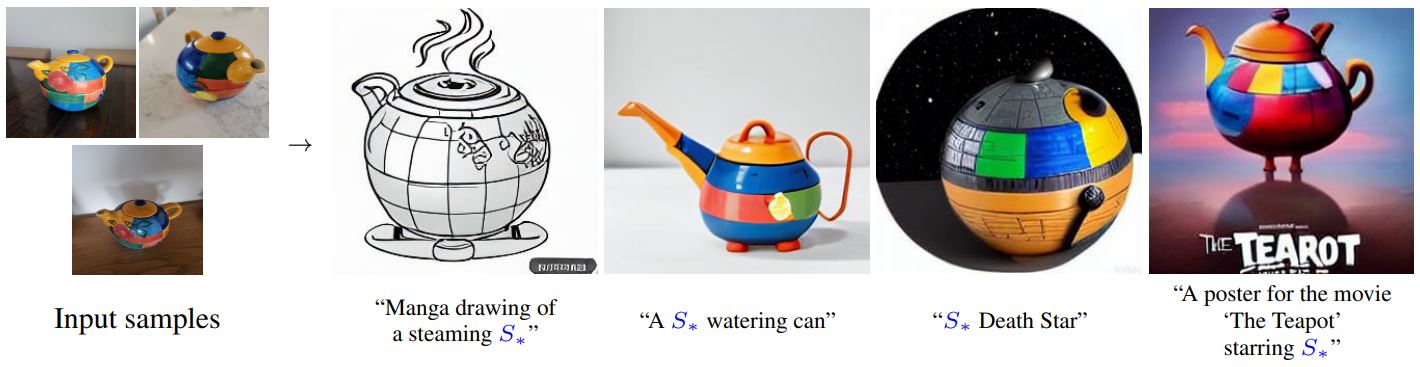
[textual-inversion](https://arxiv.org/abs/2208.01618)은 소수의 예시 이미지에서 새로운 콘셉트를 포착하는 기법입니다. 이 기술은 원래 [Latent Diffusion](https://github.com/CompVis/latent-diffusion)에서 시연되었지만, 이후 [Stable Diffusion](https://huggingface.co/docs/diffusers/main/en/conceptual/stable_diffusion)과 같은 유사한 다른 모델에도 적용되었습니다. 학습된 콘셉트는 text-to-image 파이프라인에서 생성된 이미지를 더 잘 제어하는 데 사용할 수 있습니다. 이 모델은 텍스트 인코더의 임베딩 공간에서 새로운 '단어'를 학습하여 개인화된 이미지 생성을 위한 텍스트 프롬프트 내에서 사용됩니다.
|
|
|
|
|
|
<small>By using just 3-5 images you can teach new concepts to a model such as Stable Diffusion for personalized image generation <a href="https://github.com/rinongal/textual_inversion">(image source)</a>.</small>
|
|
|
|
이 가이드에서는 textual-inversion으로 [`stable-diffusion-v1-5/stable-diffusion-v1-5`](https://huggingface.co/stable-diffusion-v1-5/stable-diffusion-v1-5) 모델을 학습하는 방법을 설명합니다. 이 가이드에서 사용된 모든 textual-inversion 학습 스크립트는 [여기](https://github.com/huggingface/diffusers/tree/main/examples/textual_inversion)에서 확인할 수 있습니다. 내부적으로 어떻게 작동하는지 자세히 살펴보고 싶으시다면 해당 링크를 참조해주시기 바랍니다.
|
|
|
|
<Tip>
|
|
|
|
[Stable Diffusion Textual Inversion Concepts Library](https://huggingface.co/sd-concepts-library)에는 커뮤니티에서 제작한 학습된 textual-inversion 모델들이 있습니다. 시간이 지남에 따라 더 많은 콘셉트들이 추가되어 유용한 리소스로 성장할 것입니다!
|
|
|
|
</Tip>
|
|
|
|
시작하기 전에 학습을 위한 의존성 라이브러리들을 설치해야 합니다:
|
|
|
|
```bash
|
|
pip install diffusers accelerate transformers
|
|
```
|
|
|
|
의존성 라이브러리들의 설치가 완료되면, [🤗Accelerate](https://github.com/huggingface/accelerate/) 환경을 초기화시킵니다.
|
|
|
|
```bash
|
|
accelerate config
|
|
```
|
|
|
|
별도의 설정없이, 기본 🤗Accelerate 환경을 설정하려면 다음과 같이 하세요:
|
|
|
|
```bash
|
|
accelerate config default
|
|
```
|
|
|
|
또는 사용 중인 환경이 노트북과 같은 대화형 셸을 지원하지 않는다면, 다음과 같이 사용할 수 있습니다:
|
|
|
|
```py
|
|
from accelerate.utils import write_basic_config
|
|
|
|
write_basic_config()
|
|
```
|
|
|
|
마지막으로, Memory-Efficient Attention을 통해 메모리 사용량을 줄이기 위해 [xFormers](https://huggingface.co/docs/diffusers/main/en/training/optimization/xformers)를 설치합니다. xFormers를 설치한 후, 학습 스크립트에 `--enable_xformers_memory_efficient_attention` 인자를 추가합니다. xFormers는 Flax에서 지원되지 않습니다.
|
|
|
|
## 허브에 모델 업로드하기
|
|
|
|
모델을 허브에 저장하려면, 학습 스크립트에 다음 인자를 추가해야 합니다.
|
|
|
|
```bash
|
|
--push_to_hub
|
|
```
|
|
|
|
## 체크포인트 저장 및 불러오기
|
|
|
|
학습중에 모델의 체크포인트를 정기적으로 저장하는 것이 좋습니다. 이렇게 하면 어떤 이유로든 학습이 중단된 경우 저장된 체크포인트에서 학습을 다시 시작할 수 있습니다. 학습 스크립트에 다음 인자를 전달하면 500단계마다 전체 학습 상태가 `output_dir`의 하위 폴더에 체크포인트로서 저장됩니다.
|
|
|
|
```bash
|
|
--checkpointing_steps=500
|
|
```
|
|
|
|
저장된 체크포인트에서 학습을 재개하려면, 학습 스크립트와 재개할 특정 체크포인트에 다음 인자를 전달하세요.
|
|
|
|
```bash
|
|
--resume_from_checkpoint="checkpoint-1500"
|
|
```
|
|
|
|
## 파인 튜닝
|
|
|
|
학습용 데이터셋으로 [고양이 장난감 데이터셋](https://huggingface.co/datasets/diffusers/cat_toy_example)을 다운로드하여 디렉토리에 저장하세요. 여러분만의 고유한 데이터셋을 사용하고자 한다면, [학습용 데이터셋 만들기](https://huggingface.co/docs/diffusers/training/create_dataset) 가이드를 살펴보시기 바랍니다.
|
|
|
|
```py
|
|
from huggingface_hub import snapshot_download
|
|
|
|
local_dir = "./cat"
|
|
snapshot_download(
|
|
"diffusers/cat_toy_example", local_dir=local_dir, repo_type="dataset", ignore_patterns=".gitattributes"
|
|
)
|
|
```
|
|
|
|
모델의 리포지토리 ID(또는 모델 가중치가 포함된 디렉터리 경로)를 `MODEL_NAME` 환경 변수에 할당하고, 해당 값을 [`pretrained_model_name_or_path`](https://huggingface.co/docs/diffusers/en/api/diffusion_pipeline#diffusers.DiffusionPipeline.from_pretrained.pretrained_model_name_or_path) 인자에 전달합니다. 그리고 이미지가 포함된 디렉터리 경로를 `DATA_DIR` 환경 변수에 할당합니다.
|
|
|
|
이제 [학습 스크립트](https://github.com/huggingface/diffusers/blob/main/examples/textual_inversion/textual_inversion.py)를 실행할 수 있습니다. 스크립트는 다음 파일을 생성하고 리포지토리에 저장합니다.
|
|
|
|
- `learned_embeds.bin`
|
|
- `token_identifier.txt`
|
|
- `type_of_concept.txt`.
|
|
|
|
<Tip>
|
|
|
|
💡V100 GPU 1개를 기준으로 전체 학습에는 최대 1시간이 걸립니다. 학습이 완료되기를 기다리는 동안 궁금한 점이 있으면 아래 섹션에서 [textual-inversion이 어떻게 작동하는지](https://huggingface.co/docs/diffusers/training/text_inversion#how-it-works) 자유롭게 확인하세요 !
|
|
|
|
</Tip>
|
|
|
|
<frameworkcontent>
|
|
<pt>
|
|
```bash
|
|
export MODEL_NAME="stable-diffusion-v1-5/stable-diffusion-v1-5"
|
|
export DATA_DIR="./cat"
|
|
|
|
accelerate launch textual_inversion.py \
|
|
--pretrained_model_name_or_path=$MODEL_NAME \
|
|
--train_data_dir=$DATA_DIR \
|
|
--learnable_property="object" \
|
|
--placeholder_token="<cat-toy>" --initializer_token="toy" \
|
|
--resolution=512 \
|
|
--train_batch_size=1 \
|
|
--gradient_accumulation_steps=4 \
|
|
--max_train_steps=3000 \
|
|
--learning_rate=5.0e-04 --scale_lr \
|
|
--lr_scheduler="constant" \
|
|
--lr_warmup_steps=0 \
|
|
--output_dir="textual_inversion_cat" \
|
|
--push_to_hub
|
|
```
|
|
|
|
<Tip>
|
|
|
|
💡학습 성능을 올리기 위해, 플레이스홀더 토큰(`<cat-toy>`)을 (단일한 임베딩 벡터가 아닌) 복수의 임베딩 벡터로 표현하는 것 역시 고려할 있습니다. 이러한 트릭이 모델이 보다 복잡한 이미지의 스타일(앞서 말한 콘셉트)을 더 잘 캡처하는 데 도움이 될 수 있습니다. 복수의 임베딩 벡터 학습을 활성화하려면 다음 옵션을 전달하십시오.
|
|
|
|
```bash
|
|
--num_vectors=5
|
|
```
|
|
|
|
</Tip>
|
|
</pt>
|
|
<jax>
|
|
|
|
TPU에 액세스할 수 있는 경우, [Flax 학습 스크립트](https://github.com/huggingface/diffusers/blob/main/examples/textual_inversion/textual_inversion_flax.py)를 사용하여 더 빠르게 모델을 학습시켜보세요. (물론 GPU에서도 작동합니다.) 동일한 설정에서 Flax 학습 스크립트는 PyTorch 학습 스크립트보다 최소 70% 더 빨라야 합니다! ⚡️
|
|
|
|
시작하기 앞서 Flax에 대한 의존성 라이브러리들을 설치해야 합니다.
|
|
|
|
```bash
|
|
pip install -U -r requirements_flax.txt
|
|
```
|
|
|
|
모델의 리포지토리 ID(또는 모델 가중치가 포함된 디렉터리 경로)를 `MODEL_NAME` 환경 변수에 할당하고, 해당 값을 [`pretrained_model_name_or_path`](https://huggingface.co/docs/diffusers/en/api/diffusion_pipeline#diffusers.DiffusionPipeline.from_pretrained.pretrained_model_name_or_path) 인자에 전달합니다.
|
|
|
|
그런 다음 [학습 스크립트](https://github.com/huggingface/diffusers/blob/main/examples/textual_inversion/textual_inversion_flax.py)를 시작할 수 있습니다.
|
|
|
|
```bash
|
|
export MODEL_NAME="duongna/stable-diffusion-v1-4-flax"
|
|
export DATA_DIR="./cat"
|
|
|
|
python textual_inversion_flax.py \
|
|
--pretrained_model_name_or_path=$MODEL_NAME \
|
|
--train_data_dir=$DATA_DIR \
|
|
--learnable_property="object" \
|
|
--placeholder_token="<cat-toy>" --initializer_token="toy" \
|
|
--resolution=512 \
|
|
--train_batch_size=1 \
|
|
--max_train_steps=3000 \
|
|
--learning_rate=5.0e-04 --scale_lr \
|
|
--output_dir="textual_inversion_cat" \
|
|
--push_to_hub
|
|
```
|
|
</jax>
|
|
</frameworkcontent>
|
|
|
|
### 중간 로깅
|
|
|
|
모델의 학습 진행 상황을 추적하는 데 관심이 있는 경우, 학습 과정에서 생성된 이미지를 저장할 수 있습니다. 학습 스크립트에 다음 인수를 추가하여 중간 로깅을 활성화합니다.
|
|
|
|
- `validation_prompt` : 샘플을 생성하는 데 사용되는 프롬프트(기본값은 `None`으로 설정되며, 이 때 중간 로깅은 비활성화됨)
|
|
- `num_validation_images` : 생성할 샘플 이미지 수
|
|
- `validation_steps` : `validation_prompt`로부터 샘플 이미지를 생성하기 전 스텝의 수
|
|
|
|
```bash
|
|
--validation_prompt="A <cat-toy> backpack"
|
|
--num_validation_images=4
|
|
--validation_steps=100
|
|
```
|
|
|
|
## 추론
|
|
|
|
모델을 학습한 후에는, 해당 모델을 [`StableDiffusionPipeline`]을 사용하여 추론에 사용할 수 있습니다.
|
|
|
|
textual-inversion 스크립트는 기본적으로 textual-inversion을 통해 얻어진 임베딩 벡터만을 저장합니다. 해당 임베딩 벡터들은 텍스트 인코더의 임베딩 행렬에 추가되어 있습습니다.
|
|
|
|
<frameworkcontent>
|
|
<pt>
|
|
<Tip>
|
|
|
|
💡 커뮤니티는 [sd-concepts-library](https://huggingface.co/sd-concepts-library) 라는 대규모의 textual-inversion 임베딩 벡터 라이브러리를 만들었습니다. textual-inversion 임베딩을 밑바닥부터 학습하는 대신, 해당 라이브러리에 본인이 찾는 textual-inversion 임베딩이 이미 추가되어 있지 않은지를 확인하는 것도 좋은 방법이 될 것 같습니다.
|
|
|
|
</Tip>
|
|
|
|
textual-inversion 임베딩 벡터을 불러오기 위해서는, 먼저 해당 임베딩 벡터를 학습할 때 사용한 모델을 불러와야 합니다. 여기서는 [`stable-diffusion-v1-5/stable-diffusion-v1-5`](https://huggingface.co/docs/diffusers/training/stable-diffusion-v1-5/stable-diffusion-v1-5) 모델이 사용되었다고 가정하고 불러오겠습니다.
|
|
|
|
```python
|
|
from diffusers import StableDiffusionPipeline
|
|
import torch
|
|
|
|
model_id = "stable-diffusion-v1-5/stable-diffusion-v1-5"
|
|
pipe = StableDiffusionPipeline.from_pretrained(model_id, torch_dtype=torch.float16).to("cuda")
|
|
```
|
|
|
|
다음으로 `TextualInversionLoaderMixin.load_textual_inversion` 함수를 통해, textual-inversion 임베딩 벡터를 불러와야 합니다. 여기서 우리는 이전의 `<cat-toy>` 예제의 임베딩을 불러올 것입니다.
|
|
|
|
```python
|
|
pipe.load_textual_inversion("sd-concepts-library/cat-toy")
|
|
```
|
|
|
|
이제 플레이스홀더 토큰(`<cat-toy>`)이 잘 동작하는지를 확인하는 파이프라인을 실행할 수 있습니다.
|
|
|
|
```python
|
|
prompt = "A <cat-toy> backpack"
|
|
|
|
image = pipe(prompt, num_inference_steps=50).images[0]
|
|
image.save("cat-backpack.png")
|
|
```
|
|
|
|
`TextualInversionLoaderMixin.load_textual_inversion`은 Diffusers 형식으로 저장된 텍스트 임베딩 벡터를 로드할 수 있을 뿐만 아니라, [Automatic1111](https://github.com/AUTOMATIC1111/stable-diffusion-webui) 형식으로 저장된 임베딩 벡터도 로드할 수 있습니다. 이렇게 하려면, 먼저 [civitAI](https://civitai.com/models/3036?modelVersionId=8387)에서 임베딩 벡터를 다운로드한 다음 로컬에서 불러와야 합니다.
|
|
|
|
```python
|
|
pipe.load_textual_inversion("./charturnerv2.pt")
|
|
```
|
|
</pt>
|
|
<jax>
|
|
|
|
현재 Flax에 대한 `load_textual_inversion` 함수는 없습니다. 따라서 학습 후 textual-inversion 임베딩 벡터가 모델의 일부로서 저장되었는지를 확인해야 합니다. 그런 다음은 다른 Flax 모델과 마찬가지로 실행할 수 있습니다.
|
|
|
|
```python
|
|
import jax
|
|
import numpy as np
|
|
from flax.jax_utils import replicate
|
|
from flax.training.common_utils import shard
|
|
from diffusers import FlaxStableDiffusionPipeline
|
|
|
|
model_path = "path-to-your-trained-model"
|
|
pipeline, params = FlaxStableDiffusionPipeline.from_pretrained(model_path, dtype=jax.numpy.bfloat16)
|
|
|
|
prompt = "A <cat-toy> backpack"
|
|
prng_seed = jax.random.PRNGKey(0)
|
|
num_inference_steps = 50
|
|
|
|
num_samples = jax.device_count()
|
|
prompt = num_samples * [prompt]
|
|
prompt_ids = pipeline.prepare_inputs(prompt)
|
|
|
|
# shard inputs and rng
|
|
params = replicate(params)
|
|
prng_seed = jax.random.split(prng_seed, jax.device_count())
|
|
prompt_ids = shard(prompt_ids)
|
|
|
|
images = pipeline(prompt_ids, params, prng_seed, num_inference_steps, jit=True).images
|
|
images = pipeline.numpy_to_pil(np.asarray(images.reshape((num_samples,) + images.shape[-3:])))
|
|
image.save("cat-backpack.png")
|
|
```
|
|
</jax>
|
|
</frameworkcontent>
|
|
|
|
## 작동 방식
|
|
|
|
|
|
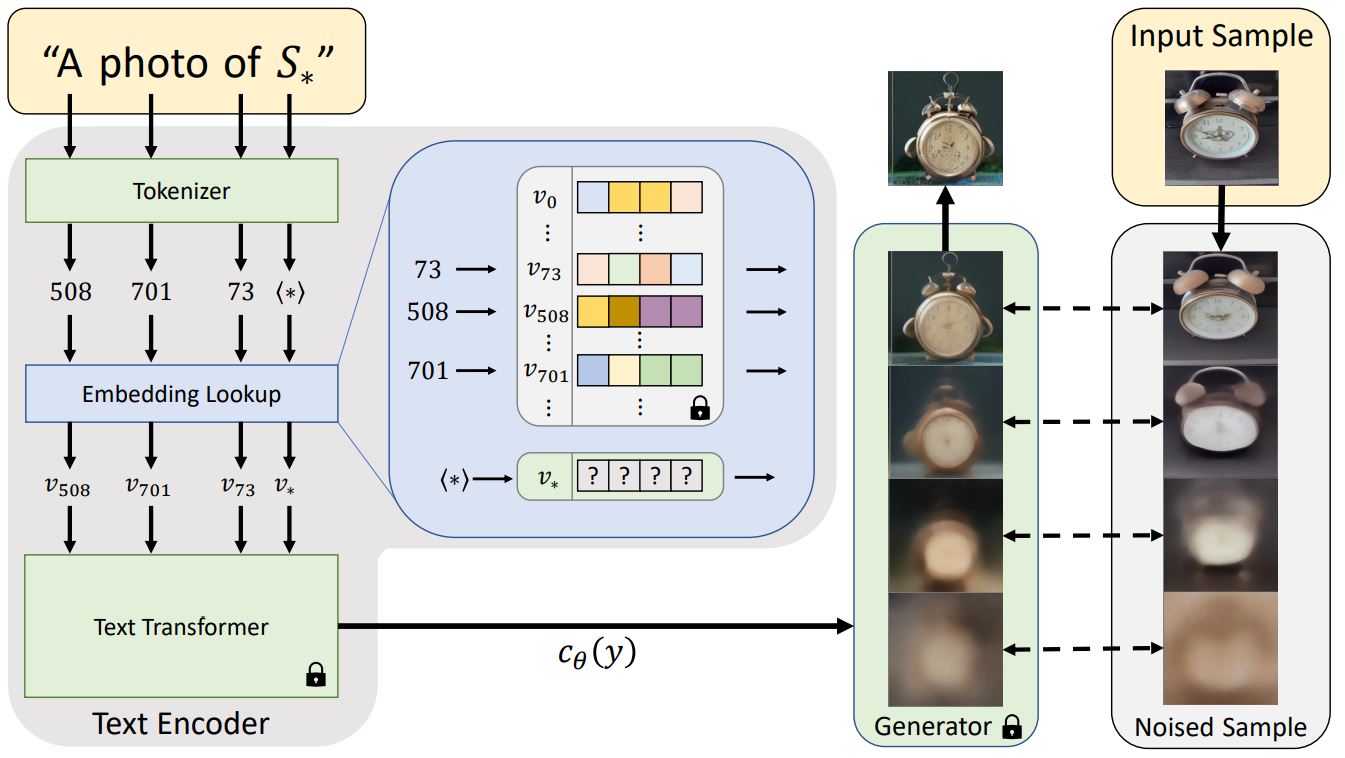
<small>Architecture overview from the Textual Inversion <a href="https://textual-inversion.github.io/">blog post.</a></small>
|
|
|
|
일반적으로 텍스트 프롬프트는 모델에 전달되기 전에 임베딩으로 토큰화됩니다. textual-inversion은 비슷한 작업을 수행하지만, 위 다이어그램의 특수 토큰 `S*`로부터 새로운 토큰 임베딩 `v*`를 학습합니다. 모델의 아웃풋은 디퓨전 모델을 조정하는 데 사용되며, 디퓨전 모델이 단 몇 개의 예제 이미지에서 신속하고 새로운 콘셉트를 이해하는 데 도움을 줍니다.
|
|
|
|
이를 위해 textual-inversion은 제너레이터 모델과 학습용 이미지의 노이즈 버전을 사용합니다. 제너레이터는 노이즈가 적은 버전의 이미지를 예측하려고 시도하며 토큰 임베딩 `v*`은 제너레이터의 성능에 따라 최적화됩니다. 토큰 임베딩이 새로운 콘셉트를 성공적으로 포착하면 디퓨전 모델에 더 유용한 정보를 제공하고 노이즈가 적은 더 선명한 이미지를 생성하는 데 도움이 됩니다. 이러한 최적화 프로세스는 일반적으로 다양한 프롬프트와 이미지에 수천 번에 노출됨으로써 이루어집니다.
|
|
|