mirror of
https://github.com/huggingface/diffusers.git
synced 2025-12-11 06:54:32 +08:00

240 lines
9.9 KiB
Plaintext
240 lines
9.9 KiB
Plaintext
<!--Copyright 2023 The HuggingFace Team. All rights reserved.
|
|
|
|
Licensed under the Apache License, Version 2.0 (the "License"); you may not use this file except in compliance with
|
|
the License. You may obtain a copy of the License at
|
|
|
|
http://www.apache.org/licenses/LICENSE-2.0
|
|
|
|
Unless required by applicable law or agreed to in writing, software distributed under the License is distributed on
|
|
an "AS IS" BASIS, WITHOUT WARRANTIES OR CONDITIONS OF ANY KIND, either express or implied. See the License for the
|
|
specific language governing permissions and limitations under the License.
|
|
-->
|
|
|
|
# Zero-Shot Text-to-Video Generation
|
|
|
|
## Overview
|
|
|
|
|
|
[Text2Video-Zero: Text-to-Image Diffusion Models are Zero-Shot Video Generators](https://arxiv.org/abs/2303.13439) by
|
|
Levon Khachatryan,
|
|
Andranik Movsisyan,
|
|
Vahram Tadevosyan,
|
|
Roberto Henschel,
|
|
[Zhangyang Wang](https://www.ece.utexas.edu/people/faculty/atlas-wang), Shant Navasardyan, [Humphrey Shi](https://www.humphreyshi.com).
|
|
|
|
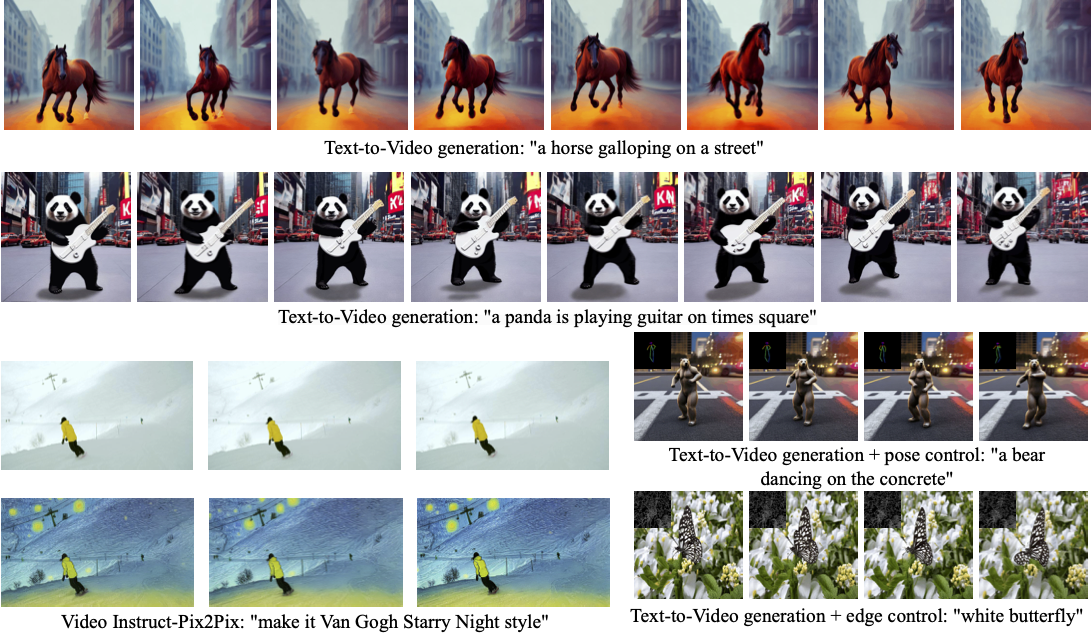
Our method Text2Video-Zero enables zero-shot video generation using either
|
|
1. A textual prompt, or
|
|
2. A prompt combined with guidance from poses or edges, or
|
|
3. Video Instruct-Pix2Pix, i.e., instruction-guided video editing.
|
|
|
|
Results are temporally consistent and follow closely the guidance and textual prompts.
|
|
|
|
|
|
|
|
The abstract of the paper is the following:
|
|
|
|
*Recent text-to-video generation approaches rely on computationally heavy training and require large-scale video datasets. In this paper, we introduce a new task of zero-shot text-to-video generation and propose a low-cost approach (without any training or optimization) by leveraging the power of existing text-to-image synthesis methods (e.g., Stable Diffusion), making them suitable for the video domain.
|
|
Our key modifications include (i) enriching the latent codes of the generated frames with motion dynamics to keep the global scene and the background time consistent; and (ii) reprogramming frame-level self-attention using a new cross-frame attention of each frame on the first frame, to preserve the context, appearance, and identity of the foreground object.
|
|
Experiments show that this leads to low overhead, yet high-quality and remarkably consistent video generation. Moreover, our approach is not limited to text-to-video synthesis but is also applicable to other tasks such as conditional and content-specialized video generation, and Video Instruct-Pix2Pix, i.e., instruction-guided video editing.
|
|
As experiments show, our method performs comparably or sometimes better than recent approaches, despite not being trained on additional video data.*
|
|
|
|
|
|
|
|
Resources:
|
|
|
|
* [Project Page](https://text2video-zero.github.io/)
|
|
* [Paper](https://arxiv.org/abs/2303.13439)
|
|
* [Original Code](https://github.com/Picsart-AI-Research/Text2Video-Zero)
|
|
|
|
|
|
## Available Pipelines:
|
|
|
|
| Pipeline | Tasks | Demo
|
|
|---|---|:---:|
|
|
| [TextToVideoZeroPipeline](https://github.com/huggingface/diffusers/blob/main/src/diffusers/pipelines/text_to_video_synthesis/pipeline_text_to_video_zero.py) | *Zero-shot Text-to-Video Generation* | [🤗 Space](https://huggingface.co/spaces/PAIR/Text2Video-Zero)
|
|
|
|
|
|
## Usage example
|
|
|
|
### Text-To-Video
|
|
|
|
To generate a video from prompt, run the following python command
|
|
```python
|
|
import torch
|
|
import imageio
|
|
from diffusers import TextToVideoZeroPipeline
|
|
|
|
model_id = "runwayml/stable-diffusion-v1-5"
|
|
pipe = TextToVideoZeroPipeline.from_pretrained(model_id, torch_dtype=torch.float16).to("cuda")
|
|
|
|
prompt = "A panda is playing guitar on times square"
|
|
result = pipe(prompt=prompt).images
|
|
result = [(r * 255).astype("uint8") for r in result]
|
|
imageio.mimsave("video.mp4", result, fps=4)
|
|
```
|
|
You can change these parameters in the pipeline call:
|
|
* Motion field strength (see the [paper](https://arxiv.org/abs/2303.13439), Sect. 3.3.1):
|
|
* `motion_field_strength_x` and `motion_field_strength_y`. Default: `motion_field_strength_x=12`, `motion_field_strength_y=12`
|
|
* `T` and `T'` (see the [paper](https://arxiv.org/abs/2303.13439), Sect. 3.3.1)
|
|
* `t0` and `t1` in the range `{0, ..., num_inference_steps}`. Default: `t0=45`, `t1=48`
|
|
* Video length:
|
|
* `video_length`, the number of frames video_length to be generated. Default: `video_length=8`
|
|
|
|
|
|
### Text-To-Video with Pose Control
|
|
To generate a video from prompt with additional pose control
|
|
|
|
1. Download a demo video
|
|
|
|
```python
|
|
from huggingface_hub import hf_hub_download
|
|
|
|
filename = "__assets__/poses_skeleton_gifs/dance1_corr.mp4"
|
|
repo_id = "PAIR/Text2Video-Zero"
|
|
video_path = hf_hub_download(repo_type="space", repo_id=repo_id, filename=filename)
|
|
```
|
|
|
|
|
|
2. Read video containing extracted pose images
|
|
```python
|
|
from PIL import Image
|
|
import imageio
|
|
|
|
reader = imageio.get_reader(video_path, "ffmpeg")
|
|
frame_count = 8
|
|
pose_images = [Image.fromarray(reader.get_data(i)) for i in range(frame_count)]
|
|
```
|
|
To extract pose from actual video, read [ControlNet documentation](./stable_diffusion/controlnet).
|
|
|
|
3. Run `StableDiffusionControlNetPipeline` with our custom attention processor
|
|
|
|
```python
|
|
import torch
|
|
from diffusers import StableDiffusionControlNetPipeline, ControlNetModel
|
|
from diffusers.pipelines.text_to_video_synthesis.pipeline_text_to_video_zero import CrossFrameAttnProcessor
|
|
|
|
model_id = "runwayml/stable-diffusion-v1-5"
|
|
controlnet = ControlNetModel.from_pretrained("lllyasviel/sd-controlnet-openpose", torch_dtype=torch.float16)
|
|
pipe = StableDiffusionControlNetPipeline.from_pretrained(
|
|
model_id, controlnet=controlnet, torch_dtype=torch.float16
|
|
).to("cuda")
|
|
|
|
# Set the attention processor
|
|
pipe.unet.set_attn_processor(CrossFrameAttnProcessor(batch_size=2))
|
|
pipe.controlnet.set_attn_processor(CrossFrameAttnProcessor(batch_size=2))
|
|
|
|
# fix latents for all frames
|
|
latents = torch.randn((1, 4, 64, 64), device="cuda", dtype=torch.float16).repeat(len(pose_images), 1, 1, 1)
|
|
|
|
prompt = "Darth Vader dancing in a desert"
|
|
result = pipe(prompt=[prompt] * len(pose_images), image=pose_images, latents=latents).images
|
|
imageio.mimsave("video.mp4", result, fps=4)
|
|
```
|
|
|
|
|
|
### Text-To-Video with Edge Control
|
|
|
|
To generate a video from prompt with additional pose control,
|
|
follow the steps described above for pose-guided generation using [Canny edge ControlNet model](https://huggingface.co/lllyasviel/sd-controlnet-canny).
|
|
|
|
|
|
### Video Instruct-Pix2Pix
|
|
|
|
To perform text-guided video editing (with [InstructPix2Pix](./stable_diffusion/pix2pix)):
|
|
|
|
1. Download a demo video
|
|
|
|
```python
|
|
from huggingface_hub import hf_hub_download
|
|
|
|
filename = "__assets__/pix2pix video/camel.mp4"
|
|
repo_id = "PAIR/Text2Video-Zero"
|
|
video_path = hf_hub_download(repo_type="space", repo_id=repo_id, filename=filename)
|
|
```
|
|
|
|
2. Read video from path
|
|
```python
|
|
from PIL import Image
|
|
import imageio
|
|
|
|
reader = imageio.get_reader(video_path, "ffmpeg")
|
|
frame_count = 8
|
|
video = [Image.fromarray(reader.get_data(i)) for i in range(frame_count)]
|
|
```
|
|
|
|
3. Run `StableDiffusionInstructPix2PixPipeline` with our custom attention processor
|
|
```python
|
|
import torch
|
|
from diffusers import StableDiffusionInstructPix2PixPipeline
|
|
from diffusers.pipelines.text_to_video_synthesis.pipeline_text_to_video_zero import CrossFrameAttnProcessor
|
|
|
|
model_id = "timbrooks/instruct-pix2pix"
|
|
pipe = StableDiffusionInstructPix2PixPipeline.from_pretrained(model_id, torch_dtype=torch.float16).to("cuda")
|
|
pipe.unet.set_attn_processor(CrossFrameAttnProcessor(batch_size=3))
|
|
|
|
prompt = "make it Van Gogh Starry Night style"
|
|
result = pipe(prompt=[prompt] * len(video), image=video).images
|
|
imageio.mimsave("edited_video.mp4", result, fps=4)
|
|
```
|
|
|
|
|
|
### DreamBooth specialization
|
|
|
|
Methods **Text-To-Video**, **Text-To-Video with Pose Control** and **Text-To-Video with Edge Control**
|
|
can run with custom [DreamBooth](../training/dreambooth) models, as shown below for
|
|
[Canny edge ControlNet model](https://huggingface.co/lllyasviel/sd-controlnet-canny) and
|
|
[Avatar style DreamBooth](https://huggingface.co/PAIR/text2video-zero-controlnet-canny-avatar) model
|
|
|
|
1. Download a demo video
|
|
|
|
```python
|
|
from huggingface_hub import hf_hub_download
|
|
|
|
filename = "__assets__/canny_videos_mp4/girl_turning.mp4"
|
|
repo_id = "PAIR/Text2Video-Zero"
|
|
video_path = hf_hub_download(repo_type="space", repo_id=repo_id, filename=filename)
|
|
```
|
|
|
|
2. Read video from path
|
|
```python
|
|
from PIL import Image
|
|
import imageio
|
|
|
|
reader = imageio.get_reader(video_path, "ffmpeg")
|
|
frame_count = 8
|
|
video = [Image.fromarray(reader.get_data(i)) for i in range(frame_count)]
|
|
```
|
|
|
|
3. Run `StableDiffusionControlNetPipeline` with custom trained DreamBooth model
|
|
```python
|
|
import torch
|
|
from diffusers import StableDiffusionControlNetPipeline, ControlNetModel
|
|
from diffusers.pipelines.text_to_video_synthesis.pipeline_text_to_video_zero import CrossFrameAttnProcessor
|
|
|
|
# set model id to custom model
|
|
model_id = "PAIR/text2video-zero-controlnet-canny-avatar"
|
|
controlnet = ControlNetModel.from_pretrained("lllyasviel/sd-controlnet-canny", torch_dtype=torch.float16)
|
|
pipe = StableDiffusionControlNetPipeline.from_pretrained(
|
|
model_id, controlnet=controlnet, torch_dtype=torch.float16
|
|
).to("cuda")
|
|
|
|
# Set the attention processor
|
|
pipe.unet.set_attn_processor(CrossFrameAttnProcessor(batch_size=2))
|
|
pipe.controlnet.set_attn_processor(CrossFrameAttnProcessor(batch_size=2))
|
|
|
|
# fix latents for all frames
|
|
latents = torch.randn((1, 4, 64, 64), device="cuda", dtype=torch.float16).repeat(len(pose_images), 1, 1, 1)
|
|
|
|
prompt = "oil painting of a beautiful girl avatar style"
|
|
result = pipe(prompt=[prompt] * len(pose_images), image=pose_images, latents=latents).images
|
|
imageio.mimsave("video.mp4", result, fps=4)
|
|
```
|
|
|
|
You can filter out some available DreamBooth-trained models with [this link](https://huggingface.co/models?search=dreambooth).
|
|
|
|
|
|
|
|
## TextToVideoZeroPipeline
|
|
[[autodoc]] TextToVideoZeroPipeline
|
|
- all
|
|
- __call__ |